“Artificial intelligence” is one of the most over-used phrases in technology, and that makes it strangely hard to learn. Marketing slaps “AI-powered” on everything; films imagine conscious robots; vendors promise magic. Underneath the noise, though, AI is a concrete, learnable engineering discipline — and the foundational ideas are genuinely approachable. This lesson strips away the hype and teaches you what AI and machine learning actually are, the handful of problem shapes (“workloads”) they solve, how a model is built and evaluated, what Azure gives you to do it, and — crucially — how Microsoft expects you to build AI responsibly.
This is a foundation lesson in the Azure Zero-to-Hero course, so we assume zero prior knowledge of AI or statistics and define every term the first time it appears. We still go deeper than a typical intro: you will finish able to hold a sensible conversation about model types, recognise which Azure service fits which job, and explain all six Responsible AI principles with real examples. Everything here maps directly to the AI-900: Microsoft Azure AI Fundamentals certification, where these topics are worth a large share of the exam.
Learning objectives
By the end of this lesson you can:
- Explain in plain English what artificial intelligence and machine learning are, and how AI, ML and deep learning relate to one another.
- Name and describe the common AI workloads — machine learning, computer vision, natural language processing, document intelligence, knowledge mining and generative AI — and give an example of each.
- Distinguish supervised learning (regression and classification) from unsupervised learning (clustering), and define features, labels, and the train/validate/test split.
- Walk through the machine-learning lifecycle from a business question to a deployed, monitored model.
- Describe Azure Machine Learning at a fundamentals level — the workspace, Automated ML, the Designer, and compute options — and say when you would reach for each.
- State and apply Microsoft’s six Responsible AI principles: fairness, reliability & safety, privacy & security, inclusiveness, transparency, and accountability.
Prerequisites & where this fits
You need only basic IT literacy and a little comfort with the idea that computers follow instructions — no maths beyond arithmetic, and no programming, is assumed for the concepts (the optional lab uses a no-code tool). It helps to have read the earlier Azure foundation lessons so terms like subscription, resource group and region are familiar, but it is not essential. This is the first lesson of the AI Fundamentals module in the Azure Zero-to-Hero course; it builds the vocabulary and mental model that the applied-AI lessons (Azure AI Vision, Language, Speech, Document Intelligence) and the generative-AI lesson all assume.
What is artificial intelligence?
The clearest working definition for our purposes: artificial intelligence is software that performs tasks which normally require human intelligence — recognising objects in a photo, understanding written or spoken language, spotting patterns, making predictions, or generating new content. It is not consciousness, and (today) it is not general reasoning across any task a person can do; it is a collection of techniques that each do something narrow surprisingly well.
It helps to nest three terms that are often used loosely as if they were synonyms:
| Term | What it means | Relationship |
|---|---|---|
| Artificial intelligence (AI) | The broad field: any technique that makes software behave “intelligently”. | The outermost umbrella. |
| Machine learning (ML) | A subset of AI in which the system learns patterns from data rather than being explicitly programmed with rules. | Inside AI. |
| Deep learning | A subset of ML that uses neural networks with many layers, especially good for images, audio and language. | Inside ML. |
The pivotal shift to understand is the one between traditional programming and machine learning. In traditional programming a developer writes the rules: if the email contains the word “lottery” and three exclamation marks, mark it as spam. That works until spammers change tactics, and someone must keep rewriting rules. In machine learning you do not write the rules at all — you show the system thousands of examples already labelled “spam” or “not spam”, and an algorithm discovers the patterns itself, producing a model. The model is the learned thing you then use to make predictions on new, unseen emails. This is why ML dominates modern AI: for messy, high-variety problems (images, speech, fraud, language), learning patterns from data beats hand-writing rules.
The common AI workloads
The AI-900 exam thinks in terms of workloads — the recognisable shapes of problem that AI solves. Recognising the shape is the most useful skill, because it tells you which family of services to reach for. Here are the ones you must know:
| Workload | What it does | Everyday example | Typical Azure service (covered next lesson) |
|---|---|---|---|
| Machine learning | Predict a value or category from data; find patterns. | Forecast tomorrow’s sales; predict which customers will churn. | Azure Machine Learning |
| Computer vision | Interpret the visual world — images and video. | Detect defects on a production line; read a number plate. | Azure AI Vision, Face |
| Natural language processing (NLP) | Understand and work with written and spoken language. | Gauge the sentiment of reviews; extract names from contracts; power a chatbot. | Azure AI Language, Azure AI Speech |
| Document intelligence | Extract structured information (fields, tables) from documents. | Read invoices and receipts into a database automatically. | Azure AI Document Intelligence |
| Knowledge mining | Index large volumes of mixed content so it becomes searchable and queryable. | Make a decade of PDFs and scanned reports instantly searchable. | Azure AI Search |
| Generative AI | Create new content — text, code, images — in response to a prompt. | Draft an email, summarise a report, generate an image. | Azure OpenAI (its own lesson) |
A few notes that examiners like to probe. Computer vision and NLP are themselves usually powered by machine learning underneath — they are not separate from ML so much as ML applied to a particular kind of input (pixels, or words). Document intelligence is a focused blend of computer vision (reading the page) and NLP (understanding the fields). Generative AI is the newest workload and the one most people now mean when they say “AI”; it is built on very large deep-learning models and gets its own lesson because it behaves quite differently from the predictive workloads.
How machine learning learns: features, labels, and types
To talk sensibly about ML you need four words. Imagine a spreadsheet of past house sales used to predict prices:
- Features — the input columns the model learns from: floor area, number of bedrooms, suburb, age of the building. Features are what you know.
- Label — the output column the model learns to predict: the sale price. The label is the answer you want.
- Training — the process of feeding the algorithm many rows (features and their known labels) so it learns the relationship between them.
- Model — the resulting trained artefact that, given new features (a house not in your data), produces a predicted label (its likely price).
Machine learning then splits into two big families based on whether your training data has labels:
Supervised learning (you have labelled answers)
In supervised learning every training example comes with the correct answer (the label), and the model learns to reproduce it. There are two sub-types you must distinguish for the exam:
| Type | Predicts | Output | Example | Example algorithms |
|---|---|---|---|---|
| Regression | A numeric, continuous value. | A number. | House price, tomorrow’s temperature, expected revenue. | Linear regression, decision-tree/forest regressors |
| Classification | A category (a class). | A label from a fixed set. | Spam vs not-spam (binary); cat/dog/bird (multi-class); is this transaction fraud? | Logistic regression, decision trees, neural networks |
The quick test: “how much / how many?” is regression; “which one / is it X?” is classification. Both are supervised because both need historic examples with known answers to learn from.
Unsupervised learning (no labels — find structure)
In unsupervised learning the data has no labels; the algorithm finds structure on its own. The headline technique for AI-900 is clustering — grouping similar items together without being told the groups in advance. For example, an online shop can cluster customers by purchasing behaviour to discover natural segments (“bargain hunters”, “premium buyers”) that nobody defined up front. Because there is no “correct answer” to check against, evaluating unsupervised models is more subjective than supervised ones.
Note: you may hear of a third family, reinforcement learning (an agent learns by trial-and-error from rewards, as in game-playing or robotics). It is good to recognise the term, but supervised and unsupervised are the two the fundamentals exam concentrates on.
Train, validate, test — and why you split the data
A model that simply memorises its training data is useless — it would score perfectly on what it has seen and fail on anything new. This failure is called overfitting. To detect and avoid it, you never evaluate a model on the same data you trained it on. You split your data into three parts:
| Split | Purpose | Rough share |
|---|---|---|
| Training set | The data the model learns from. | ~70% |
| Validation set | Used during development to tune the model and compare options without touching the test set. | ~15% |
| Test set | Held back untouched until the very end to give an honest estimate of how the model performs on unseen data. | ~15% |
The discipline is simple but vital: the test set is your stand-in for the real world, so peeking at it during training quietly inflates your confidence and undermines the whole exercise.
How do you know if a model is any good?
Different workloads use different scorecards (evaluation metrics), and AI-900 expects you to recognise a few:
- Regression uses error measures such as Mean Absolute Error (MAE) and Root Mean Squared Error (RMSE) — smaller is better — and R² (how much of the variation the model explains).
- Classification uses accuracy (share of correct predictions), plus precision and recall (which matter when one kind of mistake is costlier — e.g. missing a fraud vs a false alarm), often summarised in a confusion matrix.
You do not need to compute these by hand for the exam, but you should know that “a good model” means good on data it has never seen, measured by the right metric for the task.
The machine-learning lifecycle
Building a model is a repeatable, iterative process — not a one-shot event. Knowing the stages helps you place every Azure tool in context:
- Define the problem. Turn a business question (“which customers will churn?”) into an ML task (binary classification) with a measurable goal.
- Collect and prepare data. Gather data, clean it (fix missing values, remove duplicates), and engineer features. This is usually the largest, least glamorous part of the work, and its quality caps everything downstream — garbage in, garbage out.
- Train the model. Choose an algorithm, feed it the training set, and let it learn. Often you try many algorithms and settings.
- Evaluate. Measure performance on the validation/test data using the right metric; iterate back to data or training if it is not good enough.
- Deploy. Package the model behind an endpoint (a web address other software can call) so applications can get predictions in real time or in batches.
- Monitor and retrain. Watch the live model. The world changes and data drifts, so accuracy decays over time; you periodically retrain on fresh data. This loop is often called MLOps (machine-learning operations).
The crucial mindset: ML is circular, not linear. You will revisit data and training many times, and a deployed model is the beginning of an operational responsibility, not the end of a project.
Azure Machine Learning at a fundamentals level
Azure Machine Learning (Azure ML) is Azure’s end-to-end, managed platform for the whole lifecycle above — preparing data, training, evaluating, deploying and monitoring models. For AI-900 you do not need to operate it deeply; you need to recognise its main building blocks and what each is for.
- Workspace — the top-level Azure resource that ties everything together: your datasets, compute, experiments, trained models and endpoints all live inside a workspace. It is the unit you create, secure and bill, and the home base for the Azure ML Studio web portal where you do the work.
- Compute — the processing power your jobs run on. Azure ML separates several kinds so you pay for the right thing at the right time:
| Compute type | What it is | Used for |
|---|---|---|
| Compute instance | A personal, managed cloud workstation (a VM) for one developer. | Writing and running notebooks during development. |
| Compute cluster | A pool of VMs that scales up for training and back down to zero when idle. | Training jobs and Automated ML runs. |
| Inference cluster / endpoint | Managed compute that hosts a deployed model. | Serving live (real-time) or batch predictions. |
| Attached compute | External resources you connect (e.g. a Databricks or Kubernetes cluster). | Reusing compute you already run. |
- Automated machine learning (Automated ML / AutoML) — you supply the data and say what you want to predict; Azure ML automatically tries many algorithms and settings, evaluates them, and ranks the best model for you. It is the fastest way for a non-expert to get a strong model and a great teaching tool for how algorithm choice affects results. It supports common tasks such as classification, regression and time-series forecasting.
- Designer — a drag-and-drop, visual canvas for building ML pipelines without writing code. You connect modules (import data → clean → split → train → evaluate → deploy) on a graph. It makes the lifecycle tangible and is ideal for learning and for citizen data scientists.
- Notebooks & the SDK/CLI — for code-first practitioners, Azure ML offers hosted Jupyter notebooks plus a Python SDK and a CLI to script the entire lifecycle. (You will not be tested on the code at fundamentals level, only that these options exist for professionals.)
The way to hold this in your head: Designer is the visual/low-code path, Automated ML is the “let Azure find the best model” path, and notebooks/SDK is the full-control code path — all inside one workspace, running on compute you provision and (importantly) shut down when idle.
Microsoft’s six Responsible AI principles
AI makes consequential decisions about people — who gets a loan, which CV is shortlisted, what a self-driving car does. That power demands responsibility, and the AI-900 exam takes this seriously: expect several questions. Microsoft frames its approach as six guiding principles. Learn all six, in this order, each with a concrete example of what violating it looks like and how you uphold it.
| Principle | Core idea | What it looks like in practice |
|---|---|---|
| Fairness | AI systems should treat all people fairly and not discriminate. | A hiring model trained on biased history must not disadvantage candidates by gender or ethnicity. Uphold it by testing performance across groups and mitigating bias in data and features. |
| Reliability & safety | Systems must operate reliably, safely and consistently, including under unexpected conditions. | A self-driving car or a medical-triage model must be rigorously tested and fail safe. Uphold it with thorough testing, monitoring, and human oversight for high-stakes decisions. |
| Privacy & security | AI must respect privacy and keep data secure throughout its lifecycle. | Personal data used to train a model must be protected, consented to, and not leak through the model’s outputs. Uphold it with encryption, access control, data minimisation and de-identification. |
| Inclusiveness | AI should empower everyone and engage people of all abilities and backgrounds. | Speech recognition should work across accents and dialects; interfaces should support assistive technology. Uphold it by designing for accessibility and diverse users from the start. |
| Transparency | People should understand how an AI system works and its limitations. | Users should know they are interacting with AI and roughly why it decided as it did (interpretability). Uphold it with clear documentation, model explainability and honest communication of limits. |
| Accountability | People — not the AI — are responsible for the systems they build and run, under appropriate governance. | A human and an organisation must answer for an AI decision; “the algorithm did it” is not an excuse. Uphold it with governance, oversight, audit trails and clear ownership. |
Two of these are best thought of as the foundation that supports the other four: transparency and accountability. You can only achieve fairness, reliability, privacy and inclusiveness if a system is transparent enough to inspect and if real people are accountable for it. A simple way to remember all six is the mnemonic “FRPITA” — Fairness, Reliability & safety, Privacy & security, Inclusiveness, Transparency, Accountability — or just rehearse them as three pairs: fair & safe, private & inclusive, transparent & accountable.
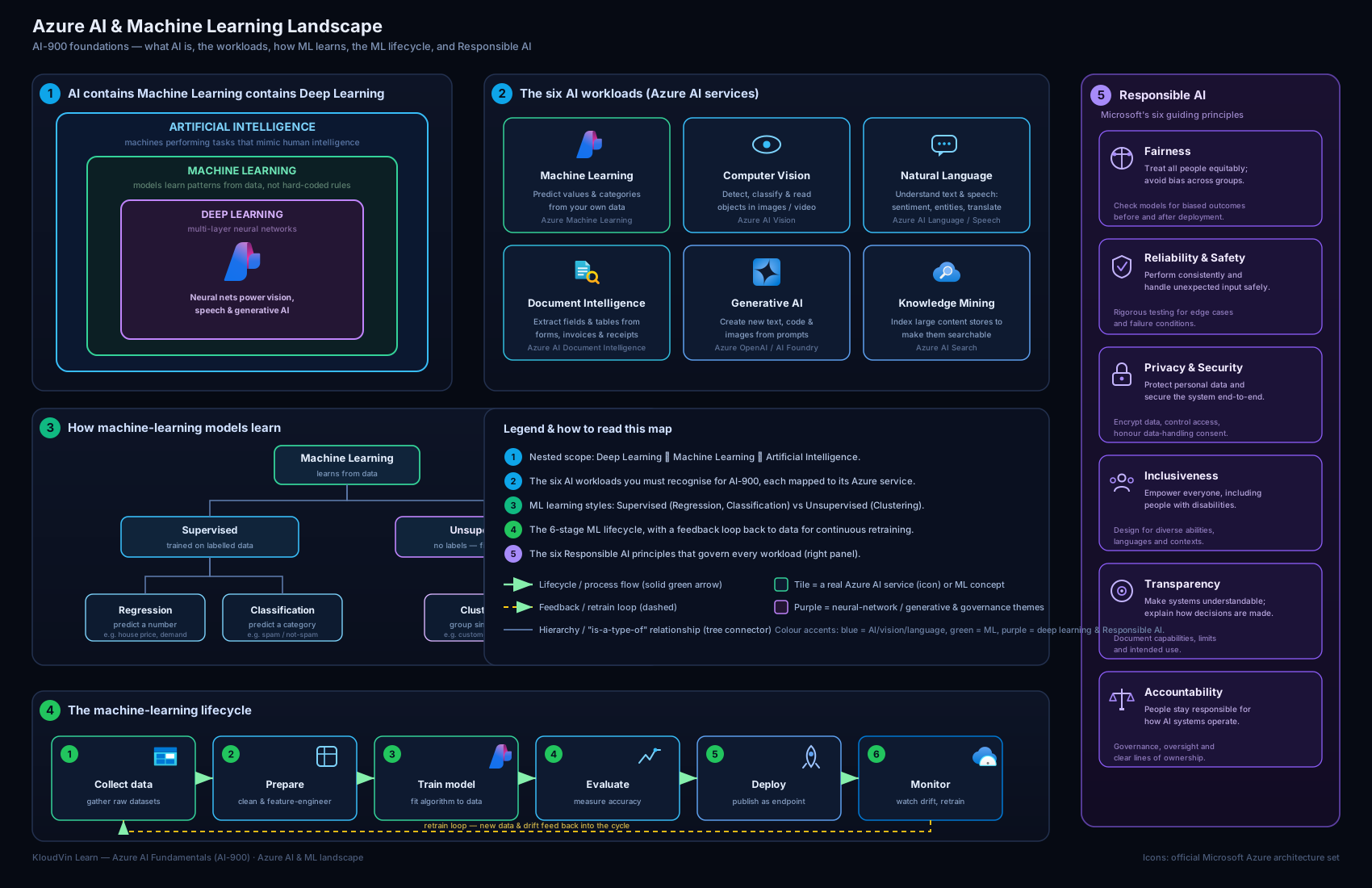
The diagram above ties the lesson together: the AI → ML → deep-learning nesting, the common workloads fanning out to their Azure services, the train-evaluate-deploy lifecycle running through Azure Machine Learning, and the six Responsible AI principles framing the whole picture.
Hands-on lab
This lab is no-code and free — you will explore Azure Machine Learning’s Automated ML to see the lifecycle without writing a line of code. Creating a workspace is free; you incur cost only while compute runs, and you will delete everything at the end. To keep this lab at essentially zero cost you may simply walk through the create blades and Studio (most learning value is in seeing the options) — only start compute if you want to run an actual training job.
Steps
- Sign in to the Azure portal (
portal.azure.com) with your free account. - In the search bar type “Azure Machine Learning” and select Create. On the Basics blade choose your subscription and resource group (create one called
rg-aml-lab), give the workspace a name (e.g.mlw-ai900-lab), pick a nearby region, and accept the defaults for the supporting resources (a storage account, Key Vault and Application Insights are created automatically). Select Review + create, then Create, and wait for deployment to finish. - Open the resource and click Launch studio to open Azure Machine Learning Studio.
- In the left menu open Automated ML → New Automated ML job. Browse the steps: select or create a dataset, choose the task type (e.g. Classification), pick the target column (the label), and review the compute step where you would create a small compute cluster. Stop here if you want to avoid all cost — you have now seen the full set-up.
- (Optional, incurs cost): create a tiny compute cluster (one small node, minimum 0 nodes so it scales to zero), submit the job on a sample dataset, and after it completes inspect the leaderboard of models and the metrics for the best one.
- Explore Designer from the left menu to see the drag-and-drop pipeline canvas and its pre-built modules.
Validation
You have succeeded when you can: see your workspace in the portal, open Studio, reach the Automated ML job-creation screen and identify where you choose the task type, target column and compute, and open the Designer canvas. (If you ran the optional job, success also means seeing a ranked leaderboard of trained models.)
Cleanup
To avoid any ongoing charges, delete the lab when done. The simplest, most reliable way is to delete the whole resource group:
az group delete --name rg-aml-lab --yes --no-wait
If you created a compute cluster, deleting the resource group removes it; if you want to be doubly sure first, set its minimum and maximum nodes to 0 in Studio so it cannot run.
Cost note
Creating the workspace and clicking through the blades costs nothing. The only charge is compute time if you run the optional job. A single small/burstable node (e.g. a B-series VM) for a short demo run is a few rupees — well under ₹50 for a brief session — provided the cluster scales to zero when idle and you delete the resource group afterwards. The cardinal rule with Azure ML cost: idle compute that is not scaled to zero is the thing that quietly runs up a bill.
Common mistakes & troubleshooting
| Symptom / mistake | Cause | Fix |
|---|---|---|
| “AI” and “machine learning” used as synonyms | Conflating the umbrella with a subset | ML is a subset of AI; deep learning is a subset of ML. Use the nested model. |
| Confusing regression with classification | Both are supervised, so they blur | Numeric output = regression; category output = classification. “How much?” vs “which one?”. |
| Model scores brilliantly in training, poorly in production | Overfitting — evaluated on data it trained on | Always hold back a test set; judge the model only on unseen data. |
| Compute cluster keeps billing after the demo | Minimum nodes not set to 0, or resources left running | Scale clusters to 0 minimum nodes and delete the resource group when finished. |
| Treating Responsible AI as optional paperwork | Seeing it as compliance, not design | The six principles are design requirements; bias and safety must be tested, not assumed. |
| Expecting AutoML to fix bad data | Believing the tool replaces data quality | AutoML picks algorithms, not facts. Garbage in, garbage out — data prep still dominates. |
| Mixing up the workloads in exam questions | Not recognising the problem shape | Map the scenario: pixels → computer vision; words → NLP; forms → document intelligence; create content → generative AI. |
Best practices
- Start with the question, not the algorithm. Define the business problem and the metric of success before choosing any model or tool.
- Invest in data quality first. Clean, representative, well-labelled data beats a fancier algorithm almost every time.
- Never evaluate on training data. Keep a held-out test set and trust the unseen-data score, not the training score.
- Prefer the highest-level tool that meets your need. Use Automated ML or Designer before hand-coding; reach for the SDK only when you need full control.
- Scale compute to zero. Treat idle ML compute the way you treat a running VM — a meter that is on. Configure auto-scale-down and clean up.
- Bake in Responsible AI from day one. Test across groups for fairness, document limitations for transparency, and assign a human owner for accountability — retrofitting these later is far harder.
Security notes
- Protect training data. Training data is often personal or sensitive; store it in encrypted storage, apply least-privilege access (RBAC), and consider de-identification — this directly serves the privacy & security principle.
- Secure the workspace and its secrets. An Azure ML workspace provisions a Key Vault, storage account and Application Insights; secure them as you would any production resource, and use managed identities rather than embedding keys.
- Lock down endpoints. A deployed model endpoint is a public-facing API by default — require authentication keys or Entra tokens, restrict network access (private endpoints/VNets), and monitor usage.
- Guard against model and data leakage. Models can memorise and leak sensitive training data through their outputs; mind what the model could reveal, and apply content and access controls.
- Keep an audit trail. Logging who trained, deployed and queried models underpins accountability and is essential for investigating issues.
Interview & exam questions
- What is the difference between AI, machine learning and deep learning? AI is the broad field of “intelligent” software; ML is a subset where systems learn patterns from data instead of being explicitly programmed; deep learning is a subset of ML using multi-layer neural networks, especially for images, audio and language.
- How does machine learning differ from traditional programming? Traditional programming: a human writes explicit rules. ML: you provide labelled examples and an algorithm learns the rules itself, producing a model.
- Define features and labels. Features are the input variables the model learns from; the label is the output value the model is trained to predict.
- Contrast supervised and unsupervised learning. Supervised learning trains on labelled data (known answers); unsupervised learning finds structure in unlabelled data (e.g. clustering).
- Regression vs classification — give an example of each. Regression predicts a continuous number (e.g. house price); classification predicts a category (e.g. spam vs not-spam).
- Why split data into training, validation and test sets? To detect and avoid overfitting and to get an honest estimate of performance on unseen data; the test set must stay untouched until the end.
- Name the stages of the machine-learning lifecycle. Define the problem → collect/prepare data → train → evaluate → deploy → monitor & retrain (iterating throughout).
- What is Automated ML and who is it for? A capability that automatically trains and compares many algorithms/settings and ranks the best model; ideal for non-experts and for quickly establishing a strong baseline.
- What is the Azure Machine Learning Designer? A drag-and-drop visual canvas for building ML pipelines without code, by connecting modules for import, clean, train, evaluate and deploy.
- Name Microsoft’s six Responsible AI principles. Fairness; reliability & safety; privacy & security; inclusiveness; transparency; accountability.
- Which two Responsible AI principles are considered foundational, and why? Transparency and accountability — you can only ensure the other four if systems are understandable and real people are answerable for them.
- Give a concrete example of the fairness principle. A recruitment model must not disadvantage candidates based on gender or ethnicity; you uphold fairness by evaluating performance across groups and mitigating bias in data.
Quick check
- Deep learning is a subset of which broader field — AI, or machine learning, or both?
- You want to predict a customer’s lifetime spend in rupees. Is that regression or classification?
- Grouping customers into segments without predefined labels is an example of which learning type and which technique?
- Which Azure ML capability automatically tries many algorithms and ranks the best model?
- Which Responsible AI principle is violated if a speech model fails to recognise certain regional accents?
Answers
- Both — deep learning is a subset of machine learning, which is itself a subset of AI.
- Regression — the output is a continuous numeric value.
- Unsupervised learning, using clustering.
- Automated ML (AutoML).
- Inclusiveness — the system fails to work for people of all backgrounds (and arguably touches fairness too).
Exercise
Pick a real decision in your own world — for example, “which support tickets should be escalated to a senior engineer?” Write a short half-page that:
- States the business question and reframes it as an ML task (regression, classification, or clustering — and say which and why).
- Lists three plausible features and the label you would predict.
- Notes which AI workload it belongs to and which Azure service you would investigate.
- Identifies one Responsible AI risk in your scenario (e.g. could the model be unfair, or leak private data?) and one concrete step to mitigate it.
This exercise forces you to practise the most valuable fundamentals skill: turning a fuzzy problem into a well-shaped ML task while thinking about responsibility from the start.
Certification mapping
This lesson maps to the AI-900: Microsoft Azure AI Fundamentals certification, primarily the domains “Describe Artificial Intelligence workloads and considerations” (the workloads and the Responsible AI principles) and “Describe fundamental principles of machine learning on Azure” (model types, the lifecycle, features/labels, and Azure Machine Learning’s workspace, Automated ML, Designer and compute). The Responsible AI content here is examined across the AI-900 syllabus and is also valuable background for the AI-102: Azure AI Engineer Associate certification.
Glossary
- Algorithm — the procedure that learns patterns from data during training.
- Model — the trained artefact produced by an algorithm; you use it to make predictions on new data.
- Feature — an input variable the model learns from.
- Label — the output value the model is trained to predict (supervised learning).
- Supervised learning — training on labelled examples; includes regression and classification.
- Unsupervised learning — finding structure in unlabelled data; e.g. clustering.
- Regression — predicting a continuous numeric value.
- Classification — predicting a category/class.
- Clustering — grouping similar items without predefined labels.
- Overfitting — when a model memorises training data and fails to generalise to unseen data.
- Training / validation / test sets — the splits used to learn, tune, and honestly evaluate a model.
- Endpoint — a web address that hosts a deployed model so applications can request predictions.
- MLOps — the practice of deploying, monitoring and retraining models in production.
- Workspace — the top-level Azure Machine Learning resource that holds datasets, compute, models and endpoints.
- Automated ML (AutoML) — Azure ML capability that auto-trains and ranks many models.
- Designer — Azure ML’s drag-and-drop, no-code pipeline builder.
- Compute instance / cluster — managed VMs for development / scalable training.
- Responsible AI — Microsoft’s framework of six principles for building AI ethically and safely.
Next steps
You now have the mental model for AI and machine learning, know your way around Azure Machine Learning at a fundamentals level, and can explain all six Responsible AI principles. Next, move from concepts to the ready-made building blocks Microsoft provides — pre-trained services you can call without training a model yourself — in AI-900: Azure AI Services — Vision, Language, Speech, Document Intelligence & Search. After that, the course turns to generative AI and Azure OpenAI, where these foundations and the Responsible AI principles become essential.