A fintech’s platform team gets a finding from their auditor that lands like a brick: every production backup — the RDS Aurora clusters holding ledger data, the EBS volumes under the matching-engine hosts — lives in the same AWS account as the workloads it protects. If that account is compromised, ransomwared, or a privileged operator fat-fingers a DeleteBackupVault, the backups die with the primary. The mandate that comes down is specific: copies of every production database and volume snapshot must land, encrypted, in a separate “recovery” account that production has no write path into, on a schedule, with proof. This guide builds exactly that — an automated cross-account snapshot copy pipeline using AWS Backup for the copy engine, a dedicated KMS key for re-encryption, and EventBridge to catch the moments AWS Backup does not surface on its own (failed copies, vault-lock drift) and turn them into tickets and pages. It is the kind of control a SOC 2 / DORA audit actually wants to see, not a cron job someone wrote on a Friday.
Prerequisites
- Two AWS accounts under the same AWS Organization: a source/production account and an isolated recovery account (this guide uses placeholders
111111111111for source and222222222222for recovery). AWS Organizations is required — cross-account AWS Backup copy only works inside an Org. - AWS Organizations management access to enable the two Backup org features, plus permission to assume an admin role in both member accounts.
- AWS CLI v2 configured with two named profiles,
prodandrecovery, and Terraform >= 1.6 for the durable infrastructure. - Production resources to protect: at least one RDS/Aurora instance or cluster and one EBS volume, each encrypted with a customer-managed KMS key (AWS Backup will not copy default-
aws/ebs-key snapshots across accounts). - HashiCorp Vault reachable from your CI runner — it brokers short-lived AWS credentials (via the Vault AWS secrets engine) for the Terraform apply, so no static access keys live in the pipeline.
- An IdP — Okta federated to AWS IAM Identity Center (or Entra ID if that is your workforce directory) — so every human who touches the recovery account does so through SSO with an audit trail, never a long-lived key.
Target topology
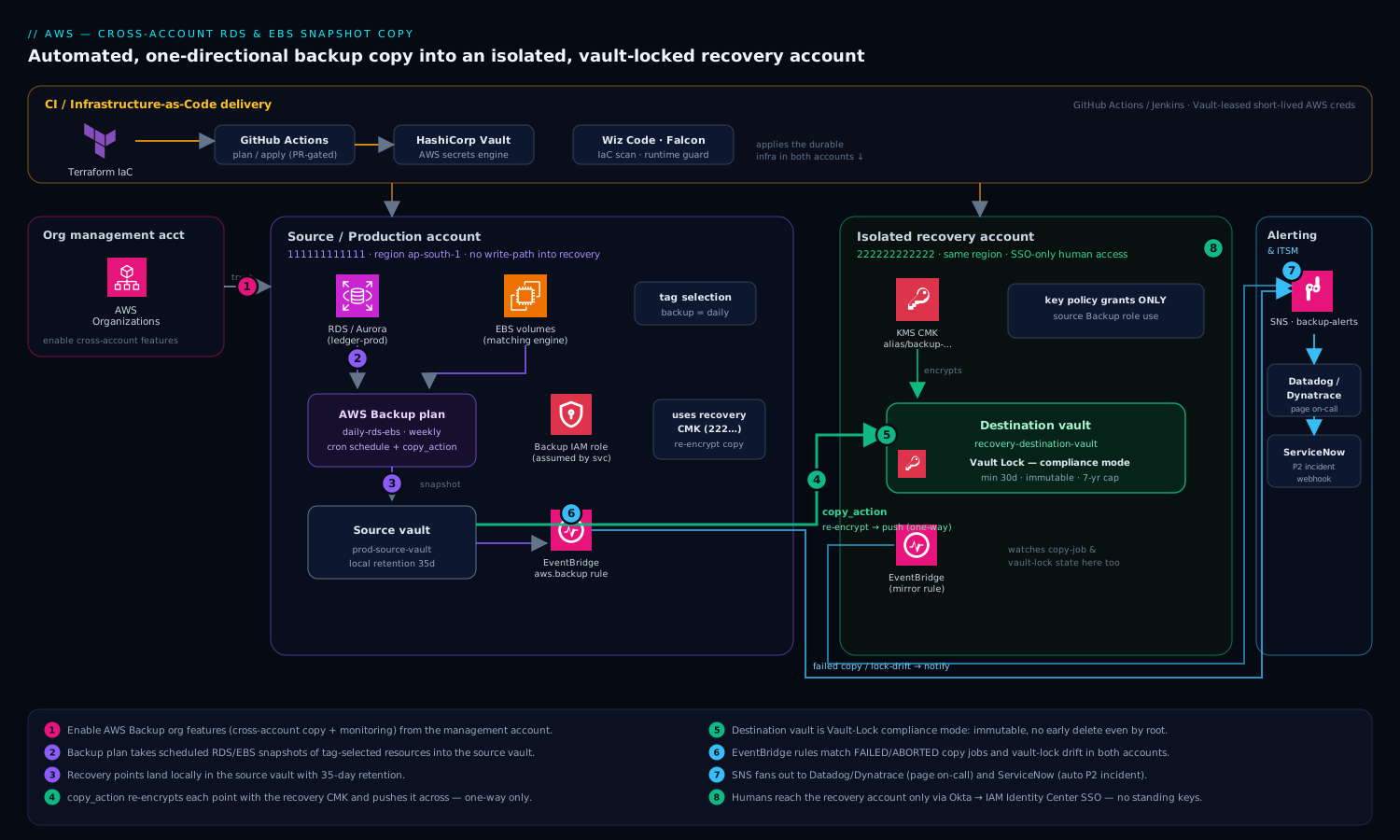
The flow is deliberately one-directional, and that direction is the whole point. In the source account a Backup plan runs on a schedule, takes snapshots of the RDS and EBS resources a selection matches, and writes them to a local source vault. A copy action on that plan then re-encrypts each recovery point with a KMS key owned by the recovery account and pushes it into a destination vault there. The recovery account’s vault carries AWS Backup Vault Lock in compliance mode, so even its own root user cannot shorten retention or delete a recovery point before its time — that is what makes the copies ransomware-resistant rather than merely off-box. EventBridge rules in both accounts watch the aws.backup event stream: a COPY_JOB that fails, or a vault-lock configuration change, fans out to SNS (paging Datadog/Dynatrace and the on-call), and opens a ServiceNow incident. Production holds no IAM principal that can write to or delete from the recovery vault; the only path data travels is AWS Backup’s own copy mechanism, which the recovery KMS key policy explicitly grants and nothing else.
The durable pieces — vaults, KMS keys, IAM roles, backup plan, EventBridge rules — are all defined in Terraform and applied through GitHub Actions (or Jenkins; either drives the same code), with Vault issuing the AWS credentials each run. Ansible is reserved for the one host-side concern: installing and tagging the application-consistent pre/post freeze hooks on the EBS-backed Linux hosts so snapshots are crash-consistent.
1. Enable the AWS Backup organization features
Cross-account copy and cross-account monitoring are Org-level features, off by default. Run these once from the Organizations management account. The first call turns AWS Backup into a trusted service so it can act across accounts; the next two flip the actual features.
# From the Organizations management account
aws organizations enable-aws-service-access \
  --service-principal backup.amazonaws.com

# Allow recovery points to be copied between accounts in the Org
aws backup update-global-settings \
  --global-settings isCrossAccountBackupEnabled=true \
  --profile mgmt

# (Optional but recommended) aggregate backup/copy job status Org-wide
aws backup update-global-settings \
  --global-settings isCrossAccountMonitoringEnabled=true \
  --profile mgmt

# Confirm both are "true"
aws backup describe-global-settings --profile mgmt
If isCrossAccountBackupEnabled is not true, every copy job you create later will fail with Access Denied no matter how perfect your KMS and IAM are — so verify this first.
2. Create the destination vault and KMS key in the recovery account
The recovery account owns the encryption key and the destination vault. Critically, the KMS key policy must grant the source account’s AWS Backup service role permission to use the key — without that grant, the copy lands but cannot be decrypted on restore. Define this in Terraform under a recovery provider alias.
# providers.tf
provider "aws" {
  alias   = "recovery"
  region  = "ap-south-1"
  profile = "recovery"   # creds injected by Vault AWS secrets engine in CI
}

# recovery_account.tf
data "aws_caller_identity" "recovery" {
  provider = aws.recovery
}

resource "aws_kms_key" "backup_copy" {
  provider                = aws.recovery
  description             = "CMK for cross-account AWS Backup copies (RDS/EBS)"
  enable_key_rotation     = true
  deletion_window_in_days = 30

  policy = jsonencode({
    Version = "2012-10-17"
    Statement = [
      {
        Sid       = "RecoveryAccountAdmin"
        Effect    = "Allow"
        Principal = { AWS = "arn:aws:iam::222222222222:root" }
        Action    = "kms:*"
        Resource  = "*"
      },
      {
        # The SOURCE account's Backup role must be able to use this key
        # to write the re-encrypted copy and to decrypt it on restore.
        Sid    = "AllowSourceBackupRoleUse"
        Effect = "Allow"
        Principal = {
          AWS = "arn:aws:iam::111111111111:role/AWSBackupCrossAccountRole"
        }
        Action = [
          "kms:Encrypt", "kms:Decrypt", "kms:ReEncrypt*",
          "kms:GenerateDataKey*", "kms:DescribeKey", "kms:CreateGrant"
        ]
        Resource = "*"
      }
    ]
  })
}

resource "aws_kms_alias" "backup_copy" {
  provider      = aws.recovery
  name          = "alias/backup-cross-account"
  target_key_id = aws_kms_key.backup_copy.key_id
}

resource "aws_backup_vault" "destination" {
  provider    = aws.recovery
  name        = "recovery-destination-vault"
  kms_key_arn = aws_kms_key.backup_copy.arn
}
3. Lock the destination vault (compliance mode)
A copy that an attacker can delete is not a backup, it is a delay. Vault Lock in compliance mode makes retention immutable — once the lock’s cooling-off period (changeable_for_days) elapses, nobody, including the recovery account root, can delete a recovery point early or weaken the policy. Set the cooling-off window honestly: during it you can still back out, after it the lock is permanent.
resource "aws_backup_vault_lock_configuration" "destination" {
  provider            = aws.recovery
  backup_vault_name   = aws_backup_vault.destination.name
  changeable_for_days = 3      # cooling-off: lock becomes immutable after this
  min_retention_days  = 30     # nothing can be deleted before 30 days
  max_retention_days  = 2555   # ~7 years cap to satisfy financial retention
}
Test the entire pipeline end to end in a throwaway pair of accounts before you let
changeable_for_daysexpire in production. Compliance-mode lock is intentionally unforgiving.
4. Create the source backup vault and AWS Backup service role
Back in the production account, create a local vault to hold the primary recovery points and the IAM role AWS Backup assumes. Attach the two AWS-managed policies plus an inline statement granting use of the recovery account’s KMS key.
# providers.tf (source)
provider "aws" {
  alias   = "prod"
  region  = "ap-south-1"
  profile = "prod"
}

# source_account.tf
resource "aws_backup_vault" "source" {
  provider = aws.prod
  name     = "prod-source-vault"
}

resource "aws_iam_role" "backup" {
  provider = aws.prod
  name     = "AWSBackupCrossAccountRole"
  assume_role_policy = jsonencode({
    Version = "2012-10-17"
    Statement = [{
      Effect    = "Allow"
      Principal = { Service = "backup.amazonaws.com" }
      Action    = "sts:AssumeRole"
    }]
  })
}

# Managed policies for backup + restore of RDS/EBS
resource "aws_iam_role_policy_attachment" "backup" {
  provider   = aws.prod
  role       = aws_iam_role.backup.name
  policy_arn = "arn:aws:iam::aws:policy/service-role/AWSBackupServiceRolePolicyForBackup"
}

resource "aws_iam_role_policy_attachment" "restore" {
  provider   = aws.prod
  role       = aws_iam_role.backup.name
  policy_arn = "arn:aws:iam::aws:policy/service-role/AWSBackupServiceRolePolicyForRestores"
}

# Use the recovery account's CMK for the copy
resource "aws_iam_role_policy" "kms_copy" {
  provider = aws.prod
  name     = "use-recovery-cmk"
  role     = aws_iam_role.backup.id
  policy = jsonencode({
    Version = "2012-10-17"
    Statement = [{
      Effect = "Allow"
      Action = [
        "kms:Encrypt", "kms:Decrypt", "kms:ReEncrypt*",
        "kms:GenerateDataKey*", "kms:DescribeKey", "kms:CreateGrant"
      ]
      Resource = aws_kms_key.backup_copy.arn   # cross-account ARN, account 222...
    }]
  })
}
5. Define the backup plan with a cross-account copy action
The plan is the schedule plus the rules. Each rule here takes a snapshot on a cron schedule, keeps it locally for 35 days, and — through copy_action — pushes a re-encrypted copy to the recovery vault with its own retention. The lifecycle blocks are what actually expire recovery points; AWS Backup, not you, deletes them on time.
resource "aws_backup_plan" "cross_account" {
  provider = aws.prod
  name     = "prod-cross-account-copy"

  rule {
    rule_name         = "daily-rds-ebs"
    target_vault_name = aws_backup_vault.source.name
    schedule          = "cron(0 3 * * ? *)"   # 03:00 UTC daily
    start_window      = 60                      # minutes to start
    completion_window = 300                     # minutes to finish

    lifecycle {
      delete_after = 35                         # local copy retention (days)
    }

    copy_action {
      destination_vault_arn = aws_backup_vault.destination.arn  # in 222...
      lifecycle {
        delete_after = 90                       # recovery-account retention
      }
    }
  }

  # Weekly long-retention rule, copied with cold-storage tiering for cost
  rule {
    rule_name         = "weekly-longterm"
    target_vault_name = aws_backup_vault.source.name
    schedule          = "cron(0 4 ? * SUN *)"  # Sundays 04:00 UTC

    lifecycle {
      cold_storage_after = 30
      delete_after       = 365
    }

    copy_action {
      destination_vault_arn = aws_backup_vault.destination.arn
      lifecycle {
        cold_storage_after = 30
        delete_after       = 2555              # ~7 years
      }
    }
  }
}
6. Select resources by tag, not by ARN
Hard-coding ARNs into a selection guarantees that the database someone provisions next month is silently unprotected. Select by tag instead and make backup=daily part of your standard resource tagging (enforce it with an SCP or a Terraform module default). The selection also needs the Backup role’s ARN.
resource "aws_backup_selection" "tagged" {
  provider     = aws.prod
  name         = "rds-and-ebs-tagged"
  plan_id      = aws_backup_plan.cross_account.id
  iam_role_arn = aws_iam_role.backup.arn

  selection_tag {
    type  = "STRINGEQUALS"
    key   = "backup"
    value = "daily"
  }
}
Then tag the actual resources (or, better, set these tags in the modules that create them):
# Tag an RDS/Aurora cluster and an EBS volume for inclusion
aws rds add-tags-to-resource \
  --resource-name arn:aws:rds:ap-south-1:111111111111:cluster:ledger-prod \
  --tags Key=backup,Value=daily --profile prod

aws ec2 create-tags \
  --resources vol-0a1b2c3d4e5f6a7b8 \
  --tags Key=backup,Value=daily --profile prod
7. Catch the silent failures with EventBridge
AWS Backup will happily run for weeks with a failing copy job and never page anyone — the dashboard goes green on the source snapshot while the cross-account copy quietly errors. EventBridge is how you close that gap. Create a rule on the aws.backup source that matches failed copy jobs and vault-lock changes, and route it to SNS. This rule lives in the source account; mirror a copy-job rule in the recovery account too.
resource "aws_cloudwatch_event_rule" "backup_failures" {
  provider    = aws.prod
  name        = "backup-copy-and-lock-alerts"
  description = "Alert on failed copy jobs and vault-lock drift"
  event_pattern = jsonencode({
    source      = ["aws.backup"]
    detail-type = ["Copy Job State Change", "Backup Vault State Change"]
    detail = {
      state = ["FAILED", "ABORTED"]
    }
  })
}

resource "aws_sns_topic" "backup_alerts" {
  provider = aws.prod
  name     = "backup-alerts"
}

resource "aws_cloudwatch_event_target" "to_sns" {
  provider  = aws.prod
  rule      = aws_cloudwatch_event_rule.backup_failures.name
  target_id = "sns"
  arn       = aws_sns_topic.backup_alerts.arn
}
Wire the SNS topic to the tools that already run your on-call: a subscription to the Datadog (or Dynatrace) AWS integration endpoint so a failed copy raises a monitor and shows on the reliability dashboard, and a subscription that hits a ServiceNow inbound webhook to auto-open a P2 incident with the failed job’s ARN. That way a broken backup is a ticket and a page within minutes, not a discovery during an actual restore.
8. Drive it all from CI with Vault-issued credentials
Run the Terraform from GitHub Actions (Jenkins works identically). The job asks HashiCorp Vault for short-lived AWS credentials via the AWS secrets engine — one lease scoped to the source account, one to the recovery account — so the pipeline never holds a static key. For app-consistent EBS snapshots on the matching-engine hosts, an Ansible play lays down the fsfreeze pre/post scripts that AWS Backup’s Windows VSS equivalent does for you on Linux.
# In the CI runner, before terraform: lease creds from Vault
export VAULT_ADDR="https://vault.internal:8200"
vault login -method=jwt role=backup-ci jwt="$CI_OIDC_TOKEN" >/dev/null

# Source-account lease
eval "$(vault read -format=json aws/creds/prod-backup-admin \
  | jq -r '.data | "export AWS_ACCESS_KEY_ID=\(.access_key)\nexport AWS_SECRET_ACCESS_KEY=\(.secret_key)"')"

terraform init
terraform plan  -out=tfplan
terraform apply -auto-approve tfplan
Gate the apply behind a pull-request review and let Wiz Code scan the Terraform in the PR — it will flag a vault with no lock, a KMS key with an over-broad policy, or public exposure before the plan is ever applied. At runtime, CrowdStrike Falcon sensors on the CI runners and the production hosts watch for tampering with the snapshot/backup agents themselves.
Validation
Do not wait for an audit to find out the pipeline is broken. Force a run and prove a copy actually landed and is restorable.
# 1. Trigger an on-demand backup of one resource (don't wait for the schedule)
aws backup start-backup-job \
  --backup-vault-name prod-source-vault \
  --resource-arn arn:aws:rds:ap-south-1:111111111111:cluster:ledger-prod \
  --iam-role-arn arn:aws:iam::111111111111:role/AWSBackupCrossAccountRole \
  --profile prod

# 2. Watch the resulting copy job to COMPLETED
aws backup list-copy-jobs \
  --by-state RUNNING --profile prod \
  --query 'CopyJobs[].{Id:CopyJobId,State:State,Dest:DestinationBackupVaultArn}'

# 3. Confirm the recovery point exists IN THE RECOVERY ACCOUNT
aws backup list-recovery-points-by-backup-vault \
  --backup-vault-name recovery-destination-vault \
  --profile recovery \
  --query 'RecoveryPoints[].{Arn:RecoveryPointArn,Status:Status,Created:CreationDate}'

# 4. Prove it is restorable: restore the copied RDS recovery point
#    INTO the recovery account as a new cluster, then drop it.
aws backup start-restore-job \
  --recovery-point-arn <ARN-from-step-3> \
  --iam-role-arn arn:aws:iam::222222222222:role/AWSBackupCrossAccountRole \
  --metadata DBInstanceIdentifier=ledger-restore-test \
  --resource-type RDS --profile recovery
A copy that lists in step 3 but fails to restore in step 4 is the failure mode that actually hurts — almost always a KMS key-policy gap (the restoring role cannot use the CMK). Run step 4 on a schedule, quarterly at minimum, as your real DR drill. Confirm the lock too:
aws backup describe-backup-vault \
  --backup-vault-name recovery-destination-vault --profile recovery \
  --query '{Locked:Locked,MinRet:MinRetentionDays,MaxRet:MaxRetentionDays}'
Locked: true is the line your auditor screenshots.
Rollback / teardown
Tearing this down is asymmetric on purpose, because the lock is the feature.
# Disable the schedule without losing existing copies: delete the plan + selection.
terraform destroy \
  -target=aws_backup_selection.tagged \
  -target=aws_backup_plan.cross_account

# Source vault: deletable once it holds no recovery points.
aws backup list-recovery-points-by-backup-vault \
  --backup-vault-name prod-source-vault --profile prod
# (delete remaining source recovery points, then)
aws backup delete-backup-vault \
  --backup-vault-name prod-source-vault --profile prod
The locked destination vault cannot be emptied or deleted before min_retention_days elapses — that is compliance mode doing its job, and there is no override, not even from the recovery root. If you locked a test vault you now want gone, you wait out the retention, or (if you are still inside the changeable_for_days cooling-off window) delete the lock configuration first. Plan teardown windows accordingly; never point a learning exercise at a 7-year min_retention. Leave EventBridge rules and the SNS topic in place until the last copy expires, so a late failure still pages someone.
Common pitfalls
- Default-key snapshots silently skip the copy. AWS Backup cannot copy a snapshot encrypted with the AWS-managed
aws/ebsoraws/rdskey across accounts. Re-encrypt those resources with a customer-managed key first, or the copy job fails with an opaque KMS error. - Forgetting the source role in the recovery KMS policy. The copy lands but is unrecoverable. The grant in Step 2’s key policy (
AllowSourceBackupRoleUse) is the single most-missed line. isCrossAccountBackupEnabledleft off. Everything else is perfect and every copy stillAccess Denieds. Step 1 first, always.- Treating a green source snapshot as success. The source backup and the cross-account copy are two jobs; monitor
Copy Job State Change, not justBackup Job State Change. - Locking production before you have tested. Compliance mode is irreversible after the cooling-off window. Rehearse in disposable accounts.
- Selecting by ARN. New databases go unprotected. Select by tag and enforce the tag.
Security notes
The architecture is its own primary control: production holds no IAM principal able to write to or delete from the recovery vault, so a full compromise of the source account cannot reach the copies. Vault Lock compliance mode defends against the insider and the ransomware operator who do get into the recovery account. Re-encryption with a recovery-owned CMK means the source account’s key material is irrelevant to the copies’ confidentiality. Every human entry point goes through Okta → IAM Identity Center (or Entra ID) SSO with no standing keys; the CI pipeline uses Vault-leased, short-lived credentials; Wiz Code gates the IaC for misconfiguration in the PR and CrowdStrike Falcon watches the hosts and runners at runtime. Push the AWS Backup audit framework findings and the EventBridge alerts into your SIEM so “is every production resource being copied off-account” is a continuously answered question, not an annual scramble.
Cost notes
Cross-account copy cost is dominated by two things: storage of the copies in the recovery account (warm tier) and, for the long-retention rule, the much cheaper cold-storage tier that cold_storage_after moves recovery points into after 30 days — use it for anything kept beyond a few months. Snapshot storage is incremental, so daily copies of slowly-changing volumes cost far less than their full size suggests; RDS copies are full per snapshot, so right-size the daily-vs-weekly split. Cross-account, same-region copy avoids inter-region data-transfer charges — keep the recovery account in the same region unless a regional-isolation requirement forces otherwise, in which case budget the transfer. Watch the long-retention delete_after: a 7-year cap that you never actually need for most resources quietly compounds. Tag the recovery vault’s spend and surface it on the same Datadog/Dynatrace cost dashboard the rest of the platform reports to, so backup storage is a line the team owns rather than a surprise on the bill.