A mid-sized e-learning company runs a Moodle-based course platform for about 60,000 students across a handful of universities, and right now it lives on a single beefy server one of the founders set up three years ago. It works — until it doesn’t. The afternoon before semester exams, ten thousand students log in within the same hour to download study material, the one box runs out of memory, and the whole platform goes dark for forty minutes. Worse, the database password is sitting in a config.php file on that same server, in plain text, and it was once accidentally committed to a Git repo. The new platform lead has a clear mandate: the site must survive losing a server, survive losing a whole data-centre, and stop storing the database password in a file anyone can read. This article is the reference architecture for doing exactly that on AWS — the foundational, “this is how you do it properly the first time” version. It is deliberately not exotic. It is the pattern every team should reach for before anything fancier.
The pressures here are the ones every growing app eventually hits. Availability: a single server is a single point of failure, and “the server died” cannot be the reason 60,000 students miss an exam deadline. Spiky load: traffic is flat most of the term and then spikes 20x the week before exams, so a fixed-size fleet is either wasteful most of the time or too small exactly when it matters. Security: a database password in a config file is a breach waiting to happen, and the team has already been burned by leaking credentials into Git once. And cost: this is a budget-conscious shop, so the design has to be cheap when traffic is low and only spend money when students actually show up. High availability on AWS is the pattern that answers all four at once — by spreading the app across independent failure domains and letting it grow and shrink with demand.
Why not just a bigger server
The tempting shortcut is to buy a bigger box, and it is worth naming why that fails, because someone on the team will suggest it.
One large server still has one power supply, one host, one Availability Zone, and one operating system to patch. When it goes down — and it will, for hardware, for an OS update, for an AWS maintenance event — the entire platform is down with it. Making it bigger (vertical scaling) buys headroom but not resilience; you have spent more money to have the same single point of failure. Two servers behind a round-robin DNS is better but crude: DNS caches, so when one server dies, a chunk of students keep getting sent to the dead one for minutes, and DNS has no idea whether a server is actually healthy.
The real fix is horizontal scaling across Availability Zones with a health-aware load balancer in front. Run several identical app servers, spread them across two physically separate AWS data-centres (AZs), and put a load balancer ahead of them that constantly health-checks each one and only sends traffic to the healthy ones. Now losing a server is a non-event — the load balancer simply stops routing to it — and losing an entire data-centre still leaves you running in the other one. That is what “highly available” actually means: no single failure takes you down.
Architecture overview
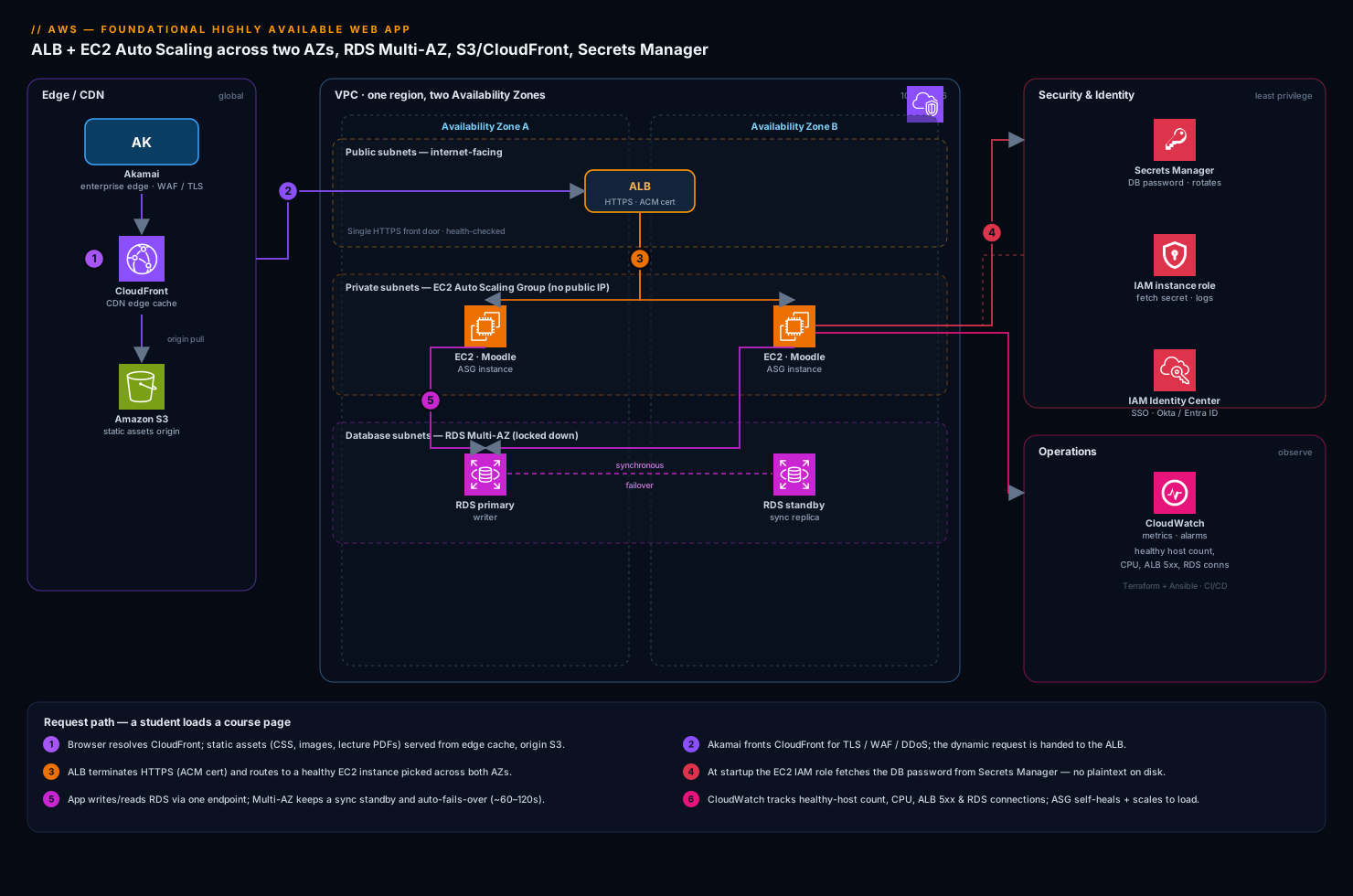
Everything lives inside one VPC (your own private network in AWS) spread across two Availability Zones in a single region. Think of an AZ as an independent data-centre with its own power and cooling; if one catches fire, the other keeps running. The VPC is split into subnets, and the most important early decision is which tiers are public and which are private.
- Public subnets (one per AZ) hold only the Application Load Balancer (ALB). This is the single front door the internet is allowed to reach.
- Private subnets (one per AZ) hold the EC2 application servers. They have no public IP and cannot be reached directly from the internet — only the ALB can talk to them.
- Database subnets (one per AZ) hold RDS, even more locked down — only the app servers can reach it.
This three-tier split (load balancer → app → database, each more private than the last) is the backbone of the whole design.
The request path, following a student loading a course page:
- The student’s browser first resolves CloudFront, AWS’s CDN. Static assets — the Moodle theme CSS, JavaScript, course images, lecture PDFs — are served from CloudFront’s edge cache close to the student, pulling from an S3 bucket as the origin. This means the bulk of the bytes never touch your servers at all. In front of CloudFront, the company runs Akamai as its enterprise edge for global TLS termination, WAF, and bot/DDoS protection — a single security perimeter that fronts this app and the company’s other properties — before traffic is handed to CloudFront and the AWS origin.
- The dynamic request (the actual page logic — “show me my enrolled courses”) goes to the ALB in the public subnets. The ALB terminates HTTPS (its certificate managed by AWS Certificate Manager) and looks at its target group of healthy app servers.
- The ALB forwards the request to one healthy EC2 instance in the private subnet, picked across both AZs. The instance is part of an Auto Scaling Group (ASG) that keeps the fleet at the right size and replaces any instance that fails its health check.
- The Moodle code on that instance needs to read or write data, so it connects to the RDS database. Crucially, it does not read the password from a file. At startup the instance fetches the DB credentials from AWS Secrets Manager, using its IAM instance role — no password is ever stored on disk or in the code.
- RDS runs as Multi-AZ: a primary in one AZ with a synchronous standby in the other. The app only ever talks to a single DNS endpoint; if the primary fails, AWS promotes the standby and re-points that endpoint automatically.
The response flows back the same way: app server → ALB → student. Static bytes came from CloudFront; only the dynamic, personalised part of the page involved your EC2 fleet.
The components, and why each one is here
| Tier | AWS service | What it does here | Why it gives you HA |
|---|---|---|---|
| Edge / CDN | Akamai → CloudFront + S3 | Serve and cache static assets close to students | Offloads servers; survives origin blips from cache |
| Front door | Application Load Balancer | Single HTTPS entry; health-checks and routes to app servers | Stops sending traffic to dead instances instantly |
| Compute | EC2 + Auto Scaling Group | Run the Moodle app; grow/shrink with load; self-heal | Spread across 2 AZs; replaces failed instances |
| Database | RDS Multi-AZ | Managed SQL database for courses, users, grades | Synchronous standby in a second AZ; auto-failover |
| Secrets | AWS Secrets Manager | Holds the DB password; rotates it | No plaintext credential on any server |
| Identity (app) | IAM roles | Lets EC2 fetch the secret with no stored keys | Removes long-lived credentials entirely |
| Identity (people) | Okta / Entra ID | SSO for staff into Moodle and the AWS Console | Central control; no shared local logins |
A few of these deserve the why, because they are the choices junior teams most often get wrong.
Why the database is Multi-AZ, not just backed up. A nightly backup protects you from data loss, but restoring it takes time — your platform is down while you do it. Multi-AZ is about availability: RDS keeps a hot standby copy in the second AZ, kept in sync in real time, and if the primary dies it fails over to the standby in typically 60–120 seconds with the same endpoint name. You want both — Multi-AZ for staying up, and automated backups (plus point-in-time recovery) for getting data back if something corrupts it. They solve different problems.
Why Secrets Manager, not a config file or an environment variable. The password in config.php was the bug that started this project. Secrets Manager stores the credential encrypted, hands it out only to identities you authorise via IAM, logs every access in CloudTrail, and can rotate the password automatically on a schedule — when it rotates, it updates both Secrets Manager and RDS together so nothing breaks. The app fetches it at runtime over a private call. There is no file to leak and no password to commit to Git.
Why an Auto Scaling Group, even at minimum size. Even if you never scaled up, an ASG earns its keep: if an instance crashes or fails its health check, the ASG automatically launches a fresh one from your launch template to restore the desired count. Self-healing is free. On top of that, scaling policies let the fleet grow when CPU or request count climbs — which is exactly what the exam-week spike needs.
Handling the exam-week spike with Auto Scaling
The whole reason a single server failed was the 20x login surge before exams. The ASG turns that from an outage into a non-event. You attach a target-tracking scaling policy that says, in effect, “keep average CPU near 50% — add instances when it climbs, remove them when it drops.” When ten thousand students log in, CPU rises, the ASG launches more instances across both AZs, the ALB starts routing to them as soon as they pass health checks, and the platform absorbs the load. When the rush passes, the ASG scales back down so you stop paying for idle servers.
A minimal scaling policy is just a target and a metric:
{
  "TargetValue": 50.0,
  "PredefinedMetricSpecification": {
    "PredefinedMetricType": "ASGAverageCPUUtilization"
  },
  "EstimatedInstanceWarmup": 120
}
Two settings make this behave well in the real world. Set a sensible minimum (say 2, one per AZ, so you are always redundant) and a maximum that caps spend even under a runaway spike or an attack. And set EstimatedInstanceWarmup so the ASG waits for new instances to actually boot and warm up before judging whether it needs even more — otherwise it over-reacts and launches a stampede. For predictable calendar events like exam week, you can also add a scheduled action to pre-scale the fleet at 7am before the rush, rather than waiting for CPU to prove it is needed.
Security: locking the doors with security groups and IAM
Security in this design is mostly about who is allowed to talk to whom, enforced by security groups — stateful virtual firewalls attached to each tier. The rule of thumb is that each tier only accepts traffic from the tier directly in front of it. You reference security groups as the source, not IP ranges, so the rules keep working as instances come and go.
| Security group | Inbound allowed from | Effect |
|---|---|---|
alb-sg (load balancer) |
0.0.0.0/0 on 443 (via Akamai/CloudFront) | The internet can reach only the ALB, only on HTTPS |
app-sg (EC2 fleet) |
alb-sg on the app port |
Only the ALB can reach app servers; no direct internet |
db-sg (RDS) |
app-sg on 3306/5432 |
Only app servers can reach the database |
This chain means even if an attacker found an app server’s private IP, they could not reach it — nothing but the ALB is allowed in. And the database is doubly protected: it is in a private subnet and only the app tier’s security group can connect.
Two more identity layers complete the picture, and they map to two different audiences:
- IAM roles for the machines. The EC2 instances carry an IAM instance role granting exactly two permissions: read this one secret from Secrets Manager, and write logs/metrics to CloudWatch. No access keys are stored anywhere — the role provides temporary credentials automatically. Least privilege, no long-lived secrets.
- Okta / Entra ID for the people. Staff (instructors, admins) sign in to Moodle through the company’s Okta (or Microsoft Entra ID) single sign-on, so there are no shared local Moodle admin passwords and access is revoked centrally the day someone leaves. The same SSO, federated to AWS IAM Identity Center, governs who can log in to the AWS Console — so engineers get role-based, audited, time-bound access instead of permanent IAM users.
For a security-conscious shop, two more guardrails are worth adding from day one without complicating the core design. Wiz (with Wiz Code scanning the Terraform before it is applied) runs continuous cloud-posture checks and would loudly flag exactly the mistakes that hurt before — an S3 bucket gone public, a security group opened to the world, a secret drifting into plaintext. And CrowdStrike Falcon sensors on the EC2 instances provide runtime threat detection on the servers themselves, feeding alerts to whoever is on call. Neither changes the architecture; they are the safety net that catches human error.
Cost: cheap when quiet, paying only for the spike
This is a budget-conscious team, so the design is built to be inexpensive at rest. The biggest savings come from a few deliberate choices.
| Lever | Mechanism | Effect on the bill |
|---|---|---|
| Auto Scaling to demand | ASG runs ~2 instances off-peak, many at peak | You pay for the spike only while it lasts |
| Right-size + Savings Plans | Buy a Compute Savings Plan for the always-on baseline | ~30–50% off the 2 baseline instances |
| Offload static to CloudFront/S3 | Cache assets at the edge from cheap S3 storage | Fewer/smaller EC2 instances; lower data-transfer cost |
| Single-AZ NAT, or none | Endpoints/careful routing to avoid pricey NAT data | Cuts a sneaky recurring cost |
| RDS sized to load | Start small; Multi-AZ doubles DB cost — accept it for HA | Predictable, and the price of staying up |
The one cost to go in with eyes open about is Multi-AZ RDS roughly doubles the database bill, because you are paying for the standby that sits ready. That is the deliberate price of surviving a data-centre failure, and for a platform that 60,000 students depend on at exam time, it is worth it. Everything else — scaling compute to actual demand, serving static bytes from CloudFront instead of EC2, buying a Savings Plan for the steady baseline — keeps the day-to-day bill low and makes the cost track real usage.
Operations: how the team actually runs this
Building it is half the job; running it is the other half, and the foundational version still needs a real operating model.
Everything as code with Terraform. The entire stack — VPC, subnets, ALB, ASG, RDS, security groups, the S3 bucket and CloudFront distribution — is defined in Terraform, not clicked together in the console. That means the environment is reproducible, reviewable in a pull request, and you can stand up an identical staging copy in minutes. Ansible handles the inside-the-instance configuration (installing Moodle, PHP, and the agents) so a fresh instance from the ASG comes up correctly every time. Defining infrastructure as code is also what lets Wiz Code scan it for misconfigurations before anything is deployed.
A simple CI/CD pipeline. Code changes flow through GitHub Actions (or Jenkins if the team standardises on it): on a merge, the pipeline runs tests, bakes a new application image, and rolls it out to the ASG instances behind the ALB with health checks gating each step, so a bad deploy never takes the whole fleet down at once. Teams that grow into Kubernetes later add Argo CD for GitOps-style continuous delivery, but for a foundational EC2 fleet, a straightforward pipeline that updates the launch template and triggers an instance refresh is exactly right — don’t over-build it.
Monitoring and alerting. CloudWatch collects the basics — CPU, request counts, ALB 5xx errors, RDS connections, healthy host count — and alarms page the on-call engineer when something is wrong. As the team matures, Datadog (or Dynatrace) layers on richer application performance monitoring: distributed tracing of a slow course-page load, dashboards the platform lead watches during exam week, and anomaly detection that surfaces a problem before students notice. Whichever you pick, the metric that matters most is healthy host count behind the ALB — if it drops, you are losing redundancy.
Incidents and change control through ServiceNow. When an alarm fires or a student-affecting outage happens, an incident is raised in ServiceNow so there is a tracked ticket, an owner, and a record — not just a Slack message that scrolls away. Planned changes (a database engine upgrade, a Moodle version bump) go through ServiceNow change management too, which gives the universities the documented, auditable process they expect from a vendor.
A note on virtual appliances: if a university security team mandates a specific third-party firewall or web-application-firewall product, you can run it as a virtual appliance (a vendor’s pre-built EC2 AMI) in the public subnet and route ingress through it. For most foundational builds, AWS’s own ALB plus the Akamai/CloudFront WAF cover this, and adding an appliance introduces its own scaling and HA work — so reach for it only when a compliance requirement actually forces it.
Failure modes, and what each one looks like
Naming the failures before they happen is what separates a design that claims high availability from one that delivers it.
- An app server dies. Its ALB health check fails within seconds, the ALB stops routing to it, and the ASG launches a replacement. Students never notice. This is the everyday case the whole design makes boring.
- An entire Availability Zone fails. The ALB routes all traffic to the healthy AZ, the ASG launches replacement instances there, and RDS fails over to its standby. You run degraded (less spare capacity) but you stay up — which is the entire point of spreading across two AZs. Lesson: keep your minimum instance count high enough that one AZ alone can serve baseline load.
- The RDS primary fails. Multi-AZ promotes the standby and re-points the endpoint in ~60–120 seconds. The app sees a brief blip of failed DB connections; with sensible connection retry in the code, students see a moment’s slowness, not an outage.
- The static-asset origin (S3) has a blip. CloudFront keeps serving cached assets from the edge, so course images and theme files stay up even if the origin is briefly unhappy.
- A traffic flood or attack. Akamai/CloudFront absorbs and filters at the edge, the ALB and ASG scale the app tier, and the ASG maximum caps how far you scale so an attack cannot run up an unlimited bill. The security groups ensure nothing but the ALB is even reachable.
The one failure this single-region design does not survive is an entire AWS region going down. That is a deliberate scope choice: full multi-region active-active is a large step up in cost and complexity, and it is the right next project, not part of the foundational build. What you do have today is solid backups — automated RDS snapshots and point-in-time recovery, plus S3’s built-in durability — so even a regional disaster is recoverable, just not instantly.
Explicit tradeoffs
What this design accepts. It is two-AZ, single-region: it shrugs off a lost server or a lost data-centre, but a regional outage is a recover-from-backups event, not a seamless failover. Multi-AZ RDS doubles the database cost for a standby that mostly sits idle — you are paying an insurance premium. And there is more moving machinery than a single box: a load balancer, an Auto Scaling Group, a managed database, a secrets store, and security groups to reason about. For a junior team, that learning curve is real — but every piece here is a managed AWS service doing the heavy lifting, which is precisely why this is the foundational pattern and not an advanced one.
The alternatives, and when they win. If you genuinely have a tiny, low-stakes internal tool, a single EC2 instance with good backups is cheaper and simpler — just be honest that it has no HA. If your app can be made serverless (Lambda + API Gateway + DynamoDB), you get HA and scaling without managing servers at all, and for new greenfield apps that is often the better starting point — but Moodle is a traditional server-based PHP application, so the EC2 + RDS pattern fits what actually has to run. If you outgrow EC2 fleets and want finer-grained scaling and richer deploys, containers on ECS or EKS (with Argo CD for delivery) are the natural graduation — but moving there before you need it is complexity you will pay for and not use.
The shape of the win
For the e-learning company, the payoff is concrete: the afternoon before exams, thirty thousand students log in within the hour, the Auto Scaling Group quietly adds instances across both AZs, CloudFront serves the lecture PDFs from the edge, and the platform stays fast — and when one of the app servers crashes at 2am, the on-call engineer sleeps through it because the ASG already replaced it. The database password no longer lives in a file; it is in Secrets Manager, rotating on a schedule, fetched at runtime by an IAM role, and there is nothing left to leak into Git. That is the whole promise of foundational high availability on AWS: not that nothing ever fails, but that when things fail — and they will — your students never find out. Start exactly here. It is the right first architecture, and most of what comes later is just refinement on top of these same bones.