Two candidates apply for the same mid-level AWS role. Both list the same five certifications. The first attaches a CV that says “experienced with EC2, S3, Lambda, and IAM.” The second attaches a GitHub profile with six pinned repositories — a static site with a real CI/CD pipeline, a serverless API with tests, a containerised three-tier app behind a load balancer, an event-driven pipeline, an observability stack with dashboards and SLOs, and a multi-account landing zone built entirely in Terraform — each with a tidy README, an architecture diagram, a cost note, and a teardown script. As the hiring manager, you have read perhaps forty CVs that morning. Which of these two do you phone first? The answer is not close, and it is the entire reason this lesson exists.
Certifications prove you can recognise the right answer in a multiple-choice question. A portfolio proves you can build the thing. Those are different skills, and interviewers know it. A certification is a filter that gets your CV past the first screen; a portfolio is the evidence that survives the technical interview, because the questions stop being “what does CloudFront do?” and become “walk me through your CloudFront setup — why Origin Access Control and not the old OAI? how does your cache invalidate on deploy? what did it cost?” You can only answer those crisply if you have actually shipped it. This article gives you six projects, deliberately arranged as a hiring ladder — each one a rung harder, each one mapping to a tier of AWS roles and certifications — so that by the time you finish the sixth you are not “studying AWS,” you are demonstrably an AWS engineer.
The ladder is designed so the projects compound. Project 1 teaches you Infrastructure as Code and CI/CD on the gentlest possible surface. Project 2 adds application logic and a managed database. Project 3 introduces containers, networking, and stateful tiers. Project 4 is the asynchronous, decoupled architecture every real system grows into. Project 5 makes all of it observable and operable — the difference between a demo and production. Project 6 is the platform-engineering capstone that puts everything inside a governed, multi-account organisation, which is where senior and staff roles live. You do not have to build all six to get hired — three good ones will land you an associate-level role — but the higher you climb, the more senior the conversations you can hold.
Learning objectives
By the end of this lesson you will be able to:
- Choose the right portfolio project for the AWS role and seniority you are targeting, using a clear ladder that maps projects to certifications and job tiers.
- Build each of the six projects from a concrete service list and a step-by-step build outline, all on or near the AWS Free Tier.
- Produce the GitHub deliverable for each project — repository structure, README, architecture diagram, IaC, and a teardown path — to a standard a reviewer respects.
- Write a quantified résumé bullet for each project that survives a recruiter screen and a technical deep-dive, using the copy-paste templates provided.
- Present a GitHub profile that reads as “this person ships,” using a repeatable presentation standard for repos, READMEs, commits, and pinned projects.
- Defend your portfolio in an interview, anticipating the follow-up questions each project invites and the design trade-offs an interviewer will probe.
Prerequisites
You should be comfortable with the AWS fundamentals, the IAM model, and basic VPC networking — the earlier rungs of this course cover all three. You will need an AWS account (the Free Tier is enough for projects 1–5; project 6 needs a fresh management account and the ability to create a small number of member accounts), the AWS CLI v2, Terraform (or AWS CDK/SAM where noted), Git, and a GitHub account. A little familiarity with one programming language — Python or TypeScript/Node.js are the most portable choices for Lambda — will carry you through projects 2, 4, and 5. None of the projects require paid third-party tooling; everything here uses the free tiers of AWS and GitHub.
This lesson sits in the Career module of the AWS Zero-to-Hero course, immediately after the architecture ladder (which teaches the designs); here you build and present them. It pairs naturally with the certification prep kit that follows it and with the capstone, which takes project 6 to full production depth.
The portfolio ladder: how the six projects map to roles and certs
Before the projects themselves, internalise the shape of the ladder. Each rung adds a capability that an interviewer at the next seniority tier expects you to have touched. The table below is the map; treat the “Hiring signal” column as the sentence a reviewer says to themselves when they see the repo.
| # | Project | Core new capability | Targets role | Maps to cert | Hiring signal |
|---|---|---|---|---|---|
| 1 | Static site + CI/CD | IaC + automated deploys | Junior / Cloud Support | CLF-C02, SAA-C03 | “Knows IaC, doesn’t click in the console” |
| 2 | Serverless REST API | App logic + managed NoSQL + tests | Associate Developer | DVA-C02, SAA-C03 | “Can build a real serverless backend” |
| 3 | Containerised 3-tier on Fargate | Containers, ALB, VPC, RDS | Associate / DevOps | SAA-C03, DOP-C02 | “Comfortable with networking and stateful tiers” |
| 4 | Event-driven pipeline | Asynchronous, decoupled design | Associate / Developer | DVA-C02, SAA-C03 | “Thinks in events and queues, not just request/response” |
| 5 | Observability / SRE | Operability, SLOs, alarms, tracing | DevOps / SRE | DOP-C02, SOA-C02 | “Operates systems, not just deploys them” |
| 6 | Multi-account landing zone | Governance, org-scale identity, platform IaC | Senior / Platform / Architect | SAP-C02, DOP-C02 | “Can build the foundation other teams land on” |
A useful rule of thumb: build the rung that matches the role you want, plus the one below it. Targeting an associate developer role? Projects 1, 2, and 4 tell the strongest story. Targeting DevOps/SRE? Projects 3, 5, and 6. Targeting a solutions-architect or platform role? Projects 3, 5, and 6 again, with 1 as the polished “I know the fundamentals cold” showpiece. Quality beats quantity every time — three excellent, well-documented repos outshine six abandoned ones.
A word on cost discipline, because it is itself a hiring signal: every project below stays on or near the Free Tier, and every one ships with a teardown path (terraform destroy or a documented cleanup). Leaving a NAT gateway or an RDS instance running for a month is exactly the mistake a cost-conscious employer is screening for. Build, screenshot, document, tear down.
Project 1 — Static site with a CI/CD pipeline
The brief. Host a static website (a portfolio page, a blog, or a single-page app build) on AWS so that it is globally fast, served only over HTTPS, and deployed automatically from a Git push — no console clicking, no manual S3 uploads. The whole thing must be defined as code and destroyable with one command. This is the gentlest possible surface on which to prove the two skills every modern cloud role assumes: Infrastructure as Code and CI/CD.
The AWS services.
| Service | Role in this project |
|---|---|
| Amazon S3 | Private origin bucket holding the built site (no public bucket access) |
| Amazon CloudFront | Global CDN, HTTPS termination, caching, custom domain |
| Origin Access Control (OAC) | Lets only CloudFront read the bucket; keeps the bucket private |
| AWS Certificate Manager (ACM) | Free TLS certificate for the custom domain (must be in us-east-1 for CloudFront) |
| Amazon Route 53 | DNS for the custom domain (optional but recommended) |
| GitHub Actions | CI/CD: build the site, sync to S3, invalidate the CloudFront cache |
| Terraform | Defines every resource above as code |
Build outline.
- Write the Terraform: a private S3 bucket, a CloudFront distribution with an OAC (not the deprecated Origin Access Identity), a bucket policy that allows only that distribution to
s3:GetObject, an ACM certificate in us-east-1, and (optionally) a Route 53 record. Enable Block Public Access on the bucket and confirm the site is reachable only through CloudFront. - Add a CloudFront default root object (
index.html) and a custom error response mapping 403/404 to your SPA’sindex.htmlif it is a single-page app. - Put your site source in the same repo. Build it (or just use plain HTML for a first pass).
- Write a GitHub Actions workflow that, on push to
main, authenticates to AWS via an OIDC role (no long-lived access keys in secrets — this is the modern, secure pattern), runs the build,aws s3 syncs the output to the bucket, and issues acloudfront create-invalidationso visitors see the new version immediately. - Document the architecture, capture a screenshot of a green pipeline run, and add a
terraform destroynote.
The GitHub deliverable. A repo containing infra/ (Terraform), the site source, .github/workflows/deploy.yml, an architecture diagram, and a README that explains the OAC-keeps-the-bucket-private decision, the OIDC-not-access-keys decision, and the cache-invalidation step. Pin it.
Copy-paste résumé bullet.
Built and deployed a globally distributed static site on AWS (S3 + CloudFront with Origin Access Control, ACM TLS) defined entirely in Terraform, with a GitHub Actions CI/CD pipeline that authenticates via OIDC (zero long-lived credentials) and ships every commit to production in under 3 minutes with automatic cache invalidation, cutting page-load latency ~60% versus single-region hosting.
Project 2 — Serverless REST API
The brief. Build a working REST API — a URL shortener, a notes/todo service, or a simple bookmarking backend — with no servers to manage. It must persist data, validate input, return proper HTTP status codes, be defined as code, and have automated tests. This proves you can build application logic on AWS, not just wire up infrastructure.
The AWS services.
| Service | Role in this project |
|---|---|
| Amazon API Gateway | HTTP API front door, routing, request validation, throttling |
| AWS Lambda | The function(s) implementing each endpoint (Python or Node.js) |
| Amazon DynamoDB | Serverless NoSQL persistence (on-demand capacity for Free Tier friendliness) |
| AWS IAM | Least-privilege execution role per function |
| Amazon CloudWatch | Logs, metrics, and a basic alarm on errors |
| AWS SAM or Terraform | IaC for the whole stack |
Build outline.
- Model the data for DynamoDB first — partition key and, if needed, a sort key or a global secondary index for your main access pattern (e.g.
PK = shortCodefor a URL shortener). Design for the query, not the entity. - Write Lambda handlers for the CRUD operations. Keep handlers thin; validate input and return correct status codes (
201on create,404on miss,400on bad input). - Define an API Gateway HTTP API with routes mapped to the functions; enable request validation and a sensible throttling limit so a runaway client cannot drive your bill up.
- Give each function a least-privilege IAM role —
dynamodb:GetItem/PutItemon exactly your table ARN, nothing wildcard. - Add unit tests for the handlers (mock the AWS SDK) and at least one integration test that hits the deployed endpoint. Wire the tests into a GitHub Actions workflow.
- Add a CloudWatch alarm on the function error metric. Document the data model and the access patterns.
The GitHub deliverable. A repo with src/ (handlers), tests/, the IaC (template.yaml for SAM or infra/ for Terraform), a CI workflow that runs tests then deploys, an OpenAPI sketch or a curl examples section in the README, and an architecture diagram. The README should justify the DynamoDB key design and show example requests/responses.
Copy-paste résumé bullet.
Designed and shipped a serverless REST API on AWS (API Gateway + Lambda + DynamoDB) with a single-table data model tuned to the primary access pattern, per-function least-privilege IAM roles, request validation, and CloudWatch error alarms; covered by unit and integration tests in a GitHub Actions pipeline, sustaining sub-50 ms median latency at effectively zero idle cost.
Project 3 — Containerised three-tier app on ECS Fargate
The brief. Take a containerised web application (a small CRUD app — Flask, Express, or similar — with a database) and run it as a production-shaped three-tier architecture: a load balancer in public subnets, the app on serverless containers in private subnets, and a managed relational database in isolated subnets. This is the project that proves you understand VPC networking, load balancing, and stateful tiers — the things serverless lets you skip.
The AWS services.
| Service | Role in this project |
|---|---|
| Amazon VPC | Public / private / isolated subnets across two Availability Zones |
| Application Load Balancer (ALB) | Public entry point, health checks, HTTPS |
| Amazon ECS on AWS Fargate | Serverless containers running the app (no EC2 to patch) |
| Amazon ECR | Private registry for the container image |
| Amazon RDS (PostgreSQL/MySQL) | Managed database, Multi-AZ for the resilience story |
| AWS Secrets Manager | The DB credentials — never in env files or the image |
| NAT Gateway / VPC endpoints | Outbound access for tasks (or endpoints to avoid NAT cost) |
| Terraform | IaC for the network, cluster, service, and database |
Build outline.
- Build the VPC: two AZs, with public subnets (ALB), private subnets (Fargate tasks), and isolated subnets (RDS). Add either a NAT gateway or — to save cost and show awareness — VPC interface endpoints for ECR/Secrets Manager/CloudWatch so tasks need no NAT.
- Containerise the app, push to ECR. Define an ECS task definition and a service running ≥2 tasks across the two AZs behind the ALB.
- Stand up RDS in the isolated subnets; store the credentials in Secrets Manager and inject them into the task via the task definition’s
secretsblock (so they never appear in plaintext). - Lock down security groups as a chain: ALB SG allows 443 from the internet; task SG allows the app port only from the ALB SG; RDS SG allows the DB port only from the task SG. This security-group-referencing pattern is a classic interview talking point.
- Configure ALB health checks and ECS service auto scaling on CPU or request count.
- Document the three-tier diagram, the security-group chain, and the Secrets Manager flow. Note the cost of NAT vs endpoints. Provide
terraform destroy.
The GitHub deliverable. A repo with the app, a Dockerfile, infra/ (Terraform for VPC, ECS, ALB, RDS, Secrets Manager), a CI workflow that builds and pushes the image and updates the service, an architecture diagram showing all three tiers and the SG chain, and a README explaining the subnet tiers, the SG-referencing pattern, and the Multi-AZ resilience story.
Copy-paste résumé bullet.
Deployed a production-shaped three-tier application on AWS — ALB → ECS Fargate (2 AZs, auto-scaling) → RDS Multi-AZ — inside a custom VPC with public/private/isolated subnet tiers, security-group-referenced traffic chaining, and database credentials managed in Secrets Manager; fully defined in Terraform and self-healing across an Availability Zone failure with zero single points of failure.
Project 4 — Event-driven data pipeline
The brief. Build an asynchronous, decoupled pipeline: a file lands in S3 (an image, a CSV, a log), and that event triggers a processing chain that does real work — resize the image and write a thumbnail, parse the CSV and store rows, enrich a record — with the processing decoupled via a queue, a dead-letter queue for poison messages, and notifications on completion or failure. This proves you think in events and queues, not just request/response — the mental shift that separates associate-level engineers from juniors.
The AWS services.
| Service | Role in this project |
|---|---|
| Amazon S3 | The event source (object-created notifications) |
| Amazon EventBridge | Routes the S3 event to targets; the central event bus |
| AWS Lambda | The processing function(s) |
| Amazon SQS | Buffers work between stages; absorbs spikes; enables retries |
| Amazon SNS | Fan-out notifications (e.g. email/Slack on completion or failure) |
| SQS Dead-Letter Queue | Captures messages that fail repeatedly for inspection |
| Amazon DynamoDB | Stores processing results / job state |
Build outline.
- Configure S3 → EventBridge (enable EventBridge notifications on the bucket) and write an EventBridge rule that matches
Object Createdevents and routes them onward. - Put an SQS queue in front of the processing Lambda so work is buffered and retried independently of the producer; attach a dead-letter queue with a sensible
maxReceiveCount(e.g. 3). - Implement the processing Lambda idempotently — the same S3 object may be delivered more than once, so use a deterministic key (e.g. the object key + ETag) in DynamoDB to detect duplicates. Idempotency is the question every interviewer asks about event pipelines.
- On success, write results to DynamoDB and publish to an SNS topic; subscribe an email endpoint. On exhaustion, the DLQ holds the failed message and a CloudWatch alarm fires.
- Add a tiny producer (or just upload a file) and demonstrate the end-to-end flow, including a deliberately malformed file landing in the DLQ.
- Document the event flow, the at-least-once-delivery / idempotency reasoning, and the DLQ replay procedure.
The GitHub deliverable. A repo with the function(s), the IaC (S3, EventBridge rule, SQS + DLQ, SNS, DynamoDB, alarms), a CI workflow, an architecture diagram showing the event flow and the DLQ branch, and a README that explains idempotency, at-least-once delivery, and how to replay the DLQ. Include a screenshot of a message in the DLQ and a successful SNS notification.
Copy-paste résumé bullet.
Built a serverless event-driven pipeline on AWS (S3 → EventBridge → SQS → Lambda → DynamoDB + SNS) with idempotent processing keyed on object ETag, a dead-letter queue with automated alarming for poison messages, and fan-out notifications; the queue-decoupled design absorbed 10x ingestion bursts without loss and isolated producer failures from consumers.
Project 5 — Observability and SRE
The brief. Take one of the earlier applications (project 2, 3, or 4 is ideal) and make it observable and operable: structured logs, custom metrics, dashboards, actionable alarms, distributed tracing, and a defined SLO with an error budget. The deliverable is the difference between “I deployed an app” and “I operate a service” — exactly the gap DevOps and SRE interviews probe.
The AWS services.
| Service | Role in this project |
|---|---|
| Amazon CloudWatch Logs | Centralised, structured (JSON) logs |
| CloudWatch Logs Insights | Querying logs for diagnostics |
| CloudWatch Metrics + Dashboards | The four golden signals on one screen |
| CloudWatch Alarms | Actionable, multi-datapoint alarms (not noisy single-spike ones) |
| Amazon SNS | Alarm notification delivery (email/Slack) |
| AWS X-Ray | Distributed tracing across API Gateway → Lambda → DynamoDB |
| CloudWatch Synthetics (canary) | Outside-in availability check against the SLO |
Build outline.
- Make the app emit structured JSON logs with a correlation/request ID so you can trace a single request across components in Logs Insights.
- Publish custom metrics (e.g. business events, or use Embedded Metric Format) and build a CloudWatch dashboard showing the four golden signals — latency, traffic, errors, saturation — on one screen.
- Enable X-Ray tracing and capture a service map showing the call path and where latency accumulates.
- Define a concrete SLO (e.g. “99.5% of requests succeed and return in <300 ms over 30 days”), compute the error budget, and create a CloudWatch alarm with multiple datapoints / anomaly detection so it fires on real degradation, not single blips. Route it to SNS.
- Add a CloudWatch Synthetics canary that exercises the endpoint from outside and feeds the availability SLI.
- Write a one-page runbook: what each alarm means and the first three diagnostic steps. Document the SLO, the dashboard, and a sample Logs Insights query.
The GitHub deliverable. A repo (or a folder added to an existing project) with the dashboard and alarm definitions as IaC (dashboards-as-code is a strong signal), the canary script, the runbook, a screenshot of the dashboard under load, an X-Ray service-map screenshot, and a README stating the SLO and error budget. Treating monitoring as code, not click-ops, is the thing that impresses here.
Copy-paste résumé bullet.
Instrumented a production AWS workload for SRE — structured JSON logging with request correlation, a four-golden-signals CloudWatch dashboard, X-Ray distributed tracing, and multi-datapoint alarms wired to SNS — defined a 99.5%/300 ms SLO with an error budget and a Synthetics canary, all as code, cutting mean-time-to-diagnose from guesswork to a single Logs Insights query.
Project 6 — Multi-account landing zone
The brief. Build the governed foundation that real organisations run on: a multi-account AWS environment with a security/log-archive separation, a sane organisational-unit structure, centralised single-sign-on with permission sets, preventive guardrails, and a baseline of org-wide logging and detection — provisioned and version-controlled with Terraform. This is the platform-engineering capstone; it is where senior, platform, and architect roles live, because it demonstrates you can build the thing other teams land on rather than a single app.
The AWS services.
| Service | Role in this project |
|---|---|
| AWS Organizations | The account hierarchy and OUs; the root of governance |
| AWS Control Tower | Orchestrates the landing zone, baseline guardrails, account factory |
| AWS IAM Identity Center | Centralised SSO, permission sets, account assignments |
| Service Control Policies (SCPs) | Preventive, org-wide guardrails (e.g. deny region/root-action) |
| AWS CloudTrail (org trail) | Org-wide, tamper-resistant audit log to a central account |
| AWS Config + GuardDuty | Org-wide configuration recording and threat detection |
| AWS KMS / Secrets Manager | Central encryption keys and secrets baseline |
| Terraform | Codifies OUs, SCPs, Identity Center assignments, baselines |
Build outline.
- Start from a fresh management account. Enable AWS Organizations, then set up a Control Tower landing zone (it creates the log-archive and audit accounts and a baseline). Understand what Control Tower provisions before you add to it.
- Design an OU structure — at minimum a
SecurityOU, anInfrastructureOU, and aWorkloadsOU (often splitProd/Non-Prod). Keep it shallow; OUs are for applying policy, not org-charting. - Author Service Control Policies as code and attach them to OUs — e.g. deny disabling CloudTrail/GuardDuty, deny use of non-approved regions, restrict root-user actions. SCPs set the maximum permissions; they do not grant.
- Configure IAM Identity Center: define permission sets (e.g.
AdministratorAccess,ReadOnly, a scopedDeveloper) and assign groups to accounts. This replaces per-account IAM users — a key talking point. - Ensure the org CloudTrail lands in the central log-archive account, and that Config and GuardDuty are enabled org-wide with findings centralised.
- Vend at least one member account through the account factory to demonstrate the workflow end to end. Document the OU/SCP design and the identity model. (Mind the cost: Control Tower itself is free, but enabled services and any running resources are not — tear down what you can.)
The GitHub deliverable. A repo with terraform/ defining OUs, SCP documents, Identity Center permission sets and assignments, and the logging/detection baseline; an architecture diagram of the account/OU topology and the identity flow; and a README that explains the blast-radius-as-account principle, why SCPs are guardrails not grants, and how access flows through Identity Center. This is the most senior-signalling repo you can pin.
Copy-paste résumé bullet.
Architected a governed multi-account AWS landing zone with Control Tower and Organizations — a Security/Infrastructure/Workloads OU hierarchy, preventive Service Control Policies as code, centralised access via IAM Identity Center permission sets, and org-wide CloudTrail, Config, and GuardDuty into a dedicated log-archive account — all in Terraform, giving new teams a compliant, audit-ready account in minutes instead of weeks.
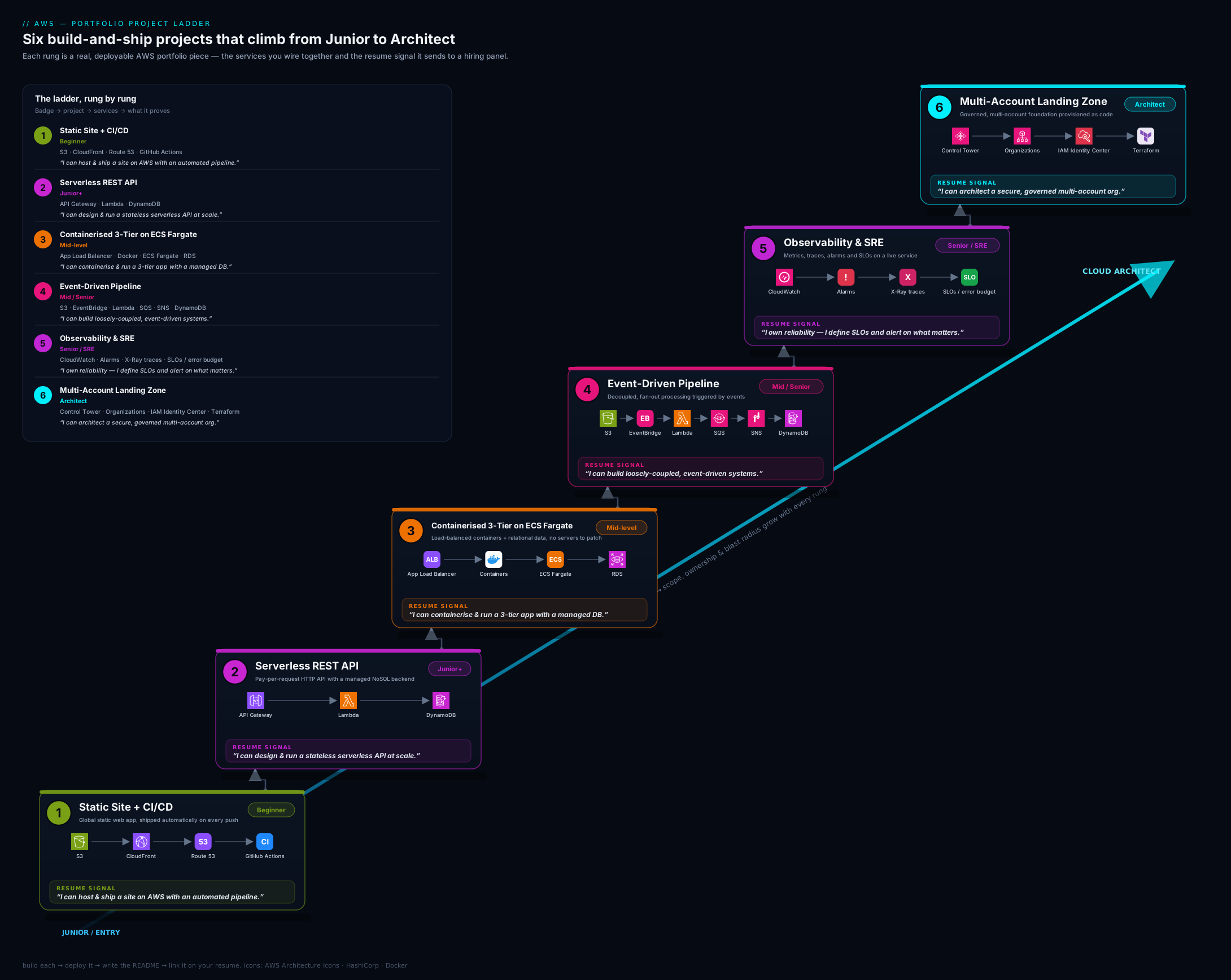
The diagram above shows the six projects as ascending rungs, each annotated with its headline AWS services, the role tier it targets, and the certification it maps to — so you can see at a glance how capability and seniority compound as you climb.
The GitHub presentation standard
A brilliant project hidden in a messy repo is a wasted project. Reviewers spend seconds, not minutes, on each repo; presentation is not vanity, it is the medium through which your work is read. Apply this standard to every project above.
The repository. Give it a clear, descriptive name (aws-serverless-url-shortener, not project2). Pin your best three-to-six repos on your GitHub profile so they appear first. Add topics/tags (aws, terraform, serverless) so the repo is discoverable. Include a permissive licence (MIT is fine) — its absence quietly signals “not really finished.” Ensure the default branch is clean and the repo has no committed secrets (more on this below).
The README is the product. It is the first — often only — thing read. Structure it: a one-line description and an architecture diagram at the very top; then What it does, Architecture (the diagram plus a paragraph), How to deploy (the exact commands), How to tear down (terraform destroy or cleanup steps), Cost (a Free-Tier note or rough monthly estimate), and Key decisions / trade-offs (this section is what wins technical interviews — explain why OAC, why DynamoDB, why the SG chain). A reviewer who reads only the README should understand the whole project.
Architecture diagrams. Every repo gets one, embedded in the README. Use a consistent tool (draw.io/diagrams.net, Excalidraw, or the official AWS architecture icons) and commit the source so it is editable. A clear diagram instantly communicates seniority; its absence reads as “I can’t see the whole system.”
Commit history. Make commits atomic and meaningfully messaged (“Add CloudFront OAC and bucket policy,” not “stuff” or “fix”). A clean history shows how you work and is itself reviewed. Avoid one giant “initial commit” dump where possible — incremental, descriptive commits read as professional.
Infrastructure as Code, always. Every project is defined in Terraform/CDK/SAM and destroyable with one command. Console click-ops in a portfolio reads as junior; reproducible IaC reads as production-ready. Bonus signals: a CI badge in the README, a Makefile or task runner for common commands, and a short CONTRIBUTING/architecture-decision note.
The table below is the at-a-glance checklist to run against each repo before you pin it.
| Element | The standard | Why a reviewer cares |
|---|---|---|
| Repo name | Descriptive, hyphenated | Signals intent at a glance |
| Pinned | Best 3–6 on profile | Controls first impression |
| README top | One-liner + diagram | Whole project understood in seconds |
| Deploy/teardown | Exact commands, both ways | Proves it actually runs — and that you clean up |
| Cost note | Free-Tier / estimate | Cost-awareness is a hiring signal |
| Key decisions | Why each choice | Wins the technical interview |
| Diagram | Embedded, source committed | Communicates system thinking |
| Commits | Atomic, well-messaged | Shows how you work |
| IaC | One-command create/destroy | Reads as production-ready |
| Secrets | None committed; OIDC/Secrets Manager | Screens out a common security failure |
Hands-on lab: ship Project 1 and pin it
This lab gets the first rung done end to end on the Free Tier, so you finish with a real, pinned repository.
Step 1 — scaffold the repo. Create a GitHub repo aws-static-site-cicd, clone it, and add a minimal index.html. Create an infra/ directory for Terraform.
Step 2 — write the Terraform. In infra/, define a private S3 bucket with Block Public Access on, a CloudFront distribution with an Origin Access Control, a bucket policy granting s3:GetObject only to that distribution (condition on the AWS:SourceArn of the distribution), and a default root object of index.html. Run:
cd infra
terraform init
terraform apply
Expected: Terraform prints the CloudFront domain name as an output (e.g. dxxxx.cloudfront.net).
Step 3 — first manual deploy (to validate). Sync the site and confirm it serves only through CloudFront:
aws s3 sync .. s3://<your-bucket> --exclude "infra/*" --exclude ".git/*"
curl -I https://<cloudfront-domain>/
Expected: HTTP/2 200 from CloudFront. Validation: try the bucket’s direct REST endpoint — curl -I https://<bucket>.s3.amazonaws.com/index.html should return 403 AccessDenied, proving the origin is private and only reachable via CloudFront.
Step 4 — wire CI/CD with OIDC (no static keys). Create an IAM OIDC identity provider for GitHub Actions and a role that trusts your repo (scoped to the main branch), with permissions to s3:sync to the bucket and create CloudFront invalidations. Add .github/workflows/deploy.yml that, on push to main, assumes the role via aws-actions/configure-aws-credentials (OIDC), syncs to S3, and runs aws cloudfront create-invalidation --paths "/*".
Step 5 — prove the pipeline. Edit index.html, commit, and push to main. Watch the Actions run go green; refresh the CloudFront URL and confirm the change is live. Screenshot the green run for your README.
Step 6 — document and pin. Write the README to the presentation standard above (diagram, deploy, teardown, cost, key decisions). Pin the repo on your profile.
Cleanup / cost note. Run terraform destroy to remove the distribution and bucket. Everything here is Free-Tier eligible (S3 storage of a few MB, CloudFront’s perpetual free allotment, ACM is free, Route 53 is the only paid item at about ₹45/USD 0.50 per hosted zone per month if you add a custom domain). Leaving it running costs effectively nothing, but destroy it if you used a hosted zone you do not need.
Common mistakes & troubleshooting
| Symptom | Likely cause | Fix |
|---|---|---|
| CloudFront returns 403 for every path | Bucket policy doesn’t grant the distribution, or OAC not attached to the origin | Attach OAC to the origin and set a bucket policy allowing the distribution’s AWS:SourceArn |
| ACM certificate won’t attach to CloudFront | Certificate created in the wrong region | CloudFront requires the cert in us-east-1; recreate it there |
| GitHub Actions can’t authenticate to AWS | Long-lived keys leaked/rotated, or OIDC trust policy doesn’t match the repo/branch | Use OIDC; set the role trust sub condition to repo:owner/name:ref:refs/heads/main |
| RDS in project 3 is unreachable from tasks | Security-group chain wrong, or DB in a public subnet | RDS SG should allow the DB port only from the task SG; keep RDS in isolated subnets |
| Event pipeline processes the same file twice | No idempotency; at-least-once delivery | Use a deterministic dedupe key (object key + ETag) in DynamoDB |
| Alarms fire constantly (alert fatigue) | Single-datapoint alarm on a noisy metric | Require multiple datapoints / use anomaly detection; alarm on the SLI, not raw spikes |
| Surprise bill after a project | NAT gateway, RDS, or a forgotten resource left running | terraform destroy; prefer VPC endpoints over NAT; set an AWS Budget alert |
| Secrets committed to the repo | Credentials in env files or the image | Use Secrets Manager / OIDC; run git-secrets or gitleaks in CI; rotate anything exposed |
Best practices
- Everything as code, destroyable in one command. No console click-ops in a portfolio; IaC plus
terraform destroyis the standard. - Least privilege everywhere. Scope IAM to specific ARNs and actions; one role per function/service. Wildcards in a portfolio are a red flag.
- Document the why, not just the what. The “Key decisions / trade-offs” section is where you win the technical interview.
- Stay on the Free Tier and tear down. Cost discipline is itself a hiring signal; screenshot, document, destroy.
- Make it reproducible. A reviewer should be able to
terraform applyyour repo and get a working system. - Quality over quantity. Three excellent, finished, well-documented projects beat six abandoned ones every time.
- Tell a coherent story. Pin the rungs that match your target role so your profile reads as a deliberate progression, not a grab-bag.
Security notes
A portfolio is also a security exhibit — reviewers notice both good and bad habits.
- Never commit secrets. No access keys, DB passwords, or tokens in the repo or its history. Add a
gitleaks/git-secretsscan to CI. If something leaked, rotate it immediately — Git history is forever, and scrapers find exposed keys within minutes. - Prefer OIDC over long-lived keys for CI/CD. GitHub Actions assuming a short-lived role via OIDC is the modern, secure pattern and a positive signal in itself.
- Keep origins and databases private. S3 buckets behind CloudFront with Block Public Access on; RDS in isolated subnets reachable only via the app’s security group.
- Encrypt by default. Enable encryption at rest (S3 SSE, RDS/EBS encryption, DynamoDB) — it is free and expected.
- Apply least privilege and guardrails. Per-resource IAM scoping in the app projects; SCPs and centralised logging/detection in project 6 demonstrate you think about an organisation’s security posture, not just one app’s.
- Don’t expose real personal data. Use synthetic data in demos; a portfolio leaking real PII is the worst possible signal.
Interview & exam questions
Q1. Why use Origin Access Control instead of making the S3 bucket public? A public bucket exposes objects directly, bypasses CloudFront’s caching/TLS/WAF, and is a top cause of breaches. OAC lets only the CloudFront distribution read the bucket (via a signed request and a bucket policy scoped to the distribution’s ARN), keeping the origin private while serving globally. OAC supersedes the older Origin Access Identity (OAI) and supports SSE-KMS.
Q2. In your CI/CD pipeline, why OIDC instead of storing AWS access keys in GitHub secrets? Long-lived access keys are a standing liability — if leaked they grant persistent access. OIDC lets GitHub Actions exchange a short-lived token for temporary AWS credentials by assuming a role whose trust policy is scoped to your specific repo and branch. No secret to leak, automatic expiry, and least-privilege by branch.
Q3. In the three-tier project, how do the security groups enforce the tiers? As a chain of references, not IP ranges: the ALB SG allows 443 from the internet; the Fargate task SG allows the app port only from the ALB SG; the RDS SG allows the DB port only from the task SG. Referencing SGs rather than CIDRs means the rules stay correct as instances/tasks scale and IPs change.
Q4. Why put an SQS queue between S3/EventBridge and the processing Lambda? To decouple producer from consumer: the queue absorbs bursts (the producer never waits on the consumer), provides independent retries, and — with a dead-letter queue — isolates poison messages for inspection instead of blocking the pipeline. It turns a brittle synchronous chain into a resilient asynchronous one.
Q5. Your event pipeline must handle the same S3 event being delivered twice. How? Make processing idempotent. EventBridge/SQS guarantee at-least-once delivery, so design for duplicates: derive a deterministic key (e.g. object key + ETag) and record it in DynamoDB with a conditional write; if the key already exists, skip. The operation’s effect is then the same no matter how many times it runs.
Q6. What is an SLO, an SLI, and an error budget, and how did you implement them? An SLI is the measured indicator (e.g. % of successful requests under 300 ms); the SLO is the target for it (e.g. 99.5% over 30 days); the error budget is the allowed shortfall (0.5%). I implemented the SLI as a CloudWatch metric/Synthetics canary, alarmed on multi-datapoint breaches via SNS, and tracked the budget on a dashboard — so alerts fire on real degradation, not single spikes.
Q7. What does Control Tower give you that raw AWS Organizations does not? Organizations provides accounts, OUs, and SCPs. Control Tower orchestrates a best-practice landing zone on top: it provisions the log-archive and audit accounts, applies baseline guardrails, sets up Identity Center, and gives you an account factory for governed account vending — turning a blank org into a compliant foundation.
Q8. SCPs — do they grant permissions? No. SCPs are guardrails: they define the maximum permissions available to accounts in an OU but grant nothing themselves. Effective permissions are the intersection of SCPs and the identity’s IAM policies. A common use is denying disabling of CloudTrail/GuardDuty or use of non-approved regions org-wide.
Q9. Why DynamoDB rather than RDS for the serverless API project? DynamoDB is serverless (no instance to manage or pay for at idle), scales seamlessly, and with on-demand capacity is Free-Tier friendly and effectively zero-cost when quiet. The trade-off is data-modelling discipline — you design tables around access patterns (single-table design, GSIs), not normalised relations. For a known-access-pattern API it is the right fit.
Q10. A reviewer opens your repo. What are the first three things you want them to see, and why? (1) The README’s one-line description and architecture diagram at the top — instant comprehension of what and how. (2) A clear deploy and teardown section — proof it actually runs and that I clean up. (3) A “Key decisions / trade-offs” section — evidence I made reasoned choices, which is what the technical interview probes.
Q11. How do you keep these projects from costing money?
Stay on the Free Tier (DynamoDB on-demand, Lambda/API Gateway free allotments, CloudFront’s free tier), prefer VPC endpoints over NAT gateways, avoid leaving RDS/NAT running, define everything in IaC so I can terraform destroy after capturing screenshots, and set an AWS Budgets alert as a backstop.
Q12. Which of these projects would you build first for a DevOps/SRE role, and why? Project 5 (observability) layered on project 3 (containerised three-tier), then project 6 (landing zone). DevOps/SRE roles care most about operating systems — dashboards, SLOs, alarms, tracing — and about platform-scale governance and IaC, which those three projects evidence directly.
Quick check
- What replaces the deprecated Origin Access Identity for keeping an S3 origin private behind CloudFront?
- In which region must an ACM certificate live to be used by CloudFront?
- What delivery guarantee do EventBridge and SQS provide, and what application property must you therefore design for?
- Do Service Control Policies grant permissions?
- Name the three subnet tiers in the project-3 architecture and which component lives in each.
Answers
- Origin Access Control (OAC) — attached to the CloudFront origin, with a bucket policy scoped to the distribution’s ARN.
- us-east-1 (N. Virginia) — CloudFront only reads ACM certificates from there.
- At-least-once delivery; therefore your processing must be idempotent (e.g. dedupe on object key + ETag).
- No. SCPs are guardrails that cap the maximum permissions; effective access is the intersection of SCPs and IAM grants.
- Public subnets (the ALB), private subnets (the ECS Fargate tasks), isolated subnets (the RDS database).
Exercise
Pick the two rungs that match the role you are currently targeting (use the ladder table) and take them to the full GitHub presentation standard: descriptive repo name, README with diagram/deploy/teardown/cost/key-decisions, IaC with a one-command destroy, atomic commits, a secrets scan in CI, and the repo pinned to your profile. Then write the quantified résumé bullet for each, adapting the templates above with your own numbers (latency, cost, burst factor, deploy time). Finally, draft a two-sentence answer to the question “walk me through this project” for each — out loud, timed to under 90 seconds. If you can build it, present it, quantify it, and narrate it, that rung is interview-ready.
Certification mapping
This lesson is portfolio evidence across the AWS certification ladder rather than mapped to a single exam:
- CLF-C02 (Foundational) — Project 1 demonstrates core services, the shared-responsibility/private-origin model, and cost-awareness.
- SAA-C03 (Solutions Architect – Associate) — Projects 1–4 cover the architectural breadth: edge/CDN, serverless, multi-tier VPC + ALB + RDS, and event-driven decoupling.
- DVA-C02 (Developer – Associate) — Projects 2 and 4 evidence Lambda, API Gateway, DynamoDB, EventBridge/SQS/SNS, and idempotency.
- SOA-C02 (SysOps – Associate) and DOP-C02 (DevOps – Professional) — Project 5 (observability, SLOs, alarms, tracing) and the CI/CD across all projects.
- SAP-C02 (Solutions Architect – Professional) — Project 6 (multi-account landing zone, Organizations, SCPs, Identity Center) is the headline professional-tier signal.
Build the projects that match the certifications you are pursuing; the portfolio and the exam reinforce each other.
Glossary
- Portfolio ladder — a deliberately ordered set of projects where each rung adds a capability expected at the next seniority tier.
- Infrastructure as Code (IaC) — defining cloud resources in version-controlled files (Terraform/CDK/SAM) so they are reproducible and destroyable in one command.
- CI/CD — Continuous Integration / Continuous Delivery: automated build, test, and deploy on every commit.
- OIDC (for CI/CD) — OpenID Connect federation that lets a pipeline assume a short-lived AWS role instead of storing long-lived access keys.
- Origin Access Control (OAC) — the mechanism that lets only a CloudFront distribution read a private S3 origin; supersedes Origin Access Identity (OAI).
- Three-tier architecture — a web tier (load balancer), an application tier (compute), and a data tier (database), isolated in separate subnet tiers.
- Security-group referencing — allowing traffic by referencing another security group rather than an IP range, so rules stay correct as resources scale.
- Idempotency — the property that performing an operation multiple times has the same effect as performing it once; essential under at-least-once delivery.
- Dead-letter queue (DLQ) — a queue that captures messages which failed processing repeatedly, for inspection and replay.
- SLI / SLO / error budget — the measured reliability indicator, its target, and the allowed shortfall before you must stop shipping risk.
- Service Control Policy (SCP) — an Organizations guardrail that caps the maximum permissions in an OU without granting anything.
- Landing zone — a governed, multi-account AWS foundation (accounts, OUs, identity, logging, guardrails) that workloads “land” in.
Next steps
You now have a build plan and a presentation standard for a portfolio that gets you hired. Next, sharpen the exam side of the story with the AWS Certification Prep Kit: CLF, SAA, SOA, DVA, SAP & DOP — checklists, scenario practice questions, and cheat sheets that pair with these projects. Then take the most senior rung all the way to production depth in the AWS Capstone: Build a Well-Architected Multi-Account Landing Zone + 3-Tier App, which turns projects 3 and 6 into a single, pillar-by-pillar reference build. Together, the portfolio, the certifications, and the capstone make the complete case: you can recognise the right answer, and you can build it.