Every connection on the internet begins with a question: what is the IP address for this name? The Domain Name System (DNS) answers it, and on AWS that answer is served by Amazon Route 53 — a highly available, globally distributed authoritative DNS service named after the port DNS runs on, port 53. Route 53 does three distinct jobs that people often conflate: it registers domain names (you can buy example.com through it), it hosts the authoritative records for a domain (it is the source of truth resolvers ask), and it routes traffic intelligently using policies that go far beyond plain DNS — weighting answers for canary releases, sending users to the lowest-latency Region, failing over to a backup when a health check goes red, and answering differently based on the user’s geography.
Route 53 sits at the very front of almost every architecture. It is the first thing a client touches, before the load balancer, before CloudFront, before any compute you pay for. Get it right and you have a resilient, fast-resolving front door with sub-second failover. Get it wrong — a stray CNAME at the apex, a TTL of 86,400 seconds on a record you need to fail over, a health check pointed at the wrong port — and you have an outage that DNS caches will keep serving for hours. This lesson is the exhaustive version: every record type, the Alias-versus-CNAME distinction that trips up nearly everyone, all seven routing policies with explicit when-to-use guidance, the three kinds of health check, and how TTL governs how fast the world sees your changes.
Learning objectives
By the end of this lesson you will be able to:
- Distinguish Route 53’s three roles — domain registration, authoritative hosting, and traffic routing — and explain how a recursive resolver finds your records.
- Create and manage public and private hosted zones, and explain how split-horizon DNS works.
- Choose the correct record type for any scenario (A, AAAA, CNAME, MX, TXT, NS, SOA, SRV, CAA, PTR) and use Alias records correctly — including at the zone apex where CNAME is forbidden.
- Select the right routing policy (simple, weighted, latency, failover, geolocation, geoproximity, multivalue answer) for a given requirement, and combine them.
- Configure health checks (endpoint, calculated, and CloudWatch-alarm) and wire them into failover so traffic drains from unhealthy targets automatically.
- Reason about TTL as the lever that trades query cost and resolution speed against how fast a change propagates.
Prerequisites & where this fits
You should be comfortable with the AWS Console and the AWS CLI (see AWS Hands-On First Steps: Console, CLI, CloudShell, SDKs & Access Keys), and you should have met load balancers in AWS Elastic Load Balancing, In Depth: ALB, NLB, GWLB & Target Groups — Route 53 most often points at an ALB or CloudFront distribution. A working mental model of how a domain delegates to name servers helps but is not assumed; we build it here. This lesson belongs in the Networking module of the AWS Zero-to-Hero course, immediately after load balancing, because the natural progression is: distribute traffic within a Region (ELB), then distribute and fail over traffic across Regions and endpoints (Route 53). It also feeds directly into the edge and DNS-security lessons cross-linked at the end.
Core concepts
Before the settings, the mental model. DNS is a hierarchical, distributed database that maps human-readable domain names to machine-usable data, most commonly IP addresses. The hierarchy reads right-to-left: the root (.), then the top-level domain (TLD — .com, .org, .co.uk), then your registered domain (example.com), then any subdomains (api.example.com).
When a user’s machine needs to resolve api.example.com, it does not ask Route 53 directly. It asks a recursive resolver (typically run by the user’s ISP, or a public one like 8.8.8.8). That resolver walks the hierarchy: it asks a root server “who handles .com?”, asks the .com TLD servers “who is authoritative for example.com?”, and they answer with the name servers for your domain — which, if you host the zone in Route 53, are four Route 53 name servers. The resolver then asks one of those Route 53 name servers for api.example.com, gets the record, caches it for the TTL, and returns it to the user. Route 53 is the authoritative server at the end of that chain — it holds the truth. Everything else is asking and caching.
A few load-bearing terms:
- Hosted zone — a container for all the DNS records of one domain (and its subdomains). It is the Route 53 representation of a zone. Creating one gives you a set of four authoritative name servers.
- Record set (resource record set) — an individual entry in a zone: a name, a type, a TTL, and a value (or, for Alias records, a target AWS resource). Route 53 calls them “records” in the console.
- Authoritative vs recursive — Route 53 is authoritative (it answers for zones you own). Resolvers are recursive (they chase answers on a client’s behalf and cache them). Route 53 is not a recursive resolver for arbitrary internet names — the Route 53 Resolver (covered in a separate lesson) is the in-VPC recursive service.
- TTL (time to live) — how many seconds a resolver may cache an answer before asking again. It governs propagation speed.
- Delegation — pointing a parent zone (the registrar’s
.comentry, or a parent hosted zone) at the name servers of a child zone viaNSrecords. This is how the hierarchy connects.
With that, the settings.
Hosted zones: every setting
A hosted zone is where you start. There are two kinds, and the difference is who can see the records.
Public hosted zones
A public hosted zone is authoritative on the public internet. Any resolver in the world can query it. You create one for a domain you intend to serve publicly (example.com). On creation Route 53 assigns four name servers (an NS record) and a SOA record, both created automatically — never delete them. To make the zone live, you must delegate to those four name servers from the parent: if you registered the domain through Route 53, you point the registered domain at the zone’s name servers (Route 53 can do this automatically); if you registered elsewhere, you copy the four name servers into your registrar’s control panel.
| Setting | What it does | Choices / default | When to change / gotcha |
|---|---|---|---|
| Domain name | The apex/root the zone is authoritative for | Any DNS name; immutable after creation | Must match the registered domain. Typo means nothing resolves — delete and recreate. |
| Type | Public vs private | Public (default) | Public = internet-visible. Cannot convert a zone’s type after creation. |
| Comment | Free-text description | Optional | Use it to record owner/ticket; editable later. |
| Name servers (NS) | The four authoritative servers Route 53 assigns | Auto-generated, 4 per zone | Copy exactly these into your registrar. Two zones for the same name get different name servers — only the delegated set is live. |
| SOA | Start-of-authority metadata (primary NS, contact, serial, timers) | Auto-generated | Rarely edited; the minimum TTL field affects negative-caching. Do not delete. |
A subtle and very common mistake: deleting a public hosted zone and recreating it gives you a brand-new set of four name servers. The old delegation at the registrar now points at name servers that no longer host the zone, and the domain goes dark until you update the registrar. Treat hosted-zone name servers as something to wire once and leave alone.
Private hosted zones
A private hosted zone is authoritative only inside one or more VPCs you associate with it. Queries from those VPCs (via the Route 53 Resolver at the VPC .2 address) get the private answers; the rest of the internet cannot see the zone at all. This is how you give internal services friendly names — db.internal.example.com resolving to a private IP — without exposing topology publicly.
| Setting | What it does | Choices / default | When to change / gotcha |
|---|---|---|---|
| Domain name | The zone the records cover | Any name (often a real domain or an internal-only one) | You can run a private zone for the same name as a public zone — this is split-horizon DNS (below). |
| VPCs to associate | Which VPCs see these records | One or more, any Region/account | The VPC must have enableDnsHostnames and enableDnsSupport both on, or resolution fails silently. Cross-account association needs a CLI authorisation step. |
| Region | Where the zone is created | Any; association can span Regions | Private zones are global objects but associations are per-VPC. |
Split-horizon (split-view) DNS is the headline use case: associate a private zone for example.com with your VPCs and keep a public zone for example.com on the internet. Inside the VPC, app.example.com resolves to a private ALB; outside, the same name resolves to a public CloudFront distribution. Route 53 evaluates the most specific matching private zone first for queries from an associated VPC, falling back to public resolution only if no private zone covers the name. The classic gotcha: if a private zone for example.com exists but lacks a record for legacy.example.com, queries from the VPC get NXDOMAIN rather than falling through to the public zone — the private zone is authoritative for the whole name space it covers.
Record types: every type you will meet
A record (resource record set) has a name, a type, a TTL (except Alias), and a value. The type tells resolvers what kind of data to expect. Route 53 supports the full standard set; these are the ones you will actually configure.
| Type | What it holds | Typical value | Notes & gotchas |
|---|---|---|---|
| A | IPv4 address | 203.0.113.10 |
The workhorse. Can be an Alias (see below) instead of a literal IP. |
| AAAA | IPv6 address | 2001:db8::1 |
The IPv6 equivalent of A; also Alias-capable. Add it whenever you serve IPv6. |
| CNAME | Canonical name (an alias to another name) | lb-123.eu-west-1.elb.amazonaws.com |
Returns a name, not an IP; the resolver must look that up too. Forbidden at the zone apex and must be the only record at its name. |
| NS | Name servers for a zone or delegated subdomain | four ns-xxx.awsdns-xx.* |
Created automatically for the zone apex. Add your own NS records to delegate a subdomain to a different zone/provider. |
| SOA | Start of authority — zone metadata and timers | ns-... hostmaster... serial refresh retry expire minTTL |
One per zone, auto-created. The last field sets negative caching (how long NXDOMAIN is cached). |
| MX | Mail exchanger — where email for the domain goes | 10 mail.example.com |
The number is priority (lower = preferred). Required for receiving email. |
| TXT | Arbitrary text | "v=spf1 include:_spf.google.com ~all" |
Used for SPF, DKIM, DMARC, and domain-ownership verification. Quote each string; 255-char chunks. |
| SRV | Service location (host + port + priority + weight) | 10 60 5060 sip.example.com |
For protocols that advertise host and port (SIP, LDAP, some game and chat services). |
| CAA | Which Certificate Authorities may issue certs for the domain | 0 issue "amazon.com" |
A security control — stops a rogue CA issuing a cert for your domain. Add amazon.com so ACM can issue. |
| PTR | Reverse DNS (IP → name) | host.example.com |
Lives in special in-addr.arpa / ip6.arpa zones; used for reverse lookups and mail-server reputation. |
| NAPTR / DS / SPF / others | Telephony rewriting, DNSSEC delegation signer, legacy SPF | varies | Less common; Route 53 supports them. SPF-the-type is deprecated — use TXT for SPF. |
Two practical rules that catch people: a CNAME must be alone at its name (you cannot have a CNAME and an A for www.example.com), and you cannot put a CNAME at the apex (example.com itself), because the apex must also carry the NS and SOA records and the DNS spec forbids a CNAME coexisting with other records. The fix for the apex is the Alias record.
Alias vs CNAME: the distinction that trips everyone
This is the single most-asked Route 53 interview question, so understand it cold.
A CNAME is standard DNS: it says “this name is really that name; go look that up.” It works for any target, AWS or not, but it returns a name, forcing the resolver to do a second lookup, and it is forbidden at the apex and must be alone at its record name.
An Alias record is a Route 53 extension (not standard DNS). It points an A or AAAA record directly at a supported AWS resource — and at resolution time Route 53 substitutes that resource’s current IP address(es) into the answer. To the resolver it looks like a normal A/AAAA answer (it gets IPs, not a name), so there is no second lookup and no charge for Alias queries to AWS resources. Crucially, an Alias works at the zone apex, which is why example.com → CloudFront is always an Alias, never a CNAME.
| Dimension | CNAME | Alias |
|---|---|---|
| Standard? | Yes (RFC) | No — Route 53 only |
| Returns | A name (triggers another lookup) | IP address(es) directly |
| Works at apex? | No | Yes |
| Can coexist with other records at the name? | No (must be alone) | Yes (it is an A/AAAA) |
| Targets | Any DNS name | Specific AWS resources + same-zone records (see below) |
| Query cost | Charged as a normal query | Free when pointing at an AWS resource |
| Health/failover integration | Manual | Evaluate Target Health auto-tracks the target |
| TTL | You set it | Inherited from the target (you cannot set it) |
Alias targets you can point at: CloudFront distributions, ELB load balancers (ALB/NLB/CLB), S3 website endpoints, API Gateway, VPC interface endpoints, Elastic Beanstalk environments, Global Accelerator, AppSync, and — very usefully — another record in the same hosted zone. That last one lets you alias www.example.com to example.com and maintain the IP in one place.
The Evaluate Target Health toggle on an Alias is the quiet superpower: set it to Yes and Route 53 stops returning that Alias if the underlying resource (e.g. all targets behind an ALB) is unhealthy — health checking you get for free, without creating a separate health check, as long as you are aliasing an ELB, CloudFront, or another Route 53 record that is itself health-checked.
When to use which: Alias for anything pointing at an AWS resource (always — it is free, faster, and apex-capable); CNAME only for pointing a subdomain at a non-AWS name (a SaaS endpoint, a partner’s host) or where you genuinely need standard-DNS behaviour.
Routing policies: all seven, with when-to-use
A routing policy is set per record and decides which value Route 53 returns when several records share the same name and type. This is where Route 53 stops being plain DNS and becomes a traffic director. There are seven.
1. Simple
One record, one answer (or, if you give multiple values, Route 53 returns them all in random order and the client picks). No health checking. This is ordinary DNS.
- When to use: a single resource, or when you do not need conditional logic. The default.
- Gotcha: with multiple values in a simple record you get crude client-side load spreading but no failover — a dead IP stays in the answer set.
2. Weighted
Multiple records, same name/type, each with a weight (0–255). Route 53 returns each in proportion to its weight ÷ total. Weight 0 takes a record out of rotation (unless all are 0, in which case all are returned equally).
- When to use: canary / blue-green releases (send 5% to the new stack, 95% to the old, then shift), A/B testing, gradually migrating between Regions or providers.
- Gotcha: proportions are over queries, and resolver caching means an individual user sticks to one answer for the TTL — keep TTLs low while shifting weights, and remember weight is per-record so percentages are weight/sum, not absolute.
3. Latency-based
Multiple records, each tagged with an AWS Region. Route 53 returns the record whose Region gives the lowest network latency to the resolver, based on AWS’s continuously-measured latency map.
- When to use: active-active multi-Region deployments where you want each user served from the fastest Region (a global web app with stacks in
eu-west-1andus-east-1). - Gotcha: it optimises for latency, not geography or compliance — a user near a border can be routed across it. It measures from the resolver, not the user, so users behind a distant DNS resolver may be routed sub-optimally. For data-residency rules use geolocation instead.
4. Failover
A primary and a secondary record. Route 53 returns the primary while its health check is healthy, and switches to the secondary when the primary fails. The classic active-passive pattern.
- When to use: disaster recovery — a hot primary site with a standby (which can be an S3 static “we’ll be right back” page, or a second-Region stack).
- Gotcha: the primary must have an associated health check (or be an Alias with Evaluate Target Health) or failover never triggers. The secondary should be reachable independently of whatever took the primary down.
5. Geolocation
Returns a different record based on the geographic location of the user (resolver), matched by continent, country, or — for the US — state. You can set a default record for locations that match no rule.
- When to use: content localisation (serve a French site to users in France), licensing / compliance (keep EU users on EU infrastructure), geo-blocking (return a “not available in your region” answer).
- Gotcha: always set a default record — a user whose location matches no rule and has no default gets no answer (NODATA). Location is inferred from the resolver’s IP and can be wrong for VPN/corporate-resolver users.
6. Geoproximity
Routes based on the geographic distance between the user and your resources, with a bias you can dial (–99 to +99) to expand or shrink the geographic area a resource serves. Configured via Route 53 Traffic Flow (the visual policy editor).
- When to use: when you want geographic routing but with control over the boundaries — shift more traffic to a resource by increasing its bias, e.g. to drain a Region gradually or to balance load between two nearby Regions.
- Gotcha: distinct from geolocation — geolocation matches named regions (country/state); geoproximity matches distance and lets you warp the map with bias. It requires Traffic Flow.
7. Multivalue answer
Returns up to eight healthy records chosen at random from a larger set, each optionally health-checked. It is like a simple record with multiple values plus health checking, giving you crude DNS-level load distribution that automatically omits unhealthy endpoints.
- When to use: improving availability for a set of independent endpoints (several web servers by IP) where you want health-aware spreading without a load balancer.
- Gotcha: it is not a substitute for a real load balancer — there is no connection awareness, no even distribution guarantee, and clients cache one answer per TTL. Each value needs its own health check to benefit from the health-aware behaviour.
| Policy | Returns based on | Health-check aware? | Signature use case |
|---|---|---|---|
| Simple | Single config | No | One resource, plain DNS |
| Weighted | Assigned weights | Yes (per record) | Canary / blue-green, A/B |
| Latency | Lowest measured latency | Yes (per record) | Active-active multi-Region for speed |
| Failover | Primary health | Yes (required) | Active-passive DR |
| Geolocation | User’s country/continent/state | Yes (per record) | Localisation, compliance, geo-block |
| Geoproximity | Distance + bias | Yes (per record) | Distance routing with tunable boundaries |
| Multivalue | Up to 8 random healthy values | Yes (per record) | Health-aware spreading without an LB |
You can nest policies with Traffic Flow — e.g. latency-based at the top to pick a Region, then weighted within each Region for a canary, then failover under each weight. That composition is how large multi-Region systems are actually expressed.
Health checks: every kind
A health check is a separate Route 53 object that monitors a target and reports healthy/unhealthy; routing policies consult it to decide whether to return a record. Route 53 health checkers run from multiple AWS locations worldwide and a target is considered up if more than 18% of checkers see it as healthy (this is why you must allow the Route 53 health-checker IP ranges through firewalls). There are three types.
Endpoint health checks
Monitor an IP or domain name on a chosen protocol. The settings:
| Setting | What it does | Choices / default | When to change / gotcha |
|---|---|---|---|
| Protocol | How to probe | HTTP, HTTPS, TCP | HTTP(S) lets you check a path and status; TCP only checks the port opens. HTTPS does not validate the certificate by default. |
| Endpoint | What to probe | IP address or domain name + port | If you use a domain name, Route 53 resolves it each check. Use an IP to pin it. |
| Path (HTTP/S) | Which URL to request | e.g. /health; default / |
Point at a deep health endpoint that checks dependencies, not a static page that is “up” while the app is broken. |
| Request interval | Probe frequency | Standard 30 s or Fast 10 s | Fast detects failure sooner but costs more and is noisier. |
| Failure threshold | Consecutive fails before “unhealthy” | 1–10, default 3 | Lower = faster failover, more false positives on a blip. 3×30s ≈ 90s to flip. |
| String matching | Require a string in the first 5,120 bytes of the response body | Off / on with search string | Catches “200 OK but wrong content” — e.g. require "OK" in the body. |
| Latency graphs | Record response time in CloudWatch | Off (default) / on | Turn on to alarm on slow-but-up endpoints. |
| Invert health status | Treat healthy as unhealthy and vice-versa | Off (default) | Niche — e.g. fail over to a site only when a maintenance flag returns 200. |
| Health checker regions | Which checker locations probe | Default set / custom | Reduce to fewer regions to cut noise, but keep enough for the 18% rule. |
| SNI (HTTPS) | Send the hostname in the TLS handshake | On by default | Required for endpoints that serve multiple certs on one IP. |
Calculated health checks
A health check whose status is derived from other health checks using a Boolean rule — “healthy if at least N of these child checks are healthy”. It probes nothing itself.
- When to use: model a service that is up only if several components are up (app and database and cache), or, with a low threshold, an any-of OR.
- Gotcha: you set “report healthy when N of M are healthy”; choose N deliberately (N=M is AND, N=1 is OR).
CloudWatch-alarm health checks
A health check that mirrors the state of a CloudWatch alarm. The check is unhealthy when the alarm is in ALARM. This lets you health-check anything CloudWatch can measure — DynamoDB throttles, SQS queue depth, ELB 5xx rate, a custom metric — not just an HTTP endpoint.
- When to use: failover driven by an internal signal that is not a simple endpoint probe (e.g. “fail over the Region when its error-rate alarm fires”).
- Gotcha: choose what happens when the alarm has insufficient data (treat as healthy / unhealthy / last known) — getting this wrong causes spurious failovers when a metric goes quiet.
Health checks integrate with routing in two ways: associate a health check with a record (failover, weighted, latency, geolocation, multivalue all honour it and stop returning unhealthy records), or use Evaluate Target Health on an Alias to inherit the target’s health automatically. A frequent design is a failover record pair where the primary is an Alias to an ALB with Evaluate Target Health = Yes — no manual health check object needed.
TTL: the propagation lever
TTL (time to live), in seconds, tells every resolver how long it may cache an answer before re-asking Route 53. It is the single biggest control over how fast a DNS change reaches users — and a constant trade-off.
- High TTL (e.g. 86,400 = 1 day): fewer queries to Route 53 (lower cost), faster resolution for repeat users (it’s cached), but a change — including a failover — can take up to a full TTL to propagate. A day-long TTL on a record you need to fail over means up to a day of stale answers.
- Low TTL (e.g. 60 s): changes propagate fast and failover is quick, but more queries hit Route 53 (more cost) and resolvers cache less.
| Record purpose | Sensible TTL | Reasoning |
|---|---|---|
Stable apex/www pointing at CloudFront (Alias) |
n/a — Alias TTL is managed | Route 53 handles it; you can’t set it. |
| Records you may fail over | 60 s | Fast failover; the small extra query cost is worth the recovery time. |
Stable MX, TXT (SPF/DKIM), NS |
3,600–86,400 s | Rarely change; cache hard. |
| A record you’re about to migrate | lower it to 60 s a day before | So the cut-over propagates quickly, then raise it again. |
Two things people miss: Alias records to AWS resources have a TTL managed by Route 53 (you cannot set it), and negative answers (NXDOMAIN) are cached according to the minimum TTL in the SOA record, so a typo that returns NXDOMAIN can stick in caches even after you fix it.
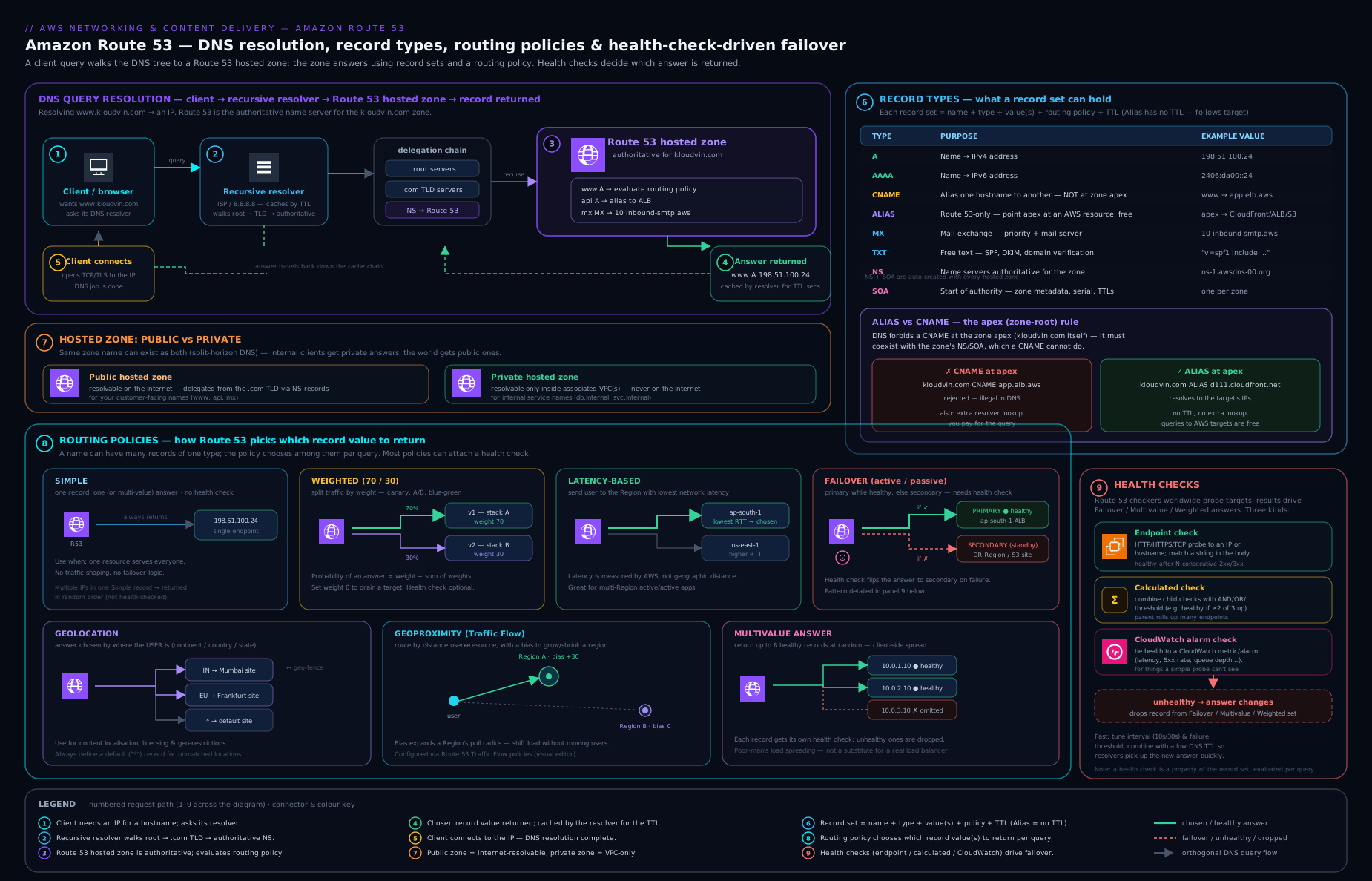
The diagram traces a single query from a client through the recursive resolver to a Route 53 hosted zone, then shows the same name resolving differently under each routing policy and how health checks gate which records are returned.
Hands-on lab
We will create a hosted zone, add records, build a failover pair backed by a health check, and clean up. This uses Route 53 features that incur small charges (see the cost note); there is no perpetual free tier for hosted zones, but the cost of doing this for an hour is a few cents. You do not need to own a domain — we will create a zone and inspect it; you would only delegate a real domain at the registrar step.
1. Set a zone name and create a public hosted zone.
ZONE=kloudvin-lab-$RANDOM.example
aws route53 create-hosted-zone \
  --name "$ZONE" \
  --caller-reference "lab-$(date +%s)" \
  --hosted-zone-config Comment="Route53 deep-dive lab"
Expected output includes a HostedZone.Id like /hostedzone/Z0123456789ABCDEFG and a DelegationSet.NameServers list of four ns-*.awsdns-* servers. Capture the ID:
ZID=$(aws route53 list-hosted-zones-by-name --dns-name "$ZONE" \
  --query 'HostedZones[0].Id' --output text | sed 's#/hostedzone/##')
echo "$ZID"
2. View the auto-created NS and SOA records.
aws route53 list-resource-record-sets --hosted-zone-id "$ZID" \
  --query "ResourceRecordSets[?Type=='NS' || Type=='SOA'].[Name,Type]" --output table
You should see the apex NS (four name servers) and the SOA — both created for you.
3. Add a simple A record.
cat > /tmp/r53-simple.json <<JSON
{ "Changes": [ {
  "Action": "UPSERT",
  "ResourceRecordSet": {
    "Name": "www.$ZONE",
    "Type": "A",
    "TTL": 60,
    "ResourceRecords": [ { "Value": "203.0.113.10" } ]
  } } ] }
JSON
aws route53 change-resource-record-sets --hosted-zone-id "$ZID" \
  --change-batch file:///tmp/r53-simple.json
The response shows a ChangeInfo.Status of PENDING. Route 53 changes are atomic and usually INSYNC within seconds.
4. Create a health check (endpoint, HTTPS to a known-good host) and a failover pair.
HCID=$(aws route53 create-health-check \
  --caller-reference "hc-$(date +%s)" \
  --health-check-config 'Type=HTTPS,FullyQualifiedDomainName=aws.amazon.com,Port=443,RequestInterval=30,FailureThreshold=3,ResourcePath=/' \
  --query 'HealthCheck.Id' --output text)
echo "Health check: $HCID"

cat > /tmp/r53-failover.json <<JSON
{ "Changes": [
  { "Action": "UPSERT", "ResourceRecordSet": {
      "Name": "app.$ZONE", "Type": "A", "TTL": 60,
      "SetIdentifier": "primary",
      "Failover": "PRIMARY",
      "HealthCheckId": "$HCID",
      "ResourceRecords": [ { "Value": "203.0.113.20" } ] } },
  { "Action": "UPSERT", "ResourceRecordSet": {
      "Name": "app.$ZONE", "Type": "A", "TTL": 60,
      "SetIdentifier": "secondary",
      "Failover": "SECONDARY",
      "ResourceRecords": [ { "Value": "198.51.100.30" } ] } }
] }
JSON
aws route53 change-resource-record-sets --hosted-zone-id "$ZID" \
  --change-batch file:///tmp/r53-failover.json
5. Validate. Confirm both failover records exist and check the health-check status:
aws route53 list-resource-record-sets --hosted-zone-id "$ZID" \
  --query "ResourceRecordSets[?Name=='app.$ZONE.'].[SetIdentifier,Failover,HealthCheckId]" \
  --output table

aws route53 get-health-check-status --health-check-id "$HCID" \
  --query 'HealthCheckObservations[].StatusReport.Status' --output table
You should see a primary/PRIMARY record bound to your health-check ID, a secondary/SECONDARY record, and several checker locations reporting Success: HTTP Status Code 200, OK. Because the records use placeholder documentation IPs, do not expect a real dig against them to reach a server — the point is the Route 53 configuration and the health-check signal.
6. Cleanup. Delete the records, the health check, and the zone (a zone with non-default records cannot be deleted):
# delete the failover records (Action must be DELETE with exact current values)
sed 's/"UPSERT"/"DELETE"/g' /tmp/r53-failover.json > /tmp/r53-failover-del.json
aws route53 change-resource-record-sets --hosted-zone-id "$ZID" \
  --change-batch file:///tmp/r53-failover-del.json

sed 's/"UPSERT"/"DELETE"/g' /tmp/r53-simple.json > /tmp/r53-simple-del.json
aws route53 change-resource-record-sets --hosted-zone-id "$ZID" \
  --change-batch file:///tmp/r53-simple-del.json

aws route53 delete-health-check --health-check-id "$HCID"
aws route53 delete-hosted-zone --id "$ZID"
Cost note. A hosted zone costs USD 0.50 per month (pro-rated only for the first 12 hours, then charged per month — so create and delete on the same day to keep it to the half-dollar). Standard queries are about USD 0.40 per million; Alias queries to AWS resources are free. Health checks of AWS endpoints are free; checks of non-AWS endpoints cost about USD 0.75 per check per month, with optional features (HTTPS, string matching, fast interval) adding small increments. This lab, deleted promptly, costs well under a dollar. Always run the cleanup — an orphaned hosted zone quietly bills USD 0.50 every month.
Common mistakes & troubleshooting
| Symptom | Likely cause | Fix |
|---|---|---|
| Domain doesn’t resolve at all | Registrar still points at old/auto name servers, not the zone’s four | Copy the zone’s exact NS values into the registrar’s name-server settings; allow propagation. |
| “CNAME at apex not allowed” error | Tried to CNAME example.com to an AWS resource |
Use an Alias A/AAAA record at the apex instead. |
| Failover never switches | Primary record has no health check (or Alias Evaluate Target Health is off) |
Attach a health check to the primary, or enable Evaluate Target Health on the Alias. |
| Change made but users see old value for ages | TTL was high (e.g. 86,400) | Lower TTL before a planned change; for emergencies you can only wait out the cached TTL. |
| Geolocation users get no answer | No default record for unmatched locations | Add a geolocation record with location Default. |
| Private zone returns NXDOMAIN for a name that resolves publicly | Private zone is authoritative for that name space and lacks the record | Add the record to the private zone, or scope the private zone to a narrower name. |
| Health check flaps / always unhealthy | Firewall blocks Route 53 health-checker IPs, or path returns non-2xx/3xx | Allow the route53-healthchecks IP ranges; point the check at a real 200-returning health path. |
| Records in VPC don’t resolve from instances | VPC enableDnsSupport/enableDnsHostnames off, or zone not associated |
Enable both VPC attributes and associate the private zone with the VPC. |
Best practices
- Always use Alias for AWS targets — apex-capable, free, faster, and health-aware via Evaluate Target Health.
- Keep failover-eligible records on low TTL (60 s) so recovery is fast; keep stable records (MX/TXT/NS) high to cut cost.
- Point health checks at a deep health endpoint that verifies real dependencies, with string matching to catch “200 but broken”.
- Always set a default record for geolocation/geoproximity policies.
- Manage zones as code (Terraform/CloudFormation) so records are reviewed and reproducible — manual record edits are a common outage source.
- Enable query logging (to CloudWatch Logs) on important public zones for security and debugging visibility.
- Use one delegated set of name servers — never recreate a live zone casually; if you must, update the registrar immediately.
- Add a
CAArecord listingamazon.comso only intended CAs (including ACM) can issue certificates for your domain.
Security notes
DNS is a security surface, not just plumbing. Enable DNSSEC signing on public zones to let resolvers cryptographically verify that answers are authentic and unmodified — this defends against DNS spoofing and cache poisoning (Route 53 supports DNSSEC signing with KMS-backed keys; you also add a DS record at the parent). Add CAA records to constrain certificate issuance to authorities you trust. Guard against dangling DNS / subdomain takeover: if a record points at a de-provisioned resource (a deleted S3 bucket or released Elastic IP), an attacker can claim that resource and serve content under your name — audit and remove records whose targets no longer exist. Turn on query logging to spot anomalous lookups (data-exfiltration tunnels, malware C2 patterns). Apply least-privilege IAM: scope route53:ChangeResourceRecordSets to specific hosted-zone ARNs so a compromised credential cannot rewrite every zone you own. Finally, for protecting outbound DNS from your VPCs (filtering what your workloads are allowed to resolve), use Route 53 Resolver DNS Firewall — covered in the resolver lesson linked below.
Interview & exam questions
-
What is the difference between an Alias record and a CNAME, and when must you use an Alias? A CNAME is standard DNS that returns another name (forcing a second lookup), is charged as a query, must be alone at its name, and cannot sit at the zone apex. An Alias is a Route 53 extension on an A/AAAA record that returns the target AWS resource’s IPs directly, is free for AWS targets, can coexist as a normal record, and works at the apex. You must use an Alias to point the apex (
example.com) at CloudFront, an ELB, S3 website, etc. -
You need to roll a new version of a service to 10% of users, then ramp up. Which routing policy? Weighted routing — give the new stack weight 10 and the old weight 90, then shift the weights. Keep TTL low so the proportions track reality and users re-resolve quickly.
-
A multi-Region app should serve every user from the fastest Region. Which policy, and what’s its limitation? Latency-based routing. Limitation: it optimises for measured network latency from the resolver, not the user, and ignores geography/compliance — a user near a border can be sent across it. For data-residency, use geolocation.
-
Failover routing isn’t switching to the secondary even though the primary is down. Why? The primary record almost certainly has no associated health check (and, if it’s an Alias, Evaluate Target Health is off). Without a health signal Route 53 keeps returning the primary. Attach a health check or enable Evaluate Target Health.
-
What are the three types of health check? Endpoint (probe an IP/domain over HTTP/HTTPS/TCP), calculated (Boolean combination of other health checks — “N of M healthy”), and CloudWatch alarm (mirror the state of any CloudWatch alarm, so you can fail over on metrics like error rate or queue depth).
-
Explain split-horizon DNS in Route 53 and one gotcha. Run a private hosted zone and a public hosted zone for the same domain; queries from associated VPCs hit the private zone, the internet hits the public one. Gotcha: the private zone is authoritative for its whole name space, so a name it lacks returns NXDOMAIN to the VPC rather than falling through to public resolution.
-
What does TTL control, and what’s a safe value for a record you might need to fail over? TTL is how long resolvers cache an answer before re-querying. For failover-eligible records use a low TTL (~60 s) so a failover propagates quickly; the extra query cost is negligible versus recovery time.
-
Why can’t you put a CNAME at
example.com? The apex must carry the zone’sNSandSOArecords, and DNS forbids a CNAME from coexisting with any other record at the same name. Route 53’s Alias record solves this because it is technically an A/AAAA record. -
Geolocation vs geoproximity — what’s the difference? Geolocation routes by the user’s named location (continent/country/US state) with a default fallback. Geoproximity routes by distance between user and resource and lets you apply a bias to expand or shrink each resource’s service area; it requires Traffic Flow.
-
What is multivalue answer routing and when would you use it over a load balancer? It returns up to eight random, optionally health-checked values, omitting unhealthy ones — health-aware DNS spreading. Use it for a small set of independent endpoints when you want availability without an LB; it is not a true load balancer (no connection awareness, no even distribution).
-
How does Route 53 decide an endpoint is healthy, and why does it matter for firewalls? Health checkers in multiple global locations probe the endpoint; it’s healthy if more than 18% report success. You must therefore allow the Route 53 health-checker IP ranges through security groups/NACLs/firewalls, or checks fail and traffic drains erroneously.
-
What is subdomain takeover and how do you prevent it? A “dangling” DNS record points at a de-provisioned resource (deleted bucket, released EIP); an attacker re-creates/claims that resource and serves content under your name. Prevent it by removing records whose targets no longer exist and auditing zones regularly.
Quick check
- Which record type points a name at an IPv6 address?
- True/false: you can place a CNAME at the zone apex if it is the only record there.
- Which routing policy is the right choice for active-passive disaster recovery?
- What happens to a geolocation query that matches no rule and has no default record?
- Are Alias queries to an AWS resource charged?
Answers
- AAAA.
- False — a CNAME is never allowed at the apex (the apex must hold
NS/SOA); use an Alias. - Failover routing (primary + secondary, with a health check on the primary).
- It returns no answer (NODATA) — always configure a Default record for geolocation.
- No — Alias queries that resolve to AWS resources are free; standard queries are charged per million.
Exercise
Design the DNS for a two-Region web application (eu-west-1 and us-east-1) fronted by an ALB in each Region, that must (a) serve every user from the lower-latency Region, (b) fail a Region out automatically when its ALB has no healthy targets, and © serve EU users only from eu-west-1 for data-residency. Sketch the records: which routing policies, how they nest, what each record’s Alias target and health configuration are, and what TTLs you’d set. Then write the aws route53 change-resource-record-sets change-batch JSON for the apex records. (Hint: geolocation at the top to honour residency, latency for the rest, Alias-to-ALB with Evaluate Target Health for the per-Region failover, 60 s TTLs.)
Certification mapping
- AWS Certified Solutions Architect – Associate (SAA-C03): routing policies and when to use each, Alias vs CNAME, failover and health checks, latency-based routing for multi-Region, private vs public hosted zones — heavily tested.
- AWS Certified Advanced Networking – Specialty (ANS-C01): deep DNS — split-horizon, DNSSEC, geoproximity/Traffic Flow, calculated and CloudWatch health checks, hybrid resolution (with the Resolver lesson), and health-checker IP allow-listing.
- Touches SOA-C02 (operating failover and health checks) and DVA-C02 (pointing app endpoints at AWS resources).
Glossary
- Hosted zone — Route 53 container for one domain’s records; gives you four authoritative name servers.
- Authoritative server — the server that holds the real records for a zone (Route 53). Distinct from a recursive resolver, which chases and caches answers.
- Record set — one DNS entry: name, type, TTL, value (or Alias target).
- Alias — a Route 53-only A/AAAA record that returns an AWS resource’s IPs directly; apex-capable, free, health-aware.
- CNAME — standard record aliasing one name to another; not allowed at the apex.
- Routing policy — the rule deciding which record value Route 53 returns (simple, weighted, latency, failover, geolocation, geoproximity, multivalue).
- Health check — a Route 53 object monitoring a target (endpoint, calculated, or CloudWatch-alarm) that gates whether a record is returned.
- Evaluate Target Health — an Alias setting that inherits the health of the AWS target automatically.
- TTL — seconds a resolver may cache an answer before re-querying.
- Split-horizon DNS — same domain served differently to VPCs (private zone) and the internet (public zone).
- Delegation — pointing a parent at a child zone’s name servers via
NSrecords. - DNSSEC — cryptographic signing of DNS answers so resolvers can verify authenticity.
Next steps
- Build the resilient global front door these records feed into: Global Edge Architecture with CloudFront and Route 53: Failover Routing, Origin Shielding, and WAF Protection (
cloudfront-route53-global-edge-failover-waf-origin-protection). - Go deeper on resolving and filtering DNS inside your VPCs and across hybrid networks: Route 53 Resolver: DNS Firewall, Endpoints, Rules & Hybrid Resolution (
route53-resolver-dns-firewall-endpoints-rules-hybrid-resolution). - Continue the Networking module with observability: AWS Observability, In Depth: CloudWatch, CloudTrail, Config & EventBridge (
aws-cloudwatch-cloudtrail-observability-deep-dive).