A national pharmacy chain is launching a flu-shot campaign, and the marketing team has built a beautiful single-page microsite — appointment finder, eligibility checker, store locator — as a static React build. The brief from the VP of Digital is simple to say and easy to get wrong: “It needs to survive a TV ad slot.” That means a hundred thousand people typing the URL inside the same two-minute commercial break, on phones, on slow rural connections, all expecting the page in under a second. There is no shopping cart, no login, no server-rendered personalization — it is HTML, CSS, JavaScript, and images. And yet a junior engineer’s first instinct, “just put it on a web server,” is exactly how these launches fall over: one box, one region, one bill that scales with every request, and a security team that will not sign off on a public server exposing a bucket of files. This article is the right way to host that microsite — a private S3 origin behind a CloudFront CDN — explained from first principles, but shaped the way a real platform team ships it.
The pressures here are gentler than a trading floor’s, but they are real. Traffic is spiky and unpredictable — flat for weeks, then a wall of requests the instant the ad airs. The audience is global-ish and mobile — latency is dominated by physical distance to the user, and a server in one AWS region is far from someone on a phone three time zones away. Cost has to track value — a campaign that costs more to host than it earns in appointments is a failed campaign. And security still applies even to “just static files” — a misconfigured public bucket is one of the most common breaches on the internet, and “it’s only marketing HTML” is no defense when the bucket name leaks or someone parks malware in it. The S3-plus-CloudFront pattern answers all four at once, and understanding why each piece is there is the whole point.
Why not the obvious shortcuts
Three tempting shortcuts each fail in a way worth naming, because someone on the project will suggest all three.
“Just run a web server (EC2 + Nginx).” Now you own a server: patching, scaling, an availability zone that can fail, and a fixed capacity that either wastes money at idle or falls over under the ad-break spike. You are paying by the hour for a machine to hand out files that never change. It is the wrong shape for static content.
“Just turn on S3 static website hosting and point DNS at it.” S3 has a built-in website endpoint, and it genuinely serves files. But that endpoint is HTTP only — no HTTPS — which fails every modern security baseline and makes browsers show “Not Secure,” and it forces the bucket to be public, which is the exact misconfiguration that leaks data across the industry. It also has no edge caching, so a user far from the bucket’s region waits on a long round trip. Fine for a throwaway demo; not for a brand’s campaign.
“Put it on a generic shared host.” Cheap, but no global edge, no TLS control, no infrastructure-as-code, and nothing the security team can audit. It does not survive the ad slot and it does not pass review.
The production answer keeps the files in a private S3 bucket — no public access at all — and puts CloudFront, AWS’s content delivery network, in front as the only thing allowed to read them. CloudFront caches copies of the files at hundreds of edge locations physically close to users, terminates HTTPS with a free AWS certificate, and absorbs the spike at the edge so most requests never even reach S3. That is the pattern, and the rest of this article is what each component does and why.
Architecture overview
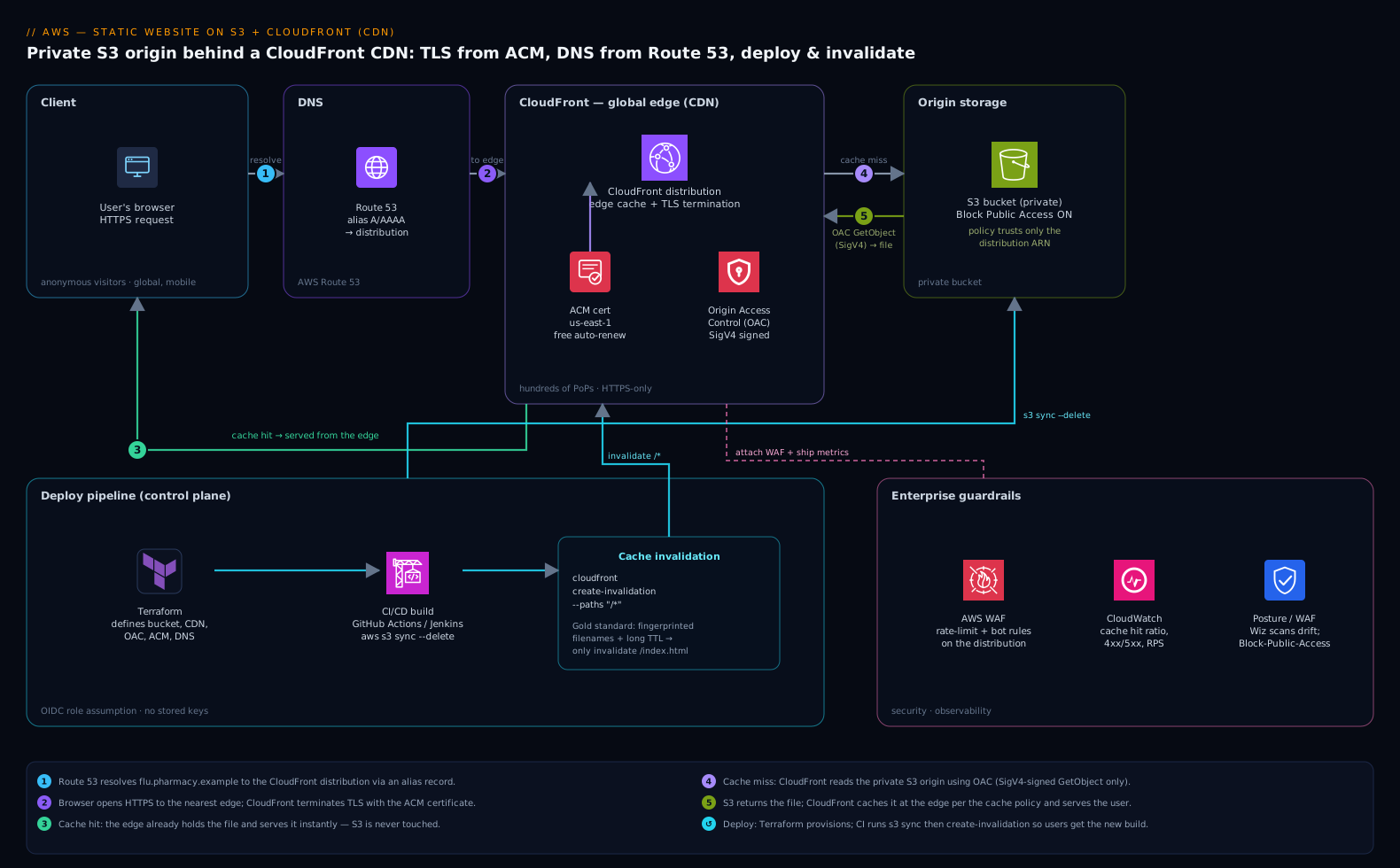
The whole design is a short, one-directional path: a user’s browser asks CloudFront for a page, CloudFront serves it from a nearby edge cache if it has it, and only fetches from the private S3 origin on a cache miss. There is no application server in the request path at all. Walk it in order, because every hop earns its place.
The request flow, following a user:
- A user taps the campaign link. Route 53, AWS’s DNS service, resolves
flu.pharmacy.exampleto the CloudFront distribution (via an alias record — more on why that matters below). DNS is just the phone book here: it points your friendly domain name at CloudFront’s global address. - The browser opens an HTTPS connection to the nearest CloudFront edge location. CloudFront terminates TLS using a certificate issued for free by AWS Certificate Manager (ACM), so the connection is encrypted and the browser shows the padlock. There are hundreds of these edge locations worldwide; the user hits whichever is closest, which is what kills latency.
- CloudFront checks its edge cache. If this edge already has
index.htmlor that hero image (because someone nearby requested it recently), it returns the cached copy immediately — a cache hit — and S3 is never touched. This is how one origin survives a hundred thousand concurrent users: the edge fan-out does the heavy lifting. - On a cache miss, CloudFront fetches the file from the S3 origin. Crucially, it does this using Origin Access Control (OAC) — CloudFront signs the request with AWS SigV4, and the bucket policy allows reads only from this specific CloudFront distribution. The bucket itself stays fully private with S3 Block Public Access on. No human and no other service can read the bucket over the internet; CloudFront is the single authorized reader.
- CloudFront caches the fetched file at that edge per its cache policy (governed by
Cache-Controlheaders and a TTL), then returns it to the user. The next nearby user gets a hit. Files are immutable build artifacts, so they cache hard and long.
That is the entire data path. The control path — how files get into the bucket in the first place, and how the cache is told a new version exists — is the deploy pipeline, and it is where the one genuinely tricky part of static hosting lives.
Component breakdown
| Component | AWS service | Role in the design | Key configuration choice |
|---|---|---|---|
| DNS | Route 53 | Maps the domain to CloudFront | Alias A/AAAA record to the distribution (not a CNAME at the apex) |
| CDN / edge | CloudFront | Global cache, TLS termination, the only origin reader | OAC to S3; HTTPS-only; cache + security-headers policies |
| TLS certificate | AWS Certificate Manager (ACM) | Free, auto-renewing HTTPS cert | Issued in us-east-1 (required for CloudFront); DNS-validated |
| Origin (storage) | S3 (private bucket) | Holds the built static files | Block Public Access ON; bucket policy trusts only the distribution |
| Access control | Origin Access Control (OAC) | Lets only CloudFront read S3 | SigV4 signing; replaces the legacy OAI |
| Deploy | CI/CD (GitHub Actions / Jenkins) | Build, sync to S3, invalidate cache | aws s3 sync + cloudfront create-invalidation |
| Infra as code | Terraform | Defines every resource above, repeatably | One module; OIDC to AWS, no stored keys |
A few of these deserve the why, because they are the parts juniors most often get wrong.
Why the bucket must be private, and OAC is non-negotiable. The single most common AWS security incident on the public internet is a misconfigured S3 bucket left open to the world. The entire point of this architecture is that the bucket is never public: S3 Block Public Access is on at the account and bucket level, and the only principal in the bucket policy is the CloudFront distribution, identified by its ARN. Origin Access Control is the modern mechanism that lets CloudFront sign its origin requests so S3 trusts them — it replaced the older Origin Access Identity (OAI) and supports SSE-KMS-encrypted buckets and all regions. The bucket policy looks like this, and it is the heart of the security model:
{
  "Effect": "Allow",
  "Principal": { "Service": "cloudfront.amazonaws.com" },
  "Action": "s3:GetObject",
  "Resource": "arn:aws:s3:::flu-pharmacy-site/*",
  "Condition": {
    "StringEquals": {
      "AWS:SourceArn": "arn:aws:cloudfront::111122223333:distribution/E1ABCDEF2GHIJ"
    }
  }
}
Read that Condition carefully: only that one distribution may read the bucket, and only GetObject (read), never write or list. There is no "Principal": "*" anywhere — that string is the smell of the breach you are avoiding.
Why the certificate has to live in us-east-1. ACM gives you a free TLS certificate that auto-renews, so you never hand-roll or forget to renew a cert. But CloudFront has a quirk every newcomer trips on: the certificate it uses must be issued in the us-east-1 region, regardless of where your bucket or users are, because CloudFront is a global service rooted there. Issue it anywhere else and CloudFront simply will not see it. Validate it with a DNS record (which Route 53 can add automatically) and renewal is hands-off forever.
Why Route 53 needs an alias, not a CNAME, at the apex. DNS rules forbid a CNAME on a zone apex (pharmacy.example itself, as opposed to www.pharmacy.example). Route 53’s alias record is an AWS-specific record type that points the apex straight at CloudFront with no extra lookup and no monthly query charge — exactly what you want for the bare domain. This is a small detail that blocks many first deployments, so it is worth knowing before you hit it.
The deploy pipeline and the one tricky part: cache invalidation
Static hosting has a single genuine gotcha, and it surprises everyone the first time: the cache is doing its job too well. You push a fixed copy of the homepage, but CloudFront and the user’s browser are still happily serving the old cached version from before your deploy. The marketing team swears the new banner is live; users see yesterday’s. Understanding this is the difference between “it works on my machine” and a reliable launch.
The deploy itself is two steps, run from CI/CD — GitHub Actions for a modern repo, or Jenkins if the org already standardizes its build farm there. Both do the same two things: copy the freshly built files to S3, then tell CloudFront to forget its cached copies.
# 1. Upload the new build to the private origin bucket
aws s3 sync ./dist s3://flu-pharmacy-site --delete

# 2. Tell every edge location to drop its cached copies so users see the new build
aws cloudfront create-invalidation \
  --distribution-id E1ABCDEF2GHIJ \
  --paths "/*"
The s3 sync --delete mirrors your build folder into the bucket (uploading changes, removing files you deleted). The invalidation is the part that matters: it tells all those edge caches “the copies you hold are stale, fetch fresh ones.” Without it, users keep getting the old page until the TTL naturally expires — which could be hours.
There are two professional ways to handle this, and the better one avoids invalidations almost entirely:
| Strategy | How it works | Tradeoff |
|---|---|---|
Invalidate /* every deploy |
Wipe the whole cache after each upload | Simple; but AWS only gives 1,000 free invalidation paths/month, and a brief window of mixed old/new files |
| Fingerprinted filenames + long TTL | Build tools name files app.9f3a2b.js; a new build = a new filename |
The gold standard: assets cache forever and never need invalidating, because a changed file has a new name. Only the tiny, never-cached index.html points to the new names |
The second pattern is what mature front-end builds (Vite, webpack, Next.js static export) do by default: content-hash the filenames so every changed asset gets a brand-new URL. Then you set a long TTL with Cache-Control: public, max-age=31536000, immutable on those hashed assets, and a short or no-cache TTL on index.html only. A deploy becomes “upload, and at most invalidate /index.html” — fast, cheap, and free of the stale-cache trap. This is the single most useful thing a junior can learn about CDNs: don’t fight the cache, name your files so the cache is always correct.
Everything is defined in Terraform so the bucket, distribution, OAC, ACM cert, and Route 53 records come up identically every time and can be torn down cleanly after the campaign. The pipeline authenticates to AWS via OIDC (GitHub Actions assuming an IAM role) so there are no long-lived access keys sitting in a CI secret to leak — the same hard-won discipline every team should keep, even for a “simple” marketing site.
CloudFront vs. Akamai: a quick edge primer
CloudFront is one CDN among several, and Akamai is the incumbent giant a junior will hear named in any large enterprise — so it is worth knowing where each fits. A CDN is a CDN: both cache content at edge locations near users, terminate TLS, and offer a Web Application Firewall and DDoS protection. The differences are about ecosystem and reach, not the core idea.
| CloudFront | Akamai | |
|---|---|---|
| Edge footprint | Hundreds of PoPs; very large, AWS-operated | The largest edge network in the world, deepest into last-mile ISPs |
| Best fit | AWS-native apps; tight S3/ACM/Route 53 integration, one bill | Huge global enterprises, demanding media/streaming, ISP-edge reach |
| Pricing model | Pay-as-you-go, integrated into the AWS bill | Enterprise contracts, often committed volume |
| Setup for this site | Native — OAC reads the private S3 origin directly | Possible, but you point Akamai at an S3/CloudFront origin and manage a separate vendor |
For a static site whose files already live in S3, CloudFront is the obvious default: it reads the private origin natively through OAC, shares one bill and one IAM model with the bucket, and is provisioned in the same Terraform. You would reach for Akamai when you are an enterprise already standardized on it for its sheer ISP-edge reach and global media delivery — for instance, the same pharmacy chain might serve its main high-traffic e-commerce property through Akamai under a corporate contract, while this campaign microsite happily rides CloudFront. Knowing both exist, and that they solve the same problem at different scales, is the takeaway; you do not need Akamai to ship this microsite.
Enterprise considerations
Even a “simple” static site, when it carries a national brand, inherits the organization’s guardrails. Here is where the broader tooling fits — and what each piece actually does for this site — so a junior sees how a microsite plugs into a real platform.
Security and posture. The architecture is secure by construction: a private origin, a single authorized reader, HTTPS everywhere, no public surface. Layer the org’s standards on top. Attach AWS WAF to the CloudFront distribution for rate-limiting and bot rules so the ad-break spike of real users is not joined by a scraper flood. A cloud-security-posture tool like Wiz continuously scans the account and would alert the instant anyone disabled Block Public Access or widened the bucket policy — it is the independent backstop that catches the misconfiguration before it becomes a breach, and Wiz Code can scan the Terraform in the pull request to flag a public-bucket setting before it is ever applied. Even though there is no server to defend, the build agents that run the deploy are real machines, so the org’s CrowdStrike Falcon runtime sensor runs on the Jenkins/GitHub runner fleet, feeding detections to the SOC. Human access to the AWS account is gated through the corporate IdP — Okta or Microsoft Entra ID federated to AWS IAM Identity Center — so engineers log in with their SSO identity and conditional-access policies, never a static IAM user. The handful of non-AWS secrets a richer pipeline might need (a third-party analytics token, a CMS webhook key) live in HashiCorp Vault, leased short-lived rather than pasted into CI config.
Identity, kept simple but real. This site has no end-user login — visitors are anonymous, which is correct for a public campaign. The identity that matters is the operators’: SSO through Okta or Entra ID into IAM Identity Center for humans, and OIDC role assumption for the pipeline so there are zero long-lived keys. That is the whole identity story, and its simplicity is a feature.
Cost optimization. This is where the architecture shines, and the numbers are friendly enough that a junior can reason about them. There is no server billed by the hour — you pay for S3 storage (a few cents per GB for a tiny site), CloudFront data transfer out, and request counts. Because CloudFront serves most traffic from the edge cache, the origin fetch count to S3 stays tiny even under the ad-break spike — the cache deflects the load that would otherwise be a bill. Levers that matter here:
| Lever | Mechanism | Effect |
|---|---|---|
| High cache hit ratio | Long TTLs on fingerprinted assets | Most requests never reach S3 — cheaper and faster |
| CloudFront price class | Restrict to the regions your audience is in | Drops transfer cost if traffic is geographically concentrated |
| Compression | Enable Brotli/Gzip at CloudFront | Fewer bytes transferred per request |
| Tear-down in IaC | terraform destroy after the campaign |
Stops all charges cleanly once the flu season ends |
For a campaign microsite, the monthly bill is typically dollars, not hundreds of dollars — the opposite of the always-on EC2 box.
Scalability and reliability. There is almost nothing to scale: CloudFront’s edge network is the scaling layer, designed to absorb exactly the spiky, global load the ad slot creates, and S3 is effectively infinitely durable (eleven nines) and available. The “server” that could fall over does not exist. For availability, S3 and CloudFront are both multi-AZ, AWS-managed, and span regions by design — a single data-center failure is invisible to users. Disaster recovery is correspondingly trivial: the bucket can be cross-region-replicated, and because the entire stack is in Terraform, the true recovery guarantee is that you can rebuild the whole site in another account or region from code and a copy of the build artifacts in minutes. There is no database to restore, no state to lose.
Observability and operations. Turn on CloudFront access logs and CloudWatch metrics to watch the numbers that tell you the launch is healthy: cache hit ratio (the higher, the cheaper and faster), 4xx/5xx error rate, origin latency, and requests per second as the ad airs. In an enterprise already running Datadog or Dynatrace, ship these CloudFront and CloudWatch metrics into the existing dashboard so the campaign sits beside every other property on one pane of glass — the on-call engineer watches the same tool they always do, and an anomaly (a sudden drop in hit ratio, a spike in 5xx) pages them automatically. When something does need human action — a planned cache purge before a content swap, or an incident if error rate climbs — it is raised as a ServiceNow change or incident ticket, so even a marketing microsite follows the same documented operational gate as the rest of the estate. Configuration drift (someone toggling a setting in the console by hand) is caught by Terraform plan in CI and by Wiz posture scanning, so the deployed reality and the code in the repo never quietly diverge.
Governance and change control. Every resource is in version control as Terraform, reviewed in a pull request, and applied by the pipeline — never click-ops in the console. Ansible has no real role on a pure static site (there is no OS or server to configure), which is itself instructive: the serverless shape removes whole categories of config-management work a junior might otherwise expect. The deploy is the only moving part, and it is two idempotent commands behind a reviewed pipeline. If this microsite later needs to embed, say, an interactive eligibility course or training module, that is the point you would reach for a platform like Moodle as a separate hosted application behind its own path — but the static marketing shell stays exactly this simple, and resisting the urge to add a server just in case is the discipline that keeps the bill and the attack surface small.
Explicit tradeoffs
Accept these or pick a different pattern. Static hosting on S3-plus-CloudFront is the right tool only for content that is genuinely static — pre-built HTML, CSS, JS, images, downloads. The moment you need server-side rendering per request, a database read on page load, or user-specific server logic, this pattern alone is not enough, and you add an API (API Gateway + Lambda, or a backend service) behind the same CloudFront, or move to a different architecture. The cache that gives you speed and cheapness is also the thing that bites you: you must think about invalidation and TTLs, and the “stale content after deploy” surprise is real until you adopt fingerprinted filenames. The us-east-1 certificate rule, the apex-alias rule, and the private-bucket-plus-OAC wiring are small pieces of essential knowledge that block first-time deployments — none are hard, but all are non-obvious. And while the architecture is cheap and scalable, it is not zero-effort to set up correctly: getting OAC, Block Public Access, the bucket policy, and the cert region all right is exactly the work that separates a secure deployment from the next public-bucket headline.
The alternatives, and when they win. A managed platform — AWS Amplify Hosting, or third parties like Netlify or Vercel — wraps this exact S3-plus-CDN pattern in a turnkey product with git-push deploys and automatic cache handling; reach for one when a small team wants speed over control and does not need to own the underlying resources. Plain S3 static website hosting (no CloudFront) is acceptable only for an internal, HTTP-only throwaway where TLS and a private origin do not matter — which is almost never, for anything with a brand on it. And if you are already an Akamai enterprise, you might front this S3 origin with Akamai instead of CloudFront to consolidate on one edge vendor. For a campaign microsite that has to be cheap, fast, global, secure, and disposable, though, the architecture in this article is the destination: a private bucket of files, a CDN in front, TLS from ACM, DNS from Route 53, and a two-line deploy.
The shape of the win
When the flu-shot ad airs and a hundred thousand people hit the link in the same two minutes, the microsite loads in under a second on a phone in a rural pharmacy parking lot, the bill for the whole campaign is a rounding error, the bucket of files was never once exposed to the public internet, and the on-call engineer watches a calm green dashboard because CloudFront’s edge absorbed the entire spike before it ever reached the origin. That outcome is not luck — it is the direct payoff of each deliberate choice: the private S3 origin that keeps the files safe, the OAC that makes CloudFront their only reader, the ACM certificate that gives every visitor HTTPS for free, the Route 53 alias that points the brand domain at the edge, and the fingerprint-and-invalidate deploy that means users always see the new build and never the old. Start here, learn each piece for what it does, and you have the foundation that every richer AWS web architecture is built on top of.