A single-service problem is a puzzle; a multi-service incident is a crime scene. When an EC2 instance will not accept SSH you can reason about it in isolation — security group, key, subnet, status checks — and the previous lesson gave you those playbooks. But production rarely fails that politely. Real incidents arrive as a payments API at 30% error rate, and the cause turns out to be a DynamoDB table that started throttling because a deploy three hours ago doubled its read pattern, which exhausted the connection pool in a downstream Lambda, which tripped a circuit breaker in the upstream service, which is why the checkout page — three hops away — is timing out. Nobody changed checkout. The symptom and the cause are in different services, owned by different teams, and the only thing that ties them together is a trace ID and a timeline.
This lesson is about that kind of incident. The skill is no longer “do I know this service” — it is correlation under pressure: imposing a lifecycle on the chaos, reading three or four observability tools against one clock, forming hypotheses you can cheaply disprove, and writing the whole thing down afterwards so it never recurs. We will walk the incident-response lifecycle, the correlation toolkit (CloudWatch metrics and Logs Insights, CloudTrail, X-Ray, the Health Dashboard, Trusted Advisor), five fully worked complex scenarios as symptom → hypotheses → cross-service diagnosis → fix, the role of Service Quotas, and the blameless postmortem (Amazon’s COE) that closes the loop. This is the SOA-C02 and SAP-C02 operational-excellence mindset, written the way an on-call architect actually works it.
Learning objectives
By the end of this lesson you will be able to:
- Run an incident through a disciplined lifecycle — detect, triage, communicate, mitigate, perform root-cause analysis (RCA), prevent — and know what “done” means at each stage.
- Correlate CloudWatch metrics, CloudWatch Logs Insights queries, CloudTrail events and X-Ray traces against a single timeline to locate a cause that is not in the failing service.
- Diagnose and fix five classes of complex incident: cascading failure from a throttled dependency, Availability Zone (AZ) impairment, a service-quota breach under load, an IAM/SCP change with a wide blast radius, and a Route 53/DNS or ACM certificate failure.
- Tell the difference between a mitigation (stop the bleeding now) and a fix (remove the cause) and sequence them correctly.
- Use Service Quotas, Trusted Advisor and the AWS Health Dashboard proactively so the next breach is a CloudWatch alarm, not an outage.
- Write a blameless Correction of Error (COE) with a real five-whys, contributing factors and CAPA action items.
Prerequisites
You should be comfortable with the single-service troubleshooting method and playbooks from AWS Troubleshooting Playbooks: EC2, VPC, IAM, S3 & Lambda — reproduce, isolate the layer, check config against desired state, inspect CloudWatch and CloudTrail, hypothesise, fix, verify, prevent. You should know IAM policy evaluation (explicit deny beats allow beats implicit deny), how VPC routing and security groups work, and roughly what CloudWatch, CloudTrail and X-Ray each record. This lesson sits in the Troubleshooting & operations module of the Zero-to-Hero track, immediately after the single-service playbooks and before the architecting ladder. It is mapped to SOA-C02 (AWS Certified SysOps Administrator) and the operational sections of SAP-C02 (Solutions Architect Professional).
The incident-response lifecycle
Under pressure, ad-hoc investigation produces tunnel vision: three engineers staring at the same dashboard while nobody talks to the customer or writes anything down. A lifecycle is the antidote. It is not bureaucracy — it is the set of jobs that must happen concurrently, and naming them lets you assign them.
| Phase | Goal | Key actions | Done when |
|---|---|---|---|
| Detect | Know there is an incident, fast | Alarms (CloudWatch composite + SLO burn-rate), synthetic canaries, customer reports, Health Dashboard events | An incident is declared with a severity and a single owner |
| Triage | Size the blast radius and assign roles | Confirm scope (one customer / one AZ / one Region / global), set severity, name an Incident Commander (IC), a comms lead and an ops lead | Everyone knows their role and the severity is agreed |
| Communicate | Keep stakeholders ahead of the rumour | Status page / internal channel updates on a cadence (e.g. every 30 min for Sev-1), business-impact statement | Stakeholders are updated and the cadence is running |
| Mitigate | Stop customer pain before you understand it fully | Roll back, fail over, raise a quota, shed load, disable a feature flag — anything that restores service | Customer impact is gone or sharply reduced |
| RCA | Find the true cause, not the trigger | Correlate logs/metrics/traces/CloudTrail on one timeline, five-whys | The causal chain is written down and agreed |
| Prevent | Make recurrence impossible or detectable | CAPA action items with owners and dates, new alarms, guardrails, runbook updates | Action items are tracked to completion |
Two principles separate seniors from juniors here. First: mitigate before you fully diagnose. The instinct to find the cause before acting is wrong during customer impact — if a rollback or failover restores service, do it, then investigate from a calm seat. The cause is still in the telemetry. Second: one Incident Commander. The IC does not debug; they coordinate, decide, and protect the responders from interruptions. The fastest incidents I have run had an IC who never touched a keyboard.
A note on severity: pick a simple scale and stick to it. A common one is Sev-1 (major customer-facing outage, all hands, exec comms), Sev-2 (significant degradation or single-AZ/single-feature impact), Sev-3 (minor or internal-only). Severity drives the comms cadence and who gets paged — it is a routing decision, not a judgement of blame.
The correlation toolkit: reading four tools against one clock
The defining move of multi-service RCA is correlation. The cause lives in a different service from the symptom, so you must line up signals from several tools on a single, UTC timeline. Configure every console and query to UTC during an incident — the single most common diagnostic error is comparing a log in local time against a metric in UTC and “proving” the wrong thing.
Here is what each tool is for, and crucially what it is not for:
| Tool | Answers | Best for | Blind spot |
|---|---|---|---|
| CloudWatch metrics | “What changed, and when?” | Spotting the inflection point — latency, errors, throttles, saturation | Aggregates hide per-request detail; high cardinality is expensive |
| CloudWatch Logs Insights | “What exactly happened in this service?” | Querying structured logs across log groups for patterns, error messages, request IDs | Only as good as your logging; cross-service joins are manual |
| CloudTrail | “Who did what to the control plane, and when?” | Tying an incident to a config change, deploy, IAM/SCP edit, quota change | Management events only by default; data events cost extra; ~minutes of delivery latency |
| X-Ray (traces) | “Where in the call graph is the time/error going?” | Following one request across services; the service map shows the failing edge | Sampled by default — the one trace you want may not be captured |
| AWS Health Dashboard | “Is this AWS’s problem?” | Ruling in/out an AWS-side event in your account/Region (PHD shows account-specific) | Not real-time to the second; absence of an event is not proof |
| Trusted Advisor | “Am I near a limit or misconfigured?” | Pre-incident hygiene and quota headroom checks | Periodic, not a live diagnostic |
The high-leverage skill is the golden-signal sweep: in the first two minutes, look at latency, traffic, errors and saturation (the four golden signals) for the affected service and its immediate dependencies, all on the same time window. The shape tells you the class of problem before you read a single log line:
- Errors up, latency flat, traffic flat → a dependency is rejecting fast (throttling, 4xx, a bad deploy returning errors).
- Latency up, then errors up, traffic flat → saturation or a slow dependency; the queue fills, then requests time out.
- Traffic up, then latency/errors up → load-driven: you are hitting a capacity or quota ceiling.
- A step change at an exact timestamp → something changed — go straight to CloudTrail for that minute.
Logs Insights and CloudTrail: the two queries you will type most
When errors spike, this Logs Insights query finds the dominant failure mode fast — bin by minute, count by status, and you see both the onset and the breakdown:
fields @timestamp, @message
| filter status >= 500 or @message like /Throttl|Timeout|ProvisionedThroughputExceeded/
| stats count(*) as errors by bin(1m), errorType
| sort errors desc
And when a metric shows a step change at a specific minute, this CloudTrail lookup answers “what changed”:
# Who/what touched the control plane around the inflection point (UTC)
aws cloudtrail lookup-events \
  --start-time 2026-06-15T14:25:00Z \
  --end-time   2026-06-15T14:35:00Z \
  --query 'Events[].{Time:EventTime,User:Username,Event:EventName,Src:EventSource}' \
  --output table
Pair a step change in a metric with a CloudTrail event in the same minute and you have usually found your trigger. For request-level correlation, propagate a request ID (and the X-Ray trace ID) through your logs so you can pivot from a metric, to the traces on that edge, to the exact log lines for that request.
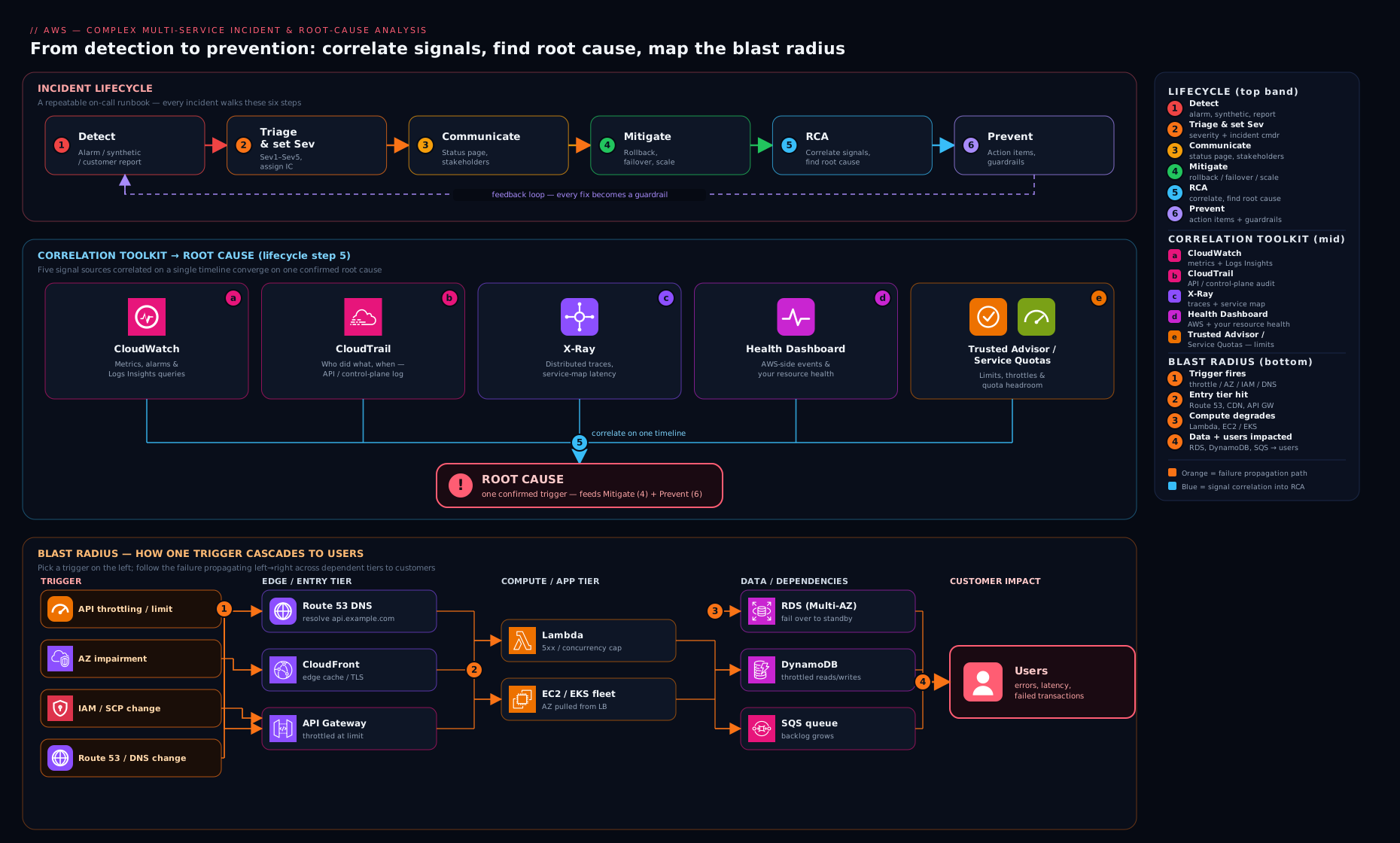
The diagram above ties it together: the lifecycle across the top, and beneath it the correlation plane where one UTC timeline links a CloudWatch metric inflection, a CloudTrail change event, an X-Ray service-map fault edge and the Logs Insights detail — the four views you triangulate to move from symptom to root cause.
Worked scenario 1 — Cascading failure from a throttled dependency
Symptom. The checkout API’s p99 latency climbs from 200 ms to 8 s over ten minutes, then it starts returning 5xx. Traffic is flat — no marketing spike. The on-call for checkout swears they deployed nothing.
Hypotheses.
- Checkout itself regressed (deploy, memory leak, GC). Unlikely — no deploy, and latency rose before errors.
- A downstream dependency slowed or started rejecting, and checkout’s threads/connections are now blocked waiting on it (back-pressure cascade).
- A shared resource (a database, a connection pool, a Lambda concurrency limit) is saturated and several services are contending for it.
Cross-service diagnosis. The golden-signal shape — latency up first, then errors, traffic flat — points away from load and towards a slow or rejecting dependency. Open the X-Ray service map for the checkout request: it shows checkout → order-service → a DynamoDB table, and the order-service → DynamoDB edge is red with high latency and a fault rate. Pivot to CloudWatch and overlay the table’s ThrottledRequests (or ReadThrottleEvents) metric — it went non-zero exactly when checkout’s latency began to climb. Now the question is why is the table throttling on flat traffic? CloudTrail lookup-events for the preceding hour shows an UpdateItem-heavy deploy on a different service that began writing a new attribute, and a Logs Insights query on order-service shows it is doing a Scan where it used to Query because a feature flag flipped. The Scan reads the whole partition, blows the table’s provisioned (or hot-partition) capacity, DynamoDB throttles, order-service retries (amplifying load), its connection pool fills, and checkout — waiting on order-service — backs up and finally times out. Classic cascade: the symptom is in checkout, the trigger is a flag on a third service, the bottleneck is one DynamoDB partition.
Fix.
- Mitigate now: turn off the feature flag that introduced the Scan (removes the load source instantly); if the table is provisioned, bump capacity or enable on-demand to absorb the burst; ensure clients use exponential backoff with jitter so retries stop amplifying.
- Fix the cause: restore the access pattern to a
Queryagainst a proper key/GSI; add a circuit breaker in checkout so a slow dependency fails fast instead of consuming all threads; set sensible client timeouts and bounded retries; consider DAX or caching for the hot read. - Prevent: alarm on
ThrottledRequestsand on the saturation of the connection pool; add a canary that exercises checkout end to end; require load-testing of access-pattern changes; adopt bulkheads so one dependency cannot exhaust a shared pool.
The lesson: retries and missing timeouts turn a small dependency hiccup into a system-wide outage. Backoff with jitter, timeouts, circuit breakers and bulkheads are the resilience primitives that contain a cascade.
Worked scenario 2 — Availability Zone impairment and failover
Symptom. Error rate jumps to roughly one-third of requests and p99 latency spikes, but two-thirds of requests are perfectly healthy. The pattern is partial and persistent — refreshes sometimes succeed, sometimes fail.
Hypotheses.
- A bad deploy on a subset of instances (canary gone wrong).
- One AZ is impaired — networking, a backing service, or capacity in that zone.
- A single unhealthy backend (one RDS replica, one cache node) serving a fraction of traffic.
Cross-service diagnosis. “One-third failing, two-thirds fine” across a three-AZ deployment is the signature of single-AZ impairment. Confirm it three ways. First, the AWS Health Dashboard (Personal Health Dashboard) — check for an account-specific event naming an AZ ID (note: AZ names like us-east-1a are randomised per account; the Health event and your metrics should be reconciled by AZ ID, e.g. use1-az2). Second, break the load balancer’s metrics down by AZ: target group healthy-host count has dropped in one AZ and HTTPCode_Target_5XX_Count is concentrated there. Third, check the data tier — if RDS is Multi-AZ, is the primary in the impaired zone? Is one ElastiCache shard’s primary there? CloudWatch per-AZ metrics and the target-health view localise it. CloudTrail will be quiet — this is not a change you made, which itself is a strong signal that the cause is infrastructure, not config.
Fix.
- Mitigate now: fail traffic away from the bad AZ. If targets are auto-registered, the load balancer’s health checks should already be routing around unhealthy targets — verify cross-zone load balancing and that healthy capacity in the other AZs can absorb the shifted load (this is why you provision for N+1 across AZs). For data, if the impaired AZ holds an RDS primary, trigger a Multi-AZ failover; promote a healthy read replica or fail over the cache primary as needed.
- Fix the cause: you do not fix an AZ — AWS does. Your job is to confirm your failover actually works and that capacity headroom in surviving AZs is real, not theoretical.
- Prevent: deploy across at least three AZs with enough headroom to lose one; enable RDS Multi-AZ and test failover regularly (game days); make sure Auto Scaling is balanced across AZs and that subnets exist in each; alarm on per-AZ healthy-host count, not just the aggregate.
The lesson: design assuming an AZ will fail, then an AZ failure is a non-event. The incident is only severe if your architecture cannot tolerate losing one zone.
Worked scenario 3 — A service-quota breach under load
Symptom. During a traffic surge, a fraction of API requests fail with errors that mention Rate exceeded, LimitExceeded, or ThrottlingException — and the failures track traffic: more load, more failures, and they vanish when load drops. Nothing is “down”; the system is hitting an invisible ceiling.
Hypotheses.
- An application-level rate limit or a downstream API throttle.
- A Lambda concurrency or burst limit (account or function-level reserved concurrency).
- An account Service Quota — API request rate, ENIs per Region, concurrent executions, EIPs, etc. — being exceeded as load scales.
Cross-service diagnosis. The “fails in proportion to load, recovers when load drops” shape is the fingerprint of a quota or limit, not a bug. Identify which ceiling. For Lambda, CloudWatch shows Throttles rising with invocations while ConcurrentExecutions flatlines at a round number (1,000 by default, or your reserved figure) — that is the concurrency limit. For API throttling, the error envelope names the service; check the Service Quotas console for that service’s “applied quota value” and compare against your CloudWatch usage metrics (many quotas now publish a usage metric you can alarm on). CloudTrail can show whether someone recently lowered a reserved concurrency or whether a new function ate the account pool. The tell that distinguishes this from scenario 1: here the errors are immediate throttles that scale with traffic, not latency-then-timeout from a slow dependency.
Fix.
- Mitigate now: request a quota increase via the Service Quotas console or API (some are auto-approved, some go to Support — for a Sev-1, open a Support case in parallel); for Lambda, raise reserved concurrency or remove a too-low reservation that is starving the function; shed non-critical load or queue it (SQS) to flatten the spike below the ceiling.
- Fix the cause: right-size reserved concurrency per function so one workload cannot starve others; put a queue in front of spiky producers so the consumer drains at a controlled rate; cache to cut call volume to the throttled API.
- Prevent: this is the headline preventive — monitor quotas proactively. Use Service Quotas usage metrics and Trusted Advisor’s service-limit checks to alarm at ~80% of every quota that scales with your traffic, so the next surge is a warning, not an outage. Track quotas as part of capacity planning before launches and seasonal peaks.
The lesson: quotas are a capacity-planning problem, not an incident. If you discover a quota during an outage, you have a monitoring gap, not just a limit.
Worked scenario 4 — An IAM/SCP change with a wide blast radius
Symptom. At a precise timestamp, multiple unrelated services across one or several accounts start failing with AccessDenied — uploads to S3, a Lambda that can no longer write to DynamoDB, an ECS task that cannot pull from ECR. No application deploy happened. The breadth is the clue: many services, one moment, same error class.
Hypotheses.
- A KMS key policy or grant was changed and everything that decrypts through it now fails (a wide but specific blast radius).
- An IAM change — a shared role’s permissions, or a permission boundary tightened.
- A Service Control Policy (SCP) at the Organization/OU level changed and is now denying actions org-wide regardless of IAM (SCPs set the maximum permissions; an explicit deny there wins everywhere).
Cross-service diagnosis. When AccessDenied appears across many services at the same minute, suspect a policy layer above the application, because identity-based policies are usually edited per service. Go straight to CloudTrail and look up PutBucketPolicy, PutKeyPolicy, PutRolePolicy, DeleteRolePolicy, PutPermissionsBoundary, and crucially the Organizations events UpdatePolicy/AttachPolicy (SCPs are recorded in the management/delegated-admin account’s CloudTrail). The timestamp of the change will line up exactly with the onset. To prove which layer is denying, take one failing call and reason through the evaluation chain: an SCP deny blocks the action no matter what IAM allows, so if the IAM policy looks correct but the call still fails org-wide, the SCP (or a permission boundary, or a resource-policy/KMS-key-policy deny) is the culprit. CloudTrail’s errorCode: AccessDenied entries, combined with knowing that explicit deny always wins, let you walk from symptom to the exact policy edit. IAM Access Analyzer can help confirm what a principal can actually do after the change.
Fix.
- Mitigate now: revert the offending policy change — this is the fastest mitigation and CloudTrail tells you precisely what changed and to what. If it was an SCP, detach or correct it in the management account; if a KMS key policy, restore the statement that granted the failing principals
kms:Decrypt/kms:GenerateDataKey. - Fix the cause: re-apply the intended restriction correctly and narrowly — most blast-radius incidents come from an overly broad deny or a removed-too-much edit. Scope conditions tightly; never broaden a deny without modelling who it hits.
- Prevent: manage IAM/SCPs/key policies as code through a pipeline with review and a plan/diff, never click-ops in the console; test SCP changes against a non-production OU first; use IAM Access Analyzer and policy simulation pre-merge; alarm on CloudTrail for sensitive events (
PutKeyPolicy, OrganizationsAttachPolicy/UpdatePolicy) so a risky change is visible immediately.
The lesson: a one-line policy edit can have the widest blast radius in AWS. The layered evaluation model (SCP → resource policy → permission boundary → identity policy, with explicit deny trumping all) is exactly what you walk during diagnosis — and exactly why these changes belong in a reviewed pipeline.
Worked scenario 5 — A Route 53 / DNS or certificate failure
Symptom. Users report “the site won’t load” or “your connection is not private,” but your load balancer and application metrics look completely healthy — low latency, no 5xx, normal CPU. The failure is happening before traffic reaches your infrastructure, which is why your dashboards are clean.
Hypotheses.
- DNS resolution is failing or returning the wrong answer (a record was changed/deleted, a failover/health-check flipped, an NS delegation issue).
- A TLS certificate expired or the wrong certificate is being served (ACM cert not renewed because validation lapsed; cert/domain mismatch).
- CDN/edge or WAF is blocking or misrouting at the edge.
Cross-service diagnosis. Healthy backend metrics with “can’t load” reports is the signature of an edge/DNS/cert problem. Split the two possibilities at the command line. For DNS, resolve the name and inspect the answer end to end:
dig +trace example.com           # follows the delegation chain NS by NS
dig example.com A @8.8.8.8       # what a public resolver actually returns
If dig returns the wrong IP, an empty answer, or SERVFAIL, the problem is DNS. In Route 53, check whether a health check flipped a failover record (a failing health check will route away from the healthy endpoint), whether a record was edited (CloudTrail ChangeResourceRecordSets shows the change and the actor), and whether the hosted zone’s NS records still match the registrar’s delegation. For TLS, inspect the served certificate’s expiry and subject:
echo | openssl s_client -connect example.com:443 -servername example.com 2>/dev/null \
  | openssl x509 -noout -dates -subject -issuer
An expired notAfter, or a subject/SAN that does not cover the host, is your cause. With ACM, expiry almost always traces back to DNS validation breaking (the CNAME validation record was removed, so ACM could not auto-renew) — and CloudTrail/ACM events will show the renewal failures.
Fix.
- Mitigate now: for DNS, revert the bad
ChangeResourceRecordSetsor correct the failover/health-check configuration so traffic routes to the healthy endpoint; for an expired cert, deploy a valid certificate to the load balancer/CloudFront immediately. Remember DNS TTLs mean changes are not instant — lower the TTL if you anticipate needing fast cutovers. - Fix the cause: restore the ACM DNS validation CNAME so auto-renewal works (this is the single most common ACM expiry cause); fix the NS delegation if the registrar and hosted zone disagree; correct health-check thresholds that are too sensitive.
- Prevent: let ACM manage and auto-renew certificates with DNS validation kept intact (no manual certs to forget); alarm on
DaysToExpiryfor any certificate; manage Route 53 records as code with review; add an external synthetic check (a canary that resolves DNS and validates the cert from outside your VPC) so you detect an edge failure your internal dashboards cannot see.
The lesson: when your metrics are healthy but users cannot reach you, look outward — DNS, certificate, edge — because the failure is upstream of everything your CloudWatch sees.
Service Quotas, Trusted Advisor and the Health Dashboard as prevention
Three of the five scenarios above (and most real incidents) are preventable with hygiene that lives outside the application:
- Service Quotas is the source of truth for account limits. Most quotas now publish a usage CloudWatch metric — alarm at ~80% of every quota that scales with traffic (concurrent Lambda executions, ENIs/Region, EIPs, API request rates, RDS instances). Request increases ahead of known peaks.
- Trusted Advisor runs periodic checks across cost, performance, security, fault tolerance and service limits. Its limit and fault-tolerance checks are a cheap pre-incident sweep; its security checks catch the open-bucket and over-broad-policy classes before they bite.
- AWS Health Dashboard — the Personal Health Dashboard (PHD) shows events specific to your account and resources (scheduled maintenance, AZ events, deprecations) and is your first stop to answer “is this AWS or me?” The Service Health Dashboard is the public, all-customers view. PHD can fire EventBridge events so AWS-side issues page you automatically.
The pattern across all three: convert future incidents into present-day alarms. A quota you alarm on at 80% is a Tuesday-afternoon ticket; the same quota discovered at 100% during a launch is a Sev-1.
Hands-on lab — correlate a self-inflicted incident (Free Tier)
You will create a tiny, safe incident and practise the correlation workflow end to end, then clean up. Everything here is Free-Tier-eligible if you tear it down promptly.
1. Set up a function and a log group. Create a minimal Lambda (any runtime) named coe-lab that logs a structured line and occasionally “fails”:
aws lambda create-function --function-name coe-lab \
  --runtime python3.13 --handler index.handler --timeout 5 \
  --role arn:aws:iam::111122223333:role/your-lambda-basic-role \
  --zip-file fileb://function.zip
(function.zip contains an index.py whose handler prints {"level":"INFO","reqId":context.aws_request_id,...} and raises an exception when the event has {"fail": true}.)
2. Generate a signal. Invoke it a few times, including failures, to put both success and error lines into CloudWatch Logs:
for i in $(seq 1 20); do
  aws lambda invoke --function-name coe-lab --payload '{"fail":false}' /dev/null >/dev/null
done
aws lambda invoke --function-name coe-lab --payload '{"fail":true}' /dev/null
3. Triage with metrics. In the CloudWatch console, open the Errors, Invocations and Throttles metrics for coe-lab (set the timezone to UTC). Note the minute the error appears — that is your inflection point.
4. Drill in with Logs Insights. Run a query against the function’s log group:
fields @timestamp, @message
| filter @message like /ERROR|Traceback|"level":"ERROR"/
| stats count(*) as errors by bin(1m)
| sort @timestamp desc
Confirm the error count and timing match the metric. This is the metric→logs pivot you will do in every real incident.
5. Tie it to a change with CloudTrail. Update the function’s configuration (a harmless change) to create a control-plane event:
aws lambda update-function-configuration --function-name coe-lab --timeout 6
aws cloudtrail lookup-events \
  --lookup-attributes AttributeKey=ResourceName,AttributeValue=coe-lab \
  --query 'Events[].{Time:EventTime,User:Username,Event:EventName}' --output table
You should see your UpdateFunctionConfiguration event with its timestamp and actor — exactly how you would prove “someone changed this at 14:31”.
Validation. You have, on one UTC timeline, (a) a metric inflection, (b) the matching log lines, and © the control-plane change that explains a config-driven incident. That is the core RCA loop in miniature.
Cleanup.
aws lambda delete-function --function-name coe-lab
aws logs delete-log-group --log-group-name /aws/lambda/coe-lab
Cost note. A handful of Lambda invocations and a few Logs Insights queries fall within the Free Tier; the log group stores a trivial amount. CloudTrail management events are free to view via lookup-events. Deleting the function and log group leaves nothing billable. If you ever enable CloudTrail data events or create a CloudWatch alarm at scale, those can incur small charges — not needed for this lab.
Common mistakes & troubleshooting
| Symptom of your process | Cause | Fix |
|---|---|---|
| Investigation goes in circles; the “fix” doesn’t hold | Comparing signals in different time zones | Put every console and query in UTC; align all tools to one clock |
| You debug for 40 minutes while customers suffer | Trying to find root cause before mitigating | Mitigate first (roll back / fail over / raise quota), diagnose after |
| Three people, three theories, no progress | No Incident Commander | Name an IC who coordinates and decides and does not debug |
| You “fixed” the trigger but it recurs | Treated the trigger as the cause | Five-whys to the systemic cause (missing timeout, no alarm, no review) |
| The one trace you need isn’t in X-Ray | Default sampling dropped it | Raise sampling for the affected service during the incident; rely on metrics+logs meanwhile |
| CloudTrail “shows nothing” around the event | Looking at the wrong account or only management events | Check the management/delegated-admin account for SCP/Org events; widen the window for delivery latency |
| You blame the failing service | Symptom and cause are in different services | Use the service map and golden-signal shapes to find the upstream cause |
| Postmortem names a person | Blameful culture | Run a blameless COE — fix the system that let a human error become an outage |
Best practices
- Impose the lifecycle every time, even for small incidents — the muscle memory pays off when it is a Sev-1 at 03:00.
- One Incident Commander; comms on a cadence. Separate coordinating, communicating and debugging into different people.
- Mitigate then diagnose. Optimise for time-to-recovery; the telemetry keeps the evidence for the RCA.
- Everything on one UTC timeline. Metrics, logs, traces and CloudTrail aligned to the same clock and window.
- Instrument for correlation before you need it: structured logs with request and trace IDs, X-Ray on the critical path, alarms on the four golden signals and on quotas at 80%.
- Build for failure: multi-AZ with headroom, timeouts + backoff-with-jitter + circuit breakers + bulkheads, tested Multi-AZ failover, queues in front of spiky producers.
- Govern change: IAM/SCP/DNS/cert as reviewed code; alarm on sensitive CloudTrail events.
- Close the loop with a blameless COE and track CAPA items to done — an action item without an owner and a date is a wish.
Security notes
- Treat a sudden, broad
AccessDeniedas potentially a security event, not just an outage — it can equally be an attacker’s tightened policy, a compromised credential changing permissions, or a legitimate-but-wrong edit. CloudTrail (including the Organizations trail) is your forensic record; protect it with log-file validation and a separate, locked-down logging account so an attacker cannot cover their tracks. - During an incident, mitigations sometimes tempt you to loosen security (open a security group “just to test”, attach an over-broad policy). Resist, or scope it tightly and time-box it — incident-time exceptions are how durable holes get created. Record any exception in the COE and revert it before you close the incident.
- Least-privilege the responders too: break-glass roles should be auditable, MFA-protected and alerted-on, not shared admin keys.
- For DNS/cert incidents, remember that a hijacked Route 53 record or a mis-issued certificate is a security incident — verify who changed the record (CloudTrail
ChangeResourceRecordSets) and protect hosted zones and ACM with tight IAM and change review. - Keep CloudTrail data events in mind: they are off by default and cost extra, but for sensitive buckets/tables they are the difference between knowing and guessing who read what during a suspected breach.
Interview & exam questions
1. Walk me through how you run a multi-service incident. Detect → triage (scope, severity, name an IC and comms lead) → communicate on a cadence → mitigate before fully diagnosing → RCA by correlating metrics/logs/traces/CloudTrail on one UTC timeline → prevent via a blameless COE with tracked CAPA items.
2. The symptom is in service A but A didn’t change — how do you find the cause? Use the X-Ray service map to find the failing edge, read the four golden signals for A and its dependencies to classify the failure shape, then pivot to the dependency’s metrics/logs and to CloudTrail for any change at the inflection minute. The cause is usually a downstream throttle, a saturated shared resource, or a config change elsewhere.
3. Errors rise in proportion to traffic and vanish when load drops — what is it, usually? A quota or limit (Lambda concurrency, API request rate, ENIs, etc.), not a bug. Identify it via the throttle metrics and the Service Quotas console; mitigate with a quota increase / load shedding / queueing; prevent by alarming at 80% of quota.
4. One-third of requests fail, two-thirds are fine, persistently — what’s your first hypothesis? Single-AZ impairment on a three-AZ deployment. Confirm with the Personal Health Dashboard, per-AZ load-balancer/target metrics (by AZ ID, since AZ names are randomised per account), and the data tier (is an RDS/cache primary in that AZ). Fail traffic away and rely on cross-AZ headroom.
5. Difference between a mitigation and a fix — give an example. A mitigation stops customer pain now (roll back the deploy, fail over the AZ, raise the quota); a fix removes the cause (correct the access pattern, fix the policy, restore ACM validation). You mitigate first, then fix; both belong in the COE.
6. Multiple services across accounts throw AccessDenied at the same minute — what changed? Almost certainly a policy layer above the app: an SCP (in the management/delegated-admin account), a KMS key policy, or a shared role/permission boundary. CloudTrail (PutKeyPolicy, Organizations AttachPolicy/UpdatePolicy, PutRolePolicy) shows the edit; explicit deny wins, so revert the change to mitigate.
7. Your dashboards are green but users say the site won’t load — where do you look? Outward — DNS and certificates and edge. dig +trace to validate resolution and openssl s_client to check the served cert’s expiry/subject. Common cause: ACM auto-renewal failed because the DNS validation CNAME was removed; or a Route 53 record/health-check flipped.
8. What’s a cascading failure and how do you prevent it? A small dependency hiccup amplified by retries and missing timeouts until threads/connections exhaust and the failure spreads upstream. Prevent with timeouts, exponential backoff with jitter, circuit breakers and bulkheads, plus alarms on dependency throttles and saturation.
9. How do you correlate a metric spike to a specific change? Note the exact UTC minute of the inflection, then aws cloudtrail lookup-events for that window. A control-plane event in the same minute (a deploy, a quota edit, a policy change) is your trigger.
10. Why blameless postmortems? Because blame drives information underground — people stop sharing what really happened, and you fix symptoms instead of the systemic gaps (missing alarm, no timeout, click-ops policy edit) that let a human error become an outage. The COE asks “what about the system allowed this?”, not “who did it?”
11. X-Ray is sampled — what if the failing trace wasn’t captured? Temporarily raise the sampling rate for the affected service, and in the meantime lean on metrics (the service-map edge statistics are aggregated, not sampled-away) and structured logs keyed by request ID.
12. How do you make quota breaches a non-event? Treat quotas as capacity planning: enable Service Quotas usage metrics and Trusted Advisor limit checks, alarm at ~80% of every quota that scales with traffic, and request increases ahead of known peaks.
Quick check
- What must you align across CloudWatch, CloudTrail, X-Ray and logs before you can correlate them?
- In the incident lifecycle, what do you do before you fully understand the cause?
- “Errors rise with traffic, recover when traffic drops” — what class of problem is this?
- Which AWS construct, changed in one account, can deny actions across an entire Organization regardless of IAM?
- Your application metrics are healthy but users can’t reach the site — name two things to check.
Answers
- A single UTC timeline (and ideally a shared request/trace ID) — same clock and window across every tool.
- Mitigate — roll back, fail over, raise a quota, shed load — to stop customer impact; diagnose afterwards from the telemetry.
- A service-quota / limit breach (e.g. Lambda concurrency, API throttling), not an application bug.
- A Service Control Policy (SCP) — an explicit deny in an SCP overrides any IAM allow across the OU/Organization.
- DNS (
dig +trace— wrong/empty answer, failover/health-check flip, deleted record) and the TLS certificate (openssl s_client— expired or wrong subject, usually ACM DNS-validation lapse). Edge/WAF is a valid third.
Exercise
Take a real or representative architecture you know (say: CloudFront → ALB → ECS → RDS Multi-AZ, with a Lambda doing async work off SQS). For each of the five scenario classes in this lesson, write a one-page runbook entry: the symptom as it would actually page you, the first three hypotheses in priority order, the exact CloudWatch metric, Logs Insights query and CloudTrail lookup you would run to confirm, the mitigation (and how to execute it for your stack), the fix, and the one alarm or guardrail that would turn this incident into a warning. Then pick the scenario you are least prepared for and actually create that alarm in a sandbox account. Bonus: run a 30-minute game day with a colleague playing IC while you inject one of the failures (e.g. lower a Lambda’s reserved concurrency to 1 under load) and practise the lifecycle for real.
Certification mapping
- SOA-C02 (SysOps Administrator – Associate): Monitoring, Logging & Remediation, and the Reliability/BCDR and Deployment domains map directly — CloudWatch metrics/alarms/Logs Insights, CloudTrail, X-Ray, Health Dashboard, Trusted Advisor, Service Quotas, Multi-AZ failover, and troubleshooting across services are core SOA-C02 territory. This lesson is squarely an SOA-C02 capstone for operations.
- SAP-C02 (Solutions Architect – Professional): “Continuous improvement for existing solutions” and “design for organizational complexity” — the operational-excellence reasoning, blast-radius analysis of SCP/IAM changes, multi-account CloudTrail, AZ-failure design, and quota/capacity planning all appear at the professional level.
- Adjacent value for DOP-C02 (DevOps Engineer – Professional): incident response, monitoring, and the blameless-postmortem/CAPA loop overlap heavily with the DOP “Incident and Event Response” and “Monitoring and Logging” domains.
Glossary
- Incident Commander (IC): The single person who coordinates an incident — decides, assigns and protects responders; does not debug.
- Mitigation vs fix: A mitigation restores service now (rollback, failover, quota bump); a fix removes the underlying cause.
- RCA (Root-Cause Analysis): The disciplined search for the true, systemic cause behind an incident, not merely its trigger.
- COE (Correction of Error): Amazon’s blameless postmortem format — timeline, impact, five-whys, contributing factors, and CAPA action items.
- CAPA (Corrective and Preventive Action): The tracked, owned, dated action items that prevent recurrence.
- Golden signals: Latency, traffic, errors, saturation — the four metrics whose shape classifies a failure fast.
- Cascading failure: A small dependency problem amplified (by retries/missing timeouts) until it exhausts resources and spreads upstream.
- Bulkhead / circuit breaker: Resilience patterns that isolate dependencies and fail fast so one slow downstream cannot take down the whole service.
- Blast radius: The breadth of impact of a single change — widest, in AWS, for SCP/IAM/KMS-key-policy edits.
- AZ impairment: A fault confined to one Availability Zone; survivable if you deploy across AZs with headroom.
- Service Quota: An account/Region limit on a resource or API rate; a capacity-planning input, not an incident if monitored.
- Personal Health Dashboard (PHD): The account-specific view of AWS health events affecting your resources.
- Logs Insights: CloudWatch’s query language over log groups — your metric→detail drill-down tool.
- X-Ray service map: The derived call graph across services, with per-edge latency/error/fault statistics — your “where is it failing” view.
Next steps
You now have the operational mindset for incidents that span services. Next, turn that operational knowledge into design: The AWS Architecting Ladder: From a Static Site to Multi-Region Active-Active (aws-architecting-ladder-static-site-to-multi-region) shows how the resilience primitives you just used in mitigation — Multi-AZ, failover, headroom, bulkheads — are baked into architectures from the ground up, so the incidents in this lesson become non-events. If you have not yet, revisit the single-service playbooks in AWS Troubleshooting Playbooks: EC2, VPC, IAM, S3 & Lambda — they are the per-layer detail that the cross-service diagnosis here builds upon.