Every workload you run in AWS that touches the network — an EC2 instance, an RDS database, a Lambda function reaching a private API, a load balancer — lives inside a Virtual Private Cloud (VPC): your own logically isolated, software-defined slice of the AWS network where you choose the IP address range, carve it into subnets across Availability Zones, and decide exactly what can reach the internet, what stays private, and how packets are routed. Get the design right and everything downstream just works. Get it wrong and you feel it for years: you run out of addresses mid-migration, you cannot peer two VPCs because their ranges overlap, traffic that should stay private egresses through a NAT gateway you are paying for by the gigabyte, or a “private” instance silently has a route to the internet.
This is the exhaustive lesson. We go component by component — the VPC CIDR and how to add IPv6 and secondary ranges, every field on a subnet and the five IP addresses AWS reserves in each one, route tables and the immovable local route, the Internet Gateway, the long-running argument of NAT Gateway versus a self-managed NAT instance, DHCP option sets, the two DNS attributes that break name resolution when they are off, the difference between gateway and interface (PrivateLink) endpoints, where peering ends and Transit Gateway begins, and VPC Flow Logs — until you can whiteboard a production VPC from memory and answer the follow-up questions a Solutions Architect interview or the SAA-C03 and ANS-C01 exams will throw at you. It is beginner-accessible — every term is defined as it appears — but complete: read it once and you know the service end to end.
Learning objectives
By the end of this lesson you will be able to:
- Plan a VPC CIDR block with room to grow, add secondary IPv4 ranges, and enable IPv6, understanding what you can and cannot change after creation.
- Size and place subnets across Availability Zones, classify them as public or private by their routing, and account for the five reserved IP addresses AWS takes in every subnet.
- Build route tables correctly — the main vs custom distinction, the unremovable
localroute, the0.0.0.0/0default route, and route priority (longest-prefix match). - Attach an Internet Gateway and reason about what actually makes a subnet public.
- Choose between a NAT Gateway and a NAT instance for outbound-only internet access, and size both for cost and throughput.
- Configure DHCP option sets and the
enableDnsSupport/enableDnsHostnamesattributes, and explain what each one controls. - Decide between gateway endpoints (S3, DynamoDB) and interface endpoints / PrivateLink, and know when each saves money or is required.
- Connect VPCs with peering and know where Transit Gateway takes over, and turn on VPC Flow Logs for visibility.
Prerequisites & where this fits
You need an AWS account and the basics of regions, Availability Zones, and the CLI/console from the earlier Fundamentals lessons, plus a working idea of what an IP address and a subnet are. No deep networking background is assumed — CIDR, routing, and NAT are all explained from first principles. This is the opening Networking deep-dive of the AWS Zero-to-Hero course and the foundation that every later networking lesson builds on. The very next lesson, AWS Security Groups vs Network ACLs, In Depth, covers the filtering layer that sits on top of the routing layer you design here; this lesson deliberately stays on addressing, routing, and connectivity, and points you there for firewalls. When your address planning outgrows a spreadsheet, Amazon VPC IPAM: Hierarchical CIDR Planning, Allocation, and BYOIP at Scale automates it; when one VPC becomes dozens, Designing Multi-Account VPC Connectivity with Transit Gateway replaces the peering mesh.
Core concepts
A VPC (Virtual Private Cloud) is a regional resource — it spans every Availability Zone in one AWS Region but cannot cross Regions — that defines a private IPv4 address range (and optionally IPv6) which is yours alone. Inside it you build a network using a small set of primitives that fit together predictably. Anchor everything that follows on these mental models:
- The VPC is the building; subnets are the floors. You give the building an address space (e.g.
10.0.0.0/16) and partition it into subnets (10.0.1.0/24,10.0.2.0/24, …). Every network interface — and therefore every instance, database, or load balancer node — attaches to a subnet, never to the VPC directly. - A subnet lives in exactly one Availability Zone. This is the single most important fact for designing high availability: to survive an AZ failure you need at least two subnets in two different AZs, and you place a copy of your workload in each.
- Routing decides “public” vs “private”, not the subnet itself. A subnet is “public” only because its route table sends
0.0.0.0/0to an Internet Gateway. There is no checkbox called “public”; it is a property of the routes. - Everything inside is reachable by default; the edges are controlled. Every subnet in a VPC can reach every other subnet via the built-in
localroute. What crosses the edge — to the internet, to another VPC, to on-premises — is what you explicitly enable with gateways and routes. - Filtering is a separate layer. Routing gets a packet to a destination; security groups (stateful, on the network interface) and network ACLs (stateless, on the subnet) decide whether it is allowed. They are covered in the next lesson — keep them mentally separate from routing.
Key terms you will see throughout: CIDR (Classless Inter-Domain Routing — the /16, /24 notation that defines how many addresses a block holds and how the prefix is split between network and host), ENI (Elastic Network Interface — the virtual NIC that everything in a VPC actually attaches to), IGW (Internet Gateway — the VPC’s door to the public internet), NAT (Network Address Translation — letting many private addresses share one public address for outbound traffic), route table (the ordered set of rules that decides where a packet goes next), and endpoint (a private on-ramp to an AWS service that keeps traffic off the internet).
Default VPC vs a custom VPC
Every Region in a new account comes with a default VPC so that you can launch an instance immediately without designing a network first. Understanding what makes it “default” tells you what a custom VPC does not give you for free.
| Property | Default VPC | Custom VPC (one you create) |
|---|---|---|
| CIDR | 172.31.0.0/16, fixed |
You choose |
| Subnets | One default subnet per AZ, all public | None until you create them |
| Internet Gateway | Created and attached | You attach it yourself |
Route to 0.0.0.0/0 |
Present in the main route table → IGW | You add it |
| Public IP on launch | Auto-assign public IPv4 = on in default subnets | Off by default |
| DNS hostnames | Enabled | Disabled by default |
| Good for | Quick demos, getting started | Everything real — explicit control |
The convenience of the default VPC is also its danger: every default subnet is public and auto-assigns a public IP, so an instance launched there is internet-reachable the moment a permissive security group is attached. For anything beyond a throwaway test, build a custom VPC where nothing is public unless you deliberately route it that way. You can delete the default VPC, and recreate it later from the console if you ever need it back.
VPC CIDR: primary, secondary, and IPv6
When you create a VPC the one truly load-bearing decision is the primary IPv4 CIDR block. It defines the pool of private addresses every subnet will be carved from, and it cannot be changed or removed for the life of the VPC — you can only add secondary blocks.
| Setting | What it is | Choices / limits | Default | When to change / gotcha |
|---|---|---|---|---|
| Primary IPv4 CIDR | The main private address range | /16 (65,536 addresses) down to /28 (16 addresses); use RFC 1918 private ranges |
None — required | Permanent. Pick a /16 for production so subnets have room. Cannot overlap with any network you will peer or connect to on-prem. |
| Secondary IPv4 CIDRs | Extra ranges added later when you run out | Up to 5 by default (raise to ~50 via quota); must not overlap existing blocks or reserved AWS ranges | None | Add when subnets fill up. Cannot fall inside an existing block; choose from the same private range family to keep routing sane. |
| IPv6 CIDR | An optional /56 block |
Amazon-provided (you get a /56, subnets are /64) or your own (BYOIP) |
Off | Enable for IPv6 workloads or to use egress-only internet gateways. IPv6 addresses are public and globally routable — there is no “private IPv6” in the RFC 1918 sense. |
Two rules save most teams from pain. First, size for the whole estate, not today’s app — a /16 costs nothing extra over a /28 (you pay for traffic and resources, never for address space), and running out of contiguous space later forces ugly secondary-CIDR workarounds. Second, never reuse the same CIDR across VPCs you might connect. If vpc-a and vpc-b are both 10.0.0.0/16, you can never peer them or attach them to the same Transit Gateway — overlapping ranges have no unambiguous route. Allocate a unique block per VPC up front; when this becomes hard to track by hand, that is exactly the problem VPC IPAM solves.
# Create a custom VPC with a /16 primary block
aws ec2 create-vpc \
  --cidr-block 10.0.0.0/16 \
  --tag-specifications 'ResourceType=vpc,Tags=[{Key=Name,Value=vpc-lab}]'

# Add a secondary IPv4 block later
aws ec2 associate-vpc-cidr-block --vpc-id vpc-0abc... --cidr-block 10.1.0.0/16

# Add an Amazon-provided IPv6 /56
aws ec2 associate-vpc-cidr-block --vpc-id vpc-0abc... --amazon-provided-ipv6-cidr-block
Subnets: public vs private, AZ placement, sizing, and reserved IPs
A subnet is a sub-range of the VPC CIDR that lives in exactly one Availability Zone. Resources attach to subnets, and the subnet’s route table determines whether it is public or private.
| Setting | What it is | Choices | Default | When / trade-off / gotcha |
|---|---|---|---|---|
| VPC | The parent network | Any VPC in the Region | — | The subnet’s CIDR must fall inside the VPC’s CIDR. |
| Availability Zone | Physical location of the subnet | Any AZ in the Region | AWS picks if unspecified | Pin it explicitly and spread workloads across ≥2 AZs for HA. A subnet cannot span or move AZs. |
| IPv4 CIDR block | The subnet’s address range | /16 to /28 within the VPC |
Required | /24 (256 addresses) is a comfortable default. Smaller than /28 is not allowed because of reserved IPs. |
| IPv6 CIDR | Optional /64 from the VPC’s /56 |
One /64 per subnet |
None | Required if the subnet hosts IPv6 resources. |
| Auto-assign public IPv4 | Give launched instances a public IP automatically | On / Off | Off | Turning this on is what people mean by a “public subnet” in practice — but it only matters alongside a route to an IGW. |
| Auto-assign IPv6 | Auto-assign an IPv6 address on launch | On / Off | Off | Enable for IPv6 subnets. |
Public vs private is purely about routing. A subnet is public when its route table has a 0.0.0.0/0 route pointing at an Internet Gateway (and, in practice, auto-assign public IP is on or instances carry Elastic IPs). It is private when it has no such route — instances reach the internet only outbound via a NAT gateway, or not at all. A common third tier is an isolated subnet with no internet route in either direction (for databases), reachable only inside the VPC and via endpoints.
The five reserved IP addresses
AWS reserves the first four and the last IP address in every subnet, so a /24 (256 addresses) gives you 251 usable, not 256. Memorise this — it is a classic exam question and it bites IP planning.
Address (in 10.0.1.0/24) |
Reserved for |
|---|---|
10.0.1.0 |
Network address |
10.0.1.1 |
VPC router (the implied default gateway) |
10.0.1.2 |
Amazon-provided DNS (the “.2 resolver” — VPC base +2) |
10.0.1.3 |
Reserved for future use |
10.0.1.255 |
Network broadcast (broadcast is not supported, but the address is still reserved) |
Because five addresses always disappear, the smallest permitted subnet is a /28 (16 addresses → 11 usable). The .2 resolver in particular matters later: it is the address the Amazon DNS server answers on, and several DNS features depend on it.
# Two subnets in two different AZs (HA), with auto-assign public IP on for the first
aws ec2 create-subnet --vpc-id vpc-0abc... --cidr-block 10.0.1.0/24 \
  --availability-zone ap-south-1a \
  --tag-specifications 'ResourceType=subnet,Tags=[{Key=Name,Value=public-1a}]'
aws ec2 modify-subnet-attribute --subnet-id subnet-0pub... --map-public-ip-on-launch

aws ec2 create-subnet --vpc-id vpc-0abc... --cidr-block 10.0.11.0/24 \
  --availability-zone ap-south-1b \
  --tag-specifications 'ResourceType=subnet,Tags=[{Key=Name,Value=private-1b}]'
Route tables: main vs custom, the local route, and priority
A route table is an ordered set of rules — destination CIDR → target — that the VPC router consults for every packet leaving a network interface. Each subnet is associated with exactly one route table at a time; if you do not associate one explicitly, the subnet uses the VPC’s main route table.
| Concept | What it is | Detail / gotcha |
|---|---|---|
| Main route table | The default table every new subnet implicitly uses | One per VPC; you can edit it, but the safer pattern is to leave it minimal (private) and attach custom tables to public subnets. |
| Custom route table | A table you create and explicitly associate with subnets | The recommended way to define “public” vs “private” — one custom table per tier. |
local route |
An automatic route for the entire VPC CIDR with target local |
Always present, cannot be deleted or edited. It is why every subnet can reach every other subnet with zero configuration. |
0.0.0.0/0 (IPv4) / ::/0 (IPv6) |
The “default route” — everything not matched elsewhere | Point it at an IGW (public), a NAT gateway (private outbound), a Transit Gateway, a peering connection, or an egress-only IGW (IPv6). |
| Subnet associations | Which subnets use this table | A subnet has one table; a table can serve many subnets. |
| Route propagation | Auto-learn routes from a VPN/Direct Connect gateway via BGP | Toggle per route table; avoids hand-maintaining on-prem prefixes. |
Route priority is longest-prefix match. When several routes could apply, the VPC router picks the most specific (longest prefix) one. A packet to 10.0.5.7 matches 10.0.0.0/16 → local over 0.0.0.0/0 → nat because /16 is more specific than /0. The local route therefore always wins for in-VPC traffic, which is precisely why you cannot accidentally route internal traffic out to the internet. Static routes beat propagated (BGP-learned) routes of the same prefix.
# A public route table: default route to the Internet Gateway, associated to the public subnet
aws ec2 create-route-table --vpc-id vpc-0abc... \
  --tag-specifications 'ResourceType=route-table,Tags=[{Key=Name,Value=rtb-public}]'
aws ec2 create-route --route-table-id rtb-0pub... \
  --destination-cidr-block 0.0.0.0/0 --gateway-id igw-0xyz...
aws ec2 associate-route-table --route-table-id rtb-0pub... --subnet-id subnet-0pub...
Internet Gateway: the door to the public internet
An Internet Gateway (IGW) is a horizontally scaled, redundant, highly available VPC component that allows communication between instances in your VPC and the internet. It does two jobs: it provides a target in your route tables for internet-bound traffic, and it performs one-to-one NAT between an instance’s private IPv4 address and its public IPv4 address (or Elastic IP).
Three conditions must all be true for an instance to be reachable from the internet over IPv4 — miss any one and connectivity silently fails, which is the most common “why can’t I reach my instance” support question:
- An IGW is attached to the VPC.
- The subnet’s route table has
0.0.0.0/0→ the IGW. - The instance has a public IPv4 address (auto-assigned, or an Elastic IP) and its security group / network ACL allow the traffic.
Key facts: a VPC can have only one IGW attached at a time; the IGW itself is free (you pay for data transfer and, since 2024, for public IPv4 addresses); and for IPv6 there is a separate egress-only internet gateway that allows outbound IPv6 only (the IPv6 equivalent of a NAT gateway, since IPv6 has no NAT).
aws ec2 create-internet-gateway \
  --tag-specifications 'ResourceType=internet-gateway,Tags=[{Key=Name,Value=igw-lab}]'
aws ec2 attach-internet-gateway --internet-gateway-id igw-0xyz... --vpc-id vpc-0abc...
NAT Gateway vs NAT instance: outbound-only internet
Instances in a private subnet often still need outbound internet — to download patches, call a third-party API, or pull a container image — without being reachable inbound. That is Network Address Translation (NAT): many private addresses share one public address for outbound flows, and return traffic for those flows is allowed back, but nothing can initiate a connection to the private instances from outside.
You route the private subnet’s 0.0.0.0/0 to the NAT, and the NAT itself sits in a public subnet (it needs the IGW to reach the internet). There are two ways to provide NAT:
| Dimension | NAT Gateway (managed) | NAT instance (self-managed EC2) |
|---|---|---|
| What it is | A fully managed AWS service | An EC2 instance running NAT software |
| Availability | Highly available within one AZ; deploy one per AZ for zone resilience | Single instance = single point of failure; you build HA yourself |
| Throughput | Scales automatically 5 → 100 Gbps | Bounded by the instance type’s network/CPU |
| Management | Zero — no patching, no sizing | You patch, monitor, and size it |
| Source/dest check | N/A | Must disable source/destination check or it will not forward |
| Security groups | Cannot attach an SG (control via NACL / the private route) | Has a security group like any instance |
| Port forwarding / bastion | Not possible | Possible (it is a normal instance) |
| Cost | Hourly charge + per-GB data processing | Just the EC2 instance (often a small/free-tier type) |
| Use it when | Almost always — the default | Cost-sensitive dev/test, or you need features only an instance gives |
Default to the NAT Gateway — it is the managed, scalable, low-effort choice and the right answer in virtually every exam scenario. The two things to know cold: it is zonal, so a truly resilient design places one NAT gateway in each AZ and points each AZ’s private subnets at the NAT gateway in their own AZ (this also avoids paying cross-AZ data transfer); and its bill has two parts — an hourly rate plus a per-GB data-processing charge — which is exactly why pulling large objects from S3 through a NAT gateway is wasteful when a free gateway endpoint would keep that traffic off the NAT entirely (see the next section).
A NAT instance is the legacy approach. The detail interviewers love is that, because the instance forwards traffic for other hosts, you must disable the source/destination check (aws ec2 modify-instance-attribute --no-source-dest-check) — by default an instance drops packets whose source or destination is not itself.
# Allocate an Elastic IP and create a NAT gateway in the PUBLIC subnet
aws ec2 allocate-address --domain vpc           # returns an AllocationId
aws ec2 create-nat-gateway --subnet-id subnet-0pub... --allocation-id eipalloc-0...

# Point the PRIVATE subnet's default route at the NAT gateway
aws ec2 create-route --route-table-id rtb-0priv... \
  --destination-cidr-block 0.0.0.0/0 --nat-gateway-id nat-0...
DHCP option sets
When an instance boots, it gets its network configuration — DNS servers, domain name, NTP servers — via DHCP, and a DHCP option set is the VPC-level object that defines those values. Every VPC has one associated; the default one points at AmazonProvidedDNS and is fine for most cases.
| Option | What it controls | Default | When to change |
|---|---|---|---|
domain-name-servers |
Which DNS resolvers instances use | AmazonProvidedDNS (the .2 resolver) |
Point at custom resolvers (e.g. on-prem AD DNS, or Route 53 Resolver inbound endpoints) for hybrid name resolution. |
domain-name |
The domain suffix applied to hostnames | Region-specific (e.g. ap-south-1.compute.internal) |
Set a corporate suffix like corp.example.com. |
ntp-servers |
Time servers | Amazon Time Sync (169.254.169.123) |
Override only if you have a specific NTP requirement. |
netbios-name-servers / netbios-node-type |
Legacy Windows NetBIOS | None | Rarely needed; set node-type=2 for Windows estates that use it. |
The important gotchas: you cannot edit an option set in place — you create a new one and associate it with the VPC. After re-associating, existing instances pick up the change only when their DHCP lease renews (or on reboot), so do not expect it to take effect instantly. Replacing AmazonProvidedDNS with custom servers is the usual reason to touch this, and it is how you wire VPC DNS into a hybrid Active Directory environment.
DNS in the VPC: enableDnsSupport and enableDnsHostnames
Two VPC attributes control DNS, and confusing them is a perennial source of “my private endpoint resolves to a public IP” tickets. Both default differently for default vs custom VPCs.
| Attribute | What it does | Default (custom VPC) | If turned off |
|---|---|---|---|
enableDnsSupport |
Whether the Amazon DNS resolver (the .2 address) answers queries in the VPC |
On | Instances cannot resolve names via the AWS resolver; DNS-based features (including private DNS for endpoints) break. |
enableDnsHostnames |
Whether instances with a public IP get a public DNS hostname auto-assigned | Off | Instances get no public DNS name; private DNS names for interface endpoints will not resolve even if support is on. |
The rule to remember: enableDnsSupport must be on for any DNS to work at all, and enableDnsHostnames must also be on for interface (PrivateLink) endpoints’ private DNS names to resolve to the endpoint’s private IP. Both default to on in the default VPC and (in modern accounts) enableDnsSupport is on but enableDnsHostnames is off in custom VPCs — so when you adopt PrivateLink and find s3.ap-south-1.amazonaws.com still resolving to a public IP, the fix is almost always to turn on enableDnsHostnames.
aws ec2 modify-vpc-attribute --vpc-id vpc-0abc... --enable-dns-support '{"Value":true}'
aws ec2 modify-vpc-attribute --vpc-id vpc-0abc... --enable-dns-hostnames '{"Value":true}'
VPC endpoints: gateway vs interface (PrivateLink)
A VPC endpoint lets resources in your VPC reach supported AWS services (and third-party / your-own services) privately, over the AWS network, without an Internet Gateway, NAT gateway, or public IPs. There are two fundamentally different kinds, and knowing which is which — and when each is even available — is core SAA/ANS material.
| Dimension | Gateway endpoint | Interface endpoint (PrivateLink) |
|---|---|---|
| Supported services | Only Amazon S3 and DynamoDB | Most AWS services (SSM, EC2 API, ECR, CloudWatch, Secrets Manager, SQS, KMS, …) and partner/your-own services |
| How it works | A route added to your route table targeting the endpoint (a prefix list) |
An ENI with a private IP placed in your subnet(s) |
| What you point at it | Route tables | DNS — queries to the service name resolve to the ENI’s private IP (with private DNS enabled) |
| Cost | Free (no hourly or data charge) | Hourly per-endpoint, per-AZ charge + per-GB data processing |
| Cross-Region / on-prem reachable | No (stays in-Region, in-VPC) | Yes — reachable over peering, TGW, VPN, Direct Connect |
| Access control | Endpoint policy (a resource policy on the endpoint) | Endpoint policy + security group on the ENI |
| Use it for | Keeping S3/DynamoDB traffic off the NAT gateway — the classic cost win | Private access to every other AWS service API |
The decision tree is simple. Is it S3 or DynamoDB? Use a gateway endpoint — it is free and removes that traffic from your NAT bill entirely (a private subnet that only talks to S3 may not need a NAT gateway at all). Anything else? Use an interface endpoint, accepting the hourly cost in exchange for keeping API traffic private. Interface endpoints are built on AWS PrivateLink, the same technology you use to expose your own service privately to other VPCs — covered in depth in AWS PrivateLink for Service Providers and Consumers. Two gotchas: gateway endpoints are Region-local and route-based, so they do not work for on-prem or cross-Region callers (use an interface endpoint there); and interface-endpoint private DNS only works when both enableDnsSupport and enableDnsHostnames are on (see the DNS section above).
# Gateway endpoint for S3 (free) — attach to the private route table
aws ec2 create-vpc-endpoint --vpc-id vpc-0abc... \
  --vpc-endpoint-type Gateway \
  --service-name com.amazonaws.ap-south-1.s3 \
  --route-table-ids rtb-0priv...

# Interface endpoint for SSM (PrivateLink) — ENIs in the private subnets, with private DNS
aws ec2 create-vpc-endpoint --vpc-id vpc-0abc... \
  --vpc-endpoint-type Interface \
  --service-name com.amazonaws.ap-south-1.ssm \
  --subnet-ids subnet-0priv... \
  --security-group-ids sg-0... \
  --private-dns-enabled
Connecting VPCs: peering vs Transit Gateway (in brief)
A single VPC is rarely the whole story — you connect VPCs to each other and to on-premises. Two options dominate, and the line between them is a frequent interview question.
| Dimension | VPC peering | Transit Gateway (TGW) |
|---|---|---|
| Topology | One-to-one link between two VPCs | Hub-and-spoke; one TGW connects many VPCs (and VPN/Direct Connect) |
| Transitivity | Non-transitive — if A↔B and B↔C, A still cannot reach C | Transitive — all attached VPCs can route to each other |
| Scale | Connections explode as n(n-1)/2 (a full mesh of 10 VPCs = 45 peerings) |
Linear — each VPC attaches once |
| Routing control | Per-VPC route tables | Central TGW route tables; segmentation via multiple route tables |
| Cost | No hourly fee; pay data transfer | Hourly per-attachment fee + per-GB; more, but far simpler at scale |
| Cross-Region | Inter-Region peering supported | TGW peering across Regions |
| Use it when | A handful of VPCs, simple any-to-any | Many VPCs / accounts, central egress, hybrid connectivity |
The headline rule: peering is non-transitive and does not scale — it is fine for two or three VPCs, but a growing estate becomes an unmanageable mesh, at which point you move to a Transit Gateway, which is transitive, centrally routed, and the standard for multi-account networking. Peering also requires non-overlapping CIDRs (you cannot peer two 10.0.0.0/16 VPCs) and does not support edge-to-edge routing (you cannot use a peer’s IGW or NAT). The full hub-and-spoke design, segmentation, and centralised egress are covered in Designing Multi-Account VPC Connectivity with Transit Gateway.
VPC Flow Logs: seeing the traffic
You cannot debug — or secure — a network you cannot see. VPC Flow Logs capture metadata about the IP traffic going to and from network interfaces: source and destination IP and port, protocol, packet and byte counts, the action (ACCEPT or REJECT), and more. They do not capture packet contents — this is NetFlow-style metadata, not a packet capture.
| Setting | What it is | Choices | Notes |
|---|---|---|---|
| Scope | What the logs cover | VPC, subnet, or a single ENI | VPC-level captures everything beneath it; start there. |
| Filter | Which traffic to record | All, Accepted, or Rejected | Rejected is great for spotting blocked traffic / misconfigured security groups. |
| Destination | Where logs go | CloudWatch Logs, S3, or Kinesis Data Firehose | S3 is cheapest for archival/analytics (query with Athena); CloudWatch for alerting. |
| Format | Which fields | Default or custom | Add fields like vpc-id, subnet-id, pkt-srcaddr, tcp-flags for richer analysis. |
| Aggregation interval | How often records are emitted | 1 min or 10 min | 1-minute is more granular but higher volume. |
The single most important caveat for troubleshooting: flow logs show the result of security group and NACL evaluation, not the rules themselves. A REJECT tells you traffic was blocked but not by which layer — that you reason out from the stateful/stateless behaviour you will learn in the next lesson. Turn flow logs on for every production VPC; they are inexpensive (you pay for log storage/ingestion) and indispensable the day something breaks or a security review asks “what talked to what”.
aws ec2 create-flow-logs \
  --resource-type VPC --resource-ids vpc-0abc... \
  --traffic-type ALL \
  --log-destination-type s3 \
  --log-destination arn:aws:s3:::my-flow-logs-bucket/vpc/
The complete picture
The diagram below assembles every component into one production-shaped VPC: a /16 split into public and private subnets across two Availability Zones, an Internet Gateway on the public tier, a NAT Gateway per AZ for private-subnet egress, a free gateway endpoint pulling S3 traffic off the NAT, an interface endpoint for an AWS API, the route tables that tie it together, and flow logs watching it all.
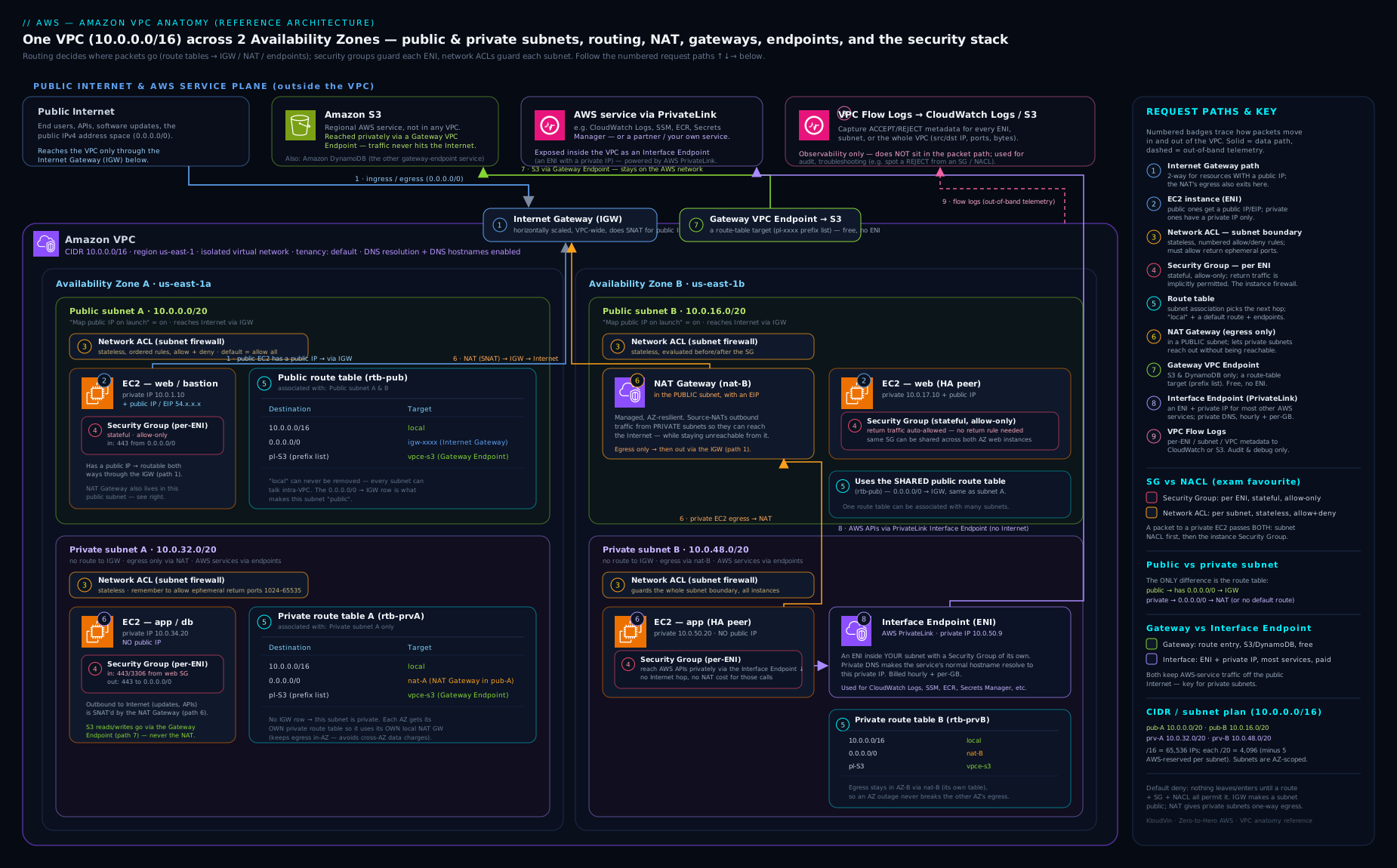
Trace a packet through it and the whole lesson clicks: an instance in a private subnet hits the internet via its route table’s 0.0.0.0/0 → NAT gateway (in its AZ) → IGW; the same instance reaches S3 via the local-then-gateway-endpoint route with no NAT involved; and a packet to a peer subnet matches the local route and never leaves the VPC.
Hands-on lab
You will build a minimal but complete two-tier VPC — one public and one private subnet, an IGW, a NAT gateway, and an S3 gateway endpoint — entirely from the CLI, validate routing, then tear it all down. Everything here is AWS Free Tier eligible except the NAT gateway and the Elastic IP, so follow the Cost note and clean up promptly.
Prerequisites: the AWS CLI v2 configured (aws configure) with a region set (examples use ap-south-1).
Step 1 — Create the VPC and turn on DNS hostnames.
VPC=$(aws ec2 create-vpc --cidr-block 10.0.0.0/16 \
  --query Vpc.VpcId --output text)
aws ec2 modify-vpc-attribute --vpc-id $VPC --enable-dns-hostnames '{"Value":true}'
aws ec2 create-tags --resources $VPC --tags Key=Name,Value=lab-vpc
echo "VPC=$VPC"
Step 2 — Create one public and one private subnet in the same AZ (for simplicity).
PUB=$(aws ec2 create-subnet --vpc-id $VPC --cidr-block 10.0.1.0/24 \
  --availability-zone ap-south-1a --query Subnet.SubnetId --output text)
aws ec2 modify-subnet-attribute --subnet-id $PUB --map-public-ip-on-launch
PRIV=$(aws ec2 create-subnet --vpc-id $VPC --cidr-block 10.0.2.0/24 \
  --availability-zone ap-south-1a --query Subnet.SubnetId --output text)
echo "PUB=$PUB PRIV=$PRIV"
Step 3 — Attach an Internet Gateway and make the public subnet public.
IGW=$(aws ec2 create-internet-gateway --query InternetGateway.InternetGatewayId --output text)
aws ec2 attach-internet-gateway --internet-gateway-id $IGW --vpc-id $VPC
RTPUB=$(aws ec2 create-route-table --vpc-id $VPC --query RouteTable.RouteTableId --output text)
aws ec2 create-route --route-table-id $RTPUB --destination-cidr-block 0.0.0.0/0 --gateway-id $IGW
aws ec2 associate-route-table --route-table-id $RTPUB --subnet-id $PUB
Step 4 — Create a NAT gateway in the public subnet and route the private subnet through it.
EIP=$(aws ec2 allocate-address --domain vpc --query AllocationId --output text)
NAT=$(aws ec2 create-nat-gateway --subnet-id $PUB --allocation-id $EIP \
  --query NatGateway.NatGatewayId --output text)
# Wait until the NAT gateway is available (takes a couple of minutes)
aws ec2 wait nat-gateway-available --nat-gateway-ids $NAT
RTPRIV=$(aws ec2 create-route-table --vpc-id $VPC --query RouteTable.RouteTableId --output text)
aws ec2 create-route --route-table-id $RTPRIV --destination-cidr-block 0.0.0.0/0 --nat-gateway-id $NAT
aws ec2 associate-route-table --route-table-id $RTPRIV --subnet-id $PRIV
Step 5 — Add a free S3 gateway endpoint to the private route table.
aws ec2 create-vpc-endpoint --vpc-id $VPC --vpc-endpoint-type Gateway \
  --service-name com.amazonaws.ap-south-1.s3 --route-table-ids $RTPRIV
Step 6 — Validate. Confirm the routing is exactly what you intended:
# Public route table should show 0.0.0.0/0 -> igw-...
aws ec2 describe-route-tables --route-table-ids $RTPUB \
  --query 'RouteTables[].Routes' --output table
# Private route table should show 0.0.0.0/0 -> nat-... AND an S3 prefix-list -> vpce-...
aws ec2 describe-route-tables --route-table-ids $RTPRIV \
  --query 'RouteTables[].Routes' --output table
Expected: the public table has a local route plus 0.0.0.0/0 → igw-…; the private table has local, 0.0.0.0/0 → nat-…, and a pl-… (S3) → vpce-… route. That last line is the gateway endpoint at work — S3 traffic now bypasses the NAT entirely.
Cleanup — delete in reverse dependency order (endpoints and NAT before the IGW and subnets, or the deletes will fail):
EPID=$(aws ec2 describe-vpc-endpoints --filters Name=vpc-id,Values=$VPC \
  --query 'VpcEndpoints[0].VpcEndpointId' --output text)
aws ec2 delete-vpc-endpoints --vpc-endpoint-ids $EPID
aws ec2 delete-nat-gateway --nat-gateway-id $NAT
aws ec2 wait nat-gateway-deleted --nat-gateway-ids $NAT
aws ec2 release-address --allocation-id $EIP
aws ec2 detach-internet-gateway --internet-gateway-id $IGW --vpc-id $VPC
aws ec2 delete-internet-gateway --internet-gateway-id $IGW
aws ec2 delete-subnet --subnet-id $PUB
aws ec2 delete-subnet --subnet-id $PRIV
aws ec2 delete-route-table --route-table-id $RTPUB
aws ec2 delete-route-table --route-table-id $RTPRIV
aws ec2 delete-vpc --vpc-id $VPC
Cost note: the VPC, subnets, IGW, route tables, and the S3 gateway endpoint are free. The two charged items are the NAT gateway (an hourly rate plus per-GB processing) and the Elastic IP (free while attached to a running resource, charged when idle). Running this lab for under an hour and cleaning up costs a few US cents at most — but do not leave the NAT gateway running, as its hourly charge accrues around the clock.
Common mistakes & troubleshooting
| Symptom | Likely cause | Fix |
|---|---|---|
| Instance in a “public” subnet has no internet | Missing one of the three conditions (no IGW, no 0.0.0.0/0 route, or no public IP) |
Verify IGW attached, route table has 0.0.0.0/0 → igw, and the instance has a public/Elastic IP. |
| Private instance cannot reach the internet outbound | No NAT route, or NAT gateway is in a private subnet | Put the NAT gateway in a public subnet and point the private route table’s 0.0.0.0/0 at it. |
Cannot create subnet: CIDR not within VPC |
Subnet CIDR outside the VPC block, or overlaps another subnet | Choose a sub-range that fits inside the VPC CIDR and does not overlap. |
| Interface endpoint name still resolves to a public IP | enableDnsHostnames is off (or private DNS not enabled) |
Turn on enableDnsHostnames and enableDnsSupport; enable private DNS on the endpoint. |
| Cannot peer two VPCs | Overlapping CIDR ranges | Re-IP one VPC, or use distinct ranges from the start — overlapping blocks cannot be peered. |
| Self-built NAT instance forwards nothing | Source/destination check still enabled | Run modify-instance-attribute --no-source-dest-check. |
| S3 traffic is inflating the NAT bill | No gateway endpoint; S3 traffic flows through NAT | Add a free S3 gateway endpoint to the private route table. |
| App “A” cannot reach app “C” through a middle VPC | Peering is non-transitive | Add a direct peering A↔C, or move to a Transit Gateway. |
Best practices
- Plan CIDR for the whole estate. Allocate a unique, non-overlapping block per VPC, size production VPCs at
/16, and leave room for secondary blocks. Use IPAM once you have more than a handful. - Multi-AZ by default. At least two subnets in two AZs per tier; one NAT gateway per AZ so an AZ failure never takes out egress and you avoid cross-AZ data charges.
- Three subnet tiers. Public (load balancers, NAT), private-with-egress (app servers), and isolated (databases) — separated by their route tables.
- Leave the main route table private. Attach explicit custom route tables to public subnets so nothing becomes public by accident.
- Use endpoints aggressively. A free gateway endpoint for S3/DynamoDB and interface endpoints for the AWS APIs your private workloads call — this both saves NAT cost and keeps traffic off the public internet.
- Turn on flow logs everywhere (to S3 for cheap archival), and tag every network resource (
env,owner,tier) for cost allocation and automation.
Security notes
- Private by default. Build custom VPCs where nothing is internet-reachable unless a route deliberately makes it so; reserve public subnets for the few resources that truly need ingress.
- Endpoints reduce exposure. Reaching AWS services through interface/gateway endpoints keeps that traffic on the AWS network and off any IGW/NAT, shrinking your attack surface; pair with endpoint policies to restrict which resources can be reached.
- Flow logs are an audit and detection tool.
REJECTrecords surface scanning and misconfiguration; ship them to S3 and query with Athena, or to CloudWatch for alarms. - Routing is not a firewall. A route gets a packet to a destination; security groups and network ACLs decide whether it is allowed — design both layers, and read the next lesson for how stateful vs stateless filtering actually behaves.
- Mind the IGW NAT. The Internet Gateway’s one-to-one NAT means any instance with a public IP and a permissive security group is directly exposed — audit public IP assignment.
- Egress control at scale. For centralised, inspected egress across many VPCs, route through a Transit Gateway to an inspection VPC rather than per-VPC NAT.
Interview & exam questions
-
What makes a subnet “public”? Its route table has a
0.0.0.0/0route pointing at an Internet Gateway. (In practice you also enable auto-assign public IP or attach Elastic IPs.) There is no “public” flag on the subnet itself — it is purely routing. -
How many usable IPs are in a
/24subnet, and why not 256? 251. AWS reserves the first four addresses (network, VPC router, Amazon DNS, future use) and the last (broadcast) in every subnet. -
NAT Gateway vs NAT instance — give three differences. NAT Gateway is managed, auto-scales to 100 Gbps, and is HA within an AZ; the NAT instance is a self-managed EC2 (single point of failure, fixed throughput, you patch it) but can act as a bastion/port-forwarder and needs source/destination check disabled.
-
Why deploy one NAT gateway per Availability Zone? A NAT gateway is zonal; one per AZ removes the single-AZ dependency and avoids cross-AZ data-transfer charges by keeping each AZ’s egress local. If the AZ holding your only NAT gateway fails, all private-subnet egress fails.
-
Gateway endpoint vs interface endpoint — when do you use each? Gateway endpoints serve only S3 and DynamoDB, are free, and work via a route-table entry. Interface endpoints (PrivateLink) serve most other services, place an ENI with a private IP in your subnet, cost per hour + per GB, and are reachable cross-Region / on-prem.
-
Can you change a VPC’s primary CIDR after creation? No. The primary IPv4 CIDR is permanent. You can only add up to four (default) secondary CIDR blocks that do not overlap existing ranges.
-
An interface endpoint’s DNS name resolves to a public IP — what is wrong?
enableDnsHostnames(andenableDnsSupport) must be on, and private DNS must be enabled on the endpoint, for the service name to resolve to the endpoint’s private IP. -
Is VPC peering transitive? No. If A↔B and B↔C are peered, A cannot reach C through B. You add a direct A↔C peering or move to a Transit Gateway, which is transitive.
-
What is the
localroute and can you remove it? An automatic route for the entire VPC CIDR with targetlocalthat lets every subnet reach every other subnet. It cannot be deleted or modified and always wins for in-VPC traffic (longest-prefix match). -
You need a private instance to reach the internet outbound but never be reachable inbound — what do you build? A NAT gateway in a public subnet, with the private subnet’s
0.0.0.0/0route pointing at it. For IPv6, an egress-only internet gateway instead. -
How do route tables decide between two matching routes? Longest-prefix match — the most specific route wins (e.g.
/24over/0); static routes beat propagated BGP routes of the same prefix. -
How do you cut S3 data-transfer costs through a NAT gateway? Add a free S3 gateway endpoint to the private subnet’s route table so S3 traffic bypasses the NAT entirely.
Quick check
- True or false: a subnet can span two Availability Zones.
- Which two AWS services are supported by gateway endpoints?
- Which VPC attribute must be on for interface-endpoint private DNS names to resolve correctly?
- Where must a NAT gateway be placed — a public or a private subnet — and why?
- What is the smallest subnet size AWS allows, and what limits it?
Answers
- False — a subnet lives in exactly one AZ; use multiple subnets across AZs for HA.
- Amazon S3 and DynamoDB (only these two).
enableDnsHostnames(alongsideenableDnsSupport, which must also be on).- A public subnet — the NAT gateway needs a route to the Internet Gateway to reach the internet on behalf of private instances.
/28(16 addresses, 11 usable) — limited by the five reserved IPs AWS takes in every subnet.
Exercise
Design (on paper or in the console) a production-ready VPC for a three-tier web application in the ap-south-1 Region that must survive the loss of one Availability Zone:
- Choose a
/16CIDR and carve six subnets — public, private-app, and isolated-database tiers across two AZs. - Decide where IGWs and NAT gateways go, and how many NAT gateways you need for AZ resilience.
- Add a free S3 gateway endpoint and at least one interface endpoint (e.g. SSM, so you can manage instances without SSH/bastion).
- Sketch the route tables for each tier and confirm the database tier has no internet route.
- List which components are free and which incur cost, and estimate the dominant cost driver.
Bonus: explain what you would change to add a second VPC and connect the two, and at what point you would replace peering with a Transit Gateway.
Certification mapping
| Exam | Objective area this supports |
|---|---|
| SAA-C03 (Solutions Architect – Associate) | Design secure and resilient architectures — VPC/subnet/AZ design, public vs private routing, NAT for egress, gateway vs interface endpoints, and peering vs Transit Gateway trade-offs. |
| ANS-C01 (Advanced Networking – Specialty) | Network design and connectivity — CIDR/IPv6 planning, route-table behaviour and priority, PrivateLink/endpoints, DHCP option sets and hybrid DNS, and flow-log-based troubleshooting. |
| DVA-C02 (Developer – Associate) | Deployment and security — placing application resources in the right subnet tier and reaching AWS services privately via endpoints. |
| SOA-C02 (SysOps – Associate) | Networking and monitoring — operating NAT gateways, route tables, and VPC Flow Logs for day-to-day troubleshooting. |
Glossary
- VPC (Virtual Private Cloud) — a logically isolated, software-defined virtual network in one AWS Region.
- CIDR — Classless Inter-Domain Routing; the
/16-style notation defining an address block’s size. - Subnet — a sub-range of the VPC CIDR confined to a single Availability Zone.
- Availability Zone (AZ) — one or more discrete data centres in a Region with independent power and networking.
- Reserved IPs — the five addresses (first four + last) AWS reserves in every subnet.
- Route table — the ordered rules mapping destination CIDRs to targets; one per subnet (defaults to the main table).
localroute — the unremovable route for the VPC’s own CIDR that makes all subnets mutually reachable.- Internet Gateway (IGW) — the VPC’s door to the public internet; performs one-to-one NAT for public IPs.
- Egress-only internet gateway — the IPv6 equivalent of NAT: outbound-only IPv6 internet access.
- NAT (Network Address Translation) — letting many private addresses share a public address for outbound traffic.
- NAT Gateway / NAT instance — the managed vs self-managed ways to provide outbound-only internet to private subnets.
- Elastic IP (EIP) — a static public IPv4 address you allocate and attach.
- ENI (Elastic Network Interface) — the virtual NIC that resources attach to in a subnet.
- DHCP option set — VPC-level DNS/domain/NTP configuration handed to instances at boot.
enableDnsSupport/enableDnsHostnames— the two VPC attributes that control AWS DNS resolution and public/endpoint DNS names.- VPC endpoint — a private on-ramp to AWS (or partner) services; gateway (S3/DynamoDB, free, route-based) or interface (PrivateLink, ENI-based).
- PrivateLink — the technology behind interface endpoints; also exposes your own services privately.
- VPC peering — a one-to-one, non-transitive connection between two VPCs.
- Transit Gateway (TGW) — a transitive hub connecting many VPCs and on-prem links.
- VPC Flow Logs — metadata (not packet contents) about IP traffic on ENIs/subnets/VPCs.
Next steps
Continue the course with AWS Security Groups vs Network ACLs, In Depth — now that you control where traffic flows, learn the filtering layer that decides what is allowed, including the stateful-vs-stateless difference and the classic “return traffic blocked by a NACL” gotcha. Then deepen your networking with:
- Amazon VPC IPAM: Hierarchical CIDR Planning, Allocation & BYOIP at Scale — automate the address planning this lesson did by hand.
- Designing Multi-Account VPC Connectivity with Transit Gateway — replace the peering mesh with a transitive hub and centralised egress.
- AWS PrivateLink for Service Providers & Consumers — expose and consume private services across accounts using the technology behind interface endpoints.