A regional pharmacy chain — 600 stores, an e-commerce arm, and a same-day prescription-delivery service — is moving its order-management app off a rented rack and into AWS. The app is unglamorous and absolutely critical: a web tier that store staff and customers hit, and a PostgreSQL database holding orders, inventory, and patient-linked prescription records. The CISO’s brief is one sentence and it is non-negotiable: the database must never be reachable from the internet, because that database is in scope for HIPAA and a leaked prescription record is a breach notification, a fine, and a front-page story. The platform engineer assigned to this has stood up EC2 instances before but has never designed a network, and the instinct — “just launch the instances and open the ports until it works” — is exactly the instinct that produces the breach.
This article is the mental model that engineer needs before anyone says the words “landing zone” or “Control Tower.” Those are the right destination for an organization running dozens of accounts, but you cannot reason about a multi-account, multi-VPC landing zone if you cannot yet reason about how a single VPC carries a single packet. So we are going to build exactly one VPC for exactly one two-tier app — the pharmacy’s order system — and trace where every packet goes and what is allowed to stop it. Get this right and the landing zone later is just this, repeated and connected, with guardrails on top.
What a VPC actually is
A VPC (Virtual Private Cloud) is your own logically isolated slice of the AWS network — a private IP address space that is yours, invisible to and unroutable from every other customer’s VPC by default. You define it with a CIDR block, which is just the range of private IP addresses the VPC owns. For the pharmacy we’ll use 10.20.0.0/16, which gives roughly 65,000 addresses — far more than this app needs, but a /16 is the conventional choice because it leaves room to grow and to carve into clean subnets.
Two properties of a fresh VPC surprise people coming from a traditional data centre, and both are deliberate:
- Nothing can reach the internet, in either direction, until you explicitly wire it. A brand-new VPC is a sealed room. That is a security default, not a limitation — you add connectivity on purpose, rather than closing holes you forgot were open.
- Everything inside the VPC can talk to everything else by default, because the VPC’s main route table has a
localroute covering the whole CIDR. Isolation within the VPC is something you impose with subnets and firewalls, not something you get for free.
Hold those two facts. Almost every VPC mistake is forgetting one of them.
Subnets: where you actually place things
A VPC is too big to be useful as one undivided space. You slice it into subnets — smaller CIDR ranges, each pinned to a single Availability Zone (AZ). An AZ is a physically separate datacentre within an AWS Region; pinning a subnet to one AZ is what lets you design for the failure of a whole datacentre. A subnet living in two AZs is impossible by definition, and that constraint is the foundation of high availability on AWS.
The single most important distinction in this entire article is public subnet vs private subnet — and the surprising part is that nothing about the subnet itself makes it public or private. A subnet is “public” purely because its route table sends internet-bound traffic to an Internet Gateway. Change that one route and a public subnet becomes private. The label is a description of routing, not a setting you toggle.
For the pharmacy’s two-tier app across two AZs (so a datacentre failure cannot take the app down), the layout is:
| Subnet | CIDR | AZ | Tier | Public? | Holds |
|---|---|---|---|---|---|
public-a |
10.20.0.0/24 |
ap-south-1a |
Ingress | Yes | ALB node, NAT gateway |
public-b |
10.20.1.0/24 |
ap-south-1b |
Ingress | Yes | ALB node, NAT gateway |
app-a |
10.20.10.0/24 |
ap-south-1a |
Web/app | No | EC2 web servers |
app-b |
10.20.11.0/24 |
ap-south-1b |
Web/app | No | EC2 web servers |
data-a |
10.20.20.0/24 |
ap-south-1a |
Database | No | RDS PostgreSQL (primary) |
data-b |
10.20.21.0/24 |
ap-south-1b |
Database | No | RDS PostgreSQL (standby) |
Three tiers, each spanning two AZs, each a /24 (251 usable addresses — AWS reserves five per subnet). The web servers sit in private subnets even though customers reach them, because customers do not reach the EC2 instances directly — they reach a load balancer in the public subnets, which forwards inward. The only things that truly live in public subnets are the load balancer’s nodes and the NAT gateways. The database tier is private and, as we’ll see, has no path to the internet at all — which is the CISO’s one sentence, expressed as routing.
Architecture overview
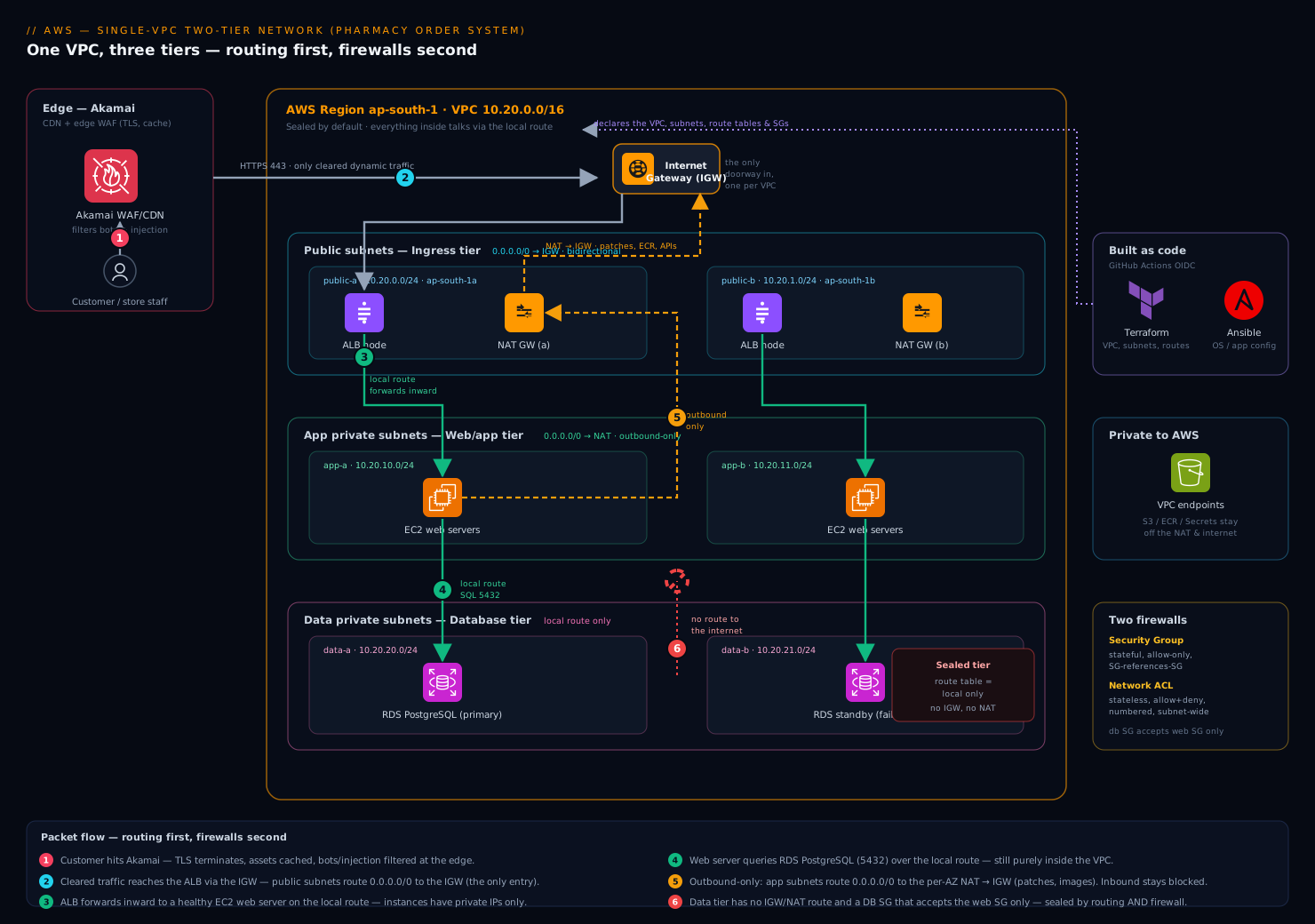
Here is the whole system as a single VPC, and the discipline is to read it as routing first, firewalls second.
The VPC 10.20.0.0/16 is anchored by an Internet Gateway (IGW) — a horizontally-scaled, AWS-managed component attached to the VPC that is the only doorway between the VPC and the public internet. Attaching an IGW does nothing on its own; it becomes meaningful only when a route table points at it. There is exactly one IGW per VPC, and it is the thing the CISO’s database must never have a route to.
Inbound request path (a customer placing an order), following the packet:
- A customer’s browser resolves the app’s hostname. Akamai sits in front as the CDN and edge WAF — it terminates TLS at the edge, caches static product images and assets near the user, and filters bot and injection traffic before anything reaches AWS. Only dynamic, cleared traffic is forwarded to the origin.
- That origin is an Application Load Balancer (ALB) with nodes in
public-aandpublic-b. The ALB has a public-facing presence because its public subnets’ route table sends0.0.0.0/0to the IGW. This is the single internet-facing entry point into the VPC. - The ALB does not run the app — it forwards the request inward to a healthy EC2 web server in
app-aorapp-b. That hop is VPC-internal: it uses the route table’slocalroute, never the IGW. The web servers have only private IPs and are unreachable from the internet directly. - The web server needs order and inventory data, so it opens a connection to RDS PostgreSQL in
data-a(the primary). Again purelylocalrouting inside the VPC. The database answers, the web server renders the response, the ALB returns it to the customer, Akamai delivers it.
Notice what never happened: at no point did a packet from the internet reach the app tier or the data tier directly, and at no point did the database send a packet toward the internet. The internet only ever touched the ALB.
Outbound-only path (a web server needs to reach out, but must stay unreachable):
The web servers occasionally need the internet outbound — to fetch OS security patches, pull a container image, or call a payment API. But they must never be reachable inbound. That asymmetry is exactly what a NAT Gateway provides. A NAT gateway lives in a public subnet; the private app subnets’ route table sends 0.0.0.0/0 to the NAT gateway, which then forwards to the IGW using its own public IP. Return traffic for connections the instance initiated comes back; unsolicited inbound connections cannot — NAT only tracks and returns flows that originated inside. That is “outbound yes, inbound no,” delivered as routing.
The data tier gets no NAT route at all. Its route table contains only the local route. The RDS instance therefore has zero path to or from the internet — patching is handled by the managed service, and that is precisely the property that satisfies HIPAA scope and lets the CISO sign.
Route tables: the rules that decide everything
A route table is an ordered set of rules that answers one question for every packet leaving a subnet: given this destination IP, where do I send it? Each subnet is associated with exactly one route table. AWS uses longest-prefix match — the most specific matching rule wins — so the local route always beats a 0.0.0.0/0 default for in-VPC traffic.
The three tiers differ only in their route tables, and lining them up side by side is the clearest way to see what “public” and “private” really mean:
| Route table | Used by | 10.20.0.0/16 |
0.0.0.0/0 (everything else) |
|---|---|---|---|
| Public | public-a, public-b |
local |
Internet Gateway |
| App (private) | app-a, app-b |
local |
NAT Gateway |
| Data (private) | data-a, data-b |
local |
(no route — sealed) |
Read it top to bottom: the public table reaches the internet bidirectionally via the IGW; the app table reaches the internet outbound-only via the NAT; the data table cannot reach the internet at all. Same VPC, same local route everywhere — the entire security posture of three tiers is expressed in one column of this table. This is why “routing first” is the right way to read any VPC diagram: the route tables are the architecture.
A common cost-and-security upgrade belongs here too. The data and app tiers regularly need AWS services — S3 for backups, Secrets Manager for credentials, ECR for images. Routing that through the NAT gateway works but sends private traffic out to the public AWS endpoints and bills you per gigabyte. A VPC endpoint (a Gateway endpoint for S3/DynamoDB, an Interface endpoint for most others) adds a route or a private DNS entry so that traffic to those services stays inside AWS’s private network — cheaper, and it keeps sensitive backup traffic off any internet path entirely.
Security groups vs NACLs: the two firewalls
Routing decides where a packet can go. Firewalls decide whether it is allowed to. AWS gives you two, at two different layers, and confusing them is the most common stumbling block for someone new to VPCs. You need both, and they behave differently on purpose.
A Security Group (SG) is a firewall attached to an elastic network interface — effectively, to an instance, a load balancer, or an RDS endpoint. It is stateful: if you allow a connection in, the return traffic is automatically allowed out, and vice versa, regardless of your outbound rules. SGs are allow-only — you list what’s permitted; everything else is denied. And the most powerful feature: an SG rule can reference another security group as its source, instead of an IP range. That lets you write “the database accepts connections from whatever is in the web-server security group” — and it keeps working as instances scale up and down and change IPs.
A Network ACL (NACL) is a firewall attached to a subnet, evaluating every packet crossing the subnet boundary. It is stateless: it does not remember outbound flows, so you must explicitly allow the return traffic (typically the ephemeral port range 1024–65535) or replies silently vanish. NACLs have both allow and deny rules, evaluated in numbered order (lowest first, first match wins) — which means a NACL can explicitly block a bad IP, something an SG fundamentally cannot do.
| Property | Security Group | Network ACL |
|---|---|---|
| Attaches to | Instance / ENI (ALB, RDS, EC2) | Subnet |
| State | Stateful — returns auto-allowed | Stateless — must allow returns yourself |
| Rule types | Allow only | Allow and deny |
| Evaluation | All rules, logical OR | Numbered order, first match wins |
| Can reference another SG? | Yes | No — IP ranges only |
| Best used for | Primary, per-resource access control | Coarse subnet-wide guardrails & explicit blocks |
The practical guidance: make security groups your primary control, because referencing SGs by name is precise, self-documenting, and scale-proof. Use NACLs as a coarse second layer — a blanket guardrail at the subnet edge and a place to hard-block a hostile IP — not as your day-to-day access policy.
For the pharmacy’s three-SG design, expressed as Terraform-style intent:
# ALB: open to the world on 443 (Akamai is the real front door upstream)
resource "aws_security_group_rule" "alb_https_in" {
  security_group_id = aws_security_group.alb.id
  type              = "ingress"
  protocol          = "tcp"
  from_port         = 443
  to_port           = 443
  cidr_blocks       = ["0.0.0.0/0"]
}

# Web tier: accept traffic ONLY from the ALB's security group, not from any IP
resource "aws_security_group_rule" "web_from_alb" {
  security_group_id        = aws_security_group.web.id
  type                     = "ingress"
  protocol                 = "tcp"
  from_port                = 8080
  to_port                  = 8080
  source_security_group_id = aws_security_group.alb.id   # SG reference, not a CIDR
}

# Database: accept 5432 ONLY from the web tier's security group. Nothing else, ever.
resource "aws_security_group_rule" "db_from_web" {
  security_group_id        = aws_security_group.db.id
  type                     = "ingress"
  protocol                 = "tcp"
  from_port                = 5432
  to_port                  = 5432
  source_security_group_id = aws_security_group.web.id
}
That database rule is the CISO’s sentence as code: PostgreSQL accepts connections only from the web-tier security group. There is no IP range, no 0.0.0.0/0, no SSH. Combined with the data subnet’s route table that has no internet path, the database is unreachable from the internet by two independent mechanisms — routing and firewall — which is exactly the defence-in-depth a regulated workload needs.
How this gets built and operated
The deployment itself is infrastructure as code with Terraform — the VPC, subnets, route tables, gateways, and security groups are all declared in version-controlled HCL, applied through GitHub Actions authenticating to AWS via OIDC so no long-lived AWS keys sit in the pipeline. Instance-level configuration — installing the web app, hardening the OS — is handled by Ansible. The few real secrets the app needs, like the database password, are never written into Terraform state or an AMI; the web servers fetch them at boot from HashiCorp Vault, which issues short-lived, dynamically-generated database credentials so a leaked credential expires on its own.
Operating the VPC safely brings in the rest of the enterprise toolchain, each playing a specific role:
- Wiz (and Wiz Code) runs continuous cloud-posture scanning and scans the Terraform before it merges — it flags exactly the mistakes this article warns about: a security group opened to
0.0.0.0/0on a database port, a data subnet that accidentally gained a route to the IGW, a public IP on something that should be private. It is the automated reviewer that catches “open the ports until it works” before it reaches production. - CrowdStrike Falcon sensors run on the EC2 instances for runtime threat detection, so even within the private subnets a compromised process is caught and reported to the security team.
- Datadog (the team also evaluates Dynatrace) ingests VPC Flow Logs — a record of every accepted and rejected connection in the VPC — alongside ALB and application metrics, giving one place to see “who is talking to whom” and to prove a rejected connection was the NACL or SG doing its job.
- ServiceNow is the change gate: any modification to a production route table or a database security group goes through a change request, so a network change that could expose the data tier has an approval trail.
- The same patterns extend to other regulated systems the chain runs — for instance the staff-training platform on Moodle sits in its own VPC built identically — and where a third-party security stack ships as virtual appliances (a vendor firewall, an IDS), those run on EC2 in a dedicated inspection subnet with route tables steering traffic through them.
Identity ties it together. Engineers do not get static IAM users — they authenticate through Okta (federated to Microsoft Entra ID where the corporate directory lives) into AWS via SSO, assuming time-boxed roles. So the human who can change the VPC, the CI pipeline that applies it, and the database credential the app uses are all short-lived and traceable, with no permanent key to leak.
Failure modes, scaling, and cost
Failure modes worth naming before they page you:
- The single-NAT trap. A NAT gateway lives in one AZ. If you build one NAT in
public-aand route both app subnets through it, anap-south-1aoutage kills outbound internet for theapp-binstances too — your “multi-AZ” design has a single-AZ dependency hiding in the route table. The fix: one NAT gateway per AZ, each private subnet routing to the NAT in its own AZ. - The stateless-NACL silent drop. Someone tightens a NACL to allow inbound
443but forgets the outbound ephemeral range for return traffic. The connection establishes and then hangs — no error, just a timeout — because replies are being dropped at the subnet edge. This is the classic NACL debugging session; the lesson is that NACLs need return rules in both directions because they are stateless. - CIDR overlap. Two VPCs (or a VPC and the on-prem network) chosen with overlapping CIDRs — both
10.0.0.0/16— can never be peered or connected, and the only fix is to rebuild one. Plan non-overlapping ranges from day one, which is one reason the pharmacy chose10.20.0.0/16deliberately rather than the default.
Scaling. The VPC’s address space is the first ceiling — a /24 subnet’s 251 addresses run out faster than you’d think once an autoscaling web tier and its load-balancer ENIs are consuming them, so size subnets for the peak, not today. The web tier scales horizontally behind the ALB via an Auto Scaling group; the SG-references-SG pattern is what makes that painless, because new instances inherit the right access automatically with no rule edits. RDS scales the read path with read replicas and the write path by instance size; the standby in data-b is for failover, not load. When this single VPC eventually needs to connect to others or to on-prem, that is VPC peering or a Transit Gateway — and the discipline of non-overlapping CIDRs you established here is what makes that possible.
Cost. The line items that surprise teams are all networking, and they are worth knowing on day one:
| Item | What drives the cost | How to control it |
|---|---|---|
| NAT gateway | Hourly charge per gateway plus per-GB processed | Real money at one-per-AZ; route S3/ECR/Secrets via VPC endpoints to bypass it |
| VPC endpoints | Hourly per Interface endpoint; Gateway endpoints are free | Use the free Gateway endpoints for S3/DynamoDB; add Interface endpoints where NAT savings exceed their cost |
| Cross-AZ traffic | Per-GB charge for traffic between AZs | Real but usually worth paying — it is the price of multi-AZ resilience |
| Data transfer out | Per-GB egress to the internet | Akamai caching at the edge cuts origin egress substantially |
The biggest single lever for a small two-tier app is usually VPC endpoints for S3 and the AWS APIs, which both cut the NAT data-processing bill and keep backup and secret traffic off the public path entirely — a cost win and a security win in the same change.
Explicit tradeoffs
This single-VPC design is the right starting point, and you should know its edges. It deliberately uses one VPC for one app — simple to reason about, simple to secure, simple to debug — and that simplicity is the whole point at this stage. The cost is that it does not give you account-level blast-radius isolation: everything here shares one AWS account and one VPC, so a mistake in the app tier is closer to the data tier than it would be across account boundaries. That is the gap a landing zone fills — many accounts, network guardrails enforced from the top, centralized logging and SSO — and it is genuinely the right destination once you run more than a handful of workloads or teams. But adopting it before you understand a single VPC means operating guardrails you cannot reason about, which is its own kind of risk.
One NAT per AZ vs one shared NAT is the most common tradeoff you’ll actually face. One shared NAT is cheaper and fine for dev; one-per-AZ costs more but removes a hidden single-AZ dependency from an otherwise multi-AZ design. For the pharmacy’s production order system, resilience wins and you pay for the second NAT. For its staging environment, you share one and save the money — the same VPC pattern, dialed to the environment.
Security groups vs NACLs is not either/or. Lean on security groups as the precise, primary control because SG-references-SG scales and self-documents; keep NACLs as a thin coarse layer for subnet-wide guardrails and explicit IP blocks. Trying to run fine-grained access policy in stateless, numbered NACLs is how you end up debugging silent timeouts at 2 a.m.
The shape of the win
For the pharmacy, the payoff is not “we’re on AWS now.” It is that a customer’s order request travels Akamai → ALB → web tier → database and back in milliseconds, while the prescription database sits in a subnet with no route to the internet and a firewall that accepts connections from exactly one security group — unreachable from the public internet by two independent mechanisms, continuously verified by Wiz, every connection logged in flow logs and watched in Datadog, every change to it gated through ServiceNow. The CISO’s one sentence — “the database must never be reachable from the internet” — is now expressed three times over: in a route table with no IGW path, in a security group with no public source, and in a posture scanner that fails the build if either ever changes. That is what a VPC is for. Master this one, and the landing zone later is this same packet, this same route table, this same security group — just repeated across accounts, with the guardrails you now understand well enough to trust.