A health-insurance payer runs a 2,200-seat contact center across three time zones, and its VP of operations has run out of patience with the laptop model. Agents handle protected health information all day — claim status, prior-authorization details, a member’s diagnosis codes — on company laptops that go home in backpacks. Two of those laptops were lost last quarter; both were encrypted, but the breach-notification lawyers still spent a week reconstructing exactly what each agent had open. Meanwhile the payer is hiring 400 seasonal agents for open enrollment, and the desktop team cannot image, ship, and recover 400 machines in six weeks and then claw them back in February. The ask from the VP is blunt: “Agents should log into a desktop that lives in our cloud, touch PHI that never lands on local disk, and disappear cleanly when the season ends — and it has to pass a HIPAA audit.” This article is the reference architecture for that, built on AWS WorkSpaces.
The pressures here are the ones that make VDI worth the trouble. Regulation means every PHI access needs an audit trail and the data physically cannot rest on an endpoint that walks out the door. Elasticity means scaling from 1,800 to 2,200 seats for ten weeks and back, without a procurement cycle. Cost means a seasonal agent who works 40 hours a week should not cost the same as a full-time one who lives in the desktop. And security means a contact-center floor — high turnover, bring-anything devices, the single most phished population in any company — is treated as hostile by default. Persistent virtual desktops in AWS solve all four at once: the desktop and its data stay inside your VPC, the endpoint becomes a dumb pixel-and-keystroke terminal, and you pay per running desktop instead of per shipped laptop.
Why not the obvious shortcuts
Three cheaper-sounding options get proposed on every project like this, and each fails in a way that matters.
Encrypted laptops with MDM is where most payers start, and it is exactly what this payer is fleeing. Full-disk encryption protects data at rest, but the data still is at rest on the device, so a lost laptop is a forensic event and a possible breach notification every single time. MDM can wipe a device — eventually, if it checks in. The contact-center reality of 80% annual turnover means you are perpetually shipping, recovering, and re-imaging hardware.
A self-managed VDI stack — your own connection brokers, gateway servers, image-management tooling, and a fleet of GPU and CPU hosts — gives you control and hands you a second full-time platform to operate. For a contact center whose differentiator is answering member calls, not running a desktop-virtualization product, that is undifferentiated heavy lifting. AWS WorkSpaces is the managed alternative: AWS runs the brokers, the streaming protocol, the patching of the underlying host, and the directory plumbing.
Streaming a single application (just the claims app) instead of a full desktop sounds leaner, but agents live in a dozen tools at once — the claims system, a soft phone, a knowledge base, email, the scheduling portal — and stitching all of those into per-app streams is more work and a worse experience than giving them one governed desktop. The full WorkSpace is the honest unit here.
Architecture overview
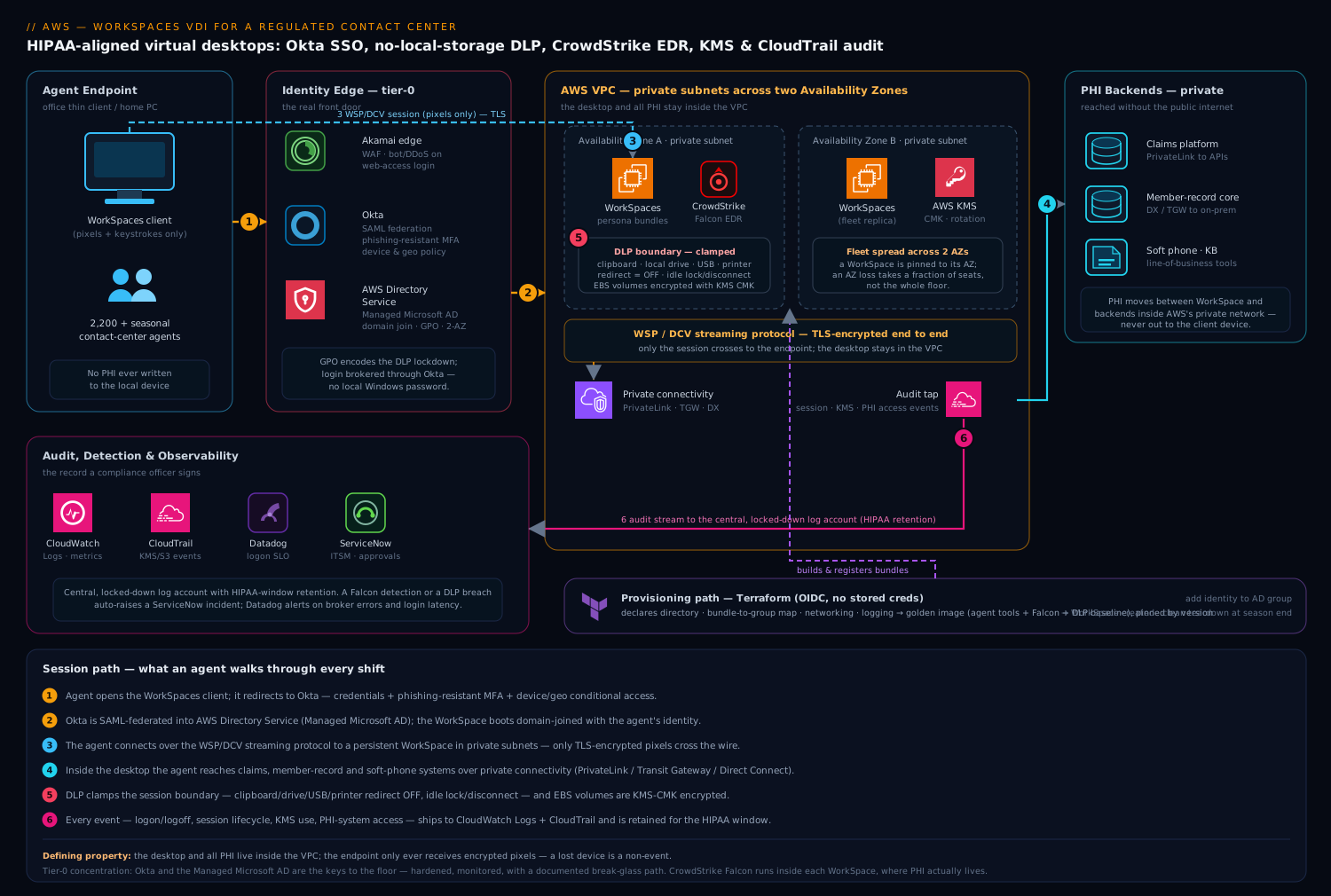
The platform has two paths that share infrastructure but run on different clocks: the session path an agent walks through every shift, and the provisioning path the platform team runs to create, patch, and retire desktops. Keeping them mentally separate is the first step to operating this cleanly.
The defining property of the whole topology — the one the security and compliance teams care about most — is that the desktop and all PHI live inside your VPC, and the endpoint device only ever receives encrypted pixels. Nothing of substance crosses to the client. No claim detail, no member record, no document is written to the agent’s local laptop, tablet, or thin client. That single property is what turns a lost endpoint from a breach into a shrug.
Session path, following the control flow:
- An agent opens the WorkSpaces client (or the web access page) on whatever endpoint they have — a locked-down thin client on the office floor, or a home PC for remote agents. Authentication does not happen against a local password. The client redirects to Okta, the payer’s workforce identity provider, which enforces the real front door: the agent’s credentials, a phishing-resistant MFA factor (FIDO2 or Okta Verify push with number challenge), and a device-and-network conditional-access policy.
- Okta is federated into the desktops’ directory via AWS Directory Service — specifically AWS Managed Microsoft AD — so the WorkSpace boots as a domain-joined machine with the agent’s own identity, group memberships, and Group Policy applied. SAML federation means the WorkSpaces login itself is brokered through Okta; the agent never types a Windows password.
- The agent connects over the WSP/DCV streaming protocol to their persistent WorkSpace, which lives in private subnets across two Availability Zones in the payer’s VPC. The session is the only thing that traverses the network to the endpoint, and it is TLS-encrypted end to end.
- Inside the desktop the agent reaches the line-of-business systems — the claims platform, the soft phone, the member-record system — over private connectivity (VPC routing, PrivateLink endpoints, or a Direct Connect/Transit Gateway path to on-prem cores). PHI moves between the WorkSpace and those backends inside AWS’s private network, never out to the client.
- Data-loss-prevention controls clamp the session boundary: clipboard redirection, local-drive mapping, USB redirect, and printer redirect are all disabled by policy, so an agent cannot copy a member’s record to their home machine, save a PDF to a USB stick, or paste claim data into a personal email. The WorkSpace’s own volumes are EBS-encrypted with a customer-managed KMS key.
- Every meaningful event — logon, logoff, session start, the WorkSpace’s OS and application audit logs, and PHI-system access — is shipped to CloudWatch Logs and CloudTrail, aggregated centrally, and retained for the HIPAA-mandated window. This is the audit trail the compliance officer signs.
Provisioning path, run by the platform team and largely automated: desktops are defined as persona-tuned bundles (the compute/memory/storage profile each role needs), built from a golden custom image that already contains the agent toolset, the CrowdStrike Falcon sensor, and the DLP baseline. New agents are provisioned by group membership — adding an identity to the right Okta/AD group creates their WorkSpace from the matching bundle. Terraform declares the directory, the bundles-to-groups mapping, the networking, and the logging; an automation runbook (Lambda or a scheduled job) handles seasonal scale-up and the clean teardown when enrollment season ends.
Component breakdown
| Component | Service / tool | Role in the platform | Key configuration choices |
|---|---|---|---|
| Virtual desktop | AWS WorkSpaces | Persistent, domain-joined desktop per agent inside the VPC | Persona bundles; AutoStop/AlwaysOn per persona; WSP protocol; cross-AZ subnets |
| Directory | AWS Directory Service (Managed Microsoft AD) | Domain join, Group Policy, group-based provisioning | Two-AZ deployment; GPO for DLP lockdown; conditional forwarder to on-prem AD |
| Identity / SSO | Okta | Workforce SSO + phishing-resistant MFA + conditional access | SAML federation to WorkSpaces; FIDO2/number-challenge MFA; device & geo policy |
| Endpoint security | CrowdStrike Falcon | EDR on every WorkSpace; runtime detection piped to the SOC | Sensor baked into the golden image; sensor tags by persona; detections to SIEM |
| DLP boundary | WorkSpaces policy + GPO | No local storage, no clipboard/USB/printer exfil | Clipboard/drive/USB/printer redirect = off; idle lock + disconnect timers |
| Encryption | AWS KMS | Customer-managed keys for WorkSpace volumes | CMK with rotation; key policy scoped to the WorkSpaces service role |
| Private connectivity | VPC / PrivateLink / Transit Gateway | PHI backends reached without traversing the public internet | Private subnets; PrivateLink to claims APIs; DX/TGW to on-prem member core |
| Audit & logging | CloudWatch Logs + CloudTrail | HIPAA-aligned access trail and session telemetry | Central log account; long-retention log groups; CloudTrail data events on KMS/S3 |
| Network edge | Akamai | Protects public web-access endpoint; bot/DDoS at the perimeter | WAF on the WorkSpaces web-access origin; geo controls on the login page |
| Observability | Datadog | Session health, login latency, capacity & cost dashboards | WorkSpaces metrics + custom logon-time metric; alerting on broker errors |
| ITSM / approvals | ServiceNow | Onboarding, access requests, incident records | Access request triggers group add; auto-ticket on Falcon detection or DLP breach |
| Provisioning / IaC | Terraform | Directory, bundles, networking, logging as code | OIDC to AWS (no stored creds); bundle-to-group map; image pinned by version |
A few of these choices deserve the why, because they are where teams on this exact project go wrong.
Why persona bundles, not one-size-fits-all. A contact center is not uniform. A tier-1 phone agent runs a soft phone, a browser, and the claims app — a Standard bundle (2 vCPU, 4 GB) is plenty, and at scale that frugality is the difference between a defensible and an absurd bill. A clinical-review nurse cross-references imaging and runs heavier tools and wants a Performance or Power bundle. A workforce-management lead lives in spreadsheets and dashboards across multiple monitors. Mapping each role to a right-sized bundle, and binding that bundle to an AD group, means provisioning is a membership change and cost tracks actual need rather than a worst-case spec applied to everyone.
| Persona | WorkSpaces bundle (guide) | Running mode | Why |
|---|---|---|---|
| Tier-1 phone agent | Standard (2 vCPU / 4 GB) | AutoStop, hourly | Soft phone + browser + claims app; idle gaps between shifts |
| Senior / escalation agent | Performance (2 vCPU / 8 GB) | AutoStop, hourly | Heavier multitasking, more concurrent tools |
| Clinical review nurse | Power (4 vCPU / 16 GB) | AlwaysOn, monthly | Imaging cross-reference, near-full-time utilization |
| WFM / team lead | Performance, multi-monitor | AlwaysOn, monthly | Dashboards across screens, steady all-day use |
| Seasonal enrollment agent | Standard (2 vCPU / 4 GB) | AutoStop, hourly | Short tenure, predictable shift hours, ruthless cost control |
Why AutoStop is the cost lever — and where it bites. WorkSpaces bills either monthly (a flat rate for an always-running desktop) or hourly (a small fixed fee plus an hourly charge only while the desktop is in use, via AutoStop). For a seasonal agent working 40 hours a week, AutoStop hourly is dramatically cheaper than a monthly seat that sits idle 75% of the time. The tradeoff is a cold-start delay: a stopped WorkSpace takes a minute or two to resume on first login. For shift-based agents that is invisible — they log in once and stay — but for a persona that logs in and out all day it is friction. The rule of thumb: AutoStop for shift workers and seasonal staff, AlwaysOn (monthly) for high-utilization, near-full-time roles. AWS publishes a built-in cost-optimizer that flips bundles between modes based on observed usage; let it, and watch the savings in Datadog.
Why DLP lives in policy, not in training. “Don’t copy PHI to your personal machine” as a written policy is a control that depends on every one of 2,200 high-turnover agents choosing to comply. That is not a control a HIPAA auditor respects. Instead, the session boundary is clamped technically: clipboard redirection off (no copy-out to the local OS), local drive mapping off (the WorkSpace cannot see the endpoint’s disk and vice versa), USB and printer redirect off, and an idle timer that locks and then disconnects an unattended session. These are enforced through the WorkSpaces directory settings and Group Policy on the Managed Microsoft AD, so they apply to every desktop uniformly and cannot be toggled by the agent.
# WorkSpaces directory DLP posture (enforced, not advisory)
Clipboard redirection:        DISABLED   # no copy from WorkSpace to local
Local drive (storage) access: DISABLED   # endpoint disk invisible to session
USB redirection:              DISABLED   # no USB exfil
Printer redirection:          DISABLED   # no print-to-local
Idle disconnect:              15 min lock / 30 min disconnect
Volume encryption:            KMS CMK (root + user volumes)
Implementation guidance
Provision with Terraform, and treat the directory and network as the first deliverables. The order matters: WorkSpaces cannot launch until the directory exists, is registered with the WorkSpaces service, and lives in subnets across two Availability Zones for resilience.
- The VPC with private subnets in two AZs for the WorkSpaces, plus the routing/PrivateLink/Transit Gateway paths to the PHI backends.
- AWS Managed Microsoft AD spanning both AZs, with a conditional forwarder to on-prem AD if hybrid identity is in play, and Group Policy objects encoding the DLP lockdown.
- The Okta SAML federation to WorkSpaces, so the login is brokered through Okta with MFA and conditional access — agents never authenticate against a local credential.
- A golden custom image built from a base WorkSpace: agent tools installed, the CrowdStrike Falcon sensor embedded and verified, the DLP baseline applied, then captured as a custom bundle per persona.
- The bundle-to-group mapping and the logging pipeline (CloudWatch Logs + CloudTrail to a central, locked-down log account).
A minimal Terraform shape for the directory and a persona bundle communicates the intent — two AZs, encryption on, identity-driven:
resource "aws_directory_service_directory" "corp" {
  name     = "agents.payer.internal"
  type     = "MicrosoftAD"
  edition  = "Standard"
  vpc_settings {
    vpc_id     = aws_vpc.workspaces.id
    subnet_ids = [aws_subnet.ws_az_a.id, aws_subnet.ws_az_b.id]
  }
}

resource "aws_workspaces_workspace" "tier1_agent" {
  directory_id = aws_directory_service_directory.corp.id
  bundle_id    = var.tier1_standard_bundle_id   # persona-tuned image
  user_name    = var.agent_username             # resolved from AD group

  root_volume_encryption_enabled = true
  user_volume_encryption_enabled = true
  volume_encryption_key          = aws_kms_key.workspaces.arn

  workspace_properties {
    running_mode                              = "AUTO_STOP"   # seasonal/shift
    running_mode_auto_stop_timeout_in_minutes = 60
  }
}
Pin the bundle to an explicit image version. An unpinned “latest” image means two agents provisioned a week apart get different desktops, and your golden-image change control evaporates.
Failure modes and resilience
The honest failure analysis for VDI is about availability of the desktop itself, because when the desktop is the workplace, an outage is the whole floor going dark.
- AZ loss. WorkSpaces are pinned to the AZ of the subnet they launch in; a single WorkSpace does not float between AZs. Resilience comes from spreading the fleet across two AZs so an AZ failure takes out a fraction of agents, not all of them, and from a documented recovery path. For the highest-tier roles, AWS offers cross-Region WorkSpaces with a multi-Region directory so a Region-level event can fail desktops over — expensive, so reserve it for the seats whose downtime is intolerable.
- Directory outage. If the Managed Microsoft AD is unhealthy, no one can authenticate and no WorkSpace can launch. Two-AZ directory deployment is non-negotiable, and the conditional forwarder to on-prem must not become a single dependency that a WAN blip can sever.
- Identity-provider outage. Because login is federated through Okta, an Okta outage means agents cannot reach their desktops. This is the price of centralizing identity, and it is worth it for the security posture — but it must be on the risk register, with Okta’s own HA and a documented break-glass path for a defined set of supervisors.
- Streaming-gateway degradation. A network path problem between agents and the WorkSpaces service shows up as frozen sessions and rising logon latency. This is exactly what Datadog dashboards exist to catch — alert on broker connection errors and a logon-time SLO before the floor floods the help desk.
- Endpoint compromise. A home agent’s personal PC gets malware. Because no PHI lands locally and the session is pixels-only, the blast radius is contained to the endpoint; the WorkSpace and its data are untouched. CrowdStrike Falcon runs inside the WorkSpace, so the protected surface is the desktop where PHI actually lives, not the disposable endpoint.
Scaling and cost
Scaling a contact center is bursty and seasonal, which is precisely the shape WorkSpaces fits. For open enrollment, the platform team adds the seasonal agents’ identities to the enrollment AD group, and the automation provisions their Standard AutoStop WorkSpaces in batches. When the season ends, the same automation deregisters the identities and terminates the WorkSpaces, and the cost stops the same day — no laptops to chase down, no asset-recovery backlog.
Cost discipline comes from three levers stacked together:
- Right-sized bundles so a phone agent does not pay for a Power desktop.
- AutoStop for everyone who isn’t near-full-time, so idle hours are not billed.
- The cost-optimizer flipping bundles between hourly and monthly based on real usage — an agent who unexpectedly runs 200+ hours in a month is cheaper on monthly, and the optimizer moves them automatically.
The comparison that justifies the whole program to finance is rarely WorkSpaces versus nothing — it is WorkSpaces versus the fully loaded cost of laptops: hardware refresh, imaging, shipping both ways, asset recovery, the help-desk load of physical machines, and the un-budgetable cost of a single lost-laptop breach notification. Against that baseline, a per-agent monthly desktop charge with no device logistics and no PHI-on-endpoint risk is an easy story.
Security and compliance
This is where the architecture earns its keep, because HIPAA is the reason it exists.
A signed AWS Business Associate Addendum (BAA) is the legal foundation, and WorkSpaces, Directory Service, KMS, CloudWatch, and CloudTrail are all HIPAA-eligible services operated within that BAA’s scope. The architecture then implements the controls the BAA presumes:
- Access control. Every session is a federated Okta login with phishing-resistant MFA and conditional access; there are no local desktop passwords to phish. Provisioning and de-provisioning are driven by group membership, so an agent who leaves loses their desktop when HR removes them from the directory group — and ServiceNow records the request and the approval.
- Encryption. PHI is encrypted at rest on KMS-CMK-protected WorkSpace volumes and in transit over the TLS-encrypted streaming protocol and private backend paths.
- Data minimization on the endpoint. The DLP boundary guarantees PHI never rests on a device outside the VPC — the single most consequential HIPAA control in a remote-agent model.
- Audit controls. CloudWatch Logs and CloudTrail capture logon/logoff, session lifecycle, KMS key usage, and PHI-system access, aggregated into a central log account with retention set to the required window and the log store itself locked down so it cannot be tampered with.
- Threat detection. CrowdStrike Falcon on every WorkSpace feeds the SOC, and a detection auto-raises a ServiceNow incident; Akamai shields the public web-access login from bots and volumetric attacks before they reach AWS.
The explicit tradeoff to put on the table: this architecture concentrates risk in identity and in the directory. When login is federated through Okta and desktops are domain-joined to Managed Microsoft AD, those two systems become the keys to the contact-center floor. That concentration is a feature — one place to enforce MFA, one place to revoke access, one audit trail — but it demands that Okta and the directory are treated as tier-0 systems with their own hardening, monitoring, and break-glass procedures. Centralized identity is the right call here; pretending it isn’t also a single point of failure is not.
Wrapping up
The payer’s VP wanted three things: PHI that never lands on a device that can be lost, a fleet that scales for enrollment season and shrinks cleanly afterward, and an audit trail that passes a HIPAA review. AWS WorkSpaces delivers all three by inverting the laptop model — the desktop and its data stay in the VPC, the endpoint becomes a disposable terminal, and identity, encryption, DLP, EDR, and logging are enforced uniformly from the cloud side rather than hoped for on 2,200 endpoints. Persona bundles keep the bill honest, AutoStop matches spend to shift reality, Okta federation puts a phishing-resistant front door on the floor, no-local-storage policy makes a lost endpoint a non-event, CrowdStrike Falcon watches the desktops where PHI actually lives, and CloudWatch/CloudTrail produce the record a compliance officer signs. It is not the cheapest desktop you can buy — it is the one a regulated contact center can defend.