Azure App Service is Microsoft’s fully managed platform for hosting web applications, REST APIs and back-ends — a Platform as a Service (PaaS) that takes care of the operating system, the web server, patching, load balancing and the underlying virtual machines, leaving you to deploy nothing but your code or container. Where a virtual machine hands you a bare OS and says “good luck”, App Service hands you an HTTPS endpoint, a deployment pipeline, autoscaling, SSL certificates and staging environments out of the box. If you have ever run a site on a shared web host but wished it could scale to millions of requests, survive a datacentre fault, swap a new release into production with zero downtime and integrate privately into a corporate network — that is App Service.
This lesson is deliberately exhaustive. App Service is the single most-examined PaaS service on both AZ-104 (Azure Administrator) and AZ-204 (Azure Developer), and interviewers probe it relentlessly: “What’s the difference between scaling up and scaling out?”, “How does a slot swap achieve zero downtime?”, “Which settings are sticky to a slot?”, “Free vs Basic vs Premium v3 — when each?”. We cover every App Service Plan tier with its features, SLA and cost trade-offs; every runtime stack option; the full scaling model (manual, rule-based autoscale, and the newer automatic scaling); deployment slots and all four swap behaviours; TLS/SSL end to end (managed certificates, custom certificates, bindings, HTTPS-only, minimum TLS version); custom domains with their DNS verification records; the complete networking story (VNet integration, private endpoints, hybrid connections, access restrictions); app settings and connection strings; backup; diagnostics and the Kudu console; and managed identity. Every core operation comes with both an az CLI command and a Bicep snippet.
By the end you will know App Service end to end — enough to ace an AZ-104 or AZ-204 question, sail through an interview, and run a production web tier safely.
Learning objectives
By the end of this lesson you can:
- Choose the right App Service Plan tier (Free, Shared, Basic, Standard, Premium v3, Isolated v2) for a workload and explain each one’s features, SLA, limits and cost.
- Distinguish scaling up (bigger instances) from scaling out (more instances), and configure manual scale, rule-based autoscale and automatic scaling.
- Design deployment slots for zero-downtime releases and explain swap, swap-with-preview, sticky (slot) settings and auto-swap.
- Secure an app with managed and custom TLS certificates, TLS bindings, HTTPS-only and a minimum TLS version, and bind a custom domain with the correct A/CNAME/TXT verification.
- Connect an app privately with regional VNet integration, private endpoints, hybrid connections and access restrictions, and configure app settings, connection strings, backup, diagnostics/Kudu and managed identity.
- Reproduce the core create/configure operations in both
azCLI and Bicep.
Prerequisites & where this fits
You should understand Azure’s basic hierarchy — subscription → resource group → resource — regions, and how to run az commands in Cloud Shell (covered in the Foundations module). It helps to have met virtual networks and managed identity before, since the networking and identity sections build on them; if not, the terms are defined here. No prior App Service experience is assumed. This lesson sits in the Compute module of the Azure Zero-to-Hero course, alongside the Virtual Machines and load-balancing deep dives — App Service is the PaaS counterpart to the IaaS VM, and the two are frequently compared in exams (“when would you use App Service instead of a VM?”). It immediately precedes the monitoring deep dive, because everything you deploy here you will want to observe.
Core concepts
Before any settings, fix five mental models. They explain why App Service is shaped the way it is.
The plan is the hardware; the app is the software. App Service has two distinct resources you must keep straight. An App Service Plan (Microsoft.Web/serverfarms) is the compute — it defines the operating system, the region, the pricing tier (which sets vCPU, RAM, and feature set) and the number of instances. A Web App / App Service (Microsoft.Web/sites) is the application that runs on that plan. One plan can host many apps, and they all share the plan’s CPU, memory and instances. This is the single most important architectural idea in App Service: you pay for the plan, not the app. Ten small apps on one Basic plan cost the same as one app on that plan; you scale and pay at the plan level.
App Service is multi-tenant compute on shared infrastructure — except Isolated. In every tier from Free to Premium v3, your app runs on VMs that Microsoft manages and (in the shared/free tiers) may share with other customers. The Isolated v2 tier is different: it runs your plan inside a dedicated App Service Environment (ASE v3) — a single-tenant deployment injected into your virtual network, with no shared front-ends. That isolation is why Isolated exists and why it costs the most.
Windows plans and Linux plans are separate worlds. When you create a plan you pick the OS (Windows or Linux), and it is immutable — you cannot change a plan’s OS later. Linux plans run your app in a container (even for “code” deployments); Windows plans can run code natively or as Windows containers. Some features differ by OS (for example, certain deployment options and the exact runtime stack list), so the OS choice is consequential and permanent for that plan.
Scaling has two axes. Scale up changes the tier/size of every instance (more CPU/RAM each) — you move from, say, B1 to P1v3. Scale out changes the number of instances running your app behind the built-in load balancer. They are independent levers, and confusing them is a classic exam trap: scaling up makes each worker bigger; scaling out adds more workers.
Deployment slots are live copies of your app on the same plan. A slot is a fully functional clone of your app with its own hostname (e.g. myapp-staging.azurewebsites.net), running on the same plan. You deploy to a slot, warm it up and test it, then swap it with production — the swap is a fast hostname/route exchange, which is how App Service delivers near-zero-downtime deployments and instant rollback.
Key terms used throughout: plan (the compute), app/site (the application), instance/worker (one VM running your app), slot (a live copy of the app), swap (exchanging slot routes), sticky/slot setting (a setting that does not move during a swap), runtime stack (the language/version, e.g. .NET 8, Node 20, Python 3.12), and Kudu/SCM (the advanced management site behind every app).
App Service Plans: every tier (the master comparison)
The plan tier is the most consequential decision you make — it sets your feature set, your SLA, your scale ceiling and the bulk of your bill. App Service tiers fall into four categories: Shared compute (Free, Shared — your app shares VMs with other tenants and runs in a quota-limited sandbox), Dedicated compute (Basic, Standard, Premium v3 — dedicated VMs for your apps), and Isolated (Isolated v2 — dedicated VMs in your own VNet via an ASE).
| Tier | Category | Compute | Custom domains | TLS/SSL | Deployment slots | Autoscale | VNet integration | SLA | Typical use |
|---|---|---|---|---|---|---|---|---|---|
| Free (F1) | Shared | Shared, 60 CPU-min/day quota | No (only *.azurewebsites.net) |
No custom certs | None | No | No | None | Learning, throwaway demos |
| Shared (D1) | Shared | Shared, 240 CPU-min/day quota | Yes | SNI SSL only (no IP SSL) | None | No | No | None | Tiny sites needing a custom domain |
| Basic (B1–B3) | Dedicated | Dedicated VMs, up to 3 instances | Yes | SNI + custom certs | None | Manual only | Yes | 99.95% | Dev/test, small production |
| Standard (S1–S3) | Dedicated | Dedicated VMs, up to 10 instances | Yes | SNI + IP SSL + custom | 5 slots | Rule-based | Yes | 99.95% | General production |
| Premium v3 (P0v3–P5v3) | Dedicated | Faster Dv-series VMs, up to 30 instances | Yes | SNI + IP SSL + custom | 20 slots | Rule-based + automatic | Yes | 99.95% | Production at scale, low latency |
| Isolated v2 (I1v2–I6v2) | Isolated (ASE v3) | Dedicated VMs in your VNet | Yes | All | 20 slots | Rule-based + automatic | Native (deployed into VNet) | 99.95% | Regulated/network-isolated workloads |
A few essentials behind the table:
- Free and Shared have no SLA and a daily CPU-minute quota. When the quota is exhausted the app stops responding (HTTP 403) until the next day. They run in a sandbox that blocks some APIs. Never use them for anything you care about.
- Basic is the cheapest dedicated tier — you get full CPU/RAM with no quota and the 99.95% SLA, but no deployment slots and only manual scaling (up to 3 instances). It is the natural home for dev/test and very small production sites.
- Standard adds rule-based autoscale and 5 deployment slots, scaling to 10 instances. It is the workhorse general-production tier.
- Premium v3 is the modern recommended production tier. It runs on faster Dv-series hardware, supports up to 30 instances, 20 slots, zone redundancy (spread instances across availability zones), and the newer automatic scaling. The smallest size, P0v3 (1 vCPU / 4 GiB), exists as a low-cost entry point; P1v3–P3v3 (2/4/8 vCPU) are the common production sizes; there are also memory-optimized variants. Note that Premium v2 (Pv2) still exists but Premium v3 is preferred for new work.
- Isolated v2 runs inside an App Service Environment v3 — single-tenant, network-isolated, deployed into your own subnet. It is the only tier that places App Service natively inside a VNet (everything else uses VNet integration). It carries a fixed hourly ASE infrastructure charge on top of the per-instance cost, so it is the most expensive option by far and is reserved for compliance/isolation requirements.
The SLA gotcha to memorise: the 99.95% SLA applies to Basic and above. Free and Shared have no financially backed SLA at all. For higher resilience, deploy a Premium v3 plan with zone redundancy so instances are spread across availability zones in the region.
Scaling between tiers is mostly live, with rules. You can scale a plan up or down between tiers at any time and it applies to all apps on the plan, but you can only move within the same OS and you cannot move into or out of an ASE by changing the tier (Isolated is tied to an ASE). Moving from Free/Shared to a dedicated tier is a simple scale-up; moving back down loses any features you were using (slots, custom certs).
Runtime stacks and OS
When you create a web app you choose how your code runs: a runtime stack for code deployments, or a container image.
| Choice | What it is | Examples | Notes |
|---|---|---|---|
| Code (managed runtime) | App Service provides the language runtime; you push code | .NET 8/9, Java 17/21, Node 20/22, Python 3.11/3.12, PHP 8.x, Ruby (Linux) | Pick the major version; App Service patches the minor/security versions for you |
| Container (Web App for Containers) | You provide a Docker image from ACR/Docker Hub/registry | Any Linux container; Windows containers on Windows plans | Full control of the runtime; you own the base image patching |
OS choice (Windows vs Linux) is set at create time and is immutable for the plan. Linux is typically cheaper for equivalent sizes and is the default for Node/Python/PHP/Ruby; Windows is required for .NET Framework (full framework) apps and Windows containers. Gotcha: the available runtime stack list differs slightly by OS, and you cannot mix Windows and Linux apps on the same plan — they must live on separate plans.
Runtime version is a setting you can change after creation (e.g. bump Node 20 → 22), but treat it like a deployment: test in a slot first, because a major-version jump can break your app. App Service marks old runtime versions as deprecated over time and eventually removes them, so part of operating an app is keeping the stack current.
Creating a Web App: every setting
The portal’s “Create Web App” wizard presents several tabs. Take them field by field.
Basics tab
| Field | What it is / choices | Default | When / trade-off / gotcha |
|---|---|---|---|
| Subscription & Resource group | Billing boundary and lifecycle folder | Your default sub; RG chosen/created | Put the app, its plan and related resources in one RG to delete as a unit |
| Name | The app name; becomes <name>.azurewebsites.net |
— | Globally unique across all of Azure; 2–60 chars, letters/numbers/hyphens. Effectively immutable — renaming means recreate |
| Publish | How the app runs: Code, Container, or Static Web App | Code | Code = managed runtime; Container = your image; Static Web App is a different service for SPAs/static sites |
| Runtime stack | Language + major version (Code only) | A recent LTS | You can change the version later, but test in a slot |
| Operating System | Windows or Linux | Depends on stack | Immutable for the plan; Linux usually cheaper; .NET Framework needs Windows |
| Region | Azure datacentre geography | — | Nearest to users; prices vary by region; the plan and app must be in the same region as each other |
| App Service Plan | Existing plan or create new | Create new | Pick the pricing plan (tier) here — this is the cost lever. Reuse a plan to host multiple apps cheaply |
| Zone redundancy (Premium v3) | Spread instances across availability zones | Off | On for higher resilience; requires Premium v3 and 2+ instances; small cost for the extra instance(s) |
Gotcha: the name must be globally unique because it forms a public DNS hostname — contoso may be taken. Gotcha: once you pick the plan’s OS you cannot change it; choose deliberately.
Deployment tab
| Field | What it is | Default | Notes |
|---|---|---|---|
| Continuous deployment (GitHub Actions) | Wire the app to a GitHub repo/branch; the wizard generates a workflow | Disabled | Convenient CI/CD; you can also use Azure DevOps, az webapp deploy, ZIP deploy, or local Git later |
| Basic authentication (SCM/FTP creds) | Allow username/password publishing to Kudu/FTP | Increasingly disabled by default | Prefer Entra-based deployment; leaving basic auth off is a security best practice |
Networking tab
| Field | What it is / choices | Default | Notes |
|---|---|---|---|
| Enable public access | Whether the app is reachable from the internet | On | Turn off to make the app private (reachable only via private endpoint) |
| Enable network injection | Place the app’s outbound traffic into a VNet (regional VNet integration) at create time | Off | Lets the app reach private resources (databases, Key Vault) from creation; can also be added later |
| Inbound access (private endpoint) | Create a private endpoint so inbound traffic stays on the VNet | Off | Combine with “public access off” for a fully private app |
Monitoring + Tags tabs
| Field | What it is | Default | Notes |
|---|---|---|---|
| Application Insights | Enable APM (requests, dependencies, failures, live metrics) | On (recommended) | Strongly recommended; creates/links an App Insights resource. Adds a little cost for ingestion |
| Tags | Key/value metadata on the app and plan | None | Use for cost allocation, ownership, environment — enforce via Azure Policy |
az CLI and Bicep: the core create
The two-resource model (plan + app) is explicit on the command line.
# Variables
RG=rg-appsvc-demo
LOC=centralindia
PLAN=plan-appsvc-demo
APP=kv-appsvc-$RANDOM   # must be globally unique

az group create -n $RG -l $LOC

# Create a Linux plan on the Basic B1 tier
az appservice plan create \
  -g $RG -n $PLAN \
  --sku B1 --is-linux

# Create a web app on that plan with the .NET 8 runtime
az webapp create \
  -g $RG -p $PLAN -n $APP \
  --runtime "DOTNETCORE:8.0"

# Scale UP later (bigger instances) — change the plan's SKU
az appservice plan update -g $RG -n $PLAN --sku P1V3

# Scale OUT (manual) — set instance count (Standard+ for autoscale)
az appservice plan update -g $RG -n $PLAN --number-of-workers 3

# Enforce HTTPS-only and a minimum TLS version
az webapp update -g $RG -n $APP --https-only true
az webapp config set -g $RG -n $APP --min-tls-version 1.2
The equivalent Bicep, with HTTPS-only and a minimum TLS version baked in:
param location string = resourceGroup().location
param appName string
param sku string = 'P1v3'

resource plan 'Microsoft.Web/serverfarms@2023-12-01' = {
  name: 'plan-${appName}'
  location: location
  sku: {
    name: sku        // e.g. B1, S1, P1v3, I1v2
    tier: 'PremiumV3'
  }
  kind: 'linux'
  properties: {
    reserved: true   // 'reserved: true' = Linux plan
    zoneRedundant: true
  }
}

resource app 'Microsoft.Web/sites@2023-12-01' = {
  name: appName
  location: location
  properties: {
    serverFarmId: plan.id
    httpsOnly: true
    siteConfig: {
      linuxFxVersion: 'DOTNETCORE|8.0'
      minTlsVersion: '1.2'
      ftpsState: 'Disabled'
      http20Enabled: true
    }
  }
  identity: {
    type: 'SystemAssigned'   // managed identity, covered below
  }
}
Gotcha: reserved: true on the plan is what makes it a Linux plan in ARM/Bicep — a frequent point of confusion. For Windows, omit reserved (or set it false) and use windowsFxVersion/netFrameworkVersion instead of linuxFxVersion.
Scaling: up vs out, autoscale, and automatic
This is the most-tested concept in the whole service, so be precise.
Scale up (vertical) changes the pricing tier/size of the plan — every instance becomes more powerful (more vCPU and RAM) and you unlock tier features (slots, autoscale, more instances). You scale up by changing the plan SKU (az appservice plan update --sku P2V3). It applies to all apps on the plan. Use it when a single request needs more CPU/RAM, or when you need a feature only a higher tier provides.
Scale out (horizontal) changes the number of instances running your app behind App Service’s built-in load balancer. More instances = more concurrent throughput and better resilience. There are three ways to scale out:
| Mechanism | Available on | How it works | When to use |
|---|---|---|---|
| Manual scale | Basic and above | You set a fixed instance count | Predictable, steady load; dev/test |
| Rule-based autoscale | Standard and above | Azure Monitor autoscale rules add/remove instances based on metrics (CPU %, memory, queue length, HTTP queue) and/or a schedule | Variable load with known patterns; full control of thresholds and min/max |
| Automatic scaling | Premium v3 | A platform-managed mode: you set max instances per app and a prewarmed instance count; App Service scales each app in/out based on incoming HTTP traffic, no rules to author | Spiky HTTP traffic where you want hands-off scaling and fast burst response |
Rule-based autoscale is the classic AZ-104 topic. A scale condition contains scale-out and scale-in rules, plus instance limits (minimum / maximum / default). A rule says, for example, “when average CPU > 70% over 10 minutes, increase count by 1” and a matching scale-in rule “when CPU < 30% over 10 minutes, decrease by 1”. Always pair a scale-out rule with a scale-in rule, set a sensible cool-down to avoid flapping, and use the default instance count as the fallback when no metric data is available. You can also add time-based (scheduled) profiles — e.g. scale to 5 instances every weekday 8am–6pm.
# Enable rule-based autoscale (Standard+): 2..10 instances, scale on CPU
az monitor autoscale create -g $RG \
  --resource $PLAN --resource-type Microsoft.Web/serverfarms \
  --name autoscale-appsvc --min-count 2 --max-count 10 --count 2

az monitor autoscale rule create -g $RG --autoscale-name autoscale-appsvc \
  --condition "CpuPercentage > 70 avg 10m" --scale out 1

az monitor autoscale rule create -g $RG --autoscale-name autoscale-appsvc \
  --condition "CpuPercentage < 30 avg 10m" --scale in 1
Gotcha: autoscale acts on the plan, not the app for rule-based scaling — all apps on the plan share the instance count. Automatic scaling (Premium v3), by contrast, lets you cap per-app maximum instances, which is its key advantage. Cost gotcha: you pay per instance-hour, so a runaway scale-out rule (low threshold, high max) can multiply your bill — set the maximum deliberately.
Deployment slots: swap, swap-with-preview, sticky settings, auto-swap
A deployment slot is a live copy of your app on the same plan with its own hostname. Slots are available on Standard (5), Premium v3 (20) and Isolated v2 (20); Basic and below have none. The default slot is production; additional slots are commonly named staging.
The swap is the core operation. When you swap staging into production, App Service:
- Applies the target slot’s settings to the source slot’s instances and warms them up (it sends requests to the app root / a configured warm-up path until it responds healthily).
- Once warm, it exchanges the routing — production traffic now hits the instances that were
staging, and the old production instances becomestaging.
Because the new code is fully warmed before it receives production traffic, the swap is near-zero-downtime, and because the old version is still sitting in the now-staging slot, rolling back is just another swap. This is the single most important reason teams use slots.
Sticky (slot) settings — the interview classic. By default, app settings and connection strings swap with the app. But you can mark an individual setting as a deployment slot setting (“sticky”), which means it stays with the slot and does not move during a swap. The rule to memorise:
| Sticky / slot setting | Swaps with the slot? | Use for |
|---|---|---|
| Not sticky (default) | Yes — moves to production on swap | App config that should be identical in staging and prod |
| Sticky (slot setting) | No — stays put | Environment-specific values: connection strings to a staging DB, feature-flag toggles, slot-specific endpoints |
Some things are always slot-specific and never swap regardless of stickiness: publishing endpoints, custom domain names, TLS/SSL bindings and certificates, scale settings, Always On, IP/access restrictions, and managed identities. Knowing what doesn’t swap is exactly the kind of detail exams test.
Swap-with-preview (multi-phase swap). Instead of a single atomic swap you can do it in two phases. Phase 1 applies the production slot’s settings to the staging slot and warms it — but does not change routing yet — so you can hit the staging hostname and validate the app with production configuration (production connection strings, etc.). When satisfied you complete the swap (phase 2 exchanges routing) or cancel it (staging reverts to its own settings). Use swap-with-preview when your app’s behaviour depends on settings that only exist in production.
Auto-swap. You can configure a slot to automatically swap into production whenever a deployment to that slot succeeds — useful for fully automated CD pipelines where every successful staging deploy should go live. Gotcha: auto-swap is not supported on Linux plans and you should pair it with a warm-up (Always On + a custom warm-up path) so the swap waits for the app to be ready.
Percentage traffic routing. Independently of swaps, you can route a percentage of production traffic to a slot (e.g. 10% to staging) for a canary / blue-green rollout, using the x-ms-routing-name cookie to pin a user to a slot.
# Create a staging slot (Standard+)
az webapp deployment slot create -g $RG -n $APP --slot staging

# Deploy a build to the slot, then swap it into production
az webapp deploy -g $RG -n $APP --slot staging --src-path ./app.zip --type zip
az webapp deployment slot swap -g $RG -n $APP --slot staging --target-slot production

# Swap with preview: start, validate the staging URL, then complete (or reset)
az webapp deployment slot swap -g $RG -n $APP --slot staging --action preview
az webapp deployment slot swap -g $RG -n $APP --slot staging --action swap   # complete

# Mark a setting as sticky (slot setting)
az webapp config appsettings set -g $RG -n $APP \
  --slot-settings DB_ENVIRONMENT=staging

# Canary: send 10% of production traffic to staging
az webapp traffic-routing set -g $RG -n $APP --distribution staging=10
TLS/SSL: managed certificates, custom certificates, bindings, HTTPS-only, min TLS
App Service gives every app free TLS on the default *.azurewebsites.net hostname automatically. The work is securing custom domains.
App Service Managed Certificate (free). App Service can issue and auto-renew a free TLS certificate for a custom domain you have already added and verified. It is the easiest option, but it has limits: it does not support wildcard certificates on all configurations, cannot be exported, and the domain must be verified first. Use it for standard single-hostname public sites.
Custom (bring-your-own) certificates. You can upload your own certificate in three ways:
| Source | What it is | When |
|---|---|---|
Upload a .pfx |
Your own purchased certificate + private key | You bought a cert from a CA, or need a wildcard *.contoso.com |
| Import from Key Vault | Reference a certificate stored in Azure Key Vault (App Service auto-renews if the KV cert renews) | Central certificate management, rotation governance |
| App Service Certificate | Buy a certificate through Azure (stored in Key Vault) | One-stop purchase + management inside Azure |
TLS bindings connect a certificate to a custom domain. There are two binding types:
| Binding type | What it is | Requirement | Notes |
|---|---|---|---|
| SNI SSL | Server Name Indication — multiple certs share one IP, selected by hostname | Supported on Shared and above | The normal, modern choice; near-zero cost |
| IP-based SSL | Dedicates a static inbound IP to one cert/hostname | Standard and above | For old clients without SNI; costs an extra IP and may change your inbound IP |
HTTPS-only. A single toggle that redirects all HTTP to HTTPS (returns 301). Turn it on for every production app — there is no reason to serve plaintext. Minimum TLS version sets the floor the server accepts (1.0 / 1.1 / 1.2 / 1.3). Set it to 1.2 or higher — older versions are insecure and fail most compliance baselines. There is also a client certificate (mutual TLS) setting if you need to require client certs for the app or specific paths.
# Create a free App Service managed certificate for an added+verified custom domain
az webapp config ssl create -g $RG -n $APP --hostname www.contoso.com

# Bind it (SNI SSL)
THUMB=$(az webapp config ssl list -g $RG \
  --query "[?subjectName=='www.contoso.com'].thumbprint" -o tsv)
az webapp config ssl bind -g $RG -n $APP \
  --certificate-thumbprint $THUMB --ssl-type SNI

# Upload your own .pfx and bind it
az webapp config ssl upload -g $RG -n $APP \
  --certificate-file cert.pfx --certificate-password '***'

# Enforce HTTPS-only and TLS 1.2
az webapp update -g $RG -n $APP --https-only true
az webapp config set -g $RG -n $APP --min-tls-version 1.2
Custom domains: A / CNAME / TXT verification
To serve your app at www.contoso.com you map your DNS to the app and prove you own the domain.
| DNS record | Maps / proves | When to use | Notes |
|---|---|---|---|
| CNAME | www → <app>.azurewebsites.net |
Subdomains (www, api) |
The standard choice; cannot be used at the zone apex on classic DNS |
| A record | contoso.com → the app’s inbound IP |
Apex/root domains (contoso.com) |
Pair with the TXT verification record; the IP can change unless you use IP-based SSL |
| TXT | asuid.<host> → the app’s custom domain verification ID |
Both — proves ownership | App Service checks this asuid. TXT record to confirm you control the domain before activating the binding |
The flow: get the app’s Custom Domain Verification ID (and inbound IP for apex), create the CNAME (or A) record plus the TXT asuid. record at your DNS provider, then add the custom domain in App Service, which validates the records. Gotcha: DNS changes take time to propagate; the TXT asuid. record is what fails most first attempts — it must be exact. Apex domains require the A + TXT pair; subdomains use CNAME + TXT.
# Show the verification ID to put in the asuid. TXT record
az webapp show -g $RG -n $APP --query customDomainVerificationId -o tsv

# After DNS records exist, bind the custom domain
az webapp config hostname add -g $RG --webapp-name $APP \
  --hostname www.contoso.com
Networking: VNet integration, private endpoints, hybrid connections, access restrictions
App Service has outbound networking (how your app reaches other resources) and inbound networking (who can reach your app). Keep them separate.
Regional VNet integration (outbound). This injects your app’s outbound traffic into a delegated subnet of a VNet, so the app can reach private resources — a database with a private endpoint, Key Vault, an internal API — using private IPs. It requires Basic and above, a dedicated subnet delegated to Microsoft.Web/serverFarms, and the subnet must have enough free addresses for scale-out. Gotcha: VNet integration is outbound only — it does not make your app reachable from the VNet (that’s a private endpoint), and by default only RFC-1918 private traffic is routed unless you enable “route all”.
Private endpoints (inbound). A private endpoint puts a private IP from your VNet onto your app, so inbound traffic reaches it without traversing the internet. Combined with public network access = disabled, this makes the app fully private — only clients on the VNet (or peered/connected networks) can reach it. This is the standard pattern for internal line-of-business apps and is heavily favoured by security baselines.
Hybrid Connections. A way to reach a specific host:port on-premises (or anywhere) without a VPN or VNet, using the Azure Relay service. The app makes an outbound connection to Relay and an on-prem Hybrid Connection Manager agent bridges to the target. Use it for point connections to a single legacy database or service when full VNet connectivity is overkill. Limit: it is host:port specific, not a general network route.
Access restrictions (inbound IP/service filtering). An allow/deny list of IP ranges, service tags or VNet subnets that can reach the app’s main site and (separately) the SCM/Kudu site. Rules have priorities, an unmatched-rule action (default Allow → switch to Deny once you add allow rules), and can be combined with private endpoints. Use it to lock the app down to, say, your corporate IP range or a Front Door / Application Gateway service tag.
| Feature | Direction | Needs | Use it for |
|---|---|---|---|
| VNet integration | Outbound | Basic+, delegated subnet | App → private DB/Key Vault/internal API |
| Private endpoint | Inbound | Standard+ (commonly), VNet | Make the app reachable only privately |
| Hybrid Connections | Outbound | Relay + on-prem agent | One host:port to on-prem without VPN |
| Access restrictions | Inbound | Any tier | IP/service-tag/subnet allow-deny on site & Kudu |
# Add regional VNet integration (subnet must be delegated to Microsoft.Web/serverFarms)
az webapp vnet-integration add -g $RG -n $APP \
  --vnet my-vnet --subnet snet-appsvc

# Lock the main site to a corporate IP range
az webapp config access-restriction add -g $RG -n $APP \
  --rule-name corp --priority 100 --action Allow --ip-address 203.0.113.0/24

# Make the app private: disable public access (pair with a private endpoint)
az webapp update -g $RG -n $APP --set publicNetworkAccess=Disabled
App settings and connection strings
App settings are environment variables injected into your app at runtime as KEY=value pairs — the standard way to configure an app without hard-coding values. Connection strings are a special category that App Service injects with provider-specific prefixes (SQLAzure, MySQL, PostgreSQL, Custom) and which some frameworks (notably .NET) surface differently.
| Aspect | App settings | Connection strings |
|---|---|---|
| What | Generic env vars | DB/service connection strings, typed |
| Injection | As environment variables | As env vars with a type prefix (e.g. SQLAZURE_...) |
| Swap behaviour | Swap by default; can be marked sticky | Same — swap by default, can be sticky |
| Secret handling | Reference Key Vault via @Microsoft.KeyVault(...) |
Reference Key Vault the same way |
Key Vault references are the recommended way to keep secrets out of configuration: a setting’s value becomes @Microsoft.KeyVault(SecretUri=https://kv.vault.azure.net/secrets/db-pwd/) and App Service resolves it at runtime using the app’s managed identity — so the secret never appears in the app config. Gotcha: App settings have a size limit and are not meant for large blobs; keep them small and push secrets to Key Vault.
Backup
App Service (Standard and above) can back up an app’s content and, optionally, a linked database to a storage account — on demand or on a schedule with a retention period. A backup captures the app configuration, file content, and (if configured) the connected database, and can be restored to the same app or a new one. Limits: there is a size cap per backup, and database backup supports specific database types. Gotcha: backup is not a substitute for source control or slot-based rollback — use Git for code and slots for release rollback; use backup for content/state recovery.
Diagnostics, log streaming, and Kudu
App Service logs can be turned on for application logging (your app’s stdout/log output), web server (HTTP) logs, detailed error messages, and failed request tracing, written to the filesystem (short-lived) or, better, streamed to Azure Monitor / Log Analytics via diagnostic settings for retention and KQL queries. Log streaming tails the logs live (az webapp log tail) — invaluable when debugging a deployment.
Kudu / SCM (<app>.scm.azurewebsites.net) is the advanced management site that sits behind every app. It provides a file browser, a console/SSH into the app, environment variable and process explorers, deployment history, and the deployment engine itself. Security gotcha: the SCM site is a privileged surface — protect it with access restrictions and prefer Entra auth over basic auth for it. Diagnose and solve problems (App Service Diagnostics) is the portal’s built-in detector suite for availability, performance and configuration issues.
# Turn on filesystem application logging and stream logs live
az webapp log config -g $RG -n $APP --application-logging filesystem --level information
az webapp log tail -g $RG -n $APP
Managed identity
A managed identity gives your app an Entra ID identity so it can authenticate to other Azure services (Key Vault, Storage, SQL, Service Bus) without storing any credentials. There are two kinds:
| Type | Lifecycle | When |
|---|---|---|
| System-assigned | Created with the app, deleted with it; one per app | Simple 1:1 — this app needs to call Key Vault/Storage |
| User-assigned | A standalone resource you create and attach to many apps | Shared identity across several apps; survives app deletion; pre-provision RBAC once |
Enable the identity, then grant it RBAC roles (e.g. Key Vault Secrets User) on the target resources. This is what powers Key Vault references in app settings and credential-free access to data services — and it is the security pattern exams and interviews expect you to reach for instead of secrets in config.
# Enable a system-assigned identity and grant it Key Vault secret access
az webapp identity assign -g $RG -n $APP
PRINCIPAL=$(az webapp identity show -g $RG -n $APP --query principalId -o tsv)
az role assignment create --assignee $PRINCIPAL \
  --role "Key Vault Secrets User" \
  --scope $(az keyvault show -n my-kv --query id -o tsv)
After creation: what you can (and can’t) change
Most App Service settings are mutable, but a few are not — and knowing which is exactly what production operators and exams care about.
| Operation | Can you change it? | Notes |
|---|---|---|
| Scale up/down tier | Yes, live | Applies to all apps on the plan; same OS only |
| Scale out instances | Yes, live | Manual or autoscale (Standard+) / automatic (P v3) |
| Runtime version | Yes | Test in a slot; major bumps can break |
| App settings / connection strings | Yes, live (app restarts) | Mark slot-specific ones sticky |
| Custom domains & TLS bindings | Yes | Always slot-specific; do not swap |
| VNet integration / private endpoint / access restrictions | Yes | Add/remove after creation |
| Managed identity | Yes | Add system/user-assigned anytime |
| Plan OS (Windows ↔ Linux) | No | Immutable — create a new plan and migrate |
| App name / hostname | No (effectively) | Globally unique DNS name; rename = recreate |
| Region | No | Recreate in the target region (or use a clone) |
| Move app between plans | Yes, with rules | Both plans must be same region and OS (use az webapp update --plan / portal) |
The signature day-2 operations: scale up/out, create and swap slots, bind a managed/custom certificate, add a custom domain, add VNet integration / private endpoints / access restrictions, enable managed identity and Key Vault references, configure backup and diagnostics, and restart / move the app.
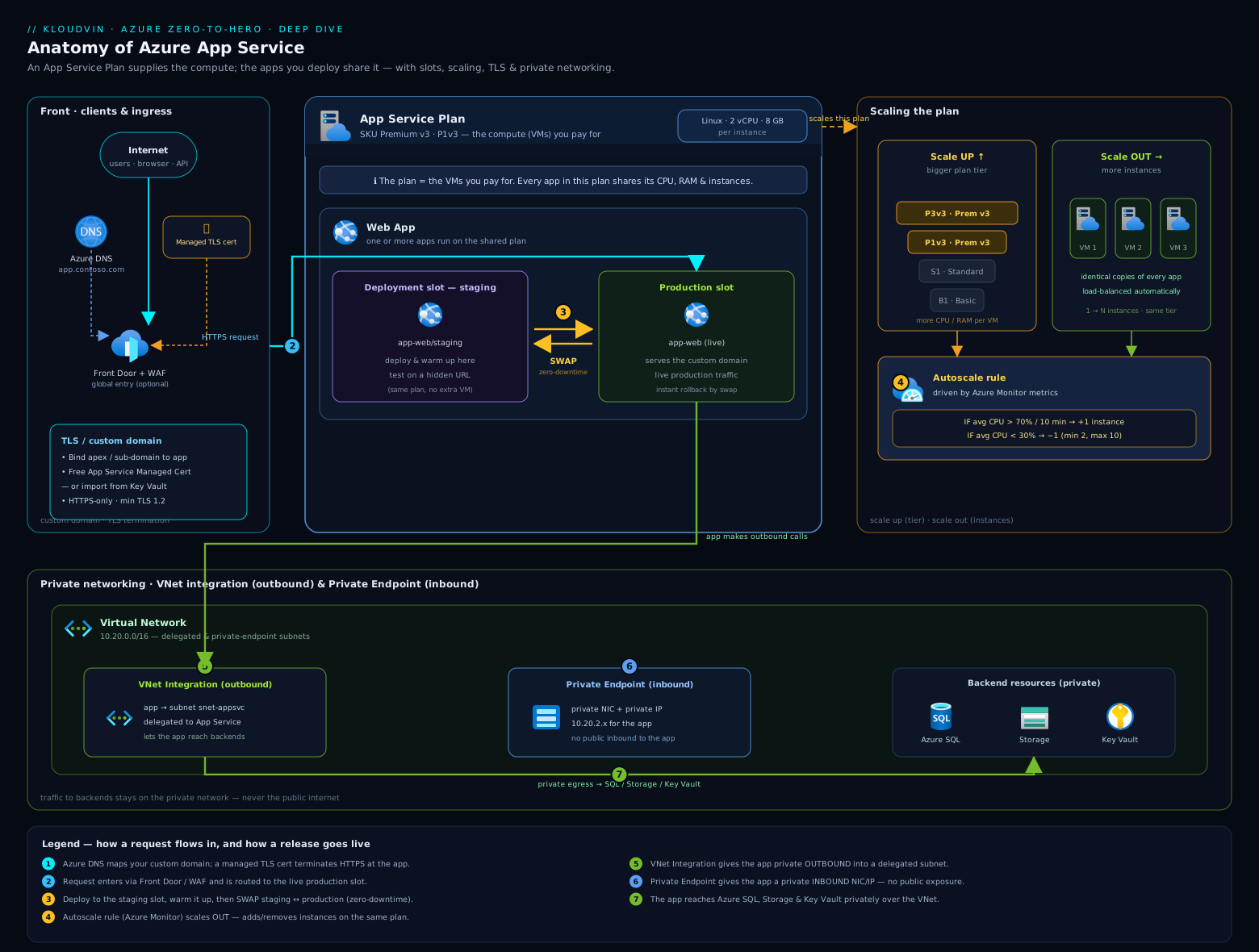
The diagram shows the two-resource model at the centre — the plan (compute) hosting the app with its production and staging slots and the swap between them — surrounded by the four cross-cutting concerns this lesson covers: inbound TLS/custom domains, networking (VNet integration outbound, private endpoint inbound, access restrictions), identity/config (managed identity, app settings, Key Vault references) and operations (Kudu/SCM, diagnostics, backup).
Hands-on lab
In this lab you create an App Service Plan and web app, add a deployment slot, deploy a tiny app to each, swap them, and exercise scaling, HTTPS-only, a sticky setting and managed identity — entirely from Cloud Shell. Custom domain and certificate binding are described (they need a domain you own) but every other step runs for real. Use a Standard tier so slots are available.
Step 1 — Resource group and a Standard plan.
RG=rg-appsvc-lab
LOC=centralindia
PLAN=plan-appsvc-lab
APP=kv-appsvc-lab-$RANDOM   # globally unique

az group create -n $RG -l $LOC
az appservice plan create -g $RG -n $PLAN --sku S1 --is-linux
Expected: the plan is created with "sku": { "name": "S1", "tier": "Standard" }.
Step 2 — Create the web app and deploy a one-line site.
az webapp create -g $RG -p $PLAN -n $APP --runtime "NODE:20-lts"

# Deploy a trivial app from a public sample (or your own zip)
az webapp up -g $RG -n $APP --runtime "NODE:20-lts" --html  2>/dev/null || true

# Confirm it answers
curl -s -o /dev/null -w "%{http_code}\n" https://$APP.azurewebsites.net
Expected: 200. Browse to https://$APP.azurewebsites.net to see the placeholder/site.
Step 3 — Enforce HTTPS-only and TLS 1.2.
az webapp update -g $RG -n $APP --https-only true
az webapp config set -g $RG -n $APP --min-tls-version 1.2
curl -s -o /dev/null -w "%{http_code}\n" http://$APP.azurewebsites.net   # expect 301
Expected: 301 — plain HTTP now redirects to HTTPS.
Step 4 — Add a staging slot and a sticky setting.
az webapp deployment slot create -g $RG -n $APP --slot staging

# A sticky (slot) setting that will NOT move during a swap
az webapp config appsettings set -g $RG -n $APP --slot staging \
  --slot-settings ENVIRONMENT=staging

# A normal setting that WILL swap
az webapp config appsettings set -g $RG -n $APP --settings RELEASE=v2
Expected: the staging slot exists at https://$APP-staging.azurewebsites.net.
Step 5 — Swap staging into production.
az webapp deployment slot swap -g $RG -n $APP --slot staging --target-slot production
# The RELEASE setting follows to production; ENVIRONMENT (sticky) stays with each slot
az webapp config appsettings list -g $RG -n $APP -o table
Validation: RELEASE=v2 is now on production; ENVIRONMENT did not swap (it remains the slot’s own value) — proving the sticky-setting rule.
Step 6 — Scale out and enable a managed identity.
az appservice plan update -g $RG -n $PLAN --number-of-workers 2   # scale OUT to 2
az webapp identity assign -g $RG -n $APP                          # system-assigned MI
az webapp identity show -g $RG -n $APP --query principalId -o tsv
Expected: the plan reports 2 workers; the app prints a principalId (its Entra identity).
Step 7 (described) — Custom domain + managed certificate. With a domain you own, you would create a CNAME (www → $APP.azurewebsites.net) and an asuid.www TXT record set to az webapp show -g $RG -n $APP --query customDomainVerificationId -o tsv, then az webapp config hostname add the domain, az webapp config ssl create --hostname www.yourdomain.com for a free managed cert, and az webapp config ssl bind ... --ssl-type SNI to bind it. This is the production “secure custom domain” flow.
Cleanup.
az group delete -n $RG --yes --no-wait
Cost note: the Standard S1 plan is billed per hour while it exists, regardless of whether the app is receiving traffic or how many apps are on it — so the lab cost is the plan’s hourly rate times the time you leave it running (the extra worker in step 6 doubles the instance cost). Deleting the resource group stops all charges. To keep a learning app at near-zero cost, scale the plan down to Free (F1) instead — but you then lose slots, custom certs and the SLA.
Common mistakes & troubleshooting
| Symptom | Likely cause | Fix |
|---|---|---|
| “App name not available” on create | The name is taken — it must be globally unique (it’s a public hostname) | Choose a different, unique name |
| Slot swap caused an outage / wrong config in prod | A setting you expected to be slot-specific was not marked sticky, so it swapped | Mark environment-specific settings as deployment slot settings (sticky); use swap-with-preview to validate first |
| Custom domain won’t verify | The asuid. TXT record is missing/incorrect or DNS hasn’t propagated |
Recreate the asuid.<host> TXT with the exact customDomainVerificationId; wait for propagation; use apex A+TXT, subdomain CNAME+TXT |
| App can’t reach a private database / Key Vault | No VNet integration, or “route all” not enabled, or subnet not delegated | Add regional VNet integration on a delegated subnet; enable route-all if the target isn’t RFC-1918; ensure subnet has free IPs |
| App returns 403 / stops at midday on Free tier | Free/Shared CPU-minute quota exhausted | Scale up to Basic+ (no quota, has SLA) |
| Autoscale isn’t scaling | You’re on Basic (manual only), or no scale-in rule / wrong metric / min=max | Use Standard+; pair scale-out with scale-in rules; check the metric and min/max instance limits |
@Microsoft.KeyVault(...) reference shows as literal text |
App has no managed identity or lacks RBAC on the vault | Enable a managed identity and grant it Key Vault Secrets User; confirm the secret URI |
| Cold starts / first request slow after deploy or scale | Always On is off, or no warm-up before swap | Enable Always On (Basic+); configure a warm-up path so swaps wait for readiness |
| Can’t change a plan from Linux to Windows | OS is immutable for a plan | Create a new plan with the right OS and move/redeploy the app |
Best practices
- Default to Premium v3 with zone redundancy for production: faster hardware, 20 slots, automatic scaling and resilience across availability zones. Use Basic for dev/test and Standard for modest production.
- Host related apps on a shared plan to save money, but isolate noisy or critical apps on their own plan so they don’t contend for CPU/RAM.
- Always use a staging slot and swap-with-preview for releases; keep the old version in the slot for instant rollback. Mark environment-specific settings sticky.
- Enable Always On (Basic+) for production so the app isn’t unloaded when idle, and configure a warm-up path so swaps and scale-outs serve warm instances.
- Turn on HTTPS-only and minimum TLS 1.2 on day one; use App Service managed certificates for simple public domains and Key Vault-imported certs where you need governance or wildcards.
- Put secrets in Key Vault and reference them via managed identity — never in app settings as plaintext.
- Wire diagnostic settings to Log Analytics and enable Application Insights so you have metrics, logs and distributed traces before something breaks.
Security notes
- Disable basic (FTP/SCM) authentication and use Entra-based deployment; protect the Kudu/SCM site with access restrictions — it is a privileged management surface.
- Use managed identity + Key Vault references for all credentials so nothing sensitive sits in configuration; grant the identity least-privilege RBAC on each target resource.
- Make internal apps private: disable public network access and expose them via a private endpoint, reachable only from the VNet (and through Front Door / App Gateway if internet-facing).
- Lock inbound access with access restrictions (corporate IP ranges, the Front Door service tag) on both the main site and the SCM site.
- Enforce HTTPS-only, TLS ≥ 1.2, and consider client certificates (mTLS) for APIs that require strong client authentication.
- Govern with Azure Policy: enforce HTTPS-only, minimum TLS, private endpoints, managed identity and required tags across all App Service resources.
Cost & sizing
The bill is driven by the plan, not the app, and by how many instances run. The levers that move it:
- Tier (scale up). Each step up (Basic → Standard → Premium v3) raises the per-instance hourly rate but adds features and performance. P0v3 is the cheapest Premium v3 entry point; size up only when CPU/RAM or features demand it.
- Instance count (scale out). You pay per instance-hour. Two instances cost double one; a runaway autoscale max multiplies the bill — set the maximum deliberately and pair scale-out with scale-in rules.
- Plan consolidation. Hosting multiple apps on one plan is effectively free per extra app (they share the instances) — a major cost lever for many small apps. The trade-off is shared CPU/RAM (noisy-neighbour risk).
- Free/Shared for non-production. F1 is free (with quotas, no SLA); scaling a learning app down to F1 between sessions keeps it at zero compute cost.
- Isolated v2 (ASE) adds a fixed hourly infrastructure charge on top of per-instance costs — reserve it for genuine isolation/compliance needs.
- Reservations & savings. Premium v3 (and Isolated) instances can be covered by 1- or 3-year reservations / savings plans for a large discount on steady workloads. Azure Hybrid Benefit can reduce Windows plan costs if you bring Windows Server licences.
Sizing rule of thumb: start one tier above “it works” (so you have headroom), enable autoscale with conservative min/max, watch CPU/memory and HTTP queue length in Application Insights for a week, then right-size. Scale out for throughput/resilience and up when a single request needs more CPU/RAM or you need a higher-tier feature.
Interview & exam questions
1. What’s the difference between scaling up and scaling out in App Service? Scale up (vertical) changes the plan tier/size — each instance gets more vCPU/RAM and you unlock features; scale out (horizontal) changes the number of instances behind the load balancer for more throughput and resilience. They are independent levers.
2. What is the relationship between an App Service Plan and a Web App? The plan is the compute (OS, region, tier, instances); the app runs on it. One plan hosts many apps that share its instances, and you pay for the plan, not per app.
3. How does a deployment slot swap achieve near-zero downtime? App Service applies the target slot’s settings to the source slot’s instances and warms them up, then exchanges the routing so production traffic hits the already-warm instances. The old version remains in the now-staging slot, so rollback is just another swap.
4. Which settings are “sticky” and what does that mean? A setting marked as a deployment slot setting is sticky — it stays with the slot and does not swap. By default app settings and connection strings do swap. Sticky settings are for environment-specific values (e.g. a staging DB connection). Additionally, custom domains, TLS bindings, scale settings, Always On, access restrictions and identities never swap.
5. Free vs Basic vs Standard vs Premium v3 — when each? Free/Shared: learning only (quotas, no SLA). Basic: cheapest dedicated tier — full CPU/RAM, 99.95% SLA, but no slots, manual scale only. Standard: adds rule-based autoscale and 5 slots. Premium v3: faster hardware, 20 slots, automatic scaling, zone redundancy — the modern production default.
6. What is swap-with-preview and when would you use it? A two-phase swap: phase 1 applies production settings to staging and warms it without changing routing so you can validate the app with production configuration; phase 2 completes (or you cancel). Use it when behaviour depends on settings that only exist in production.
7. Difference between VNet integration and a private endpoint for App Service? VNet integration is outbound — it lets the app reach private resources from a delegated subnet. A private endpoint is inbound — it gives the app a private IP so clients reach the app privately. Combine “public access off” + private endpoint for a fully private app.
8. How do you secure a custom domain end to end? Add the custom domain (CNAME for subdomains, A+TXT for apex; the asuid. TXT proves ownership), then bind a certificate — a free App Service managed certificate or your own/Key Vault cert — via an SNI SSL binding, and turn on HTTPS-only with minimum TLS 1.2.
9. What is auto-swap and what’s a key limitation? Auto-swap automatically swaps a slot into production after every successful deployment to it — handy for full CD. Key limitation: it is not supported on Linux plans, and you should pair it with Always On + a warm-up path so it waits for readiness.
10. How should an App Service app authenticate to Key Vault or Storage without secrets? Enable a managed identity (system- or user-assigned), grant it least-privilege RBAC on the target, and use it directly (or via Key Vault references in app settings). No credentials are stored.
11. What are Hybrid Connections used for? To reach a specific host:port (often on-premises) without a VPN or VNet, via Azure Relay and an on-prem Hybrid Connection Manager agent. It is point-to-point, not a general network route.
12. Why does the Free tier sometimes return 403 mid-day, and how do you fix it? It exhausted its daily CPU-minute quota (Free/Shared run in a quota-limited sandbox with no SLA). Scale up to Basic or higher for unmetered CPU and the 99.95% SLA.
Quick check
- You need 5 deployment slots and rule-based autoscale but want the cheapest tier that provides both. Which tier?
- Your app must read a database secret with no credentials in configuration. What two features do you combine?
- You add allow rules to access restrictions but the app is still reachable from everywhere. What did you miss?
- You want to validate a release with production settings before it goes live, without changing routing. Which feature?
- True or false: changing a plan from Linux to Windows is a live, in-place operation.
Answers
- Standard (S1+) — it is the lowest tier with both 5 slots and rule-based autoscale (Basic has neither; Premium v3 has more slots but costs more).
- Managed identity + a Key Vault reference (the identity resolves the secret at runtime).
- The unmatched-rule action is still Allow — once you add allow rules you must set the default action to Deny so non-matching traffic is blocked.
- Swap-with-preview (multi-phase swap) — phase 1 applies production config and warms staging without exchanging routes.
- False — a plan’s OS is immutable; you must create a new plan with the target OS and migrate the app.
Exercise
Build a production-style web app from scratch on a Premium v3 plan: enable zone redundancy, create a staging slot, deploy two versions and demonstrate a swap-with-preview then swap. Add a sticky app setting and prove it doesn’t move during a swap. Turn on HTTPS-only and minimum TLS 1.2, enable a system-assigned managed identity, grant it Key Vault Secrets User on a test Key Vault, and wire one app setting as a Key Vault reference. Finally, add regional VNet integration to a delegated subnet and an access restriction limiting the SCM site to your IP. Capture the az commands for each step, then tear everything down with a single az group delete. Write a short note on which settings swapped and which didn’t, and what each tier change did to the projected hourly cost.
Certification mapping
This lesson maps to both major Azure certifications:
- AZ-104 (Azure Administrator) — Deploy and manage Azure compute resources: create and configure App Service plans and apps, configure scaling (up/out, autoscale), deployment slots, custom domains and TLS/SSL, networking (VNet integration, access restrictions), backup, and app settings. App Service is a named workload in the skills-measured list.
- AZ-204 (Azure Developer) — Implement Azure App Service Web Apps: create an App Service Web App, configure and scale it, configure deployment slots and swaps, manage app settings/connection strings, enable diagnostics logging, and implement authentication and managed identity. The slot/swap, sticky-setting and managed-identity topics here are core AZ-204 material.
- AZ-305 (Solutions Architect) — design choices: when App Service (PaaS) vs VMs/AKS/Container Apps, choosing tiers for resilience (zone redundancy) and isolation (ASE/Isolated v2), and private networking patterns.
Glossary
- App Service Plan — the compute resource (OS, region, tier, instances) that apps run on; you pay per plan.
- Web App / App Service — the application (
Microsoft.Web/sites) running on a plan. - Tier / SKU — the pricing level (Free, Shared, Basic, Standard, Premium v3, Isolated v2) that sets features, SLA, scale ceiling and cost.
- Scale up — change the plan’s tier/size so each instance is more powerful.
- Scale out — change the number of instances running the app.
- Autoscale — rule-based instance scaling on metrics/schedule (Standard+); automatic scaling is the platform-managed per-app variant (Premium v3).
- Deployment slot — a live copy of the app on the same plan with its own hostname.
- Swap — exchange the routing between two slots; swap-with-preview does it in two phases; auto-swap does it after a successful deploy.
- Sticky / slot setting — a setting marked to stay with its slot and not swap.
- SNI SSL / IP-based SSL — TLS binding types; SNI shares an IP by hostname, IP-based dedicates an IP to one cert.
- Managed certificate — a free, auto-renewing TLS certificate App Service issues for a verified custom domain.
- VNet integration — outbound injection of the app’s traffic into a delegated VNet subnet.
- Private endpoint — an inbound private IP on the app so clients reach it without the internet.
- Hybrid Connection — a host:port bridge (via Azure Relay) to reach on-prem without a VPN.
- Access restrictions — inbound IP/service-tag/subnet allow-deny rules for the site and the SCM/Kudu site.
- Kudu / SCM — the advanced management site (
*.scm.azurewebsites.net) behind every app. - Managed identity — an Entra identity for the app to authenticate to other services without stored credentials.
- App Service Environment (ASE v3) — single-tenant App Service deployed into your VNet; the basis of the Isolated v2 tier.
Next steps
- Continue the course with the Azure Monitor deep dive: metrics, logs (KQL), alerts, action groups & insights — everything you deployed here you will want to observe and alert on.
- Go deeper on safe releases with App Service: secure, zero-downtime deployments — slots, warm-up and deployment hardening in production.
- See the full canary/blue-green pattern in Blue-green deployments on Azure App Service: slots & Traffic Manager.