Most engineers meet Azure one resource at a time. You create a virtual network, attach a subnet, drop a VM in it, wire up a public IP, and it works. Do that two hundred times across forty teams and you do not have a cloud estate — you have a landfill. No two subscriptions are named the same way, identity is a patchwork of half-configured RBAC, half your storage accounts are reachable from the public internet, and nobody can answer the simplest governance question: which workloads are non-compliant, and who owns them?
The Cloud Adoption Framework (CAF) exists to stop that outcome before it starts. It is Microsoft’s end-to-end guidance for the organisational journey to cloud — the strategy, the planning, the operating model, and the governed environment that workloads land in. Its physical centrepiece is the Azure Landing Zone (ALZ): a pre-built, opinionated, policy-governed foundation so that application teams move fast without re-litigating identity, networking, and security on every project.
This lesson is the design-judgement layer the tutorials skip. We will draw the bright line between CAF and the Well-Architected Framework, walk all seven CAF methodologies (and explain why older courses say six), then go deep on the landing-zone architecture itself: platform vs application landing zones, the eight design areas that every enterprise-scale foundation is built from, and the ALZ accelerator — including the modern Azure Verified Modules (AVM) path in Bicep and Terraform versus the portal accelerator. By the end you should be able to reason about a landing-zone design the way an architecture review board does: not “what button do I click”, but “what decision am I making, and what does it cost me later”.
Learning objectives
By the end of this lesson you will be able to:
- Distinguish CAF from WAF by scope and audience — the organisational adoption journey versus the per-workload quality bar — and explain why a mature estate needs both.
- Name and sequence the seven CAF methodologies, separating the four foundational sequential phases (Strategy → Plan → Ready → Adopt) from the three operational, continuous ones (Govern, Secure, Manage), and explain the historical shift from six to seven.
- Differentiate a platform landing zone from an application landing zone, and articulate the separation-of-duties model that makes the distinction load-bearing.
- Enumerate and reason about the eight ALZ design areas, including the key decision in each (e.g. hub-spoke vs Virtual WAN, management-group hierarchy depth, policy-driven vs detective governance).
- Choose an ALZ deployment path — the Azure Verified Modules accelerator (Bicep or Terraform) versus the portal accelerator — based on the customer’s IaC maturity and operating model.
- Apply CAF/ALZ reasoning to AZ-305-style scenario questions, which are dominated by management-group design, subscription strategy, Azure Policy placement, and connectivity topology.
Prerequisites & where this fits
This is an Architecture & Design Mastery lesson. You should already be comfortable with the building blocks it composes:
- Azure resource hierarchy — management groups, subscriptions, resource groups, resources — and Microsoft Entra ID (formerly Azure AD) for identity and RBAC.
- Core networking — virtual networks, subnets, NSGs, peering, and the idea of a hub-and-spoke topology. (See Azure virtual network basics and cloud network segmentation if those are fuzzy.)
- Azure Policy at a conceptual level — definitions, initiatives, assignments, effects.
- Infrastructure as Code — that Bicep and Terraform exist and produce idempotent deployments.
Where it sits in the course: the previous lesson, The Azure Well-Architected Framework, In Depth, taught the workload quality bar as a tradeoff system. This lesson zooms out to the organisational frame — CAF — and the foundation it produces. The companion implementation series (azure-landing-zone-billing-tenant, azure-landing-zone-identity, azure-landing-zone-network, and the rest of the eight) drills each design area to the Bicep/Terraform level; this lesson is the map that ties them together. The next lesson, Choosing an Architecture: Styles & the Ten Design Principles, moves from the foundation to what you build on it.
CAF vs WAF: organisation versus workload
The single most common conceptual error in Azure architecture is treating CAF and WAF as interchangeable, or as competing checklists. They are neither. They operate at different altitudes and answer different questions, and a mature estate runs both at once.
The Well-Architected Framework (WAF) is a workload lens. It asks: is this particular system well-built? It judges a single workload against five pillars — Reliability, Security, Cost Optimization, Operational Excellence, and Performance Efficiency — and forces you to reason about the tensions between them. WAF is what an architecture review applies to one application. Its time horizon is the lifetime of that workload, and its primary tool is judgement about tradeoffs.
The Cloud Adoption Framework (CAF) is an organisational lens. It asks: is the enterprise adopting and operating cloud well, at scale? Its scope is the whole estate and the whole journey — motivations and business case, a migration and innovation plan, the governed foundation, the operating model, and the continuous disciplines of governance, security, and management that run forever. CAF is what a cloud centre of excellence (CCoE) and a platform team apply across all workloads. Its time horizon is the life of the organisation in the cloud.
A clean mental model: CAF builds and runs the neighbourhood; WAF inspects each house. CAF gives you zoning, roads, water, and power — the landing zone. WAF makes sure the house you build on a given plot is sound. You can build a beautifully Well-Architected workload and still have a chaotic estate (no governance, no consistent identity, no cost accountability). You can have a pristine CAF-aligned foundation and still deploy a fragile, over-provisioned workload onto it. You need both, and they reference each other deliberately — CAF’s Ready and Govern methodologies bake WAF principles into the platform so that every workload starts from a better baseline.
| Dimension | Cloud Adoption Framework (CAF) | Well-Architected Framework (WAF) |
|---|---|---|
| Scope | The whole cloud estate and adoption journey | A single workload |
| Question it answers | “Are we adopting & operating cloud well at scale?” | “Is this system well-built?” |
| Primary audience | Leadership, CCoE, platform/landing-zone team | Workload architects & engineering teams |
| Time horizon | The organisation’s entire cloud lifecycle | The lifetime of one workload |
| Core artefacts | Strategy, plan, Azure Landing Zone, operating model, governance baseline | Pillar design reviews, tradeoff decisions, the WAF assessment |
| Tooling | ALZ accelerator, Azure Policy, management groups, Azure Migrate | Well-Architected Review, Azure Advisor / Advisor Score, Service Guides |
| Relationship | Produces the foundation workloads land in | Judges each workload on that foundation |
A note on the broader family. CAF and WAF are two of the pillars of Microsoft’s architecture guidance, alongside the Azure Architecture Center (reference architectures, design patterns, architecture styles) and the Mission-Critical guidance (the apex reliability bar). They are designed to be used together: CAF tells you how to adopt; the Architecture Center tells you what to build; WAF tells you whether it is good; Mission-Critical tells you how to push reliability to its limit. This lesson lives squarely in CAF.
The seven CAF methodologies
CAF is organised into methodologies — coherent bodies of guidance for a phase or discipline of adoption. There are seven in the current model. This is the first place to be precise, because the canon changed and many courses, exam dumps, and blog posts are stale.
The seven split into two groups by their cadence:
- Four foundational, sequential methodologies — you move through them roughly in order, once, to establish your cloud presence: Strategy → Plan → Ready → Adopt.
- Three operational, continuous methodologies — they run in parallel, forever, across everything you have adopted: Govern · Secure · Manage.
Why seven, not six (or eight). Older CAF material described six methodologies, with security folded into Govern and Manage rather than standing alone. Microsoft elevated Secure to its own first-class methodology to reflect how central security and Zero Trust have become — so the current, canon-accurate count is seven. (You may also see Adopt drawn as containing two sub-tracks, Migrate and Innovate; those are sub-methodologies of Adopt, not separate top-level methodologies. If a question lists “Migrate” and “Innovate” as peers of Strategy and Plan, treat them as the two paths inside Adopt.) On the exam: if the choices include a standalone Secure, the modern seven-methodology model is what’s being tested.
The four foundational (sequential) methodologies
1. Strategy — establish the why. Before any technology decision, define the motivations (cost savings, datacentre exit, agility, new capabilities, risk reduction), the business outcomes (measurable: “reduce time-to-market for a new market from 9 months to 6 weeks”), and the business case that justifies investment. The signature artefact is a clear, leadership-endorsed statement of why you are doing this. Without it, every later argument — how much to spend on the foundation, how strict governance should be — has no anchor. Strategy is where you decide migrate vs modernise vs innovate at the portfolio level and secure executive sponsorship.
2. Plan — turn strategy into an actionable plan. Inventory and rationalise the existing estate using the 5 Rs (Rehost, Refactor, Rearchitect, Rebuild, Replace — Microsoft’s rationalisation model; you will also see “Retain” and “Retire” as disposition decisions). Build a skills-readiness plan (your people need to learn), and produce a cloud adoption plan — a backlog of workloads, sequenced and estimated, often tracked in Azure DevOps or GitHub. Plan is where wishful strategy becomes a dated, owned, prioritised list of work.
3. Ready — prepare the environment: this is where landing zones live. Ready is the methodology that produces the Azure Landing Zone — the governed foundation. It prescribes the eight design areas (covered in depth below), the landing zone conceptual architecture, and the deployment options (the ALZ accelerator). Critically, Ready embeds a start-small-and-expand philosophy: you do not need a perfect, fully built-out foundation on day one, but you do need the design decisions made and a path to grow into them. Ready is the bridge between CAF the methodology and ALZ the architecture — and the single most exam-relevant CAF methodology, because management-group and subscription design questions are Ready questions.
4. Adopt — migrate and innovate. With a foundation in place, you actually move and build. Adopt contains the two sub-tracks:
- Migrate — bring existing workloads to Azure, typically with Azure Migrate for discovery/assessment and a structured assess → migrate → optimise → secure & manage loop. The 5 Rs from Plan get executed here.
- Innovate — build new, cloud-native capability: modern apps, data platforms, AI. This is where the cloud earns its keep beyond cost savings — the innovate track is about new business value, not just relocating old value.
The three operational (continuous) methodologies
These do not “finish”. They run as long as you are in the cloud, and they apply to everything Strategy/Plan/Ready/Adopt produced.
5. Govern — keep the estate compliant and controlled over time. Governance is the continuous discipline of staying within policy as the estate grows and changes. CAF frames it as the Govern methodology built on the CAF governance benchmark and the Five Disciplines of Cloud Governance: Cost Management, Security Baseline, Resource Consistency, Identity Baseline, and Deployment Acceleration. The mechanism in Azure is overwhelmingly Azure Policy (and initiatives) assigned at the management-group level, plus Azure landing-zone policy baselines that ship with the accelerator. Govern is an incremental discipline: you establish a minimum viable governance baseline, then tighten it as risk and maturity grow — you do not boil the ocean on day one.
6. Secure — protect the estate (now its own methodology). Secure is CAF’s dedicated security methodology, aligned to Zero Trust (verify explicitly, use least-privilege access, assume breach) and the Microsoft Cloud Security Benchmark (MCSB). It spans security operations, asset protection, identity and access, infrastructure and endpoint security, and the security of DevOps and data. In Azure it shows up as Microsoft Defender for Cloud, Microsoft Sentinel, Entra ID controls (Conditional Access, PIM), and the security baseline policies. Its elevation from “part of Govern/Manage” to a standalone methodology is the precise reason the count moved from six to seven.
7. Manage — operate for reliability and ongoing value. Manage is the operations methodology: a management baseline (monitoring, backup, patching/update management, alerting), operations management for business-critical workloads (higher commitments where the business case justifies it), and the bridge to WAF’s Operational Excellence and Reliability pillars. In Azure: Azure Monitor / Log Analytics, Azure Backup, Azure Site Recovery, Update Manager, and the management-subscription resources the landing zone provisions centrally. Manage is where the foundation’s central management subscription earns its place.
| # | Methodology | Group | Cadence | Core question | Signature Azure tooling |
|---|---|---|---|---|---|
| 1 | Strategy | Foundational | Sequential (once) | Why are we doing this? | Business case, motivations/outcomes |
| 2 | Plan | Foundational | Sequential (once) | What, in what order? | Azure Migrate (discovery), adoption plan, 5 Rs |
| 3 | Ready | Foundational | Sequential (once) | What foundation? | Azure Landing Zone, ALZ accelerator, mgmt groups |
| 4 | Adopt | Foundational | Sequential (once) | Move & build | Azure Migrate (migrate), AKS/App Service/Fabric (innovate) |
| 5 | Govern | Operational | Continuous | Stay compliant | Azure Policy & initiatives, governance benchmark |
| 6 | Secure | Operational | Continuous | Stay protected | Defender for Cloud, Sentinel, Entra, MCSB |
| 7 | Manage | Operational | Continuous | Operate well | Azure Monitor, Backup, Site Recovery, Update Manager |
Azure Landing Zones: the architecture
A landing zone is an environment that has been provisioned and governed ahead of the workloads that will use it. The term is deliberately physical: when a workload “lands”, the runway — network, identity, policy, monitoring — is already there. The Azure Landing Zone is CAF’s reference implementation of that idea, and it is opinionated on purpose. The opinion is the value: every team lands in the same shape, so security, cost, and operations are consistent by construction rather than by heroics.
The architecture is split into two clearly separated kinds of landing zone, and getting this distinction right is the foundation of everything else.
Platform landing zone vs application landing zone
The platform landing zone is the set of shared, central subscriptions that provide common services to every workload. In the ALZ conceptual architecture these live under a Platform management group and are conventionally three subscriptions:
- Identity — domain controllers / Entra Domain Services, identity sync, the resources that underpin authentication for the estate.
- Connectivity (Network) — the hub: ExpressRoute/VPN gateways, Azure Firewall, DNS private zones, the central network everything routes through.
- Management — Log Analytics workspace, Automation account, backup vaults, the central monitoring and operations plane.
The platform landing zone is owned and operated by the platform team (the CCoE). It is built once, carefully, and changed deliberately. Application teams consume it; they do not modify it.
An application landing zone is a subscription (or set of subscriptions) where a workload actually runs. It is provisioned from the platform — pre-wired with a spoke network peered to the hub, the right RBAC, the policy assignments inherited from above, and a budget — and then handed to an application team to deploy into. Application landing zones live under the Landing Zones management group, typically split into Corp (workloads needing on-prem connectivity / no public exposure) and Online (internet-facing workloads). They come in flavours — for example a subscription per workload, or per-environment subscriptions (prod / non-prod) — chosen by your isolation and blast-radius requirements.
The reason this distinction is load-bearing is separation of duties and blast-radius isolation. The platform team owns shared, high-blast-radius concerns (connectivity, identity, policy) in subscriptions application teams cannot touch. Application teams get autonomy inside their own subscription — they can deploy freely — but the guardrails (policy, networking, RBAC) are inherited and non-negotiable. This is the model that lets a large enterprise give hundreds of teams self-service speed without surrendering governance. The automated provisioning of new application landing zones from the platform is called subscription vending (covered in its own lesson, caf-subscription-vending-platform-automation).
The full conceptual hierarchy, top to bottom: the Tenant Root management group → an intermediate root (e.g. “Contoso”) → then Platform (Identity / Connectivity / Management subscriptions), Landing Zones (Corp / Online application subscriptions), Sandbox (safe experimentation, isolated), and Decommissioned (workloads on the way out). Policy is assigned high in this tree so it inherits down; subscriptions are the unit of scale and the primary management/billing boundary.
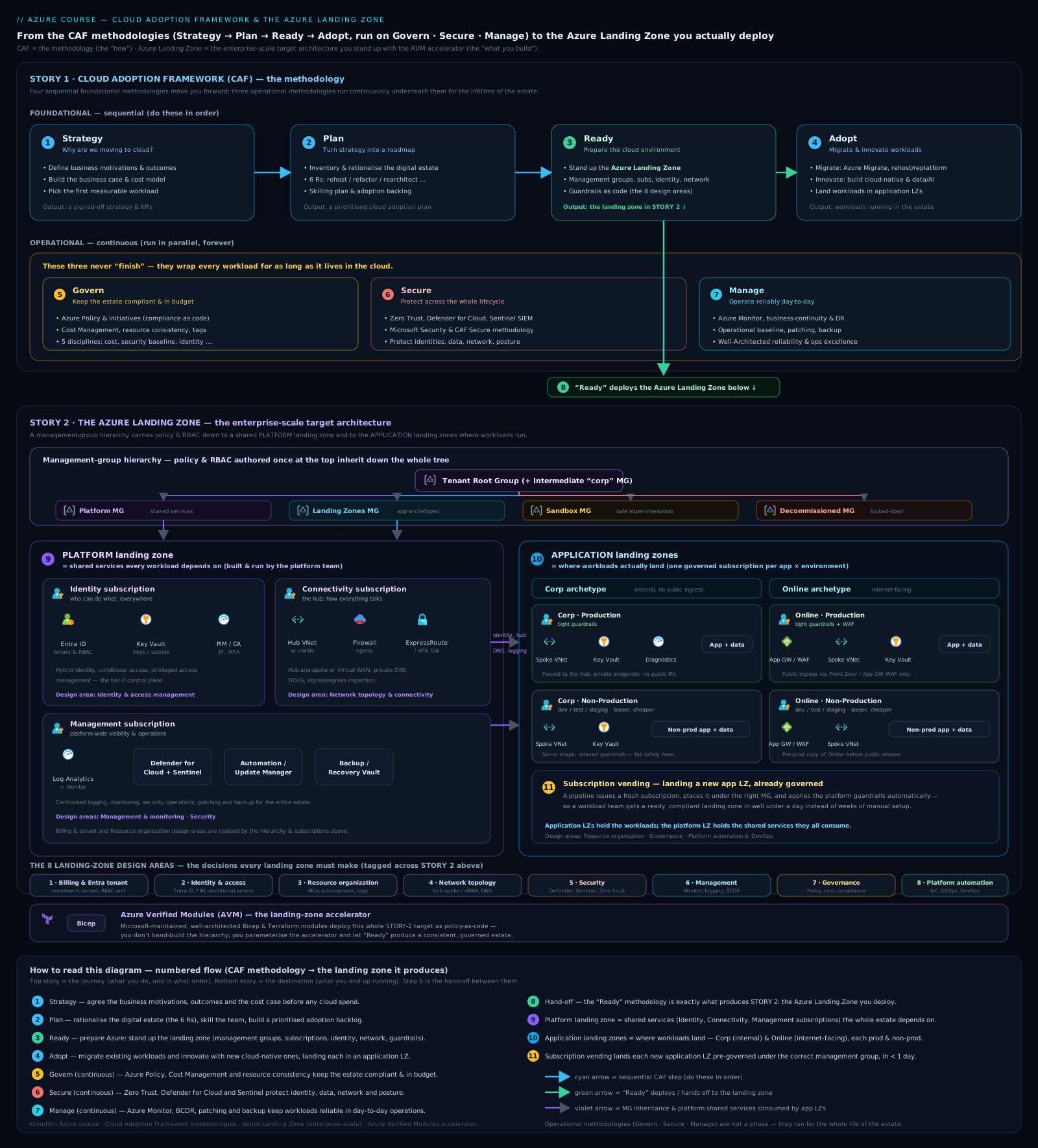
The diagram above ties the two concepts together: the management-group hierarchy on the left (with platform and application landing zones), and the eight design areas — the cross-cutting decisions — running across the whole foundation.
The eight design areas
Every enterprise-scale landing zone is the product of decisions across eight design areas. These are not features to switch on; they are decisions to make, each with real tradeoffs. Make them well and the rest is implementation. The eight, in canon order:
- Azure billing & Microsoft Entra tenant
- Identity & access management
- Resource organization
- Network topology & connectivity
- Security
- Management
- Governance
- Platform automation & DevOps
The first design area is sometimes framed as the environment design areas (the enrolment and tenant), and the eight are sometimes grouped as foundational (1–4) and “operate” (5–8) — but the canonical AZ-305 list is these eight by name. We will take each in turn, with the central decision and the tradeoff.
1. Azure billing & Microsoft Entra tenant
The decision: what is your billing/enrolment topology, and how many Entra tenants do you have?
This is the bedrock. Your billing comes through an Enterprise Agreement (EA), a Microsoft Customer Agreement (MCA), or a Cloud Solution Provider (CSP) relationship — and the billing hierarchy (billing account → billing profiles → invoice sections, or EA enrollment accounts/departments) determines how cost is segmented and who can create subscriptions. Your Microsoft Entra tenant is the identity and security boundary for the whole estate.
The tradeoff: the strong default is a single Entra tenant. One tenant means one identity boundary, one place to apply Conditional Access and PIM, and the simplest possible governance. Multiple tenants (often inherited from M&A, or demanded by hard sovereignty/regulatory isolation) multiply identity management, complicate cross-tenant access, and break the clean inheritance model — so you adopt multi-tenant only when a real requirement forces it, never for “team separation” (that is what management groups and subscriptions are for). Get this wrong and every later design area inherits the mess.
2. Identity & access management
The decision: how do humans and workloads authenticate and what can they do?
Identity is the new perimeter. This area covers your Entra ID design — hybrid identity (Entra Connect sync vs cloud-only), the RBAC model (custom roles, role assignments at management-group/subscription scope), Privileged Identity Management (PIM) for just-in-time elevation, Conditional Access policies, and managed identities for workloads so secrets stop living in code.
The tradeoff: centralise identity governance (consistency, auditability, least privilege enforced from the top) against the friction it adds to teams. Over-tight RBAC creates ticket queues and shadow workarounds; over-loose RBAC creates standing privilege and breach blast radius. The landing zone’s job is to set a least-privilege baseline with PIM-gated elevation so the common case is frictionless and the dangerous case is gated. (Deep dive: azure-landing-zone-identity.)
3. Resource organization
The decision: how do you structure management groups and subscriptions?
This is the most exam-tested design area. Management groups form a hierarchy above subscriptions and are the inheritance scope for Azure Policy and RBAC — policy assigned at a management group flows to every subscription beneath it. Subscriptions are the primary unit of scale, the management boundary, and a billing/quota boundary. The ALZ reference hierarchy (Platform / Landing Zones / Sandbox / Decommissioned under an intermediate root) is the canonical starting point.
The tradeoff: hierarchy depth vs manageability. A flat structure cannot express differentiated governance (Corp vs Online have genuinely different policy needs); too deep a hierarchy becomes unmanageable and confusing, and Azure limits management-group depth to six levels below root anyway. Subscription granularity is the same tension: more subscriptions give cleaner isolation, independent quotas, and tighter blast radius, but more to govern and vend. The guidance: model management groups on policy/governance needs, not on org chart (org charts change; governance needs are more stable), and use subscriptions for scale and isolation boundaries. Avoid mirroring your HR hierarchy in management groups — a classic anti-pattern. (Deep dive: azure-landing-zone-resource-organization and enterprise-scale-landing-zone-management-group-hierarchy-design.)
4. Network topology & connectivity
The decision: what is your network topology — hub-and-spoke or Virtual WAN — and how do you connect to on-prem and the internet?
The two canonical topologies:
- Traditional hub-and-spoke — you build and manage the hub VNet (with Azure Firewall, gateways, DNS) and peer spoke VNets to it. Maximum control and customisation; you own the routing and the operational burden.
- Virtual WAN (vWAN) — a Microsoft-managed hub that handles transit routing, branch/VPN/ExpressRoute connectivity, and any-to-any spoke connectivity at scale. Less control over the internals, far less operational burden, and the better choice for large, global, many-region estates with lots of branch connectivity.
Plus the connectivity primitives: ExpressRoute (private, dedicated) and/or VPN to on-prem, Azure Firewall for centralised egress inspection, private DNS zones, and Private Link / private endpoints to keep PaaS traffic off the public internet.
The tradeoff: control vs operational burden vs scale. Hub-spoke gives you total control at the cost of running it yourself, and it scales less gracefully across many regions and hundreds of spokes. Virtual WAN trades some control for managed scale and simpler global transit. Choose hub-spoke for smaller/single-region estates that need bespoke routing; choose Virtual WAN when you are global, branch-heavy, or expect the spoke count to explode. (Deep dives: azure-landing-zone-network and azure-virtual-wan-global-network-architecture.)
5. Security
The decision: what is your security baseline across the platform?
This design area operationalises the Secure methodology in the foundation: Microsoft Defender for Cloud (CSPM + workload protection) enabled across subscriptions, Microsoft Sentinel for SIEM/SOAR, encryption (at rest and in transit) standards, Key Vault for secrets/keys/certs, and the security baseline policies that ship with the landing zone. It is Zero Trust made concrete in the platform — assume breach, segment, inspect, and monitor.
The tradeoff: security genuinely adds latency, cost, and failure points (every inspection hop, every private endpoint, every gateway is something that can fail or slow you down) — exactly the WAF Security-vs-Performance/Reliability tension, applied estate-wide. The landing zone’s job is to make the baseline secure-by-default so workloads inherit good posture for free, while leaving room for workload-specific tightening. (Deep dive: azure-landing-zone-security; the workload-level treatment is azure-waf-security.)
6. Management
The decision: how is the platform monitored, backed up, and patched — centrally?
This is the Manage methodology in the foundation: a central Log Analytics workspace (the management subscription’s crown jewel), Azure Monitor for metrics/alerts, Azure Backup and Azure Site Recovery for protection and DR, Update Manager for patching, and the platform-wide alerting and operations baseline. Centralising telemetry means you can answer estate-wide operational questions in one place.
The tradeoff: centralisation vs cost/sovereignty. A single central workspace is operationally ideal but can become a cost and data-residency concern at scale (ingestion is billed, and some data cannot cross regions/borders). The pattern is a central platform workspace for platform/security telemetry, with workload teams able to add their own where isolation or residency demands it. (Deep dive: azure-landing-zone-management.)
7. Governance
The decision: how do you enforce and audit compliance continuously — primarily via Azure Policy?
Governance is the Govern methodology made real: Azure Policy definitions and initiatives assigned at management-group scope to enforce (Deny), audit (Audit), or auto-remediate (DeployIfNotExists / Modify) standards across the estate, plus cost controls (budgets, tags) and the landing-zone policy baseline that the accelerator ships. Policy assigned high inherits down — this is why resource organisation (area 3) and governance (area 7) are joined at the hip.
The tradeoff: preventive (Deny) vs detective (Audit) controls. Deny stops non-compliant resources from ever existing (strong, but it breaks deployments and frustrates teams if mis-scoped). Audit lets you see drift without blocking (low friction, but non-compliance still happens). Mature estates use Deny for the truly non-negotiable (no public IPs on certain resources, allowed regions, required encryption) and Audit + remediate for the rest, tightening over time per the incremental-governance philosophy. (Deep dive: azure-landing-zone-governance.)
8. Platform automation & DevOps
The decision: how is the platform itself defined, deployed, and evolved — as Infrastructure as Code, through pipelines?
The landing zone is itself a software product. This area covers IaC (Bicep or Terraform) for the platform, the CI/CD pipelines (GitHub Actions / Azure DevOps) that deploy and update it, the GitOps/source-of-truth model, and subscription vending automation that mass-produces application landing zones on demand. The principle: no ClickOps on the foundation — every change is code, reviewed, and repeatable.
The tradeoff: up-front automation investment vs long-term velocity and consistency. Building the foundation as IaC with pipelines is slower on day one than clicking it together, but it is the only way to keep hundreds of subscriptions consistent, auditable, and reproducible as the estate grows — and it is what makes self-service subscription vending possible at all. (Deep dive: azure-landing-zone-platform-automation and caf-subscription-vending-platform-automation.)
| # | Design area | The decision | Primary tradeoff | Deep-dive lesson |
|---|---|---|---|---|
| 1 | Azure billing & Entra tenant | Enrolment topology; tenant count | Single-tenant simplicity vs forced multi-tenant isolation | azure-landing-zone-billing-tenant |
| 2 | Identity & access | AuthN/AuthZ, RBAC, PIM | Central least-privilege control vs team friction | azure-landing-zone-identity |
| 3 | Resource organization | Mgmt-group & subscription structure | Hierarchy depth/granularity vs manageability | azure-landing-zone-resource-organization |
| 4 | Network topology & connectivity | Hub-spoke vs Virtual WAN; on-prem links | Control vs managed scale & operational burden | azure-landing-zone-network |
| 5 | Security | Platform security baseline (Zero Trust) | Posture vs latency/cost/failure points | azure-landing-zone-security |
| 6 | Management | Central monitoring/backup/patching | Centralisation vs cost & sovereignty | azure-landing-zone-management |
| 7 | Governance | Azure Policy enforcement & audit | Preventive (Deny) vs detective (Audit) | azure-landing-zone-governance |
| 8 | Platform automation & DevOps | IaC + pipelines for the platform | Up-front automation cost vs long-term velocity | azure-landing-zone-platform-automation |
Deploying the landing zone: the ALZ accelerator
Knowing the eight design areas is the architecture. Actually building the foundation is where the Azure Landing Zone accelerator comes in — Microsoft’s productised, opinionated implementation of the conceptual architecture. There are two principal paths, and choosing between them is itself a design decision tied to the customer’s IaC maturity (design area 8).
The portal accelerator
The portal accelerator is a guided, wizard-style experience in the Azure portal that deploys the full ALZ — management-group hierarchy, platform subscriptions, policy baseline, connectivity — from a set of form choices. It is the fastest path to a working, opinionated foundation, and it is excellent for getting started, demos, and organisations without strong IaC practices. Its limitation is exactly its strength: it is portal-driven, so the foundation itself is born outside source control and pipelines, which sits awkwardly with design area 8’s “no ClickOps on the platform” principle. Many teams use it to bootstrap, then bring the result under IaC.
Azure Verified Modules (Bicep & Terraform)
The modern, recommended path for any organisation with real IaC maturity is the Infrastructure-as-Code accelerator built on Azure Verified Modules (AVM). Azure Verified Modules are Microsoft’s single, official, supported library of reusable IaC modules — one canonical module per resource/pattern, available in both Bicep and Terraform, that bake in WAF and ALZ best practices. AVM replaced the older fragmented module landscape (CARML, the Terraform AzureRM landing-zone modules, sundry community modules) with one consistent, Microsoft-owned standard.
The ALZ accelerator on AVM gives you the whole foundation as code: the management-group hierarchy, policy assignments, platform subscriptions, and connectivity expressed as Bicep or Terraform modules, deployed through CI/CD pipelines (GitHub Actions or Azure DevOps) with the source of truth in Git. This is the path that satisfies design area 8 end-to-end: the platform is versioned, reviewed, reproducible, and continuously deployable — and it is what makes mass subscription vending of application landing zones practical.
Bicep vs Terraform within AVM is a tooling/operating-model choice, not a capability gap — AVM ships both. Choose Bicep if you are an Azure-only shop wanting the tightest Azure integration, native ARM tooling, and no state file to manage. Choose Terraform if you are multi-cloud, already standardised on Terraform/HCL, and want one IaC language across providers (and you accept managing state). The decision follows your existing engineering standards, not Azure capability.
| Path | Best for | Source of truth | Satisfies design area 8? | Notes |
|---|---|---|---|---|
| Portal accelerator | Getting started, demos, low IaC maturity | Portal (not Git) | Partially — born outside pipelines | Fastest to a working foundation; often a bootstrap step |
| AVM — Bicep | Azure-only shops, native ARM tooling, no state to manage | Git | Yes — full IaC + pipelines | Tightest Azure integration |
| AVM — Terraform | Multi-cloud, Terraform-standardised orgs | Git | Yes — full IaC + pipelines | One language across clouds; manage state |
The rule of thumb: AVM-based IaC is the default for any serious enterprise estate; the portal accelerator is for bootstrapping and learning. A common, pragmatic sequence is to deploy with the portal accelerator to see the shape quickly, then re-platform onto AVM Bicep/Terraform so the foundation lives in Git going forward.
Real-world application
How does all this show up in an actual Azure design, the kind you would present to an architecture review board?
A regulated enterprise (say a logistics carrier or a bank) onboarding to Azure does not start by creating VMs. The platform team runs CAF top-down. Strategy produces a board-approved motivation (datacentre exit + faster market entry) and business case. Plan uses Azure Migrate to inventory 800 on-prem servers, rationalises them with the 5 Rs (rehost the legacy SAP, rearchitect the customer portal, retire 120 dead VMs), and produces a sequenced backlog. Ready is where the architecture happens: the team deploys the ALZ via the AVM Terraform accelerator (they are multi-cloud), standing up an intermediate root management group, Platform subscriptions (Identity, Connectivity with a Virtual WAN hub because they are global, Management with a central Log Analytics workspace), and Landing Zones management groups split Corp/Online. The eight design areas are each a documented decision in the design doc — single Entra tenant; PIM-gated RBAC baseline; six-level-max management-group hierarchy modelled on governance not org chart; Virtual WAN with ExpressRoute to on-prem; Defender for Cloud + Sentinel everywhere; central monitoring/backup; an Azure Policy baseline with Deny on disallowed regions and public IPs; and the whole thing in Git with GitHub Actions pipelines.
Then Adopt runs: workloads are migrated and built into application landing zones that are vended automatically from the platform — a team requests an environment, subscription vending provisions a new subscription pre-peered to the vWAN hub, with policy inherited and a budget attached, and hands it over. Meanwhile Govern, Secure, Manage run continuously — policy compliance dashboards, Defender posture, central operations — and every individual workload that lands is separately assessed against WAF (is this workload reliable, secure, cost-efficient?). That is CAF and WAF working together exactly as designed: CAF built and runs the estate; WAF judges each house in it.
You can see this concretely in the course’s enterprise examples — enterprise-arch-azure-landing-zone and the multi-cloud secure-multicloud-landing-zone-global-logistics and zero-downtime-multicloud-landing-zone-universal-bank case studies all instantiate exactly this CAF/ALZ skeleton.
Common mistakes & anti-patterns
- Mirroring the org chart in management groups. Management groups should model governance and policy needs, which are relatively stable, not the HR/org structure, which reorganises constantly. Org-chart hierarchies churn and force painful subscription moves; governance hierarchies (Platform / Corp / Online / Sandbox) endure.
- Treating CAF and WAF as the same thing — or as a single checklist. They are different altitudes. Applying WAF to “the organisation” or CAF to “a workload” produces confused designs. Know which question you are answering.
- Skipping Strategy and Plan and jumping straight to building a landing zone. A foundation with no business case behind it has no anchor for its governance strictness, its cost ceiling, or its scope — and tends to get over- or under-built.
- Building the platform by ClickOps in the portal and never bringing it into IaC. The foundation is the highest-blast-radius thing you own; it must be code (AVM Bicep/Terraform) so it is reproducible, auditable, and safely changeable. The portal accelerator is a bootstrap, not a destination.
- Letting application teams modify platform (shared) subscriptions. This destroys separation of duties and blast-radius isolation. Application teams own their application landing zones; the platform team owns Identity/Connectivity/Management. Vending, not editing.
- Over-using Deny policies on day one. Aggressive preventive policy across the whole estate breaks deployments and trains teams to route around governance. Start with a minimum viable baseline (Deny only the non-negotiable; Audit the rest) and tighten incrementally.
- Defaulting to multiple Entra tenants for “separation”. Multi-tenant multiplies identity overhead and breaks inheritance. Use management groups and subscriptions for separation; reserve multi-tenant for genuine sovereignty/regulatory or M&A requirements.
- Choosing hub-spoke vs Virtual WAN by habit instead of by scale. Hand-rolling hub-spoke for a global, branch-heavy, hundred-spoke estate is an operational trap; conversely, paying for Virtual WAN’s managed transit on a tiny single-region estate is over-engineering. Match topology to scale and control needs.
- Saying “six methodologies” / forgetting Secure is now standalone. The current model is seven, with Secure as its own methodology. Stale “six” answers are a tell on the exam.
- Confusing platform landing zones with application landing zones (or thinking “landing zone” means only the network). Platform = shared central subscriptions (Identity/Connectivity/Management); application = where workloads run. Both are landing zones.
Interview & exam questions
These concepts dominate AZ-305’s design sections. Practise reasoning to the answer, not just recognising it.
-
A company is reorganising frequently. How should they structure management groups so the hierarchy does not need constant restructuring? — Model management groups on governance/policy needs (e.g. Platform / Corp / Online / Sandbox), not on the org chart. Governance needs are stable; org charts churn. This is the canonical AZ-305 management-group question.
-
What is the difference between a platform landing zone and an application landing zone? — A platform landing zone is the shared central subscriptions (Identity, Connectivity, Management) owned by the platform team. An application landing zone is a subscription where a workload actually runs, vended from the platform with policy/networking/RBAC inherited and owned by an application team.
-
You need to enforce that no storage account in the estate allows public network access. Where and how do you implement this? — An Azure Policy with a Deny effect, assigned at a management-group scope so it inherits to all subscriptions beneath. (Audit if you need visibility without blocking; DeployIfNotExists/Modify to remediate.)
-
When would you choose Virtual WAN over a traditional hub-and-spoke topology? — When the estate is large, global, multi-region, and branch-heavy, and you want Microsoft-managed transit routing with lower operational burden. Choose hub-spoke when you need maximum control/bespoke routing and the scale is modest/single-region.
-
Name the seven CAF methodologies and group them. — Four foundational/sequential: Strategy → Plan → Ready → Adopt. Three operational/continuous: Govern · Secure · Manage. (If the question offers “six”, the model is stale — Secure is now standalone.)
-
Which CAF methodology produces the Azure Landing Zone? — Ready. It defines the eight design areas, the conceptual architecture, and the deployment accelerators.
-
A workload needs on-prem connectivity and must not be internet-facing. Which application landing-zone management group does it belong under? — Corp (Connected) — for workloads requiring private/on-prem connectivity. Internet-facing workloads go under Online.
-
What is the recommended way to deploy and maintain the landing zone as code, in either Bicep or Terraform? — The ALZ accelerator built on Azure Verified Modules (AVM) — Microsoft’s single official module library, available in both Bicep and Terraform, deployed via CI/CD pipelines with Git as the source of truth.
-
How do CAF and WAF relate, and which applies to a single workload? — CAF is the organisational adoption journey (builds/runs the estate and the landing zone); WAF applies to a single workload (judges its quality across five pillars). You use both; WAF is per-workload.
-
How are new subscriptions provisioned at scale for application teams in an ALZ? — Via subscription vending — automated provisioning (IaC/pipelines) of new application-landing-zone subscriptions, pre-wired with networking (spoke peered to hub/vWAN), inherited policy, RBAC, and a budget.
-
What are the Five Disciplines of Cloud Governance in CAF? — Cost Management, Security Baseline, Resource Consistency, Identity Baseline, and Deployment Acceleration — the structure of the Govern methodology.
-
A single Entra tenant or multiple — what is the default and when do you deviate? — Default to a single tenant (one identity/security boundary, simplest governance). Deviate only for genuine sovereignty/regulatory isolation or M&A realities — never for mere team separation.
Quick check
Q1. True or false: the Well-Architected Framework is the right tool to assess whether an entire organisation is adopting cloud well.
Q2. How many CAF methodologies are there in the current model, and which one was elevated to standalone status (causing the count to change)?
Q3. Which three subscriptions conventionally make up the platform landing zone?
Q4. Where should you assign an Azure Policy so it applies to every subscription beneath a given part of the hierarchy?
Q5. What is the Microsoft-recommended IaC foundation for deploying an Azure Landing Zone in both Bicep and Terraform?
Answers
A1. False. WAF assesses a single workload. The organisational adoption journey is the Cloud Adoption Framework (CAF).
A2. Seven. Secure was elevated from being folded into Govern/Manage to its own methodology, moving the count from six to seven.
A3. Identity, Connectivity (Network), and Management — the shared central subscriptions under the Platform management group.
A4. At the management-group scope above those subscriptions — Azure Policy (and RBAC) inherit downward through the management-group hierarchy.
A5. The ALZ accelerator built on Azure Verified Modules (AVM) — one official module library available in both Bicep and Terraform, deployed via pipelines.
Exercise
The scenario (a design thought-experiment). You are the lead architect for Northwind Freight, a global express-and-cold-chain carrier moving to Azure. Constraints:
- ~600 workloads to migrate over 18 months; a further pipeline of new cloud-native apps (tracking, IoT telemetry).
- Operations in 14 countries; two have strict data-residency laws. The company is multi-cloud (some AWS already).
- Three big workload classes: internet-facing customer/partner portals; internal back-office (must reach on-prem ERP, no public exposure); and a sandbox for the data-science team to experiment freely.
- A regulator requires that no production resource is deployable outside approved regions, and all storage must deny public network access.
- The platform team is small but strong on Terraform; they want self-service for the ~40 application teams.
Your task: sketch the CAF/ALZ design. Decide: (a) tenant strategy; (b) management-group hierarchy; © the platform-subscription set and network topology; (d) where the three workload classes land; (e) how you enforce the two regulatory rules; (f) how application teams get environments; (g) which deployment accelerator/IaC path.
A model answer.
(a) Tenant strategy. Single Entra tenant. The data-residency requirement is about data location (handled by region policy and resource placement), not identity isolation — it does not justify multi-tenant. One tenant keeps identity governance, Conditional Access, and PIM simple. (Deviate only if a regulator literally mandates a separate identity boundary.)
(b) Management-group hierarchy. Tenant Root → intermediate root “Northwind” → Platform, Landing Zones (with Corp and Online children), Sandbox, Decommissioned. Modelled on governance, not the 14-country org chart. Stays well within the six-level limit.
© Platform subscriptions + network. Three platform subscriptions: Identity, Connectivity, Management (central Log Analytics). Network topology = Virtual WAN — the estate is global and multi-region with on-prem (ERP) connectivity and many spokes, which is exactly vWAN’s sweet spot; hand-rolling hub-spoke across 14 countries would be an operational trap. ExpressRoute/VPN into the vWAN hub for on-prem ERP; Azure Firewall for central egress; Private Link for PaaS.
(d) Where workloads land. Internet-facing portals → Online application landing zones. Back-office reaching on-prem ERP with no public exposure → Corp application landing zones (private connectivity via the vWAN hub). Data-science experimentation → the Sandbox management group (isolated, looser policy, capped budget). Use subscription-per-workload (or prod/non-prod pairs) for blast-radius isolation.
(e) Enforcing the regulatory rules. Two Azure Policy definitions assigned at the management-group level with Deny effect: an allowed-locations policy (production scope) denying resource creation outside approved regions, and a storage public network access policy denying public-enabled storage accounts. Assigned high so they inherit to every subscription — assign the region policy on the production management groups (Corp/Online) and the storage policy estate-wide. Add Audit/remediate policies for the softer standards (tags, diagnostics). This is the preventive-vs-detective tradeoff applied: Deny for the two non-negotiable regulator rules, Audit for the rest.
(f) Self-service for 40 teams. Subscription vending — automated provisioning of application-landing-zone subscriptions from the platform: a team requests an environment, the pipeline creates a subscription pre-peered to the vWAN hub, with inherited policy, RBAC, and a budget, then hands it over. Teams get autonomy inside their subscription; guardrails are inherited and non-negotiable.
(g) Deployment path. The AVM Terraform ALZ accelerator — the team is multi-cloud and Terraform-strong, so one IaC language across Azure and AWS, with the foundation in Git and deployed through pipelines (satisfying design area 8 fully). They might bootstrap once with the portal accelerator to see the shape, then operate on AVM Terraform.
The point of the exercise is the reasoning: every choice traces to a stated requirement and a named tradeoff, which is exactly how an architecture review board evaluates a landing-zone design — and how AZ-305 scenario questions are scored.
Certification mapping
AZ-305 — Designing Microsoft Azure Infrastructure Solutions (primary). CAF and Azure Landing Zones are core to multiple objective domains:
- Design identity, governance, and monitoring solutions — management-group hierarchy and subscription design (resource organization), Azure Policy governance (placement, Deny vs Audit, initiatives), RBAC/PIM, central monitoring/Log Analytics. This domain is saturated with Ready/Govern/Manage design-area questions.
- Design data storage / business continuity — touches the Management design area (backup, Site Recovery) and region/residency decisions enforced by policy.
- Design infrastructure solutions — connectivity topology (hub-spoke vs Virtual WAN), compute/network placement into application landing zones, and the platform foundation generally.
Expect scenario questions where the correct answer hinges on: assigning policy at the right scope, modelling management groups on governance not org chart, the single-vs-multi-tenant decision, hub-spoke vs vWAN by scale, and platform-vs-application landing-zone responsibility.
AZ-104 — Azure Administrator (supporting). The operate side of these design areas: creating/managing management groups, subscriptions, RBAC, Azure Policy assignments, virtual networks/peering, Azure Monitor and Backup. AZ-104 tests you on doing what AZ-305 tests you on designing.
AZ-204 — Developer (peripheral). Where it touches: deploying into application landing zones, using managed identities instead of secrets, and consuming platform services (Key Vault, private endpoints) — i.e. living correctly inside the guardrails the landing zone sets.
Beyond Microsoft certs, the enterprise-scale / landing-zone reasoning here is exactly what is probed in cloud-architect interviews and internal architecture review boards.
Glossary
- Cloud Adoption Framework (CAF) — Microsoft’s end-to-end guidance for the organisational cloud journey: strategy, plan, the governed foundation, the operating model, and continuous governance/security/management.
- Well-Architected Framework (WAF) — Microsoft’s framework for assessing a single workload against five pillars (Reliability, Security, Cost Optimization, Operational Excellence, Performance Efficiency).
- Methodology (CAF) — one of the seven bodies of CAF guidance: Strategy, Plan, Ready, Adopt (foundational/sequential) and Govern, Secure, Manage (operational/continuous).
- Azure Landing Zone (ALZ) — CAF’s opinionated reference implementation of a pre-provisioned, governed Azure foundation that workloads land in.
- Platform landing zone — the shared central subscriptions (Identity, Connectivity, Management) owned by the platform team; consumed, not modified, by application teams.
- Application landing zone — a subscription where a workload runs, vended from the platform with networking, policy, and RBAC inherited; owned by an application team.
- Eight design areas — the eight decisions every ALZ is built from: Azure billing & Entra tenant; Identity & access; Resource organization; Network topology & connectivity; Security; Management; Governance; Platform automation & DevOps.
- Management group — a scope above subscriptions in the Azure hierarchy; the inheritance point for Azure Policy and RBAC (max six levels below root).
- Subscription — the primary unit of scale, management boundary, and billing/quota boundary in Azure; where resources live.
- Hub-and-spoke — a network topology with a customer-managed central hub VNet and peered spokes; maximum control, more operational burden.
- Virtual WAN (vWAN) — a Microsoft-managed networking hub for global transit, branch, and any-to-any connectivity at scale; less control, less operational burden.
- Azure Policy — the governance engine; definitions/initiatives assigned at scope to enforce (Deny), audit (Audit), or remediate (DeployIfNotExists/Modify) standards.
- Subscription vending — automated provisioning of new application-landing-zone subscriptions from the platform, pre-wired with guardrails.
- Azure Verified Modules (AVM) — Microsoft’s single, official, supported IaC module library, available in both Bicep and Terraform, embedding WAF/ALZ best practice.
- ALZ accelerator — Microsoft’s productised deployment of the landing zone: the portal accelerator (wizard) or the IaC accelerator built on AVM (Bicep/Terraform + pipelines).
- CCoE (Cloud Centre of Excellence) — the central team that owns the platform landing zone and the CAF disciplines.
- 5 Rs — the rationalisation model in Plan: Rehost, Refactor, Rearchitect, Rebuild, Replace (with Retain/Retire as dispositions).
Next steps
- Next lesson: Choosing an Architecture: Styles & the Ten Design Principles (
azure-cloud-architecture-styles-design-principles) — having built the foundation, we turn to what you build on it: the six architecture styles as constraint systems and the ten design principles for Azure applications. - Build the foundation, design area by design area — the implementation series drills each of the eight to Bicep/Terraform depth:
azure-landing-zone-billing-tenant,azure-landing-zone-identity,azure-landing-zone-resource-organization,azure-landing-zone-network,azure-landing-zone-security,azure-landing-zone-management,azure-landing-zone-governance,azure-landing-zone-platform-automation. - A worked landing-zone blueprint —
azure-landing-zone-cafwalks an enterprise-scale Azure landing zone end to end (management groups, subscription democratization, hub-spoke, policy, identity) with Bicep and Terraform. - Subscription vending in depth —
caf-subscription-vending-platform-automationandenterprise-scale-landing-zone-management-group-hierarchy-designfor the self-service/at-scale mechanics. - The CAF methodologies, lesson by lesson —
azure-caf-strategy,azure-caf-plan,azure-caf-ready,azure-caf-migrate,azure-caf-modernize,azure-caf-innovate,azure-caf-govern,azure-caf-secure,azure-caf-manage. - Where WAF meets the workloads on this foundation —
azure-waf-reliabilityandazure-waf-securityfor the per-workload bar, andazure-multi-region-active-active-disaster-recoveryfor resilience design on top of the landing zone.