Almost every “AI” or “analytics” project you will ever touch rests on the same unglamorous foundation: getting data out of the systems where it is created, into a place where it can be cleaned and combined, and out again in a shape that a dashboard, a report, or a model can use. That pipeline — ingest, store, transform, serve, govern — is the analytics data platform, and on Azure it is built from a small set of services you must know cold as an architect: Azure Data Factory, Azure Synapse Analytics, Azure Data Lake Storage Gen2, Microsoft Fabric, and Microsoft Purview.
This lesson is the senior-architect’s map of that landscape. We will walk the full data journey one stage at a time, build the mental model of the medallion architecture that organises a modern lake, and — most importantly for interviews and real projects — give you a clear, defensible answer to the question everyone is asking in 2026: “Synapse, Fabric, or Databricks — which do we use, and why?” Microsoft has made its strategic direction explicit, and you need to understand both where the platform is going and what to do with the large estates already running on the previous generation.
This is an Advanced lesson. We assume you already know the Azure basics (subscriptions, resource groups, regions, storage accounts, Entra identity) and have at least passing familiarity with SQL. You do not need to be a data engineer — we define every term — but by the end you should be able to design a platform, defend the choices, and speak fluently to the DP-900 and DP-700 certifications.
Learning objectives
By the end of this lesson you can:
- Describe the five stages of an analytics data platform — ingest, store, transform, serve, govern — and name the Azure service that owns each.
- Explain Azure Data Factory pipelines, activities, datasets, linked services and integration runtimes (Azure, self-hosted, Azure-SSIS), and when each runtime is required.
- Lay out a Data Lake Storage Gen2 lake using the medallion (bronze/silver/gold) architecture and explain what each layer is for.
- Compare the engines that transform and serve data — Synapse dedicated vs serverless SQL pools, Spark pools, Microsoft Fabric, and Azure Databricks — and choose between them with a clear rationale.
- Explain how data is served to consumers through a warehouse and Power BI (including DirectLake), and governed end-to-end with Microsoft Purview.
- State Microsoft’s strategic direction (Fabric) and give pragmatic guidance for greenfield vs existing Synapse estates.
Prerequisites & where this fits
You should be comfortable with the Azure fundamentals — the tenant → subscription → resource group → resource hierarchy, storage accounts (Data Lake Gen2 is a storage-account feature), and Entra identity and RBAC, because a data platform is, at heart, identity plus storage plus compute. Basic SQL helps. This lesson sits in the Data module of the Azure Zero-to-Hero course and is deliberately broad-but-deep: rather than exhausting one service, it joins the whole platform together so you can reason about the system, not just its parts. It is the natural companion to the database deep-dives (Azure SQL, Cosmos DB) and the streaming services (Event Hubs).
Core concepts: the shape of a data platform
Before any service, fix the mental model. An analytics platform moves data through five stages. Everything Microsoft sells maps onto one or more of them.
| Stage | What it does | Azure services |
|---|---|---|
| Ingest | Copy/move data from sources (databases, SaaS apps, files, APIs, streams) into the platform | Data Factory, Synapse pipelines, Fabric Data Factory, Event Hubs/IoT (streaming) |
| Store | Hold raw and refined data cheaply and durably | Data Lake Storage Gen2, Fabric OneLake, Blob |
| Transform | Clean, join, aggregate, reshape — turn raw data into trustworthy tables | Spark pools, Synapse/Fabric SQL, Databricks, Data Flows, dbt |
| Serve | Expose modelled data for queries, reports and models with good performance | Dedicated SQL pool / Fabric Warehouse, Power BI, Analysis Services |
| Govern | Catalogue, classify, secure, and trace lineage across all of the above | Microsoft Purview, Entra, RBAC, Private Link |
Two cross-cutting ideas underpin everything:
- Separation of storage and compute. Modern platforms keep data in cheap object storage (the lake) and attach transient, independently-scaled compute (Spark or SQL) only when needed. This is why you can have a 50 TB lake costing a few hundred rupees a day at rest, then spin up a large Spark cluster for an hour to process it and pay only for that hour. The old model — a fixed warehouse appliance where storage and compute were welded together — is gone.
- Schema-on-read vs schema-on-write. A traditional data warehouse enforces a strict schema when you write (schema-on-write) — clean, modelled, relational. A data lake lets you dump raw files now and impose structure when you read them later (schema-on-read) — flexible, cheap, but messier. The lakehouse (the dominant 2026 pattern) merges both: lake-cheap storage in open table formats (Delta/Parquet) with warehouse-grade SQL, transactions and governance on top. Fabric and Databricks are both lakehouses; classic Synapse straddles the two worlds.
A few more terms you will use constantly: ETL (Extract-Transform-Load — transform before loading, the classic warehouse pattern) versus ELT (Extract-Load-Transform — land raw data first, transform inside the platform using its compute, the modern lake pattern). Batch (process data on a schedule, e.g. nightly) versus streaming (process events continuously as they arrive). OLTP (transactional systems — your apps, optimised for many small writes) versus OLAP (analytical systems — your warehouse/lake, optimised for large aggregating reads). The whole platform exists to ferry data from OLTP systems into an OLAP store without slowing the apps down.
Ingest: Azure Data Factory and Synapse pipelines
Azure Data Factory (ADF) is Azure’s cloud data-integration (ETL/ELT orchestration) service. Think of it as a managed, serverless conductor: it does not store your data — it moves and orchestrates it. You define what to do and when, and ADF runs it on managed compute, scaling to zero when idle (you pay per activity run and per data-movement hour, not for an always-on server).
The same engine is embedded inside Azure Synapse Analytics as Synapse pipelines (and again inside Microsoft Fabric as Fabric Data Factory / Dataflows Gen2). The authoring experience and concepts are nearly identical across all three — learn ADF and you know all of them. The building blocks:
| Concept | What it is |
|---|---|
| Pipeline | A logical container of activities that run as a unit — your workflow/DAG |
| Activity | A single step. Three families: data movement (Copy), data transformation (Data Flow, Spark/SQL/Stored Proc, Databricks notebook), and control flow (ForEach, If, Until, Lookup, Execute Pipeline, Wait) |
| Dataset | A named, typed view of data inside a store (a table, a folder of CSVs) — the what |
| Linked service | A connection string / credential to a store or compute — the where/how to connect (200+ connectors) |
| Integration runtime (IR) | The compute that actually executes the activity — the engine (see below) |
| Trigger | What starts a pipeline: schedule, tumbling window (fixed, contiguous, back-fillable time slices), event (a blob lands / a custom event), or manual |
The Copy activity is the workhorse — it bulk-moves data from a source to a sink, optionally with light mapping and type conversion, and is highly parallelised. For heavier reshaping without writing code, Mapping Data Flows give you a visual transformation canvas (joins, aggregates, derived columns, pivots) that ADF compiles to Apache Spark and runs on a managed cluster — so you get Spark power without managing Spark.
Integration runtimes — the most-tested ADF concept
The integration runtime (IR) is where an activity runs, and choosing the right one is a classic exam and interview question because it is where networking and security live.
| IR type | Where it runs | Use it for |
|---|---|---|
| Azure IR | Fully managed, serverless, in Azure (a region you pick or auto-resolved) | Cloud-to-cloud copy and Data Flows when all endpoints are public/Azure. The default. |
| Self-hosted IR (SHIR) | Software you install on a VM/machine inside your own network (on-prem or another VNet) | Reaching private/on-prem sources (SQL Server, files, private endpoints) — it makes an outbound connection to ADF, so no inbound firewall holes |
| Azure-SSIS IR | A managed cluster of VMs that runs the SSIS engine | Lift-and-shift of existing SQL Server Integration Services packages to the cloud unchanged |
The mental shortcut: cloud-only → Azure IR; on-prem or private data → Self-hosted IR; migrating old SSIS packages → Azure-SSIS IR. A self-hosted IR is also how you connect to data behind a private endpoint or a corporate firewall, because it dials out to Azure rather than requiring inbound access. For VNet-native private connectivity entirely within Azure, the Azure IR also supports a managed virtual network with managed private endpoints to your data stores.
ADF/Synapse pipelines also give you the production-grade plumbing you need around the moving of data: parameters and variables for reuse, integration with Git (Azure Repos/GitHub) for source-controlled pipelines with a publish branch, CI/CD via ARM templates, built-in monitoring of every run with retry and alerting, and managed-identity authentication so pipelines reach Key Vault, storage and databases without secrets in the definition.
Store: Data Lake Storage Gen2 and the medallion architecture
The store layer is Azure Data Lake Storage Gen2 (ADLS Gen2) — which is not a separate product but a capability of a standard storage account: you enable the hierarchical namespace (HNS) at creation and a flat blob store becomes a true file system with real directories, atomic directory rename/delete, and POSIX-style ACLs on files and folders. That hierarchy is what makes lake-scale analytics efficient (listing and securing a folder of a million files is cheap) and is the single setting that distinguishes a “data lake” from ordinary Blob storage. You get all the storage-account redundancy and tiering options (LRS/ZRS/GRS, Hot/Cool/Cold/Archive) underneath, so lake storage is cheap and durable by default.
A lake without organisation becomes a data swamp — a dumping ground nobody trusts. The industry-standard cure is the medallion architecture: organise the lake into three quality layers, each consuming the one before and improving it.
| Layer | Also called | Contents | Format | Who uses it |
|---|---|---|---|---|
| Bronze | Raw / landing | Exact copies of source data, as ingested, append-only, immutable history | Often source format (CSV/JSON) or Parquet | Data engineers (reprocessing) |
| Silver | Cleansed / conformed | De-duplicated, validated, typed, joined into clean entity tables | Delta/Parquet | Engineers, data scientists |
| Gold | Curated / serving | Business-level aggregates and dimensional models, ready for reports | Delta/Parquet, often a star schema | Analysts, Power BI, business |
The flow is always bronze → silver → gold, and each transition is a transformation job (Spark or SQL). Bronze preserves an immutable record of what arrived (so you can always reprocess if a bug is found downstream); silver is the clean, trustworthy single source of truth; gold is shaped for consumption — denormalised star schemas (fact and dimension tables) tuned for fast aggregation in dashboards. This separation is what keeps a lake usable for years: raw history is never lost, cleansing logic lives in one place, and consumers only ever see curated gold.
The de-facto open format for silver and gold is Delta Lake — Parquet files plus a transaction log that adds ACID transactions, time-travel (querying old versions), schema enforcement and evolution, and efficient upserts (MERGE) to plain files in the lake. Delta is what turns a “lake” into a “lakehouse”, and it is the native table format of both Microsoft Fabric and Databricks, which is why those two interoperate so cleanly over the same files.
Transform & serve: the engine landscape (Synapse, Fabric, Databricks)
Storage is cheap and standard; the interesting — and most-asked — decisions are about the engine that transforms and serves the data. There are two engine families, and the major platforms package them differently.
- SQL engines — you express logic in SQL; best for set-based transformations, the gold-layer warehouse, and BI serving. Comes in two flavours: dedicated (a provisioned, always-on cluster you size and pay for continuously — fast, predictable, expensive) and serverless (pay-per-TB-scanned, query files in the lake on demand with no infrastructure — cheap for ad-hoc, exploration and light loads).
- Spark engines — you express logic in Python/Scala/SQL notebooks running on Apache Spark; best for big-data transformation, machine learning, complex/unstructured processing, and the bronze→silver→gold pipeline.
Azure Synapse Analytics (the previous-generation unified service)
Azure Synapse Analytics was Microsoft’s bid to put all of these under one roof in Synapse Studio: pipelines (the ADF engine), dedicated SQL pools (the former SQL Data Warehouse — an MPP, massively-parallel-processing warehouse you provision in DWUs), serverless SQL pools (query lake files on demand, billed per TB scanned), and Apache Spark pools. It is a genuinely capable platform and powers thousands of production estates. But Microsoft’s investment has clearly shifted: Synapse is now in maintenance mode and its capabilities are being delivered through Microsoft Fabric instead. You will still meet Synapse constantly in existing estates and on the DP-900/DP-700 exams, so you must understand it — but you would not start a new platform on it today.
Microsoft Fabric (the strategic direction)
Microsoft Fabric is Microsoft’s unified, SaaS analytics platform and the explicit strategic direction for data and analytics on Microsoft’s stack. It folds the whole platform — Data Factory, data engineering (Spark), data warehouse, real-time intelligence, data science, and Power BI — into a single product with one capacity-based licence (Fabric F-SKUs, billed by capacity units, with pause/resume). The keys to understanding Fabric:
- OneLake — “OneDrive for data”: a single, tenant-wide logical data lake (built on ADLS Gen2, open Delta/Parquet) that every Fabric workload reads and writes. There is one copy of the data, used by Spark, SQL and Power BI alike — no per-engine copies.
- Shortcuts — virtual references that make data living elsewhere (another OneLake, ADLS Gen2, S3, Google Cloud Storage) appear inside OneLake without copying it — the platform comes to the data.
- DirectLake — a Power BI mode that reads Delta tables directly from OneLake with no import refresh and no DirectQuery round-trip, giving import-grade speed on live lake data — arguably Fabric’s headline feature for BI.
- SaaS simplicity — there is little to provision: you buy a capacity, create workspaces, and start building. It is aimed at making a lakehouse accessible to analysts, not just data engineers.
Azure Databricks (the best-in-class Spark lakehouse)
Azure Databricks is a first-party Azure service (co-engineered with Databricks, the company that created Apache Spark, Delta Lake, and the lakehouse concept). It is the premier platform for large-scale Spark and machine-learning/AI workloads, with Unity Catalog for governance, Photon (a vectorised query engine), and MLflow for the ML lifecycle. It is multi-cloud (the same product runs on AWS and GCP), which is a deciding factor for organisations that refuse to be locked to one cloud. It excels where the work is heavy data engineering and data science; for self-service BI deeply integrated with Power BI and Office, Fabric is the more natural home.
Choosing between them — the decision an architect must defend
| Dimension | Microsoft Fabric | Azure Synapse | Azure Databricks |
|---|---|---|---|
| Strategic status | Strategic direction; actively invested | Maintenance/legacy; superseded by Fabric | Premier Spark/ML platform; multi-cloud |
| Delivery model | SaaS — minimal provisioning, capacity (F-SKU) | PaaS — provision pools (DWU/Spark/serverless) | PaaS — provision workspaces/clusters |
| Sweet spot | Unified analytics + Power BI for business; analyst-friendly lakehouse | Existing MPP warehouse + lake estates | Large-scale Spark/ML/AI, advanced data science |
| Storage | OneLake (one copy, Delta) | ADLS Gen2 + dedicated pool storage | ADLS Gen2 (Delta) |
| Governance | Purview + Fabric-native | Purview | Unity Catalog (+ Purview) |
| Multi-cloud | No (Azure/M365) | No | Yes (AWS/GCP/Azure) |
| Best for BI | Excellent (DirectLake, native Power BI) | Good (via Power BI) | Good (via Power BI/Databricks SQL) |
The architect’s heuristics:
- Greenfield, Microsoft-centric, BI-led? → Fabric. It is the strategic direction, it is SaaS-simple, and its Power BI integration is unmatched.
- Heavy data engineering / data science / ML, or you need multi-cloud? → Databricks (often alongside Fabric — Databricks does the heavy transformation, Fabric/Power BI serves it; they share Delta in the lake).
- Already on Synapse? → keep operating it, but plan migration to Fabric; do not start new workloads on Synapse. Fabric provides migration paths for Synapse warehouses, pipelines and Spark.
- Just need ad-hoc SQL over lake files? → serverless SQL (Synapse serverless or Fabric SQL endpoint) — pay only per TB scanned, no cluster to run.
Note these are not mutually exclusive: a very common 2026 architecture is Databricks for engineering/ML + Fabric/Power BI for serving, both reading the same Delta tables in the lake. Open formats are precisely what make that possible.
Serve: warehouse and Power BI
“Serving” is making curated gold data fast and friendly for consumers. Two layers:
- The warehouse / SQL serving layer. Gold tables are exposed through a relational SQL surface — a Fabric Warehouse (or, on the old stack, a Synapse dedicated SQL pool, or serverless over lake files). This is where analysts run SQL, and where BI tools connect. The warehouse typically holds a star schema: central fact tables (events/measures — sales, clicks) surrounded by dimension tables (the descriptive context — product, customer, date), a model tuned for fast aggregation and intuitive slicing.
- Power BI — Microsoft’s BI and visualisation tool, and the primary consumption surface for the whole platform. Power BI connects to the serving layer in one of three storage modes, a frequent exam point:
| Mode | How it works | Trade-off |
|---|---|---|
| Import | Data is copied into Power BI’s in-memory (VertiPaq) engine on refresh | Fastest queries, but data is a snapshot and limited by memory; needs scheduled refresh |
| DirectQuery | Every visual issues a live query to the source | Always current, no size limit, but slower and load on the source |
| DirectLake (Fabric) | Reads Delta tables directly from OneLake in memory, no import, no per-query round-trip | Import-grade speed and live data — the best of both, Fabric-only |
DirectLake is the reason Fabric is so compelling for BI: it removes the historic choice between “fast but stale” (Import) and “fresh but slow” (DirectQuery). Power BI content is organised into datasets/semantic models (the modelled tables + relationships + DAX measures), reports (the visuals), and dashboards, published to workspaces and shared via apps, with row-level security (RLS) controlling who sees which rows.
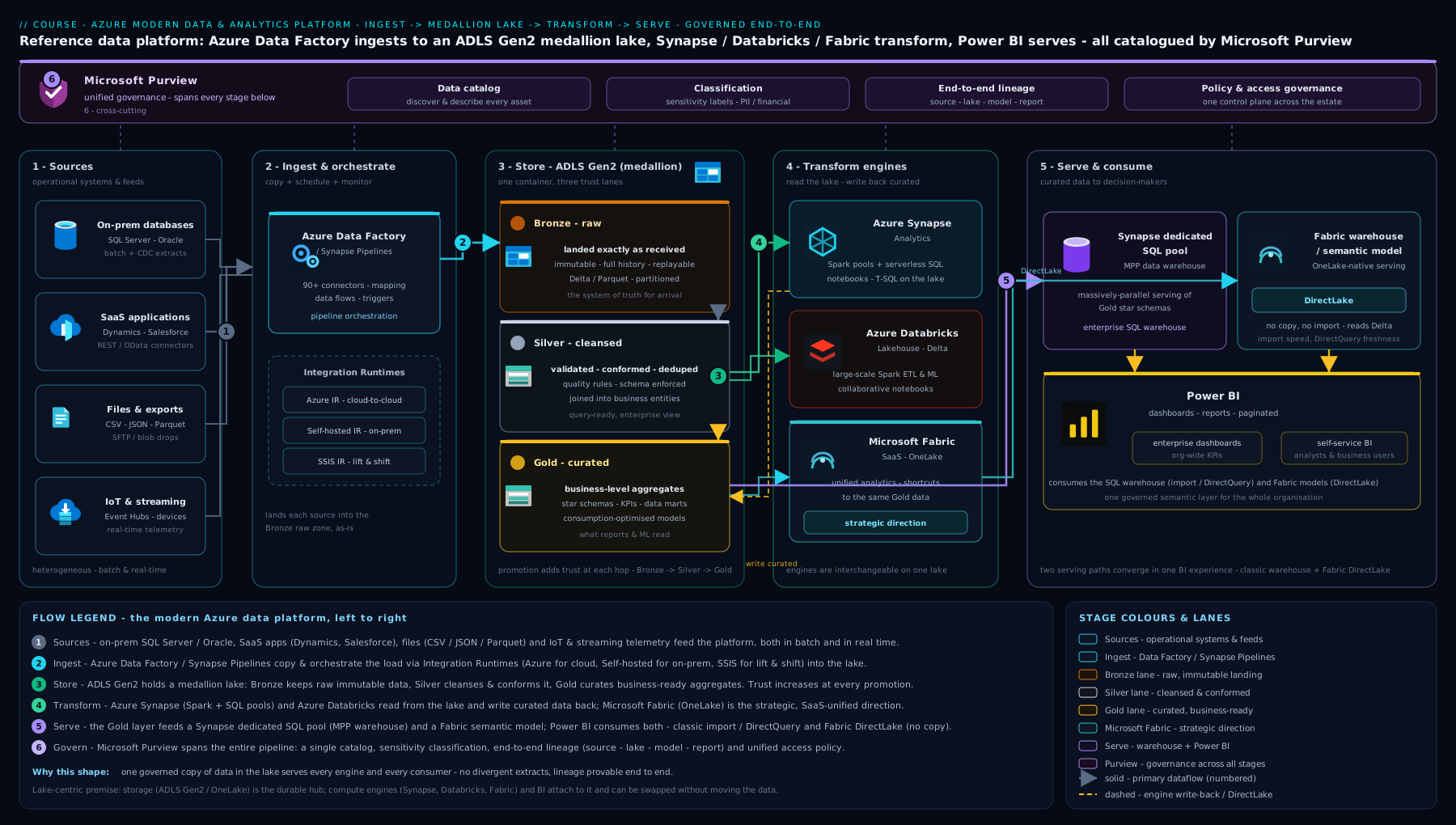
The diagram traces a record’s whole journey: sources flow through Data Factory ingestion (with the right integration runtime) into the bronze layer of a Data Lake Gen2 / OneLake medallion, are refined bronze → silver → gold by Spark and SQL engines, then surface through a warehouse and Power BI — with Purview governing and cataloguing everything end to end.
Govern: Microsoft Purview
A platform that moves an organisation’s data is worthless — and dangerous — without governance: knowing what data you have, where it is, who can see it, whether it is sensitive, and where it came from. Microsoft Purview is Azure’s unified data governance and compliance suite, and it spans the whole platform (and beyond Azure).
- Data Map & Catalogue — Purview scans your sources (lake, SQL, Synapse/Fabric, Power BI, even other clouds) to build a searchable catalogue of every asset, so analysts can find trustworthy data instead of re-creating it. This is the cure for the data swamp.
- Classification & sensitivity labels — built-in and custom classifiers automatically detect and tag sensitive data (PII, financial, health, credit-card numbers) and apply sensitivity labels that can drive protection and DLP.
- Data lineage — Purview traces a column’s journey across services — from the source table, through each ADF/Spark/SQL transformation, to the Power BI report — so you can answer “where did this number come from?” and assess the blast radius of a change. (Lineage from ADF/Synapse pipelines flows into Purview automatically.)
- Data Estate Insights & policies — health/governance reporting over the estate, plus access policies that grant data access through Purview centrally.
- Compliance — the broader Purview suite also covers DLP, information protection, insider-risk and records management for the wider Microsoft 365 + data estate.
The architect’s takeaway: wire Purview in from day one. Retrofitting a catalogue and lineage onto a sprawling, ungoverned lake is painful; building governance in from the start keeps the platform trustworthy as it grows. In Fabric, governance is increasingly native and Purview-integrated out of the box.
Hands-on lab: a minimal lake + a Data Factory copy pipeline
We will build the smallest meaningful slice of the platform with the az CLI: a Data Lake Gen2 account (the store), a Data Factory (the ingest engine), and a Copy pipeline that lands a public sample file into a bronze container. It is essentially free (a few KB of storage and one tiny pipeline run) and we clean up at the end.
Prerequisites: an Azure subscription and Cloud Shell (or local az). Ensure the Data Factory CLI extension is present:
az extension add --name datafactory --upgrade
1. Set variables and create a resource group.
RG=rg-dataplatform-lab
LOC=centralindia
SA=lakedemo$RANDOM           # storage account names must be globally unique, lowercase
ADF=adf-dataplatform-$RANDOM

az group create --name $RG --location $LOC
2. Create the Data Lake Gen2 account (hierarchical namespace ON) and the medallion containers.
az storage account create \
  --name $SA --resource-group $RG --location $LOC \
  --sku Standard_LRS --kind StorageV2 \
  --hierarchical-namespace true            # <-- this is what makes it a Data Lake

# create bronze / silver / gold filesystems (containers)
for layer in bronze silver gold; do
  az storage fs create --name $layer --account-name $SA --auth-mode login
done
--hierarchical-namespace true is the single setting that turns a storage account into ADLS Gen2. Expected: three filesystems listed by az storage fs list --account-name $SA --auth-mode login -o table.
3. Create the Data Factory.
az datafactory create --resource-group $RG --factory-name $ADF --location $LOC
4. Author the linked service, datasets and a Copy pipeline. ADF objects are JSON. We copy a public sample CSV (an HTTP source) into the bronze container — a tiny end-to-end ingest.
# Linked service -> our lake (managed identity auth)
SA_DFS="https://$SA.dfs.core.windows.net/"
az datafactory linked-service create -g $RG --factory-name $ADF --name lsLake --properties "{
  \"type\": \"AzureBlobFS\",
  \"typeProperties\": { \"url\": \"$SA_DFS\" }
}"

# Grant the factory's managed identity write access to the lake
ADF_MI=$(az datafactory show -g $RG -n $ADF --query identity.principalId -o tsv)
SA_ID=$(az storage account show -g $RG -n $SA --query id -o tsv)
az role assignment create --assignee $ADF_MI \
  --role "Storage Blob Data Contributor" --scope $SA_ID

# Linked service -> public HTTP source
az datafactory linked-service create -g $RG --factory-name $ADF --name lsHttp --properties '{
  "type": "HttpServer",
  "typeProperties": { "url": "https://raw.githubusercontent.com/", "enableServerCertificateValidation": true, "authenticationType": "Anonymous" }
}'
Authoring full dataset + pipeline JSON is verbose on the CLI; in practice you would use the Data Factory Studio visual authoring (Author → new pipeline → drag a Copy data activity, pick source = HTTP dataset, sink = the
bronzefilesystem, then Debug to run). The CLI above provisions the linked services and identity; finish the Copy activity in Studio and click Debug, or import the pipeline JSON viaaz datafactory pipeline create.
5. Validate. In Studio, open Monitor → Pipeline runs and confirm the run Succeeded, then check the file landed:
az storage fs file list --file-system bronze --account-name $SA --auth-mode login -o table
You have now exercised the core loop: ingest (ADF) → store (bronze in the lake). From here, a real platform would add a Spark/SQL job to refine bronze→silver→gold, a serving warehouse, and Power BI — but the orchestration and storage pattern is exactly what you just built.
Cleanup — delete the whole resource group so nothing lingers on the bill:
az group delete --name $RG --yes --no-wait
Cost note: at lab scale this is effectively free — a Data Factory has no standing charge (you pay per activity run, ~₹0.001s of rupees here, and per data-movement DIU-hour), and a few KB in Standard LRS storage is negligible. The expensive parts of a real platform are always-on compute (a dedicated SQL pool, a running Spark cluster, a Fabric capacity) — so the cardinal cost rule is pause/stop compute when idle and prefer serverless/consumption for spiky work.
Common mistakes & troubleshooting
| Symptom | Likely cause | Fix |
|---|---|---|
| ADF Copy from on-prem SQL fails / times out | Using the Azure IR to reach a private source | Install a Self-hosted IR on a machine inside that network and bind the linked service to it |
| Lake has millions of tiny files; queries crawl | “Small-file problem” — many KB-sized files kill Spark/SQL performance | Compact to larger Parquet/Delta files (OPTIMIZE); partition sensibly; avoid one-file-per-row writes |
| Storage account behaves like flat blob, ACLs missing | Hierarchical namespace not enabled at creation | HNS can’t be toggled later — create a new ADLS Gen2 account with HNS on and migrate |
| Pipeline can’t authenticate to storage/SQL | Secrets in JSON, or managed identity lacks a role | Use the factory’s managed identity + Key Vault references; grant Storage Blob Data Contributor/SQL role |
| Power BI report is always stale | Import mode without a scheduled refresh | Schedule dataset refresh, or switch to DirectLake (Fabric) / DirectQuery for live data |
| Dedicated SQL pool bill is huge even when unused | Pool is provisioned and running 24×7 | Pause the dedicated SQL pool when idle; or use serverless for intermittent querying |
| “Data swamp” — nobody trusts the lake | No medallion structure, no catalogue | Adopt bronze/silver/gold; scan with Purview so assets are discoverable with lineage |
| Started a new project on Synapse | Unaware Synapse is superseded | New work belongs in Fabric; reserve Synapse for operating existing estates |
Best practices
- Impose the medallion from day one — bronze (immutable raw), silver (clean), gold (curated). It is the difference between a lake and a swamp.
- Use open table formats — Delta/Parquet for silver and gold, so Spark, SQL, Databricks and Fabric can all read the same one copy of the data.
- Separate storage from compute and pause compute when idle — keep data cheap at rest; pay for transient compute only when running.
- Parameterise and source-control pipelines — Git-backed ADF/Synapse with CI/CD; never hand-edit production pipelines.
- Govern early with Purview — catalogue, classify and trace lineage from the start, not as a retrofit.
- Prefer ELT over ETL on the lake — land raw, then transform inside the platform with its scalable compute.
- Pick the engine for the job — serverless SQL for ad-hoc, Spark for big/ML transforms, a warehouse for BI serving; don’t force one engine to do everything.
- For new builds, default to Fabric; bring Databricks where heavy Spark/ML or multi-cloud demands it; migrate Synapse over time.
Security notes
A data platform concentrates an organisation’s most sensitive information, so security is non-negotiable:
- Identity over keys. Authenticate pipelines and engines with managed identities and Entra, not storage keys or connection strings in JSON. Store any unavoidable secrets in Key Vault and reference them.
- Least-privilege access. Use Azure RBAC for management-plane control and ADLS POSIX ACLs for fine-grained file/folder data access; scope every grant to the smallest layer. Consider serving sensitive data only through the gold layer with row-level security in Power BI/warehouse.
- Private networking. Put the lake, Synapse/Fabric and databases behind Private Endpoints; use a Self-hosted IR or managed VNet so data movement never traverses the public internet; restrict storage firewalls to known VNets.
- Encryption. Data is encrypted at rest by default (platform keys); use customer-managed keys (CMK) where policy requires, and TLS in transit everywhere.
- Classify and protect. Let Purview find and label PII/financial data, and drive DLP and access policy from those labels.
- Audit everything. Enable diagnostic logging on storage, pipelines and SQL to a Log Analytics workspace; track who accessed what — essential for the next lesson on Zero Trust.
Interview & exam questions
Practise saying these answers out loud — they are the ones that come up.
-
“What is the difference between a data lake and a data warehouse?” A warehouse is structured, relational, schema-on-write storage optimised for SQL analytics on cleaned/modelled data. A lake is cheap object storage holding raw data of any shape, schema-on-read, flexible but unmanaged. A lakehouse (Fabric/Databricks) combines both — lake-cheap open-format storage with warehouse-grade SQL, transactions and governance.
-
“Explain ETL vs ELT.” ETL transforms data before loading it into the target (classic warehouse pattern, transform on separate compute). ELT loads raw data first, then transforms it inside the platform using the platform’s scalable compute (the modern lake pattern). Lakes favour ELT because storage is cheap and the engine (Spark/SQL) is powerful and elastic.
-
“What is an integration runtime, and which type for on-prem data?” The IR is the compute that executes an ADF activity. Azure IR for cloud/public endpoints; Self-hosted IR (installed inside your network, dials outbound to ADF) for on-prem or private sources; Azure-SSIS IR to lift-and-shift existing SSIS packages. On-prem → Self-hosted IR.
-
“Describe the medallion architecture.” Three lake layers of increasing quality: bronze (raw, immutable, as-ingested), silver (cleansed, de-duplicated, conformed, typed), gold (curated business-level aggregates / star schema for serving). Each layer is produced from the previous by a transformation job; it keeps raw history, centralises cleansing, and gives consumers trustworthy data.
-
“Dedicated vs serverless SQL pool — when each?” Dedicated is a provisioned, always-on MPP warehouse (sized in DWUs) — fast and predictable for steady, heavy workloads, but you pay 24×7 (so pause it when idle). Serverless queries lake files on demand and bills per TB scanned with no infrastructure — ideal for ad-hoc exploration and intermittent/light loads.
-
“Synapse, Fabric, or Databricks — how do you choose?” Fabric is Microsoft’s strategic direction — SaaS, unified, best Power BI integration — and the default for new, Microsoft-centric, BI-led platforms. Databricks is the premier Spark/ML/AI lakehouse and the choice for heavy data engineering, data science, or multi-cloud. Synapse is legacy/maintenance — operate existing estates but migrate to Fabric; start nothing new on it. They interoperate over shared Delta tables, so Databricks-for-engineering + Fabric-for-serving is common.
-
“What is OneLake?” Fabric’s single, tenant-wide logical data lake (on ADLS Gen2, open Delta/Parquet) that every Fabric workload reads/writes — one copy of the data for Spark, SQL and Power BI, with shortcuts to reference external/other-cloud data in place without copying.
-
“What is DirectLake in Power BI?” A Fabric storage mode where Power BI reads Delta tables directly from OneLake in memory — giving Import-grade speed with live data and no import refresh or DirectQuery round-trip. It resolves the classic Import-vs-DirectQuery trade-off.
-
“What is Delta Lake and why does it matter?” Parquet files plus a transaction log that adds ACID transactions, time-travel, schema enforcement/evolution and efficient upserts to lake files. It turns a lake into a lakehouse and is the common open format that lets Fabric and Databricks share the exact same data.
-
“What does Microsoft Purview provide?” Unified data governance: an automatically-scanned catalogue of assets (so data is discoverable), classification/sensitivity labelling of sensitive data, end-to-end lineage across services (source → transforms → report), and central access policies/insights — the cure for an ungoverned data swamp.
-
“How do you secure a data platform?” Managed-identity/Entra auth (no keys), least-privilege via RBAC + ADLS ACLs, Private Endpoints/Self-hosted IR for private networking, encryption at rest (CMK where required) and in transit, Purview classification/DLP, and full audit logging — i.e. Zero-Trust applied to data.
-
“What is the small-file problem and how do you fix it?” Many tiny files crush Spark/SQL performance (per-file overhead dominates). Fix by compacting into larger Parquet/Delta files (Delta
OPTIMIZE), sensible partitioning, and avoiding one-file-per-record writes.
Quick check
- Which single storage-account setting turns a plain blob account into a Data Lake Gen2, and can it be changed later?
- You must copy data from an on-prem SQL Server into the lake. Which integration runtime do you use, and why is it firewall-friendly?
- Name the three medallion layers in order and say, in one phrase, what each is for.
- A Power BI report must show live lake data at near-Import speed. Which storage mode, and on which platform?
- For a brand-new, Microsoft-centric, BI-led analytics platform in 2026, which service is the strategic default — and what is the right disposition for an existing Synapse estate?
Answers
- Hierarchical namespace (HNS), enabled at creation. It cannot be toggled on later — you create a new ADLS Gen2 account with HNS on and migrate.
- A Self-hosted Integration Runtime installed inside the on-prem network. It makes an outbound connection to ADF, so no inbound firewall ports need opening.
- Bronze = raw/immutable as-ingested; Silver = cleansed/conformed/trustworthy; Gold = curated business aggregates/star schema for serving. Order: bronze → silver → gold.
- DirectLake mode, on Microsoft Fabric (reads Delta directly from OneLake — Import-grade speed with live data).
- Microsoft Fabric is the strategic default. Keep operating the existing Synapse estate but plan its migration to Fabric; start no new workloads on Synapse.
Exercise
Design (on paper, then sketch the resources/az outline) an end-to-end platform for a small retailer that has: an on-prem SQL Server of orders, a SaaS CRM with a REST API, and a stream of website clickstream events. Requirements: a single trustworthy analytics store, a daily refreshed sales dashboard in Power BI, and PII (customer email) must be discoverable and protected.
Produce: (a) the ingest design — which sources use which integration runtime, and batch vs streaming for each; (b) the lake design — the medallion containers and what lands in bronze/silver/gold; © the transform/serve engine choice with a one-line justification (Fabric? Synapse? Databricks? serverless SQL?); (d) the Power BI storage mode and why; (e) the governance plan — what Purview scans, classifies and traces; and (f) three security controls (identity, networking, access). Bonus: name one place where the small-file problem could bite and how you’d prevent it.
Certification mapping
DP-900 (Azure Data Fundamentals):
- Core data concepts — relational vs non-relational, batch vs streaming, OLTP vs OLAP, ETL/ELT, the analytics workload stages (ingest/store/transform/serve/govern).
- Analytics workloads on Azure — the roles of Data Factory, Synapse, Data Lake Gen2, Microsoft Fabric and Power BI; data ingestion, processing and visualisation concepts.
DP-700 (Fabric Data Engineer Associate):
- Implement and manage an analytics solution — workspaces, OneLake, lakehouse vs warehouse, capacity, and governance/Purview integration.
- Ingest and transform data — pipelines/Dataflows, Spark notebooks, the medallion (bronze/silver/gold), Delta tables, and incremental loads.
- Monitor and optimise — pipeline/query monitoring, the small-file/optimisation problem, and serving via Warehouse/SQL endpoint and DirectLake to Power BI.
(The platform concepts here also underpin DP-203-style data-engineering and AZ-305 “design data storage solutions” scenarios.)
Glossary
- Azure Data Factory (ADF) — cloud data-integration/orchestration (ETL/ELT) service; moves and orchestrates data, doesn’t store it.
- Pipeline / activity / dataset / linked service — the workflow / a step / a typed view of data in a store / a connection to a store or compute.
- Integration runtime (IR) — the compute that runs an activity: Azure (cloud), Self-hosted (on-prem/private), Azure-SSIS (lift-and-shift SSIS).
- Synapse pipelines — the ADF engine embedded inside Azure Synapse (and Fabric Data Factory).
- Data Lake Storage Gen2 (ADLS Gen2) — a storage account with hierarchical namespace (real folders + POSIX ACLs); the lake.
- Hierarchical namespace (HNS) — the setting that turns blob storage into a true file system; set at creation only.
- Medallion (bronze/silver/gold) — lake layering by data quality: raw → cleansed → curated.
- Delta Lake — Parquet + transaction log adding ACID, time-travel, schema enforcement and upserts; the lakehouse table format.
- ETL vs ELT — transform-then-load vs load-then-transform-in-platform.
- Schema-on-write / schema-on-read — structure enforced at write (warehouse) vs imposed at read (lake).
- Lakehouse — lake-cheap open-format storage with warehouse-grade SQL, transactions and governance.
- Synapse Analytics — Microsoft’s previous-generation unified analytics service (dedicated/serverless SQL + Spark pools); now superseded by Fabric.
- Dedicated vs serverless SQL pool — provisioned always-on MPP warehouse (DWU, pause when idle) vs pay-per-TB-scanned on-demand SQL over lake files.
- Microsoft Fabric — Microsoft’s unified SaaS analytics platform and strategic direction; capacity-licensed (F-SKU).
- OneLake — Fabric’s single tenant-wide logical lake (one copy of the data for all engines).
- Shortcut — a virtual reference to external data that appears in OneLake without copying it.
- DirectLake — Power BI mode reading Delta directly from OneLake — Import-speed with live data.
- Azure Databricks — first-party, multi-cloud, best-in-class Spark/ML lakehouse (Delta, Unity Catalog, MLflow, Photon).
- Power BI — Microsoft’s BI/visualisation tool; storage modes Import / DirectQuery / DirectLake; semantic model, report, RLS.
- Star schema / fact / dimension — the BI data model: measures (fact) surrounded by descriptive context (dimensions).
- Microsoft Purview — unified data governance: catalogue, classification/sensitivity labels, lineage, access policies.
- Small-file problem — many tiny files degrading Spark/SQL performance; fixed by compaction (
OPTIMIZE) and partitioning.
Next steps
- Continue the course with Azure Zero-Trust & the multi-layer security model — the data platform you just designed holds an organisation’s most sensitive information, so securing it across every layer (identity, network, data, monitoring) is the natural next step.
- Revisit the storage foundation the lake is built on in the Azure Storage accounts deep dive — Data Lake Gen2 is the hierarchical-namespace feature of a storage account.
- See how streaming sources feed the platform in Event Hubs, Kafka & capture — the real-time complement to batch ingestion with Data Factory.