Most cloud workloads start with a request from a browser. The Internet of Things inverts that: the workload starts with a thing — a temperature sensor on a vaccine fridge, a vibration probe on a pump, a GPS tracker in a delivery van — that has no keyboard, no human watching it, intermittent connectivity, a tiny budget for power and bandwidth, and a working life measured in years. There may be ten of these, or ten million. They need to be identified so the cloud knows which fridge is talking, trusted so a counterfeit device cannot poison your data, onboarded without a technician typing secrets into each one on a factory floor, commanded so the cloud can push a setpoint or a firmware update, and understood as part of a larger system — this pump belongs to that production line, which sits in that factory.
Azure’s IoT platform is the set of services that solves exactly those problems. At its centre sits Azure IoT Hub, the bidirectional message broker and device registry. Around it are the Device Provisioning Service (DPS) for zero-touch onboarding at scale, Azure IoT Edge for running cloud logic on the device when the link is slow or absent, a telemetry pipeline (message routing into Event Hubs, Stream Analytics, Azure Data Explorer and storage) that turns a firehose of readings into insight, and Azure Digital Twins for modelling the real-world environment your devices live in. This lesson teaches all of them from first principles, then ties them together into a reference architecture you could actually propose. It is written to the awareness depth of the (now retired) AZ-220: Azure IoT Developer Specialty exam — broad enough to design and reason about an IoT solution, with the load-bearing concepts explained in full.
Learning objectives
By the end of this lesson you can:
- Explain what IoT Hub is and use its four core capabilities — device identity, device twins, direct methods / cloud-to-device messages, and message routing — and pick a hub tier and unit sensibly.
- Describe the Device Provisioning Service, the three attestation mechanisms (X.509, TPM, symmetric key), and how enrolment groups deliver true zero-touch onboarding.
- Lay out an Azure IoT Edge deployment — the runtime, modules, the module twin, and how Edge keeps working offline and acts as a gateway for downstream devices.
- Design a telemetry pipeline: route device-to-cloud messages by query to Event Hubs, Service Bus, Storage and Event Grid, then process with Stream Analytics and store in Azure Data Explorer.
- Explain Azure Digital Twins — authoring models in DTDL, building a twin graph, and keeping twins live from device telemetry.
- Choose the right device security primitives — X.509 certificates, TPM/HSM, per-device symmetric keys — and apply IoT security best practice.
Prerequisites & where this fits
You should be comfortable with core Azure concepts — resource groups, regions, RBAC, managed identity — and the messaging building blocks from the Event Hubs deep-dive and the Event Grid MQTT lesson, since IoT Hub is built on Event Hubs and shares an MQTT story with Event Grid. No physical hardware is needed: the lab uses a free-tier IoT Hub (F1) and a simulated device. This is the IoT module of the Azure Zero-to-Hero course — an intermediate, breadth-first tour that gives you the mental model and vocabulary to go deeper into any one service afterwards.
Core concepts: the shape of an IoT solution
Before the services, fix the vocabulary. Every Azure IoT design is built from the same primitives, and interviewers probe whether you can keep them straight.
| Term | What it means |
|---|---|
| Device | A physical (or simulated) thing that sends telemetry and receives commands. Has a unique device ID and credentials. |
| Telemetry / device-to-cloud (D2C) | The stream of readings a device emits (temperature, location, status). High volume, fire-and-forget. |
| Cloud-to-device (C2D) | Messages or commands the cloud sends to a device (a setpoint, a config change). |
| Device twin | A JSON document in the cloud that mirrors a device’s metadata, desired configuration and reported state. The device need not be online to read/update it. |
| Direct method | A request/response call from cloud to device that runs immediately and returns a result — like an RPC. Requires the device to be connected. |
| Endpoint / protocol | How a device connects: MQTT (the IoT default), AMQP, or HTTPS. MQTT is lightest and supports long-lived connections. |
| Provisioning | The one-time act of giving a device an identity in a specific IoT Hub and the credentials to connect. |
| IoT Edge | The Azure runtime that lets a device run modules (containers) locally — cloud logic at the edge, with store-and-forward when offline. |
| Digital twin | A live software model of a real-world environment (rooms, floors, machines) and the relationships between things — distinct from a device twin. |
The two “twins” trip everyone up, so anchor it now: a device twin is IoT Hub’s per-device JSON state document; a digital twin (Azure Digital Twins) is a node in a graph model of the physical world. A device twin is about one device; a digital twin is about the world the devices observe.
Telemetry vs commands — the two directions
An IoT solution is fundamentally bidirectional, and the two directions have completely different shapes:
| Device → Cloud (telemetry) | Cloud → Device (control) | |
|---|---|---|
| Volume | Very high, continuous | Low, occasional |
| Pattern | Fire-and-forget stream | Twin (async config) · Direct method (sync RPC) · C2D message (queued) |
| Latency need | Throughput matters more than latency | Often needs to be immediate (direct method) |
| Where it lands | Routed to Event Hubs / Storage / processing | Delivered to the specific device |
Keep these separate in your head and most of IoT Hub’s surface area falls into place.
Azure IoT Hub: the centre of gravity
Azure IoT Hub is a managed, cloud-hosted message broker and device registry that sits between your devices and your back end. It is the one service you cannot do without — DPS, Edge and the pipeline all orbit it. It does five things:
- Per-device identity & authentication — every device gets a unique identity in the hub’s identity registry, with its own credentials, so devices can be authenticated and individually revoked.
- Secure bidirectional messaging at scale — millions of devices, billions of messages a day, over MQTT, AMQP or HTTPS, with per-device TLS.
- Device twins — a cloud-side JSON state document per device for configuration and status, queryable across the whole fleet.
- Direct methods & C2D messaging — synchronous RPC-style commands and queued cloud-to-device messages.
- Message routing — declarative rules that fan device messages out to Event Hubs, Service Bus, Storage and Event Grid based on a query.
Device identity and the identity registry
Each device is registered once and receives credentials. IoT Hub supports three credential types, which map onto the same three attestation types DPS uses:
| Credential | How it works | Best for |
|---|---|---|
| Symmetric key | A shared secret (primary + secondary key) per device. Simple. | Dev/test, low-risk devices, software simulators. |
| X.509 certificate | The device proves possession of a private key matching a registered certificate (self-signed thumbprint or CA-signed). | Production at scale; the recommended default. |
| X.509 CA (chain) | The device presents a cert signed by a CA you’ve registered; the hub trusts any device with a valid chain. | Fleets where you issue certs from your own PKI. |
Two keys exist (primary/secondary) precisely so you can rotate credentials with zero downtime: switch devices to the secondary, regenerate the primary, then switch back. A compromised device is disabled by setting its identity’s status to Disabled — it can no longer connect, while the rest of the fleet is untouched. This per-device revocation is the single biggest reason you do not share one key across all devices.
Device twins — configuration without a live connection
A device twin is a JSON document IoT Hub stores for each device, with four sections:
| Section | Written by | Purpose |
|---|---|---|
tags |
Back end (cloud) only | Metadata for organising/querying the fleet (region, customer, firmware channel). Not visible to the device. |
properties.desired |
Back end (cloud) | The configuration the cloud wants — e.g. { "telemetryInterval": 30 }. The device subscribes and applies it. |
properties.reported |
Device | The state the device actually has — e.g. { "telemetryInterval": 30, "firmware": "1.4.2" }. |
properties.connectionState, etc. |
IoT Hub | System-managed metadata (last activity, connection state). |
The elegance is that desired and reported are decoupled in time. The cloud sets desired.telemetryInterval = 60 even if the device is offline; when the device next connects it receives the delta, applies it, and writes it back to reported. Convergence of reported to desired tells you the change took effect. Twins are also queryable with a SQL-like language across the entire fleet — SELECT * FROM devices WHERE properties.reported.firmware != '1.4.2' finds every device that hasn’t updated. Twins are for state and configuration, not for commands or high-frequency telemetry (there are size limits — 8 KB per section, 32 KB total).
Direct methods vs C2D messages — two ways to talk to a device
Both send something to a device, but they are not interchangeable:
| Direct method | Cloud-to-device (C2D) message | Desired property (twin) | |
|---|---|---|---|
| Pattern | Synchronous request/response (RPC) | Asynchronous, queued | Asynchronous config sync |
| Device must be online? | Yes (fails fast if not) | No — queued up to TTL (default 1 h, max 48 h) | No — applied on next connect |
| Result returned? | Yes, with status + payload | No (delivery ack only) | Convergence via reported property |
| Use for | “Reboot now and tell me it worked” | “Here’s a message to process when you can” | “From now on, sample every 30 s” |
The rule of thumb: direct method for an immediate, acknowledged command; desired property for durable configuration that should persist and converge; C2D message for queued one-off payloads to a possibly-offline device.
IoT Hub tiers and units
Choosing a tier is a real exam and design question. There are three editions plus a free tier:
| Tier | Messages/day per unit | Key capabilities | When |
|---|---|---|---|
| Free (F1) | 8,000 | Full features, 1 unit only, no SLA | Learning, the lab below |
| Basic (B1/B2/B3) | 400k / 6M / 300M | D2C only — no twins, no direct methods, no Edge, no C2D | Telemetry-only fleets with no control plane |
| Standard (S1/S2/S3) | 400k / 6M / 300M | Everything — twins, methods, C2D, IoT Edge, message routing | Almost all real solutions |
You scale horizontally by adding units of a tier and vertically by moving up a SKU (S1→S2→S3) for higher per-unit throughput. The classic trap: Basic looks cheaper but has no twins, no direct methods, no IoT Edge and no cloud-to-device — if you need any control plane at all, you need Standard. Daily message quota is counted in 4 KB blocks (an 8 KB message counts as two), so payload size directly affects how many “messages” you consume.
One IoT Hub has an Event Hubs-compatible built-in endpoint; that is how downstream consumers read the telemetry stream, and it’s why understanding Event Hubs partitions and consumer groups pays off directly here.
Device Provisioning Service: zero-touch onboarding
Registering ten devices by hand is fine. Registering a million that roll off a production line — each needing the right hub, the right initial twin, and credentials — is impossible manually, and you don’t want a factory worker handling secrets. The IoT Hub Device Provisioning Service (DPS) solves this: it is a global helper that assigns each device to the correct IoT Hub and registers it automatically, the first time the device powers on, with no per-device cloud configuration.
The flow is:
- The device is manufactured with credentials (a cert or TPM key) and one piece of shared knowledge: the DPS global endpoint and an ID Scope.
- On first boot the device contacts DPS (not a hub) and presents its credential for attestation.
- DPS verifies the attestation, applies an allocation policy, and provisions the device into the chosen IoT Hub, optionally seeding its initial device twin.
- DPS returns the assigned hub’s hostname; the device caches it and connects to that hub from then on, contacting DPS again only if it must be re-provisioned.
Attestation: how DPS trusts a device
DPS supports the same three mechanisms as IoT Hub identity, and the choice is a security decision:
| Attestation | How the device proves itself | Hardware root of trust? | Use |
|---|---|---|---|
| X.509 certificate | Presents a cert (individual, or signed by a registered CA / intermediate) | If the private key lives in an HSM, yes | Production fleets; pairs with enrolment groups |
| TPM | Proves possession of the Endorsement Key (EK) baked into a Trusted Platform Module | Yes — strongest | High-assurance devices with a TPM/HSM |
| Symmetric key | A shared secret (often derived per-device from a group key) | No | Simpler devices, dev/test, constrained hardware |
Enrolments: individual vs group
DPS provisions based on enrolments you configure once:
- An individual enrolment targets a single device by its specific credential — useful for a handful of known devices.
- An enrolment group trusts any device whose credential chains up to a registered CA certificate (X.509) or shares a group symmetric key. This is what makes DPS scale: you register the CA once, and every device your factory ever produces with a cert from that CA is provisioned automatically — you never touch the cloud per device.
Allocation policies
When a device shows up, DPS decides which hub via an allocation policy:
| Policy | Behaviour |
|---|---|
| Lowest latency | Assign to the linked hub geographically nearest the device. |
| Evenly weighted distribution | Spread devices across linked hubs (default with multiple hubs). |
| Static configuration | Always a specific hub. |
| Custom (webhook / Azure Function) | Your own logic — e.g. route by customer, region or device model. |
DPS also enables re-provisioning (move devices between hubs for migration, load-balancing or geo-relocation) and disenrolment (block a device permanently). The net effect: devices are built once and “just work,” and you retain central control over where each one lands and whether it’s allowed at all.
Azure IoT Edge: cloud logic on the device
A reliable cloud assumes a reliable network. The edge often has neither — a ship at sea, a remote pumping station, a factory cell that must keep running through an internet outage, or a site where shipping every raw reading to the cloud is too slow or too expensive. Azure IoT Edge moves cloud workloads onto the device: it runs your logic locally as containers, keeps working offline, and can act as a gateway for other devices.
The IoT Edge runtime and modules
An IoT Edge device runs the IoT Edge runtime, which has two system components:
edgeAgent— instantiates and monitors the modules described in a deployment manifest, restarting them if they fail and reporting health back to IoT Hub.edgeHub— a local message broker that mirrors IoT Hub’s behaviour at the edge: modules and downstream devices talk to it exactly as they would to the cloud, and it stores-and-forwards messages when the cloud link is down.
Your workloads are modules — Docker/OCI containers, pulled from a container registry (typically Azure Container Registry). A module can be your own code (filter, aggregate, run an ML model), a packaged Azure service that runs at the edge (Stream Analytics on Edge, Azure Functions, SQL Edge, Azure Blob Storage on IoT Edge, Azure Machine Learning models), or a protocol translator. Modules are wired together with routes declared in the deployment manifest, so messages flow sensor module → ML module → upstream ($upstream = the cloud).
| Concept | Cloud equivalent | Notes |
|---|---|---|
| Module | A microservice | A container with its own identity and module twin |
| Module twin | Device twin | Same desired/reported model, per module |
| Deployment manifest | Desired config | JSON listing modules, settings, routes; pushed via IoT Hub |
$upstream |
The cloud | The route target that sends to IoT Hub when connected |
| Routes | Message routing | Wire modules to each other and to the cloud |
Offline operation and gateways
Two capabilities make Edge worth its complexity:
- Offline / store-and-forward. When the cloud link drops,
edgeHubkeeps accepting and buffering messages locally (subject to configured storage limits and TTL) and forwards them when connectivity returns. Modules keep running, twins keep working from cached state, and even provisioning can be cached so a rebooted device doesn’t need the cloud to resume. The site keeps operating; the cloud catches up later. - Gateway / nested edge. Downstream devices that cannot reach IoT Hub directly — because they speak only Modbus/OPC-UA, lack TLS, or sit on an isolated OT network — connect to the Edge device instead. It supports transparent gateway (downstream devices have their own identities and the gateway just relays), translation (a module converts a non-IoT protocol to IoT messages on the device’s behalf), and identity translation patterns. Nested edge (IoT Edge for Industrial IoT / ISA-95 layered networks) chains gateways so only the top tier touches the internet — exactly the segmentation a regulated factory wants.
The architect’s rule: push to the edge the work that must keep running offline, is latency-sensitive, or reduces what you ship upstream (filter/aggregate to cut bandwidth and cost); keep in the cloud the work that needs fleet-wide context, elastic scale or heavy storage.
The telemetry pipeline: from device to insight
A device emitting a reading every few seconds is worthless until that stream becomes a dashboard, an alert, or a trained model. IoT Hub’s message routing is the on-ramp: declarative rules that send device-to-cloud messages — and other event types — to different destinations based on a routing query.
Message routing
A route has three parts: a data source (what kind of message), a routing query (a condition over the message), and an endpoint (where matching messages go). Sources and endpoints:
| Routing source | What it carries |
|---|---|
| Device telemetry messages | The D2C stream |
| Twin change events | A device/module twin was modified |
| Device lifecycle events | A device was created or deleted |
| Device connection state events | A device connected/disconnected |
| Digital twin change events | (IoT Plug and Play) digital-twin updates |
| Routing endpoint | Typical use |
|---|---|
| Built-in (Event Hubs-compatible) | Default sink; read by Stream Analytics, Functions, Spark |
| Event Hubs (custom) | High-throughput streaming into your own hub |
| Service Bus queue / topic | Reliable, ordered command/work distribution |
| Azure Storage (Blob/ADLS Gen2) | Cheap cold storage / data lake landing (Avro or JSON, batched) |
| Event Grid (via IoT integration) | Reactive, event-driven fan-out to many subscribers |
A routing query reads message properties, the message body (if JSON), and twin tags — for example:
# Route only high-temperature alerts to a Service Bus queue
$body.temperature > 70 AND $twin.tags.deviceType = 'fridge'
Messages that match no route can be sent to a fallback route (and you can deactivate the default to drop everything unrouted). The mental model: routing is the splitter that sends hot alerts to a queue, raw telemetry to a lake, and the full stream to real-time analytics — all from the same firehose, with no device-side change.
Processing and storage
Once messages leave IoT Hub, three services do the heavy lifting:
| Service | Role | Sweet spot |
|---|---|---|
| Azure Stream Analytics | SQL-like real-time stream processing over temporal windows (tumbling, hopping, sliding, session) | Continuous aggregation, anomaly detection, alerting in seconds |
| Azure Data Explorer (ADX) | A column-store time-series database queried with KQL; ingests millions of events/sec | Interactive ad-hoc analytics over huge volumes of telemetry history |
| Azure Functions / Logic Apps | Event-driven compute and integration | Custom transforms, calling APIs, lightweight orchestration |
A common shape: route the full stream to the built-in endpoint, have Stream Analytics compute rolling averages and raise anomalies (writing alerts to Service Bus and aggregates to Power BI), and also land raw telemetry in Azure Data Explorer for historical KQL queries and in ADLS Gen2 for cheap long-term retention and ML training. Microsoft Fabric Real-Time Intelligence (which embeds an ADX engine and event streams) is the strategic, SaaS direction for this whole stage. For broader analytics context, see the Data Factory, Synapse & Fabric deep-dive.
Azure Digital Twins: modelling the real world
IoT Hub knows about devices. It does not know that this temperature sensor is in room 204 on floor 2 of the Pune building, served by air handler 7. Azure Digital Twins (ADT) is the service that captures exactly that — a live, graph-based digital model of an entire environment (buildings, factories, energy grids, supply chains) and the relationships between the things in it. It turns a flat list of devices into a queryable model of the physical world.
DTDL: the modelling language
You author models in DTDL (Digital Twins Definition Language), a JSON-LD vocabulary. A model (an Interface) defines a type of thing and declares:
| DTDL element | Purpose |
|---|---|
| Property | State that persists on the twin (e.g. temperature, occupancy) |
| Telemetry | A transient measurement event flowing through (not stored on the twin) |
| Relationship | A typed, directional link to another twin (contains, feeds, servedBy) |
| Component | A reusable sub-interface embedded in a model (e.g. a thermostat component) |
| Command (in IoT Plug and Play models) | A callable operation |
extends |
Inheritance — a ConferenceRoom extends Room |
From these models you instantiate digital twins (specific instances — Room 204, Floor 2) and connect them with relationships to form the twin graph.
The twin graph and live execution
The twin graph is the heart of ADT: nodes are twins, edges are relationships, and you query it with the Azure Digital Twins query language (SQL-like) — for example, “find every temperature sensor in any room on Floor 2 reading above 28 °C.” That single query spans the model: sensor → room → floor, following relationships IoT Hub knows nothing about.
Crucially, ADT is live: it is kept current by device data, and changes propagate through the graph. The standard pattern wires it up with IoT Hub + Azure Functions: device telemetry arrives at IoT Hub, an Event Grid-triggered Function updates the corresponding twin’s properties, and twin change events flow back out (via Event Grid / Event Hubs) to drive downstream twins, analytics or storage. You can compute roll-ups — a floor’s average temperature derived from its rooms’ sensors — and feed history to Azure Data Explorer or Time Series Insights’ successor patterns. The result is a single source of truth about the environment that applications, dashboards (often 3D, via Azure Digital Twins 3D Scenes Studio) and AI can reason over.
The distinction worth memorising for interviews: a device twin (IoT Hub) is one device’s state document; Azure Digital Twins is a graph of the whole environment the devices observe, modelled in DTDL — different scope, different service, different problem.
Device security: identity, attestation and the chain of trust
IoT massively expands the attack surface: physical devices in the field, long lifetimes, weak hardware, and remote networks. Security is not a bolt-on — it is the platform’s foundation, and it follows a chain of trust from silicon to cloud.
| Primitive | What it provides | Notes |
|---|---|---|
| TLS | Encrypted, authenticated transport for every connection | Mandatory; devices validate the hub’s server cert |
| Symmetric key | A per-device shared secret | Simplest; protect at rest; never one key for the whole fleet |
| X.509 certificate | Asymmetric per-device identity (thumbprint or CA-signed) | The production default; supports per-device revocation |
| X.509 CA / PKI | Trust a whole fleet via a registered CA + enrolment group | Issue certs from your own CA; scale onboarding via DPS |
| TPM / HSM | A hardware root of trust — keys generated and held in tamper-resistant silicon, never exported | Strongest; underpins TPM attestation in DPS |
Beyond credentials, the defence-in-depth checklist:
- Per-device identity, always. One credential per device so a single compromise is contained and individually revocable (disable the identity in the hub).
- Hardware root of trust (TPM/HSM) where the threat model warrants it — keys that can’t be extracted defeat cloning.
- Least privilege on the back end. Use Microsoft Entra-based RBAC and managed identities for service-to-service access (hub → storage, Functions → ADT) instead of connection strings and SAS keys.
- Private networking. Lock the hub and downstream resources behind Private Endpoints so management and telemetry traffic never traverse the public internet — see Private Endpoints & Private DNS at scale.
- Microsoft Defender for IoT. Agent-based or agentless threat detection and posture management for IoT/OT fleets — anomalous behaviour, vulnerable firmware, rogue devices.
- Secure the whole lifecycle — secure boot, signed firmware, encrypted OTA updates (Device Update for IoT Hub), and network segmentation (nested edge) so OT devices never face the internet directly.
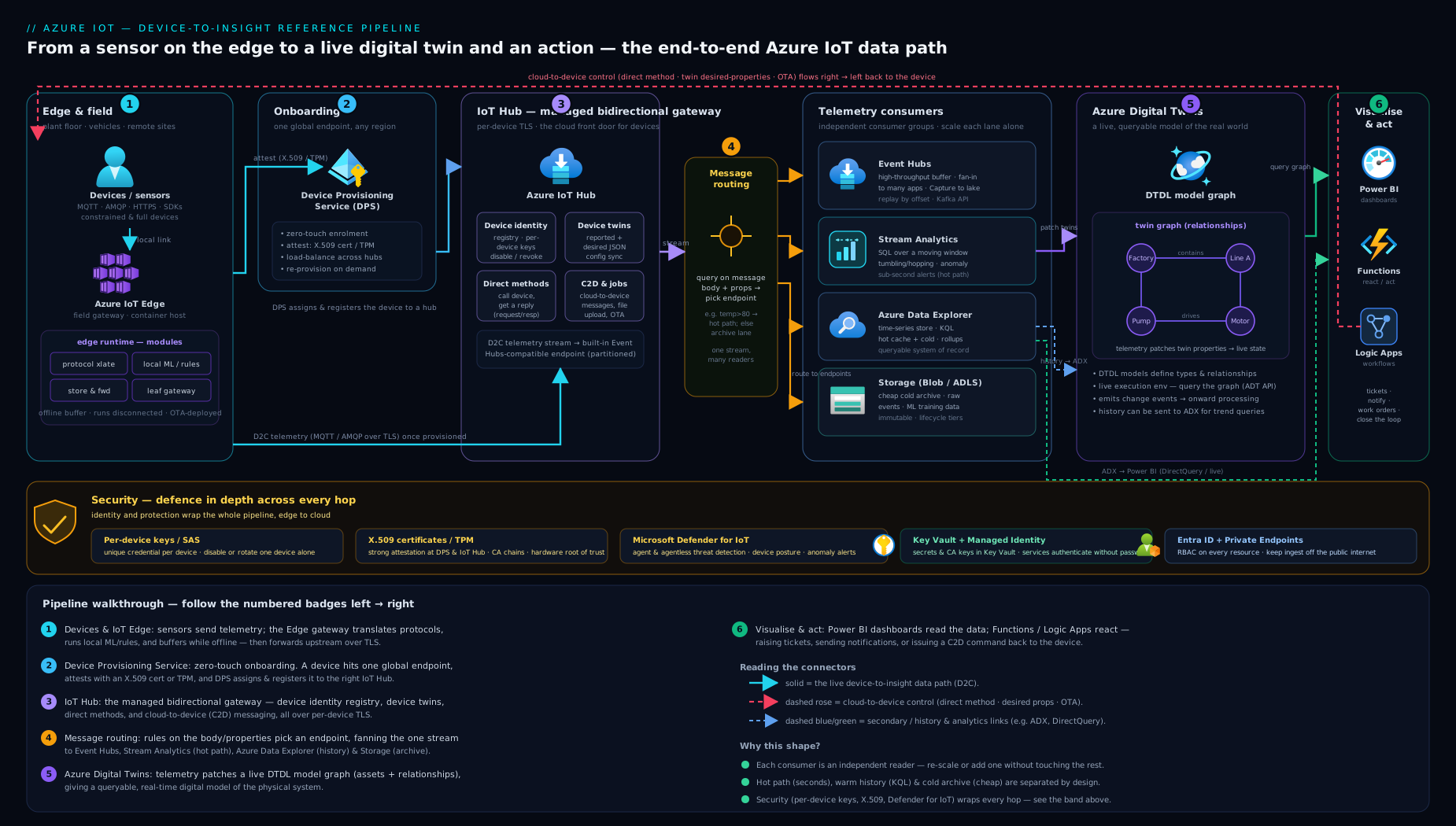
The diagram traces the end-to-end flow: a device attests to DPS on first boot and is provisioned into the right IoT Hub; telemetry flows up (directly, or via an IoT Edge gateway that filters and buffers offline); message routing splits the stream to Event Hubs / Stream Analytics / Data Explorer / Storage; commands flow back down via direct methods and desired twin properties; and an Azure Functions bridge keeps the Azure Digital Twins graph live so applications can reason over the modelled environment.
Hands-on lab: simulate a device and read its telemetry
You will create a free-tier IoT Hub, register a device, send telemetry from a software-simulated device, set a desired twin property, and observe the message stream — all with az and no hardware. Everything fits inside the F1 free tier.
1. Set up and create a free IoT Hub
# Variables
RG=rg-iot-lab
LOC=centralindia
HUB=iothub-kvlab-$RANDOM     # must be globally unique

az group create -n $RG -l $LOC

# Add the IoT extension (one-time)
az extension add --name azure-iot

# Create a FREE (F1) IoT Hub
az iot hub create \
  --name $HUB \
  --resource-group $RG \
  --sku F1 \
  --partition-count 2 \
  --location $LOC
Expected: a JSON object with "provisioningState": "Succeeded" and "sku": { "name": "F1" }. Note: only one F1 hub is allowed per subscription.
2. Register a device
az iot hub device-identity create \
  --hub-name $HUB \
  --device-id sim-fridge-01

# Show its keys (symmetric-key auth, fine for the lab)
az iot hub device-identity connection-string show \
  --hub-name $HUB --device-id sim-fridge-01 -o tsv
Expected: a connection string HostName=...;DeviceId=sim-fridge-01;SharedAccessKey=....
3. Send simulated telemetry
In one terminal, start the built-in device simulator:
az iot device simulate \
  --hub-name $HUB \
  --device-id sim-fridge-01 \
  --data '{"temperature": 5.4, "humidity": 61}' \
  --msg-count 20 --msg-interval 3
Expected: it prints Sending message ... lines as it emits 20 messages.
4. Watch the telemetry arrive (validation)
In a second terminal, monitor IoT Hub’s built-in endpoint:
az iot hub monitor-events --hub-name $HUB --device-id sim-fridge-01
Expected: you see each message echoed as it lands, e.g.:
{
  "event": {
    "origin": "sim-fridge-01",
    "payload": "{\"temperature\": 5.4, \"humidity\": 61}"
  }
}
That round trip — device → IoT Hub → consumer — is the core telemetry path proven end to end.
5. Use the device twin (cloud → device config)
# Cloud sets a DESIRED property
az iot hub device-twin update \
  --hub-name $HUB --device-id sim-fridge-01 \
  --desired '{"telemetryInterval": 30}'

# Read the twin back
az iot hub device-twin show \
  --hub-name $HUB --device-id sim-fridge-01 \
  --query 'properties.desired'
Expected: the desired block now contains "telemetryInterval": 30. A real device would receive this delta on its next connection and converge reported to match.
6. Cleanup
az group delete -n $RG --yes --no-wait
Cost note (INR). The F1 IoT Hub is free (8,000 messages/day, one per subscription) — this lab costs ₹0. If you later move to a Standard S1 hub, it is roughly ₹2,000–2,200 per month per unit (about US$25), so for experiments stay on F1 and delete the resource group when done. The simulator, twin operations and
monitor-eventsconsume free-tier message quota only.
Common mistakes & troubleshooting
| Symptom | Likely cause | Fix |
|---|---|---|
| Need twins/methods but they don’t exist | Hub created as Basic (B1) | Basic has no control plane — recreate as Standard (S1) |
| Direct method returns timeout/404 | Device offline, or method name mismatch | Direct methods need a live connection; use a desired property for offline config |
| Telemetry not reaching downstream service | No custom route, or query never matches | Check routes; remember the fallback route; test the routing query syntax |
| Device can’t connect after a key change | Rotated the primary key devices were using | Rotate via the secondary key first, then regenerate primary |
| Hit message quota mid-day | Large payloads counted in 4 KB blocks | Batch/compress; add units or move up a SKU |
| DPS provisions device to wrong hub | Allocation policy misconfigured | Set the right policy (lowest-latency / static / custom webhook) |
| Edge module won’t start / keeps restarting | Bad image ref, registry creds, or manifest error | Check edgeAgent logs; verify ACR credentials and the deployment manifest |
| Digital twin not updating from telemetry | Ingestion Function not wired to Event Grid | Confirm the IoT Hub → Event Grid/Function → ADT update path and the Function’s RBAC on ADT |
Best practices
- One identity per device; never a shared key. It is the foundation of revocation and auditing.
- Use X.509 + enrolment groups + DPS for anything beyond a handful of devices — zero-touch onboarding with no per-device cloud config.
- Twins for state and config; routing for telemetry. Don’t push high-frequency data through twins (size limits) and don’t use telemetry for durable config.
- Filter and aggregate at the edge to cut bandwidth and cost — ship insight, not every raw byte, when the link is constrained.
- Design the pipeline as fan-out: hot path (Stream Analytics → alerts), warm path (ADX/KQL for interactive history), cold path (ADLS Gen2 for retention/ML).
- Model the environment in Azure Digital Twins, not just devices, when relationships (asset hierarchies, spatial context) matter to the business question.
- Plan for offline first on edge sites — store-and-forward limits, cached provisioning, graceful catch-up.
- Use managed identity and RBAC for service-to-service hops; avoid long-lived connection strings in code.
Security notes
- Hardware root of trust (TPM/HSM) wherever device theft or cloning is in the threat model — keys that never leave silicon defeat impersonation.
- TLS everywhere, devices validating the hub’s certificate; reject downgraded/plaintext connections.
- Private Endpoints to keep hub and downstream telemetry off the public internet; pair with NSGs and DNS as in the private-networking lesson.
- Microsoft Defender for IoT for fleet threat detection, vulnerability assessment and OT visibility.
- Secure the lifecycle: secure boot, signed firmware, encrypted OTA via Device Update for IoT Hub, and prompt identity revocation on compromise.
- Segment OT from IT with nested edge so industrial devices never directly face the internet.
Cost & sizing — the levers that move the bill
- Tier and units. F1 (free, 1 unit) for learning; S1/S2/S3 scale per-unit throughput; add units for more daily messages. Basic is cheaper but lacks the control plane — rarely the right saving.
- Message count & size. Quota is per 4 KB block; large or chatty payloads burn quota fast. Batch and aggregate (often at the edge) to do more with fewer messages.
- Downstream services dominate at scale. Stream Analytics is billed per Streaming Unit, ADX per cluster size/uptime, storage per GB/transactions. The pipeline, not the hub, is usually the bigger line item — right-size SUs and use storage tiers.
- DPS is billed per operation (provisioning is infrequent), so it’s typically negligible.
- Edge runs on your own hardware/VMs — the cloud cost is just the IoT Hub messages it forwards.
Interview & exam questions
- What is the difference between a device twin and an Azure Digital Twin? A device twin is IoT Hub’s per-device JSON state document (tags, desired, reported); Azure Digital Twins is a separate service holding a graph model of an entire environment authored in DTDL — different scope and service.
- When would you use a direct method versus a desired property versus a C2D message? Direct method for an immediate, acknowledged command (device must be online); desired property for durable config that converges; C2D message for a queued payload to a possibly-offline device.
- What does DPS do, and why not just register devices in IoT Hub directly? DPS enables zero-touch provisioning at scale — devices built once with a credential are auto-assigned to the right hub on first boot via an allocation policy, with no per-device cloud config; direct registration doesn’t scale to millions or to a factory line.
- Name the three attestation mechanisms. X.509 certificate, TPM, and symmetric key — used by both IoT Hub identity and DPS; X.509 (with enrolment groups) is the production default, TPM is the strongest.
- Individual enrolment vs enrolment group? Individual targets one device by its credential; a group trusts any device whose cert chains to a registered CA (or shares a group key) — register the CA once, provision the whole fleet automatically.
- Basic vs Standard IoT Hub — what do you lose with Basic? Basic supports D2C only: no device twins, no direct methods, no cloud-to-device, no message routing-to-everything, and no IoT Edge. Need any control plane → Standard.
- How does IoT Edge keep working offline? The
edgeHubruntime stores and forwards messages locally, modules keep running from cached twins, and provisioning can be cached, so the site operates through outages and the cloud catches up on reconnect. - What is an IoT Edge gateway and when do you need one? An Edge device that relays/translates for downstream devices that can’t reach IoT Hub directly (legacy protocols, no TLS, isolated OT networks) — transparent, translation or identity-translation patterns; nested edge layers them for segmentation.
- How does message routing work? Declarative routes = source + query + endpoint; messages are fanned out to Event Hubs, Service Bus, Storage or Event Grid based on properties/body/twin tags, with an optional fallback route.
- Which services process and store the telemetry, and how do they differ? Stream Analytics for SQL-like real-time windowed processing; Azure Data Explorer (KQL) for interactive time-series analytics over huge history; Storage/ADLS for cheap retention; Functions for custom transforms.
- How do you keep an Azure Digital Twins graph live? Typically IoT Hub → Event Grid-triggered Azure Function updates the twin’s properties, and twin change events propagate to downstream twins/analytics; you query the graph with the ADT query language.
- How do you contain a compromised device? Set its identity to Disabled in the hub (per-device revocation) so only that device is cut off; this is why every device needs its own credential, ideally backed by a TPM/HSM.
Quick check
- Which IoT Hub tier supports device twins, direct methods and IoT Edge?
- True or false: a direct method can be delivered to a device that is currently offline.
- What single piece of shared configuration does a device need (besides its credential) to use DPS, and what does DPS return to it?
- Name the three sections of a device twin that store state (not system metadata).
- In DTDL, what element creates a typed link from one twin to another?
Answers
- Standard (S1/S2/S3) — Basic supports device-to-cloud only.
- False — direct methods require a live connection and fail fast; use a desired property for offline configuration.
- The DPS global endpoint + ID Scope; DPS attests the device and returns the assigned IoT Hub’s hostname (optionally seeding the initial twin).
tags,properties.desired, andproperties.reported.- A Relationship (e.g.
contains,feeds,servedBy).
Exercise
Design — on paper — an IoT solution for a cold-chain pharmaceutical distributor with 5,000 refrigerated trucks, each carrying a temperature/humidity/GPS sensor, operating across regions with patchy connectivity. Specify: (1) how trucks are onboarded at the depot with no manual per-device cloud config (which DPS attestation and enrolment type); (2) which IoT Hub tier and why; (3) what runs on an IoT Edge gateway in each truck (and what it buffers when offline); (4) the message routing rules — where do over-temperature alerts go versus the raw stream; (5) the processing/storage services for live alerting, interactive history, and long-term retention; (6) whether and how you’d use Azure Digital Twins (model trucks → routes → distribution centres); and (7) the security posture (credential type, root of trust, network isolation, revocation). Write one or two sentences justifying each choice. (Suggested direction: X.509 + enrolment group via DPS; Standard S1+; an Edge module aggregating readings and store-and-forwarding through dead zones, raising local alerts; route $body.temperature > 8 to Service Bus, full stream to the built-in endpoint and ADLS; Stream Analytics for alerts, ADX/KQL for history, ADLS Gen2 for retention; ADT to model the fleet/route hierarchy for spatial queries; per-device X.509 keys in an HSM, Private Endpoints, Defender for IoT, identity revocation on theft.)
Certification mapping
This lesson maps to the awareness depth of the AZ-220: Microsoft Azure IoT Developer Specialty exam (now retired but still the canonical IoT skill set) — principally set up the IoT solution infrastructure (IoT Hub, DPS, tiers, routing), provision and manage devices (identity, twins, DPS enrolments/attestation, direct methods), implement IoT Edge (runtime, modules, gateways, offline), process and manage data (routing, Stream Analytics, Azure Data Explorer, storage), and secure the solution (X.509/TPM/keys, Defender for IoT, private networking). IoT topics also appear lightly in AZ-305 (designing data and integration on Azure) and the data-engineering exams where streaming pipelines are concerned.
Glossary
- IoT Hub — Azure’s managed message broker and device registry; the centre of an IoT solution.
- Device identity / identity registry — the per-device record (and credentials) IoT Hub uses to authenticate and revoke devices.
- Device twin — a per-device JSON document (tags, desired, reported) for configuration and state, usable while the device is offline.
- Direct method — a synchronous request/response (RPC-style) command from cloud to a connected device.
- Cloud-to-device (C2D) message — an asynchronous, queued message delivered to a device (TTL up to 48 h).
- Message routing — declarative rules (source + query + endpoint) that fan device messages out to Event Hubs, Service Bus, Storage or Event Grid.
- DPS (Device Provisioning Service) — the service that auto-assigns and registers devices into the correct IoT Hub at first boot for zero-touch onboarding.
- Attestation — how a device proves its identity to DPS/IoT Hub: X.509, TPM, or symmetric key.
- Enrolment group — a DPS rule that trusts any device chaining to a registered CA (or sharing a group key), enabling fleet-scale onboarding.
- Allocation policy — DPS logic that chooses which hub a device is assigned to (lowest latency, even distribution, static, custom).
- IoT Edge — the runtime that runs containerised modules on a device, with offline store-and-forward and gateway capabilities.
- Module / module twin — a container workload on IoT Edge and its desired/reported state document.
- Deployment manifest — the JSON that declares an Edge device’s modules, settings and routes.
- Gateway / nested edge — an Edge device relaying/translating for downstream devices; layered for OT/IT segmentation.
- Stream Analytics — SQL-like real-time stream processing over temporal windows.
- Azure Data Explorer (ADX) / KQL — a time-series column store queried with the Kusto Query Language.
- Azure Digital Twins (ADT) — a service for a live, graph-based model of a real-world environment.
- DTDL — Digital Twins Definition Language; the JSON-LD vocabulary for ADT models (properties, telemetry, relationships, components).
- Twin graph — the network of digital-twin instances connected by relationships, queryable with the ADT query language.
- TPM / HSM — tamper-resistant hardware that holds device keys as a root of trust.
- Microsoft Defender for IoT — threat detection and security posture management for IoT/OT fleets.
- Device Update for IoT Hub — the service for secure over-the-air firmware/software updates.
Next steps
You now have the full mental model of the Azure IoT platform — from a device’s first boot through to a live model of the world it lives in. To build on it:
- Next lesson: Azure End-User Computing: AVD, Windows 365 Cloud PC, FSLogix & MSIX App Attach — delivering desktops and apps from Azure.
- Go deeper on the stream: Event Hubs, Kafka, Capture & Stream Analytics throughput scaling — the engine under IoT Hub’s telemetry path.
- Event-driven routing: Event Grid MQTT, event-driven routing & dead-letter — the reactive fan-out side of IoT.
- Land and analyse the data: Data Factory, Synapse & Microsoft Fabric deep-dive.
- Lock it down: Private Endpoints & Private DNS at scale for keeping IoT traffic off the public internet.