You have a working OpenAI curl command and an API key, and now someone has said “but it has to run on Azure.” That sentence changes more than the hostname. On Azure OpenAI — Microsoft’s hosted offering of the OpenAI models, billed through your Azure subscription and governed by Azure identity, networking and policy — you do not call a model by its name. You call a deployment: a named instance of a specific model (say gpt-4o, version 2024-11-20) that you create inside your resource, with your quota and region. The endpoint is your resource’s hostname, the auth is a resource key or a Microsoft Entra ID token, and the URL embeds the deployment name, not the model. Get those four things right — resource, deployment, endpoint, auth — and the first 200 OK comes back in under fifteen minutes. Muddle them and you stare at DeploymentNotFound or 401, wondering why the payload that worked on api.openai.com fails here.
This guide takes you from an empty subscription to a working GPT-4o chat call three ways — a raw REST call with curl, the Python SDK, and the JavaScript SDK — with both the simple api-key header and the production-correct keyless Microsoft Entra ID token. We build the resource and deployment in all three of the portal, the az CLI, and Bicep. Every option that matters — deployment types, the tokens-per-minute (TPM) quota, model versions, the GA 2024-10-21 inference API, the RBAC roles — sits in a scannable table beside the commands, so you can debug the next person’s 404 too.
The mental shift to internalise up front: on Azure OpenAI the deployment name is the unit of everything. It is what goes in the URL, carries the quota, and what RBAC, the playground and your code all reference. The model is what you put into a deployment. Lose that distinction and nothing lines up; hold it and the service clicks into place.
What problem this solves
Teams reach for Azure OpenAI for reasons that have nothing to do with the model weights, which are identical to OpenAI’s. They want an Azure service’s data-handling posture (your prompts are not used to train models; residency is controllable), RBAC and SSO instead of a shared key, private networking so the endpoint never touches the public internet, Azure Policy and cost governance over who deploys what, and one consolidated bill. The capability is the same; the control plane is the reason to be here.
That control plane is what trips up a first deployment. On api.openai.com you authenticate with one bearer key, name the model in the body, and you are done. On Azure none of that holds: there is no “the API key” — keys belong to a resource you create first; the model name in the body is ignored in favour of a deployment name in the URL; the endpoint is your resource’s unique host, not a shared one; and the most common failure is not a bug but a quota of zero tokens-per-minute, or a key-based call against an org that has disabled keys. None of this is hard, but each is a place a newcomer loses an hour.
Who hits it: every developer porting a prototype from OpenAI, every platform team standing up a governed AI landing zone, and anyone whose security team said “no API keys in app settings” and now needs managed-identity auth. The fix is always the same — understand the four-part contract (resource, deployment, endpoint, auth), then express it in code or IaC.
To frame the field before we build, here is the four-part contract and where each piece comes from:
| Piece | What it is | Where it comes from | The mistake it causes |
|---|---|---|---|
| Resource | An Microsoft.CognitiveServices account, kind OpenAI |
You create it (portal / az / Bicep) |
None yet — but no resource, no endpoint or keys |
| Deployment | A named instance of one model + version + capacity | You create it inside the resource | Putting the model name (gpt-4o) in the URL → DeploymentNotFound |
| Endpoint | Your resource’s hostname https://<name>.openai.azure.com |
Generated when the resource is created | Reusing api.openai.com → connection/401 errors |
| Auth | api-key header or Entra ID Authorization: Bearer <token> |
Resource keys, or an RBAC role assignment | Key when keys are disabled, or a token without the role → 401/403 |
Learning objectives
By the end of this article you can:
- Explain the difference between an Azure OpenAI resource, a model, and a deployment, and why the deployment name — not the model name — goes in the request URL.
- Create an Azure OpenAI resource and a GPT-4o deployment three ways: the Azure portal (Microsoft Foundry), the
az cognitiveservicesCLI, and Bicep. - Choose the right deployment type (
Standard,GlobalStandard,DataZoneStandard, provisioned, batch) and set sensible TPM capacity, knowing what each trades off. - Call your deployment from
curl, the Python SDK, and the JavaScript SDK against the GA2024-10-21inference API (and know where the newer/openai/v1/path fits). - Authenticate both ways: the simple
api-keyheader, and keyless Microsoft Entra ID usingDefaultAzureCredentialand the Cognitive Services OpenAI User role. - Read the response shape —
choices,message.content,finish_reason, and theusagetoken counts — and turn on streaming. - Diagnose the first-deployment failures (
DeploymentNotFound,401,403,429, content-filter blocks) from the exact error string, and tear the whole thing down so it costs nothing.
Prerequisites & where this fits
You need an Azure subscription with permission to create resources in a resource group (Contributor on the RG is enough; we note where extra roles matter), the az CLI signed in or Cloud Shell (which has az, python and node preinstalled), and for the SDK steps Python 3.8+ or Node.js 18+. Comfort with HTTP, JSON and a terminal is assumed; no ML background is needed — this is an integration task.
One real prerequisite is access to Azure OpenAI itself. Most subscriptions now have it by default, but some (certain trial/sponsored ones) do not, and you discover this when resource creation fails — that gate, not your command, is usually why.
This sits at the start of the AI/ML on Azure track and underpins every later topic: once you can call a deployment, you add retrieval with Azure AI Search: Vector, Hybrid & Semantic Ranking for RAG, lock the endpoint down with Azure Private Link & Private DNS for PaaS, keep keys out of config with Azure Key Vault: Secrets, Keys & Certificates, and govern the estate as an Azure OpenAI Enterprise Landing Zone. A quick map of who owns what during a first rollout:
| Concern | Lives in | Usually owned by | What it blocks if wrong |
|---|---|---|---|
| Subscription access to Azure OpenAI | Subscription / Microsoft | Cloud platform team | Resource creation outright |
| Resource + region choice | Resource group | You / app team | Endpoint, model availability |
| TPM quota for the model | Subscription, per region | Platform / FinOps | Deployment capacity (429 if zero) |
| RBAC role for keyless auth | Resource IAM | Security / platform | Entra ID calls (403 without the role) |
| Private networking | VNet / Private DNS | Network team | Reachability if keys/public access locked |
| Content filter / responsible AI | Resource (Foundry) | AI governance | Whether prompts/responses are blocked |
Core concepts
Five ideas make every command in this guide obvious.
The resource is a Cognitive Services account, not a special “OpenAI” object. An Azure OpenAI resource is Microsoft.CognitiveServices/accounts with kind: OpenAI and SKU S0 — which is why the CLI verb is az cognitiveservices account create, not az openai. The resource owns the endpoint (https://<name>.openai.azure.com), two keys, the managed-identity options, the network rules, and the content filters.
A deployment binds one model + one version + one capacity. A deployment is a Microsoft.CognitiveServices/accounts/deployments object where you pick the model (gpt-4o), version (2024-11-20), deployment type (the sku.name, e.g. GlobalStandard), and capacity (TPM in thousands), and give it a name — often the same as the model for clarity. That name is the deployment id in the URL. You can run several deployments of one model (a gpt-4o-prod and a gpt-4o-canary) with different quotas.
The URL embeds the deployment; the body does not name the model. A chat call is POST https://<name>.openai.azure.com/openai/deployments/<deployment-id>/chat/completions?api-version=2024-10-21. The model is implied by the deployment id in the path — unlike OpenAI’s API, a model field in the JSON body is not how routing happens. This one difference is behind most “worked on OpenAI, not Azure” confusion.
Auth is one of two modes, and orgs increasingly forbid the easy one. Either put a resource key in the api-key header (trivial, but a long-lived shared secret), or present a Microsoft Entra ID token in Authorization: Bearer <token> for scope https://cognitiveservices.azure.com/.default, where the caller — a user or managed identity — holds the Cognitive Services OpenAI User role. Keyless is production-correct, and many subscriptions disable key auth entirely, so know both.
Capacity is tokens-per-minute, and the default can be zero. A Standard deployment’s throughput is a TPM quota granted per subscription, per region, per model; you assign a deployment some of it as capacity (in thousands — capacity 30 ≈ 30,000 TPM). Requests-per-minute (RPM) is derived from TPM, not set separately. If the quota is exhausted or never granted, every call returns 429 Too Many Requests — the most common “why won’t it work” after the URL mistake.
The vocabulary in one table
Pin these down before the steps; the glossary repeats them for lookup.
| Term | One-line definition | Where it lives | Why it matters |
|---|---|---|---|
| Resource (account) | Microsoft.CognitiveServices account, kind OpenAI, SKU S0 |
Resource group | Owns endpoint, keys, identity, network |
| Endpoint | https://<name>.openai.azure.com |
Generated with the resource | The host every call targets |
| Model | The weights (gpt-4o, gpt-4o-mini) |
Microsoft’s catalogue | What a deployment serves |
| Model version | Dated snapshot (2024-11-20) |
Chosen at deploy time | Pins behaviour/features (e.g. Structured Outputs) |
| Deployment | Named instance of model+version+capacity | Inside the resource | The id in the URL; carries quota |
| Deployment type (SKU) | Standard / GlobalStandard / provisioned / batch |
sku.name on the deployment |
Scope, billing, latency profile |
| TPM capacity | Tokens-per-minute allotment (in thousands) | On the deployment | Throughput; zero → 429 |
api-key |
Resource key in an HTTP header | Resource → Keys and Endpoint | Simple auth (a shared secret) |
| Entra ID token | Bearer token for cognitiveservices.azure.com |
Acquired via a credential | Keyless auth (needs RBAC role) |
api-version |
Query param selecting the API contract | The request URL | GA 2024-10-21; preview dates change shapes |
Resource, model, deployment: getting the relationship right
Why the deployment name, not the model name, is in the URL
On OpenAI’s API you write "model": "gpt-4o" in the body and the platform routes to its shared gpt-4o. Azure inverts this: you first deploy gpt-4o into your resource under a name you choose, then address that name in the path. The body’s model field is irrelevant to routing — Azure already knows the model from the deployment id. Name the deployment gpt-4o and the two match, hiding the distinction; name it chat-prod and it becomes vivid — the URL reads .../deployments/chat-prod/... yet still reaches a GPT-4o model.
This is why DeploymentNotFound is the signature first error: a developer copies an OpenAI snippet, puts gpt-4o in the path expecting it to mean the model, but never created a deployment named gpt-4o. The fix is never in the body — deploy the model and use the deployment’s exact, case-sensitive name in the URL.
Picking the model and version for a first chat app
For a first general-purpose chat or assistant, gpt-4o (multimodal, fast, strong) or the cheaper gpt-4o-mini are the right starting points — both take text and images and support JSON Mode and tool calling. Versions are dated snapshots; pin one explicitly rather than drift. The GPT-4o lineage you choose between:
| Model | Version | Context (input) | Max output | Notable additions | Pick it when |
|---|---|---|---|---|---|
gpt-4o |
2024-05-13 |
128,000 | 4,096 | First GPT-4o; text+image, JSON Mode, parallel tools | You need the original 4o behaviour |
gpt-4o |
2024-08-06 |
128,000 | 16,384 | Adds Structured Outputs; larger output | You want schema-guaranteed JSON |
gpt-4o |
2024-11-20 |
128,000 | 16,384 | Latest 4o; better writing/accuracy | Default for new chat apps |
gpt-4o-mini |
2024-07-18 |
128,000 | 16,384 | Cheap, fast; text+image, JSON Mode, tools | High volume / cost-sensitive |
A note on currency: Microsoft ships newer flagship families over time, and your resource’s model catalogue (az cognitiveservices account list-models or the portal) is the source of truth for what your region can deploy today. The mechanics here — deploy a name, call the path — are identical whichever chat model you pick; GPT-4o is simply the broadly available, well-documented choice to learn on.
Choosing a deployment type
The deployment type (the sku.name on the deployment) decides where data is processed, how you pay, and your latency profile. For learning and most pay-as-you-go workloads, GlobalStandard is the default: highest quota, broadest availability, pay-per-token. Use data-zone or regional types only when compliance pins processing to a geography, and provisioned/batch only at scale. Every type, side by side:
| Deployment type | sku.name |
Data processed | Billing | Use it for |
|---|---|---|---|---|
| Global Standard | GlobalStandard |
Any Azure region | Pay-per-token | General workloads; highest quota (default) |
| Standard (regional) | Standard |
The deployment region | Pay-per-token | Single-region data residency, low volume |
| Data Zone Standard | DataZoneStandard |
Within US or EU data zone | Pay-per-token | EU/US zone compliance, higher quota than regional |
| Global Provisioned | GlobalProvisionedManaged |
Any Azure region | Reserved PTU | Predictable high throughput, low latency variance |
| Regional Provisioned | ProvisionedManaged |
The deployment region | Reserved PTU | Region-pinned + guaranteed throughput |
| Data Zone Provisioned | DataZoneProvisionedManaged |
US or EU data zone | Reserved PTU | Zone compliance + guaranteed throughput |
| Global Batch | GlobalBatch |
Any Azure region | ~50% off, 24-hr async | Large offline jobs (no real-time SLA) |
| Data Zone Batch | DataZoneBatch |
US or EU data zone | ~50% off, 24-hr async | Large offline jobs with zone compliance |
The decision rule as a table — match your constraint to the type:
| If your constraint is… | Choose | Why |
|---|---|---|
| “Just get me running, cheapest to start” | GlobalStandard |
Highest quota, pay-per-token, broadest models |
| “Data must stay in the EU (or US)” | DataZoneStandard (EU/US region) |
Processing pinned to the data zone |
| “Single Azure region, regional residency” | Standard |
Processed in the deployment’s region only |
| “Steady high volume, predictable latency” | GlobalProvisionedManaged |
Reserved PTUs guarantee throughput |
| “Millions of rows overnight, cost-sensitive” | GlobalBatch |
~50% cheaper, async 24-hr turnaround |
The endpoint and authentication contract
The two auth modes, in detail
Once the deployment exists, a call needs the endpoint, the deployment id, an api-version, and auth — the part with two faces. The trade-offs:
| Aspect | api-key header |
Microsoft Entra ID (keyless) |
|---|---|---|
| What you send | api-key: <resource key> |
Authorization: Bearer <token> |
| Secret to manage | A long-lived shared key | None — token minted on demand, short-lived |
| Who can call | Anyone holding the key | A principal with the right RBAC role |
| Token scope | n/a | https://cognitiveservices.azure.com/.default |
| Required role | n/a | Cognitive Services OpenAI User (to infer) |
| Rotation | Manual (two keys to rotate) | Automatic (tokens expire ~1 hr) |
| Works if local auth disabled | No | Yes |
| Best for | Quick local tests | Production, CI, managed identities |
Learn the keyless path properly — it is what production uses and what disableLocalAuth: true forces. The shape is always: acquire a token for the Cognitive Services scope via a credential (your az login identity locally; a managed identity in Azure), and the SDK attaches it as a bearer token. The caller must hold an RBAC role granting the inference data-action.
The RBAC roles that matter
Azure OpenAI has a small set of built-in roles. The two you use constantly are Cognitive Services OpenAI User (call the model and playground; cannot see keys or create deployments) and Cognitive Services Contributor (create the resource and read keys; but, crucially, cannot infer with Entra ID). That asymmetry surprises people — the role that builds the resource is not the role that calls it keyless. The map:
| Role | Call inference (Entra ID) | View/regenerate keys | Create/edit deployments | Create the resource | View quota |
|---|---|---|---|---|---|
| Cognitive Services OpenAI User | ✅ | ❌ | ❌ | ❌ | ❌ |
| Cognitive Services OpenAI Contributor | ✅ | ❌ | ✅ | ❌ | ❌ |
| Cognitive Services Contributor | ❌ | ✅ | ✅ (via API/Foundry) | ✅ | ❌ |
| Cognitive Services Usages Reader | ➖ | ➖ | ➖ | ➖ | ✅ (subscription scope) |
So: an app’s managed identity that calls GPT-4o needs OpenAI User (not Contributor — it cannot infer); a platform engineer building resources needs Cognitive Services Contributor plus OpenAI Contributor to create deployments; and viewing TPM quota needs Usages Reader assigned at subscription scope, not the resource.
API versions: GA vs preview, and the new /openai/v1/ path
The api-version query parameter selects the contract. For stable chat completions, use the GA 2024-10-21. Preview versions (dated 2025-…-preview) unlock features earlier but can change shapes between releases — fine to experiment with, risky to pin in production. Microsoft also offers a next-generation /openai/v1/ path that mirrors OpenAI’s API style and reduces constant api-version bumps; know it exists, but the 2024-10-21 deployment-path call here is the dependable baseline. The versions you will meet:
api-version |
Status | Use it for |
|---|---|---|
2024-10-21 |
GA (data plane) | Stable chat completions — the baseline this guide uses |
2025-…-preview |
Preview (data plane) | Newest features early; expect shape changes |
2025-06-01 |
GA (control plane) | Resource/deployment management (ARM), not inference |
/openai/v1/ (GA) |
Next-gen data-plane path | OpenAI-style surface; fewer version bumps |
Architecture at a glance
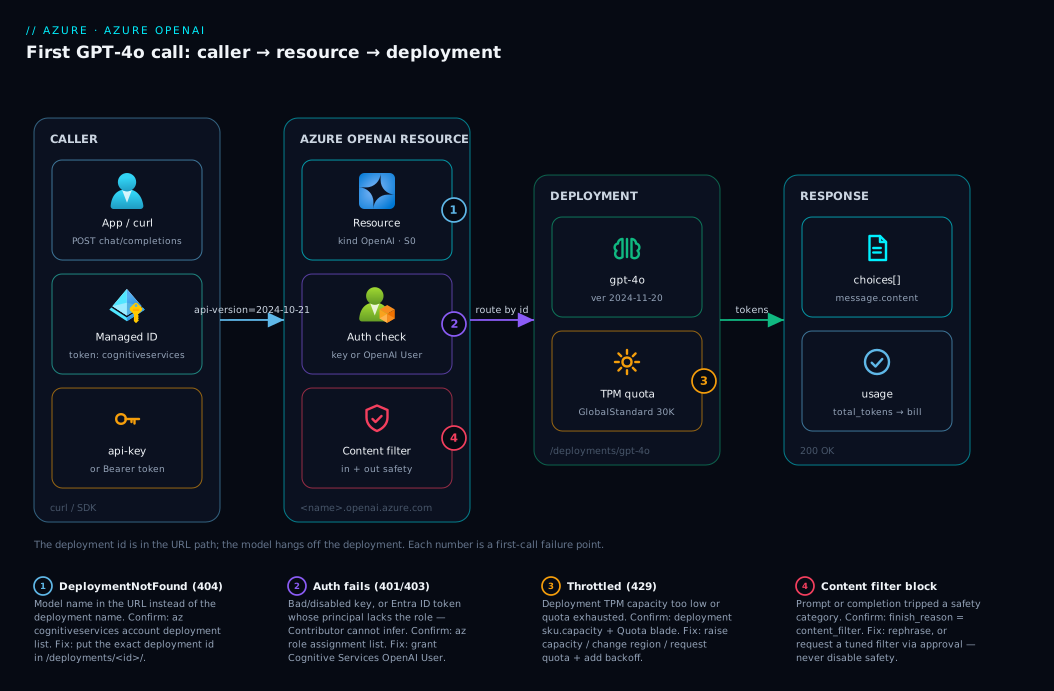
Read the diagram left to right as the life of one chat request. On the left, a caller — your laptop running curl or an app running the SDK — holds one of two credentials: a resource key for the api-key header, or the production path, a short-lived Microsoft Entra ID token minted from its managed identity. The request hits your Azure OpenAI resource at https://<name>.openai.azure.com on the path /openai/deployments/<id>/chat/completions?api-version=2024-10-21. The resource is the control point: it validates the credential (key, or token plus Cognitive Services OpenAI User role), checks the content filter, and looks up the deployment named in the path. That deployment — the box that matters — is bound to a model (gpt-4o), a version, and a slice of TPM quota. Only after auth, filter and quota pass does the model run and stream tokens back, with a usage block tallying what you are billed.
The key thing the picture teaches: the deployment sits inside the resource and is what the URL addresses — the model hangs off the deployment, not the reverse. The numbered badges show where a first call dies: a wrong path (1) never finds the deployment; a bad/disabled key or a token missing the role (2) fails auth at the resource boundary; zero TPM (3) throttles every call; and a blocked prompt (4) is stopped by the content filter before the model sees it. Same path, four failure points — and the error string tells you which.
Real-world scenario
Saral Health, a 60-person telemedicine startup in Bengaluru, runs a patient-triage assistant that summarises symptom intake and drafts a clinician note. The prototype used OpenAI’s public API with a key pasted into the app’s environment. Signing an enterprise hospital customer triggered a security review with two hard requirements: no third-party data egress (patient text stays in Azure under their tenant) and no static API keys in any config. Two engineers had a week.
Day one went sideways. They created the resource in Central India, copied their OpenAI curl, swapped the hostname — and got DeploymentNotFound. An hour later they realised they had never deployed a model, assuming gpt-4o in the body would route as it did on OpenAI. They created a deployment named gpt-4o, and the api-key call worked — but they had just hardcoded a key, the exact thing forbidden.
Day two hit the quota wall. Moved to a containerised App Service API, a load test returned 429 on every third call. The deployment had been created with capacity 1 (≈1,000 TPM), the default offered, and long intake transcripts blew through it instantly. Raising capacity to 30 against their GlobalStandard quota cleared it.
The real work was keyless auth. They enabled a system-assigned managed identity on the App Service, set disableLocalAuth: true to satisfy the “no keys” rule, and found that their instinct — granting the app Cognitive Services Contributor — produced 403 on every call. The fix was the roles-table asymmetry: Contributor builds resources but cannot infer with Entra ID; the app needed Cognitive Services OpenAI User. After assigning that role and switching the SDK to DefaultAzureCredential, the app called GPT-4o with zero secrets in config.
The week ended clean: resource in Central India, one gpt-4o (2024-11-20) GlobalStandard deployment at 30K TPM, local auth disabled, the App Service identity holding Cognitive Services OpenAI User, and — week two — a Private Endpoint removing public network access entirely. Spend was usage-driven, roughly ₹14,000, dominated by output tokens on the summaries. The runbook lesson: “You deploy a name and call the name. Keys are a crutch; the role that builds the resource is not the role that calls it; quota is a number you set, and its default is too small.” All four day-one mistakes map to a badge in the diagram above.
Advantages and disadvantages
The Azure-hosted model — same weights, Azure control plane — is the right call for governed, compliance-bound, identity-centric workloads, and overhead you would skip for a weekend hack. Weigh it honestly:
| Advantages | Disadvantages |
|---|---|
| Enterprise data handling: your prompts/completions are not used to train models; residency is controllable via deployment type | More moving parts than OpenAI’s single key + model name — a steeper first deployment |
| Keyless auth via Entra ID + managed identity — no secrets in config, automatic rotation | The deployment-vs-model distinction trips newcomers (DeploymentNotFound) |
| RBAC and Azure Policy govern who can deploy and call what | Two different roles for building vs calling the resource — easy to mis-assign |
| Private networking (Private Endpoint) keeps the model endpoint off the public internet | Quota (TPM) is per-subscription-per-region and can default low/zero → 429 |
| One Azure bill; cost lands in Cost Management with your other resources | Model/version availability varies by region; the newest models land on Azure slightly later |
| Regional + data-zone options for sovereignty needs | Provisioned throughput (PTUs) for scale adds capacity-planning complexity |
When each side matters: the advantages dominate for anything customer-facing, regulated, or running inside an enterprise tenant — which is most reasons you are on Azure at all. The disadvantages are almost entirely first-time friction (the four day-one mistakes in the scenario) plus the genuine, ongoing need to manage quota as you scale. None are blockers; they are the things this guide exists to pre-empt.
Hands-on lab
This is the centerpiece: from an empty subscription to a streaming GPT-4o chat call, validated at every step, then torn down. Do it once in the portal and once with the az CLI (they are alternatives — pick either to create the resource, both shown), add the Bicep version for repeatability, then call the deployment from curl, Python and JavaScript, with both auth modes. It is pay-as-you-go cheap: a handful of test calls cost a few rupees, and teardown removes everything. Run it in Cloud Shell (Bash) unless noted.
Part A — Create the resource and deployment in the Azure portal
Step A1 — Open Azure OpenAI. In the Azure portal, search Azure OpenAI and select + Create. Expected: the create blade with Basics.
Step A2 — Fill Basics. Choose your subscription, a resource group (create rg-openai-lab), a region (e.g. Central India or East US — regions differ in model availability), a globally meaningful Name (e.g. oai-lab-<yourinitials>), and Pricing tier Standard S0. Expected: validation passes; if the region greys out the model later, switch regions.
Step A3 — Network and finish. On Network, leave All networks for the lab (you would pick a Private Endpoint in production). Skip tags, Review + create, then Create. Expected: deployment completes in 1–2 minutes; Go to resource.
Step A4 — Open Foundry and deploy a model. On the resource, click Go to Azure AI Foundry portal (or Explore/Model deployments → Manage Deployments). In Foundry, go to Deployments → + Deploy model → Deploy base model, pick gpt-4o, and select Confirm. Expected: the deploy dialog showing model, version, and deployment-type fields.
Step A5 — Name the deployment and set capacity. Set Deployment name to gpt-4o (this becomes the URL id), Model version to 2024-11-20, Deployment type to Global Standard, and Tokens per Minute Rate Limit to a small value like 30K. Click Deploy. Expected: the deployment appears with state Succeeded; note the Target URI and that the deployment name is gpt-4o.
Step A6 — Grab the endpoint and key. Back on the resource, open Keys and Endpoint. Expected: an Endpoint like https://oai-lab-xxx.openai.azure.com/ and KEY 1 / KEY 2. Copy the endpoint and KEY 1 for Part C.
Step A7 — Smoke-test in the playground. In Foundry, open Chat playground, confirm your gpt-4o deployment is selected, type “Say hello in one short sentence,” and Send. Expected: a one-line reply. This proves the deployment works before any code.
What you just built, mapped to the four-part contract:
| Step | Portal action | Contract piece it created | Validates |
|---|---|---|---|
| A2–A3 | Create resource (S0, region) | Resource + endpoint | Resource exists, endpoint minted |
| A4–A5 | Deploy gpt-4o named gpt-4o |
Deployment (model+version+TPM) | The URL id and quota |
| A6 | Read Keys and Endpoint | Auth (key) + endpoint host | Credentials for the call |
| A7 | Playground chat | End-to-end path | Model responds at all |
Part B — Same thing with the az CLI (and Bicep)
This is the repeatable path. It assumes az login is done and the cognitiveservices commands are available (they ship with the CLI).
Step B1 — Variables and resource group.
RG=rg-openai-lab
LOC=eastus                      # a region with gpt-4o availability
ACCT=oai-lab-$RANDOM            # globally-unique resource name
DEP=gpt-4o                      # the deployment id you will call
az group create -n $RG -l $LOC -o table
Step B2 — Create the Azure OpenAI resource. It is a Cognitive Services account, kind OpenAI, SKU S0:
az cognitiveservices account create \
  --name $ACCT --resource-group $RG --location $LOC \
  --kind OpenAI --sku S0 \
  --custom-domain $ACCT \
  --yes -o table
Expected: a JSON/table row with provisioningState: Succeeded. The --custom-domain makes the endpoint https://$ACCT.openai.azure.com.
Step B3 — Confirm the endpoint and that gpt-4o is available here.
az cognitiveservices account show -n $ACCT -g $RG \
  --query "properties.endpoint" -o tsv

# List deployable models in this region; confirm gpt-4o is present
az cognitiveservices account list-models -n $ACCT -g $RG \
  --query "[?contains(name,'gpt-4o')].{model:name, version:version, format:format}" -o table
Expected: the endpoint URL, and a row for gpt-4o. If gpt-4o is absent, your region lacks it — recreate in another region (e.g. swedencentral).
Step B4 — Create the GPT-4o deployment. Bind model + version + type + capacity:
az cognitiveservices account deployment create \
  --name $ACCT --resource-group $RG \
  --deployment-name $DEP \
  --model-name gpt-4o --model-version "2024-11-20" --model-format OpenAI \
  --sku-name GlobalStandard --sku-capacity 30 \
  -o table
Expected: a deployment row, provisioningState: Succeeded, sku.name: GlobalStandard, sku.capacity: 30 (≈30,000 TPM). If you get a quota error, lower --sku-capacity, switch region, or request a quota increase.
Step B5 — Verify the deployment.
az cognitiveservices account deployment list -n $ACCT -g $RG \
  --query "[].{name:name, model:properties.model.name, version:properties.model.version, sku:sku.name, tpm:sku.capacity}" -o table
Expected: one row, name: gpt-4o. That name is your URL id.
Step B6 — The Bicep version (idempotent, review-friendly). Save as openai.bicep:
@description('Azure OpenAI account name (also the endpoint subdomain)')
param accountName string
param location string = resourceGroup().location
@description('Disable api-key auth; require Entra ID (set true for production)')
param disableLocalAuth bool = false

resource account 'Microsoft.CognitiveServices/accounts@2024-10-01' = {
  name: accountName
  location: location
  kind: 'OpenAI'
  sku: { name: 'S0' }
  identity: { type: 'SystemAssigned' }          // for the resource's own MI if needed
  properties: {
    customSubDomainName: accountName             // makes <name>.openai.azure.com
    disableLocalAuth: disableLocalAuth           // true → keys off, Entra ID only
    publicNetworkAccess: 'Enabled'               // 'Disabled' + Private Endpoint in prod
  }
}

resource gpt4o 'Microsoft.CognitiveServices/accounts/deployments@2024-10-01' = {
  parent: account
  name: 'gpt-4o'                                 // the deployment id used in the URL
  sku: { name: 'GlobalStandard', capacity: 30 }  // ≈30,000 TPM
  properties: {
    model: { format: 'OpenAI', name: 'gpt-4o', version: '2024-11-20' }
    versionUpgradeOption: 'OnceNewDefaultVersionAvailable'
  }
}

output endpoint string = account.properties.endpoint
output deploymentName string = gpt4o.name
Deploy and capture the outputs:
az deployment group create -g $RG \
  --template-file openai.bicep \
  --parameters accountName=$ACCT \
  --query "properties.outputs" -o json
Expected: endpoint and deploymentName outputs. Re-running is a no-op if nothing changed — that idempotency is the point of IaC. Set disableLocalAuth=true to do the whole lab keyless from the start.
Part C — Call it with curl (api-key)
Step C1 — Export endpoint, key, deployment.
ENDPOINT=$(az cognitiveservices account show -n $ACCT -g $RG --query "properties.endpoint" -o tsv)
API_KEY=$(az cognitiveservices account keys list -n $ACCT -g $RG --query "key1" -o tsv)
DEP=gpt-4o
API_VERSION=2024-10-21
Step C2 — Make the chat call. The deployment id is in the path; the key is in the api-key header:
curl -sS "${ENDPOINT}openai/deployments/${DEP}/chat/completions?api-version=${API_VERSION}" \
  -H "Content-Type: application/json" \
  -H "api-key: ${API_KEY}" \
  -d '{
        "messages": [
          {"role": "system", "content": "You are a terse assistant."},
          {"role": "user", "content": "Name three Azure regions in India."}
        ],
        "max_tokens": 100,
        "temperature": 0.2
      }'
Expected: a JSON body with choices[0].message.content listing regions (Central India, South India, West India), a finish_reason of stop, and a usage object with prompt_tokens, completion_tokens, total_tokens. That usage block is your bill in miniature.
Step C3 — Read the response shape. The fields you care about:
| Field | Meaning | Watch for |
|---|---|---|
choices[0].message.content |
The model’s reply text | Empty + content_filter → blocked prompt |
choices[0].finish_reason |
Why it stopped | length = hit max_tokens (raise it) |
usage.prompt_tokens |
Tokens you sent | Long context = higher cost |
usage.completion_tokens |
Tokens generated | The pricier half on most models |
usage.total_tokens |
Sum (billed) | Multiply by per-token price for cost |
model |
The serving model+version | Confirms which version answered |
Part D — Call it from Python (api-key, then keyless)
Step D1 — Install the SDK.
pip install openai azure-identity
Step D2 — api-key version. The openai package ships an AzureOpenAI client. Save chat_key.py:
import os
from openai import AzureOpenAI

client = AzureOpenAI(
    azure_endpoint=os.environ["AZURE_OPENAI_ENDPOINT"],   # https://<name>.openai.azure.com/
    api_key=os.environ["AZURE_OPENAI_KEY"],
    api_version="2024-10-21",
)

resp = client.chat.completions.create(
    model="gpt-4o",                                        # the DEPLOYMENT name, not the model
    messages=[
        {"role": "system", "content": "You are a terse assistant."},
        {"role": "user", "content": "Explain a deployment in Azure OpenAI in one sentence."},
    ],
    max_tokens=120,
    temperature=0.2,
)
print(resp.choices[0].message.content)
print("tokens:", resp.usage.total_tokens)
Run it:
export AZURE_OPENAI_ENDPOINT=$ENDPOINT
export AZURE_OPENAI_KEY=$API_KEY
python chat_key.py
Expected: one sentence printed, then a token count. Note the SDK quirk: the model= argument is the deployment name — the Azure client maps it onto the URL path for you.
Step D3 — Keyless (Entra ID) version — the production path. First, grant your own signed-in user the inference role so DefaultAzureCredential works locally:
ACCT_ID=$(az cognitiveservices account show -n $ACCT -g $RG --query id -o tsv)
ME=$(az ad signed-in-user show --query id -o tsv)
az role assignment create --assignee $ME \
  --role "Cognitive Services OpenAI User" \
  --scope $ACCT_ID
Expected: a role-assignment JSON. (Propagation can take a minute.) Now chat_keyless.py:
import os
from openai import AzureOpenAI
from azure.identity import DefaultAzureCredential, get_bearer_token_provider

# Mint Entra ID tokens for the Cognitive Services scope; no key anywhere.
token_provider = get_bearer_token_provider(
    DefaultAzureCredential(),
    "https://cognitiveservices.azure.com/.default",
)

client = AzureOpenAI(
    azure_endpoint=os.environ["AZURE_OPENAI_ENDPOINT"],
    azure_ad_token_provider=token_provider,                # ← instead of api_key
    api_version="2024-10-21",
)

resp = client.chat.completions.create(
    model="gpt-4o",                                        # deployment name
    messages=[{"role": "user", "content": "Say 'keyless works' and nothing else."}],
    max_tokens=20,
)
print(resp.choices[0].message.content)
Run it (note: no key exported):
export AZURE_OPENAI_ENDPOINT=$ENDPOINT
python chat_keyless.py
Expected: keyless works. If you get 403, the role has not propagated yet or you assigned the wrong role (Contributor cannot infer — assign OpenAI User). In Azure, swap DefaultAzureCredential for a managed identity and the same code runs with zero secrets.
Part E — Call it from JavaScript
Step E1 — Install.
npm install openai @azure/identity
Step E2 — Keyless chat.mjs (the recommended path; api-key shown in a comment):
import { AzureOpenAI } from "openai";
import { DefaultAzureCredential, getBearerTokenProvider } from "@azure/identity";

const scope = "https://cognitiveservices.azure.com/.default";
const azureADTokenProvider = getBearerTokenProvider(new DefaultAzureCredential(), scope);

const client = new AzureOpenAI({
  endpoint: process.env.AZURE_OPENAI_ENDPOINT,   // https://<name>.openai.azure.com/
  azureADTokenProvider,                          // keyless; or: apiKey: process.env.AZURE_OPENAI_KEY
  apiVersion: "2024-10-21",
  deployment: "gpt-4o",                           // the deployment id
});

const resp = await client.chat.completions.create({
  messages: [{ role: "user", content: "Reply with a single word: ready." }],
  max_tokens: 10,
});
console.log(resp.choices[0].message.content);
console.log("tokens:", resp.usage.total_tokens);
Run it:
export AZURE_OPENAI_ENDPOINT=$ENDPOINT
node chat.mjs
Expected: ready and a token count.
Part F — Turn on streaming
For chat UX you want tokens as they arrive. In Python, add stream=True and iterate (chat_stream.py):
stream = client.chat.completions.create(
    model="gpt-4o",
    messages=[{"role": "user", "content": "List 5 uses for GPT-4o, one per line."}],
    max_tokens=200,
    stream=True,
)
for chunk in stream:
    if chunk.choices and chunk.choices[0].delta.content:
        print(chunk.choices[0].delta.content, end="", flush=True)
print()
Expected: text printing incrementally rather than all at once. Streaming chunks carry delta.content instead of a full message; the final chunk has the finish_reason.
Validation checklist
You proved the whole contract end to end. The lab steps and what each one demonstrates:
| Step | What you did | What it proves |
|---|---|---|
| A4–A5 / B4 | Deploy gpt-4o named gpt-4o |
The deployment is the URL id; quota is a number you set |
| A7 | Playground chat | Path works before any code |
| C2 | curl with api-key |
The raw HTTP contract (path + header) |
| D2 / E2 | SDK call, model = deployment |
SDK maps deployment → path for you |
| D3 | Keyless with DefaultAzureCredential + OpenAI User |
Production auth: zero secrets, role-gated |
| B6 | Bicep deploy | Repeatable, idempotent IaC |
| F | stream=True |
Token-by-token UX |
Teardown
Delete the resource group to stop all charges and remove the deployment, resource and role assignment scoped to it:
az group delete -n $RG --yes --no-wait
Expected: the command returns immediately; deletion completes in the background. Cost note: pay-as-you-go means you were billed only per token — a dozen tiny test calls are a few rupees. There is no idle/hourly charge for a Standard deployment, but deleting cleans up and prevents accidental future usage.
Common mistakes & troubleshooting
The first-deployment failure modes, as a scannable table, then the detail for the ones that bite hardest. Each is symptom → root cause → confirm → fix.
| # | Symptom | Root cause | Confirm | Fix |
|---|---|---|---|---|
| 1 | 404 DeploymentNotFound |
Model name in URL instead of the deployment name (or wrong case) | az ...deployment list shows the real name |
Use the exact deployment id in the path |
| 2 | 401 Unauthorized (Access denied…api key) |
Wrong/rotated key, or wrong resource’s endpoint | az ...keys list; check endpoint matches resource |
Use the matching key+endpoint, or switch to Entra ID |
| 3 | 401/403 on a keyless call |
Token missing the role, or local auth disabled and you sent a key | az role assignment list --assignee <id> |
Assign Cognitive Services OpenAI User to the caller |
| 4 | 403 though you’re an Owner-ish role |
You hold Contributor, which cannot infer with Entra ID | Check the role; it lacks the inference DataAction | Add Cognitive Services OpenAI User explicitly |
| 5 | 429 Too Many Requests from the first call |
Deployment TPM capacity too low / quota exhausted | Deployment sku.capacity; quota blade |
Raise capacity, switch region, or request quota |
| 6 | 400 content filter / empty content |
Prompt or completion hit the content filter | Response finish_reason: content_filter |
Rephrase; adjust filter (with approval) |
| 7 | model field “ignored”, wrong model answers |
Body model doesn’t route on Azure; the deployment does |
Which deployment id is in the URL | Point the URL at the intended deployment |
| 8 | SDK error: unknown api_version shape |
Mismatched/old preview api-version for the feature |
The api_version string |
Use GA 2024-10-21 (or the right preview) |
| 9 | Could not create resource at step 1 |
Subscription lacks Azure OpenAI access, or region full | Portal error; try another region | Use an enabled subscription/region |
| 10 | finish_reason: length, reply truncated |
max_tokens too small for the answer |
The finish_reason value |
Raise max_tokens (≤ model’s max output) |
| 11 | DefaultAzureCredential fails locally |
Not signed in / no credential in the chain | az account show |
az login; or set a service-principal env credential |
| 12 | Works locally, 403 from App Service |
Managed identity lacks the role (your user had it) | Identity’s role assignments on the resource | Grant the identity OpenAI User, not just your user |
1. 404 DeploymentNotFound — you put the model name in the path expecting OpenAI-style routing, but no deployment by that exact, case-sensitive name exists (or you named it chat-prod and used gpt-4o). Confirm with az cognitiveservices account deployment list -n $ACCT -g $RG -o table; fix by using the deployment name in the path. The body’s model field does not route on Azure — the URL does.
3 & 4. Keyless 401/403 and the Contributor trap — Entra ID auth needs a role with the inference DataAction. OpenAI User has it; Cognitive Services Contributor does not (it builds the resource and reads keys but cannot infer with a token) — the classic mis-assignment. Confirm with az role assignment list --assignee <principalId> --scope <accountId>; fix with az role assignment create --assignee <id> --role "Cognitive Services OpenAI User" --scope <accountId> and wait for propagation.
5. 429 on the very first request — the deployment’s TPM capacity is too small (a default of 1 ≈ 1,000 TPM is easy to exhaust with a long prompt), or the subscription’s quota for that model/region is used up. Check sku.capacity and the Quotas blade (used vs available TPM); fix by raising --sku-capacity, picking a free-quota region, switching to GlobalStandard, or requesting an increase — and add backoff retry regardless.
6. Content filter blocks a prompt or completion — the content filters (hate, sexual, violence, self-harm) flag inputs/outputs, returning a policy error or an empty completion with finish_reason: content_filter. Confirm via that finish_reason or the named category; fix by rephrasing, or for genuine false-positives request a tuned filter through approval — never disable safety for one prompt.
12. Works on your laptop, 403 in Azure — locally DefaultAzureCredential used your user (which has OpenAI User); in Azure it uses the app’s managed identity, which you never granted the role. Confirm the identity’s role assignments on the resource; fix by assigning Cognitive Services OpenAI User to the managed identity, not just your account.
Best practices
- Name deployments deliberately. Use a stable name your code targets (e.g.
gpt-4oorchat) and keep it constant across environments so config is portable; pin the model version explicitly rather than relying on auto-upgrade for production. - Go keyless from the start. Use Entra ID + managed identity with
DefaultAzureCredential; setdisableLocalAuth: trueso keys cannot be used even by accident. It removes the single most-leaked secret class. - Grant the right role, least privilege. Apps that call the model get Cognitive Services OpenAI User — nothing more. Reserve resource creation and key access for platform identities.
- Set capacity to your real load, not the default. Size TPM to measured token throughput; treat a
429as a quota signal, not a code bug, and wire exponential-backoff retry into every client. - Pin
api-versionto the GA2024-10-21for production stability; reserve preview versions for feature spikes and bump them deliberately. - Pass
model= the deployment name in SDKs and remember the URL routes by deployment — never assume the body’smodelselects the model on Azure. - Keep the endpoint private in production. Disable public network access and front the resource with a Private Endpoint so the model host is never internet-reachable.
- Manage resource + deployment as Bicep, reviewed in PRs — the deployment name, version, type and capacity are exactly the things you want under change control.
- Watch the
usageblock and Cost Management. Bill is driven by tokens (output tokens cost more); logtotal_tokensper call and alert on spend anomalies. - Separate deployments by purpose/quota. A
gpt-4ofor interactive chat and agpt-4o-batch(or batch SKU) for bulk jobs isolates throughput and cost, and stops a backfill from starving the UI.
Security notes
- Managed identity over keys. The production posture is no static keys: enable a managed identity, set
disableLocalAuth: true, and authenticate with Entra ID tokens. If you must use keys (a quick test), store them in Key Vault and never in source or plain app settings. - Least-privilege RBAC. Grant Cognitive Services OpenAI User to callers and keep Contributor/key access to a small platform group. Audit assignments — an over-broad role on a model endpoint is a data-exfiltration path.
- Private networking. Set
publicNetworkAccess: 'Disabled'and use a Private Endpoint with Private DNS so the resource is reachable only from your VNet; combine with NSGs and (optionally) a firewall for egress control. - Data handling and residency. Azure OpenAI does not use your prompts/completions to train models; choose a deployment type (
Standard/DataZoneStandard) that pins processing to the geography your compliance requires, and document it. - Keep secrets and PII out of prompts where avoidable, and rely on the built-in content filters for safety; do not disable them to unblock a single request — request a tuned filter through the approval flow instead.
- Log responsibly. If you log requests/responses for debugging, treat that store as sensitive (it contains user content); scrub or restrict it, and never log API keys or full tokens.
- Rotate and monitor. If keys are enabled at all, rotate both keys on a schedule (two keys exist precisely to rotate without downtime), and alert on anomalous call volume or
401/403spikes that suggest credential misuse.
Cost & sizing
A Standard/Global Standard deployment is purely usage-based — no hourly charge for existing. You pay per 1,000 tokens, separately for input (prompt) and output (completion, materially pricier); gpt-4o-mini is several times cheaper than gpt-4o. The levers are which model, tokens per call (prompt length + max_tokens), and call volume. Provisioned (PTU) flips this to a fixed reserved cost — worth it only at steady high volume; Batch is ~50% cheaper for async jobs tolerating a 24-hour turnaround. The cost drivers:
| Cost driver | What you pay for | How to control it | Watch-out |
|---|---|---|---|
| Input (prompt) tokens | Tokens you send, per 1K | Trim context; summarise history; cache | Long RAG context inflates every call |
| Output (completion) tokens | Tokens generated, per 1K (pricier) | Cap max_tokens; ask for concise output |
finish_reason: length = you capped too low or paid the cap |
| Model choice | 4o vs 4o-mini rate | Use gpt-4o-mini where quality allows |
Over-using the flagship for trivial tasks |
| Deployment type | Pay-per-token vs PTU vs batch | Standard to start; PTU only at scale; batch for bulk | PTUs are a fixed monthly commitment |
| Call volume | Number of calls × tokens | Cache, dedupe, batch | A retry storm on 429 multiplies cost |
For sizing: there is no free tier, but the floor is effectively zero — an idle Standard deployment costs nothing, so a learning resource left deployed (without calls) does not bill. A light internal assistant might run ₹3,000–15,000/month depending on traffic and whether it is gpt-4o or gpt-4o-mini; Saral Health’s clinical-summary workload landed near ₹14,000 (output-token-heavy). Right-sizing is mostly prompt hygiene (shorter context, capped output, the smaller model where it suffices) before it is anything architectural. Set a Cost Management budget + alert on the resource so a runaway loop surfaces fast.
Interview & exam questions
1. What goes in the request URL — the model name or the deployment name, and why? The deployment name. The path /openai/deployments/<name>/chat/completions routes by that name; the model is implied by the deployment. A model field in the body does not select the model as it does on OpenAI’s API — which is why DeploymentNotFound is the classic first error.
2. Difference between a resource, a model, and a deployment? The resource is a Microsoft.CognitiveServices account (kind OpenAI, SKU S0) owning the endpoint, keys and network. A model (gpt-4o) is the weights in Microsoft’s catalogue. A deployment is a named instance binding one model + version + capacity inside the resource — the unit you call, carrying the TPM quota.
3. Name the two authentication modes and when to use each. The api-key header (a long-lived shared secret, fine for quick tests) and Microsoft Entra ID bearer tokens (keyless, short-lived, role-gated — production). Keyless is mandatory when disableLocalAuth: true, and needs the Cognitive Services OpenAI User role and a token for scope https://cognitiveservices.azure.com/.default.
4. A Contributor on the resource gets 403 calling the model with a token. Why? Cognitive Services Contributor can build the resource and read keys but cannot infer with Entra ID — it lacks the inference DataAction. Assign Cognitive Services OpenAI User (or OpenAI Contributor) to the caller. The role that builds the resource is not the role that calls it.
5. What unit is quota measured in, and what if it is too low? Tokens-per-minute (TPM), granted per subscription/region/model; a deployment gets some as capacity (in thousands), and RPM derives from it. Too low or exhausted → 429 Too Many Requests (the most common failure after the URL mistake). Raise capacity, change region, or request an increase.
6. Sensible default deployment type for a new pay-as-you-go chat app, and why? GlobalStandard — pay-per-token, highest default quota, broadest model availability, data processed in any Azure region. Choose DataZoneStandard/Standard only when compliance pins a geography, and provisioned/batch only at scale.
7. What is the GA data-plane inference API version, and where does /openai/v1/ fit? 2024-10-21 is the stable data-plane version for chat completions. The next-generation /openai/v1/ path mirrors OpenAI’s API style and reduces frequent api-version bumps. Preview api-version values unlock features earlier but can change shapes.
8. In the SDKs, what do you pass as the model argument? The deployment name, not the model id — the AzureOpenAI client maps it onto the deployment path (the JS client also takes deployment). A frequent point of confusion when porting OpenAI code.
9. How do you call Azure OpenAI with no secrets at all? Enable a managed identity, grant it Cognitive Services OpenAI User on the resource, and use DefaultAzureCredential with a bearer-token provider for the Cognitive Services scope — the SDK mints and attaches Entra ID tokens automatically. Combine with disableLocalAuth: true.
10. What does the usage object tell you, and why care? It reports prompt_tokens, completion_tokens and total_tokens — the exact basis of your bill (output tokens cost more). Logging it per call tracks and forecasts spend; a finish_reason of length warns the answer was truncated by max_tokens.
11. You ported a working OpenAI curl and got DeploymentNotFound. Walk through the fix. The snippet named the model in the body and hit a shared host. On Azure: (a) target your endpoint https://<name>.openai.azure.com, (b) create a deployment of gpt-4o, and © put that deployment’s exact name in the path with ?api-version=2024-10-21. The body’s model field is not how routing works.
12. Standard vs Provisioned vs Batch — billing, one line each. Standard/GlobalStandard: pay-per-token, best-effort latency, bursty workloads. Provisioned (PTU): reserved capacity at fixed cost, guaranteed throughput, steady high volume. Batch: ~50% cheaper for async jobs with a 24-hour turnaround and no real-time SLA.
These map most directly to AI-102 (Azure AI Engineer Associate) — plan and manage an Azure AI solution; implement generative AI solutions with Azure OpenAI — and the fundamentals appear in AI-900. The identity and networking angles (managed identity, RBAC, Private Endpoint) touch AZ-204 and AZ-500. A compact cert map:
| Question theme | Primary cert | Objective area |
|---|---|---|
| Resource/model/deployment, REST/SDK calls | AI-102 | Implement Azure OpenAI solutions |
| Deployment types, TPM quota, versions | AI-102 | Provision & manage Azure OpenAI |
| Keyless auth, managed identity, RBAC | AI-102 / AZ-500 | Secure AI services; manage identity |
| Generative-AI fundamentals on Azure | AI-900 | Generative AI workloads |
| Private networking for the endpoint | AZ-500 / AZ-700 | Secure & connect Azure services |
Quick check
- On Azure OpenAI, you call
POST .../openai/deployments/<X>/chat/completions. Is<X>the model name or the deployment name? - Your keyless call returns
403, yet your account has Contributor on the resource. What role do you actually need? - The first request to a brand-new deployment returns
429. What is the most likely cause and one fix? - In the Python/JS SDK, what value do you pass as the
modelargument? - Name the two authentication modes, and which one still works when
disableLocalAuthistrue.
Answers
- The deployment name — the one you chose when you deployed the model. The model is implied by the deployment; a
modelfield in the body does not route on Azure. - Cognitive Services OpenAI User (or OpenAI Contributor). Plain Contributor can build the resource and read keys but cannot infer with Entra ID — it lacks the inference DataAction.
- The deployment’s TPM capacity is too low / quota exhausted. Fix by raising
--sku-capacitywithin available quota (or switching to a region/GlobalStandardwith free quota, or requesting a quota increase), and add backoff retry. - The deployment name, not the model id. The Azure client maps it onto the URL path (and the JS client can also take
deploymenton the client). - The
api-keyheader and Microsoft Entra ID bearer tokens. Only Entra ID works when local (key) auth is disabled.
Glossary
- Azure OpenAI resource — a
Microsoft.CognitiveServices/accountsresource withkind: OpenAIand SKUS0; owns the endpoint, keys, identity, network rules and content filters. - Endpoint — the resource’s unique host,
https://<name>.openai.azure.com, that every inference call targets. - Model — the weights in Microsoft’s catalogue (e.g.
gpt-4o,gpt-4o-mini); what a deployment serves. - Model version — a dated snapshot of a model (e.g.
2024-11-20) pinning behaviour and feature set. - Deployment — a named instance binding one model + version + capacity inside the resource; its name is the deployment id used in the URL and it carries the TPM quota.
- Deployment type (SKU) —
Standard,GlobalStandard,DataZoneStandard,ProvisionedManaged(and global/data-zone/batch variants) set onsku.name; controls data-processing scope, billing and latency. - TPM (tokens-per-minute) — the throughput quota for a Standard deployment, granted per subscription/region/model and assigned to a deployment as capacity (in thousands); RPM is derived from it.
- PTU (provisioned throughput unit) — the unit of reserved capacity for provisioned deployment types, giving guaranteed throughput at a fixed cost.
api-key— a resource key sent in theapi-keyHTTP header; the simple, shared-secret auth mode.- Microsoft Entra ID auth (keyless) — bearer-token auth for scope
https://cognitiveservices.azure.com/.default, requiring an RBAC role; the production path. DefaultAzureCredential— an SDK credential that resolves an identity from the environment (youraz loginlocally, a managed identity in Azure) to mint Entra ID tokens.- Cognitive Services OpenAI User — the RBAC role granting inference (and playground) access via Entra ID; the role apps need to call the model.
api-version— the query parameter selecting the API contract; GA2024-10-21for data-plane chat completions, with a newer/openai/v1/path available.usage— the response block reportingprompt_tokens,completion_tokensandtotal_tokens— the basis of your bill.- Content filter — Azure OpenAI’s input/output safety system; a blocked request yields a policy error or
finish_reason: content_filter. disableLocalAuth— a resource property that, whentrue, turns off key auth entirely and requires Entra ID.
Next steps
You can now stand up Azure OpenAI and call a GPT-4o deployment three ways with both auth modes. Build outward:
- Next: Azure AI Search: Vector, Hybrid & Semantic Ranking for RAG Indexing — give the model your own data via retrieval-augmented generation.
- Related: Azure OpenAI Enterprise Landing Zone — govern resources, quota and access across many teams.
- Related: Azure Private Link & Private DNS for PaaS — take the model endpoint off the public internet with a Private Endpoint.
- Related: Azure Key Vault: Secrets, Keys & Certificates — manage any remaining secrets and certificates correctly.
- Related: Azure Monitor & Application Insights for Observability — trace latency, token usage and failures on your AI calls.