A regional veterinary clinic chain — twelve sites, one overworked practice manager, and a paper appointment book that someone once left out in the rain — gets a mandate from the new operations director: “I want our front desks to book appointments from one shared system, and I want our website’s booking widget to talk to the same data.” The budget is a rounding error, there is exactly one developer (who has never shipped to a cloud before), and the load is genuinely tiny — a few hundred bookings a day, spiky around 9 a.m. and 5 p.m. and dead at 3 a.m. This is the single most common shape of “we need an API” in the real world, and it is exactly the case serverless was built for. This article walks that one developer through a real, defensible serverless API on Azure: small enough to understand in an afternoon, but built the way it would survive a security review when the clinic chain doubles in size. We will keep it beginner-honest — every piece earns its place — while pointing at the enterprise guardrails you grow into rather than bolting them on prematurely.
The pressures here are gentle versions of the ones every system eventually faces. Cost means the clinic refuses to pay for a server sitting idle at 3 a.m. — they want to pay per request, and ideally pay nothing on a quiet Sunday. Spiky load means the architecture has to absorb the 9 a.m. rush without anyone capacity-planning. Security means a customer’s pet records and contact details are personal data, so secrets cannot live in code and the API cannot be wide open to the internet. And one developer means the operational burden has to be near zero: no OS to patch, no cluster to babysit. Serverless answers all four at once — you write a function, the platform runs it on demand, scales it to zero when idle and out to many instances under load, and bills you per execution. You supply the booking logic; Azure supplies everything under it.
Why not the obvious shortcuts
Three tempting shortcuts will be proposed, and naming why each fails matters because the lone developer will consider all of them at 11 p.m. on a deadline.
A single always-on VM running a web app is the instinct from the on-premises world. It works, but now you own an operating system to patch, a web server to harden, a TLS certificate to renew, and a machine billed 24×7 to serve a workload that is busy four hours a day. For this load it is pure waste and pure liability.
A spreadsheet in the cloud with a shared link is what actually happens if nobody intervenes — and it has no validation, no audit trail, no auth, and one fat-fingered sort destroys the day’s bookings. It is not an API; it is an incident waiting to be filed.
Hard-coding a database connection string into the booking widget’s JavaScript is the shortcut that ends careers. The moment that string ships to a browser, anyone can read the clinic’s entire database. Secrets belong in a vault the client never sees, reached only by trusted server-side code.
Serverless threads the needle. The booking logic lives in small HTTP-triggered functions that exist only while a request is in flight, the data lives in a managed database the public never touches directly, secrets live in a vault, and a gateway sits in front as the one controlled door. You get the validation, auth, and audit trail of a real system with almost none of the operational weight.
Architecture overview
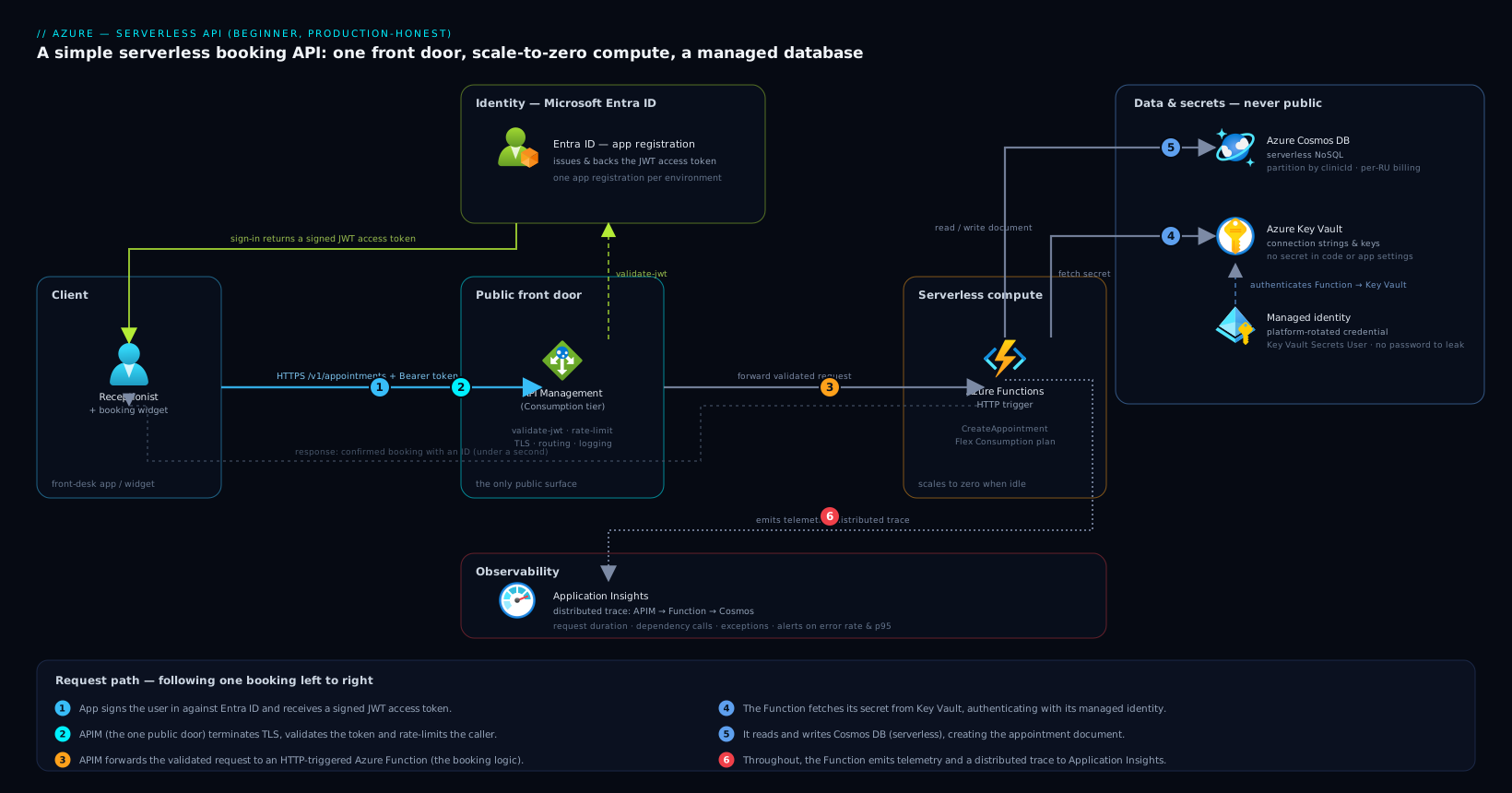
The system is deliberately small. A client — the clinic’s front-desk web app or the public booking widget — calls one public front door, that door routes to serverless compute, the compute reads and writes a managed database, and a few cross-cutting services (secrets, tracing, identity) support the whole thing. Picture a single request flowing left to right and you have understood the architecture.
The one property worth fixing in your mind early is the single front door: clients never call the Functions directly and never touch the database. Everything enters through Azure API Management (APIM), which is the only public surface. That gives you exactly one place to enforce auth, throttling, and logging — and it means the day you need to change how callers authenticate, you change it in one spot instead of in every client.
Request path, following the flow of one booking:
- A receptionist clicks “Book” in the front-desk app. Before any booking call, the app signs the user in against Microsoft Entra ID using an app registration — Entra ID is Azure’s identity service, and the app registration is the record that tells Entra “this application exists, here is what it is allowed to ask for.” The user (or the app itself, for the website widget) gets back a signed JWT access token.
- The app calls the booking endpoint on Azure API Management. APIM is the gateway: it terminates TLS, validates the Entra token (
validate-jwt), rejects anything unauthenticated, applies a rate limit so a buggy client or a script-kiddie cannot hammer the backend, and writes a log line for the request. APIM also hides the messy internal URLs — callers see a clean/v1/appointments, not a Functions hostname. - APIM forwards the validated request to an HTTP-triggered Azure Function. This is the serverless compute: a small piece of code that runs only for the duration of this request and scales automatically. The function holds the actual logic — validate that the requested slot exists, that the vet is free, that the pet belongs to this client.
- The function needs a secret to talk to the database (or a third-party SMS reminder provider). It does not carry that secret in its code or app settings. Instead it fetches it from Azure Key Vault — Azure’s managed secret store — authenticating with its own managed identity (a built-in Azure credential the platform rotates for you, so there is no password to leak).
- The function reads and writes Azure Cosmos DB, Azure’s serverless NoSQL database. It checks the slot, writes the new appointment document, and returns the created booking. Cosmos in serverless mode bills per request unit consumed, which matches the spiky, mostly-idle load perfectly.
- Throughout, the function emits telemetry to Application Insights — request duration, dependency calls to Cosmos, exceptions, and a full distributed trace. The response (a confirmed booking with an ID) flows back through APIM to the receptionist’s screen in well under a second.
That is the whole happy path. Six steps, five Azure services, no servers to manage. Now we make it honest.
Component breakdown
| Component | Service / tool | Role in the system | Beginner-friendly default |
|---|---|---|---|
| Front door / gateway | Azure API Management | The single public entry point: auth, rate limiting, routing, logging | Consumption tier (pay-per-call) for low volume |
| Compute | Azure Functions (HTTP trigger) | The booking logic, run on demand, scaled to zero when idle | Flex Consumption plan; .NET/Node/Python |
| Database | Azure Cosmos DB | Stores appointments, pets, clients as JSON documents | Serverless mode; partition by clinicId |
| Secrets | Azure Key Vault | Holds connection strings, API keys, signing secrets | Reference via managed identity, never app settings |
| Identity | Microsoft Entra ID (app registration) | Issues and backs the tokens APIM validates | One app registration per environment |
| Tracing | Application Insights | Request/dependency tracing, failures, performance | Sampling on; alerts on error rate |
A few of these choices deserve the why, because they are the ones beginners get wrong first.
Why a gateway in front of Functions, not callers hitting Functions directly. A Function does have its own HTTPS URL, and it is tempting to just give that to the web app. Resist it. Without APIM you have no central place to validate tokens, no rate limit (so one runaway loop in the widget can rack up your bill and overwhelm Cosmos), no clean versioned URL, and your internal function names leak to the public. APIM is the one controlled door — the day a partner clinic wants read-only access, you add a product and a subscription key in APIM, touching no code.
Why Cosmos DB in serverless mode, not a relational database. Bookings are naturally document-shaped — an appointment with a nested pet and client object reads and writes as one JSON document, no joins required. More importantly, serverless Cosmos bills per request unit you actually consume, so a quiet Sunday costs almost nothing, which is exactly the cost profile the clinic demanded. A provisioned relational database bills for capacity whether you use it or not. Choose the data model that matches the access pattern and the billing model that matches the load.
Why Key Vault with managed identity, not app settings. You can paste a connection string into a Function’s application settings, and many tutorials do. But that is a plaintext secret one misconfigured export away from a leak, and rotating it means editing every app. Key Vault stores the secret once; the Function authenticates to Key Vault with its managed identity — a credential Azure creates and rotates, with no password anyone can copy. Rotate the database key, and every Function picks up the new value with no redeploy.
A look at the actual code
The beauty of this pattern is how little code it takes. An HTTP-triggered Function in C# that creates an appointment is essentially this shape — note that the secret is injected, never hard-coded:
[Function("CreateAppointment")]
public async Task<HttpResponseData> Run(
    [HttpTrigger(AuthorizationLevel.Anonymous, "post", Route = "v1/appointments")]
    HttpRequestData req)
{
    var booking = await req.ReadFromJsonAsync<Booking>();

    // Validate before you write — the API is the guardian of the data.
    if (booking is null || booking.SlotId is null)
        return req.CreateResponse(HttpStatusCode.BadRequest);

    // _cosmos was built from a Key Vault-referenced connection string,
    // resolved at startup via managed identity — no secret in this file.
    var container = _cosmos.GetContainer("clinic", "appointments");
    booking.Id = Guid.NewGuid().ToString();
    await container.CreateItemAsync(booking, new PartitionKey(booking.ClinicId));

    var res = req.CreateResponse(HttpStatusCode.Created);
    await res.WriteAsJsonAsync(booking);
    return res;
}
Two things to notice. First, the function authorizes at Anonymous on purpose — authentication is enforced one layer up at APIM, so the function trusts that any request reaching it is already validated. (You can also enable Functions’ built-in Entra auth as defense in depth.) Second, the Key Vault reference is wired up in configuration, not code, with a syntax like this in the Function’s settings:
CosmosConnection = @Microsoft.KeyVault(SecretUri=https://kv-clinic-prod.vault.azure.net/secrets/cosmos-conn/)
The Function’s managed identity is granted Key Vault Secrets User, Azure resolves the reference at startup, and the literal secret never appears in your repo, your settings blade, or your logs.
The APIM policy that does the heavy lifting
Most of the security in this design is a few lines of APIM policy, not application code. The inbound policy on the booking API validates the Entra token and rate-limits per caller:
<inbound>
  <validate-jwt header-name="Authorization" failed-validation-httpcode="401">
    <openid-config url="https://login.microsoftonline.com/{tenant-id}/v2.0/.well-known/openid-configuration" />
    <required-claims>
      <claim name="aud"><value>api://clinic-booking</value></claim>
    </required-claims>
  </validate-jwt>
  <rate-limit-by-key calls="60" renewal-period="60"
       counter-key="@(context.Request.IpAddress)" />
</inbound>
That is the entire front-door contract: no valid Entra token, no entry; more than 60 calls a minute from one source, throttled. The Functions behind it can stay focused purely on booking logic.
Enterprise considerations
This is where a beginner architecture earns the word “production.” You do not need all of this on day one — but you should know where each piece plugs in, because the clinic chain will grow.
Security & access. The design is already sound: one public door (APIM), token-based auth via Entra ID, secrets in Key Vault, no database exposed to the internet. As the estate grows you layer on posture and runtime tooling that larger Azure shops run as standard. Wiz (with Wiz Code shifting the same checks left into the repo) performs agentless cloud-security-posture scanning — it watches for the classic drift that bites beginners, such as a Cosmos account accidentally left with public network access, a Key Vault without firewall rules, or an over-broad role assignment, and raises it before an attacker finds it. For anything you do run on VMs — say a legacy reminder system or a virtual appliance like a network firewall in front of the VNet — CrowdStrike Falcon provides runtime threat detection on those hosts. If your workforce identity provider is Okta rather than Entra, the standard play is to federate Okta to Entra over OIDC so staff keep one login while Azure still sees a native Entra token; the app registration consuming the token does not change. And as secrets multiply across many APIs, teams often graduate from Key Vault alone to HashiCorp Vault for centralized, multi-cloud secret management with dynamic, short-lived database credentials — though for one clinic API, Key Vault is the right-sized choice and HashiCorp Vault would be over-engineering.
Cost. This is the headline win, so let us be concrete about the levers.
| Lever | Mechanism | Why it fits this workload |
|---|---|---|
| Scale to zero | Functions on Flex Consumption bill per execution + GB-seconds | The 3 a.m. idle period costs effectively nothing |
| Serverless Cosmos | Billed per request unit consumed, not provisioned capacity | Spiky, low-average load never pays for peak capacity |
| Consumption APIM | Pay-per-call gateway tier | No fixed gateway cost while volume is tiny |
| Sampling in App Insights | Keep a statistical subset of traces | Telemetry stays cheap as request volume climbs |
The trap to avoid: serverless is dramatically cheaper at low and spiky volume, but if this API ever became genuinely high-throughput and steady (millions of calls a day, around the clock), provisioned plans and provisioned-throughput Cosmos become cheaper per request. Watch the App Insights request-count metric, and revisit the plan when steady volume crosses into the millions — not before.
Scalability. Each tier scales on its own with no capacity planning from you. Functions add instances automatically as concurrent requests rise and shed them as load falls. Cosmos in serverless mode handles bursts up to its per-container ceiling; if you outgrow it, you switch the same container to provisioned throughput with autoscale. APIM Consumption scales elastically. The one thing to design correctly up front is the Cosmos partition key — partition by clinicId so each clinic’s bookings spread evenly and one busy site does not create a hot partition. Getting the partition key right early is far cheaper than fixing it after you have a million documents.
Failure modes, and what each one looks like. Name them before they page you.
- Cold starts — after an idle stretch, the first request waits while a Function instance spins up, adding latency to that 9 a.m. first booking. Mitigation: the Flex Consumption plan’s always-ready instances keep a warm baseline, trading a little cost for predictable latency.
- Cosmos 429 (request-unit throttling) — a sudden burst exceeds the serverless RU ceiling and Cosmos starts rejecting with
429 Too Many Requests. Mitigation: the SDK retries with backoff automatically; for sustained load, move to provisioned autoscale. - Key Vault unreachable at startup — if the Function cannot resolve its Key Vault reference (network rule, revoked role), it fails to start and every call 500s. Mitigation: alert on Function startup failures, and never tighten Key Vault network rules without testing the Function’s identity path first.
- A misconfigured app registration — the wrong
audor an expired client secret, and APIM rejects every token with a 401 even though the backend is healthy. Mitigation: an App Insights availability test hitting an authenticated endpoint catches this within minutes of a bad change.
Reliability & DR (RTO/RPO). For a clinic, modest targets are honest and affordable. Cosmos DB’s automatic backups (and optional multi-region replication) protect the booking data — enabling continuous backup gives you point-in-time restore, a near-zero RPO for the data that matters. Functions and APIM configuration live entirely in code and Infrastructure as Code, so the application is rebuildable in minutes by redeploying. A pragmatic target: RTO under an hour, RPO measured in minutes for the booking data, achieved by Cosmos backups plus redeployable infrastructure — no warm standby fleet required, which keeps the bill down.
Observability. Application Insights is non-negotiable even at this size. Turn on the distributed trace so one request shows APIM → Function → Cosmos with timing on each hop — when a receptionist says “booking is slow,” the trace tells you in seconds whether it is a cold start, a slow Cosmos query, or a Key Vault stall. Set an alert on error rate and on p95 latency, and an availability test that books a synthetic appointment every few minutes. For a small shop, App Insights alone is plenty; larger enterprises often forward the same telemetry into Datadog or Dynatrace to correlate this API with dozens of others on one pane of glass and apply AI-driven anomaly detection across the estate — useful at fleet scale, overkill for one API.
Delivery & operations. Ship this with a pipeline from the start — it is a five-minute setup that saves you from “it worked on my laptop.” GitHub Actions (or Jenkins, if your org standardizes on it) builds the Function, runs tests, and deploys, authenticating to Azure via OIDC federation so there is no stored service-principal secret to leak. Define the whole estate — APIM, Functions, Cosmos, Key Vault, the app registration — as code with Terraform, so a second environment (staging) or a thirteenth clinic is a parameter change, not a weekend of clicking in the portal; Ansible earns its keep only if you also run the VM-based pieces (that virtual appliance, a legacy box) and need their OS configured repeatably. Larger platforms layer Argo CD for GitOps-style continuous delivery into Kubernetes — but this serverless API has no cluster, so Argo CD is simply not part of this picture, and adding it would be cargo-cult complexity. Operationally, wire failures into ServiceNow so a sustained error-rate alert opens a ticket the on-call practice-IT contact actually sees, rather than an email that scrolls past. And if the clinic ever needs to teach staff to use the new system, that training content typically lives in a learning platform like Moodle — adjacent to this architecture, not part of it, but worth knowing where it sits. Finally, if this booking API ever serves a high-traffic public website, putting Akamai at the edge for CDN caching of static assets, TLS, and WAF/bot protection shields APIM from junk traffic — a sensible addition once you are public-facing, unnecessary while you are an internal tool.
Explicit tradeoffs
Accept these or pick a different pattern. Serverless trades operational simplicity for a few real costs. Cold starts mean the first request after idle is slower — fine for a booking screen, unacceptable for a hard real-time API, where you would keep instances always-warm or choose a different compute model. Per-execution billing is a gift at low volume and a tax at high steady volume — the very thing that makes this cheap for a clinic would make it expensive for a system serving millions of steady requests, where provisioned compute wins. Debugging is more distributed — a request crosses APIM, a Function, and Cosmos, so you lean on Application Insights traces instead of attaching a debugger to one process; the tracing is what makes this tractable, which is why it is not optional. And the gateway-plus-vault-plus-identity setup is genuinely more moving parts than a single script talking to a database — you accept that overhead because it is what turns a toy into something that survives a security review.
The alternatives, and when they win. If you have one tiny endpoint and no growth plans, a single Function with its own HTTPS URL and built-in Entra auth — skipping APIM entirely — is legitimately simpler, and you add the gateway later when a second consumer appears. If your workload is steady, high-throughput, and around the clock, containers on Azure Container Apps or AKS with provisioned Cosmos throughput will cost less per request than serverless — graduate when your App Insights volume metric says so. And if you genuinely need a relational model with multi-table transactions and joins — invoicing, say, rather than bookings — reach for Azure SQL Database (serverless tier) instead of Cosmos; match the database to the data, not to fashion.
The shape of the win
For the clinic chain, the payoff is not “an API.” It is that on a dead-quiet Sunday the system costs almost nothing, on Monday at 9 a.m. it absorbs the rush without anyone planning capacity, a customer’s pet records never sit in a browser or a public database, and the one developer sleeps because there is no server to patch and Application Insights will page them with a trace if anything breaks. Every piece earned its place: APIM is the one door, Functions are the logic that scales to zero, Cosmos is the right-shaped database with the right-shaped bill, Key Vault keeps the secret out of the code, Entra ID proves who is calling, and App Insights makes the whole thing observable. Start exactly here. This is small enough to build in an afternoon and honest enough to grow into — when the thirteenth clinic opens, you add a row in Terraform, not a new architecture.