The Azure Storage account is the most quietly load-bearing resource in the platform. It is where your blobs, file shares, queues, and tables physically live, and it is the backing store behind Azure Functions, boot diagnostics, Azure Monitor exports, Terraform state, container registries, and a dozen other services that create one on your behalf without telling you. It is also where the most expensive and embarrassing mistakes happen: public blob access left on becomes a data-breach headline; an LRS account in a single datacentre becomes an outage when that datacentre burns; an access key checked into Git becomes a permanent backdoor because nobody rotated it; an Archive blob someone needs right now takes fifteen hours to come back. Almost every Azure security review, cost review, and “where did our data go” incident eventually lands on a storage account and the options that were — or were not — set when it was created.
This is the deep dive that makes the storage account stop being a black box. A storage account is a top-level Azure Resource Manager namespace that gives you a globally unique endpoint (https://<name>.blob.core.windows.net and siblings) and a set of policies — redundancy, performance, access tier, encryption, network access, identity — that apply to everything inside it. You will leave knowing every account kind, every redundancy option and exactly what each survives, all four data services, the access tiers and the economics of Archive rehydration, the complete security model (firewall, private endpoints, access keys and rotation, every SAS type, stored access policies, Entra ID), encryption including CMK and infrastructure encryption, the data-protection suite (soft delete, versioning, change feed, object replication, point-in-time restore, immutable WORM), lifecycle management, and the tools — with working az CLI and Bicep, covering what you choose at creation, what you can change afterwards, and what you are stuck with forever.
Learning objectives
By the end of this lesson you will be able to:
- Choose the correct account kind (general-purpose v2, Premium block-blob / file-share / page-blob) and performance tier (Standard vs Premium) for a workload.
- Explain every redundancy option — LRS, ZRS, GRS, RA-GRS, GZRS, RA-GZRS — in terms of durability, what each survives, read access to the secondary, failover, and cost, and convert between them where allowed.
- Configure the four data services (Blob, Files, Queue, Table) and choose access tiers (Hot / Cool / Cold / Archive), including the rehydration rules and costs.
- Lock a storage account down with the full security model: storage firewall and service/private endpoints, public network access, access-key management and rotation, every SAS type (account, service, user-delegation) with stored access policies, and Entra ID authorization.
- Apply encryption correctly — server-side encryption with Microsoft- or customer-managed keys and infrastructure (double) encryption.
- Turn on the data-protection features — soft delete, versioning, change feed, object replication, point-in-time restore, and immutable WORM — and automate cost with lifecycle management policies.
Prerequisites & where this fits
You should be comfortable creating a resource group and reasoning about regions; if you have not yet seen the portal/CLI basics, start with the Azure portal, CLI & Cloud Shell first steps. You will get more out of the security section if you have met Microsoft Entra ID and role-based access control before — the Entra ID fundamentals lesson is a good primer — and the encryption section is easier if you have seen Azure Key Vault. This lesson sits in the Storage module of the Azure Zero-to-Hero course. It is the foundational storage lesson: the Azure Blob Storage lifecycle, immutability & soft delete deep dive and the Azure Files / NetApp deep dive both assume the account-level concepts you learn here, and managed disks reuse the same redundancy vocabulary.
Core concepts
The account is a namespace and a policy boundary. A storage account does two jobs. First, it gives you a set of service endpoints — Blob, Data Lake (dfs), File, Queue, Table, and (for static websites) web — each at https://<account>.<service>.core.windows.net. The account name must be globally unique across all of Azure, 3–24 characters, lowercase letters and numbers only, because it becomes a DNS label. Second, it is the boundary at which you set redundancy, performance, default access tier, encryption, network rules, and identity: change a setting on the account and it applies to every container, share, queue, and table inside. Some of those settings are changeable later, and some — most importantly the account kind and the performance tier — are effectively fixed at creation, so the create-time choices matter more here than almost anywhere else in Azure.
Containers, shares, queues, tables — and then the data. Inside an account, Blob storage organizes data into containers (flat namespaces of blobs; there are no real folders, only /-delimited names that tools render as folders). Files organizes into file shares (true SMB/NFS shares with directories). Queue storage holds queues of messages; Table storage holds tables of NoSQL entities. You can create all four in a single general-purpose v2 account, though most production designs put blobs in their own account so redundancy, tier, and lifecycle policies can be tuned per workload.
Durability is measured in nines, and replication is how you buy them. Azure quotes durability as “eleven nines” (99.999999999%) for locally redundant storage and up to “sixteen nines” for geo-redundant storage. Those numbers come from keeping multiple synchronous copies of every write. The redundancy option you pick decides how many copies, spread across how many failure domains — racks, availability zones, and regions — and therefore what kind of failure your data survives. This is the single most exam-tested concept in the storage syllabus, and we give it a full section below.
Hot, Cool, Cold, Archive — you pay one way or the other. Blob access tiers let you trade storage price against access price. Hot data is cheap to read and write but expensive to store; Archive data is almost free to store but expensive — and slow — to read. The art is matching the tier to the access pattern, and the lifecycle engine automates the transitions. Tiers apply to block blobs only, and the default tier is set at the account level.
Authorization has three doors, and you should prefer the third. A request to storage can be authorized by a shared access key (the account’s master password), by a shared access signature (SAS) (a scoped, time-limited token), or by Microsoft Entra ID (an identity with an RBAC role). The modern, secure default is Entra ID for the control and data plane and user-delegation SAS when you genuinely need a URL — and disabling shared key access entirely where you can.
Account kinds and performance: every option
The first two choices on the Basics tab — performance and (implicitly) account kind — are the ones you cannot undo, so they come first.
Performance: Standard vs Premium
| Performance | Backing media | Latency | Redundancy options | Billing model | Best for |
|---|---|---|---|---|---|
| Standard | HDD-backed (magnetic) | ms-range | LRS, ZRS, GRS, RA-GRS, GZRS, RA-GZRS | Pay for capacity + transactions | General-purpose: blobs, files, queues, tables, backups, archives — the default |
| Premium | SSD-backed (solid-state) | single-digit ms / sub-ms | LRS and ZRS only (no geo) | Pay for provisioned capacity | Low-latency, high-transaction workloads: chatty blobs, IO-intensive file shares, VHDs |
The two facts to carry out of this table: Premium has no geo-redundant option (you replicate it yourself with object replication or by backing it up), and Premium bills for the capacity you provision, not what you use — a 1 TiB premium file share costs the same whether it holds 1 GiB or 1 TiB. Premium is also not one thing; it is split by the kind of premium account you create.
Account kinds
Modern Azure has effectively five kinds. General-purpose v2 (StorageV2) is the default and the answer for almost everything. The Premium kinds are specializations — each Premium account holds exactly one service type optimized for it.
| Account kind | Performance | Services it supports | Redundancy | When to pick it |
|---|---|---|---|---|
General-purpose v2 (StorageV2) |
Standard | Blob, Files, Queue, Table, Data Lake Gen2 | All six | The default. Everything, all tiers, lifecycle, all the modern features. |
Premium block blobs (BlockBlobStorage) |
Premium | Block blobs + append blobs only | LRS, ZRS | High-transaction / low-latency blob workloads, small objects, analytics |
Premium file shares (FileStorage) |
Premium | Azure Files only (SMB + NFS) | LRS, ZRS | Latency-sensitive file shares, databases on file, NFS |
Premium page blobs (StorageV2 + Premium) |
Premium | Page blobs only | LRS, ZRS | Unmanaged VM disks / page-blob workloads (legacy; managed disks preferred) |
General-purpose v1 (Storage) |
Standard | Blob, Files, Queue, Table | LRS, GRS, RA-GRS | Legacy — do not create. No access tiers, no ZRS/GZRS, older pricing. Upgrade to v2. |
The decision is almost always general-purpose v2 unless you have a measured latency or transaction need, then the Premium kind that matches your service. Two gotchas: you cannot convert between Standard and Premium (create a new account and copy), and general-purpose v1 is a trap — no access tiers, no zone-redundant options. If you inherit a v1 account, upgrade it to v2 in place (az storage account update --set kind=StorageV2).
Data Lake Storage Gen2 is not a separate kind — it is a feature (the hierarchical namespace, HNS) you enable on a v2 account at creation. HNS turns the flat blob namespace into a true directory tree with atomic directory operations and POSIX ACLs, which big-data engines (Spark, Databricks, Synapse) need. It is create-time and irreversible and changes which other features are available, so decide up front whether an account is “object storage” or “a data lake.”
Redundancy in full: LRS, ZRS, GRS, RA-GRS, GZRS, RA-GZRS
This is the heart of the lesson and the most reliably examined storage topic. Redundancy answers one question: when something fails, does my data survive, and can I still read it? Azure builds redundancy in two dimensions — local (within a region) and geo (across a region pair) — and the six options are combinations of the two.
The two local building blocks:
- LRS — Locally Redundant Storage. Three synchronous copies within a single physical location (datacentre / storage scale unit) in one region. Cheapest, eleven nines of durability. Survives disk and node failures. Does not survive a datacentre-level disaster (fire, flood, power) — if that location is lost, so is the data.
- ZRS — Zone-Redundant Storage. Three synchronous copies across three separate availability zones in one region. Twelve nines. Survives a whole-zone (datacentre) failure and keeps the data readable and writable. Requires a region that has availability zones.
The two geo building blocks layer a second region on top:
- GRS — Geo-Redundant Storage. LRS in the primary region, plus asynchronous replication to LRS in the paired secondary region (hundreds of km away). Sixteen nines. Survives a regional disaster, but the secondary copy is not readable unless you fail over.
- GZRS — Geo-Zone-Redundant Storage. ZRS in the primary region (zone-resilient) plus asynchronous replication to LRS in the secondary. The best of both: survives a zone failure and a regional disaster. Sixteen nines.
The “RA-” prefix adds read access to the secondary: RA-GRS and RA-GZRS expose a read-only secondary endpoint (https://<account>-secondary.blob.core.windows.net) you can read from any time, without a failover — useful for read-scaling and for reading during a primary outage. The catch is that the secondary is eventually consistent (asynchronous replication lags by minutes), so you may read slightly stale data.
The redundancy comparison table
| Option | Copies & placement | Durability (nines) | Survives node/disk | Survives zone outage | Survives region outage | Read secondary anytime | Relative cost |
|---|---|---|---|---|---|---|---|
| LRS | 3 copies, 1 datacentre | 11 | ✅ | ❌ | ❌ | ❌ | $ (cheapest) |
| ZRS | 3 copies, 3 zones | 12 | ✅ | ✅ | ❌ | ❌ | $$ |
| GRS | 3 local + 3 in paired region | 16 | ✅ | ❌ (primary is LRS) | ✅ (via failover) | ❌ | $$$ |
| RA-GRS | as GRS + readable secondary | 16 | ✅ | ❌ | ✅ (via failover) | ✅ (stale) | $$$ |
| GZRS | 3 zones + 3 in paired region | 16 | ✅ | ✅ | ✅ (via failover) | ❌ | $$$$ |
| RA-GZRS | as GZRS + readable secondary | 16 | ✅ | ✅ | ✅ (via failover) | ✅ (stale) | $$$$ (most) |
A few load-bearing nuances behind the table:
- The secondary is asynchronous. Geo-replication lags the primary by a few minutes (Microsoft does not give an SLA on the lag but exposes the Last Sync Time so you know how much data is at risk). If the primary is lost before the latest writes replicate, those writes are gone. This is the RPO of geo-redundancy: non-zero, measured in minutes.
Last Sync Timeis your data-loss gauge. Before initiating a failover you should check it (az storage account show ... --expand geoReplicationStats) — everything written after that timestamp will not be on the secondary.- Geo redundancy is only on Standard. Premium accounts are LRS or ZRS only.
- Cost is real. GRS/GZRS roughly double your storage capacity bill (you pay for the secondary copies) and add geo-replication egress; RA- adds a small premium for the read endpoint. Do not reach for RA-GZRS reflexively — pick the cheapest option that meets the actual failure-survival requirement.
Account failover
For GRS/GZRS (and their RA- variants) you can perform an account failover, which promotes the secondary region to be the new primary. There are two modes:
- Customer-managed (unplanned) failover — used when the primary region is in a real outage. You trigger it; Azure makes the secondary the new primary. Any data not yet replicated (after Last Sync Time) is lost, and after the failover the account is LRS in the new region until you re-configure geo-redundancy (which triggers a fresh full replication and cost).
- Customer-managed planned failover — a newer capability for drills and proactive moves: it fails over and fails back with the geo-pairing preserved and (because the primary is healthy) no data loss. Use this for DR testing.
# Check replication health and how much data is at risk before failing over
az storage account show -n $SA -g $RG \
  --expand geoReplicationStats \
  --query "geoReplicationStats.{status:status, lastSync:lastSyncTime, canFailover:canFailover}"

# Initiate an (unplanned) account failover — data after lastSync is lost; account becomes LRS
az storage account failover -n $SA -g $RG --yes
Exam classic: “You need to survive both a single-datacentre fire within the region AND a full regional disaster, with no extra read endpoint. Which redundancy?” → GZRS (zone-resilient primary + geo copy; RA- not required because no read-from-secondary need).
Changing redundancy after creation
You can change redundancy on a live account in many directions through the portal/CLI (it triggers a background re-replication), but the conversions are not all symmetric and some require a support-assisted “live migration” or a manual copy:
| From → To | How |
|---|---|
| LRS ↔ GRS/RA-GRS, ZRS ↔ GZRS/RA-GZRS | Direct, self-service (toggle in portal / az) |
| LRS → ZRS (and GRS → GZRS) | Self-service live migration or support request, depending on account; ZRS requires a zone-enabled region |
| Standard ↔ Premium, change account kind to a Premium kind | Not supported — create a new account and copy with AzCopy/object replication |
# Upgrade an LRS account to read-access geo-redundant (re-replicates in the background)
az storage account update -n $SA -g $RG --sku Standard_RAGRS
The four data services
A general-purpose v2 account exposes four data services. You rarely use all four in one account, but you should know them all.
| Service | Stores | Access protocol | Typical use | Key limits |
|---|---|---|---|---|
| Blob | Unstructured objects (block / append / page blobs) | REST (HTTPS), SDKs | Files, images, video, backups, logs, data lake, static sites | Up to ~190.7 TiB per block blob; access tiers; lifecycle; versioning |
| Files | Fully managed SMB / NFS shares | SMB 2.1/3.x, NFS 4.1, REST | Lift-and-shift file shares, app config, shared content, replaces file servers | 100 TiB per share (large file shares); identity-based auth |
| Queue | Simple FIFO-ish messages (up to 64 KB) | REST | Decoupling app tiers, work queues (vs Service Bus for richer messaging) | 500 TB per account; message TTL up to 7 days (or infinite) |
| Table | Schemaless key/attribute NoSQL entities | REST, OData | Cheap NoSQL, structured non-relational data, telemetry (Cosmos DB Table API for scale) | 1 MB per entity; PartitionKey + RowKey design |
Blob types matter for the exam. A block blob is the normal object (composed of blocks; optimized for upload/download of files). An append blob is optimized for append-only writes (logging). A page blob is a collection of 512-byte pages optimized for random read/write — the format behind (unmanaged) VM disks. Access tiers and most data-protection features apply to block blobs specifically.
Access tiers: Hot, Cool, Cold, Archive
Access tiers apply to block blobs and let you trade storage cost against access cost. There are four:
| Tier | Storage cost | Access (read) cost | Min. retention | Availability SLA | Latency to first byte | Use for |
|---|---|---|---|---|---|---|
| Hot | Highest | Lowest | None | 99.9% (RA-GRS 99.99% read) | Milliseconds | Active data, frequently read/written |
| Cool | Lower | Higher | 30 days | 99% | Milliseconds | Backups, recent data accessed occasionally |
| Cold | Lower still | Higher still | 90 days | 99% | Milliseconds | Rarely accessed but must stay online (e.g. compliance archives read once a quarter) |
| Archive | Lowest (near-free) | Highest + rehydration | 180 days | offline | Hours | Long-term retention, rarely if ever read (legal, raw footage) |
The rules that catch people:
- Hot/Cool/Cold are “online” — data is immediately readable. Archive is “offline” — the blob’s bytes are not accessible at all until you rehydrate it.
- Early-deletion fees. Deleting or moving a blob before its minimum retention (30/90/180 days) incurs a prorated early-deletion charge. Putting churny data in Cool/Cold/Archive can cost more than Hot.
- Tier can be set per blob (overriding the account default) and changed any time — but moving up a tier (Cool→Hot) on access is a billed operation, and the account default only affects new blobs.
Rehydrating an Archive blob
To read an Archive blob you must move it back to an online tier (Hot/Cool/Cold), which takes hours, not seconds. Two priorities:
| Rehydration priority | Time to complete | Cost | When |
|---|---|---|---|
| Standard | up to 15 hours | Lower | Default; planned restores |
| High | typically < 1 hour (for objects < 10 GiB) | Higher | Urgent, smaller objects |
There are two ways to trigger it: change the blob’s tier (rehydrate in place), or copy the archived blob to a new online blob (leaving the original in Archive). You set the priority at request time and can even upgrade an in-flight Standard rehydration to High if an emergency appears.
# Set a blob to Archive (offline, cheapest storage)
az storage blob set-tier --account-name $SA -c data -n bigfile.bak --tier Archive

# Rehydrate it back to Hot with high priority (still takes time; check status)
az storage blob set-tier --account-name $SA -c data -n bigfile.bak \
  --tier Hot --rehydrate-priority High

# Check rehydration progress
az storage blob show --account-name $SA -c data -n bigfile.bak \
  --query "{status:properties.rehydrationStatus, tier:properties.blobTier}"
The Archive gotcha to remember: Archive is brilliant for “write once, read maybe never” but catastrophic for “read occasionally and fast” — a 15-hour wait during an incident is the kind of thing that gets a design overruled in a review. Cold tier exists precisely for “rarely read but must be online.”
Creating a storage account: every setting
Now we go blade-by-blade through the create experience (portal Create storage account wizard; equivalent az/Bicep at the end). The portal presents tabs: Basics, Advanced, Networking, Data protection, Encryption, Tags.
Basics tab
| Setting | Choices | Default | When / trade-off / gotcha |
|---|---|---|---|
| Subscription / Resource group | Your scopes | — | Standard ARM placement. |
| Storage account name | 3–24 chars, lowercase + digits, globally unique | — | Becomes a DNS label; cannot change after creation. Pick a convention (stproddata001). |
| Region | Any Azure region | — | Cannot change later (copy to move). ZRS/GZRS only in zone-enabled regions. |
| Primary service | Blob/Data Lake, Azure Files, etc. | Blob | Just a portal hint to optimize defaults; the account still exposes all services. |
| Performance | Standard / Premium | Standard | Irreversible. Premium = SSD, LRS/ZRS only, provisioned billing. |
| Premium account type (if Premium) | Block blobs / File shares / Page blobs | — | Picks the specialized Premium kind; irreversible. |
| Redundancy | LRS / ZRS / GRS / RA-GRS / GZRS / RA-GZRS | GRS (portal) / often RA-GRS | See the redundancy section. Changeable later (mostly), but pick deliberately — it drives cost. |
| Make read access to secondary available | On/Off (when GRS/GZRS) | Off | Turning on makes it RA-GRS / RA-GZRS (adds read endpoint + small cost). |
Advanced tab
| Setting | Choices | Default | When / trade-off / gotcha |
|---|---|---|---|
| Require secure transfer (HTTPS only) | On / Off | On | Leave on — blocks plaintext HTTP. SMB to Files still uses encryption in transit. |
| Allow enabling anonymous access on containers | On / Off | Off (new accounts) | The account-level master switch for public blob access. Keep off unless you truly host a public website; this is the #1 storage breach vector. |
| Enable storage account key access (Shared Key) | On / Off | On | Turn Off to force Entra-ID-only auth (best practice for sensitive accounts). |
| Default to Entra authorization in the portal | On / Off | Off | Makes the portal use your identity (RBAC) instead of keys when browsing data. |
| Minimum TLS version | 1.0 / 1.1 / 1.2 | 1.2 | Keep at 1.2 (or higher when offered). |
| Permitted scope for copy operations | From any / same Entra tenant / with private links | From any | Restricts where this account can be a copy source/destination. |
| Enable hierarchical namespace (Data Lake Gen2) | On / Off | Off | Irreversible. Turns the account into a data lake (directories, ACLs). Disables some blob features. |
| Enable SFTP | On / Off | Off | Adds an SFTP endpoint over blob storage (needs HNS). Has its own cost. |
| Enable network file system v3 (NFS 3.0) | On / Off | Off | NFS access to blob (needs HNS + correct networking). |
| Access tier (default) | Hot / Cool / Cold | Hot | The default tier for new block blobs; per-blob overrides win. |
| Large file shares | On / Off | Off (LRS only) | Raises file-share limit to 100 TiB; LRS/ZRS only. |
Networking tab
| Setting | Choices | Default | When / trade-off / gotcha |
|---|---|---|---|
| Public network access | Enabled from all networks / Enabled from selected VNets & IPs / Disabled | Enabled from all networks | The headline control. “Disabled” + private endpoints is the zero-trust posture. |
| Firewall — selected networks | VNet subnets (service endpoints), IP ranges | — | When set to “selected”, everything else is denied unless on the allow-list. |
| Exceptions | Allow trusted Microsoft services; allow read of logging/metrics | trusted services on | “Trusted Microsoft services” lets Backup, Monitor, etc. through the firewall. |
| Private endpoints | Create one or more | none | A private IP in your VNet for a specific sub-resource (blob/file/…). The recommended way to reach storage privately. |
| Routing preference | Microsoft global network / Internet routing | Microsoft network | Microsoft routing = lower latency; Internet routing = lower egress cost. |
Data protection tab
This tab turns on the protection features (covered in depth below): blob soft delete (default 7 days, recommended on), container soft delete, file-share soft delete, blob versioning, change feed, point-in-time restore (requires versioning + change feed + soft delete), immutability policies, and object replication rules. New accounts default several of these on — leave them on.
Encryption tab
| Setting | Choices | Default | When / trade-off / gotcha |
|---|---|---|---|
| Encryption type | Microsoft-managed key (MMK) / Customer-managed key (CMK) | MMK | All data is encrypted at rest regardless; CMK gives you control of the key in Key Vault. |
| Customer-managed key | Key Vault key + identity | — | CMK applies to blobs and files; needs a managed identity with Key Vault access. |
| Enable infrastructure encryption | On / Off | Off | Create-time only, irreversible. Adds a second layer of encryption (double-encrypt). For high-compliance data. |
| Encryption scopes | per-container/blob key scoping | none | Lets different containers/blobs use different keys within one account. |
Tags tab
Standard Azure tags (cost-centre, environment, owner). Tags are key to cost reporting and policy — enforce them with Azure Policy. Changeable any time.
az CLI — create the account, every key flag
RG=rg-storage-lab
LOC=eastus
SA=stkvlab$RANDOM    # must be globally unique, lowercase+digits, 3-24 chars

az group create -n $RG -l $LOC

# Create a hardened GZRS general-purpose v2 account
az storage account create \
  -n $SA -g $RG -l $LOC \
  --kind StorageV2 \
  --sku Standard_GZRS \
  --access-tier Hot \
  --min-tls-version TLS1_2 \
  --https-only true \
  --allow-blob-public-access false \
  --allow-shared-key-access true \
  --public-network-access Enabled \
  --default-action Allow \
  --tags env=lab owner=vinod purpose=deepdive
The --sku values map one-to-one to redundancy: Standard_LRS, Standard_ZRS, Standard_GRS, Standard_RAGRS, Standard_GZRS, Standard_RAGZRS, plus Premium_LRS / Premium_ZRS for Premium.
Bicep — the same account, declaratively
resource sa 'Microsoft.Storage/storageAccounts@2023-05-01' = {
  name: storageAccountName            // globally unique, lowercase
  location: resourceGroup().location
  kind: 'StorageV2'
  sku: { name: 'Standard_GZRS' }
  properties: {
    accessTier: 'Hot'
    minimumTlsVersion: 'TLS1_2'
    supportsHttpsTrafficOnly: true
    allowBlobPublicAccess: false
    allowSharedKeyAccess: true        // set false to force Entra-only
    publicNetworkAccess: 'Enabled'
    isHnsEnabled: false               // true = Data Lake Gen2 (irreversible)
    networkAcls: {
      defaultAction: 'Allow'          // 'Deny' for firewall-locked
      bypass: 'AzureServices'
    }
    encryption: {
      keySource: 'Microsoft.Storage'  // 'Microsoft.Keyvault' for CMK
      requireInfrastructureEncryption: false  // true = double-encrypt (create-time only)
      services: {
        blob: { enabled: true }
        file: { enabled: true }
      }
    }
  }
}
After creation: what you can (and can’t) change
| Change | Possible after creation? | Notes |
|---|---|---|
| Account name / region | ❌ No | Create a new account and copy (AzCopy / object replication). |
| Performance (Standard ↔ Premium) | ❌ No | New account + copy. |
| Account kind v1 → v2 | ✅ Yes (one-way) | --set kind=StorageV2. v2 → Premium kind: no. |
| Redundancy | ✅ Mostly | LRS↔GRS, ZRS↔GZRS direct; LRS→ZRS via live migration; never Standard↔Premium. |
| Hierarchical namespace (Data Lake) | ❌ No | Create-time only. |
| Infrastructure encryption | ❌ No | Create-time only. |
| Default access tier | ✅ Yes | Affects new blobs only. |
| Network rules / firewall / private endpoints | ✅ Yes | Change freely. |
| CMK / rotate keys / encryption scopes | ✅ Yes | Switch MMK↔CMK, rotate keys, add scopes any time. |
| Min TLS, HTTPS-only, public access, shared-key access | ✅ Yes | Harden any time. |
| Data-protection features | ✅ Yes | Turn soft delete/versioning/etc. on/off (PITR has prerequisites). |
The mental model: the physical/structural choices (name, region, performance, kind, HNS, infra-encryption) are frozen; the policy/security/protection choices are fluid. Plan the frozen ones; iterate the fluid ones.
Security: the full model
Storage security has more surface area than any other part of the account, and it is where reviews focus. There are three authorization mechanisms, a network layer, and key management.
Authorization mechanism 1 — shared keys (and rotation)
Every account has two access keys (key1, key2) — full-control master credentials. Anyone with a key can do anything to the account’s data, ignoring RBAC. They are powerful and dangerous, which is why:
- Two keys exist precisely to enable zero-downtime rotation: deploy key2 to all clients, regenerate key1, deploy key1, regenerate key2 — so you always have one valid key live.
- Rotate regularly (and immediately if leaked). Better still, store the connection string in Key Vault and let Key Vault manage rotation, or disable shared-key access entirely and use Entra ID.
# List the two keys
az storage account keys list -n $SA -g $RG -o table

# Regenerate key1 (rotation step — make sure clients use key2 first!)
az storage account keys renew -n $SA -g $RG --key key1
Security memory hook: a leaked storage key is a permanent breach until rotated — it cannot be scoped or time-limited. The KloudVin project’s own incident log has leaked DB credentials from exactly this class of mistake; never commit a key or connection string, and prefer Entra ID so there is no key to leak.
Authorization mechanism 2 — Shared Access Signatures (SAS)
A SAS is a signed query string appended to a storage URL that grants scoped, time-limited access without sharing the account key. There are three kinds, and the differences are heavily tested:
| SAS type | Signed with | Scope | Revocation | Use when |
|---|---|---|---|---|
| Account SAS | Account key | Account-wide; multiple services (blob+file+queue+table), service-level ops | Only by rotating the key | You need cross-service or service-level (e.g. list containers) access |
| Service SAS | Account key | A single service (e.g. one container/blob, one share) | Rotating the key, or a stored access policy | Delegating access to one resource via a key |
| User-delegation SAS | Entra ID credentials (a user-delegation key) | Blob (and Data Lake) only | Revoke the Entra key / role; expires ≤ 7 days | The recommended SAS — no account key involved |
The user-delegation SAS is the modern best practice: it is signed with an Entra ID identity’s credentials (a “user delegation key” you request via az), so you never expose the account key, the signer’s RBAC permissions bound the SAS, and you can revoke it by revoking the role or the delegation key. Its max lifetime is 7 days.
Every SAS carries permissions (read/write/delete/list/add/create/process/tag — the racwdl... set), a start/expiry time, allowed protocols (HTTPS only), optional IP range restrictions, and (for service/user-delegation) the signed resource. Keep them short-lived and least-privileged.
# User-delegation SAS for a single blob, read-only, valid 1 hour, HTTPS only.
# (Requires you to be signed in with az login and have a data-plane RBAC role.)
END=$(date -u -v+1H '+%Y-%m-%dT%H:%MZ' 2>/dev/null || date -u -d '1 hour' '+%Y-%m-%dT%H:%MZ')
az storage blob generate-sas \
  --account-name $SA \
  -c data -n report.pdf \
  --permissions r \
  --expiry $END \
  --https-only \
  --auth-mode login \
  --as-user \
  -o tsv
Stored access policies
A stored access policy is a named policy stored on the container/share/queue/table that defines permissions and an expiry; a service SAS can reference it instead of embedding those values. The point is revocability: to revoke a SAS that has no stored policy you must rotate the account key (nuking every SAS); with a stored access policy you can change or delete the policy to instantly revoke or re-scope all SAS tokens tied to it — without touching the key. You can have up to five stored access policies per resource.
# Create a stored access policy on a container (read+list, expiring), then a SAS that uses it
az storage container policy create \
  --account-name $SA -c data -n readpolicy \
  --permissions rl --expiry 2026-12-31T00:00Z

az storage blob generate-sas \
  --account-name $SA -c data -n report.pdf \
  --policy-name readpolicy -o tsv
# Revoke everything tied to it instantly:
az storage container policy delete --account-name $SA -c data -n readpolicy
Authorization mechanism 3 — Microsoft Entra ID
The modern default. Instead of keys or SAS, a caller authenticates as an Entra identity (user, group, service principal, or managed identity) and is authorized by an Azure RBAC data-plane role. The control-plane roles (Owner/Contributor) do not grant data access by themselves — you need the data roles:
| Role | Grants |
|---|---|
| Storage Blob Data Reader | Read blobs/containers |
| Storage Blob Data Contributor | Read/write/delete blobs |
| Storage Blob Data Owner | Full blob + POSIX ACL control |
| Storage File Data SMB Share Reader/Contributor/Elevated Contributor | Files (SMB) data access |
| Storage Queue / Table Data Reader / Contributor | Queue / Table data access |
Entra auth works for Blob, Queue, Table, and Files (REST), and Azure Files additionally supports identity-based authentication over SMB using on-prem AD DS, Entra Domain Services, or Entra Kerberos — so users mount a share and get NTFS ACL-based access with their own identity (no shared key). The win over keys/SAS: centralized identity, conditional access and MFA, fine-grained RBAC, full audit trail, and nothing to leak.
# Grant yourself data-plane read/write on the account (control-plane Owner is NOT enough)
ME=$(az ad signed-in-user show --query id -o tsv)
SCOPE=$(az storage account show -n $SA -g $RG --query id -o tsv)
az role assignment create --assignee $ME \
  --role "Storage Blob Data Contributor" --scope $SCOPE
The network layer — firewall, service endpoints, private endpoints
By default a storage account is reachable from the public internet (authenticated). You lock it down in layers:
- Public network access = Disabled removes the public endpoint entirely; only private endpoints work.
- Storage firewall (selected networks) allows only listed VNet subnets (via service endpoints) and public IP ranges; everything else is denied. Add an exception for “trusted Microsoft services” so Azure Backup, Monitor, etc. still reach it.
- Service endpoints keep traffic on the Azure backbone and let the firewall trust a subnet — but the storage account still has a public IP/DNS name.
- Private endpoints put a private IP from your VNet in front of a specific sub-resource (blob, file, queue, table, dfs, web) and re-point its DNS (via a Private DNS zone like
privatelink.blob.core.windows.net) to that private IP — so the account is reachable only from your network, never the internet. This is the recommended posture.
The comparison every architect must know:
| Service endpoint | Private endpoint | |
|---|---|---|
| What it is | Firewall trust for a subnet | Private IP in your VNet for one sub-resource |
| Account public IP | Still exists (firewalled) | Can be fully disabled |
| Traffic path | Azure backbone, but to public endpoint | Stays entirely private |
| DNS | Unchanged | Private DNS zone re-points the name |
| Cross-region / on-prem (VPN/ER) | No (regional) | Yes |
| Cost | Free | Per-endpoint + data-processing charge |
| Use when | Quick lock-down, same-region VNets | Zero-trust, on-prem/hybrid access, compliance |
# Lock the firewall to a single subnet (service endpoint) and an office IP
az storage account network-rule add -g $RG --account-name $SA \
  --vnet-name vnet-app --subnet snet-app
az storage account network-rule add -g $RG --account-name $SA --ip-address 203.0.113.10
az storage account update -n $SA -g $RG --default-action Deny --bypass AzureServices
Encryption: SSE, customer-managed keys & infrastructure encryption
All data in Azure Storage is encrypted at rest, always, with no way to turn it off — this is Storage Service Encryption (SSE) using 256-bit AES, applied transparently to blobs, files, queues, and tables. The only choice is who controls the key:
| Encryption option | Who holds the key | Rotation | When to use |
|---|---|---|---|
| Microsoft-managed key (MMK) | Microsoft | Automatic, invisible | Default; fine for most workloads |
| Customer-managed key (CMK) | You, in Azure Key Vault (or Managed HSM) | You control / can automate | Compliance/regulatory key-control requirements; lets you revoke access by disabling the key |
| Customer-provided key (per-request) | You supply on each Blob request | Per request | Niche; blob-only, supplied in the API call |
CMK binds a Key Vault key to the account via a managed identity that has Get/Wrap/Unwrap on the key. The account uses your key to encrypt the per-blob keys (envelope encryption). The power and the peril: disable or delete the key and the data becomes unreadable — which is exactly the control auditors want, and exactly the foot-gun that loses data if you delete a vault. Always enable soft-delete and purge-protection on the Key Vault that holds a CMK.
Infrastructure encryption adds a second, independent layer of AES-256 beneath SSE — so data is encrypted twice with two different keys (one at the service layer, one at the infrastructure layer). It is for the highest-assurance scenarios (defence, finance) and is enabled only at account creation and can never be turned on later — decide up front.
# Switch an existing account to a customer-managed key (assumes a user-assigned identity
# with Get/WrapKey/UnwrapKey on the vault key already exists)
az storage account update -n $SA -g $RG \
  --encryption-key-source Microsoft.Keyvault \
  --encryption-key-vault https://mykv.vault.azure.net \
  --encryption-key-name sa-cmk \
  --identity-type UserAssigned \
  --user-identity-id /subscriptions/.../userAssignedIdentities/id-storage
Data protection: soft delete, versioning, replication, PITR, WORM
Azure stacks several independent features that protect blobs from accidental or malicious change and loss. Turn the relevant ones on at creation.
- Soft delete (blob, container, share). Deleted blobs/containers/file-shares are recoverable for a retention window (1–365 days; default 7 for blobs on new accounts) instead of being immediately destroyed. This is the single most important “oops” protection — leave it on. It protects against deletes and overwrites (an overwrite creates a soft-deleted prior state if versioning is off).
- Blob versioning. Every write/overwrite/delete automatically keeps the previous version as an immutable, addressable copy. You can restore or read any version. Versioning + soft delete together give comprehensive accidental-change protection (versions can accumulate cost — pair with a lifecycle rule to delete old versions).
- Change feed. An ordered, durable, read-only log of all create/update/delete events on block blobs, stored as blobs you can process (e.g. to drive downstream pipelines or audit). A prerequisite for point-in-time restore.
- Object replication. Asynchronously copies block blobs from a source container to a destination container — often in a different account/region (e.g. cross-region replication for Premium, which has no geo option, or to bring data closer to readers). Requires versioning and change feed on the source. Distinct from geo-redundancy: it is selective (per-container, rule-based) and gives you a readable, independent copy.
- Point-in-time restore (PITR). Restores a set of block blobs (a container or path prefix) to their state at a timestamp within a retention window — the “undo button” for a bad bulk operation. Requires versioning + change feed + blob soft delete all enabled, and works only for block blobs.
- Immutable storage (WORM). Write-Once-Read-Many policies make blobs un-deletable and un-modifiable for a period — for legal hold or regulatory retention (SEC 17a-4, etc.). Two policy types: time-based retention (locked for N days; a locked policy can be extended but never shortened) and legal hold (held until an explicit tag is removed). Set at container or version level. A locked time-based policy is genuinely immutable — even an account owner cannot delete the data before it expires, which is the whole point.
# Turn on the core protection suite (blob soft delete + container soft delete + versioning + change feed)
az storage account blob-service-properties update -n $SA -g $RG \
  --enable-delete-retention true --delete-retention-days 14 \
  --enable-container-delete-retention true --container-delete-retention-days 14 \
  --enable-versioning true \
  --enable-change-feed true

# Point-in-time restore (after enabling restore policy) to 1 hour ago, for a path prefix
az storage blob restore -n $SA -g $RG \
  --time-to-restore $(date -u -v-1H '+%Y-%m-%dT%H:%MZ' 2>/dev/null || date -u -d '1 hour ago' '+%Y-%m-%dT%H:%MZ') \
  --blob-range data/ data0
Don’t confuse the three “copy” mechanisms: geo-redundancy (GRS/GZRS) is account-wide, automatic, asynchronous DR you read only after failover; object replication is per-container, rule-based copying to an independently readable destination; versioning/soft delete are local time-travel within one account. A complete design often uses all three for different threats.
Lifecycle management
Storage is cheapest when cold data moves itself to cheaper tiers and stale data deletes itself. The lifecycle management engine runs a JSON policy of rules, each with filters (blob types, container/prefix, blob index tags) and actions based on age (or last-access time, if access tracking is enabled):
tierToCool,tierToCold,tierToArchive— move blobs down the tier ladder after N days since modification (or since last access).delete— delete blobs (and, separately, previous versions and snapshots) after N days.- Conditions:
daysAfterModificationGreaterThan,daysAfterLastAccessTimeGreaterThan(needs last-access tracking on),daysAfterCreationGreaterThan(for versions/snapshots).
The rules run once per day (asynchronously — not instantly) and act on block blobs. A classic policy: base blobs to Cool after 30 days, to Archive after 90, delete after 365; delete previous versions 30 days after they were created. This one policy is usually the biggest single storage-cost lever you have.
{
  "rules": [
    {
      "enabled": true,
      "name": "tier-and-expire",
      "type": "Lifecycle",
      "definition": {
        "filters": { "blobTypes": ["blockBlob"], "prefixMatch": ["data/"] },
        "actions": {
          "baseBlob": {
            "tierToCool":    { "daysAfterModificationGreaterThan": 30 },
            "tierToArchive": { "daysAfterModificationGreaterThan": 90 },
            "delete":        { "daysAfterModificationGreaterThan": 365 }
          },
          "version": { "delete": { "daysAfterCreationGreaterThan": 30 } }
        }
      }
    }
  ]
}
# Apply the policy from a file
az storage account management-policy create \
  --account-name $SA -g $RG --policy @lifecycle.json
Tools: Storage Explorer, AzCopy & File Sync
| Tool | What it is | Use it for |
|---|---|---|
| Azure Storage Explorer | Free cross-platform GUI (also embedded in the portal) | Browsing/managing blobs, files, queues, tables; generating SAS; uploads/downloads by hand |
| AzCopy | High-performance CLI for bulk data transfer | Migrations, large copies, sync between accounts/containers/on-prem; uses Entra or SAS auth, resumable, parallel |
| Azure File Sync | Agent that syncs on-prem Windows Server file shares with Azure Files (cloud tiering) | Turning a file server into a cache over Azure Files; centralizing branch-office shares |
| az storage / PowerShell Az.Storage | The CLI/PowerShell modules | Automation, scripting, CI/CD |
| Storage SDKs | Per-language client libraries | Application access (prefer DefaultAzureCredential / Entra over keys) |
AzCopy is the one to know for the exam: it is the recommended tool for bulk and migration transfers (orders of magnitude faster than Storage Explorer for big jobs), supports Entra (azcopy login) and SAS auth, and can sync two locations. Example: azcopy copy "/local/path/*" "https://<sa>.blob.core.windows.net/data?<SAS>" --recursive.
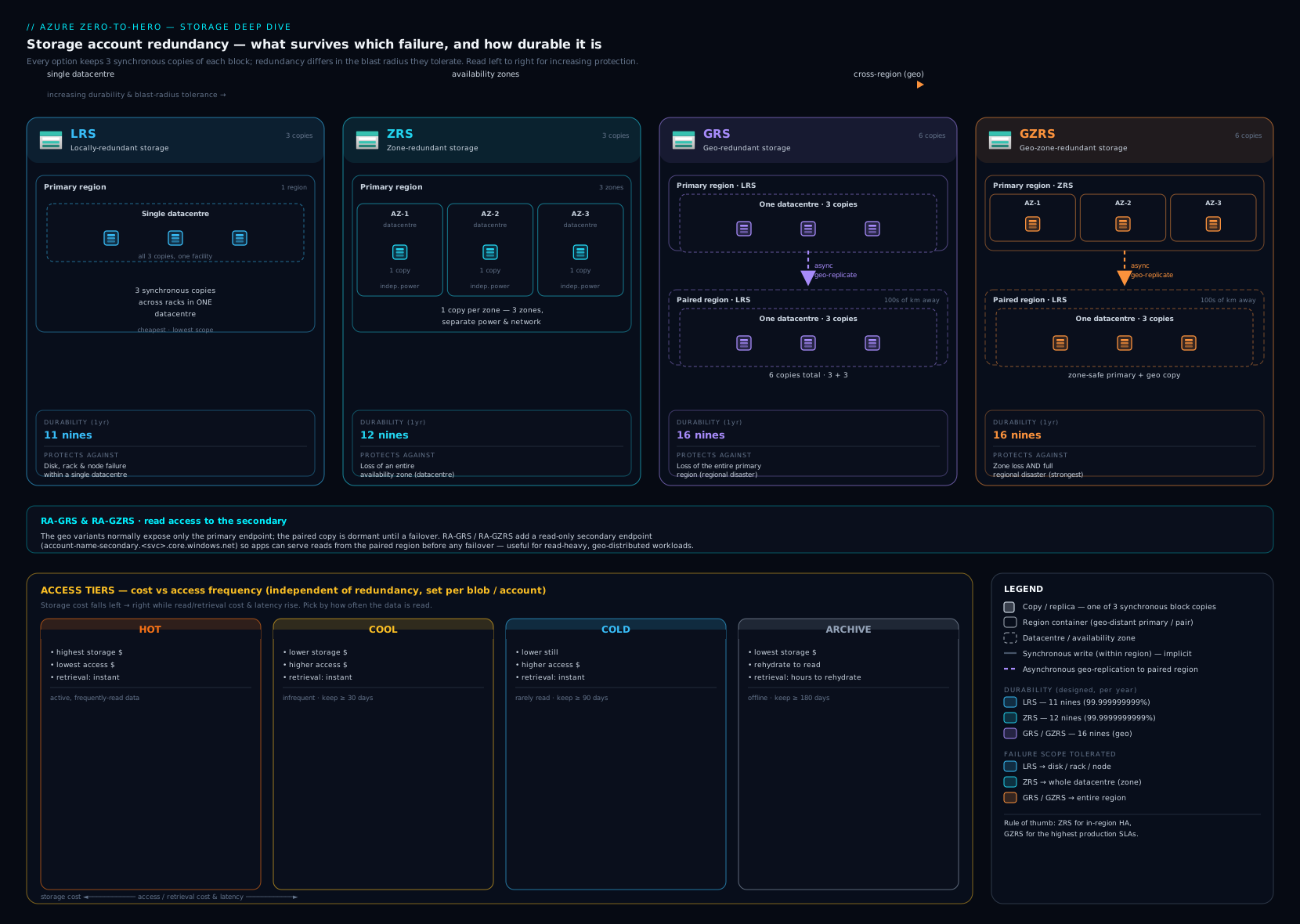
Use the diagram as the map for the redundancy section: the left column is local resilience (LRS vs ZRS), and moving right adds the geo copy (GRS/GZRS) and then the readable secondary (the RA- variants).
Hands-on lab
We will create a hardened GZRS account, a container, a lifecycle rule, mint a user-delegation SAS, and clean everything up — all free-tier-friendly (a few KB of storage and a handful of transactions cost effectively nothing). Use Azure Cloud Shell or a local az session that is logged in.
Step 1 — variables and resource group.
RG=rg-storage-lab
LOC=eastus
SA=stkvlab$RANDOM     # globally unique; if it collides, run again
az group create -n $RG -l $LOC -o table
Step 2 — create the GZRS, hardened account.
az storage account create -n $SA -g $RG -l $LOC \
  --kind StorageV2 --sku Standard_GZRS --access-tier Hot \
  --min-tls-version TLS1_2 --https-only true \
  --allow-blob-public-access false -o table
Expected: the account is created with "sku": { "name": "Standard_GZRS" } and "accessTier": "Hot".
Step 3 — give yourself a data-plane role, then create a container with Entra auth.
ME=$(az ad signed-in-user show --query id -o tsv)
SCOPE=$(az storage account show -n $SA -g $RG --query id -o tsv)
az role assignment create --assignee $ME --role "Storage Blob Data Contributor" --scope $SCOPE
# (role propagation can take a minute)
az storage container create --account-name $SA -n data --auth-mode login -o table
Step 4 — upload a blob and turn on protection + a lifecycle rule.
echo "hello kloudvin" > sample.txt
az storage blob upload --account-name $SA -c data -n sample.txt -f sample.txt --auth-mode login -o table

az storage account blob-service-properties update -n $SA -g $RG \
  --enable-delete-retention true --delete-retention-days 7 --enable-versioning true -o none

cat > lifecycle.json <<'JSON'
{ "rules": [ { "enabled": true, "name": "cool-then-delete", "type": "Lifecycle",
  "definition": { "filters": { "blobTypes": ["blockBlob"] },
    "actions": { "baseBlob": {
      "tierToCool": { "daysAfterModificationGreaterThan": 30 },
      "delete": { "daysAfterModificationGreaterThan": 365 } } } } } ] }
JSON
az storage account management-policy create --account-name $SA -g $RG --policy @lifecycle.json -o none
Step 5 — mint a user-delegation SAS (Entra-signed, no account key) and read with it.
END=$(date -u -v+1H '+%Y-%m-%dT%H:%MZ' 2>/dev/null || date -u -d '1 hour' '+%Y-%m-%dT%H:%MZ')
SAS=$(az storage blob generate-sas --account-name $SA -c data -n sample.txt \
  --permissions r --expiry $END --https-only --auth-mode login --as-user -o tsv)
URL="https://$SA.blob.core.windows.net/data/sample.txt?$SAS"
curl -s "$URL"      # -> hello kloudvin
Validation: curl prints hello kloudvin, proving the SAS works without any account key. az storage account show -n $SA -g $RG --query "sku.name" returns Standard_GZRS. az storage account management-policy show --account-name $SA -g $RG --query "policy.rules[].name" lists cool-then-delete.
Step 6 — Cleanup (do this — storage and replication keep billing).
az group delete -n $RG --yes --no-wait
Cost note: A few KB in a GZRS account plus a handful of transactions and one SAS is fractions of a rupee. The only thing that would cost is leaving a large GZRS/Archive account around (GZRS roughly doubles capacity cost; Archive rehydration is billed). Deleting the resource group removes the account, container, policy, and role assignment — confirm az group exists -n $RG returns false.
Common mistakes & troubleshooting
| Symptom | Likely cause | Fix |
|---|---|---|
AuthorizationFailure / 403 listing or reading blobs even as subscription Owner |
Owner is a control-plane role; data access needs a data-plane role | Assign Storage Blob Data Reader/Contributor at the account/container scope |
403 This request is not authorized to perform this operation from an app |
Storage firewall is set to selected networks and the caller’s subnet/IP isn’t allowed | Add a service/private endpoint or the IP; enable “trusted Microsoft services” for Azure services |
Public website / $web returns 404 or 409 on anonymous reads |
Anonymous (public) blob access disabled at account level | Enable “allow blob public access” and set the container’s access level (or front with CDN/Front Door) |
| Archived blob download fails / “blob is in archive tier” | Archive is offline; bytes aren’t accessible until rehydrated | set-tier to Hot/Cool (15h Standard / <1h High) or copy to an online blob |
| Can’t change account to Premium / can’t toggle hierarchical namespace | Both are create-time, irreversible | Create a new account with the right settings and copy data (AzCopy) |
| A SAS you issued is still working after you “revoked” it | SAS without a stored access policy can only be killed by rotating the key | Use stored access policies so you can delete/alter the policy to revoke; or rotate the key |
| Storage costs spiking unexpectedly | Versioning/snapshots accumulating, churny data in Cool/Cold (early-deletion fees), or GRS/GZRS doubling capacity | Add lifecycle rules to delete old versions; right-size the tier; reassess redundancy |
| Data becomes unreadable after a Key Vault change | CMK key was disabled/deleted/expired, or the identity lost access | Re-enable the key / restore from soft-deleted vault; always use Key Vault soft-delete + purge protection with CMK |
az data commands prompt for keys or warn about auth |
Defaulting to key auth; or shared-key access disabled | Pass --auth-mode login to use Entra; ensure you hold a data-plane role |
Best practices
- Default to general-purpose v2 and only go Premium for a measured latency/transaction need. Never create general-purpose v1.
- Choose redundancy by the failure you must survive, not by reflex: LRS for dev/replaceable data, ZRS for zone-resilient single-region production, GZRS for “survive a region too,” RA- only if you genuinely read the secondary. Remember geo doubles capacity cost.
- Turn on the protection suite at creation: blob + container soft delete, versioning, and (if you need undo) change feed + PITR. Pair versioning with a lifecycle rule so old versions don’t bloat the bill.
- Automate tiering with one lifecycle policy per data class — it is the biggest storage-cost lever.
- Prefer Entra ID over keys and SAS. Disable shared-key access where you can; when you need a URL, use a short-lived user-delegation SAS; back SAS with stored access policies for revocability.
- Lock the network: public access Disabled + private endpoints with Private DNS for sensitive accounts; storage firewall + service endpoints as a lighter option; always allow trusted Microsoft services.
- Separate workloads into separate accounts so redundancy, tier, lifecycle, and network rules can differ — and so a misconfiguration blast radius is small.
- Tag for cost and govern with Azure Policy (deny public access, require HTTPS/TLS 1.2, require private endpoints, enforce tags).
Security notes
- Anonymous blob access is the #1 storage breach vector. Keep “allow blob public access” off at the account level unless you are deliberately hosting public content; even then prefer fronting with Front Door/CDN over raw public containers.
- A leaked access key is a permanent, unscopeable breach until rotated — never commit keys/connection strings (store them in Key Vault), rotate on a schedule, and disable shared-key access to eliminate the risk entirely.
Require secure transferandMinimum TLS 1.2on, always. Use private endpoints to keep data off the public internet.- CMK needs guardrails: Key Vault soft-delete + purge protection, an identity with least-privilege key permissions, and a rotation plan — disabling the key locks the data, which is both the feature and the risk.
- Immutable WORM for compliance retention/legal hold; a locked time-based policy cannot be shortened or bypassed even by an owner.
- Audit with Entra + diagnostic logs: route storage logs to Log Analytics, and use Entra data roles for a per-identity audit trail instead of anonymous keys.
Cost & sizing
The levers that move a storage bill, in rough order of impact:
- Redundancy. GRS/GZRS roughly double capacity cost (secondary copies) and add geo-egress; RA- adds a read-endpoint premium; ZRS is a modest uplift over LRS. Picking the right redundancy is the biggest single cost decision.
- Access tier × access pattern. Hot has the cheapest transactions, Archive the cheapest storage. Putting frequently read data in Cool/Cold/Archive (high read + rehydration + early-deletion fees) can cost more than Hot. Match tier to real access; automate with lifecycle.
- Capacity, with versioning/snapshots multiplying it. Versioning and snapshots silently multiply stored bytes — always pair them with lifecycle rules that expire old versions/snapshots.
- Transactions and operations. You pay per 10,000 operations; some operations (list, write) cost more than reads. Chatty workloads on Cool/Cold pay an access surcharge.
- Data egress. Outbound data to the internet (and cross-region replication) is billed; reads from within the same region are usually free.
- Premium provisioned capacity. Premium bills for provisioned size, not used — right-size premium shares/accounts.
- Private endpoints, SFTP, and extra features each carry their own hourly/processing charges.
A pragmatic costing exercise: estimate (stored GiB × tier rate × redundancy multiplier) + (transactions × rate) + (egress GiB × rate), then add lifecycle savings from auto-tiering. The redundancy multiplier and the tier choice usually dominate.
Interview & exam questions
-
What is the difference between LRS, ZRS, GRS, and GZRS, and what does each survive? LRS = 3 copies in one datacentre (survives disk/node failure). ZRS = 3 copies across 3 availability zones (survives a zone/datacentre failure). GRS = LRS + async copy to a paired region (survives a regional disaster; secondary not readable without failover). GZRS = ZRS primary + async copy to the paired region (survives a zone and a region failure). All are 11–16 nines durable.
-
What does the “RA-” in RA-GRS / RA-GZRS add, and what’s the catch? A read-only secondary endpoint you can read from any time without a failover (
-secondaryURL). The catch: the secondary is eventually consistent (async replication lag of minutes), so reads can be stale, and you check Last Sync Time to know how stale. -
Why does a single VM disk / Premium storage have no GRS option? Premium (SSD) storage supports only LRS and ZRS — no geo. For cross-region copies of Premium data you use object replication or back it up; you don’t get automatic geo-redundancy.
-
A user is a subscription Owner but gets 403 listing blobs. Why? Owner/Contributor are control-plane roles; reading data needs a data-plane role such as Storage Blob Data Reader/Contributor. Assign that at the account or container scope (or use a key/SAS).
-
Compare the three SAS types. Account SAS (signed with the key, account-wide, multi-service, service-level ops). Service SAS (signed with the key, one service/resource, revocable via a stored access policy). User-delegation SAS (signed with Entra credentials, blob/Data Lake only, no key exposed, ≤ 7-day life — the recommended one).
-
How do you revoke a SAS you already handed out? If it has no stored access policy, only by rotating the account key (which kills every key-signed SAS). If it references a stored access policy, you delete or change the policy to revoke instantly. A user-delegation SAS is revoked by revoking the delegation key/role.
-
What’s the difference between a service endpoint and a private endpoint for storage? A service endpoint lets the storage firewall trust a VNet subnet, but the account keeps a public endpoint and stays regional. A private endpoint puts a private IP from your VNet in front of a sub-resource and re-points DNS, so the account can be reached only privately (works cross-region and from on-prem) — the zero-trust choice.
-
Explain the access tiers and the Archive gotcha. Hot/Cool/Cold are online (cheapest→pricier storage, pricier→cheaper access; min retention 0/30/90 days). Archive is offline (cheapest storage, min 180 days) — you must rehydrate (Standard ≤ 15 h, High < 1 h) before you can read it. Early deletion before the minimum retention incurs a fee.
-
What’s the difference between geo-redundancy and object replication? Geo-redundancy (GRS/GZRS) is account-wide, automatic, asynchronous DR you read only after a failover. Object replication is per-container, rule-based copying of block blobs to an independently readable destination (often another account/region) and requires versioning + change feed.
-
What is infrastructure encryption and when can you enable it? A second AES-256 layer beneath SSE (double encryption with two keys) for high-assurance compliance. It can be enabled only at account creation and never afterward.
-
What do you need for point-in-time restore (PITR) to work? Blob versioning, change feed, and blob soft delete must all be enabled (block blobs only). PITR then restores a container/prefix to a timestamp in the retention window.
-
How do you rotate storage account keys with zero downtime, and why are there two? Two keys exist so you always have one valid: point clients at key2, regenerate key1, move clients to key1, regenerate key2. Better: store the connection string in Key Vault or disable shared-key access and use Entra ID.
Quick check
- Which redundancy option survives both a zone failure and a regional disaster but does not give you a read endpoint on the secondary?
- True or false: you can convert a Standard account to a Premium account in place.
- You need to read an Archived blob within the hour. What do you do, and roughly how long does it take?
- Which SAS type is signed with Entra ID credentials and never exposes the account key?
- Name the three features that must all be enabled before point-in-time restore works.
Answers
- GZRS (zone-resilient primary + geo copy; RA-GZRS would be the choice only if you also needed to read the secondary).
- False. Standard ↔ Premium (and Standard ↔ a Premium account kind) is not supported — create a new account and copy the data with AzCopy.
- Rehydrate it to an online tier (Hot/Cool/Cold) with High priority — typically under an hour for objects < 10 GiB (Standard priority would take up to ~15 hours). You can also copy it to a new online blob.
- The user-delegation SAS (request a user delegation key with your Entra identity; max lifetime 7 days).
- Blob versioning, change feed, and blob soft delete.
Exercise
Design the storage layout for a small SaaS app with three data classes: (a) user uploads read often for 30 days then rarely; (b) nightly database backups that must survive a regional disaster and be retained 1 year; © legal audit logs that must be immutable for 7 years. For each class, specify: the account kind and performance, the redundancy (and justify what it must survive), the access tier and a lifecycle policy (tier transitions + expiry), the authorization model (keys vs SAS vs Entra) and network posture (firewall/private endpoint), and any data-protection features (soft delete, versioning, immutable WORM). Then write the az storage account create commands and one lifecycle.json that implements the uploads policy. Bonus: estimate the monthly INR cost of class (b) at 500 GiB on GZRS vs LRS and explain the difference.
Certification mapping
AZ-104 (Azure Administrator):
- Implement and manage storage — create and configure storage accounts (kind, performance, redundancy, access tier); configure network access (firewall, service/private endpoints, public access); manage access keys and rotation; create and use SAS (account/service/user-delegation) and stored access policies; configure Entra-based access (data-plane roles); manage Azure Files (identity-based auth) and Blob (containers, tiers, lifecycle); configure soft delete, versioning, object replication, and immutable storage; use Storage Explorer, AzCopy, and File Sync.
AZ-305 (Azure Solutions Architect Expert):
- Design data storage solutions — select account type and redundancy for durability/availability/cost; design access tiers + lifecycle for cost optimization; design encryption (MMK vs CMK, infrastructure encryption) and identity/network security (private endpoints, Entra, disabling keys); design data protection and DR (geo-redundancy + failover vs object replication vs backup) and immutability/WORM for compliance.
Glossary
- Storage account — a top-level ARM namespace providing globally unique service endpoints and account-wide policies (redundancy, performance, tier, encryption, network, identity).
- Account kind — general-purpose v2 (the default), the Premium kinds (block blobs / file shares / page blobs), and legacy v1.
- Performance tier — Standard (HDD-backed, all redundancy, pay-for-use) vs Premium (SSD-backed, LRS/ZRS only, provisioned billing).
- LRS / ZRS — locally redundant (3 copies, 1 datacentre) / zone-redundant (3 copies, 3 zones).
- GRS / GZRS — geo-redundant (LRS + paired-region copy) / geo-zone-redundant (ZRS + paired-region copy).
- RA-GRS / RA-GZRS — the above with a read-only, eventually-consistent secondary endpoint.
- Account failover — promoting the secondary region to primary (unplanned: possible data loss after Last Sync Time; planned: no loss, for drills).
- Last Sync Time — the timestamp up to which the geo-secondary is current; data written after it is at risk in a failover.
- Access tier (Hot / Cool / Cold / Archive) — block-blob storage-vs-access price trade-off; Archive is offline and must be rehydrated.
- Rehydration — moving an Archive blob back online (Standard ≤ 15 h / High < 1 h).
- Shared key — the account’s master credential (two keys for zero-downtime rotation).
- SAS (account / service / user-delegation) — a scoped, time-limited signed token; user-delegation is signed with Entra ID and exposes no key.
- Stored access policy — a named policy on a resource that a service SAS can reference, enabling revocation without rotating the key.
- SSE / MMK / CMK — storage service encryption (always on) with a Microsoft-managed or customer-managed (Key Vault) key.
- Infrastructure encryption — a second AES-256 layer beneath SSE (double encryption); create-time only.
- Soft delete / versioning / change feed — recover deleted items / keep prior versions / a log of blob changes.
- Object replication — rule-based, per-container async copy of block blobs to an independently readable destination.
- Point-in-time restore (PITR) — restore block blobs to a past timestamp (needs versioning + change feed + soft delete).
- Immutable storage (WORM) — write-once-read-many retention (time-based or legal hold) for compliance.
- Lifecycle management — daily policy engine that tiers and deletes blobs (and versions/snapshots) by age or last access.
- Hierarchical namespace (HNS / Data Lake Gen2) — a true directory tree with POSIX ACLs; create-time, irreversible.
Next steps
- Continue the course with the Azure Load Balancing deep dive: Load Balancer, App Gateway, Front Door & Traffic Manager — now that data has a home, we connect compute to it and balance traffic.
- Go deeper on blob-specific operations in Azure Blob Storage: lifecycle, immutability & soft delete.
- See how the same redundancy vocabulary applies to VM storage in the Azure Managed Disks deep dive.