Single-service playbooks are where troubleshooting starts: a virtual machine will not boot, a storage account returns 403, an App Service throws 502. You learn the tool that answers each question — boot diagnostics, IP flow verify, Kudu — and you fix it. But the incidents that wake you at 02:00, the ones that turn into a war room and a public status page, are almost never single-service. A certificate expires on a gateway and three downstream APIs start returning 500s. A subnet runs out of addresses and new pods cannot schedule, which looks like a memory leak. Someone tightens a Conditional Access policy and an entire tier of service principals can no longer get tokens. The symptom shows up far from the cause, in a service that is itself perfectly healthy.
This lesson is the step up: how to run a complex, multi-service incident end to end, and how to find the root cause when the failure has cascaded across the architecture. The hard skill is not knowing one tool deeply — it is correlating signals across services fast enough to separate the symptom from the cause while the clock is running and revenue is leaking. We cover the incident-response lifecycle, the cross-service correlation toolkit (Azure Monitor and Log Analytics across workspaces, Application Insights distributed tracing, Service Health, Azure Resource Graph), how to read a blast radius, five fully worked complex scenarios in a symptom → hypotheses → cross-service diagnosis → fix format, severity levels, and the blameless postmortem that closes the loop and feeds the Well-Architected Framework’s Operational Excellence pillar. Everything here maps to the operations domains of AZ-104 and the monitoring and incident-management content of AZ-400.
Learning objectives
By the end of this lesson you can:
- Run the full incident-response lifecycle — detect, triage, communicate, mitigate, resolve, RCA, prevent — and say what “good” looks like at each stage.
- Correlate signals across services using Azure Monitor metrics, Log Analytics (including cross-workspace and cross-resource queries), Application Insights distributed tracing and the application map, Service Health, and Azure Resource Graph.
- Read a blast radius — recognise the identity, DNS, network and certificate changes that cascade across many services from one root cause.
- Work a complex incident as symptom → hypotheses → cross-service diagnosis → fix, narrowing a set of competing hypotheses with evidence rather than guesswork.
- Assign a severity level correctly and run the communications that each severity demands.
- Write a blameless postmortem with a real root cause, contributing factors, and durable preventive actions, and connect it to the WAF Operational Excellence pillar.
Prerequisites & where this fits
You should be comfortable with the single-service diagnostics toolkit from the previous module — Network Watcher (IP flow verify, next hop, NSG diagnostics, connection troubleshoot), Resource Health versus Service Health, boot diagnostics and the serial console, the Activity Log, and a working command of KQL in Log Analytics. You should also understand the building blocks these incidents touch: virtual networks, subnets, NSGs and route tables; DNS and private endpoints; Microsoft Entra ID, service principals, managed identities and Conditional Access; App Service, AKS and Azure SQL at an operating level; and Azure Monitor and Application Insights at a high level. If any of those feel shaky, revisit them first — this lesson assumes you can drive each instrument and focuses on wielding them together. This is the capstone of the Troubleshooting & Operations module of the Azure Zero-to-Hero course: the methodology lesson taught you how to think, the diagnostics lesson handed you the instruments, and this lesson makes you run a real incident with all of them at once.
Core concepts: the incident-response lifecycle
An incident is not a bug. A bug is a defect in code or config; an incident is an unplanned interruption or degradation of a service that needs an urgent, coordinated response. The difference matters because incidents have a lifecycle with distinct stages, and the most common failure mode in a war room is skipping a stage — diving into root-cause analysis while customers are still down, or declaring victory after mitigation without ever finding the actual cause.
| Stage | Goal | What “good” looks like | The trap to avoid |
|---|---|---|---|
| Detect | Know there is a problem before the customer tells you | An alert fires on a symptom that matters (failed requests, latency SLO breach), not on raw infrastructure noise | Alert fatigue — so many low-value alerts that the real one is missed |
| Triage | Decide severity and assemble the right people | Severity assigned in minutes; an incident commander named; the right service owners paged | Everyone debugging in parallel with no coordination |
| Communicate | Set expectations internally and externally | A status page or stakeholder update within the SEV’s target; regular cadence even when there is “no news” | Going silent — silence reads as “they don’t know what’s happening” |
| Mitigate | Stop the bleeding — restore service even before you understand why | Customers recover via failover, rollback, scale-out, or feature flag before RCA | Refusing to mitigate until the cause is fully understood |
| Resolve | The system is back to its normal, stable state | Metrics and SLOs back to baseline and staying there; the mitigation is stable, not a hold-together hack | Confusing mitigation with resolution and standing down too early |
| RCA | Find the true root cause and contributing factors | A blameless analysis that survives “five whys” and identifies the systemic cause | Stopping at the first plausible cause; blaming a person |
| Prevent | Make this class of incident impossible or self-healing | Concrete, owned, dated action items that remove the cause or detect it earlier | A postmortem that produces no durable change |
Two ideas underpin the whole lifecycle. First, mitigation is decoupled from root cause — you can and should restore service before you understand the failure. Senior responders are ruthless about this: a failover or a rollback that buys you a calm hour to investigate is almost always the right first move. Second, the incident commander (IC) is a role, not a rank. The IC coordinates, decides, and communicates; they do not have to be the most senior engineer or the one with hands on the keyboard. Separating the driving (the IC) from the debugging (the responders) is what keeps a complex incident from descending into chaos.
Core concepts: correlating signals across services
The defining skill of complex-incident response is correlation — lining up signals from different services on the same timeline so the cause stands out from the noise. Azure does not give you one screen that says “here is your root cause”; it gives you a set of telescopes pointed at different layers, and you have to triangulate. Here is the toolkit and, crucially, the question each tool answers.
| Tool | The question it answers | Scope | The correlation it unlocks |
|---|---|---|---|
| Azure Monitor metrics | “What does the shape of the failure look like over time?” | Per-resource platform + custom metrics | Line up a latency spike against a CPU spike against a dependency-failure spike on one chart |
| Log Analytics (KQL) | “What exactly happened, in detail, and when?” | One or many workspaces; union, join, cross-resource |
Join app logs to platform logs to Activity Log on a shared time window and key |
| Application Insights — distributed tracing | “Where in the call chain did this request actually fail or slow down?” | End-to-end across services that emit correlated telemetry | Follow one operation_Id from front door through API through database |
| Application Insights — application map | “What depends on what, and which edge is red?” | Topology of components and their dependencies | See at a glance that the failure is on the SQL edge, not the Redis edge |
| Service Health | “Is Microsoft having a problem in my region/service?” | Subscription-scoped Azure platform events | Rule the platform in or out in seconds before you debug your own code |
| Resource Health | “Is this specific resource healthy from the platform’s view?” | Per-resource | Distinguish a platform-degraded instance from a self-inflicted misconfiguration |
| Azure Resource Graph | “Across all my subscriptions, what exists and what changed?” | Tenant-wide, fast KQL over resources + change history | Find every resource touched by a change, or every resource missing a setting |
| Activity Log | “Who changed what, when?” | Subscription control-plane operations | Pin the incident start to a specific deployment, policy, or config change |
A few correlation techniques separate fast responders from slow ones:
- Anchor everything to one timeline in UTC. The single most useful number in an incident is when did it start. Find it once — usually from the first alert or the first failed-request uptick — and overlay every other signal on that timestamp. Azure portal charts and KQL both honour a shared time range; use it.
- Correlate by ID, not by eyeball. Application Insights stamps every request with an
operation_Idand propagates it across services via W3C Trace Context (thetraceparentheader). That ID is the thread you pull to follow one user’s request from Front Door through your API to your database and back. Searching by ID beats scrolling logs by orders of magnitude. - Query across workspaces and resources. Real estates have telemetry scattered across multiple Log Analytics workspaces and resources. KQL’s
union, theworkspace()andapp()expressions, and cross-resource queries let you ask one question across all of them. A query like the one below finds correlated errors across an app’s traces and the cluster’s container logs on the same five-minute window:
let window = ago(1h);
union
  (AppExceptions | where TimeGenerated > window | project TimeGenerated, Service="app", Detail=ProblemId, OperationId=OperationId),
  (ContainerLogV2 | where TimeGenerated > window and LogLevel == "error"
     | project TimeGenerated, Service="aks", Detail=tostring(LogMessage), OperationId="")
| sort by TimeGenerated asc
- Let the platform correlate for you. Azure Monitor alert correlation / incident grouping and the application map both do first-pass correlation automatically. Use them as a starting hypothesis, not the final word.
Core concepts: reading a blast radius
A blast radius is the set of services affected by a single root cause. In a single-service incident the blast radius is one box. In a complex incident it is a cascade: the cause sits in a shared, foundational layer, and the damage radiates outward to everything that depends on it. The mark of a senior responder is recognising the shape of a cascade early — seeing that ten services failed at the same second and inferring that the cause is one thing they all share, not ten coincidental bugs.
Four foundational layers produce most large blast radii, because so many services depend on them:
| Foundational change | Why it cascades | Telltale signature |
|---|---|---|
| Identity (Entra, Conditional Access, expired secret/cert on an app registration, managed identity removed from RBAC) | Almost everything authenticates; break token issuance and unrelated services fail at once | A wall of 401/403/AADSTS errors across services with no code or deploy change |
| DNS (a Private DNS zone unlinked, a record deleted, a custom resolver down, an expired domain) | Name resolution is the first step of nearly every call | “Works by IP, fails by name”; NXDOMAIN/ServerFailure; failures correlate by region, not by service |
| Network (a route table, NSG, firewall rule, peering, or NAT gateway change; subnet IP exhaustion) | Connectivity is shared; one route or rule change can blackhole many flows | Timeouts and connection resets clustered by subnet/VNet; SNAT-port exhaustion errors |
| Certificates (an expired TLS cert on a gateway, App Gateway, Front Door, or APIM; a CA change) | TLS sits in front of many services; one expired cert breaks every consumer behind it | A clean cliff at the exact expiry timestamp; TLS handshake failures; 502/525 |
Three habits make blast-radius reading fast. Check Service Health and the Activity Log first — a platform event or a config change is the cheapest possible explanation and rules out a frantic code hunt. Look for the common denominator — if the failing services share a region, a VNet, an identity, a DNS zone, or a certificate, suspect that shared thing rather than the services themselves. And trust the timestamps — a cascade from a single cause shows a synchronised failure across services (everything breaks within seconds), whereas independent problems drift apart in time. Synchronisation is the fingerprint of a shared root cause.
Worked scenario A — cascading failure from a dependency
Symptom. At 02:14 UTC, the checkout API’s availability SLO alert fires. Customers see “something went wrong” on the payment page. The checkout service’s own dashboards look fine — CPU, memory and request rate are normal — yet 70% of checkout requests are failing with 500s. The product-catalogue and search APIs, which call the same downstream, are also degraded. Three services, one synchronised failure.
Hypotheses.
- A bad deployment to the checkout service introduced a bug.
- A shared downstream dependency is failing and the callers are surfacing its errors.
- An Azure platform problem in the region.
- A resource limit (connection pool, thread pool) is exhausted under load.
Cross-service diagnosis. First, rule out the cheapest causes. The Activity Log shows no deployment to checkout near 02:14, which weakens hypothesis 1; Service Health shows no active event in the region, which weakens hypothesis 3. The fact that three services failed in the same second is the key clue — that synchronisation points at a shared dependency (hypothesis 2), not three independent bugs. Open the Application Insights application map: the checkout, catalogue and search components all have a red edge to the same node — the Azure SQL Database behind a shared data service. Click the failing dependency calls and read the exception: SqlException: Resource ID: 1. The request limit for the database is 200 and has been reached. The database is hitting its DTU/connection ceiling. Pivot to the SQL resource’s Azure Monitor metrics: DTU percentage pinned at 100% and a wall of throttled sessions starting at 02:13. One more correlation: the Activity Log shows a different service — a new reporting job — was deployed at 02:10 with a heavy analytical query against the same database. The reporting job saturated the shared database; every service that depends on it failed together.
Fix. Mitigate first: kill or throttle the reporting job to relieve the database, restoring the three customer-facing services within minutes. Resolve: move the reporting workload off the transactional database (a read replica or a separate analytical store) so analytics can never again starve checkout. Prevent: add a resource limit alert on the database’s DTU/CPU and active connections; isolate workloads (the classic “noisy neighbour” lesson — never let batch analytics share a transactional database’s capacity); and add a circuit breaker in the callers so a slow dependency degrades gracefully instead of failing hard. The root cause was not in any of the three services that paged — it was a fourth service exhausting a shared dependency.
Worked scenario B — intermittent P99 latency
Symptom. The API’s P50 latency is normal (~40 ms) but P99 has crept to 3–5 seconds, and a small but steady stream of customers complain the app is “sometimes really slow”. There is no outage, no error spike — just a fat tail. It does not reproduce on demand, and it is not correlated with overall traffic volume. This is the hardest class of incident: intermittent, partial, and invisible to averages.
Hypotheses.
- A dependency is occasionally slow (a specific downstream call has a long tail).
- Cold starts — instances spinning up serve the first requests slowly.
- Noisy neighbour / throttling on a shared resource (e.g. occasional storage or database throttling).
- GC pauses or thread-pool starvation in the app under bursts.
- A specific code path (one endpoint, one customer’s data shape) is expensive.
Cross-service diagnosis. Averages hide tails, so go straight to distributed traces of the slow requests. In Application Insights, filter end-to-end transactions to duration > 2s and open several. The waterfall view is decisive here — it shows which span inside the request consumed the time. In this case every slow trace shares the same shape: the app spans are fast, but one dependency call to Azure Cache for Redis intermittently takes 2–4 seconds while normally taking 2 ms. Correlate by operation_Id to confirm it is the same dependency every time. Now pivot to why Redis is occasionally slow: open the Redis resource’s Azure Monitor metrics and overlay them on the slow-request timestamps. Server load and connected clients look fine, but cache misses and crucially evicted keys spike at exactly the slow windows, and the used-memory metric is riding near the maxmemory limit. The cache is under-provisioned: when it fills, it evicts keys, the next requests miss and fall through to the database (the slow span), and P99 balloons — but only intermittently, when memory pressure peaks. The union-style cross-resource KQL query confirms the eviction events line up with the database fall-through reads on the same timeline.
Fix. Mitigate: scale the Redis tier up (more memory) to stop evictions immediately, which collapses the P99 tail. Resolve: right-size the cache to the working set, tune the eviction policy and per-key TTLs so the cache holds the hot set without thrashing, and add a small jitter/backoff on the database fall-through so a thundering herd cannot pile on. Prevent: add percentile-based alerts (alert on P95/P99, not just averages — averages would never have caught this), an alert on Redis used-memory and evicted-keys, and an SLO on the dependency itself. The lesson: you cannot debug a tail with an average — intermittent latency lives in P99 and in individual traces, never in the mean.
Worked scenario C — throttling / retry storm
Symptom. A background processing service that calls a downstream Azure service (say, an Azure OpenAI deployment, or a Storage account, or any rate-limited API) suddenly shows its throughput collapse to near zero, while its outbound request count has paradoxically exploded — ten times normal. Logs are full of 429 Too Many Requests. The downstream service is healthy from Azure’s side. The harder the service tries, the worse it gets.
Hypotheses.
- A real, legitimate spike in workload exceeded the downstream quota / rate limit.
- A retry storm: clients hit the limit, retry aggressively, and the retries cause more throttling — a self-amplifying feedback loop.
- The downstream service’s quota was reduced or a key/tier changed.
- A poison message is being retried forever, consuming the rate budget.
Cross-service diagnosis. The signature — request count exploding while goodput collapses — is the fingerprint of a retry storm (hypothesis 2), not a simple capacity overrun. A genuine workload spike (hypothesis 1) raises requests and goodput together until the ceiling, then plateaus; a retry storm shows goodput falling as requests rise, because most of the requests are wasted retries. Confirm with metrics: in Azure Monitor, the downstream’s throttled-request count and the client’s outbound request count both spike together, while successful responses crater. Check the Activity Log and the resource’s quota: no quota reduction (weakens 3). Pull a sample of the 429 responses and read the Retry-After header — the service is explicitly telling clients how long to wait, and the client logs show it is ignoring Retry-After and retrying immediately, often with no jitter, so every client retries in lockstep. That synchronisation is what turns a brief throttle into a sustained storm. Finally, check the queue for a poison message (hypothesis 4): the dead-letter count is low, so it is the whole workload retrying, not one bad message.
Fix. Mitigate: pause the processing service (drain the inflight retries) and resume at a controlled rate, or temporarily lower concurrency, to break the feedback loop. Resolve: implement exponential backoff with jitter and honour the Retry-After header; cap the maximum retry count; and add a circuit breaker so the client stops hammering a throttled dependency and fails fast for a cool-down window. Smooth the demand with a queue and a concurrency limit sized to the downstream quota. Prevent: request a quota increase if the steady-state demand genuinely exceeds the limit; alert on the ratio of throttled to successful requests (the early warning of a storm); and load-test the retry behaviour so the storm is found in staging, not production. The counter-intuitive lesson: in a retry storm, trying less hard recovers faster — aggressive retries are the cause, not the cure.
Worked scenario D — partial outage from a single availability zone
Symptom. Roughly one-third of requests are failing or timing out; two-thirds are fine. The app runs across three availability zones. Customers report intermittent failures — “it works if I refresh”. Overall the service is degraded, not down, and simple health checks sometimes pass (they happen to hit a healthy zone). Averages and coarse uptime checks make it look like a minor blip; users experience a real, repeated failure.
Hypotheses.
- A single availability zone is unhealthy (platform event, or a zone-local resource failing).
- A subset of backend instances are bad (a partial bad deployment).
- A dependency in one zone is failing (e.g. a zonal database replica or a zonal cache).
- Random failures from an overloaded resource hitting limits.
Cross-service diagnosis. “One-third failing across three zones” is a loud hint — it maps cleanly to one zone of three (hypothesis 1). Confirm it with two moves. First, Service Health and Resource Health: check for an availability-zone-scoped platform event in the region — Azure publishes zone-level health, and a zone incident shows up here, instantly ruling the platform in. Second, slice your telemetry by zone. In Application Insights / Log Analytics, the telemetry carries the instance and (where exposed) the zone or node; group failed requests by cloud_RoleInstance (or the AKS node / zone label) and the failures cluster on the instances in one zone. The healthy two-thirds sit in the other two zones. Pivot to the dependency: if the app uses a zone-redundant database or cache, check whether the failing zone’s instances are also failing on a zonal dependency (a replica in that zone), which would explain why retries to a healthy zone succeed. The Activity Log shows no deployment, weakening hypothesis 2; the failures are cleanly zone-correlated, not instance-random, weakening hypothesis 4.
Fix. Mitigate: if it is a platform zone event, the fastest mitigation is to stop sending traffic to the bad zone — the load balancer’s health probes should already be ejecting unhealthy instances, so verify the health-probe configuration is strict enough to detect this failure mode (a too-lenient probe keeps a half-dead zone in rotation, which is exactly why one-third kept failing). Scale out the two healthy zones to absorb the load. Resolve: once Azure resolves the zone event (or you replace the zone-local failing resource), rebalance across all three zones. Prevent: this incident is a resilience test result — confirm the architecture is genuinely zone-redundant end to end (compute and every dependency), tighten health probes so a bad zone is ejected automatically, ensure there is enough headroom in N-1 zones to carry full load, and run a zone-down game day (or Azure Chaos Studio) so the failover is proven, not assumed. The lesson: a partial outage is often a zonal outage, and the right response is to lean on the redundancy you (hopefully) already built.
Worked scenario E — an identity / Conditional Access change locking out a tier
Symptom. At 09:05, shortly after the workday begins, an entire tier of automated services — a set of background jobs, a CI/CD pipeline, and a daemon app — all start failing authentication at once. Errors are AADSTS codes and 401/403. Interactive users are mostly fine; it is the non-interactive (service principal / managed identity) workloads that are locked out. No application was deployed. The failure is synchronised and identity-shaped — a classic large blast radius.
Hypotheses.
- A Conditional Access policy change now blocks the affected principals (e.g. a location, device, or MFA condition that service principals cannot satisfy).
- An app registration secret or certificate expired.
- A managed identity lost a required RBAC role assignment.
- A token / consent problem (admin consent revoked, an API permission removed).
- An Entra platform outage.
Cross-service diagnosis. The shape — non-interactive workloads failing together while users are fine — points hard at an identity policy change scoped to service principals (hypothesis 1). Rule out the platform first: Service Health shows no Entra incident (weakens 5). Now read the actual error code, because AADSTS codes are precise: AADSTS50105 (user/principal not assigned to the app), AADSTS700016 (app not found in directory), AADSTS7000215 (invalid client secret — i.e. expired/rotated, hypothesis 2), or AADSTS53003 (blocked by Conditional Access, hypothesis 1). Here the code is the Conditional-Access one. Confirm the change: the Entra audit logs (and the Activity Log) show a Conditional Access policy was modified at 09:00 — a new policy requiring compliant devices or a trusted location was rolled out and, critically, workload identities (service principals) were not excluded, so every daemon and pipeline is now blocked because a service principal has no device and no interactive MFA. Cross-confirm with Entra sign-in logs, specifically the service-principal sign-ins view: a wall of failures with failure reason “blocked by Conditional Access” against the new policy, all starting at 09:00. The synchronised, policy-shaped, non-interactive failure pattern is now fully explained.
Fix. Mitigate: either exclude the affected service principals / workload identities from the new policy, or set the policy to report-only while you sort it out — this restores the locked-out tier in minutes. (Conditional Access changes can take a short time to propagate, so allow for that.) Resolve: re-scope the policy correctly — apply device/location requirements to interactive users and use Conditional Access for workload identities with appropriate, separate controls for service principals; never apply a human-centric control to non-human identities. Prevent: always test Conditional Access changes in report-only mode first and review the impact before enforcing; maintain a documented break-glass path; alert on a spike in service-principal sign-in failures; and put identity-policy changes through change management with a named blast-radius review — because identity is the single largest blast radius in Azure, a one-line policy edit can take out an entire tier. The lesson: when non-interactive workloads fail together with no deploy, suspect identity and Conditional Access before you touch a line of application code.
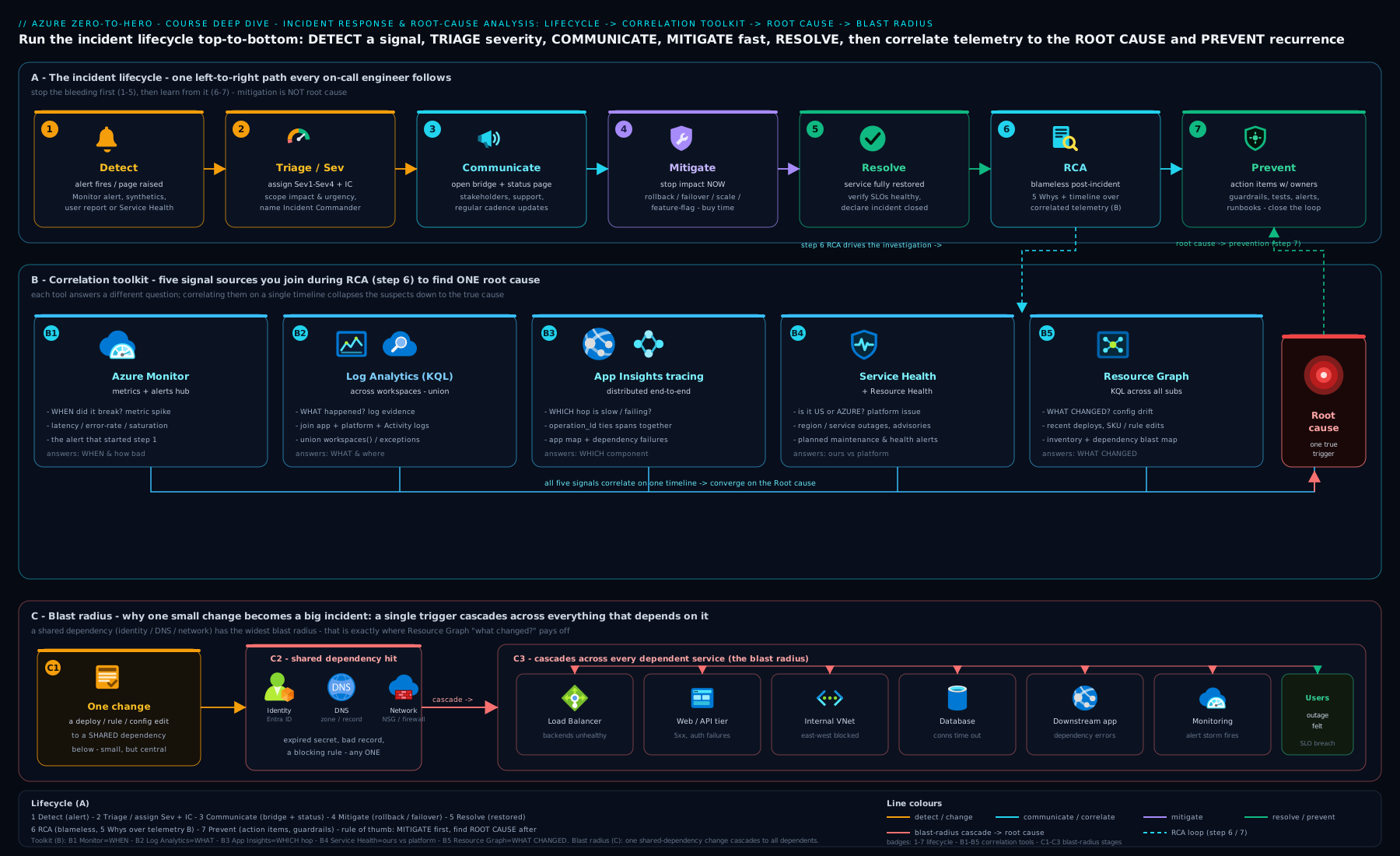
The diagram traces a single incident through the lifecycle — detect, triage, communicate, mitigate, resolve, RCA, prevent — and shows the cross-service correlation step in the middle, where Azure Monitor, Application Insights distributed tracing, Service Health, the Activity Log and Resource Graph are read together to turn a scattered set of symptoms into one root cause and a bounded blast radius.
Severity levels
Severity is the dial that controls everything else in an incident — who gets paged, how fast, how often you communicate, and whether you wake people up. Assigning it correctly in the first few minutes is one of the highest-leverage decisions in the whole response. Over-classify and you exhaust the on-call; under-classify and you let a major incident smoulder. Severity is driven by customer impact and scope, not by how interesting the bug is.
| Severity | Impact | Example | Response expectation |
|---|---|---|---|
| SEV 1 (Critical) | Major outage; core business function down or data at risk; broad customer impact | Checkout down platform-wide; a region offline; suspected data loss | All-hands, war room, incident commander, 24/7, executive + customer comms, minute-by-minute cadence |
| SEV 2 (High) | Significant degradation; a major feature broken or severe performance impact for many | One critical API failing 30% of requests; P99 breaching SLO for a key journey | On-call engaged immediately, IC for coordination, frequent stakeholder updates, fix in progress around the clock |
| SEV 3 (Moderate) | Limited or partial impact with a workaround; non-critical feature degraded | A secondary feature down; elevated errors with a fallback path working | Handled in business hours, normal on-call, periodic updates, scheduled fix |
| SEV 4 (Low) | Minor issue, little or no customer impact | A cosmetic bug; a single non-customer-facing job failing with no downstream effect | Tracked as normal work, no special comms, fixed in the regular queue |
Two practical rules. When in doubt, classify up, then downgrade — it is far cheaper to stand down an over-mobilised team than to belatedly escalate a SEV-3 that was really a SEV-1. And severity can change during the incident — a SEV-2 that turns out to involve data loss becomes a SEV-1; an outage that you mitigate to a workaround can drop from SEV-1 to SEV-3 even before root cause is found. Re-evaluate severity as the picture sharpens, and announce the change so everyone’s expectations move with it.
Blameless postmortems & the WAF Operational Excellence link
The incident is not over when service is restored — it is over when you have learned from it. The vehicle for learning is the postmortem (or post-incident review), and the single most important word attached to it is blameless. A blameless postmortem assumes that everyone acted reasonably with the information and tools they had, and asks what about the system let a reasonable action cause an incident — not who to blame. This is not soft; it is the only way to get the truth. The moment people fear blame, they stop volunteering the very details — “I ran that script without checking”, “the runbook was out of date” — that reveal the real, systemic cause. Blame produces silence and scapegoats; blamelessness produces durable fixes.
A good postmortem has a predictable structure: a short summary, an impact statement (duration, customers, SLO/revenue), a timeline in UTC (detection, key decisions, mitigation, resolution), the root cause (reached via five whys — keep asking “why?” until you hit a systemic cause, not a person or a single proximate event), the contributing factors (a complex incident usually has several — a slow alert and a too-lenient health probe and a missing exclusion), what went well (preserve the good — the fast failover, the clear comms), and action items that are specific, owned, and dated. Beware counterfactuals (“if only X had not happened”) — they describe a fantasy world; focus instead on what did happen and what would have detected or contained it.
This closes the loop into the Azure Well-Architected Framework’s Operational Excellence pillar, whose core idea is exactly this discipline: monitor for the signals that matter, respond to incidents with a defined process, and learn from failure to continuously improve. Each postmortem action item is operational-excellence debt being paid down — a better alert removes a detection gap, a circuit breaker removes a cascade path, a report-only-first policy removes a class of identity incident. The incidents in this lesson are not just fires to be fought; they are the feedback signal that drives a resilient system to become more resilient. A team that runs blameless postmortems and actually ships the action items gets measurably fewer SEV-1s over time — that trend is the truest scorecard of operational excellence.
Hands-on lab
This lab builds a small but realistic two-service estate, generates correlated telemetry, and then has you correlate signals across services the way you would in a real incident — using Application Insights distributed tracing, Log Analytics cross-resource KQL, and Azure Resource Graph change history. It stays inside the free/low-cost tiers. Run it in Azure Cloud Shell (Bash) so the tooling is preinstalled and authenticated.
Step 1 — Set variables and a resource group.
RG=rg-rca-lab
LOC=eastus
WS=law-rca-lab
AI=ai-rca-lab
az group create -n $RG -l $LOC -o table
Step 2 — Create a Log Analytics workspace (the correlation hub).
az monitor log-analytics workspace create \
  -g $RG -n $WS -l $LOC -o table
WSID=$(az monitor log-analytics workspace show -g $RG -n $WS --query id -o tsv)
The pay-as-you-go Log Analytics tier includes a monthly free data allowance; this lab ingests only a trickle, so expect effectively ₹0 in data charges.
Step 3 — Create a workspace-based Application Insights resource. Workspace-based App Insights stores its telemetry in Log Analytics, which is exactly what lets you write cross-resource KQL joining app traces to platform logs.
az extension add -n application-insights 2>/dev/null
az monitor app-insights component create \
  --app $AI -g $RG -l $LOC \
  --workspace "$WSID" -o table
Step 4 — Generate correlated telemetry. In a real estate your services emit this automatically via the OpenTelemetry / Application Insights SDK propagating traceparent. For the lab, the point is to practise the queries, so let the workspace collect a little platform telemetry and use the Activity Log (always populated) plus any app telemetry you point at it. Trigger some control-plane activity to have changes to correlate against:
az tag create --resource-id $(az group show -n $RG --query id -o tsv) \
  --tags incident-lab=true owner=vinod -o table
Step 5 — Correlate across services with KQL. Open the Log Analytics workspace in the portal (Logs blade) and run cross-resource / union queries. This pattern is the heart of multi-service RCA — one question across many tables:
// Failed dependencies grouped by target service, last hour (App Insights tables)
AppDependencies
| where TimeGenerated > ago(1h) and Success == false
| summarize failures = count() by Target, ResultCode
| sort by failures desc
// Follow one request end-to-end by operation Id (the distributed-trace thread)
let opId = "<paste an operation_Id from AppRequests>";
union AppRequests, AppDependencies, AppExceptions
| where OperationId == opId
| project TimeGenerated, ItemType=Type, Name, DurationMs=DurationMs, Success, ResultCode
| sort by TimeGenerated asc
Step 6 — Use Azure Resource Graph for change history (blast-radius + “what changed”). Resource Graph answers tenant-wide questions in milliseconds and is invaluable for pinning an incident to a change:
az graph query -q "resources | where resourceGroup == 'rg-rca-lab' | project name, type, location" -o table
# What changed recently across the subscription (needs the resource-graph change extension)
az graph query -q "resourcechanges
  | where todatetime(properties.changeAttributes.timestamp) > ago(1d)
  | project targetResourceId=tostring(properties.targetResourceId),
            changeType=tostring(properties.changeType),
            time=todatetime(properties.changeAttributes.timestamp)
  | order by time desc | take 20" -o table
Validation. You have succeeded when you can: (1) run a union/cross-resource KQL query that returns rows from more than one source; (2) follow a single operation_Id across request, dependency and exception tables; and (3) list recent changes from Resource Graph and tie a change timestamp to a hypothetical incident start. That is the exact muscle a complex incident demands.
Cleanup. Delete everything in one command so nothing keeps billing:
az group delete -n $RG --yes --no-wait
Cost note. This lab is built to cost effectively nothing: Log Analytics has a monthly free ingestion allowance, the lab ingests a trickle well under it, and App Insights (workspace-based) bills through that same allowance. Even left running for a day the spend is a rounding error (well under ₹50), and the az group delete removes the workspace and App Insights component so there is no lingering data-retention charge. The only way this lab costs real money is if you point a chatty production app at it — don’t, for a lab.
Common mistakes & troubleshooting
| Symptom | Likely cause | Fix |
|---|---|---|
| You debug code for an hour, then find it was a platform/region event | Skipped Service Health and the Activity Log at the start | Make “check Service Health + Activity Log” the first step of every incident — rule out the cheapest causes before hunting in your own code |
| Many services fail at once and you chase each one separately | Missed the synchronisation signal of a shared root cause | When N services fail in the same second, suspect the one thing they share (identity, DNS, network, cert, a downstream) — read the blast radius, don’t debug N bugs |
| “Everything is fine” on dashboards but customers are failing | Watching averages; the failure lives in the tail or in one zone | Slice by percentile (P95/P99) and by dimension (zone, instance, customer); open individual distributed traces |
| Can’t tell where in the call chain a request failed | Not using distributed tracing; correlating by eyeball | Correlate by operation_Id; read the end-to-end transaction waterfall to find the slow/failing span |
| Telemetry is scattered and you can’t get one view | Multiple workspaces/resources queried separately | Use KQL union, workspace()/app(), and cross-resource queries to ask one question across all of them |
| The incident keeps recurring after you “fixed” it | You resolved the symptom, not the root cause; no real prevention | Run a blameless postmortem, reach a systemic root cause via five whys, and ship owned, dated preventive action items |
| Retries make an overload worse | A retry storm — aggressive, jitter-less retries amplify throttling | Exponential backoff with jitter, honour Retry-After, add a circuit breaker, cap retries |
| A one-line policy change took out a whole tier | Underestimated the identity blast radius | Test Conditional Access in report-only first, exclude workload identities, review blast radius before enforcing |
Best practices
- Decouple mitigation from root cause. Restore service first (failover, rollback, scale-out, feature flag), investigate second. A calm hour bought by mitigation beats heroics under fire.
- Name an incident commander early. Separate the coordinating/communicating role from the debugging role so a complex incident doesn’t dissolve into uncoordinated parallel effort.
- Anchor to one UTC timeline and correlate by ID. Find the start time once, overlay every signal on it, and pull the
operation_Idthread instead of scrolling logs. - Rule out the cheap causes first. Service Health, Resource Health, and the Activity Log answer “is it the platform?” and “what changed?” in seconds — always before a code hunt.
- Read the blast radius. Synchronised, cross-service failures almost always trace to a shared foundational layer — identity, DNS, network, or certificates. Look for the common denominator.
- Instrument for the questions you’ll ask at 02:00. Distributed tracing, percentile metrics, dimension-rich telemetry (zone/instance/customer), and SLO-based alerts are what make a complex incident debuggable at all.
- Alert on symptoms that matter, not raw noise. Failed requests, SLO breaches, throttle ratios and identity-failure spikes — not every CPU twitch. Fight alert fatigue so the real alert lands.
- Always run a blameless postmortem with shipped action items. The trend in your SEV-1 rate is the real scorecard; it only improves if you actually close the loop.
Security notes
- Identity is the largest blast radius — treat identity changes as high-risk changes. Conditional Access edits, app-registration secret/certificate rotation, and RBAC removals can lock out entire tiers. Route them through change management, test in report-only mode, and exclude workload identities from human-centric controls.
- Don’t let an incident become a data-exposure incident. Logs, traces and packet captures gathered during an incident can contain secrets, tokens and PII. Restrict access to diagnostic workspaces (RBAC on Log Analytics), avoid pasting raw tokens into chat/tickets, and treat captured evidence as sensitive.
- Maintain a tested break-glass path. An identity misconfiguration can lock out the very accounts you need to fix it. Keep emergency-access accounts excluded from the policies that could trap you, and rehearse them.
- Rotate proactively and alert on expiry. A surprising share of large blast radii are expired certificates and secrets. Track expiry dates, automate rotation where possible, and alert before expiry — not from the 02:00 outage it causes.
- Audit the responders. Privileged actions taken during a war room (elevated access, config changes, data access) should themselves be logged and reviewed — incidents are exactly when guardrails get bypassed under pressure.
Interview & exam questions
- Walk me through the incident-response lifecycle. Detect → triage → communicate → mitigate → resolve → RCA → prevent. Emphasise that mitigation is decoupled from root cause (restore service before you fully understand the cause) and that resolution is not the same as RCA.
- Ten unrelated services start failing at the same second, with no deployment. Where do you look first and why? Suspect a shared foundational layer — identity, DNS, network, or a certificate — because synchronised cross-service failure is the fingerprint of one shared root cause. Check Service Health and the Activity Log first to rule out a platform event or a config change.
- How do you debug an intermittent P99 latency problem when averages look fine? You can’t debug a tail with an average. Filter distributed traces to the slow requests, read the transaction waterfall to find the slow span, then correlate that dependency’s metrics (e.g. cache evictions, throttling) on the same timeline. Add percentile-based alerts.
- What is a retry storm and how do you stop one? A self-amplifying feedback loop where clients hit a rate limit, retry aggressively, and the retries cause more throttling — request count explodes while goodput collapses. Fix with exponential backoff + jitter, honouring
Retry-After, a circuit breaker, and capped retries. Counter-intuitively, trying less hard recovers faster. - A third of requests are failing across a three-zone app. What’s your hypothesis and response? A single availability zone is unhealthy. Confirm via zone-scoped Service Health and by slicing telemetry by
cloud_RoleInstance/zone. Mitigate by ejecting the bad zone (tighten health probes) and scaling the healthy zones; ensure N-1 headroom. - Non-interactive workloads (service principals) suddenly can’t authenticate but users are fine, with no deploy. What happened? Almost certainly a Conditional Access change that didn’t exclude workload identities. Read the
AADSTScode, check Entra audit logs for the policy change and the service-principal sign-in logs. Mitigate by excluding the principals or setting the policy report-only. - How do you correlate telemetry that’s spread across multiple Log Analytics workspaces and resources? KQL
unionwithworkspace()andapp()expressions, and cross-resource queries — one question across many sources. With workspace-based Application Insights, app telemetry lives in Log Analytics so you can join app traces to platform logs directly. - What is distributed tracing and what makes it work across services? End-to-end tracking of one logical request across multiple services, stitched together by a correlation ID (
operation_Id) propagated via W3C Trace Context (traceparent). It produces the transaction waterfall that shows exactly which span failed or slowed. - Service Health vs Resource Health vs Activity Log — when do you use each? Service Health = is Microsoft having a problem in my subscription/region? Resource Health = is this specific resource healthy from the platform’s view? Activity Log = who changed what, when (control-plane). Together they rule out the platform and pin the incident to a change.
- What makes a postmortem “blameless,” and why does it matter? It assumes people acted reasonably with the information they had and asks what about the system allowed it — never who to blame. It matters because blame produces silence, and silence hides the systemic root cause. Reach the cause via five whys; avoid counterfactuals.
- How do you decide an incident’s severity, and can it change? By customer impact and scope, not how interesting the bug is. When in doubt, classify up and downgrade later. Severity can change mid-incident (a SEV-2 that turns out to involve data loss becomes SEV-1; a mitigated SEV-1 can drop to SEV-3) — re-evaluate and announce the change.
- How does complex-incident response connect to the Well-Architected Framework? It is the Operational Excellence pillar in action: monitor for signals that matter, respond with a defined process, and learn from failure to improve. Each shipped postmortem action item pays down operational-excellence debt; a falling SEV-1 rate is the scorecard.
Quick check
- What is the fingerprint that distinguishes a single shared root cause from many independent failures?
- Why must you slice by percentile and by dimension instead of trusting averages?
- In a retry storm, why does trying less hard often recover the system faster?
- Which Azure tools do you check first to rule out the cheapest causes, and what does each answer?
- What single word defines a good postmortem, and why does it produce better root causes?
Answers
- Synchronisation — when many services fail within the same second they almost certainly share one root cause (an identity/DNS/network/certificate layer or a shared dependency); independent problems drift apart in time.
- Averages hide the tail and hide subsets — an intermittent P99 problem or a one-zone-of-three failure is invisible in the mean but obvious when you look at P95/P99 and group by zone/instance/customer.
- Because the retries are the cause — aggressive, jitter-less retries amplify throttling into a self-sustaining feedback loop; backing off (with jitter, honouring
Retry-After, a circuit breaker) breaks the loop so real work gets through. - Service Health (is Microsoft having a problem in my region/service?), Resource Health (is this specific resource healthy?), and the Activity Log (who changed what, when?) — they rule out the platform and pin the start to a change before you hunt in your own code.
- Blameless — it assumes people acted reasonably and interrogates the system, which keeps people honest enough to surface the details that reveal the true, systemic root cause.
Exercise
Take a real or realistic incident from your own environment (or reuse Scenario A from this lesson) and write a one-page blameless postmortem for it. Include: a one-paragraph summary; an impact line (duration, who/what was affected, SLO or revenue impact); a UTC timeline with at least detection, mitigation and resolution timestamps; a root cause reached by writing out the five whys explicitly; at least three contributing factors; a “what went well” note; and three action items, each with an owner and a due date, where at least one removes the cause and at least one detects the problem earlier next time. Then, for the same incident, write the three KQL/Resource Graph queries you would have run to correlate the signals and find the cause faster — one cross-resource union, one operation_Id trace follow, and one Resource Graph change-history query.
Certification mapping
- AZ-104 — Azure Administrator: the Monitor and maintain Azure resources domain. This lesson extends single-resource monitoring into multi-service incident handling — Azure Monitor, Log Analytics/KQL across resources, Service Health and Resource Health, and the Activity Log used together to diagnose real outages.
- AZ-400 — Designing and Implementing Microsoft DevOps Solutions: the Develop an instrumentation strategy and implement a strategy for tools and integration / site-reliability content — distributed tracing with Application Insights, correlated telemetry, alerting on the signals that matter, severity/incident process, and blameless postmortems as the continuous-improvement loop.
- AZ-305 — Designing Microsoft Azure Infrastructure Solutions (supporting): the resilience and operational-excellence implications — designing for zone redundancy, isolating workloads from noisy neighbours, circuit breakers and graceful degradation, all of which appear here as preventive actions.
Glossary
- Incident: an unplanned interruption or degradation of a service requiring an urgent, coordinated response (distinct from a mere bug).
- Incident commander (IC): the role that coordinates, decides, and communicates during an incident — separate from the engineers doing the debugging.
- Mitigation vs resolution: mitigation stops customer impact (failover, rollback, scale-out) even before the cause is known; resolution is the system returned to a stable normal state.
- Root-cause analysis (RCA): the disciplined search for the true, systemic cause (and contributing factors) of an incident, typically via the five whys.
- Blast radius: the set of services affected by a single root cause; large blast radii usually originate in shared layers — identity, DNS, network, certificates.
- Distributed tracing: end-to-end tracking of one request across services, stitched by a correlation ID (
operation_Id) propagated via W3C Trace Context (traceparent). - Application map: the Application Insights topology view of components and dependencies, with failing edges highlighted.
- Cross-resource / cross-workspace query: KQL (
union,workspace(),app()) that asks one question across multiple Log Analytics workspaces or resources at once. - Service Health: subscription-scoped Azure platform events — is Microsoft having a problem in your region/service?
- Resource Health: the platform’s health view of one specific resource.
- Azure Resource Graph: a fast, tenant-wide KQL service over your resources and their change history.
- Retry storm: a self-amplifying feedback loop where rate-limit retries cause more throttling; request count explodes while goodput collapses.
- Circuit breaker: a pattern that stops calling a failing/throttled dependency for a cool-down window so callers fail fast instead of piling on.
- Conditional Access: Entra ID policy engine that grants/blocks access based on conditions (user, device, location, risk); can apply to workload identities as well as users.
AADSTScodes: Microsoft Entra authentication error codes (e.g. 53003 = blocked by Conditional Access, 7000215 = invalid client secret) that precisely identify an identity failure.- Severity (SEV): the classification of an incident by customer impact and scope (SEV 1–4) that drives paging, comms cadence and urgency.
- Blameless postmortem: a post-incident review that interrogates the system rather than assigning blame, so people surface the details that reveal the systemic root cause.
- Operational Excellence: the Well-Architected Framework pillar covering monitoring, incident response, and learning from failure to continuously improve.
Next steps
You now have the method, the instruments, and the muscle to run a complex, multi-service incident from the first alert to a shipped postmortem action item. Go deeper on the instruments themselves in The Azure Diagnostics Toolkit: Network Watcher, Resource Health & KQL, which drills into each tool you reached for here. For the resilience patterns that prevent these incidents — zone redundancy, deployment stamps, active-active — see the architecting-ladder and mission-critical lessons; and to prove your incident response works before a real outage, pair this with a chaos-engineering game day. The best operators are made in the postmortem, not the war room: run them blameless, ship the action items, and watch your SEV-1 rate fall.