A multinational insurance carrier finishes a merger and inherits the problem every regulated, distributed enterprise eventually hits: 5,000 claims adjusters, underwriters, and actuaries spread across three continents, half of them now contractors, all of them needing the same locked-down Windows desktop with the same line-of-business apps — and the security committee has just ruled that policyholder PII may never reside on an endpoint the company does not control. The old answer was to ship managed laptops; with a third of the workforce now temporary and two acquired offices on someone else’s network, that answer costs a fortune and leaks data the moment a contractor’s personal machine touches a claims file. The CIO’s mandate is blunt: “Every one of these people gets the exact same desktop, the data stays in our cloud, and I am not paying to run 5,000 VMs around the clock.” This article is the reference architecture for delivering that on Azure Virtual Desktop (AVD) — pooled session hosts, FSLogix profiles on Azure Files, schedule-driven autoscale, Okta-brokered identity, and Defender for Endpoint on every host — at a scale and under a compliance regime that a CISO will actually sign.
The pressures in insurance stack predictably. Regulation (state insurance commissioners, GDPR for the European book, SOC 2 for the reinsurance partners) means claims data cannot live on uncontrolled endpoints and every session needs an audit trail. Workforce churn means onboarding a 200-person seasonal claims surge in a week and de-provisioning them the day the catastrophe season ends, without re-imaging hardware. Cost means you cannot run 5,000 always-on VMs when the actual concurrent peak is 3,200 during business hours in each region and near-zero overnight. AVD is the pattern that satisfies all three: the desktop and its data live in Azure, the endpoint is a disposable thin client or a browser, and you pay for compute that scales to the shift, not the headcount.
Why not the obvious alternatives
Three shortcuts will be proposed in the first design meeting, and each fails for a nameable reason.
Managed laptops everywhere put regulated data on 5,000 endpoints you must patch, encrypt, track, and wipe — and contractors will not accept corporate MDM on personal machines, so you buy and ship hardware to temps you keep for ten weeks. Windows 365 Cloud PCs (the per-user, always-assigned sibling of AVD) are excellent for permanent staff with a fixed desk, but at 5,000 seats with heavy churn and overnight idle, paying a flat monthly price per persistent Cloud PC is dramatically more expensive than pooled, autoscaled session hosts that you shut off at night. A third-party VDI stack (Citrix or VMware Horizon on Azure) layers a licensing and broker tier — and an extra vendor — on top of the Azure infrastructure you are already paying for; AVD’s broker, gateway, and load balancer are a managed Azure service at no separate cost.
AVD with pooled host pools is the fit here: many users share a smaller fleet of multi-session Windows 11 Enterprise hosts, the fleet grows and shrinks on a schedule, and FSLogix makes every login feel personal even though the user lands on a different VM each morning. The endpoint holds nothing; the session, the profile, and the data all stay in the carrier’s Azure tenant.
Architecture overview
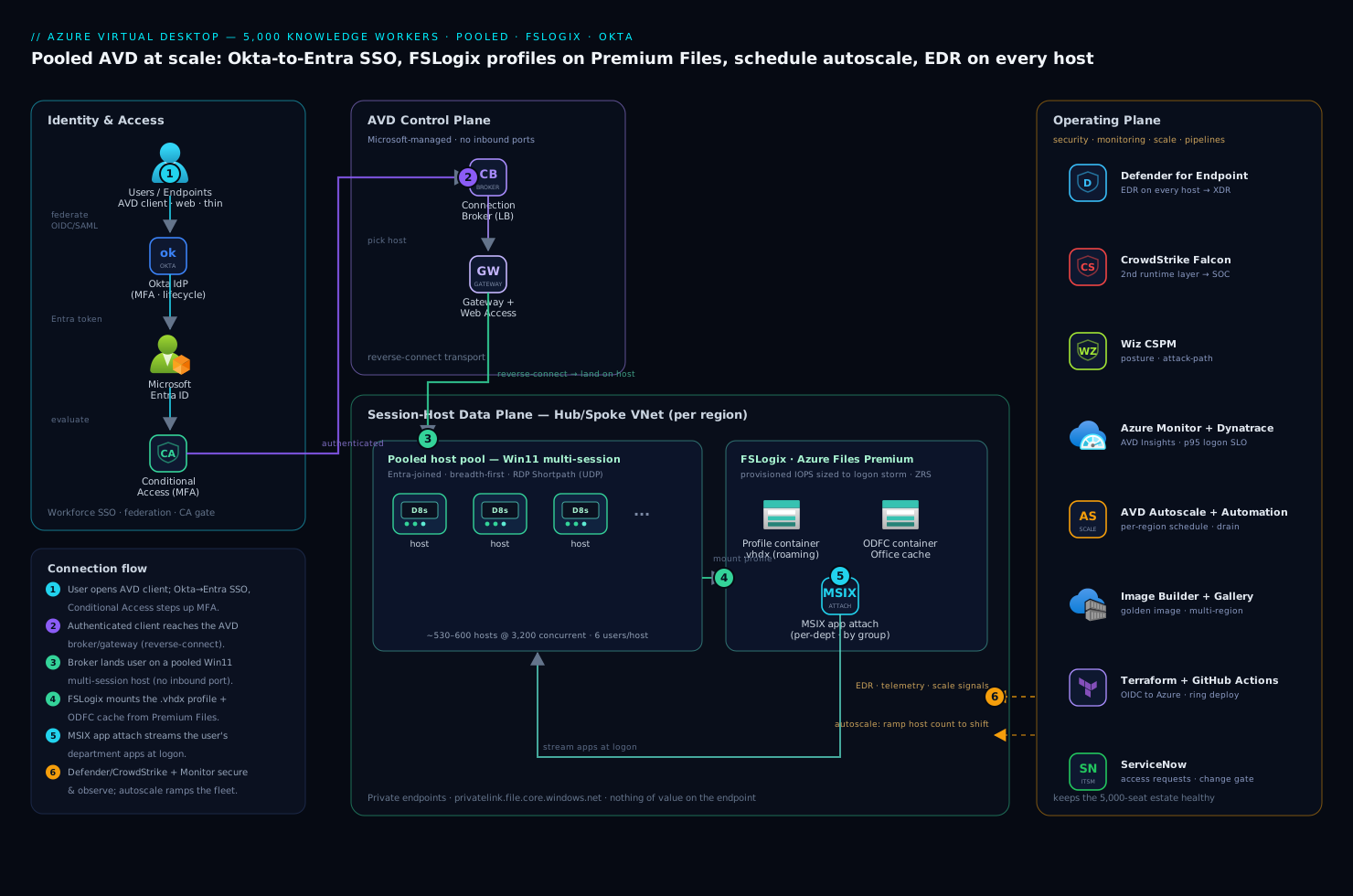
The platform has three planes that are worth separating in your head: the Microsoft-managed control plane (broker, gateway, diagnostics — you configure it but never run it), the session-host data plane (the VMs your users actually compute on, plus their profiles and apps), and the operating plane (identity, security, monitoring, and the pipelines that keep the first two healthy). Getting the boundaries right is what keeps a 5,000-seat estate operable by a small team.
The defining property the security committee cares about most: nothing of value lives on the user’s endpoint. The session runs on a session host inside the carrier’s VNet, the profile lives in Azure Files, policyholder data is accessed over the wire and rendered as pixels, and the client device — managed laptop, contractor’s browser, or a $200 thin client in an acquired office — receives only an encrypted display stream.
Connection path, following the control flow:
- A user opens the AVD client (desktop, web, or thin client). Authentication federates through Okta as the workforce IdP — the carrier’s standing SSO with its MFA and lifecycle rules — which is brokered to Microsoft Entra ID so AVD sees a first-class Entra token. Entra Conditional Access then evaluates device compliance, location, and risk, and steps up MFA before any session is brokered.
- The authenticated client reaches the AVD control plane — the Connection Broker, Gateway, and Web Access services Microsoft runs. The broker picks a session host in the user’s assigned host pool using a load-balancing algorithm (breadth-first to spread load, or depth-first to pack hosts before starting new ones), and the Gateway brokers a reverse-connect transport so no inbound port is ever opened on a session host.
- The user lands on a pooled session host — a multi-session Windows 11 Enterprise VM in a host pool, joined to Entra ID (or hybrid-joined to the on-prem AD that some line-of-business apps still need). RDP Shortpath establishes a direct UDP transport for low latency where the network allows it.
- At logon, FSLogix attaches the user’s profile container — a
.vhdxmounted from Azure Files Premium — so their Outlook cache, OneDrive state, browser profile, and app settings appear instantly even though they have never touched this specific VM before. A separate ODFC (Office) container holds the Outlook/OneDrive cache to keep the main profile lean. - The session host has the user’s department-specific apps already streamed in via MSIX app attach — claims adjusters see the claims workbench, actuaries see the modeling suite, and neither image carries the other’s software.
- Throughout the session, Microsoft Defender for Endpoint runs on the host for EDR, CrowdStrike Falcon provides a second runtime-detection layer feeding the carrier’s SOC, and session diagnostics stream to Azure Monitor / Log Analytics. The user’s work on claims data never leaves the VNet.
Scaling path, running independently against the clock: the AVD Autoscale feature (and Azure Automation for the ramp logic) starts and stops session hosts on a per-region schedule — spin up to the morning peak before the shift, ramp down through the evening, and run a skeleton crew overnight for the few off-hours users — draining sessions gracefully so nobody is kicked mid-claim. That schedule is the single biggest cost lever in the entire architecture.
Component breakdown
| Component | Service / tool | Role in the platform | Key configuration choices |
|---|---|---|---|
| Identity / SSO | Okta + Microsoft Entra ID | Workforce SSO (Okta) federated to Entra for native AVD auth and RBAC | OIDC/SAML federation; group claims drive host-pool assignment; Conditional Access on Entra |
| Control plane | AVD Broker / Gateway / Web Access | Connection brokering, reverse-connect transport, session diagnostics | Breadth-first load balancing; reverse connect (no inbound ports); validation host pool for ring-0 |
| Session hosts | Windows 11 Enterprise multi-session | The pooled VMs users compute on | D-series for office work; per-department host pools; Trusted Launch + disk encryption |
| Profiles | FSLogix on Azure Files Premium | Roaming user profile + Office cache as mounted VHDX | Cloud Cache or single-share; ODFC split; per-region profile storage |
| App delivery | MSIX app attach | Per-department app streaming, decoupled from the image | App attach packages on Azure Files; assignment by Entra group |
| Autoscale | AVD Autoscale + Azure Automation | Schedule-based ramp of host count to match shifts | Per-region schedules; drain mode; off-peak minimum host % |
| Image build | Azure Image Builder + Compute Gallery | Golden-image pipeline, versioned and replicated | Monthly patched image; multi-region gallery replication |
| Endpoint security | Microsoft Defender for Endpoint | EDR on every session host | Onboarding via policy; AV + EDR; alerts to Defender XDR |
| Runtime security | CrowdStrike Falcon | Second runtime-detection layer on hosts | Sensor baked into the image; detections to the SOC |
| Posture / CSPM | Wiz | Cloud posture, exposure, attack-path analysis across the estate | Agentless scan of Files/VMs; alert on any public-exposure or RBAC drift |
| Observability | Dynatrace + Azure Monitor | Logon-time, session health, profile-mount latency, capacity | OneAgent on hosts; AVD Insights workbook; logon-duration SLO |
| ITSM / approvals | ServiceNow | Access requests, host-pool changes, incident records | Self-service desktop request; change gate for image promotion |
| CI / IaC | GitHub Actions + Terraform + Ansible | Infra as code; image config; pipeline-driven ring deployment | OIDC to Azure (no stored creds); Ansible host hardening; ring promotion |
A few of these choices deserve the why, because they are the ones teams get wrong at this scale.
Why pooled, not personal, host pools. A personal host pool assigns each user a dedicated VM that persists — simpler, but you are back to paying for 5,000 always-on machines, which defeats the cost mandate. A pooled host pool lets, say, six office users share one multi-session host, so a 3,200-concurrent peak needs a fleet on the order of 530–600 D8s hosts rather than 5,000 — and that fleet shrinks overnight. The price is that nothing user-specific can live on the host’s local disk between sessions, which is exactly the problem FSLogix exists to solve.
Why FSLogix on Premium Files, and the I/O trap. FSLogix moves the entire Windows user profile into a VHDX mounted from a file share, so a user roams seamlessly across a stateless fleet. The non-obvious failure is storage I/O: at 9 a.m. on Monday, hundreds of users in a region log in within minutes, each mounting a profile and hydrating an Office cache — a logon storm that will saturate a Standard file share and turn a 20-second logon into four minutes. The fix is Azure Files Premium (provisioned IOPS, scaled to the concurrent-logon rate, not the total profile size) and splitting the Office cache into a separate ODFC container so the main profile stays small.
Why MSIX app attach instead of baking apps into the image. If every department’s software lives in one golden image, a single image serves everyone — but it is bloated, every app update means rebuilding and re-replicating the whole image, and the actuarial modeling suite ends up installed on adjusters’ hosts who must never run it (a licensing and attack-surface problem). MSIX app attach keeps apps in versioned packages on a file share and attaches them to a session at logon based on the user’s Entra group, so one lean OS image serves all departments and an app update is a package swap, not an image rebuild.
Implementation guidance
Provision with Terraform, and treat identity and profile storage as the first deliverables. The deployment order matters because a wrong identity or storage decision is expensive to unwind at 5,000 seats.
- The network: hub/spoke with a spoke VNet per region, subnets for session hosts and for the private endpoints on Azure Files; private DNS for
privatelink.file.core.windows.netso profiles never traverse a public path. - Identity: Okta federated to Entra over OIDC/SAML; Entra-join the session hosts where possible (hybrid-join only where a legacy app demands Kerberos to on-prem AD); Conditional Access policies requiring MFA and compliant or AVD-network access.
- Profile storage: an Azure Files Premium share per region, sized to the concurrent-logon IOPS, with the FSLogix RBAC and NTFS ACLs set so users can create but not enumerate each other’s containers.
- Host pools: a pooled host pool per department per region, each backed by a versioned image from the Compute Gallery, with a small validation host pool that takes the new image first (ring 0).
- Autoscale schedules per region, plus the Defender/CrowdStrike onboarding and Dynatrace OneAgent baked into the image.
A minimal Terraform shape for a pooled host pool communicates the intent — breadth-first load balancing, start-on-connect for the autoscale ramp, reverse-connect only:
resource "azurerm_virtual_desktop_host_pool" "claims_emea" {
  name                     = "hp-claims-emea-prod"
  resource_group_name      = azurerm_resource_group.avd.name
  location                 = "westeurope"
  type                     = "Pooled"
  load_balancer_type       = "BreadthFirst"   # spread users across hosts
  maximum_sessions_allowed = 6                 # density per D8s host
  start_vm_on_connect      = true              # autoscale can stop idle hosts
  custom_rdp_properties    = "audiocapturemode:i:1;targetisaadjoined:i:1"
  validate_environment     = false             # true only on the ring-0 pool
}
The pipeline that applies this runs in GitHub Actions, authenticating to Azure via OIDC federation so there is no stored service-principal secret to leak — a lesson the platform team intends never to repeat. Ansible handles in-guest configuration that does not belong in the image bake (last-mile policy, agent registration checks), and Argo CD is overkill for VMs but earns its place if you also run the supporting microservices (the licensing service, the self-service portal backend) on AKS.
Image as code: the golden image is a build artifact, not a pet. Build the Windows 11 multi-session image monthly with Azure Image Builder, capturing the current Patch Tuesday updates, the FSLogix agent, the Defender and CrowdStrike sensors, the Dynatrace OneAgent, and the AVD agents — then publish it to an Azure Compute Gallery replicated to every region the carrier operates in, so a host pool in Singapore pulls a local copy rather than dragging the image across the planet. Promotion is a ring deployment: the new image lands on the validation host pool first, a synthetic-logon smoke test runs, and only after it passes does the pipeline roll the image to the production pools — draining and replacing hosts in waves so no user is interrupted.
FSLogix wiring, concretely. Point FSLogix at the regional Premium share, enable the ODFC split, and decide the redundancy model deliberately: a single share with zone-redundant storage (ZRS) is simpler and the right default; Cloud Cache (which mirrors the profile across two storage accounts, even cross-region) buys profile resilience to a storage-account outage at the cost of more I/O and complexity — reserve it for the populations who genuinely cannot lose a session. Set a profile-size quota and a VHDX compaction job so abandoned contractor profiles do not silently consume the share.
Enterprise considerations
Security & Zero Trust. The architecture is Zero Trust by construction: identity-based access only, no inbound ports on hosts (reverse connect), and nothing of value on the endpoint. Layer on top: (a) Entra Conditional Access gating every connection on MFA, device compliance, and risk — the contractor on an unmanaged machine still authenticates strongly and lands in a controlled session that cannot exfiltrate to the local disk because clipboard, drive, and printer redirection are disabled by RDP policy for the regulated pools; (b) Microsoft Defender for Endpoint on every session host for EDR, feeding Defender XDR; © CrowdStrike Falcon as an independent runtime-detection layer into the SOC, because defense in depth on a shared multi-session host matters when one compromised session sits beside five others; (d) Wiz running continuous CSPM and attack-path analysis across the VMs and the Azure Files shares, alerting the moment a share drifts to public exposure or an RBAC change widens who can read profiles — the posture backstop behind the policy controls; (e) HashiCorp Vault holding the few service credentials the supporting automation needs (the licensing-service tokens, the image-build signing key), leased dynamically rather than sitting in a pipeline variable. Azure Policy denies a session host built without disk encryption or Trusted Launch, and Wiz independently verifies the policy is holding.
Cost optimization. Compute dominates and is almost entirely about not running idle hosts.
| Lever | Mechanism | Typical effect |
|---|---|---|
| Schedule autoscale | Ramp host count to the shift; skeleton crew overnight | The single largest saving — often 40–60% vs. always-on |
| Right-sized density | Tune maximum_sessions_allowed to real per-host load |
Fewer hosts for the same concurrency |
| Reserved Instances / savings plan | Commit to the steady baseline fleet (the always-on minimum) | ~30–40% on the committed compute |
| Existing Windows licensing | AVD includes the Windows 11 multi-session right under M365/E3+ | No per-VM Windows OS charge |
| Premium Files sized to IOPS | Provision for concurrent-logon I/O, not total profile GB | Avoids over-buying capacity to get throughput |
Meter cost per department by tagging host pools and pipe the metric to Dynatrace, which the platform team uses for the chargeback dashboard each business unit sees.
Scalability. Each plane scales independently. The session-host fleet scales horizontally by adding hosts to a pool (autoscale handles the daily curve; you add headroom to the schedule for a seasonal claims surge). Azure Files Premium scales by provisioning more IOPS/throughput on the share, and crucially per region so a logon storm in EMEA does not starve APAC. The control plane is Microsoft-managed and scales itself. The practical ceiling is regional vCPU quota and the IOPS ceiling of a single Premium share — which is why a 5,000-seat estate is partitioned into regional, per-department host pools rather than one giant pool, both for blast-radius and for scaling each axis on its own.
Failure modes, and what each one looks like. Name them before they page you.
- Logon storm saturates the profile share — Monday 9 a.m., hundreds of mounts at once, the Premium share hits its IOPS ceiling, and logons crawl to minutes. Mitigation: size Premium Files to the concurrent-logon rate, split the ODFC container, and stagger autoscale warm-up before the shift starts.
- FSLogix VHDX corruption / failed mount — a profile fails to attach and the user gets a temporary local profile with none of their settings, or worse, a half-mounted container. Mitigation: VHDX compaction and health checks, a documented profile-reset runbook in ServiceNow, and Cloud Cache for the populations that cannot tolerate it.
- Image regression — a bad monthly image breaks an app or balloons logon time across the fleet. Mitigation: the ring-0 validation host pool, a synthetic-logon gate in the pipeline, and one-click rollback to the prior gallery version.
- Autoscale under-provisions a surge — the catastrophe-season ramp outpaces the schedule and users wait for a host. Mitigation: schedule headroom for known seasonal peaks plus a manual scale-out runbook, and alerting on session-host saturation.
- Regional outage — see DR below.
Reliability & DR (RTO/RPO). Decide the numbers per population. Session state is ephemeral — a dropped session reconnects to another host — so the things to protect are profiles and the ability to broker sessions in a surviving region. Azure Files Premium with ZRS survives a zone loss transparently; surviving a region loss means either GRS on the profile storage or Cloud Cache mirroring profiles to the paired region, plus a warm host pool in that region that autoscale can ramp on demand. The golden image is already replicated to every region via the Compute Gallery, so standing up capacity elsewhere is minutes, not a rebuild. A pragmatic target for the carrier: RTO 30 minutes (ramp the paired-region pool, repoint users) and RPO near-zero for profiles under Cloud Cache, accepting that any unsaved in-session work is lost on a hard regional failure — the same risk a physical desktop carries on a power cut.
Observability. Instrument logon duration end to end in Dynatrace and the AVD Insights workbook on Log Analytics: time-to-connect, profile-mount latency, app-attach time, and session-host CPU/RAM/disk under load. Emit the metrics the business actually feels — p95 logon time (the number users complain about), profile-mount failure rate, session-host saturation, concurrent sessions per region, and cost per department. Alert on logon-time SLO breaches and on Defender/CrowdStrike detections. New images and host-pool changes pass through a ServiceNow change approval before going live, giving the operations board a documented gate, and a desktop-access request is a ServiceNow self-service item that, on approval, adds the user to the right Entra group — which automatically assigns the correct host pool and MSIX apps.
Governance. Pin the image version explicitly and promote through the ring gate so behavior does not drift across 5,000 seats. Keep RDP property templates, FSLogix settings, and autoscale schedules in version control, reviewable and revertable. Apply Azure Policy to deny non-compliant session hosts (no encryption, public storage exposure) and to require diagnostic settings on every host pool, with Wiz as the independent check that the controls are real. Govern app delivery: every MSIX package is signed, versioned, and assigned by group, so you always know which population can run which software — a licensing and audit requirement, not a nicety. Contractor identities carry an Entra access-review expiry so a seasonal hire’s access lapses automatically when the catastrophe season ends, rather than lingering as orphaned risk.
Explicit tradeoffs
Accept these or do not build it. Pooled AVD trades per-user persistence for cost: nothing user-specific survives on the host between sessions, so the entire experience leans on FSLogix and Azure Files being fast and healthy — your profile storage is now a tier-0 dependency, and a logon storm or a share outage is a fleet-wide incident, not a one-user problem. The schedule-based autoscale that saves the budget means a user who logs in off-schedule may wait for a host to start (start_vm_on_connect mitigates but does not eliminate the cold-start delay). MSIX app attach decouples apps from the image beautifully, but packaging legacy or badly-behaved installers into MSIX is real work, and a few stubborn apps may still have to live in the base image. The Okta-to-Entra federation adds a hop and a token-translation step the single-IdP shops will not need. And the whole multi-region, per-department, ringed-image operating model is overhead you can skip for a 50-seat departmental pilot and absolutely cannot skip for 5,000 regulated, churning seats across three continents.
The alternatives, and when they win. If your users are permanent, fixed-desk staff with no overnight idle, Windows 365 Cloud PCs are simpler — a persistent per-user desktop, no pooling math, no autoscale to tune — and they compose with AVD (Cloud PCs for the steady core, pooled AVD for the surge and the contractors). If you have deep existing investment in Citrix or Horizon and the operational muscle for it, running that stack on Azure session hosts is defensible, though you pay the extra licensing and vendor. If the requirement is genuinely just a few SaaS apps with no Windows desktop, skip VDI entirely and publish those apps through Entra and the browser. And if you only need to deliver one or two legacy Windows apps rather than a full desktop, AVD RemoteApp (the same architecture, streaming a single app instead of a desktop) is the lighter answer. Graduate to this full pooled, autoscaled, FSLogix-backed platform when scale, churn, residency, and cost discipline all demand it at once — which, for a 5,000-seat regulated carrier, they do.
The shape of the win
For the carrier, the payoff is not “remote desktops.” It is that a 200-person catastrophe-response team is onboarded in a week with zero hardware shipped — each adjuster logs in from a thin client or their own browser, lands on a fresh host with their profile and only the claims workbench attached, works policyholder PII that never once leaves the Azure VNet, and is de-provisioned automatically when the season ends and their access review lapses. The fleet ran at the morning shift’s size and idled overnight, so the bill matched the work and not the headcount. Everything upstream — the Okta-to-Entra federation, the FSLogix containers on Premium Files, the ringed golden image, the schedule autoscale, the Defender and CrowdStrike sensors, the Wiz posture scan, the Dynatrace logon-time SLO — exists to make a CIO, a CISO, and a CFO each say yes to the same platform. Start with one department in one region if you must; this is where a regulated, at-scale, churn-heavy “everyone gets the same controlled desktop” has to land.