A regional logistics company — think a parcel carrier running depots, sortation hubs, and a fleet-tracking platform across three states — has just been told by its new CISO that “everything in Azure is on one flat network, and that has to change this quarter.” Today a single virtual network holds the public-facing tracking website, the internal warehouse-management app, a finance database, and a handful of developer test machines, all able to reach each other freely. An auditor flagged it: a compromised web server could talk straight to the finance database, and there is nothing in the network itself stopping it. The company is not asking for a fancy zero-trust mesh — it is asking for the fundamentals, done correctly, so the next thing they build sits on solid ground instead of being a flat network with a bigger blast radius. This article is that foundation: what a virtual network actually is, how subnets and network security groups carve it into defensible zones, how peering stitches networks together, and where the bigger pieces — a firewall, identity, monitoring — bolt on later.
If you are early in a cloud career, this is the layer everything else stands on. Compute, databases, Kubernetes, and AI services all ultimately plug into a network. Get the network model wrong and you spend years fighting it; get it right at the start and the rest of the platform has a place to live.
What a virtual network actually is
An Azure Virtual Network (VNet) is your own private slice of network inside Azure — a logically isolated space with a private IP address range that you control, the cloud equivalent of the network behind your office router. Nothing outside it can reach into it unless you explicitly allow it. When you create a VNet you give it an address space in CIDR notation, for example 10.20.0.0/16, which reserves roughly 65,000 private IP addresses for resources you place inside.
Two rules trip up almost every beginner, so learn them now:
- A VNet lives in one region and one subscription. It does not stretch across regions on its own — connecting regions is a job for peering, which we get to below.
- Address spaces must not overlap if you ever want to connect two networks. If your production VNet is
10.20.0.0/16and your on-premises depot network is also10.20.0.0/16, you can never peer or VPN them cleanly, because a packet for10.20.5.4would not know which side to go to. Plan your ranges centrally, on a spreadsheet, before anyone clicks create. This is the single most common foundational mistake in enterprise Azure, and it is almost impossible to fix later without renumbering live systems.
For the logistics company, the first decision is simply to stop using one VNet for everything and instead reserve a clean, non-overlapping block — say 10.0.0.0/8 for all of Azure — and hand out /16 slices per environment: 10.10.0.0/16 for shared services, 10.20.0.0/16 for production, 10.30.0.0/16 for development. That allocation plan, boring as it sounds, is the real deliverable of week one.
Subnets: carving the network into zones
A VNet is a single big room. Subnets are the walls you build inside it. A subnet is a sub-range of the VNet’s address space — for example, inside 10.20.0.0/16 you might define 10.20.1.0/24 (256 addresses) for web servers and 10.20.2.0/24 for databases. Each resource you deploy — a virtual machine’s network card, a load balancer, a private endpoint — gets an IP from exactly one subnet.
Why bother splitting at all? Because the subnet is the natural unit you attach security and routing rules to. Putting the public website in a web subnet and the finance database in a data subnet lets you say, at the network layer, “the data subnet only accepts connections from the app subnet, and nothing else” — which is precisely the auditor’s complaint, solved.
A few subnet facts that matter in practice:
- Azure reserves 5 IPs per subnet (the first four and the last), so a
/24gives you 251 usable addresses, not 256. Size accordingly; do not carve a/29for a subnet that will hold a database, an app, and room to grow. - Some Azure services demand their own dedicated subnet. Azure Firewall must live in a subnet literally named
AzureFirewallSubnet; a VPN/ExpressRoute gateway needs aGatewaySubnet; Azure Bastion needsAzureBastionSubnet. Leave room for these even if you add them later. - Subnet design is hard to change once resources are deployed. You cannot shrink a subnet that has live resources in it. Plan a little headroom.
Here is a minimal Terraform sketch of the production VNet with three subnets. The logistics team uses Terraform as its infrastructure-as-code tool so the entire network is defined in version-controlled files rather than clicked together in the portal — which means the layout is reviewable, repeatable across dev and prod, and recoverable if someone deletes the wrong thing.
resource "azurerm_virtual_network" "prod" {
  name                = "vnet-prod-eastus"
  address_space       = ["10.20.0.0/16"]
  location            = "eastus"
  resource_group_name = "rg-network-prod"
}

resource "azurerm_subnet" "web" {
  name                 = "snet-web"
  virtual_network_name = azurerm_virtual_network.prod.name
  resource_group_name  = "rg-network-prod"
  address_prefixes     = ["10.20.1.0/24"]
}

resource "azurerm_subnet" "app" {
  name                 = "snet-app"
  virtual_network_name = azurerm_virtual_network.prod.name
  resource_group_name  = "rg-network-prod"
  address_prefixes     = ["10.20.2.0/24"]
}

resource "azurerm_subnet" "data" {
  name                 = "snet-data"
  virtual_network_name = azurerm_virtual_network.prod.name
  resource_group_name  = "rg-network-prod"
  address_prefixes     = ["10.20.3.0/24"]
}
Network Security Groups: the firewall on every door
A Network Security Group (NSG) is a stateful packet filter — a list of allow/deny rules for traffic in and out. It is the tool that actually enforces “web can talk to app, app can talk to data, web cannot talk to data directly.” You attach an NSG to a subnet (covering everything in it) or to an individual network interface (one VM), and the rules are evaluated by priority number, lowest first, with the first match winning.
Each rule specifies a priority (100–4096), a direction (inbound/outbound), source and destination (IP ranges, or handy service tags like Internet, VirtualNetwork, AzureLoadBalancer), a port range, a protocol, and allow or deny. Azure adds invisible default rules at the bottom: inbound traffic within the VNet is allowed, traffic from the load balancer is allowed, and everything else inbound from the internet is denied — but you should never rely on defaults alone; write your intent explicitly.
The word that matters most is stateful. If you allow an inbound connection on port 443, the return traffic is automatically permitted — you do not write a matching outbound rule for replies. This trips up people coming from old-school stateless ACLs.
Here is the data subnet’s NSG expressing the auditor’s requirement directly: the database accepts SQL (1433) only from the app subnet, and explicitly denies everything else inbound.
resource "azurerm_network_security_group" "data" {
  name                = "nsg-data"
  location            = "eastus"
  resource_group_name = "rg-network-prod"

  security_rule {
    name                       = "Allow-SQL-From-App"
    priority                   = 100
    direction                  = "Inbound"
    access                     = "Allow"
    protocol                   = "Tcp"
    source_address_prefix      = "10.20.2.0/24"   # app subnet only
    destination_port_range     = "1433"
    source_port_range          = "*"
    destination_address_prefix = "10.20.3.0/24"
  }

  security_rule {
    name                       = "Deny-All-Inbound"
    priority                   = 4096
    direction                  = "Inbound"
    access                     = "Deny"
    protocol                   = "*"
    source_address_prefix      = "*"
    destination_port_range     = "*"
    source_port_range          = "*"
    destination_address_prefix = "*"
  }
}
With that NSG attached to snet-data, a compromised web server can no longer reach the finance database at all — the network drops the packet before the database process ever sees it. That is defense in depth at the network layer, and it is exactly the control the audit demanded.
NSGs are not a full firewall, and you should know the limit. They filter on IP addresses, ports, and protocols (Layers 3–4). They do not inspect application content, do not do URL filtering, cannot detect a malicious payload inside an allowed HTTPS connection, and offer no threat intelligence. They answer “is this address allowed to talk to that port” — nothing more. That boundary is exactly why a firewall enters the picture later (below).
VNet peering: connecting networks privately
So far the production VNet stands alone. Real platforms have several VNets — separate environments, separate regions, shared services — and they need to talk. VNet peering connects two VNets so resources in each can reach the other over Azure’s private backbone, using private IPs, as if they were one network. Traffic never touches the public internet, latency is low, and there is no gateway or VPN appliance to manage.
Key properties to internalize:
- Peering is non-transitive. If VNet A peers with B, and B peers with C, A still cannot reach C. Each pair you want connected needs its own peering (or a routing appliance in B that forwards traffic — the seed of the hub-spoke pattern below).
- It works across regions and across subscriptions (global VNet peering), which is how the logistics company will eventually link its east-coast and west-coast VNets, or connect a VNet owned by a different business unit’s subscription.
- You configure both sides. Peering is a relationship; each VNet declares it. The portal can do both halves; in Terraform you write two
azurerm_virtual_network_peeringresources, one per direction. - Overlapping address spaces cannot peer — the renumbering trap from the very first section comes due here.
This is where the upfront address plan pays off. Because shared services were placed at 10.10.0.0/16, production at 10.20.0.0/16, and dev at 10.30.0.0/16 — none overlapping — they can all peer freely. Had two of them collided, peering would simply be impossible.
Architecture overview
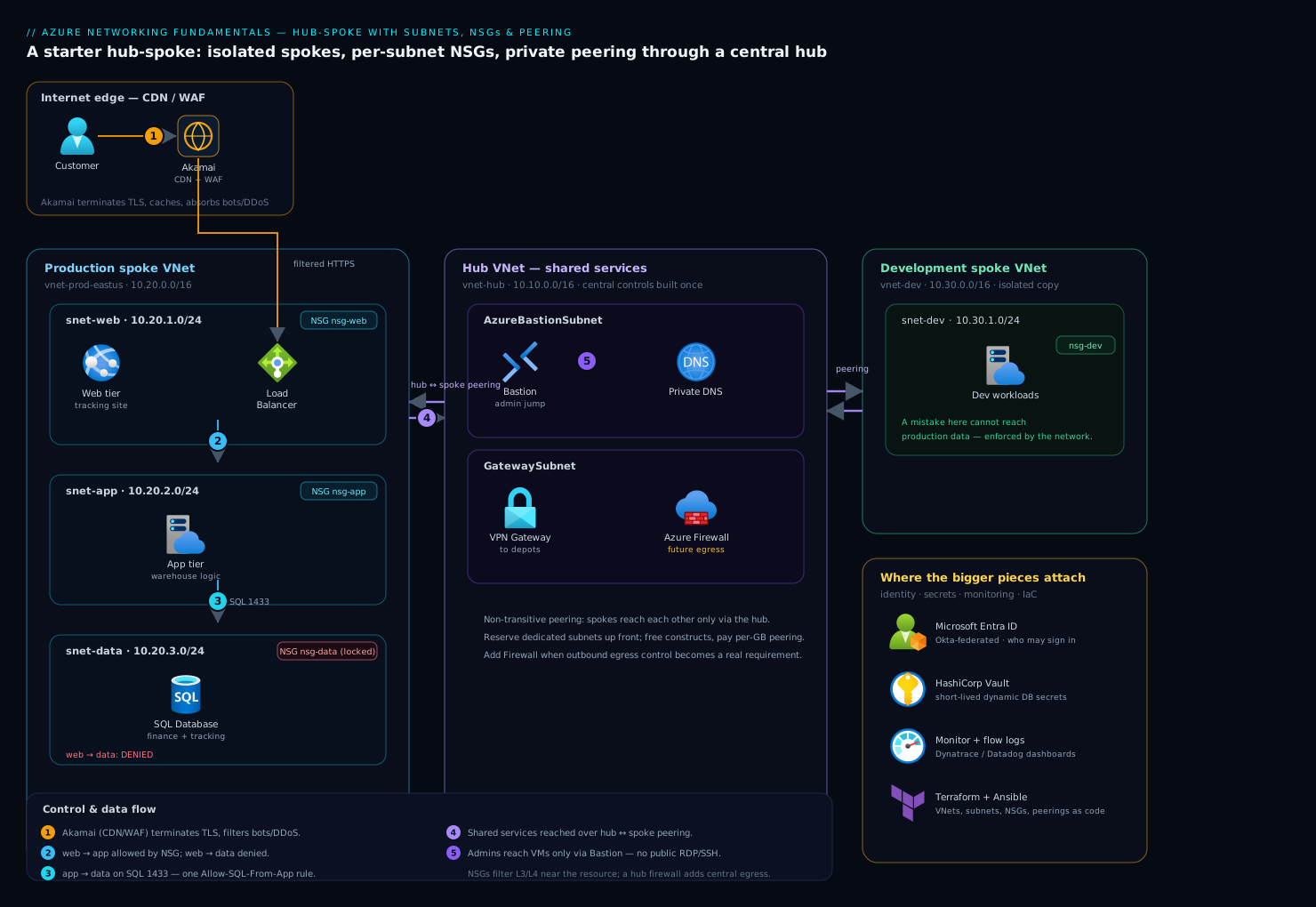
The starter design the logistics company lands on is a hub-spoke topology — the most common enterprise pattern in Azure, and one you should learn early because nearly every real deployment grows into it. A central hub VNet holds shared services that everything needs; each workload lives in its own spoke VNet, peered to the hub but not to each other. Traffic between spokes flows through the hub, where it can be inspected and controlled centrally.
The hub (10.10.0.0/16) holds the things every workload shares: a connectivity gateway back to the depots, DNS, a future firewall, and a secure-jump path for admins. The hub is where central controls live so you build them once, not per spoke.
Production spoke (10.20.0.0/16) holds the live tracking platform across its three subnets — web (public-facing, behind a load balancer and a CDN), app (the warehouse-management logic), and data (the finance and tracking databases). Each subnet has an NSG; the data NSG is the locked-down one shown above.
Development spoke (10.30.0.0/16) is an isolated copy for the engineers. Because it is a separate spoke peered only to the hub, a mistake in dev cannot reach production data — the network itself enforces the boundary the flat design never had.
Control and data flow, end to end:
- A customer tracking a parcel hits the public website. Akamai sits at the edge as the CDN and web application firewall — it terminates TLS close to the user, caches static tracking-page assets, and absorbs bot and DDoS traffic before any request reaches Azure. Only legitimate, filtered traffic arrives at the
websubnet’s load balancer. - The web tier calls the
apptier. Theweb-to-apphop is permitted by NSG rules; the reverse and any directweb-to-dataattempt is denied. - The
apptier queries thedatatier on port 1433, allowed by the singleAllow-SQL-From-Apprule. Nothing else on the network can reach the database. - When production needs something from shared services — central DNS, a secrets fetch, the route to on-premises depots — it crosses the hub-to-spoke peering into the hub.
- Administrators never expose RDP/SSH to the internet. They reach VMs through Azure Bastion in the hub (its own
AzureBastionSubnet), brokered by identity, so management ports stay closed on every NSG.
This is deliberately a starting architecture. It is correct, defensible, and small — and it has obvious seams where the next pieces attach.
Where the bigger pieces attach
The fundamentals above are necessary but not sufficient for a mature platform. Here is where the named enterprise tools plug in, and crucially why each one is needed beyond what NSGs and peering already give you.
| Concern | Tool | What it adds that the network layer cannot |
|---|---|---|
| Deep traffic inspection | Azure Firewall (or a third-party virtual appliance like Palo Alto / Fortinet) | Application-layer and URL filtering, threat intelligence, and a central choke point — far beyond an NSG’s IP/port matching |
| Human & service identity | Microsoft Entra ID, federated from Okta | The network says where traffic may go; identity says who may sign in. Okta is the workforce IdP; it federates to Entra so Azure honors a first-class token, and Entra Conditional Access gates the Bastion admin path |
| Secrets | HashiCorp Vault | Database credentials and API keys must not sit in NSG rules, code, or config files. Vault issues short-lived, dynamic secrets so the app authenticates to the database without a static password living anywhere |
| Cloud posture | Wiz / Wiz Code | Continuously scans for the exact mistakes this article warns about — an NSG accidentally opened to Internet, a database subnet that drifted public — and maps attack paths across the peered VNets. Wiz Code catches a risky NSG change in the Terraform pull request, before it ships |
| Runtime threat detection | CrowdStrike Falcon | NSGs cannot see a process running on a VM. Falcon sensors on the VMs detect a compromise inside an allowed connection and feed the security team |
| Monitoring & flow visibility | Dynatrace / Datadog | NSG flow logs show connections; Dynatrace or Datadog turn that into dashboards and alerts — which subnet talks to which, latency across the peering, and an alert when a denied-traffic spike signals an attack or a misconfiguration |
| Operations & change control | ServiceNow | A new peering or an NSG rule change is a network change with blast radius. ServiceNow gates it behind an approval and records who changed what, when |
| Automation & delivery | Terraform + Ansible, driven by GitHub Actions / Jenkins / Argo CD | Terraform defines the VNets, subnets, NSGs, and peerings; Ansible configures the OS inside the VMs; the pipeline (GitHub Actions or Jenkins, with Argo CD for any Kubernetes spoke) applies changes consistently with no manual portal clicking |
A few of these deserve a sentence on why now, because a junior engineer will be asked.
Why a firewall when you already have NSGs. The auditor’s next finding will be outbound: a compromised VM in any subnet can currently reach the entire internet on port 443, which is how data gets exfiltrated and malware phones home. NSGs cannot tell a legitimate API call from a connection to an attacker’s server — both are “443 to the internet.” Put Azure Firewall (or a vendor virtual appliance) in the hub, point every spoke’s outbound traffic at it with a route, and you get URL filtering, threat-intel-based blocking, and one inspected, logged egress point. NSGs do the cheap, fast, near-the-resource filtering; the firewall does the deep, central inspection. You want both — defense in depth — not one or the other.
Why identity sits beside the network, not inside it. Network rules answer “can 10.20.2.4 reach port 1433.” They say nothing about which human is logged into that machine. Okta authenticates the workforce and federates to Microsoft Entra ID, so an admin reaching a VM through Bastion is first proven to be a real, authorized person under Conditional Access — the network controls the path, identity controls the principal, and a real platform needs both.
Why secrets never live in the network config. It is tempting to think a locked-down data subnet means the database is safe enough to use a shared password. It is not — anything inside the app subnet can read that password. HashiCorp Vault issues a short-lived, per-application credential, so even a breach of the app tier yields a secret that expires in minutes rather than a permanent key to the finance database.
Failure modes, cost, and tradeoffs
The failure modes here are mostly self-inflicted, and naming them prevents them:
- Overlapping address spaces. Decided at creation, fatal at peering time, fixable only by renumbering live systems. Maintain one central IP-allocation plan. This is the cardinal sin.
- An NSG rule too broad. A rule with source
*orInternetwhere it should have been a subnet range silently exposes a workload. Wiz catches the drift in the running environment; Wiz Code catches it in the Terraform pull request. Always prefer service tags and specific ranges over*. - Forgetting peering is non-transitive. Two spokes “should” talk because both peer the hub — but they cannot, directly. Either peer them explicitly or route them through a firewall in the hub. Surprising the first time, obvious forever after.
- Asymmetric routing once a firewall arrives. Send traffic to the firewall on the way out but let replies bypass it, and the stateful firewall drops the half-conversation. When you add the hub firewall, route both directions through it.
- A missing reserved subnet. Discovering you need
AzureFirewallSubnetorGatewaySubnetafter the address space is fully carved means re-planning. Reserve a slot for them up front.
Cost. The fundamentals are cheap by design. VNets, subnets, and NSGs are free — you pay for the resources inside them, not the network constructs. The meaningful line items are: VNet peering charges a small per-GB fee for data crossing the peering (in and out, and more for cross-region global peering — a reason to keep chatty workloads in the same region); Azure Bastion, Azure Firewall, and VPN/ExpressRoute gateways are billed hourly whether busy or idle, so add them when you need them, not speculatively. For a junior estimate: the starter hub-spoke with Bastion runs a modest fixed monthly cost; the firewall roughly doubles the network baseline and is the single biggest network line item, which is why teams adopt it when egress control becomes a real requirement rather than on day one.
| Approach | Pros | Cons | When to choose |
|---|---|---|---|
| Single flat VNet, NSGs only | Simplest, cheapest, fastest to stand up | No central control point; spokes cannot be isolated cleanly; outbound is unfiltered | A genuinely small, single-workload deployment or a sandbox |
| Hub-spoke, NSGs, no firewall yet | Clean isolation, central shared services, room to grow, low cost | Outbound traffic still unfiltered; relies on NSGs alone for east-west | The right starting point for most enterprises — where the logistics company lands |
| Hub-spoke with Azure Firewall | Central inspected egress, URL filtering, threat intel, full defense in depth | Higher fixed cost; routing complexity; another component to operate | When outbound control, compliance, or scale demands it — the natural next step |
The honest tradeoffs. Hub-spoke adds moving parts a single flat VNet does not have: peerings to manage, routing to reason about, and the discipline of a central address plan. For a five-resource hobby project that overhead is not worth it — a single VNet with good NSGs is fine. But for anything an auditor will look at, anything multi-environment, or anything that will grow, the flat network is the liability the logistics company started with, and the modest extra structure here is what lets the platform scale without a painful renumbering project two years in. Start with this hub-spoke, leave the seams for the firewall and identity and monitoring tools visible, and add each piece when its specific need shows up.
The shape of the win
The logistics company’s auditor reopens the finding a quarter later and walks the same path: the public website can no longer reach the finance database, because the data subnet’s NSG drops the packet; the development environment is a separate spoke that cannot touch production data at all; and admin access runs through Bastion under an Entra-federated Okta login instead of an RDP port open to the internet. None of that required exotic technology — it is VNets, subnets, NSGs, and peering, the four fundamentals, arranged into a small hub-spoke and laid down in Terraform so it is repeatable and reviewable. The firewall, the deeper monitoring in Dynatrace, the Vault-issued database credentials, and the Wiz posture scanning all have an obvious place to attach when their need arrives. That is the whole point of getting the foundation right: the next thing the company builds sits on defensible ground, and the flat-network blast radius that started this is gone for good.