There is a particular kind of architecture review where everyone in the room nods along to a design, the diagram is tidy, every box is a managed service, and six months later the system is over budget, brittle under load, and impossible to operate. Nothing in the design was wrong, exactly. The problem was that nobody asked the harder question: what did each decision cost, and what did it buy?
That question is the entire point of the Azure Well-Architected Framework (WAF). Most people meet it as a checklist — five pillars, a long list of recommendations, a free assessment that spits out a score. Treated that way it is mildly useful and deeply misleading, because a checklist implies you can satisfy every item at once. You cannot. Reliability fights cost. Security adds latency and failure points. Performance optimisation can erode operability. Operational rigour slows delivery. A real architecture is the resolution of those tensions for this workload, with these business requirements, at this moment. The Well-Architected Framework, read correctly, is not a checklist — it is a structured way to reason about a system of competing forces and to make the tradeoffs deliberately rather than by accident.
This lesson teaches WAF the way a senior architect actually uses it: as a tradeoff system. We will define the five pillars and — verbatim, because the names are exam-critical and you must not paraphrase them wrong — their exact design principles. We will walk each pillar’s repeating structure (design principles → checklist → recommendation guides → Tradeoffs → supporting patterns), and we will dwell on the Tradeoffs because they are the part every other course skips. Then we will cover the three pieces of WAF that make it operational rather than theoretical: the per-service Service Guides, the free Well-Architected Review assessment, and Azure Advisor / Advisor Score as the live feedback loop that keeps a running estate honest. By the end you should be able to look at any Azure design and articulate not just whether it is “well-architected”, but which forces it favoured, which it sacrificed, and whether that was the right call for the business.
Learning objectives
By the end of this lesson you will be able to:
- Explain the Well-Architected Framework as a system of tensions, not a checklist — and articulate the major tradeoffs between pillars (Reliability vs Cost, Security vs Performance, Operational Excellence vs delivery speed, and so on).
- Name the five pillars and recite their exact design principles, and describe the repeating pillar structure (principles → checklist → recommendation guides → Tradeoffs → patterns) that the framework uses everywhere.
- Reason about each pillar’s signature tradeoffs with concrete Azure examples — why a private endpoint adds a failure mode, why active-active multiplies cost, why aggressive autoscaling can hurt reliability.
- Use the three operational components of WAF — Service Guides (per-service WAF lens), the Well-Architected Review (the free assessment), and Azure Advisor / Advisor Score (the live feedback loop) — and know which to reach for when.
- Apply Well-Architected reasoning to AZ-305-style scenario questions, where the “correct” answer is almost always the one that names the tradeoff and ties it to a business requirement.
- Position WAF correctly relative to CAF — the per-workload quality bar versus the organisational adoption journey — so you know which framework answers which question.
Prerequisites & where this fits
This is an Architecture & Design Mastery lesson — the layer that turns a service-operator into an architect. To get the most from it you should already be comfortable with:
- Core Azure building blocks — compute (VMs, App Service, AKS, Functions), storage and databases (Azure SQL, Cosmos DB, Storage accounts), and networking (VNets, NSGs, load balancers, Private Link).
- Availability concepts — availability zones vs regions, the difference between high availability and disaster recovery, and RTO/RPO. (See high-availability-vs-disaster-recovery-rto-rpo if those are fuzzy.)
- Identity and security basics — Microsoft Entra ID (formerly Azure AD), RBAC, managed identities, and the idea of Zero Trust.
- The notion of an SLA/SLO and that composing services multiplies (not averages) their availability.
Where it sits in the course: this is the first lesson of the Architecture & Design Mastery module — the design-judgement layer grounded in the Microsoft canon. It teaches the workload quality bar. The next lesson, Cloud Adoption Framework & Azure Landing Zones, In Depth (azure-cloud-adoption-framework-landing-zones-deep-dive), zooms out to the organisational journey and the governed foundation workloads land in. Together, WAF and CAF are the two halves of Microsoft’s architecture guidance: WAF inspects each house; CAF builds and runs the neighbourhood.
WAF as a tradeoff system, not a checklist
Start with the framing that the rest of the lesson hangs on, because it is the single thing that separates an architect from a service-operator.
The Well-Architected Framework is built around five pillars:
| Pillar | The question it forces | What it optimises for |
|---|---|---|
| Reliability | Will the workload do what users need, when they need it, and recover when something breaks? | Resilience, recovery, meeting reliability targets |
| Security | Is confidentiality, integrity and availability protected against a determined attacker? | Protecting data and systems on a Zero Trust basis |
| Cost Optimization | Are we getting maximum business value for every rupee/dollar spent? | Value per unit of spend |
| Operational Excellence | Can we run, observe, change and recover this safely over its lifetime? | Operability, observability, safe change |
| Performance Efficiency | Does the workload meet its performance targets efficiently as demand changes? | Meeting performance targets with the least resource |
Read down that table and a naive reading says: “do all five well.” But the pillars pull against one another. The framework is honest about this — it is the reason every pillar has an explicit Tradeoffs section, and the reason the framework repeatedly tells you to prioritise the pillars for a given workload rather than maximise all of them.
A few of the load-bearing tensions, stated plainly:
- Reliability ⇄ Cost. A redundant, multi-zone, multi-region, active-active design is dramatically more reliable — and dramatically more expensive. Geo-redundant storage, a hot standby region, and N+1 capacity all cost real money every month whether or not you ever fail over. Every “nine” you add to availability is paid for.
- Security ⇄ Performance (and Reliability). Every security control is also a thing that can fail and a thing that adds latency. A Web Application Firewall inspects every request (latency + a hop that can go down). TLS termination and re-encryption add CPU and round-trips. Private endpoints remove public exposure but introduce DNS dependencies and a new failure mode. Just-in-time access and Conditional Access add friction. Security is rarely free in either latency or availability.
- Performance Efficiency ⇄ Reliability/Cost. Running hot (high utilisation) is cost-efficient but leaves no headroom for spikes or failover. Aggressive autoscaling saves money but can lag behind a sudden surge or amplify a failure. Caching boosts performance but introduces staleness and a cache tier that can fail.
- Operational Excellence ⇄ delivery speed (and Cost). Comprehensive observability, safe-deployment gates, automated rollback and IaC for everything all slow the first delivery and cost engineering time — and pay back many times over across the workload’s life. Skipping them is faster on day one and ruinous by month six.
- Simplicity ⇄ everything. Both Reliability and Performance Efficiency explicitly warn that complexity is itself a risk. The most reliable, most secure, most performant design that is too complex to operate or reason about is, in practice, none of those things.
This is why WAF tells you to prioritise pillars per workload. A retail bank’s payments ledger ranks Reliability and Security far above Cost. A short-lived internal reporting tool ranks Cost and Operational simplicity above five-nines reliability. A real-time trading path ranks Performance above almost everything. The pillars are not equal weights to be averaged — they are forces to be ranked and balanced for the workload in front of you. Holding two pillars in tension and making the call explicitly is the core skill the framework is trying to build.
The repeating pillar structure
Every pillar in the Well-Architected Framework is documented with the same five-part structure. Learn it once and you can navigate any pillar:
- Design principles — a small set of high-level, durable statements of intent (the “north stars” for that pillar). These are the verbatim names you must know.
- Checklist — the pillar’s recommendations distilled into a review checklist you walk top to bottom during a design review.
- Recommendation guides — deeper, per-topic guidance behind each checklist item (e.g. for Reliability: redundancy, scaling, self-preservation, error handling, testing, monitoring, recovery).
- Tradeoffs — an explicit catalogue of what pursuing this pillar costs you in the other pillars. This is the section that makes WAF a tradeoff system.
- Supporting cloud design patterns — the catalogue patterns that implement the pillar (Retry, Circuit Breaker, Bulkhead, CQRS, Gateway Offloading, and so on — covered in depth in the patterns lesson).
We will now take each pillar in turn, in that structure, with the exact design principles.
Pillar 1 — Reliability
Reliability is the ability of a workload to perform its required function correctly and consistently when expected, and to recover quickly from failures. The framework’s foundational stance is that in the cloud failure is normal: hardware fails, dependencies time out, a zone goes dark, a deployment goes wrong. Reliability is therefore not “preventing failure” (impossible) but designing the workload to absorb, route around, and recover from failure while still meeting the reliability targets the business actually needs.
Design principles (exact)
- Design for business requirements
- Design for resilience
- Design for recovery
- Design for operations
- Keep it simple
Note the bookends. It opens with business requirements — you do not pursue reliability in the abstract; you pursue the specific RTO/RPO/availability the business is willing to pay for. It closes with keep it simple — because a baroque resilience design is itself a source of failure.
Checklist (what a review walks through)
- Define measurable reliability targets — SLOs, and the RTO/RPO that flow from business impact; know your composite SLA across dependencies.
- Build in redundancy at the level the targets demand — availability zones, regions, and redundant instances of every critical component.
- Design for scaling that preserves reliability (scale out, avoid scale operations that themselves become a failure mode).
- Add self-preservation and self-healing — Circuit Breaker, Bulkhead, throttling, graceful degradation, health-based load balancing.
- Handle transient faults correctly — Retry with backoff and jitter, idempotency, timeouts.
- Test reliability — fault injection / chaos engineering, failover drills, dependency-failure simulation.
- Monitor health (not just uptime) and have recovery runbooks and disaster-recovery procedures that are rehearsed.
Recommendation themes
Reliability guidance clusters around: redundancy (zones/regions/instances), scaling (capacity for surges and failover), self-preservation (degrade gracefully, isolate faults), error/transient-fault handling (retry, timeout, idempotency), testing (chaos, drills), health modelling and monitoring, and recovery (backup, DR, rehearsed runbooks). The signature Azure levers are availability zones, availability sets/zone-redundant SKUs, paired regions and geo-replication (zone-redundant or geo-redundant storage, Azure SQL active geo-replication / failover groups, Cosmos DB multi-region writes), Azure Front Door / Traffic Manager for global health-based routing, and Azure Backup / Azure Site Recovery for recovery.
Tradeoffs (this is the point)
Reliability is the pillar where the cost tension is most visceral:
- Reliability costs money — directly. Each level of redundancy is a recurring bill. Zone-redundancy is cheap insurance; an active-active multi-region design can multiply your run-rate because you are paying for full capacity in two or more regions plus cross-region data replication, whether or not you ever fail over. Higher “nines” cost exponentially more for linearly less downtime. You buy reliability with Cost.
- Reliability adds complexity — which can reduce reliability and operability. Multi-region active-active introduces data-consistency problems, split-brain risk, and a far harder operational model. The principle keep it simple exists precisely because over-engineered resilience often makes a system less dependable and much harder to run — a direct tension with Operational Excellence.
- Redundancy can hurt performance and consistency. Synchronous cross-region replication for a strong RPO adds write latency (a Performance cost); choosing asynchronous replication recovers the latency but accepts data loss on failover (a reliability cost). You are trading RPO against latency, every time.
- Over-provisioned headroom for surge/failover is wasted capacity in the common case — another straight Reliability-vs-Cost dial.
The mature move is to right-size reliability to the business requirement: spend the nines where downtime is genuinely expensive (payments, life-safety, regulated availability) and accept lower targets — and lower cost — where it is not.
Supporting patterns
Retry, Circuit Breaker, Bulkhead, Throttling, Rate Limiting, Queue-Based Load Levelling, Health Endpoint Monitoring, Leader Election, Compensating Transaction, Deployment Stamps (for fault isolation), and Geode (for global distribution). These are catalogued in depth in the cloud design patterns lesson.
Pillar 2 — Security
Security protects the workload’s confidentiality, integrity and availability — the CIA triad — against deliberate attack and accidental misuse. Microsoft frames Security on a Zero Trust basis, summarised by three guiding ideas you should be able to recite: verify explicitly (always authenticate and authorise on all available signals), use least-privilege access (just-enough/just-in-time, minimise standing permissions), and assume breach (segment, encrypt, monitor, and design so that a compromise of one component does not cascade).
Design principles (exact)
- Plan security readiness
- Design to protect confidentiality
- Design to protect integrity
- Design to protect availability
- Sustain and evolve your security posture
Notice the principles are organised around the CIA triad itself (confidentiality, integrity, availability), bracketed by readiness up front and continuous evolution at the end — security is never “done”.
Checklist (what a review walks through)
- Establish a security baseline and a security readiness plan; adopt the Microsoft Cloud Security Benchmark and Defender for Cloud posture management.
- Identity as the primary perimeter — Entra ID, Conditional Access, MFA, managed identities instead of secrets, PIM for privileged access, least privilege via RBAC.
- Protect confidentiality — encryption at rest and in transit (TLS), secrets in Key Vault, data classification, Private Link/private endpoints to remove public exposure.
- Protect integrity — code/supply-chain security, signed artefacts, tamper detection, immutability where it matters.
- Protect availability (the security angle) — DDoS Protection, WAF (Front Door / Application Gateway), rate limiting against abuse.
- Segment — network segmentation (NSGs, Azure Firewall, hub-spoke), micro-segmentation, blast-radius isolation.
- Detect and respond — centralised logging, Microsoft Sentinel (SIEM/SOAR), threat detection, an incident-response plan.
- Sustain and evolve — patching, vulnerability management, regular security testing, posture review.
Recommendation themes
Security guidance clusters around: identity and access management (the new perimeter), data protection (encryption, secrets, classification), network security and segmentation, application/supply-chain security, threat detection and response, and governance/posture management. The signature Azure levers are Entra ID + Conditional Access + PIM, Key Vault, Defender for Cloud and Microsoft Sentinel, Azure Firewall / NSGs / Private Link, WAF and DDoS Protection, and the Microsoft Cloud Security Benchmark as the baseline.
Tradeoffs (this is the point)
Security is the pillar architects most often pretend is free. It is not:
- Every security control is a potential failure point and a latency tax. A WAF inspects every inbound request — that is a hop that adds latency and that can itself fail or false-positive-block legitimate traffic. TLS termination/re-encryption costs CPU and round-trips. A private endpoint removes public exposure but adds a DNS dependency and a new failure mode (mis-resolved private DNS is a classic outage cause). So Security trades against both Performance and Reliability.
- Security adds operational friction and slows delivery. MFA, Conditional Access, PIM approvals, just-in-time access, signed-artefact pipelines and break-glass procedures all add steps. That friction is the point — but it is a real cost in Operational Excellence velocity and sometimes in user experience.
- Defence in depth costs money and complexity. Defender plans, Sentinel ingestion, DDoS Protection (Network tier), private networking, and dedicated security tooling all add to the Cost line and to the complexity the team must operate.
- Encryption and key management add overhead and risk. Customer-managed keys give control but add a hard dependency (lose the key, lose the data) and operational burden — a Security-vs-Reliability/Operability tension.
The discipline is to apply controls proportionate to the threat model and data sensitivity, not uniformly — full defence-in-depth on the regulated, internet-facing payments path; a lighter, baseline posture on an internal, low-sensitivity tool.
Supporting patterns
Federated Identity, Gatekeeper, Valet Key, Quarantine, Gateway Offloading (terminate TLS/WAF at the edge), and Sidecar/Ambassador (for consistent security cross-cutting concerns).
Pillar 3 — Cost Optimization
Cost Optimization is about getting maximum business value for every unit of spend — not “spend the least”, but “spend deliberately, on the things that create value, and stop paying for the things that do not”. For a budget-conscious estate this is the pillar that pays the rent, but its real lesson is that cost is a first-class design constraint, woven through the architecture, not a clean-up exercise you do at the end.
Design principles (exact)
- Develop cost-management discipline
- Design with a cost-efficiency mindset
- Design for usage optimization
- Design for rate optimization
- Monitor and optimize over time
The two middle principles encode the two fundamental cost levers you will use constantly: usage optimisation (use less — right-size, scale down/in, turn things off, shut down non-prod) and rate optimisation (pay less per unit — Reservations, Savings Plans, Azure Hybrid Benefit, Spot, the right SKU/tier).
Checklist (what a review walks through)
- Create cost accountability — budgets, Microsoft Cost Management, tagging for showback/chargeback, a FinOps cadence.
- Right-size everything; eliminate idle and orphaned resources; use autoscaling and scheduled shutdown for non-prod.
- Apply rate optimisation — Reservations / Savings Plans, Azure Hybrid Benefit, Spot VMs for interruptible work, dev/test pricing.
- Choose cost-efficient services and tiers — serverless/consumption for spiky or low-volume workloads; the right storage tier (hot/cool/cold/archive) with lifecycle management.
- Design for cost — pay-per-use where utilisation is low, reserved/committed where it is steady and high; avoid over-provisioned “just in case” capacity.
- Monitor and optimise continuously — cost anomaly alerts, Advisor cost recommendations, regular reviews.
Recommendation themes
Cost guidance clusters around: cost modelling and accountability (budgets, tagging, FinOps), usage optimisation (right-sizing, autoscale, shutdown, lifecycle), rate optimisation (commitments, Hybrid Benefit, Spot), service/tier selection, and continuous monitoring. The signature Azure levers are Microsoft Cost Management + Budgets, Azure Advisor cost recommendations, Reservations/Savings Plans, Azure Hybrid Benefit, Spot, autoscale, and storage lifecycle management.
Tradeoffs (this is the point)
Cost is defined by its tensions with every other pillar:
- Cost ⇄ Reliability. The cheapest design is single-instance, single-zone, no DR. Every nine you add is money. Cutting redundancy to save cost directly lowers reliability — the most common (and most dangerous) “optimisation”.
- Cost ⇄ Performance. Right-sizing aggressively and running hot saves money but removes the headroom that absorbs spikes — under-provisioning to cut cost shows up as latency and timeouts. Spot VMs are cheap but can be evicted (a reliability/availability cost).
- Cost ⇄ Security. Defender plans, Sentinel ingestion, DDoS Protection and private networking all cost money; cutting them to save spend lowers the security posture.
- Cost ⇄ Operational Excellence. Commitments (Reservations/Savings Plans) save a lot but reduce flexibility and require capacity-planning effort; FinOps governance itself is operational work. Conversely, skimping on automation/observability to save engineering cost raises long-run operational cost.
The framework’s stance is precise: optimise for value, not for the lowest number. Spending more on reliability for a revenue-critical workload is good cost optimisation; paying for five-nines on a throwaway tool is bad cost optimisation even though it is “more reliable”. The right question is always cost per unit of business value.
Supporting patterns
Queue-Based Load Levelling (smooth load so you provision for average, not peak), Compute Resource Consolidation (pack workloads to raise utilisation), Static Content Hosting (serve static assets cheaply from storage/CDN, not compute), Cache-Aside (cut expensive backend calls), and Throttling (protect against runaway cost from abuse/load).
Pillar 4 — Operational Excellence
Operational Excellence covers the practices that keep a workload running well, observable, and safely changeable over its entire life — DevOps culture, engineering standards, observability, automation, and safe deployment. It is the pillar that is invisible on day one and decisive by month six. A system you cannot observe, deploy safely, or recover quickly is not well-architected no matter how elegant its diagram.
Design principles (exact)
- Embrace DevOps culture
- Establish development standards
- Evolve operations with observability
- Automate for efficiency
- Adopt safe deployment practices
These map almost one-to-one onto a modern engineering organisation: culture, standards, observability, automation, and safe rollout (progressive exposure with the ability to roll back).
Checklist (what a review walks through)
- Establish DevOps culture — shared ownership, blameless post-incident reviews, team topologies that own what they run.
- Set development standards — coding standards, code review, branch strategy, a healthy SDLC.
- Build observability — the three pillars of telemetry (logs, metrics, traces) via Azure Monitor / Application Insights / Log Analytics, dashboards, actionable alerts, and a health model (healthy/degraded/unhealthy rather than raw uptime).
- Automate everything repeatable — Infrastructure as Code (Bicep/Terraform), CI/CD pipelines, automated configuration, self-healing automation; eliminate manual, error-prone steps.
- Adopt safe deployment practices — progressive exposure (canary / blue-green / ring-based), feature flags, automated rollback, deployment gates, and testing in the pipeline.
- Plan operational procedures — runbooks, on-call, incident response, and emergency/break-glass operations.
Recommendation themes
Operational guidance clusters around: DevOps culture and standards, observability (telemetry, alerting, health modelling), automation and IaC, CI/CD and safe deployment, and operational procedures (incident response, runbooks). The signature Azure levers are Azure Monitor / Application Insights / Log Analytics, Azure DevOps / GitHub Actions, Bicep / Terraform / Azure Verified Modules, deployment slots / rings, and Azure Automation / Update Manager.
Tradeoffs (this is the point)
Operational Excellence trades primarily against speed and cost — in the short term:
- Operational rigour slows the first delivery. Building IaC, pipelines, observability, safe-deployment gates and runbooks before you ship costs engineering time and delays day one. Skipping them is faster initially — and the debt compounds brutally (manual deploys, no telemetry when an incident hits, no rollback). The tradeoff is short-term velocity vs long-term operability, and the framework comes down firmly on the side of paying it.
- Automation and tooling cost money and effort to build and maintain. Pipelines, monitoring ingestion (Log Analytics is billed by volume), and automation are real Cost and engineering-time line items. Over-instrumenting (logging everything at high volume) is a genuine cost and noise problem — observability has its own right-sizing.
- Safe-deployment practices add latency to releases. Canary/ring rollouts and gates deliberately slow how fast a change reaches 100% of users — trading raw deployment speed for reduced blast radius (a Reliability win). That is usually the right trade, but it is a trade.
- Standards and process can ossify into bureaucracy. Too much process is its own anti-pattern — a tension with delivery agility that the framework’s “DevOps culture” principle is meant to keep in check.
The discipline: invest in operability proportionate to the workload’s longevity and criticality — full pipelines, observability and safe-deployment for a long-lived production system; lighter touch for a short-lived experiment.
Supporting patterns
Health Endpoint Monitoring, Deployment Stamps (for safe, isolated rollouts), External Configuration Store (config separate from code), Feature flags (decouple deploy from release), Sidecar/Ambassador (consistent cross-cutting operational concerns), and Strangler Fig (safe, incremental modernisation).
Pillar 5 — Performance Efficiency
Performance Efficiency is the ability of a workload to meet its performance requirements efficiently as demand changes — to scale to load, hit its latency/throughput targets, and do so without wasting resource. The word efficiently is load-bearing: a system that meets its targets by brute-force over-provisioning is performant but not performance-efficient. This pillar is about matching capacity to demand intelligently.
Design principles (exact)
- Negotiate realistic performance targets
- Design to meet capacity requirements
- Achieve and sustain performance
- Optimize for long-term improvement
It opens with negotiate realistic targets — you cannot optimise performance you have not defined; “fast” is not a target, “p95 under 200 ms at 5,000 RPS” is. It then moves to meeting capacity, sustaining performance under change, and improving continuously.
Checklist (what a review walks through)
- Define performance targets — latency (p50/p95/p99), throughput, response time — tied to user/business expectations.
- Plan capacity and choose a scaling strategy — prefer scale-out (horizontal) over scale-up for elasticity; right-size; use autoscale driven by the right metrics.
- Select the right services and data stores for the access pattern — the right compute model, the best data store for the job (polyglot persistence), partition around limits.
- Apply performance patterns — caching (Cache-Aside / Azure Cache for Redis / CDN), async processing, CQRS/read replicas, connection pooling, offloading static content.
- Test performance — load and stress testing (Azure Load Testing), benchmarking, establishing baselines.
- Monitor and continuously optimise — performance telemetry, find and remove bottlenecks, iterate.
Recommendation themes
Performance guidance clusters around: performance targets and testing, scaling and capacity (scale-out, autoscale, partitioning), service and data-store selection, caching and offloading, and continuous performance optimisation. The signature Azure levers are autoscale (VMSS, App Service, AKS/KEDA), Azure Cache for Redis and Azure Front Door/CDN, Cosmos DB partitioning and the right data store per workload, Azure Load Testing, and Application Insights performance profiling.
Tradeoffs (this is the point)
Performance is full of seductive optimisations that quietly tax the other pillars:
- Performance ⇄ Cost. The simplest way to be fast is to over-provision — which is exactly what Cost Optimization fights. Caching adds a cache tier (cost). Premium SKUs and provisioned throughput cost more. Running hot for efficiency conflicts with keeping headroom for reliability. There is a constant performance-vs-cost dial.
- Performance ⇄ Reliability. Caching improves performance but introduces staleness and a cache tier that can fail (and cache-stampede risk). Aggressive autoscaling saves cost and tracks demand but can lag a sudden surge or, worse, scale into a downstream failure and amplify it. Reducing replication/consistency for speed can cost data durability.
- Performance ⇄ Consistency. Read replicas, CQRS and eventual-consistency designs boost read performance but accept stale reads — a correctness/consistency tradeoff the business must accept knowingly.
- Performance ⇄ Operational/Security complexity. Caching layers, sharding, and bespoke performance tuning add complexity to operate and reason about; the pillar’s emphasis on sustaining performance (not just hitting it once) is a nod to that operational cost. Edge caching can also complicate cache-invalidation and data-protection.
The discipline: optimise to the negotiated target, then stop. Chasing performance past what the business needs spends Cost, Reliability, and simplicity for value nobody asked for — gold-plating dressed up as engineering.
Supporting patterns
Cache-Aside, CQRS, Materialized View, Sharding (partition around limits), Static Content Hosting, Index Table, Geode (bring data/compute near users), Priority Queue, and Competing Consumers (parallel throughput).
How the pillars compose: a worked tension
Theory becomes real when two pillars collide in one decision. Take a single, ordinary choice — should the database be reachable over a private endpoint? — and watch all five pillars speak at once:
- Security says yes, emphatically: a private endpoint removes public exposure, satisfies protect confidentiality and assume breach, and is often a compliance requirement.
- Reliability raises a hand: a private endpoint introduces a private-DNS dependency and a new failure mode; mis-configured private DNS is a classic, hard-to-diagnose outage. It must be designed and tested.
- Performance is mostly neutral but notes the extra network hop and that DNS resolution adds a little latency.
- Cost notes a (small) per-endpoint charge and the operational cost of running private DNS zones.
- Operational Excellence notes the added complexity: private DNS, conditional forwarders, and the need for runbooks when resolution breaks — and insists it all be in IaC.
A service-operator picks one answer. An architect states the tradeoff: “We use a private endpoint because the data is regulated (Security/compliance dominates), and we pay for it with a private-DNS dependency that we mitigate by deploying DNS via IaC, testing failover, and alerting on resolution failures (buying back Reliability and Operability).” That sentence — decision, dominant pillar, the pillars sacrificed, and the mitigations that buy them back — is well-architected thinking. The framework exists to make you produce that sentence for every significant decision.
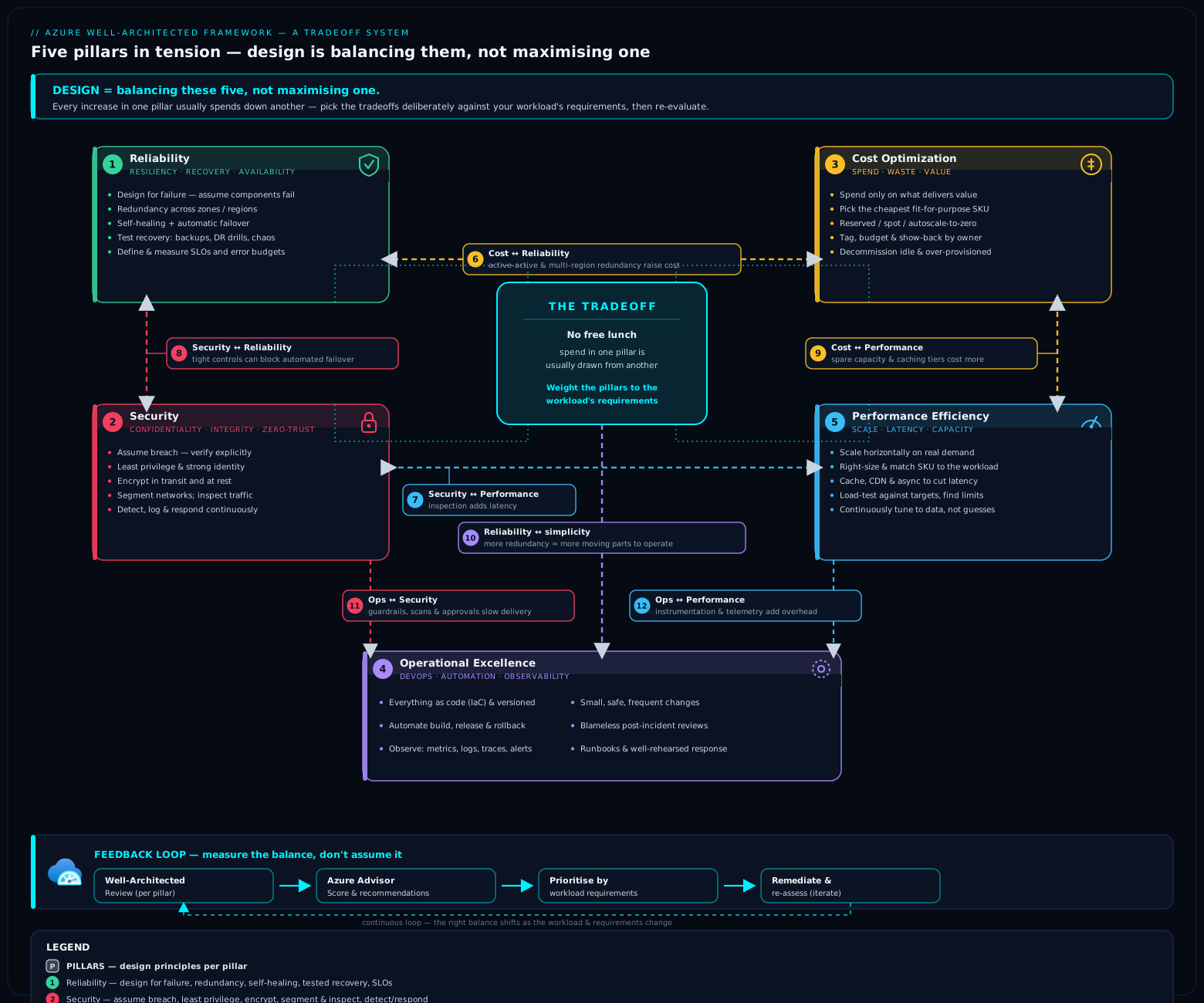
The diagram above is the mental model to keep: five pillars in tension around the workload, with the live feedback loop — Service Guides, the Well-Architected Review and Advisor — wrapped around them. The pillars are the forces; the three components below are how you apply and sustain the framework in practice.
Service Guides: the per-service WAF lens
The pillars are general. Real workloads are made of specific services — Azure SQL, AKS, App Service, Cosmos DB, Storage, Service Bus, and so on — and each service has its own set of well-architected considerations: which SKU gives zone redundancy, how this service does backup and geo-replication, what its scaling limits are, how to secure it, where its costs come from.
Service Guides are the Well-Architected Framework applied to a single Azure service. For a given service, the Service Guide walks the five pillars and gives concrete, service-specific guidance and configuration recommendations under each: for Azure SQL, for example, how to choose redundancy (zone-redundant, failover groups, active geo-replication) for Reliability; how to secure it (Entra auth, TDE, private endpoints, auditing) for Security; how to choose the right purchasing model and tier for Cost; how to monitor and automate it for Operational Excellence; and how to size and scale it for Performance Efficiency.
How to use them: when you have chosen a service for your design, open its Service Guide to translate the abstract pillar principles into this service’s concrete knobs. They are the bridge between “we value Reliability” and “set this SKU to zone-redundant and configure a failover group”. In a design review, the pillar checklists tell you what to ask; the Service Guides tell you how this particular service answers it. They are also where many of the per-pillar tradeoffs become concrete (e.g. zone-redundant Azure SQL costs more than locally-redundant — Reliability vs Cost, made specific).
The Well-Architected Review: the free assessment
The Well-Architected Review (WAR) is Microsoft’s free, self-service assessment (hosted in the Microsoft Assessments platform, with a guided experience surfaced in the Azure portal) that scores a workload against the five pillars. It is the structured way to run a Well-Architected review without convening a week-long workshop from scratch.
How it works in practice:
- Choose scope — you assess a workload, optionally focusing on specific pillars (you can run a single-pillar review or all five). You can also align it to a workload type (e.g. mission-critical) where Microsoft offers a tailored assessment.
- Answer the questionnaire — a structured set of questions derived from the pillar checklists, covering each pillar’s recommendation areas.
- Get a scored report with prioritised recommendations — the assessment produces a per-pillar score and a ranked list of recommendations, each linking back to the relevant WAF guidance and, often, to Azure Advisor and Service Guides.
- Track over time — you can re-run the assessment as you remediate, milestone the workload, and watch the scores improve. This makes it a repeatable governance tool, not a one-off.
Where it fits: the WAR is the point-in-time, design-and-posture review — ideal at design time, before a major release, at architecture-review-board checkpoints, and periodically thereafter. It is self-reported (you answer questions about your design), which is its strength (it captures intent and design decisions a scanner cannot see) and its limitation (it trusts your answers). That is exactly why it pairs with Advisor, which observes the running estate directly.
Azure Advisor and Advisor Score: the live feedback loop
If the Well-Architected Review is the design-time assessment, Azure Advisor is the run-time one. Advisor is a free Azure service that continuously analyses your actual deployed resources and telemetry and produces personalised, actionable recommendations — and, crucially, it is organised by the Well-Architected pillars. Advisor’s five recommendation categories map directly to WAF:
| Advisor category | WAF pillar | Example recommendations |
|---|---|---|
| Reliability | Reliability | Enable zone redundancy; configure backup; add redundancy to single-instance resources |
| Security | Security | (Surfaced from Microsoft Defender for Cloud) — enable MFA, fix exposed resources, apply security baseline |
| Cost | Cost Optimization | Right-size or shut down idle VMs; buy Reservations/Savings Plans; delete orphaned disks/IPs |
| Operational Excellence | Operational Excellence | Set up service health alerts; follow deployment best practices; resolve deprecations |
| Performance | Performance Efficiency | Resize under-provisioned resources; improve database/network configuration |
Advisor Score turns this into a single, trackable number. It is a percentage (0–100) that reflects how well your estate follows Advisor’s best practices, with an overall score and a per-category (per-pillar) breakdown. Higher is better; the score is weighted by the potential impact of the outstanding recommendations and by resource consumption, so it nudges you toward the changes that matter most. Because it is continuous and quantitative, Advisor Score is the natural KPI for a platform team or FinOps/reliability function: you can baseline it, set improvement targets, and watch it move as you act on recommendations — and you can postpone or dismiss recommendations that do not apply (with that choice reflected in the score).
The two tools are complementary, and knowing which to reach for is an exam-and-interview favourite:
- Well-Architected Review = design-time, self-assessed, deep, per-workload. Captures architecture and intent. Run it at design and at review checkpoints.
- Azure Advisor / Advisor Score = run-time, observed, continuous, estate-wide. Captures the live state of deployed resources. Use it as the ongoing feedback loop and KPI.
Together they close the loop: design the workload against the pillars, validate the design with the Well-Architected Review, deploy it, then let Advisor keep it honest as it runs and as Azure’s own best practices evolve. (The Security category, note, is fed by Defender for Cloud, and Operational/Reliability draw on Azure Monitor signals — WAF in practice is wired into the wider Azure management plane.)
Real-world application
How does all this show up in an actual Azure design — the kind you would defend to an architecture review board?
Picture onboarding a new payments and order-tracking platform for a global carrier onto an existing Azure landing zone. The team does not start by listing services. They start by prioritising the pillars for this workload: payments make Reliability and Security the top two (downtime and breaches both have direct financial and regulatory cost); Performance matters (checkout latency affects conversion) but ranks below the first two; Cost is a hard constraint but explicitly subordinate to reliability for the revenue-critical path; Operational Excellence underpins all of it because the system is long-lived. That ranking is written down — it is the lens every subsequent decision is judged through.
Then the design is made tradeoff by tradeoff, each justified against that ranking and each Service-Guide-informed: zone-redundant Azure SQL with a failover group (Reliability over Cost — justified); Front Door + WAF + DDoS at the edge (Security and global Reliability, paying a latency hop and monthly cost — justified); private endpoints for the data tier (Security/compliance, paying a private-DNS dependency mitigated by IaC and alerting); Azure Cache for Redis in front of read-heavy product lookups (Performance, accepting bounded staleness); autoscale on App Service/AKS tuned conservatively so it does not amplify a downstream failure (Performance and Cost, balanced against Reliability); the whole thing in Bicep/AVM with CI/CD, Application Insights, health modelling and ring-based deployment (Operational Excellence, paying first-delivery time). Reservations are bought for the steady baseline compute; Spot is used only for batch reconciliation jobs that tolerate eviction (Cost, scoped to where it is safe).
Before go-live the team runs the Well-Architected Review for the workload, focusing on the Reliability and Security pillars first, and works the prioritised recommendations down. After go-live, Azure Advisor / Advisor Score becomes the standing KPI in the operations review — Cost recommendations feed the FinOps cadence, Reliability and Security recommendations feed the platform/security backlog, and the per-pillar score is tracked release over release. Every individual workload on the landing zone gets the same treatment: that is WAF doing its job — judging each house — on the foundation that CAF built and runs.
You can see this reasoning instantiated across the course: azure-multi-region-active-active-disaster-recovery is the Reliability-vs-Cost tradeoff taken to its extreme; enterprise-arch-azure-zero-trust-web is the Security pillar made concrete; the pillar-specific deep dives (azure-waf-reliability, azure-waf-security, azure-waf-cost-optimization, azure-waf-operational-excellence, azure-waf-performance-efficiency) drill each pillar to checklist depth.
Common mistakes & anti-patterns
- Treating WAF as a checklist to be maxed out. The single biggest error. You cannot maximise all five pillars at once; pursuing one always taxes others. The framework is a tradeoff system — prioritise pillars per workload and make the sacrifices explicit.
- Ignoring the Tradeoffs sections. Most people read the principles and the checklist and skip the Tradeoffs. The Tradeoffs are the whole point — they are where the framework tells you what each pillar costs.
- Paraphrasing the design principles wrong. The principle names are canon (and exam-tested). “Keep it simple”, “Assume breach”, “Negotiate realistic performance targets” are exact. Recite them; do not approximate.
- Confusing WAF with CAF. WAF judges a single workload across five pillars; CAF is the organisational adoption journey and the landing zone. Applying WAF to “the organisation” or CAF to “a workload” is a confused design — and a tell on the exam.
- Optimising cost as “spend the least” instead of “value per spend”. Cutting redundancy or security to lower the number is bad cost optimisation. Spending more on reliability for a revenue-critical workload is good cost optimisation. Optimise for value.
- Treating security as free. Every control is a latency tax and a potential failure point (WAF, TLS, private endpoints, MFA). Apply controls proportionate to the threat model — and account for their cost in Performance, Reliability and Operability.
- Over-engineering reliability past the business requirement. Five-nines and active-active on a workload that needs three-nines is wasted money and added complexity that often reduces real reliability. Keep it simple.
- Gold-plating performance. Chasing latency well past the negotiated target spends Cost, Reliability and simplicity for value nobody asked for. Hit the target, then stop.
- Skipping operational excellence to ship faster. No observability, no IaC, no safe-deployment, no runbooks is faster on day one and ruinous by month six. Pay the operability cost up front, proportionate to longevity.
- Running the Well-Architected Review once and never again — or never running Advisor. WAR is a repeatable governance tool; Advisor/Advisor Score is the continuous feedback loop. Using neither (or only one) means the design drifts and the running estate is never checked against evolving best practice.
- Confusing the assessment tools. The Well-Architected Review is design-time, self-assessed, per-workload; Azure Advisor is run-time, observed, estate-wide. Reaching for the wrong one (or thinking they are the same) is a common error.
Interview & exam questions
These concepts dominate AZ-305’s design reasoning. Practise reasoning to the answer — and naming the tradeoff — not just recognising the term.
-
Why is the Well-Architected Framework better described as a “system of tradeoffs” than a checklist? — Because the five pillars pull against each other (Reliability vs Cost, Security vs Performance/Reliability, Performance vs Cost/Consistency, Operational Excellence vs delivery speed). You cannot maximise all five; a good design prioritises pillars for the workload and makes the sacrifices deliberately. Every pillar has an explicit Tradeoffs section for this reason.
-
Name the five pillars of the Well-Architected Framework. — Reliability, Security, Cost Optimization, Operational Excellence, Performance Efficiency.
-
State the five Reliability design principles. — Design for business requirements; Design for resilience; Design for recovery; Design for operations; Keep it simple.
-
What three Zero Trust ideas underpin the Security pillar, and what triad does Security protect? — Zero Trust: verify explicitly, use least-privilege access, assume breach. It protects the CIA triad — confidentiality, integrity, availability. The Security design principles are organised around exactly that: Plan security readiness; Design to protect confidentiality / integrity / availability; Sustain and evolve your security posture.
-
A team proposes active-active multi-region for an internal reporting tool used 9–5 on weekdays. Evaluate. — This is over-engineering reliability past the business requirement. Active-active multiplies cost (full capacity in two regions plus cross-region replication) and adds significant complexity and operational burden — violating keep it simple and design for business requirements, and failing Cost Optimization (paying for nines nobody needs). The right answer ranks Cost/operability above five-nines for this workload (zone redundancy or simple backup/restore is plenty).
-
What is the tradeoff of putting a database behind a private endpoint? — Security/compliance win (no public exposure; protect confidentiality, assume breach) at the cost of a private-DNS dependency and a new failure mode (Reliability), a small per-endpoint cost, and added operational complexity (private DNS, runbooks). Mitigate by deploying DNS via IaC, testing resolution failover, and alerting on it.
-
Cost Optimization means spending the least — true or false, and why? — False. It means maximising business value per unit of spend. Cutting redundancy or security to lower the number is bad cost optimisation; spending more on reliability for a revenue-critical workload is good cost optimisation. Optimise for value, not the lowest number. (The two core levers: usage optimisation — use less — and rate optimisation — pay less per unit.)
-
What is the difference between the Well-Architected Review and Azure Advisor — and when do you use each? — The Well-Architected Review is a free, self-assessed, design-time questionnaire that scores a workload across the five pillars and produces prioritised recommendations; use it at design and at review checkpoints. Azure Advisor is a continuous, observed, run-time service that analyses deployed resources and gives recommendations by pillar; Advisor Score is the 0–100 KPI of how well the estate follows best practice. Use Advisor as the ongoing feedback loop and KPI. WAR captures intent; Advisor captures live state.
-
What is a Service Guide and how does it relate to the pillars? — The Well-Architected Framework applied to a single Azure service: it walks the five pillars and gives concrete, service-specific configuration guidance (e.g. for Azure SQL: zone redundancy/failover groups for Reliability, TDE/private endpoints for Security, the right purchasing model for Cost). It translates abstract pillar principles into that service’s actual knobs.
-
Give a concrete Operational Excellence vs delivery-speed tradeoff and how you would resolve it. — Building IaC, CI/CD, observability and safe-deployment gates before shipping slows day one but is essential for a long-lived production system; for a throwaway experiment it would be over-investment. Resolve by sizing operability to the workload’s longevity/criticality — full pipeline + observability + ring deployment for production; lighter touch for short-lived work. (The principle in play: Adopt safe deployment practices trades release speed for reduced blast radius.)
-
Aggressive autoscaling is purely a win — true or false? — False. It improves Cost and Performance efficiency but can lag a sudden surge or scale into a downstream failure and amplify it (a Reliability risk), and tuned too tight it removes headroom. Tune scaling rules conservatively for critical paths and pair with throttling/circuit-breaking — a Performance/Cost-vs-Reliability balance.
-
How do WAF and CAF relate, and which applies to a single workload? — WAF is the per-workload quality bar (five pillars, tradeoffs, the Well-Architected Review). CAF is the organisational adoption journey (strategy, plan, the landing zone, governance). A mature estate uses both: CAF builds and runs the neighbourhood; WAF inspects each house. WAF is the one applied to a single workload.
-
Name the five Cost Optimization design principles and the two fundamental cost levers they encode. — Principles: Develop cost-management discipline; Design with a cost-efficiency mindset; Design for usage optimization; Design for rate optimization; Monitor and optimize over time. The two levers are usage optimisation (use less — right-size, autoscale, shut down) and rate optimisation (pay less per unit — Reservations/Savings Plans, Hybrid Benefit, Spot).
-
Performance Efficiency opens with “Negotiate realistic performance targets.” Why does the order matter? — Because you cannot optimise what you have not defined; “fast” is not a target, “p95 < 200 ms at 5,000 RPS” is. Negotiating realistic targets first prevents both under-building (missing real requirements) and gold-plating (chasing performance past what the business needs, spending Cost/Reliability/simplicity for no value).
Quick check
Q1. True or false: a well-architected workload maximises all five pillars simultaneously.
Q2. Recite the five Security design principles (hint: they are organised around the CIA triad).
Q3. Which Well-Architected tool is design-time and self-assessed, and which is run-time and observed?
Q4. Give one concrete way the Security pillar trades against the Reliability pillar.
Q5. Cost Optimization’s two core levers are “usage optimisation” and “rate optimisation”. Give one Azure example of each.
Answers
A1. False. The pillars are in tension; you cannot maximise all five. A well-architected workload prioritises the pillars for its business requirements and makes the tradeoffs deliberately.
A2. Plan security readiness; Design to protect confidentiality; Design to protect integrity; Design to protect availability; Sustain and evolve your security posture. (Confidentiality/integrity/availability = the CIA triad.)
A3. Design-time, self-assessed = the Well-Architected Review (the free assessment). Run-time, observed = Azure Advisor (with Advisor Score as the KPI).
A4. A private endpoint improves Security (removes public exposure) but adds a private-DNS dependency and a new failure mode (a Reliability cost). (Also acceptable: a WAF adds a hop that can fail/false-positive-block; TLS adds CPU/latency; CMK adds a hard key dependency.)
A5. Usage optimisation — right-sizing or auto-shutting-down idle/non-prod VMs; lifecycle-tiering storage to cool/archive. Rate optimisation — buying Reservations/Savings Plans, applying Azure Hybrid Benefit, or using Spot VMs for interruptible work.
Exercise
The scenario (a design thought-experiment). You are the lead architect for the new online checkout service of Northwind Freight, a global carrier. Facts:
- It is revenue-critical and customer-facing: outages and breaches both cost money and regulatory grief; checkout latency measurably affects conversion.
- Traffic is spiky (marketing campaigns, regional peaks) with a steady weekday baseline.
- It handles payment data (PCI-relevant) and must meet data-residency rules in two countries.
- The business has approved a clear but finite budget, and wants the platform team to defend every major spend.
- The service is long-lived and will be iterated on frequently by a strong, Terraform-fluent team.
Your task: Do not produce a service list first. Instead: (a) rank the five pillars for this workload and justify the ranking; (b) make three significant design decisions and, for each, name the dominant pillar, the pillar(s) you sacrifice, and the mitigation that buys them back; © state one place you would deliberately under-invest in a pillar and why; (d) say how you would validate and then sustain the design using WAF’s three operational components.
A model answer.
(a) Pillar ranking. For this workload: Security ≈ Reliability > Performance > Cost > (Operational Excellence as a constant underpinning). Security and Reliability tie at the top — payment data and revenue-critical availability both carry direct financial/regulatory cost. Performance ranks third (latency affects conversion, but a slow checkout beats a breached or down one). Cost is a hard, defended constraint but explicitly subordinate to reliability/security on this revenue path. Operational Excellence is not “fourth” so much as the substrate under all of them — the service is long-lived, so observability, IaC and safe deployment are non-negotiable. Writing the ranking down is the deliverable that makes every later decision defensible.
(b) Three decisions, each as a tradeoff.
- Zone-redundant data tier with a failover group (Azure SQL). Dominant pillar: Reliability. Sacrificed: Cost (zone-redundant + geo-secondary costs more than locally-redundant). Mitigation/justification: the revenue/regulatory cost of downtime dwarfs the SKU delta, so this is good cost optimisation (value per spend), not waste — and we right-size the secondary and use a failover group rather than full active-active to avoid over-engineering.
- Front Door + WAF + DDoS at the edge, payment data on private endpoints. Dominant pillar: Security. Sacrificed: Performance (a WAF hop and TLS add latency) and Reliability (private endpoints add a private-DNS dependency). Mitigation: terminate TLS/WAF at the edge (Gateway Offloading) to keep the latency tax minimal and centralised; deploy private DNS via Terraform, test resolution failover, and alert on it to buy back the reliability we spent.
- Conservative autoscale + Azure Cache for Redis for read-heavy lookups. Dominant pillar: Performance (and Cost — we provision for baseline, scale for spikes). Sacrificed: Reliability (autoscale can lag a surge or amplify a downstream failure) and Consistency (cache staleness). Mitigation: tune scale rules conservatively with headroom on the critical path, pair with throttling/circuit-breaking so a downstream failure is contained, and bound cache TTLs so staleness is acceptable to the business.
© Deliberate under-investment. Reliability of the batch reconciliation job. It is not on the customer path and can tolerate delay and interruption, so we run it on Spot VMs and accept eviction — under-investing in its availability on purpose to save cost, because the business value of its uptime is low. Naming this as a conscious choice (not an oversight) is exactly the skill the framework builds.
(d) Validate and sustain. Use the Service Guides for Azure SQL, Front Door, App Service/AKS and Redis to turn the pillar rankings into concrete knobs (which redundancy SKU, which security settings, which scaling metrics). Before go-live, run the Well-Architected Review for the workload, leading with the Security and Reliability pillars, and burn down the prioritised recommendations. After go-live, make Azure Advisor / Advisor Score the standing KPI in the operations review — Cost recommendations to the FinOps cadence, Security (via Defender) and Reliability recommendations to the platform backlog — tracking the per-pillar score release over release.
The point of the exercise is the reasoning: a ranked set of pillars, decisions each traced to a dominant pillar and an explicitly-bought-back sacrifice, one honest under-investment, and a validate-then-sustain loop. That is precisely how an architecture review board evaluates a design — and how AZ-305 scenario questions are scored.
Certification mapping
AZ-305 — Designing Microsoft Azure Infrastructure Solutions (primary). The Well-Architected Framework is the spine of AZ-305 — the exam is fundamentally about making well-architected tradeoffs across the four objective domains:
- Design identity, governance, and monitoring solutions — Security pillar (identity as perimeter, Conditional Access, PIM, least privilege) and Operational Excellence (Azure Monitor, observability, governance).
- Design data storage solutions — Reliability (storage redundancy: LRS/ZRS/GRS/GZRS, database geo-replication/failover groups), Cost (storage tiers/lifecycle, purchasing models), Security (encryption, private endpoints) — a tradeoff-rich domain.
- Design business continuity solutions — Reliability head-on (HA vs DR, RTO/RPO, multi-region, backup, Site Recovery) and its Cost tradeoff.
- Design infrastructure solutions — compute, networking and app architecture choices judged by Performance, Reliability, Cost and Security simultaneously.
Expect scenario questions where the correct answer is the option that matches the design to the stated business requirement and names the tradeoff — e.g. choosing ZRS over GRS when the requirement is zone (not regional) resilience and cost matters, or rejecting active-active when the SLA does not justify it. The pillar names and design-principle names can be tested directly; know them verbatim. Knowing Advisor (by pillar) + Advisor Score and the Well-Architected Review as the assessment/feedback tools is also fair game.
AZ-104 — Azure Administrator (supporting). The operate side: implementing what the pillars demand — configuring backup and zone redundancy (Reliability), RBAC/Policy/Defender (Security), Cost Management/Advisor cost recommendations (Cost), Azure Monitor/alerts (Operational Excellence), and autoscale (Performance). AZ-104 tests doing; AZ-305 tests designing and trading off.
AZ-204 — Developer (peripheral). Where it touches code: implementing resiliency patterns (Retry, Circuit Breaker), caching (Cache-Aside), managed identities over secrets (Security), and Application Insights instrumentation (Operational Excellence) — living well-architected inside the application.
Beyond Microsoft certs, “walk me through the tradeoffs in this design” is the most common senior-cloud-architect interview prompt there is — and the Well-Architected pillars are the vocabulary the answer is expected in.
Glossary
- Well-Architected Framework (WAF) — Microsoft’s framework for assessing and improving a single workload across five pillars, treating them as a system of tradeoffs.
- Pillar — one of the five dimensions of WAF: Reliability, Security, Cost Optimization, Operational Excellence, Performance Efficiency.
- Design principle — a durable, high-level statement of intent for a pillar (e.g. “Keep it simple”, “Assume breach”, “Negotiate realistic performance targets”); the names are canon and exam-tested.
- Tradeoff — the explicit cost that pursuing one pillar imposes on another (e.g. Reliability costs money; Security adds latency/failure points). WAF documents these per pillar.
- Reliability — the workload’s ability to perform correctly and consistently when expected and to recover from failure (resilience + recovery, sized to business requirements).
- Security — protection of confidentiality, integrity and availability (the CIA triad) on a Zero Trust basis (verify explicitly, least privilege, assume breach).
- Cost Optimization — maximising business value per unit of spend via usage optimisation (use less) and rate optimisation (pay less per unit).
- Operational Excellence — the practices (DevOps culture, standards, observability, automation, safe deployment) that keep a workload runnable, observable and safely changeable over its life.
- Performance Efficiency — meeting performance targets efficiently as demand changes (scale-out, right-sizing, caching, the right data store), without wasteful over-provisioning.
- CIA triad — Confidentiality, Integrity, Availability — the three properties the Security pillar protects.
- Zero Trust — the security model of “never trust, always verify”: verify explicitly, use least-privilege access, assume breach.
- Composite SLA — the combined availability of a workload computed by multiplying its dependencies’ SLAs; the reason more dependencies lower the achievable SLA.
- Service Guide — the Well-Architected Framework applied to a single Azure service, walking the five pillars with service-specific configuration guidance.
- Well-Architected Review (WAR) — Microsoft’s free, self-assessed, design-time questionnaire that scores a workload across the pillars and returns prioritised recommendations.
- Azure Advisor — a free Azure service that continuously analyses deployed resources and gives recommendations organised by the five pillars (Security fed by Defender for Cloud).
- Advisor Score — a 0–100 percentage KPI of how well the estate follows Advisor’s best practices, with an overall score and a per-pillar (per-category) breakdown.
- Microsoft Cloud Security Benchmark — Microsoft’s baseline of security recommendations underpinning the Security pillar and Defender for Cloud.
- Cloud Adoption Framework (CAF) — the organisational counterpart to WAF: the end-to-end cloud adoption journey and the governed landing zone (covered in the next lesson).
Next steps
- Next lesson: Cloud Adoption Framework & Azure Landing Zones, In Depth (
azure-cloud-adoption-framework-landing-zones-deep-dive) — having learned the per-workload quality bar, zoom out to the organisational journey: the seven CAF methodologies, platform vs application landing zones, the eight design areas, and the ALZ accelerator. CAF builds the neighbourhood; this lesson inspected each house. - Go deep on the two highest-stakes pillars —
azure-waf-reliabilityfor resilience, recovery and reliability targets at checklist depth, andazure-waf-securityfor Zero Trust, identity-as-perimeter and the CIA protections in full. - The other three pillars in depth —
azure-waf-cost-optimization,azure-waf-operational-excellence, andazure-waf-performance-efficiency. - See the tradeoffs taken to extremes —
azure-multi-region-active-active-disaster-recoveryis the Reliability-vs-Cost tension at its limit;enterprise-arch-azure-zero-trust-webis the Security pillar made concrete;chaos-engineering-program-fault-injection-experimentsis testing reliability the way the pillar demands. - The patterns that implement the pillars — the cloud design patterns lesson catalogues Retry, Circuit Breaker, Bulkhead, CQRS, Cache-Aside, Gateway Offloading and the rest, mapped to the pillars they serve.