A fintech platform team owns 180 microservices across four Kubernetes clusters, and the daily tax is real: a new engineer spends a week just learning which repo owns which service, on-call wakes up and cannot remember whether payments-ledger runs in prod-eu or prod-us, docs live in seventeen wikis that nobody updates, and every “who owns this?” question routes through a Slack channel and two senior engineers. The mandate from the head of platform is concrete: one portal where every service is catalogued with its owner, its live cluster status is one click away, and its docs are versioned next to its code. This guide builds exactly that — a production Backstage instance with the Kubernetes and TechDocs plugins — and wires it into the identity, secrets, CI/CD, security, and observability stack the team already runs, so the portal is something the security team signs and on-call actually trusts.
Prerequisites
- A Kubernetes cluster (1.27+) you can deploy to, with
kubectlcontext configured and an ingress controller (this guide assumes NGINX) plus cert-manager for TLS. - Node.js 20 LTS and Yarn 4 on your workstation; Docker or a compatible builder for the portal image.
- A PostgreSQL 14+ instance reachable from the cluster (managed RDS/Cloud SQL/Azure Database, or in-cluster for non-prod).
- An OIDC identity provider — this guide uses Okta as the workforce IdP (federated to Entra ID where Azure RBAC is also needed) for engineer SSO into the portal.
- A GitHub (or GitHub Enterprise) org for the catalog source and a CI system — GitHub Actions for build/test and Argo CD for GitOps delivery of the portal and per-cluster ServiceAccounts.
- An object store (S3/GCS/Azure Blob) for the TechDocs static-site bucket.
- A HashiCorp Vault instance for portal secrets (DB password, GitHub token, OIDC client secret).
Target topology
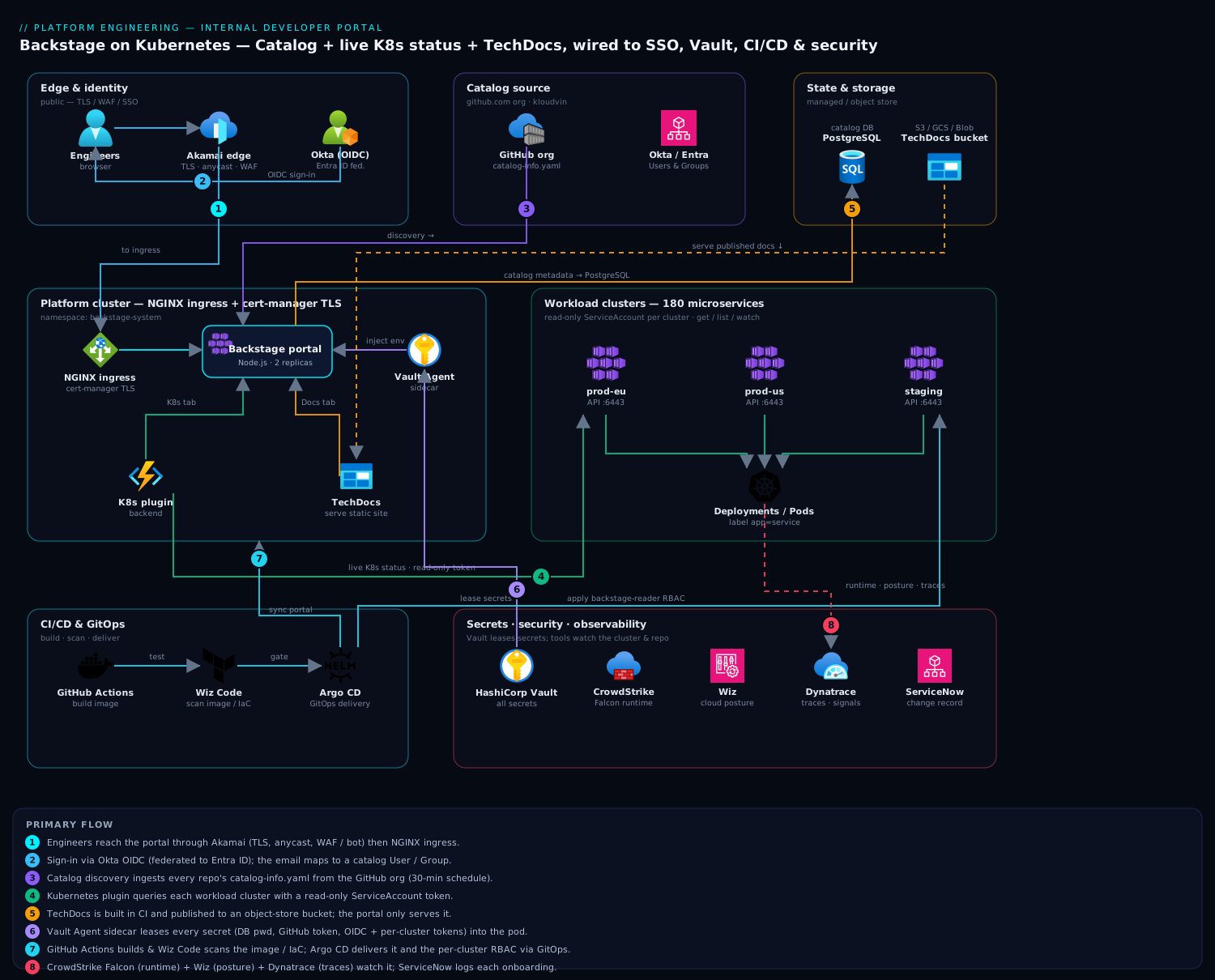
The portal is a single Node.js application (backend + bundled frontend) running on the platform cluster. Engineers reach it through Akamai at the edge for TLS termination, global anycast, and WAF/bot protection, then NGINX ingress. They authenticate via Okta (OIDC), and Backstage maps the Okta identity to a catalog User/Group so ownership and access are first-class. The catalog is populated from GitHub by discovering catalog-info.yaml files in every repo. The Kubernetes plugin in the backend talks to each of the four workload clusters through a read-only ServiceAccount token (held in Vault, injected at runtime) to render live pod, deployment, and ingress status per service. TechDocs builds each repo’s Markdown into a static site at CI time and publishes it to an object-store bucket that the portal serves. Secrets never sit in the pod spec — the Vault Agent sidecar leases them. CrowdStrike Falcon runs on the cluster nodes for runtime threat detection, Wiz (with Wiz Code) scans the cluster posture and the portal repo/IaC for misconfigurations, Dynatrace instruments the portal and clusters for tracing and golden signals, and ServiceNow receives a change ticket whenever a new component is onboarded to the catalog.
The build order below matters: stand up a bare portal first, prove auth, then add the catalog, then Kubernetes, then TechDocs. Adding plugins to a portal that is not yet authenticating is how you waste a day debugging the wrong layer.
1. Scaffold and run the portal locally
Create the app from the official template, then run it once locally against SQLite to confirm the toolchain works before touching the cluster.
# Scaffold (pins the current Backstage release line)
npx @backstage/create-app@latest --path kloudvin-portal
cd kloudvin-portal

# Install and run both backend + frontend
yarn install --immutable
yarn dev
yarn dev serves the frontend on http://localhost:3000 and the backend on :7007. You should see the default catalog with the example components. Stop it (Ctrl-C) once it renders — local SQLite and the guest identity provider are for the smoke test only; everything below moves to PostgreSQL and real SSO.
Pin your versions so CI is reproducible:
yarn backstage-cli versions:bump # aligns all @backstage/* packages to one release
2. Wire PostgreSQL and externalize config
Backstage reads app-config.yaml (base) and app-config.production.yaml (overlay). Move the database to PostgreSQL and pull every secret from the environment so Vault can supply it. Edit app-config.production.yaml:
app:
  baseUrl: https://portal.kloudvin.io
backend:
  baseUrl: https://portal.kloudvin.io
  listen:
    port: 7007
  database:
    client: pg
    connection:
      host: ${POSTGRES_HOST}
      port: 5432
      user: ${POSTGRES_USER}
      password: ${POSTGRES_PASSWORD}
      ssl:
        rejectUnauthorized: true
Note the ${...} indirection — Backstage substitutes environment variables at boot. Those variables are populated by the Vault Agent sidecar (Step 8), never hard-coded. Add the pg driver:
yarn --cwd packages/backend add pg
3. Configure Okta SSO (OIDC)
Replace the guest provider with real SSO. In Okta, create an OIDC web app with redirect URI https://portal.kloudvin.io/api/auth/okta/handler/frame, and capture the client ID/secret. Where the org also needs Azure RBAC, Okta is federated to Entra ID, but the portal itself trusts Okta as the OIDC issuer. Add the resolver to app-config.production.yaml:
auth:
  environment: production
  providers:
    okta:
      production:
        clientId: ${OKTA_CLIENT_ID}
        clientSecret: ${OKTA_CLIENT_SECRET}
        audience: ${OKTA_AUDIENCE}        # https://<your-org>.okta.com
        signIn:
          resolvers:
            - resolver: emailMatchingUserEntityProfileEmail
The resolver maps the authenticated Okta email to a catalog User entity, which is what makes ownership and access checks resolve to a real person. Add the sign-in page wiring in packages/app/src/App.tsx:
import { oktaAuthApiRef } from '@backstage/core-plugin-api';

const app = createApp({
  components: {
    SignInPage: props => (
      <SignInPage {...props} auto provider={{
        id: 'okta-auth-provider',
        title: 'Okta',
        message: 'Sign in with your KloudVin Okta account',
        apiRef: oktaAuthApiRef,
      }} />
    ),
  },
  // ...
});
4. Populate the service catalog from GitHub
The catalog is the spine of the portal. Use discovery so any repo containing a catalog-info.yaml is ingested automatically — no central list to maintain. Add a GitHub integration and a discovery processor to app-config.production.yaml:
integrations:
  github:
    - host: github.com
      token: ${GITHUB_TOKEN}            # read-only PAT or GitHub App, from Vault

catalog:
  providers:
    github:
      kloudvinOrg:
        organization: 'kloudvin'
        catalogPath: '/catalog-info.yaml'
        filters:
          branch: 'main'
        schedule:
          frequency: { minutes: 30 }
          timeout: { minutes: 3 }
  rules:
    - allow: [Component, System, API, Resource, Location, User, Group]
A service’s catalog-info.yaml (committed to its own repo) declares identity, owner, and — critically for Step 5 — the label that links it to its Kubernetes workloads:
apiVersion: backstage.io/v1alpha1
kind: Component
metadata:
  name: payments-ledger
  description: Double-entry ledger for settlement
  annotations:
    github.com/project-slug: kloudvin/payments-ledger
    backstage.io/kubernetes-label-selector: 'app=payments-ledger'
    backstage.io/techdocs-ref: dir:.
spec:
  type: service
  lifecycle: production
  owner: group:default/payments-team
  system: settlement
Group and user entities can be ingested from Okta/Entra via the org plugin, or committed as YAML; either way ownership resolves to a real team, which is what kills the “who owns this?” Slack thread.
5. Install and wire the Kubernetes plugin
This is the plugin that puts live cluster status next to each service. It has two halves: a backend that holds cluster credentials and queries the API servers, and a frontend tab on the entity page.
Install the packages:
yarn --cwd packages/backend add @backstage/plugin-kubernetes-backend
yarn --cwd packages/app add @backstage/plugin-kubernetes
Register the backend in packages/backend/src/index.ts:
backend.add(import('@backstage/plugin-kubernetes-backend'));
Add the entity tab in packages/app/src/components/catalog/EntityPage.tsx:
import { EntityKubernetesContent } from '@backstage/plugin-kubernetes';

// inside the service entity layout:
<EntityLayout.Route path="/kubernetes" title="Kubernetes">
  <EntityKubernetesContent refreshIntervalMs={30000} />
</EntityLayout.Route>
Now declare the four clusters in app-config.production.yaml. Use serviceAccount auth with a read-only token per cluster — Backstage must never hold write credentials:
kubernetes:
  serviceLocatorMethod:
    type: multiTenant
  clusterLocatorMethods:
    - type: config
      clusters:
        - name: prod-eu
          url: https://prod-eu.k8s.kloudvin.io:6443
          authProvider: serviceAccount
          serviceAccountToken: ${K8S_TOKEN_PROD_EU}
          caData: ${K8S_CA_PROD_EU}
          skipTLSVerify: false
        - name: prod-us
          url: https://prod-us.k8s.kloudvin.io:6443
          authProvider: serviceAccount
          serviceAccountToken: ${K8S_TOKEN_PROD_US}
          caData: ${K8S_CA_PROD_US}
        - name: staging
          url: https://staging.k8s.kloudvin.io:6443
          authProvider: serviceAccount
          serviceAccountToken: ${K8S_TOKEN_STAGING}
          caData: ${K8S_CA_STAGING}
Create the read-only ServiceAccount on each workload cluster. Apply this with Argo CD so the RBAC is GitOps-managed and identical across clusters:
# backstage-reader.yaml — applied to every workload cluster
apiVersion: v1
kind: ServiceAccount
metadata:
  name: backstage-reader
  namespace: backstage-system
---
apiVersion: rbac.authorization.k8s.io/v1
kind: ClusterRole
metadata:
  name: backstage-reader
rules:
  - apiGroups: ['']
    resources: ['pods', 'services', 'configmaps', 'limitranges']
    verbs: ['get', 'list', 'watch']
  - apiGroups: ['apps']
    resources: ['deployments', 'replicasets', 'statefulsets', 'daemonsets']
    verbs: ['get', 'list', 'watch']
  - apiGroups: ['networking.k8s.io']
    resources: ['ingresses']
    verbs: ['get', 'list', 'watch']
  - apiGroups: ['autoscaling']
    resources: ['horizontalpodautoscalers']
    verbs: ['get', 'list', 'watch']
---
apiVersion: rbac.authorization.k8s.io/v1
kind: ClusterRoleBinding
metadata:
  name: backstage-reader
subjects:
  - kind: ServiceAccount
    name: backstage-reader
    namespace: backstage-system
roleRef:
  kind: ClusterRole
  name: backstage-reader
  apiGroup: rbac.authorization.k8s.io
---
apiVersion: v1
kind: Secret
metadata:
  name: backstage-reader-token
  namespace: backstage-system
  annotations:
    kubernetes.io/service-account.name: backstage-reader
type: kubernetes.io/service-account-token
Pull each cluster’s token and CA into Vault — never into the repo:
TOKEN=$(kubectl -n backstage-system get secret backstage-reader-token \
  -o jsonpath='{.data.token}' | base64 -d)
CA=$(kubectl -n backstage-system get secret backstage-reader-token \
  -o jsonpath='{.data.ca\.crt}')   # already base64 for caData

vault kv put secret/backstage/k8s/prod-eu token="$TOKEN" ca="$CA"
The label selector you set in Step 4 (app=payments-ledger) is how the plugin maps a catalog component to its workloads. Make sure your Deployments and Pods actually carry that label, or the Kubernetes tab renders empty — the single most common “it doesn’t work” report.
6. Enable TechDocs with an external builder
TechDocs turns each repo’s Markdown into a versioned docs site shown inside the portal. The mistake to avoid is the default local builder, which compiles docs inside the running portal pod — slow, and it needs Python/MkDocs in your runtime image. Use the external generator: CI builds the static site and publishes it to a bucket; the portal only serves it. Configure app-config.production.yaml:
techdocs:
  builder: 'external'          # CI builds; portal never compiles at runtime
  generator:
    runIn: 'local'
  publisher:
    type: 'awsS3'              # or googleGcs / azureBlobStorage
    awsS3:
      bucketName: 'kloudvin-techdocs'
      region: 'eu-west-1'
Each repo needs an mkdocs.yml at its root and docs under docs/:
# mkdocs.yml
site_name: 'payments-ledger'
plugins:
  - techdocs-core
nav:
  - Home: index.md
  - Runbook: runbook.md
  - API: api.md
The backstage.io/techdocs-ref: dir:. annotation from Step 4 tells the portal where to find the published site for that component. Engineers now read a service’s runbook in the same tab as its live cluster status — docs versioned with code, the seventeen-wiki problem solved.
7. Build the portal image and push via CI
Build the production image. The standard backend Dockerfile bundles the compiled frontend:
yarn build:backend                          # compiles backend + bundles frontend
docker build . -f packages/backend/Dockerfile --tag kloudvin/portal:$(git rev-parse --short HEAD)
In GitHub Actions, run lint/test/build, then have Wiz Code scan the image and IaC for vulnerabilities and misconfigurations before it can be promoted — a failing scan blocks the merge:
# .github/workflows/portal.yml
name: portal
on: { push: { branches: [main] } }
jobs:
  build:
    runs-on: ubuntu-latest
    steps:
      - uses: actions/checkout@v4
      - uses: actions/setup-node@v4
        with: { node-version: '20' }
      - run: yarn install --immutable
      - run: yarn tsc && yarn lint:all && yarn test:all
      - run: yarn build:backend
      - name: Wiz Code IaC + image scan
        run: wizcli iac scan --path ./ && wizcli docker scan --image kloudvin/portal:${{ github.sha }}
      - name: Build & push
        run: |
          docker build . -f packages/backend/Dockerfile -t kloudvin/portal:${{ github.sha }}
          docker push kloudvin/portal:${{ github.sha }}
The TechDocs build also lives in CI — each service repo runs npx @techdocs/cli generate && npx @techdocs/cli publish --publisher-type awsS3 --storage-name kloudvin-techdocs --entity <ns/kind/name> so docs publish on every merge.
8. Deploy to the cluster with Vault-injected secrets
Deliver the portal with Argo CD pointing at a Helm chart or plain manifests in Git. Secrets come from Vault via the agent injector — the Deployment carries annotations, not credentials:
apiVersion: apps/v1
kind: Deployment
metadata:
  name: backstage-portal
  namespace: backstage-system
spec:
  replicas: 2
  selector: { matchLabels: { app: backstage-portal } }
  template:
    metadata:
      labels: { app: backstage-portal }
      annotations:
        vault.hashicorp.com/agent-inject: 'true'
        vault.hashicorp.com/role: 'backstage'
        vault.hashicorp.com/agent-inject-secret-env: 'secret/data/backstage/app'
        vault.hashicorp.com/agent-inject-template-env: |
          {{- with secret "secret/data/backstage/app" -}}
          export POSTGRES_PASSWORD="{{ .Data.data.pg_password }}"
          export GITHUB_TOKEN="{{ .Data.data.github_token }}"
          export OKTA_CLIENT_SECRET="{{ .Data.data.okta_secret }}"
          {{- end }}
    spec:
      serviceAccountName: backstage
      containers:
        - name: backstage
          image: kloudvin/portal:GITSHA
          args: ['node', 'packages/backend', '--config', 'app-config.yaml', '--config', 'app-config.production.yaml']
          command: ['/bin/sh', '-c', '. /vault/secrets/env && exec node packages/backend ...']
          ports: [{ containerPort: 7007 }]
Expose it behind NGINX ingress with cert-manager TLS, and point Akamai at the ingress as origin:
apiVersion: networking.k8s.io/v1
kind: Ingress
metadata:
  name: backstage-portal
  namespace: backstage-system
  annotations:
    cert-manager.io/cluster-issuer: letsencrypt-prod
    nginx.ingress.kubernetes.io/proxy-body-size: '10m'
spec:
  ingressClassName: nginx
  tls:
    - hosts: [portal.kloudvin.io]
      secretName: portal-tls
  rules:
    - host: portal.kloudvin.io
      http:
        paths:
          - path: /
            pathType: Prefix
            backend: { service: { name: backstage-portal, port: { number: 7007 } } }
When a new component is onboarded to the catalog, fire a ServiceNow change record from the onboarding pipeline so platform changes have an auditable trail, and let Dynatrace OneAgent (already on the node pool) trace the portal’s requests and surface golden signals.
Validation
Confirm each layer end to end, in order:
# 1. Pod is healthy and serving
kubectl -n backstage-system get pods -l app=backstage-portal
kubectl -n backstage-system port-forward deploy/backstage-portal 7007:7007 &
curl -fsS http://localhost:7007/healthcheck && echo OK

# 2. Catalog discovery ingested real services (not the examples)
curl -fsS http://localhost:7007/api/catalog/entities?filter=kind=component \
  -H "Authorization: Bearer $TOKEN" | jq '.[].metadata.name' | head

# 3. Kubernetes plugin can reach a cluster
kubectl --token="$TOKEN_PROD_EU" --server=https://prod-eu.k8s.kloudvin.io:6443 \
  --certificate-authority=<(echo "$CA" | base64 -d) auth can-i list pods -A   # -> yes
Then in the browser: sign in via Okta, open payments-ledger, confirm the Kubernetes tab shows live pods/deployments from prod-eu, and the Docs tab renders the published runbook. If the Kubernetes tab is empty, the label selector and the workload labels disagree (see Step 5); if Docs 404s, the CI publish step did not run for that entity.
Rollback / teardown
Because delivery is GitOps and secrets are external, rollback is clean:
# Roll the portal back to the previous known-good image via Argo CD
argocd app rollback backstage-portal       # pick the prior revision
# or pin the manifest back and let Argo sync

# Full teardown of the portal (clusters/services untouched)
kubectl delete -f manifests/backstage-portal/        # Deployment, Service, Ingress
kubectl -n backstage-system delete secret portal-tls

# Remove the read-only reader from EACH workload cluster
kubectl delete -f backstage-reader.yaml --context prod-eu
kubectl delete -f backstage-reader.yaml --context prod-us
kubectl delete -f backstage-reader.yaml --context staging

# Revoke the Vault secrets the portal used
vault kv metadata delete secret/backstage/app
vault kv metadata delete secret/backstage/k8s/prod-eu
The PostgreSQL database and the TechDocs bucket persist; drop them explicitly only if you are decommissioning, since they hold catalog history and built docs.
Common pitfalls
- Local TechDocs builder in production. It compiles docs inside the portal pod and needs MkDocs/Python in your image — switch to the external builder (Step 6) or page load times collapse.
- Write-capable cluster credentials. The reader ServiceAccount must be
get/list/watchonly. A portal is a read surface; never give it a token that can mutate a cluster. - Label selector mismatch.
backstage.io/kubernetes-label-selectormust match labels your workloads actually carry. Empty Kubernetes tabs are almost always this. - Secrets in
app-config.yaml. Everything sensitive uses${ENV}and comes from Vault. A committed token is a leak — andgitremembers, so rotate immediately if it ever happens. - Forgetting
custom CA/caData. Self-signed or private-CA API servers fail TLS silently; supplycaDatarather than settingskipTLSVerify: true. - Catalog discovery rate limits. A 30-minute schedule across a large org can hit GitHub API limits; use a GitHub App (higher limit) rather than a PAT for big orgs.
Security notes
Identity is the gate: engineers reach the portal only through Okta SSO (federated to Entra ID where Azure RBAC is also in play), so there is no anonymous access and group claims drive what each team sees. The portal holds only read-only Kubernetes credentials, scoped by the ClusterRole above, so a compromised portal cannot change a cluster. Every secret — DB password, GitHub token, OIDC client secret, per-cluster tokens — lives in HashiCorp Vault and is leased into the pod by the Vault Agent sidecar, never written to a manifest or image. Wiz continuously scans the cluster’s posture and flags drift (a public service, an over-broad RBAC binding), while Wiz Code gates the portal repo and IaC in CI so a misconfiguration is caught before merge. CrowdStrike Falcon sensors on the node pool give runtime threat detection on the portal and its neighbors, feeding the SOC. Terminate TLS and apply WAF/bot rules at Akamai so the public edge is hardened before traffic reaches NGINX.
Cost notes
Backstage itself is open source; the spend is the infrastructure under it. The portal is light — two small replicas (≈0.5 vCPU / 1 GiB each) comfortably serve a few thousand engineers, so right-size the requests rather than over-provisioning. PostgreSQL is the one stateful dependency: a small managed instance (single-AZ for non-prod, multi-AZ for prod) is enough; the catalog is metadata, not bulk data. TechDocs storage is cheap static HTML in an object-store bucket — pennies — but watch egress if docs are heavily read; front the bucket with the CDN you already pay for. Keep the Kubernetes plugin’s refresh interval sane (30s, as configured) so you are not hammering four API servers from every open browser tab. The real return is not a line on the cloud bill — it is the week of onboarding and the nightly “where does this run?” pages you stop paying for.