A 30-engineer platform team ships a Go API and a React frontend out of a single monorepo, and their GitLab pipeline has become the bottleneck everyone complains about in standup. It runs as one long linear staircase — build waits for nothing, test waits for build, lint waits for test even though it touches none of its output — so a one-line frontend change blocks on a fifteen-minute backend test suite, and every pipeline re-downloads the same node_modules and Go module cache from scratch. Worse, when a reviewer opens a merge request they get a diff and a green checkmark but no running thing to click, so “looks good to me” really means “the code compiles.” This guide rebuilds that pipeline three ways at once: convert the staircase into a needs-based DAG so independent jobs run the moment their inputs are ready, add a distributed cache backed by object storage so every runner shares one warm cache, and stand up an ephemeral review-app environment per merge request that auto-deploys the branch and auto-deletes when the MR closes. The result is a pipeline that finishes in a third of the time and hands each reviewer a real URL.
Prerequisites
- A GitLab project (self-managed 16.x+ or GitLab.com) where you can edit
.gitlab-ci.ymland project CI/CD variables. - At least one GitLab Runner with the
dockerorkubernetesexecutor registered to the project or group. The Kubernetes executor is assumed for review apps. - A Kubernetes cluster (EKS, GKE, AKS, or self-managed) with
kubectlaccess, a wildcard DNS record (*.review.example.com) pointed at the ingress controller, and a wildcard or cert-manager-issued TLS certificate. - An S3-compatible bucket for the distributed cache (AWS S3, GCS in interop mode, or MinIO).
- A container registry — the built-in GitLab Container Registry is fine.
- HashiCorp Vault reachable from runners, used here to issue short-lived cloud and registry credentials to jobs via JWT auth instead of long-lived secrets in CI variables.
- CLI tools locally:
glab(GitLab CLI),kubectl,helm, and the AWS CLI (ormcfor MinIO).
Target topology
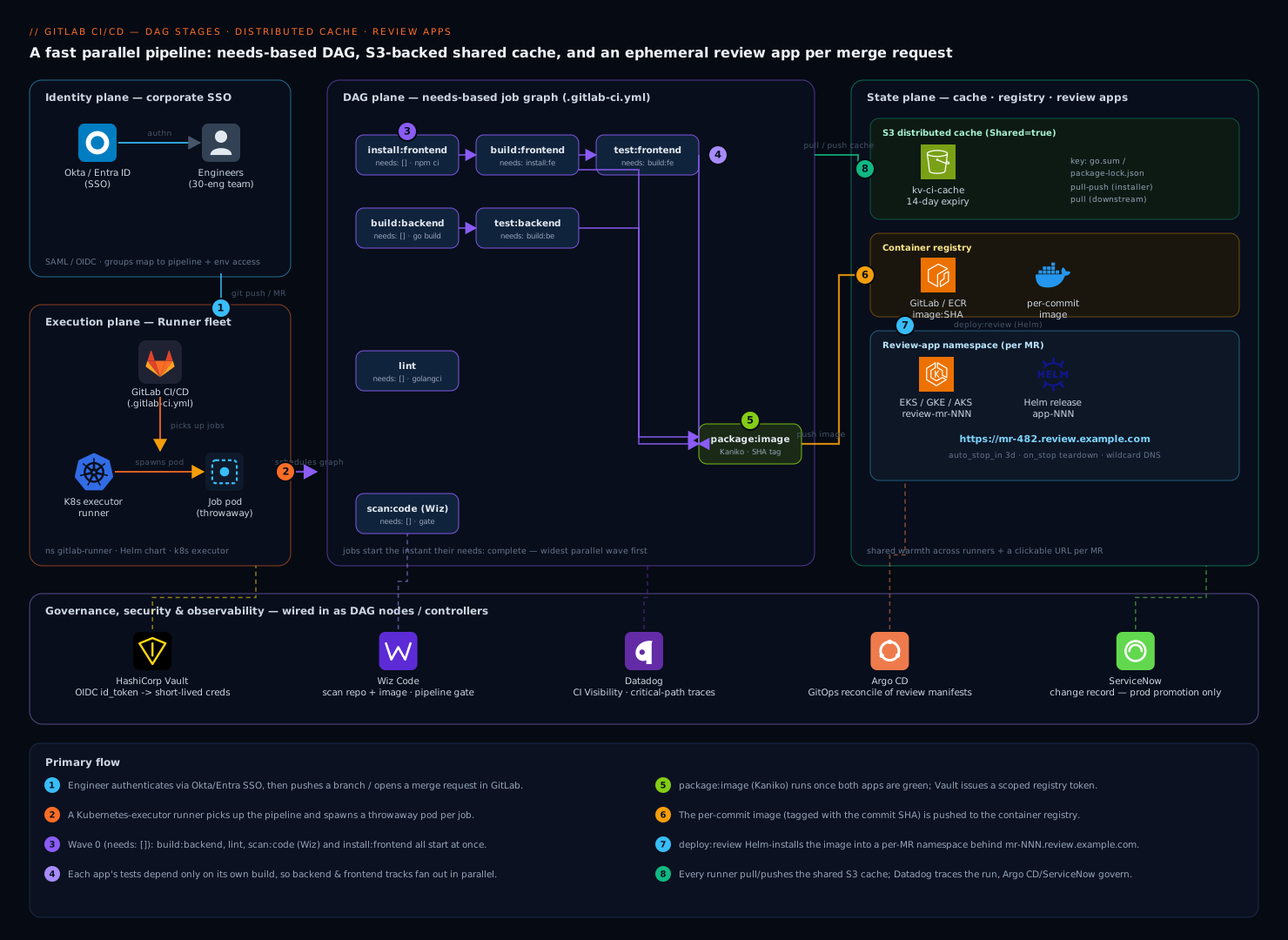
The pipeline has three planes that this guide builds in order. The execution plane is the GitLab Runner fleet: a set of Kubernetes-executor runners that pick up jobs, each job a throwaway pod. The DAG plane is the dependency graph encoded in .gitlab-ci.yml with needs: — jobs are no longer gated by stage order, only by the specific artifacts they consume, so the scheduler runs the widest possible set in parallel. The state plane is everything a job needs to be fast and to leave something behind: the S3 distributed cache that every runner reads and writes so dependency installs are warm across machines and across pipelines; the container registry that holds the per-commit image; and the review-app namespace in Kubernetes where a branch’s image is deployed behind a unique URL like mr-482.review.example.com.
Identity threads through all three planes. Engineers authenticate to GitLab through Okta (or Entra ID) via SAML/OIDC SSO, so pipeline-trigger and environment-access permissions map to corporate groups. Jobs themselves never carry static cloud keys: a runner job presents its GitLab JWT (CI_JOB_JWT_V2) to HashiCorp Vault, which validates it against the project’s claims and hands back a short-lived AWS credential for the cache bucket and a Kubernetes token for the deploy. Around the edges, Wiz Code scans the repo and the built image for vulnerabilities and misconfigurations as a pipeline gate, Datadog ingests the pipeline’s CI Visibility traces so you can see exactly which job is slow, and Argo CD is the GitOps controller that reconciles the review-app manifests the pipeline writes. ServiceNow receives a change record only when the pipeline promotes to a protected production environment — review apps deliberately skip the gate so engineers stay fast.
1. Register a Kubernetes-executor runner
Review apps need a runner that can talk to your cluster and create pods. Install the GitLab Runner Helm chart into a dedicated namespace and register it against your project or group.
First create a runner in the GitLab UI (Settings → CI/CD → Runners → New project runner) with tags k8s and review, and copy the authentication token. Then:
kubectl create namespace gitlab-runner

helm repo add gitlab https://charts.gitlab.io
helm repo update

helm upgrade --install gitlab-runner gitlab/gitlab-runner \
  --namespace gitlab-runner \
  --set gitlabUrl="https://gitlab.example.com/" \
  --set runnerToken="glrt-XXXXXXXXXXXXXXXXXXXX" \
  --set runners.executor=kubernetes \
  --set runners.config="$(cat <<'TOML'
[[runners]]
  [runners.kubernetes]
    namespace = "gitlab-runner"
    image = "alpine:3.20"
    cpu_request = "500m"
    memory_request = "512Mi"
    service_account = "gitlab-runner"
    poll_timeout = 600
  [runners.cache]
    Type = "s3"
    Shared = true
    [runners.cache.s3]
      ServerAddress = "s3.amazonaws.com"
      BucketName = "kv-ci-cache"
      BucketLocation = "ap-south-1"
TOML
)"
Shared = true on the cache is the single most important flag here — it lets every runner pod read and write the same cache object keys, which is what makes the cache truly distributed instead of node-local. Confirm the runner is online:
glab runner list --status online
2. Stand up the S3 distributed cache
A node-local cache helps one machine; a distributed cache helps the whole fleet and survives the ephemeral pods that the Kubernetes executor throws away after every job. Create the bucket and a tightly-scoped policy.
aws s3api create-bucket \
  --bucket kv-ci-cache \
  --region ap-south-1 \
  --create-bucket-configuration LocationConstraint=ap-south-1

# Expire cache objects after 14 days so the bucket does not grow forever
aws s3api put-bucket-lifecycle-configuration \
  --bucket kv-ci-cache \
  --lifecycle-configuration '{
    "Rules": [{
      "ID": "expire-ci-cache",
      "Status": "Enabled",
      "Filter": { "Prefix": "" },
      "Expiration": { "Days": 14 }
    }]
  }'
Rather than mint a static IAM access key and paste it into GitLab CI/CD variables — exactly the kind of long-lived secret that ends up leaked in a log — configure the runner to fetch credentials from Vault using GitLab’s JWT. Enable the JWT auth backend in Vault and bind a role to your project:
vault auth enable -path=gitlab jwt

vault write auth/gitlab/config \
  oidc_discovery_url="https://gitlab.example.com" \
  bound_issuer="https://gitlab.example.com"

vault write auth/gitlab/role/ci-cache \
  role_type="jwt" \
  user_claim="project_id" \
  bound_claims_type="glob" \
  bound_claims='{"project_path":"platform/monorepo","ref_protected":"true"}' \
  policies="ci-cache" \
  ttl=20m
The ci-cache Vault policy grants read on an AWS secrets-engine role that issues a 20-minute S3 credential. In the pipeline, a job authenticates and exports the credential before the cache is touched. With this in place, the cache: block in .gitlab-ci.yml keys per lockfile so a dependency change busts the cache and an unchanged lockfile reuses it:
.go-cache: &go-cache
  key:
    files:
      - go.sum
  paths:
    - .go/pkg/mod/
  policy: pull-push

.node-cache: &node-cache
  key:
    files:
      - frontend/package-lock.json
  paths:
    - frontend/node_modules/
  policy: pull
Note policy: pull on the node cache for downstream jobs that only read it — only the install job needs pull-push. Splitting the policy this way avoids the race where two parallel jobs both try to write the same cache archive.
3. Convert the linear pipeline into a needs-based DAG
This is where the staircase becomes a graph. In classic GitLab CI, a job in stage test cannot start until every job in build has finished. Adding needs: overrides that: a job starts the instant the specific jobs it lists have completed, regardless of stage. Stages still exist (they order the UI and act as a fallback), but needs: drives actual scheduling.
Here is the DAG for the monorepo. The backend and frontend build in parallel; each one’s tests depend only on its own build; lint depends on nothing but the source; and the image only builds after both apps are green.
stages: [install, build, test, package, deploy, cleanup]

variables:
  GOPATH: "$CI_PROJECT_DIR/.go"

install:frontend:
  stage: install
  image: node:20-alpine
  cache: *node-cache
  script:
    - cd frontend && npm ci --prefer-offline
  artifacts:
    paths: [frontend/node_modules/]
    expire_in: 1 hour

build:backend:
  stage: build
  image: golang:1.23
  needs: []                       # nothing to wait for — starts immediately
  cache: *go-cache
  script:
    - go build -o bin/api ./cmd/api
  artifacts:
    paths: [bin/api]

build:frontend:
  stage: build
  image: node:20-alpine
  needs: ["install:frontend"]     # only waits on its own install
  cache: *node-cache
  script:
    - cd frontend && npm run build
  artifacts:
    paths: [frontend/dist/]

test:backend:
  stage: test
  image: golang:1.23
  needs: ["build:backend"]        # NOT blocked by build:frontend
  cache: *go-cache
  script:
    - go test ./... -race -coverprofile=cover.out

test:frontend:
  stage: test
  image: node:20-alpine
  needs: ["build:frontend"]
  cache: *node-cache
  script:
    - cd frontend && npm run test:ci

lint:
  stage: test
  image: golangci/golangci-lint:v1.61
  needs: []                       # source-only, runs in parallel with everything
  script:
    - golangci-lint run ./...
The needs: [] on build:backend and lint is the key trick: an empty needs means “do not wait for any prior stage,” so those jobs launch in the very first scheduling wave alongside install:frontend. You can see the resulting graph in the pipeline’s Needs tab, and the practical effect is that total wall-clock time collapses to the longest path through the DAG (build → test on the slower app) rather than the sum of all stages.
Wire the security and observability gates in as DAG nodes too, so they parallelize instead of serializing:
scan:code:
  stage: test
  needs: []
  image:
    name: wizcli/wizcli:latest
    entrypoint: [""]
  script:
    - wizcli auth --id "$WIZ_CLIENT_ID" --secret "$WIZ_CLIENT_SECRET"
    - wizcli dir scan --path . --policy "Default vulnerabilities policy"
  allow_failure: false
Wiz Code here runs static analysis on the repository — secrets, IaC misconfigurations, and dependency CVEs — and fails the pipeline on a policy breach before anything gets packaged. Because it has needs: [] it costs you zero added wall-clock time; it runs in the first wave next to the builds.
4. Package the image with credentials from Vault
Once both apps are green, build a single image tagged with the commit SHA. Use Kaniko so no Docker daemon is required in the Kubernetes executor, and pull the registry credential from Vault rather than relying on the ambient CI_REGISTRY_PASSWORD when you want a scoped, auditable token.
package:image:
  stage: package
  needs: ["test:backend", "test:frontend", "build:frontend"]
  image:
    name: gcr.io/kaniko-project/executor:v1.23.2-debug
    entrypoint: [""]
  variables:
    VAULT_ADDR: "https://vault.example.com"
  id_tokens:
    VAULT_ID_TOKEN:
      aud: https://vault.example.com
  script:
    - export VAULT_TOKEN="$(vault write -field=token auth/gitlab/login role=ci-registry jwt=$VAULT_ID_TOKEN)"
    - export REG_PASS="$(vault kv get -field=token secret/ci/registry)"
    - echo "{\"auths\":{\"$CI_REGISTRY\":{\"username\":\"deploy\",\"password\":\"$REG_PASS\"}}}" > /kaniko/.docker/config.json
    - /kaniko/executor
        --context "$CI_PROJECT_DIR"
        --dockerfile "$CI_PROJECT_DIR/Dockerfile"
        --destination "$CI_REGISTRY_IMAGE:$CI_COMMIT_SHORT_SHA"
        --cache=true
The id_tokens: block is GitLab’s modern, per-job OIDC token (the successor to CI_JOB_JWT_V2), scoped to the Vault audience. Vault validates it, confirms the project and ref claims, and returns a token that lets the job read exactly one registry secret — no standing credential, and every issuance is logged in Vault’s audit device.
5. Deploy a review app per merge request
Now the payoff for reviewers. A dynamic environment uses CI variables in its name and url so each merge request gets its own deployment and its own URL. The job runs only on merge-request pipelines, deploys the just-built image into a per-MR namespace, and registers a teardown job via on_stop.
deploy:review:
  stage: deploy
  needs: ["package:image"]
  image: alpine/helm:3.16.1
  rules:
    - if: '$CI_PIPELINE_SOURCE == "merge_request_event"'
  environment:
    name: review/$CI_MERGE_REQUEST_IID
    url: https://mr-$CI_MERGE_REQUEST_IID.review.example.com
    on_stop: stop:review
    auto_stop_in: 3 days
  script:
    - export KUBECONFIG="$(vault kv get -field=kubeconfig secret/ci/review-cluster)"
    - NS="review-mr-$CI_MERGE_REQUEST_IID"
    - kubectl create namespace "$NS" --dry-run=client -o yaml | kubectl apply -f -
    - helm upgrade --install "app-$CI_MERGE_REQUEST_IID" ./charts/app
        --namespace "$NS"
        --set image.repository="$CI_REGISTRY_IMAGE"
        --set image.tag="$CI_COMMIT_SHORT_SHA"
        --set ingress.host="mr-$CI_MERGE_REQUEST_IID.review.example.com"
        --wait --timeout 5m
Three details make this production-grade. auto_stop_in: 3 days tells GitLab to automatically run the stop job if the MR sits idle, so abandoned branches do not leak namespaces and cloud spend. The per-MR namespace gives each review app hard isolation — its own secrets, quotas, and network policy. And the Helm chart’s ingress host is templated from CI_MERGE_REQUEST_IID, which resolves against your *.review.example.com wildcard DNS so the URL just works.
If you prefer GitOps over the pipeline calling helm directly, the deploy job instead writes a rendered manifest into an apps/review-mr-NNN/ path in a config repo and pushes; Argo CD watches that repo with an ApplicationSet and reconciles the review app into the cluster. That keeps cluster credentials out of CI entirely (Argo CD holds them) and gives you a single dashboard of every live review environment. The teardown then becomes a git rm of the directory rather than a kubectl delete.
6. Auto-teardown when the MR closes
The stop job is what keeps a fleet of review apps from becoming a cloud bill. It is referenced by on_stop above and must use the same environment name, run manually-or-on-close, and not need any artifacts.
stop:review:
  stage: cleanup
  image: alpine/helm:3.16.1
  needs: []
  rules:
    - if: '$CI_PIPELINE_SOURCE == "merge_request_event"'
      when: manual
  allow_failure: true
  environment:
    name: review/$CI_MERGE_REQUEST_IID
    action: stop
  script:
    - export KUBECONFIG="$(vault kv get -field=kubeconfig secret/ci/review-cluster)"
    - NS="review-mr-$CI_MERGE_REQUEST_IID"
    - helm uninstall "app-$CI_MERGE_REQUEST_IID" --namespace "$NS" || true
    - kubectl delete namespace "$NS" --ignore-not-found
action: stop is what tells GitLab this job tears the environment down; when the merge request is merged or closed, GitLab triggers it automatically, and the auto_stop_in timer triggers it on idle. The whole environment — Helm release, namespace, ingress, and DNS-backed URL — disappears.
Validation
Verify each layer independently rather than trusting one green pipeline.
# 1. DAG: confirm jobs report needs and run in parallel waves
glab ci view              # interactive; the "Needs" view shows the graph
glab ci status

# 2. Cache: confirm the archive is uploaded to and restored from S3
#    In the job log you should see:
#      "Creating cache go.sum-... and uploading to s3"
#      "Restoring cache" with "Downloading cache from s3" on the next run
aws s3 ls s3://kv-ci-cache/ --recursive | head

# 3. Review app: confirm the environment exists and the URL is live
glab api "projects/:id/environments?states=available" | jq '.[].name'
curl -fsS -o /dev/null -w "%{http_code}\n" https://mr-482.review.example.com/healthz
kubectl get pods -n review-mr-482
A correct run shows: independent jobs starting in the same timestamped wave (not staggered by stage); a second pipeline on an unchanged lockfile logging a cache restore and skipping the dependency download; and a 200 from the review app’s health endpoint. In Datadog, open CI Visibility and confirm the pipeline trace shows the parallel fan-out as concurrent spans and flags the critical path — that view is how you find the next bottleneck. Datadog’s CI Visibility ingests GitLab pipeline events here to give per-job duration trends, flaky-test detection, and the longest-path analysis that tells you which job to optimize next.
Rollback and teardown
To roll a review app back to a previous commit, redeploy the prior image tag without rebuilding:
helm upgrade app-482 ./charts/app -n review-mr-482 \
  --set image.tag=<previous-short-sha> --wait
To remove a stuck review environment manually when the stop job did not fire:
glab api --method POST "projects/:id/environments/<env_id>/stop"
helm uninstall app-482 -n review-mr-482 || true
kubectl delete namespace review-mr-482 --ignore-not-found
To revert the whole pipeline change, the safest path is to delete .gitlab-ci.yml’s needs: keys (which restores stage-ordered execution) and remove the deploy:review/stop:review jobs, keeping the cache config — caching is independently safe. To fully decommission, uninstall the runner (helm uninstall gitlab-runner -n gitlab-runner), empty and delete the cache bucket (aws s3 rb s3://kv-ci-cache --force), and revoke the Vault roles (vault delete auth/gitlab/role/ci-cache).
Common pitfalls
- A job lists
needs:for a job in a later stage.needs:can only point backward in stage order; a forward reference is a config error. Reorder the stages so dependencies precede dependents. - The cache silently never restores. Almost always a key mismatch — if
key:files:points at a path that does not exist on a given branch, GitLab falls back to adefaultkey and you get cache misses. Check the exact key printed in the job log. - Two parallel jobs both write the same cache and the last write wins (or corrupts). Use
policy: pullon every job except the one canonical installer, andpolicy: pull-pushonly on that installer. - Review apps pile up because the stop job needs an artifact. A stop job must have
needs: []and reference no artifacts — when an MR is closed weeks later, the source pipeline’s artifacts have expired and the stop job would fail. Keep it self-contained. environment:urldoes not resolve. The wildcard DNS*.review.example.comis not pointed at the ingress, or the Helm chart’s ingress host does not match theurl. They must be identical strings.- Kaniko cannot push. The in-pod
config.jsonis missing or malformed; echo it to a file and confirm the registry host key matches$CI_REGISTRYexactly.
Security notes
Keep static cloud and registry secrets out of CI/CD variables entirely. The pattern above issues every privileged credential — S3 for the cache, the registry token, the review cluster’s kubeconfig — from Vault in exchange for the job’s short-lived OIDC id_token, bound to the project path and ref_protected claim, so a fork or an unprotected branch cannot mint production credentials and every issuance is auditable. Gate the pipeline with Wiz Code so a vulnerable dependency or a leaked key in the diff fails the build before it is packaged, and run image scanning on the pushed tag so a known-bad base image never reaches even a review namespace. Authenticate humans to GitLab through Okta or Entra ID via SSO so that the right to trigger pipelines, approve MRs, and access protected environments maps to corporate group membership and is revoked centrally on offboarding. Isolate each review app in its own namespace with a NetworkPolicy and a ResourceQuota so a buggy branch cannot reach another team’s data or starve the cluster. Reserve a ServiceNow change record for promotion to protected production environments only — review apps are deliberately ungated to stay fast, while production deploys raise a CR automatically for the audit trail.
Cost notes
The economics of this pattern are mostly about not paying for idle. Review-app sprawl is the biggest hidden cost: every open MR running a full deployment adds up fast, which is exactly why auto_stop_in and the on_stop teardown are non-negotiable — they reclaim namespaces and their nodes automatically. Right-size review pods with small requests/limits in the Helm values; these are throwaway environments, not production. The distributed cache trades a few cents of S3 storage and transfer for minutes of compute per pipeline — a strongly positive trade given runner-minute pricing — and the 14-day lifecycle rule keeps the bucket from growing unbounded. The DAG itself saves money by collapsing wall-clock time: fewer billed runner-minutes per pipeline, and engineers unblocked sooner. If you run autoscaling runners on spot/preemptible nodes, the Kubernetes executor’s ephemeral pods are ideal — they tolerate interruption, and you pay only for the seconds a job actually runs. Watch the one metric that ties it together in Datadog: runner-minutes per merged MR, trended over time, tells you whether the pipeline is getting cheaper or quietly regressing.