A mid-sized health-insurance payer — a few thousand employees, two hundred GCP projects spread across claims processing, a member portal, an actuarial data platform, and a sprawl of analytics sandboxes — fails a HIPAA readiness audit on a single finding: they cannot prove who read a member’s PHI six months ago, and they cannot prove the access log was not altered. Logs existed, technically. Each team had Cloud Logging switched on in its own project, each with its own retention, its own half-configured exporter, and a default 30-day bucket that had long since rolled over the window the auditor asked about. When the SOC chased a suspected data-exfiltration alert, an analyst spent two days federating queries across forty projects by hand because there was no single place the logs lived. The CISO’s mandate after that audit is blunt: one tamper-evident logging lake for the whole organization, seven-year retention on the records that matter, and the SOC querying from one console instead of forty. This article is the reference architecture for building exactly that on Google Cloud — an org-wide, immutable, perimeter-protected logging lake that a HIPAA auditor and a SOC lead will both sign off on.
The pressures here are the ones every regulated logging program runs into. Compliance means certain log classes — admin activity, data access, who-touched-what on PHI — must be retained for years, provably unmodified, and produced on demand. Scale means two hundred projects emitting tens of terabytes of logs a month, and a logging design that works for one project quietly falls over at two hundred. Cost means you cannot keep every debug line in a hot, queryable store for seven years without the bill becoming the story. And investigation speed means when an alert fires, the SOC needs to pivot across the entire estate in seconds, not federate by hand across projects. A centralized logging lake — logs routed out of every project into a small set of governed, long-lived sinks — satisfies all four at once. The logs leave the noisy, short-lived project buckets and land in stores you control, secure, and retain on your terms.
Why not the obvious shortcuts
The naive fixes each fail predictably, and naming why matters because someone on the project will propose all three.
Leaving logs in each project’s _Default bucket is where everyone starts and why the audit failed: retention is per-project and easily overridden, a project owner can delete the bucket and the evidence with it, and there is no cross-project query. Bumping every project’s bucket to 365-day or custom retention keeps everything hot and queryable forever, multiplies storage spend across two hundred projects, and still leaves the data sitting inside the very projects whose owners you are trying to audit — the fox guarding the henhouse. Pointing every project’s Logging agent directly at Splunk floods the SOC’s licensed ingestion with raw debug noise, couples your retention story to a third-party tool’s storage tier, and gives you nothing queryable inside GCP for the analytics and cost teams who also need logs.
A logging lake threads the needle. Logs are routed at the organization level, the moment they are written, into a dedicated, locked-down logging project the application teams cannot touch. There they fan out by purpose: a BigQuery dataset for fast SQL investigation and analytics, a Cloud Storage bucket for cheap, immutable, long-horizon compliance archive, and a filtered, security-relevant subset exported onward to the SOC’s SIEM. Routing is also the natural choke point to enforce the things auditors care about — immutability, retention, and a perimeter the data cannot leak past.
Architecture overview
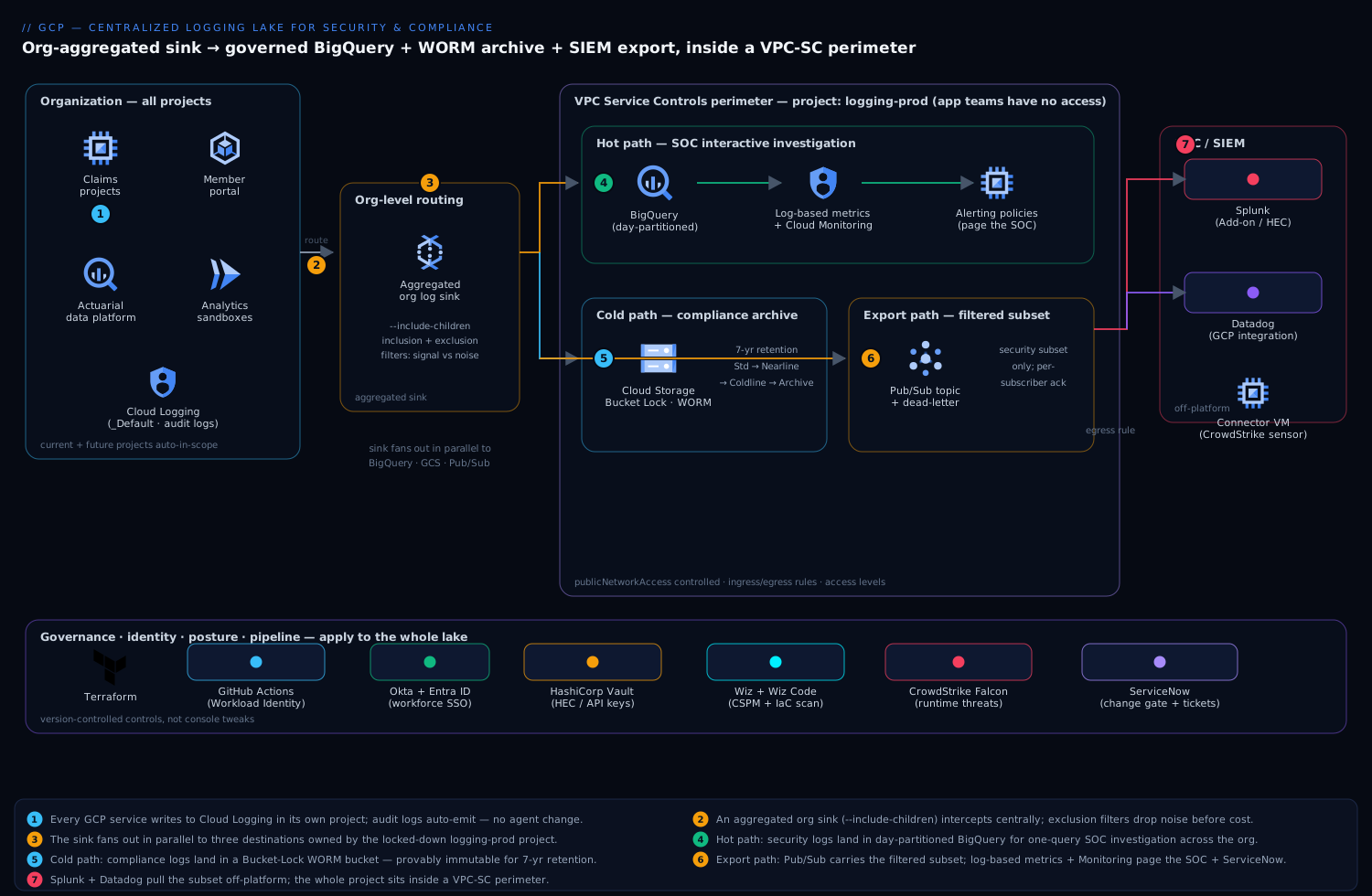
The platform has one defining property the auditor cares about most: logs are captured by an aggregated sink at the organization node, so every current and future project is in scope automatically, and the destinations live in a separate project that application teams have no write or delete rights to. A new analytics sandbox spun up next quarter is covered the day it is created — nobody has to remember to wire it in. That single design decision is what turns “logs existed, technically” into “the whole estate, provably, by construction.”
Think of the lake as one capture stage feeding three independent fan-out paths that live on different schedules and serve different masters: a hot path for the SOC’s interactive hunting, a cold path for the compliance archive, and an export path to the SIEM. Keeping them separate in your head is the first step to operating this well.
Capture and routing, following the data flow:
- Every GCP service and workload writes to Cloud Logging in its own project as it always did — no agent change, no application change. Admin Activity and (where enabled) Data Access audit logs are emitted automatically by the platform.
- An aggregated log sink defined on the organization (with
--include-children) intercepts those entries centrally. Its inclusion filter decides what is in scope; its exclusion filters drop the high-volume, low-value noise — load-balancer health checks, verbose GKE system chatter, Dataflow per-element debug — before it costs anything downstream. This filter is the single most important cost-and-signal lever in the whole design. - The sink routes matching entries, in parallel, to a set of destinations owned by a dedicated
logging-prodproject: a BigQuery dataset, a Cloud Storage bucket, and a Pub/Sub topic. Each sink writes with a Google-managed service-account identity that is granted write access only on those specific destinations.
Hot path (SOC investigation), into BigQuery:
- Security-relevant logs land in a BigQuery dataset using partitioned tables (day-partitioned on the entry timestamp). The SOC queries one place with SQL — “every
getIamPolicyandbigquery.tables.getDataagainst the claims dataset by principal X in the last 90 days” is a single query across the entire org, not a two-day federation exercise. - Log-based metrics count specific patterns as they arrive — failed authentications, IAM grants of primitive roles, VPC firewall changes, access to PHI-bearing datasets. These metrics feed Cloud Monitoring alerting policies that page the SOC and auto-open an incident.
Cold path (compliance archive), into Cloud Storage:
- The compliance-class logs are also routed to a Cloud Storage bucket configured with Bucket Lock and a retention policy, making the objects WORM (write-once-read-many) — provably immutable for the retention horizon, which is the specific control the HIPAA auditor asked for. A lifecycle rule tiers objects from Standard to Nearline to Coldline to Archive as they age, so seven-year retention does not mean seven years at hot-storage prices.
Export path (SOC SIEM), via Pub/Sub:
- A Pub/Sub topic carries the filtered, security-relevant subset off-platform. Splunk pulls it through the Splunk Add-on for GCP (or HEC via Dataflow), and Datadog ingests the same stream through its GCP Pub/Sub integration. The SOC keeps its existing SIEM workflows and correlation rules; GCP keeps the authoritative, retained copy. Crucially, only the filtered subset is exported, so the SIEM’s licensed ingestion is not drowned in debug noise.
The entire logging-prod project — BigQuery, the bucket, Pub/Sub — sits inside a VPC Service Controls perimeter, so even a principal holding valid IAM credentials cannot exfiltrate the lake to a project or network outside the perimeter.
Component breakdown
| Component | Service / tool | Role in the platform | Key configuration choices |
|---|---|---|---|
| Capture | Cloud Logging | Per-project log generation; org-level routing | Org-level aggregated sink with --include-children; exclusion filters for noise |
| Hot store | BigQuery | Fast SQL investigation + analytics on logs | Day-partitioned tables; partition-expiry on the hot window; column-level access on PHI fields |
| Cold store | Cloud Storage | Immutable long-horizon compliance archive | Bucket Lock WORM retention (7 yr); lifecycle tiering Standard→Nearline→Coldline→Archive |
| Export bus | Pub/Sub | Decoupled fan-out to the SOC SIEM | Filtered security subset only; dead-letter topic; per-subscriber ack |
| Detections | Log-based metrics + Cloud Monitoring | Turn log patterns into counters, then alerts | Counter/distribution metrics; alerting policies; notification to ServiceNow + SOC |
| Perimeter | VPC Service Controls | Stop exfiltration of the lake even with valid creds | Perimeter around logging-prod; ingress/egress rules; access levels |
| Identity / SSO | Okta + Entra ID | Workforce SSO for console + SOC access | Okta as workforce IdP federated to Cloud Identity / Entra; group-driven IAM |
| Secrets | HashiCorp Vault | Splunk HEC tokens, Datadog API keys, exporter creds | Short-lived dynamic secrets; GCP auth method; no static keys in pipelines |
| SIEM / SOC | Splunk + Datadog | Correlation, dashboards, analyst hunting off-platform | Pub/Sub pull (Splunk Add-on / HEC); Datadog GCP integration |
| CSPM / posture | Wiz + Wiz Code | Verify the lake’s own config + catch logging drift | Agentless scan of logging-prod; alert if a sink is deleted or a bucket loses WORM; Wiz Code checks the Terraform |
| Runtime security | CrowdStrike Falcon | Runtime threat detection on exporter/agent VMs | Sensor on any Dataflow worker / connector VM; detections to the SOC |
| ITSM | ServiceNow | Incident records + change gate for sink/retention edits | Auto-ticket on a detection; change approval before any sink or retention policy change |
| CI / IaC | GitHub Actions + Terraform | Pipeline + infra as code for the whole lake | Workload Identity Federation (no stored keys); Wiz Code policy gate before apply |
A few of these choices deserve the why, because they are the ones teams get wrong.
Why an aggregated org-level sink, not a sink per project. A per-project sink is one more thing every team must remember to create, configure identically, and not delete — and the project they forgot is exactly the one the auditor asks about. An aggregated sink at the organization node captures every descendant project, including ones that do not exist yet, with one definition you control centrally. Coverage becomes a property of the org hierarchy, not a hope that two hundred teams each did the right thing. (A folder-level sink is the same idea scoped to a business unit when you need that granularity.)
Why two destinations, BigQuery and Cloud Storage, not one. They answer different questions and have opposite cost curves. BigQuery is for speed: ad-hoc SQL across the estate during an active investigation, where you query the recent hot window constantly. Cloud Storage is for endurance: a cheap, immutable archive you touch rarely but must keep for years and prove untouched. Trying to serve both from BigQuery means paying hot-store prices for a seven-year cold archive; trying to serve both from Storage means no interactive querying when the SOC is mid-incident. Route to both, retain each on its own schedule.
Why Bucket Lock specifically. “Retention” in most systems is a setting an admin can quietly shorten. Bucket Lock makes the retention policy itself immutable once locked — not even a project owner or org admin can delete a covered object before its retention expires, and the lock cannot be removed. That is the precise property an auditor means by “tamper-evident,” and it is why the compliance copy lives in a locked GCS bucket rather than in a BigQuery table whose rows are, in principle, deletable.
Implementation guidance
Provision with Terraform, and treat the org-level sink and the perimeter as the first deliverables. Build the destinations and their protections before you turn the firehose on, so the first log entry that arrives is already immutable and inside the perimeter.
- A dedicated
logging-prodproject in a locked-down folder, with application teams holding no roles on it. - The BigQuery dataset (partitioned-table routing) and the Cloud Storage bucket with a retention policy you then lock.
- The aggregated organization sink with its inclusion and exclusion filters, granted write access to each destination.
- A VPC Service Controls perimeter around
logging-prod, with explicit ingress rules for the SOC’s analyst access level and egress rules for the Pub/Sub export. - The Pub/Sub topic, subscriptions, and the Splunk/Datadog wiring.
A minimal Terraform shape for the org sink communicates the intent — capture everything below the org, drop the noise, route to all three destinations:
resource "google_logging_organization_sink" "lake" {
  name             = "org-logging-lake"
  org_id           = var.org_id
  include_children = true   # every current + future project is in scope

  destination = "bigquery.googleapis.com/projects/logging-prod/datasets/security_logs"

  # keep audit + security signal; drop high-volume, low-value noise
  filter = <<-EOT
    logName:"cloudaudit.googleapis.com"
    OR severity>=WARNING
    NOT protoPayload.serviceName="k8s.io"
    NOT resource.type="http_load_balancer" AND httpRequest.status=200
  EOT
}
The Cloud Storage retention lock that makes the archive WORM is the line the auditor will literally ask to see:
resource "google_storage_bucket" "compliance_archive" {
  name     = "kv-logging-compliance-archive"
  project  = "logging-prod"
  location = "asia-south1"

  retention_policy {
    retention_period = 220752000   # 7 years, in seconds
    is_locked        = true        # WORM: policy can never be shortened or removed
  }
  lifecycle_rule {                 # tier down as objects age, keep the bill sane
    condition { age = 90 }
    action { type = "SetStorageClass"  storage_class = "COLDLINE" }
  }
}
The pipeline that applies all of this runs in GitHub Actions, authenticating to GCP via Workload Identity Federation so there is no stored service-account key to leak — a hard lesson the platform team intends never to repeat. Wiz Code scans the Terraform in the pull request and fails the build if a sink is removed, a retention lock is dropped, or the perimeter is widened, so a regression is caught before it ever applies. As an alternative to a single aggregated sink, some teams converge per-team logs first with the Logging agent / Ops Agent on legacy VMs; here, native routing keeps it simpler and agent-free for everything cloud-native.
Identity: federate the humans, kill the keys. SOC analysts and platform engineers reach the logging console and BigQuery through Okta as the workforce IdP, federated to Cloud Identity / Entra ID, so access is driven by group membership and conditional-access policy, not individual grants — an analyst in the soc-investigators group gets read on the BigQuery dataset and nothing else. The residual machine secrets that are not covered by Workload Identity — the Splunk HEC token, the Datadog API key, third-party connector credentials — live in HashiCorp Vault, issued as short-lived dynamic secrets through Vault’s GCP auth method, so nothing long-lived sits in a pipeline variable or a connector’s config.
Schema and partitioning. Route to BigQuery in partitioned-table mode (one schema, day-partitioned) rather than the legacy per-day sharded tables — partition pruning makes “last 90 days for principal X” cheap, and a partition-expiration setting drops the hot window automatically so BigQuery stays the fast store, not a second seven-year archive. Apply column-level access controls (policy tags via Data Catalog) on any field that can carry PHI or PII inside a log payload, so even an authorized analyst sees those columns only with explicit clearance.
Enterprise considerations
Security & Zero Trust. The lake is Zero Trust by construction: the destinations live in a project application teams cannot write to, access is identity-based and least-privilege per dataset, and the whole logging-prod project is wrapped in a VPC Service Controls perimeter so a stolen credential cannot copy the logs to an outside project or pull them down to an off-network machine. Layer on top: (a) Bucket Lock WORM retention as the immutability backstop the auditor signs; (b) Wiz running continuous CSPM against logging-prod itself, alerting the instant a sink is deleted, a bucket loses its retention lock, or an IAM binding widens access — the posture check behind the policy controls; © CrowdStrike Falcon sensors on any Dataflow worker or connector VM in the export path for runtime threat detection feeding the SOC; (d) an Org Policy that denies turning off Data Access audit logging, with Wiz independently verifying the policy is actually holding; (e) a detection (a burst of failed auth, a primitive-role grant, an unexpected egress) auto-raises a ServiceNow incident so the SOC has a ticket, not just a dashboard tile. Any change to a sink or a retention policy passes through a ServiceNow change gate first — you do not want the audit evidence reconfigured silently.
Cost optimization. Log volume dominates and grows with the estate, so engineer for it from day one. The principle: spend on signal, archive everything, query nothing twice.
| Lever | Mechanism | Typical effect |
|---|---|---|
| Exclusion filters at the sink | Drop health checks, verbose system logs before they route | Cuts ingested volume 40–70% on a noisy estate |
| Tiered GCS lifecycle | Standard→Nearline→Coldline→Archive as objects age | Slashes 7-yr archive cost vs. all-hot storage |
| BigQuery partition expiry | Keep only the hot investigation window queryable | Stops BQ becoming a second long-term archive |
| Export only the filtered subset | Pub/Sub carries security logs, not all logs | Protects the SOC’s licensed SIEM ingestion |
Don’t pay to store _Default twice |
Shrink per-project bucket retention once the lake holds the record | Removes duplicate retention spend across 200 projects |
The biggest single win is the exclusion filter: every gigabyte you drop at the sink is a gigabyte you do not ingest into BigQuery, archive in GCS, and push to Splunk. Tune it deliberately, and review it as workloads change.
Scalability. Each path scales independently. The aggregated sink and Cloud Logging routing are managed and absorb org-wide volume without your intervention. BigQuery scales storage and query compute separately — partitioning keeps investigation queries fast as the dataset grows into the hundreds of terabytes. Cloud Storage is effectively unbounded for the archive. The component to watch is the Pub/Sub export: size subscriptions and ack deadlines for the SIEM’s pull rate, add a dead-letter topic so a Splunk outage does not silently drop security logs, and let messages buffer in Pub/Sub (up to its retention) while the SIEM catches up rather than backpressuring the lake.
Failure modes, and what each one looks like. Name them before they page you.
- A sink silently stops routing — a misconfigured destination IAM grant or a deleted dataset, and entries quietly stop landing while everything looks green. Mitigation: a log-based metric on the sink’s own routing volume with a Monitoring alert if it drops to zero, plus Wiz watching for sink deletion.
- An exclusion filter too aggressive — someone tunes for cost and accidentally drops a security-relevant class, and the SOC is blind to it without knowing. Mitigation: treat the filter as reviewed, version-controlled code in Terraform with a change gate, never an ad-hoc console edit.
- The Pub/Sub export backs up — Splunk is down and the subscription’s backlog grows toward its retention limit, risking dropped security logs. Mitigation: a dead-letter topic, alerting on subscription backlog age, and the reassurance that the authoritative copy is already safe in BigQuery and GCS regardless.
- VPC-SC blocks a legitimate query — a new analyst’s network or an automated job is outside the perimeter and every call returns a confusing
403. Mitigation: model the SOC’s access level and any service ingress explicitly, and test perimeter rules in dry-run mode before enforcing. - A region outage — see DR below.
Reliability & DR (RTO/RPO). Decide the numbers per store. The Cloud Storage archive is the durable source of truth — use dual-region or multi-region buckets so the compliance copy survives a single region loss with near-zero RPO; this is the copy that must never be lost. BigQuery datasets are regional, so for the hot path either run cross-region copy jobs or accept that an investigation may briefly fall back to the GCS archive during a regional event — the logs are not lost, just temporarily not in the fast store. Pub/Sub buffers the export through short SIEM outages on its own. A pragmatic target for this lake: RPO near-zero for the archive (the audit evidence), RTO of an hour for restoring fast BigQuery investigation in the paired region, with the GCS archive as the guarantee that nothing is ever truly gone.
Observability. The lake must watch itself. Emit a log-based metric on routed-entry volume per sink and alert if it flatlines — a logging pipeline that has silently stopped is worse than no pipeline, because everyone assumes it is working. Track BigQuery query cost and slot usage so investigation spend does not surprise the CFO, GCS object age distribution so you can prove the lifecycle tiering is working, and Pub/Sub subscription backlog as the early-warning on a SIEM export falling behind. The same Datadog that receives the security export is a natural home for these meta-metrics, giving the platform team one dashboard for the health of the logging program itself.
Governance. Define what is captured, retained, and for how long as version-controlled Terraform, reviewed and revertable — the filter and the retention period are compliance controls, not config you tweak in a console. Apply Org Policy to deny disabling audit logs and to require the aggregated sink stays in place, with Wiz as the independent verifier that the controls are real. Document the data-residency posture (here, datasets and buckets pinned to asia-south1 to keep member data in-country) and keep a right-to-be-forgotten path in mind — log payloads can contain personal data, so the column-level controls and a defined redaction process matter under the same regime that started this project.
Explicit tradeoffs
Accept these or do not build it. A centralized lake adds real moving parts — an org-level sink to own, three destinations to keep healthy, a perimeter that will occasionally block something legitimate, and a filter you must tune and keep tuned or you either drown in cost or go blind to a threat. Centralizing also concentrates risk: the logging-prod project becomes a high-value target and a single point of failure, which is exactly why the VPC-SC perimeter, the least-privilege IAM, and the Wiz posture monitoring are non-negotiable rather than nice-to-have. The Bucket Lock that makes auditors happy is a one-way door — once locked you cannot delete those objects early even if you want to, even if they were written by mistake, so you size the retention window carefully and accept paying to store some volume you would rather not. And the Okta-to-Cloud-Identity federation adds a hop the single-IdP shops will not need.
The alternatives, and when they win. If you are a single small project, the built-in _Default bucket with extended retention is genuinely enough — this whole architecture is overkill until you have an estate to federate. If your only consumer is the SOC and you have no in-GCP analytics need, you could route straight to Splunk/Datadog and skip BigQuery — but you lose the cheap immutable archive and the in-platform query, and you couple your retention story to a vendor. If you want a batteries-included security analytics layer rather than raw logs, Google Security Operations (Chronicle) ingests and retains security telemetry with detection content built in, and composes nicely as a consumer of this same routing. And if logs are mostly operational, not compliance-driven, a lighter Log Analytics / Log Buckets setup without the WORM archive and the perimeter is the proportionate choice. Graduate to this full lake when regulation, estate size, residency, or an auditor’s “prove it” make the others insufficient.
The shape of the win
For the payer, the payoff is not “we turned on logging.” It is that when the next auditor asks “show me every access to this member’s PHI in the last seven years, and prove the record was not altered,” the compliance team runs one BigQuery query against the lake, points to the Bucket Lock retention on the immutable archive as proof of tamper-evidence, and the finding closes in an afternoon instead of failing the audit. And when the SOC’s next exfiltration alert fires, an analyst pivots across all two hundred projects from one console in seconds — not two days of hand-federation — because the logs already live in one governed place, already filtered to signal, already streaming to Splunk and Datadog. Everything upstream — the org-level aggregated sink, the BigQuery-and-GCS split, the VPC Service Controls perimeter, the Vault-held export tokens, the Wiz posture checks, the ServiceNow change gate — exists to make an auditor, a CISO, and a SOC lead each say yes. The architecture here is the destination; start with a single folder if you must, but this is where a regulated, at-scale “centralize our logs” has to land.