A continuous integration and continuous delivery (CI/CD) pipeline is the assembly line of modern software: it takes a commit and carries it, through a fixed sequence of automated steps, to running infrastructure — building, testing, scanning, packaging and deploying it without a human shepherding each step. Done well, a pipeline encodes your definition of “ready to ship” as executable policy, gives every change the same scrutiny regardless of author, and turns release from a tense event into a boring non-event. Done badly, it becomes the thing everyone routes around: flaky, slow, with security stages commented out and a “manual deploy” runbook quietly maintained on the side.
This lesson designs the pipeline properly: the full stage flow, each quality and security gate and where it belongs, artifact management (the part most teams under-think), and the engineering of the pipeline itself — pipeline-as-code, templates, caching/parallelism, keyless OIDC, and the agents/runners that execute the work. We keep it tool-agnostic but ground it with concrete syntax from GitHub Actions, Azure Pipelines and GitLab CI, and finish with a reference pipeline you can adapt.
Learning objectives
By the end of this lesson you will be able to:
- Map the canonical CI/CD stage flow (source → build → test → scan → package → publish → deploy → verify) and explain the job of each stage.
- Design quality gates — unit, coverage, SAST, DAST, SCA, container and licence scans, manual approval and automated rollback — and place each at the right point with sensible fail criteria.
- Choose and operate an artifact repository, and implement immutable versioning plus promotion across environments rather than rebuilding per stage.
- Write pipeline-as-code using reusable templates, caching and parallelism to keep pipelines fast and DRY.
- Replace long-lived cloud credentials with OIDC federated identity, and choose between hosted, self-hosted and autoscaling (ARC) runners.
- Read and adapt a complete reference pipeline that ties all of the above together.
Prerequisites
You should be comfortable with Git (branches, pull/merge requests, tags) and with YAML — pipelines are defined almost entirely in YAML, and its anchors, templates and type-coercion gotchas matter here. A working mental model of CI vs CD vs continuous deployment and the DORA metrics (deployment frequency, lead time, change-failure rate, MTTR) helps frame why each design choice exists. Containers and a registry appear throughout, so basic Docker familiarity is assumed. This lesson sits in the CI/CD module of the DevOps Zero-to-Hero course, after YAML for DevOps and before Deployment Strategies; the gates we design here are the foundation the deployment-strategy and DevSecOps lessons build on.
Core concepts: CI, CD and the pipeline as policy
Three terms get used loosely, so let us pin them down.
| Term | What it means | Ends at |
|---|---|---|
| Continuous Integration (CI) | Every change is merged to a shared mainline frequently and validated automatically (build + tests + scans) | A tested, packaged, publishable artifact |
| Continuous Delivery (CD) | Every validated change is automatically prepared for release and can be deployed to production at the push of a button | A change sitting one approval away from production |
| Continuous Deployment | Every validated change that passes all gates is deployed to production with no human approval | Running in production, automatically |
The distinction that trips people up is delivery vs deployment: continuous delivery keeps you always-releasable but a human (or a policy) decides when; continuous deployment removes even that gate. Most regulated or high-blast-radius systems run continuous delivery to production with an approval, and continuous deployment to lower environments.
The mental model that matters most: a pipeline is policy as code. Each gate is a machine-enforced answer to “what does done mean here?” — and because it is code, it is reviewed, versioned and identical for every change. A second principle underlies everything below: build once, promote the same artifact. The exact bits you tested in CI must be the bits that reach production. Rebuilding per environment reintroduces the “works on my machine” class of bug at the worst possible moment.
The stage flow, end to end
A pipeline is a directed sequence of stages, each containing jobs, each containing steps. (Terminology varies — Azure Pipelines and GitLab use stages → jobs → steps; GitHub Actions uses workflow → jobs → steps and models stage ordering with needs:.) The canonical flow:
| Stage | Purpose | Typical work | Fails fast on |
|---|---|---|---|
| Source / trigger | Get the exact code to build | Checkout, resolve commit SHA, lint config, detect changed paths | Malformed pipeline, branch-protection violations |
| Build / compile | Turn source into runnable form | Compile, transpile, bundle; restore dependencies | Compilation errors |
| Test | Prove correctness | Unit → integration → contract tests; collect coverage | Failing tests, coverage below threshold |
| Scan | Prove safety & compliance | SAST, SCA, secret scan, licence scan, IaC scan, container scan | Vulnerabilities/policy above severity gate |
| Package | Produce the deployable artifact | Build container image / jar / wheel / zip; generate SBOM; sign | Build/sign failure |
| Publish | Store the artifact immutably | Push to artifact repo with an immutable version tag | Auth/registry errors |
| Deploy | Place the artifact in an environment | Pull the published artifact, apply to env (rolling/blue-green/canary) | Health check, gate, approval |
| Verify | Confirm it actually works | Smoke tests, synthetic checks, key SLO/metric watch; auto-rollback if bad | Failing smoke tests, breached SLOs |
Two design rules give this flow its shape. Fail fast: order stages cheapest-and-most-likely-to-fail first, so a typo costs ten seconds, not ten minutes — lint and compile before you spin up integration test infrastructure. Fan out where independent: unit tests, SAST and SCA have no dependency on each other and should run in parallel jobs, then a single gate evaluates all their results. The “scan” stage in particular is usually a fan of parallel jobs, not a serial chain.
A useful mental split: everything up to and including Publish is CI (it produces a trustworthy artifact and never touches a live environment), and Deploy + Verify are CD (they move that one artifact through environments). The boundary is where the artifact repository sits.
Quality and security gates
A gate is a decision point that lets a change proceed only if it meets a criterion. Gates are what make a pipeline more than a glorified shell script. There are two kinds: automated gates (a check passes or fails on a measurable threshold) and manual gates (a human or group must approve). Get the fail criteria right — a gate that blocks on everything gets disabled; a gate that blocks on nothing is theatre.
| Gate | Stage | What it checks | Fail criterion (sensible default) | Tools |
|---|---|---|---|---|
| Build gate | Build | Code compiles / bundles cleanly | Any compile error; treat warnings-as-errors on main | Compiler, linters (ESLint, golangci-lint, Ruff) |
| Unit-test gate | Test | Behaviour is correct | Any failing test | Jest, JUnit, pytest, go test |
| Coverage gate | Test | Tests exercise enough code | Below threshold on the diff (e.g. <80% patch coverage) | Codecov, JaCoCo, coverage.py |
| SAST | Scan | Insecure code patterns (injection, XSS, hardcoded crypto) | New High/Critical findings | CodeQL, Semgrep, SonarQube |
| SCA | Scan | Vulnerable third-party dependencies | Known CVE ≥ High with a fix available | Dependabot, Snyk, OWASP Dependency-Check, npm audit |
| Secret scan | Source/Scan | Credentials committed to the repo | Any verified live secret | Gitleaks, TruffleHog, GitHub secret scanning |
| Licence / SBOM gate | Scan/Package | Disallowed OSS licences; generate a bill of materials | Any denylisted licence (e.g. AGPL in a proprietary product) | Syft (SBOM), FOSSA, ScanCode |
| DAST | Post-deploy (to a test env) | Runtime vulnerabilities against the running app | New High/Critical | OWASP ZAP, Burp Suite |
| Container scan | Scan/Package | Vulnerable OS packages / layers in the image | High/Critical with a fix; misconfig | Trivy, Grype, Docker Scout |
| Manual approval | Deploy (prod) | A human authorises a high-risk change | Required reviewer(s) do not approve | GitHub Environments, Azure Pipelines approvals, GitLab protected environments |
| Rollback | Verify | Post-deploy health is bad | Smoke test fails or SLO breaches → auto-revert | Health checks + redeploy/traffic-shift logic |
A few design notes that separate working pipelines from frustrating ones:
- Gate on the diff, not the codebase. A brand-new SAST or coverage gate applied to a legacy repo will report thousands of pre-existing findings and block every PR. Fail only on new findings introduced by the change (a “diff-aware” or “new code” gate, as SonarQube’s Clean as You Code calls it). Track the backlog separately.
- Severity- and reachability-based thresholds. “Fail on any CVE” is unworkable — you will drown in unfixable transitive Lows. Gate on High/Critical with a fix available; better still, prefer scanners that do reachability analysis (is the vulnerable function actually called?) to cut false positives.
- SAST vs DAST vs SCA — know the difference, because interviewers ask. SAST (static) reads your source/bytecode without running it — finds injection, weak crypto, secrets; runs early, fast, language-aware, but produces false positives. DAST (dynamic) attacks the running application from outside — finds runtime issues like auth bypass and misconfiguration, no source needed, language-agnostic, but needs a deployed target and runs later. SCA (software composition analysis) inventories your dependencies and matches them to known CVEs — it finds vulnerable libraries, not your code. They are complementary, not substitutes.
- Block vs warn. Not every gate must hard-fail. A new control is best rolled out in warn mode (annotate the PR, do not block) for a sprint or two, then flipped to block once the noise is tuned. Reserve hard blocks for things you would genuinely refuse to ship.
- Approvals belong to environments, not pipelines. Configure required reviewers, wait timers and branch restrictions on the environment (GitHub Environments / Azure environments / GitLab protected environments) so the same pipeline auto-deploys to dev, waits for one approver to staging, and waits for two named reviewers to prod — without forking the YAML.
- Rollback is a gate too. The Verify stage runs smoke/synthetic tests and watches key metrics; if they fail, it triggers the rollback path automatically (re-deploy the last-good version, or shift traffic back for blue-green/canary). Rollback covered by a gate is the difference between a 2-minute blip and a 2-hour incident — it directly drives your MTTR.
Artifact repositories, versioning and promotion
The artifact is the unit of currency in CD, and the artifact repository (a.k.a. binary/package registry) is where it lives between built and deployed. Treating artifacts casually is the most common pipeline design mistake.
Different ecosystems produce different artifact formats, each with its own registry protocol:
| Format | Ecosystem | Common registries |
|---|---|---|
| npm | JavaScript/Node | npm registry, GitHub Packages, Artifactory, Azure Artifacts, CodeArtifact |
| Maven / Gradle | JVM (Java, Kotlin) | Maven Central, Nexus, Artifactory, GitHub Packages |
| PyPI (wheel/sdist) | Python | PyPI, Artifactory, CodeArtifact, Azure Artifacts |
| NuGet | .NET | nuget.org, Azure Artifacts, GitHub Packages |
| Docker / OCI image | Containers | Docker Hub, GHCR, ACR, ECR, GAR, Harbor, Quay |
| Helm chart (OCI) | Kubernetes packaging | OCI registries (ACR/GHCR/ECR), ChartMuseum, Harbor |
The cross-format hosting choices are Nexus and JFrog Artifactory (self-hosted/SaaS, all formats), the cloud-native ones — GitHub Packages, GitLab Package/Container Registry, Azure Artifacts/ACR, AWS CodeArtifact/ECR, Google Artifact Registry — plus container-specialists Harbor and Quay. A managed registry also gives you what the public ones do not: private hosting, a proxy/remote cache of upstream (so a flaky public registry or a yanked package cannot break your build), retention policies, and vulnerability gating at the registry itself.
Versioning — make artifacts immutable. The cardinal rule: a version maps to exactly one set of bytes, forever. Never overwrite 1.4.2; never rely on a mutable tag for a deployment of record.
- Semantic versioning (
MAJOR.MINOR.PATCH) for libraries and releases — the contract for consumers. - For CI builds, append build metadata or a commit SHA so every build is uniquely addressable:
1.4.2+build.317or1.4.2-rc.1.gabc1234. Tools likesemantic-releasederive the version from commit messages automatically. - Container images: tag with the immutable commit SHA (
myapp:gitsha-abc1234) as the source of truth, and optionally also move human-friendly tags (:1.4.2,:staging) as pointers. Deploy by digest (@sha256:…) where you can — a digest cannot be re-pointed. Treat:latestas a convenience for humans, never as a deployment target. - Enable immutable tags / “delete protection” on the registry so a tag, once pushed, cannot be re-pushed to different content.
Promotion — build once, move the same artifact up. This is the payoff of immutable versioning. Instead of rebuilding for dev, then for staging, then for prod (three different binaries, three chances to differ), you build and publish a single artifact in CI, then promote that identical artifact through environments.
The same image myapp:gitsha-abc1234 flows: published → deployed to dev → (gate) → deployed to staging → (approval gate) → deployed to prod. Promotion is implemented either by copying/re-tagging the artifact between repositories (e.g. a dev repo, a staging repo, a prod repo, with copy-on-promote) or by immutable digest reference carried forward through the deploy jobs. Either way, the bytes never change after CI. Benefits: what you tested is what you ship; promotion is fast (no rebuild); and you get a clean audit trail of “this exact digest was approved for prod by X on date Y”. A common pattern is repository tiering — *-snapshot/*-dev for every CI build (short retention) and *-release/*-prod for promoted, retained artifacts.
Engineering the pipeline itself
A pipeline is software and deserves the same engineering. Four levers matter most: pipeline-as-code, templates/reuse, caching/parallelism, and OIDC.
Pipeline-as-code
The pipeline definition lives in the repository, versioned alongside the code it builds (.github/workflows/*.yml, azure-pipelines.yml, .gitlab-ci.yml, Jenkinsfile). This means pipeline changes are reviewed in PRs, roll back with git revert, branch with the code, and are auditable. Avoid click-configured pipelines in a UI — they drift, cannot be reviewed, and vanish when someone fat-fingers a setting. Pin third-party actions/tasks to a commit SHA, not a moving tag, so a compromised upstream cannot silently change what your pipeline runs (a real supply-chain attack vector).
Templates and reuse — DRY pipelines
Copy-pasted YAML across 40 repositories is a maintenance disaster: a fix to the build-and-scan logic means 40 PRs. Every major platform offers reuse:
| Platform | Reuse mechanism |
|---|---|
| GitHub Actions | Reusable workflows (workflow_call) and composite actions |
| Azure Pipelines | Template files (extends/template) with typed parameters, in the repo or a shared template repo |
| GitLab CI | include: (local/remote/template) plus extends: and YAML anchors |
| Jenkins | Shared libraries (@Library) with reusable steps |
The pattern: a central platform repo owns a “golden” build-test-scan-publish template; product repos call it with a few parameters (language, image name, severity threshold). One fix, propagated everywhere. Combine with YAML anchors (&/*/<<) for in-file deduplication and an extends template for cross-file reuse.
Caching and parallelism — keep it fast
A slow pipeline is a pipeline people avoid; lead time is a DORA metric for a reason. Two big speed levers:
- Caching restores expensive, deterministic outputs between runs — dependency directories (
~/.m2,node_modules/npm cache,~/.cache/pip, Go module cache) and build/layer caches (BuildKit/buildxregistry cache, compiler caches). Key the cache on a lockfile hash (hashFiles('**/package-lock.json')) so it invalidates only when dependencies actually change. Caches are a speed optimisation and must be safe to miss — never depend on cache contents for correctness. - Parallelism runs independent jobs at once: fan unit tests, SAST and SCA into separate concurrent jobs; shard a large test suite across N runners (
matrix/strategy.matrix) and split by timing; build multi-arch images in parallel. A matrix also covers fan-out across versions/OSes (test on Node 18/20/22 × Linux/Windows). Beware: caching writes/reads need care under parallelism to avoid races on a shared key.
Distinguish caching (a speed optimisation, safe to lose) from artifacts (the deployable outputs you publish and promote, which must persist) — they are different mechanisms even though both “save files between jobs”.
OIDC — kill long-lived cloud credentials
The old way: store a cloud access key as a pipeline secret and hope it never leaks. OpenID Connect (OIDC) replaces this with short-lived, federated credentials. The CI platform issues a signed OIDC identity token describing the running job (repo, branch, environment, workflow); the cloud’s identity provider is configured to trust that issuer and, on a valid token, mints a short-lived access token scoped to a specific role — no static secret stored anywhere.
| Static secret | OIDC federation | |
|---|---|---|
| Credential lifetime | Long-lived (until rotated) | Minutes |
| Stored in CI | Yes — a leak target | No secret stored |
| Scopable per branch/env | No | Yes — trust policy can require ref:refs/heads/main or a given environment |
| Rotation | Manual, error-prone | None needed |
This is now the default for cloud deploys: GitHub Actions → AWS IAM / Azure AD workload identity / GCP Workload Identity Federation; the same exists for GitLab and Azure DevOps. The trust policy must be tightly scoped to your repo/branch/environment — a wildcard subject would let any repo assume the role.
Agents and runners
The runner (GitHub) / agent (Azure Pipelines, Jenkins) is the machine that executes your jobs. Three models:
| Model | What it is | Pros | Cons / when to use |
|---|---|---|---|
| Hosted (cloud-provided) | Fresh, managed VM/container per job, run by the CI vendor | Zero maintenance; clean each run; instant scale | Per-minute cost; no access to private networks by default; fixed specs; queue limits |
| Self-hosted | Your own VM/server you register as a runner | Reach private networks/data; custom hardware (GPU, big RAM); pre-warmed caches; cost control at scale | You patch/secure/scale it; state leaks between jobs unless you clean up; standing capacity costs even when idle |
| Autoscaling ephemeral (ARC) | Runners as ephemeral Kubernetes pods, one per job, scaled on demand — GitHub Actions Runner Controller (ARC) / Azure scale-set agents | Self-hosted reach plus clean-per-job isolation; scales to zero; no idle cost | Needs a Kubernetes cluster and operational know-how |
Two non-negotiables for self-hosted: never run untrusted PR code on a persistent self-hosted runner (a fork can exfiltrate the host and any cached credentials) — gate on approval or use ephemeral runners; and prefer ephemeral runners (fresh per job) so build A cannot poison build B. ARC is the modern sweet spot: the network reach and cost control of self-hosted, with the clean isolation of hosted.
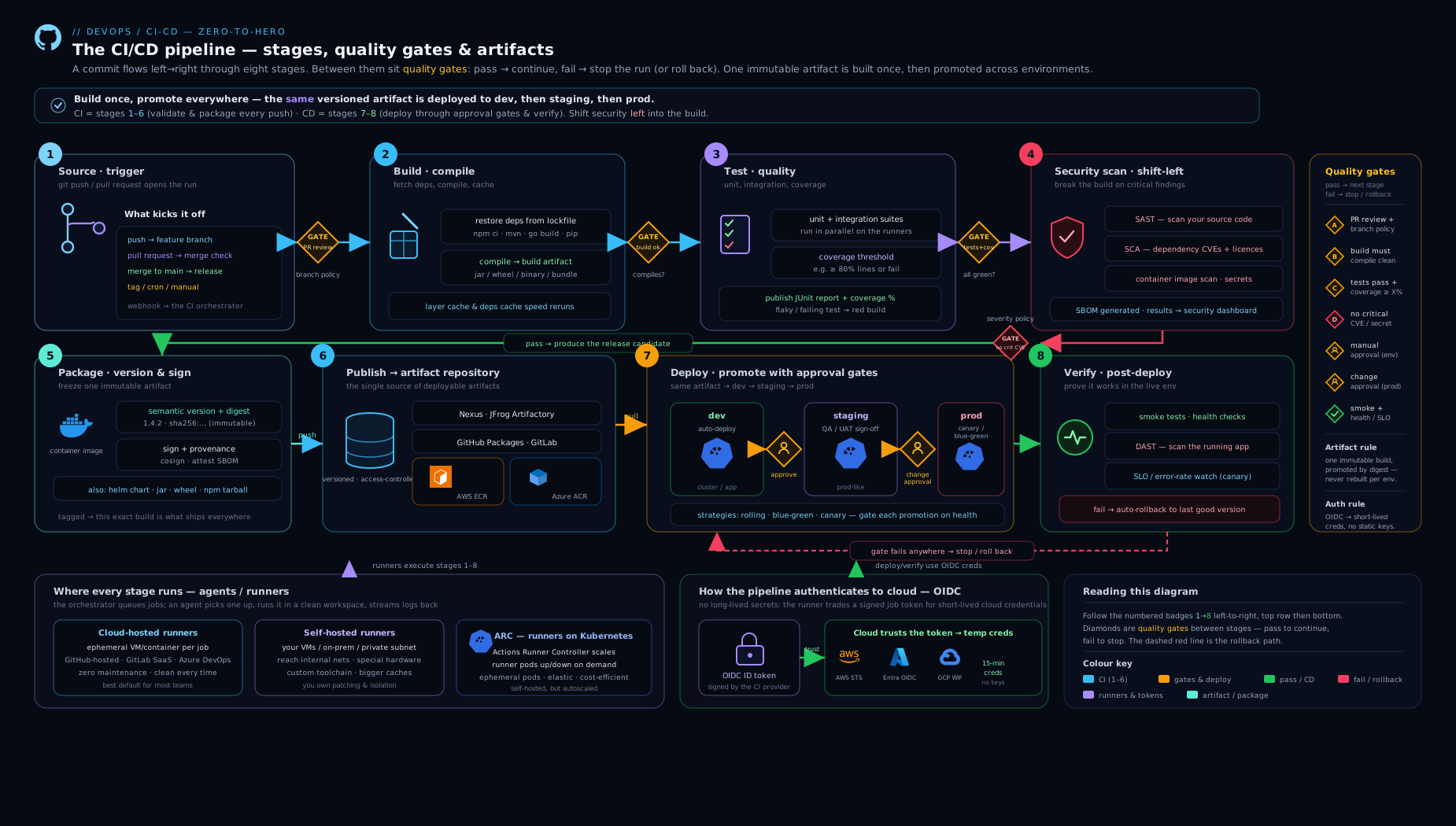
The diagram traces a commit left-to-right through every stage — source, build, the parallel test-and-scan fan (unit, coverage, SAST, SCA, secret, container scans), package-with-SBOM-and-signing, publish to the artifact repository, then promotion of that single artifact through dev → staging → prod with the gates (coverage, severity, approval) and the Verify-and-rollback loop sitting on each environment.
Hands-on lab
We will build a minimal but real CI pipeline on GitHub Actions (free tier, hosted runners — no local install needed beyond Git) for a small app, exercising the core ideas: build, test with a coverage gate, an SCA scan, a container scan, build-once, and publish to GHCR (GitHub’s free container registry). Everything here is free for public repos.
1. Scaffold a tiny app and test. In a new GitHub repo, add a trivial Node app with one passing test and a Dockerfile. Commit a package-lock.json (needed for caching and SCA).
2. Add the pipeline. Create .github/workflows/ci.yml:
name: ci
on:
  push: { branches: [main] }
  pull_request:
permissions:
  contents: read
  packages: write        # to push to GHCR
  id-token: write        # enables OIDC if you later add a cloud deploy
jobs:
  build-test:
    runs-on: ubuntu-latest
    steps:
      - uses: actions/checkout@v4
      - uses: actions/setup-node@v4
        with:
          node-version: '20'
          cache: 'npm'                       # dependency cache, keyed on lockfile
      - run: npm ci
      - run: npm test -- --coverage
      - name: Coverage gate (fail under 80%)
        run: |
          PCT=$(node -e "console.log(require('./coverage/coverage-summary.json').total.lines.pct)")
          echo "Line coverage: $PCT%"
          awk "BEGIN{exit !($PCT >= 80)}" || { echo "Coverage below 80%"; exit 1; }

  sca-scan:
    runs-on: ubuntu-latest
    steps:
      - uses: actions/checkout@v4
      - run: npm audit --audit-level=high      # SCA gate: fail on High+ with a fix

  package-publish:
    needs: [build-test, sca-scan]              # only after gates pass
    if: github.ref == 'refs/heads/main'        # publish only from main
    runs-on: ubuntu-latest
    steps:
      - uses: actions/checkout@v4
      - name: Compute immutable tag
        id: meta
        run: echo "tag=ghcr.io/${{ github.repository }}:gitsha-${GITHUB_SHA::7}" >> "$GITHUB_OUTPUT"
      - uses: docker/build-push-action@v6
        with: { context: ., push: false, load: true, tags: "${{ steps.meta.outputs.tag }}" }
      - name: Container scan (Trivy)
        uses: aquasecurity/trivy-action@0.24.0
        with:
          image-ref: ${{ steps.meta.outputs.tag }}
          severity: HIGH,CRITICAL
          exit-code: '1'                        # container gate
      - name: Log in to GHCR
        run: echo "${{ secrets.GITHUB_TOKEN }}" | docker login ghcr.io -u ${{ github.actor }} --password-stdin
      - run: docker push "${{ steps.meta.outputs.tag }}"   # build once, publish immutable
3. Run it. Push to main (or open a PR). Watch the Actions tab: build-test and sca-scan run in parallel, the coverage and SCA gates evaluate, and only if both pass does package-publish build the image, scan it, and push a commit-SHA-tagged image to GHCR.
4. Validate.
- Gate works: lower the coverage threshold check to
>= 99(or delete the test) and push — the run should go red at the coverage gate andpackage-publishshould not run. - Immutability: under the repo’s Packages, confirm an image tagged
gitsha-<sha>exists. Each commit yields a new, uniquely addressable tag. - Parallelism / cache: in the run graph the two CI jobs run side by side; a second run shows the npm cache restored (“Cache restored from key…”).
Validation checklist: green run on a good commit; red run (stopped at the gate, no publish) on a bad one; an immutable SHA-tagged artifact in GHCR.
Cleanup. Delete the package version(s) under Packages → your image → version → Delete, and delete the repository if it was throwaway (Settings → Delete this repository). GitHub-hosted minutes and GHCR storage for public repos are free, so there is no cost to leave it, but removing the package avoids clutter.
Cost note. Public-repo Actions minutes and GHCR are free. Private repos get a monthly free minute/storage allotment; beyond it, hosted minutes bill per-minute (Linux cheapest, Windows/macOS multiplied) and packages bill on storage + egress. Caching and ephemeral self-hosted/ARC runners are the main cost levers at scale.
Common mistakes & troubleshooting
| Symptom | Likely cause | Fix |
|---|---|---|
| Security stage gets disabled by devs | Gate fails on everything (all severities, whole codebase) | Gate on new High/Critical-with-fix only; roll out in warn mode first |
| “Works in staging, breaks in prod” | Rebuilding per environment → different bytes | Build once, promote the same artifact/digest |
| Pipeline takes 30+ minutes | No caching, everything serial | Add lockfile-keyed dependency + layer caches; parallelise/shard tests |
:latest deploy pulled the wrong build |
Mutable tag re-pointed between deploy and rollout | Deploy by immutable SHA tag or digest; enable immutable tags on the registry |
| Flaky pipeline (passes on re-run) | Non-deterministic tests, shared self-hosted state, cache races | Quarantine flaky tests; use ephemeral runners; isolate cache keys per job |
403/401 pushing artifacts |
Missing packages: write / wrong token scope |
Grant least-privilege write scope; for cloud, use OIDC with a scoped role |
| Leaked cloud key in logs/secrets | Long-lived static credential stored in CI | Switch to OIDC federated short-lived credentials; scope trust to repo/branch |
| Fork PR can run privileged jobs on a runner | Untrusted code on persistent self-hosted runner | Require approval for fork PRs; use ephemeral/ARC; never expose secrets to pull_request from forks |
Best practices
- Fail fast, fan out. Cheap, likely-to-fail checks first; independent checks in parallel; one gate evaluates the fan.
- Build once, promote the same artifact through environments by immutable digest. Never rebuild per stage.
- Immutable, uniquely-addressable versions (SemVer + commit SHA); enable immutable tags on the registry; deploy by digest.
- Gate on the diff with severity/reachability thresholds; roll new gates out in warn mode, then enforce.
- Pipeline-as-code, reviewed and pinned. Definitions in-repo; third-party actions pinned to SHAs; reuse via templates/reusable workflows.
- Cache aggressively, key on lockfiles; treat caches as disposable, artifacts as durable.
- Approvals on environments, not forked pipelines; required reviewers + wait timers for prod.
- Verify after deploy with smoke/synthetic tests and SLO watch; wire automatic rollback to drive MTTR down.
- Least-privilege everything: OIDC over static keys, minimal token scopes, ephemeral runners.
- Generate and store an SBOM and sign artifacts (cosign) so you can prove provenance — the supply-chain baseline.
Security notes
The pipeline is a high-value target: it holds deploy credentials and writes to production, so treat it as production infrastructure. Eliminate long-lived secrets with OIDC; where secrets are unavoidable, store them in a managed secret store (cloud KMS/Key Vault, Vault) and inject at runtime, never in plaintext YAML. Pin third-party actions/tasks to commit SHAs — a hijacked tag (e.g. the tj-actions/changed-files compromise) executes attacker code with your tokens. Set least-privilege token scopes per workflow (permissions: block) and never expose secrets to pull_request runs from forks. Keep security gates — SAST, SCA, secret scanning, container scan, IaC scan — in the pipeline so vulnerabilities are caught before publish, and emit an SBOM plus signed artifacts/provenance (cosign, SLSA) so consumers can verify what they run. Run untrusted code only on ephemeral runners that are destroyed after the job. Finally, make the pipeline auditable: who approved which digest to prod, and when.
Interview & exam questions
-
What is the difference between continuous delivery and continuous deployment? Both keep every validated change releasable. Continuous delivery stops one step short — a human or policy decides when to release (often a manual approval). Continuous deployment removes that gate: every change passing all automated gates goes straight to production.
-
Explain SAST vs DAST vs SCA. SAST analyses source/bytecode without running it (injection, weak crypto, secrets — early, fast, false-positive-prone). DAST attacks the running app from outside (auth bypass, misconfig — later, language-agnostic, needs a deployed target). SCA inventories third-party dependencies and matches them to known CVEs (vulnerable libraries, not your code). Complementary, not interchangeable.
-
Why “build once, deploy many”, and how is it implemented? So the exact bits you tested are the bits that ship — rebuilding per environment can introduce differences. Implemented by publishing one immutable artifact in CI and promoting it (copy/re-tag between repos, or carry the digest forward) through dev → staging → prod with no rebuild.
-
How do you version a container image for a deployment of record? Tag with the immutable commit SHA (and optionally human-friendly pointer tags), enable immutable tags on the registry, and deploy by digest (
@sha256:…). Never deploy:latest. -
What is OIDC in CI/CD and why is it better than a stored cloud key? The CI platform issues a short-lived signed token describing the job; the cloud trusts that issuer and mints a short-lived, scoped access token. No static secret is stored (nothing to leak), credentials expire in minutes, and trust can be scoped per repo/branch/environment.
-
Hosted vs self-hosted vs ARC runners — when each? Hosted: zero maintenance, clean per job, pay per minute — default choice. Self-hosted: when you need private-network reach, special hardware, or cost control at scale — but you secure/scale it and must avoid state leakage. ARC (ephemeral Kubernetes runners): self-hosted reach with hosted-style clean-per-job isolation and scale-to-zero.
-
How do you stop a new security gate from blocking every PR in a legacy repo? Make it diff-aware — fail only on new High/Critical findings introduced by the change; track the pre-existing backlog separately; optionally start in warn mode and flip to block once tuned.
-
What is the difference between caching and artifacts in a pipeline? Caches are a speed optimisation (dependency/build outputs, keyed on a lockfile hash) and must be safe to miss. Artifacts are the deployable outputs you publish and promote and that must persist. Don’t rely on cache contents for correctness.
-
Where do manual approvals belong, and why? On the environment (GitHub Environments / Azure environments / GitLab protected environments), not in the pipeline body — so one pipeline can auto-deploy to dev, require one approver for staging, and two for prod, without forking the YAML, with a clean audit trail.
-
How does rollback fit into pipeline design, and which DORA metric does it affect? The Verify stage runs smoke/synthetic tests and watches SLOs; on failure it triggers rollback automatically (redeploy last-good, or shift traffic back for blue-green/canary). It primarily improves MTTR (and reduces change-failure impact).
-
Name two supply-chain hardening steps for a pipeline. Pin third-party actions/tasks to commit SHAs (not moving tags), and generate an SBOM plus sign artifacts/provenance (cosign/SLSA) so consumers can verify what they run. (Also: least-privilege token scopes, OIDC, ephemeral runners.)
-
Why should untrusted (fork) PR code never run on a persistent self-hosted runner? A fork’s code could exfiltrate the host, cached credentials and the runner token, and poison subsequent builds. Gate fork PRs on approval and run them only on ephemeral runners destroyed after the job.
Quick check
- In what order do the canonical CI/CD stages run, from commit to running app?
- True or false: an SCA scan finds insecure patterns in your own source code.
- What single principle ensures “what you tested is what you ship”, and how is it implemented across environments?
- Which authentication mechanism removes long-lived cloud secrets from CI, and what makes it secure?
- You have a new SAST gate and a legacy codebase with thousands of findings. How do you avoid blocking every PR?
Answers
- Source → build → test → scan → package → publish → deploy → verify (test and scan typically fan out in parallel).
- False. SCA scans third-party dependencies for known CVEs; SAST scans your own source code.
- Build once, promote the same artifact — publish one immutable artifact in CI and promote it (re-tag/copy or carry the digest) through dev → staging → prod without rebuilding.
- OIDC federated identity — the CI platform issues a short-lived signed token, the cloud trusts the issuer and mints a short-lived, repo/branch/environment-scoped credential; no static secret is stored and it expires in minutes.
- Make the gate diff-aware (fail only on new High/Critical findings), and/or start in warn mode before enforcing; track the existing backlog separately.
Exercise
Extend the lab pipeline into a full CI/CD pipeline with promotion and gates:
- Add a deploy stage that deploys the published SHA-tagged image (a free target works well: GitHub Pages for a static build, or a free-tier container host) — pull the artifact, do not rebuild it.
- Define two GitHub Environments,
stagingandproduction. Configureproductionwith a required reviewer (yourself) and a short wait timer. - Wire the pipeline so it auto-deploys to staging on merge to
main, then waits for approval before deploying the same digest to production. - Add a Verify step after each deploy: a curl-based smoke test against a health endpoint that fails the job (and thus blocks promotion / signals rollback) if the app is unhealthy.
- Convert the build-test-scan logic into a reusable workflow (
workflow_call) and haveci.ymlcall it — proving the templating/DRY pattern.
Capture in your notes: the run graph showing the approval gate pausing the prod deploy, and proof (the digest) that staging and prod ran the identical artifact.
Certification mapping
| Exam / certification | Relevant objectives |
|---|---|
| AWS Certified DevOps Engineer – Professional (DOP-C02) | CI/CD with CodePipeline/CodeBuild/CodeArtifact/ECR; artifact promotion; OIDC to IAM; security gates in the pipeline |
| Microsoft Azure DevOps Engineer Expert (AZ-400) | Designing CI/CD with Azure Pipelines; YAML templates; environments & approvals; Azure Artifacts; service connections / workload-identity OIDC; quality & security gates |
| Google Cloud Professional DevOps Engineer | Cloud Build pipelines; Artifact Registry; release/promotion strategy; security and policy in CI/CD |
| DevOps Foundation / DevSecOps Foundation | CI/CD principles, flow & feedback, shift-left security gates, value stream |
| GitHub Actions / GitLab certifications | Workflow/pipeline authoring, reusable workflows/templates, OIDC, runners/agents, package registries |
Glossary
- Stage / job / step — the nested units of a pipeline: a stage groups jobs; a job runs on one runner; a step is one command/action.
- Gate — a pass/fail (or approve) decision point that controls whether a change proceeds.
- SAST / DAST / SCA — static code analysis / dynamic (running-app) analysis / dependency (composition) analysis.
- Artifact repository (registry) — immutable store for build outputs (images, packages) between build and deploy.
- Promotion — moving the same artifact from one environment/repository to the next without rebuilding.
- Immutable tag / digest — a version/reference that maps to exactly one set of bytes forever (a digest is content-addressed:
@sha256:…). - SBOM — Software Bill of Materials; the inventory of components in an artifact.
- OIDC federation — short-lived, signed identity tokens exchanged for scoped cloud credentials, replacing stored secrets.
- Runner / agent — the machine that executes pipeline jobs (hosted, self-hosted, or ephemeral/ARC).
- ARC — Actions Runner Controller; runs runners as ephemeral Kubernetes pods.
- Matrix / sharding — running a job across multiple parameter combinations / splitting a test suite across runners for parallelism.
Next steps
You can now design a pipeline that builds a trustworthy artifact once and promotes it through gated environments. Next, learn how that artifact actually reaches production safely in Deployment Strategies: Rolling, Blue/Green, Canary, Progressive Delivery & Rollback — the strategies your Deploy and Verify stages execute. Then go deeper on the security gates in Building a DevSecOps Pipeline: Wiring SAST, SCA, Secrets and IaC Scanning with Risk-Based Gates, and on keyless auth in GitHub Actions OIDC: Keyless Deploys to Multiple Clouds and reuse in GitHub Actions Reusable Workflows: Building a Pipeline Platform.