A managed-services team runs Ansible from a single “automation jumpbox” that three engineers SSH into and run ansible-playbook by hand. The box has accreted seven years of pip install --user packages, two conflicting boto3 versions, and a ~/.ssh directory holding root keys to 400 customer VMs. Nobody can reproduce the runtime, nobody knows who ran what against which customer last Tuesday, and the day the senior engineer is on leave the on-call cannot run the failover playbook because it needs a Python library only on her account. The fix is not “document the jumpbox.” It is to move execution into Ansible Automation Platform (AWX) — a controller that runs playbooks inside immutable, version-pinned execution environments (EEs), behind RBAC, with every run logged, secrets injected at runtime from a vault, and self-service job templates that an operator launches from a form instead of a shell. This guide builds that, end to end, on Kubernetes.
By the end you will have AWX running on a cluster, a custom EE built with ansible-builder and pushed to a registry, a project synced from Git, machine and cloud credentials sourced from HashiCorp Vault, and a governed job template with a survey and an approval node that a help-desk operator can run without ever touching a terminal.
Prerequisites
- A Kubernetes cluster (v1.27+) you can reach with
kubectl, with a defaultStorageClassand an ingress controller. A 3-node cluster with 8 GB RAM per node is comfortable for a pilot. kubectl,helm(orkustomize), andgiton your workstation.- An OCI registry you can push to (GitHub Container Registry, Harbor, Quay, ECR, or ACR).
ansible-navigatorandansible-builderinstalled locally:pip install ansible-builder ansible-navigator.- A Red Hat registry account if you base EEs on the certified
ee-supportedimages, or use the communityquay.io/ansible/awx-eebase (this guide uses the community base so no entitlement is required). - A running HashiCorp Vault (or access to one) for credential injection, and an Okta or Microsoft Entra ID tenant if you want SSO. Both are wired in later steps; AWX works without them for the build-out.
Target topology
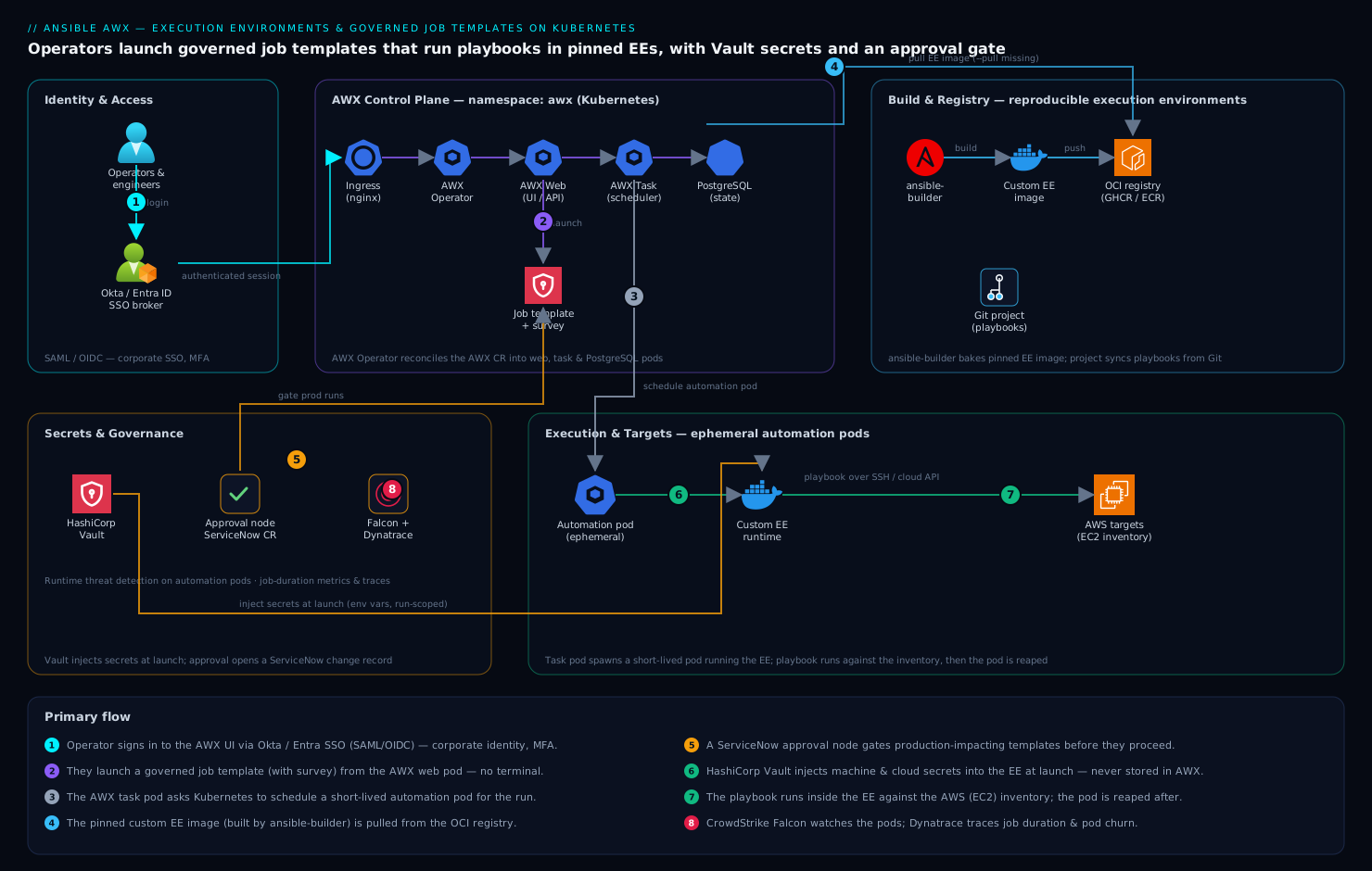
The control plane is the AWX Operator running in its own namespace; it reconciles an AWX custom resource into the web, task, and PostgreSQL pods. Engineers and operators reach the AWX web UI through an ingress; SSO is brokered to Okta (or Entra ID) over SAML/OIDC so login uses corporate identity, not local AWX passwords. Projects pull playbooks from Git (synced via GitHub Actions on merge, or on a schedule). When a job template launches, the AWX task pod asks Kubernetes to spin up a short-lived automation pod running your custom execution environment image — pulled from your registry — and the playbook runs inside it against the target inventory. Secrets (machine keys, cloud tokens) are not stored in AWX; a custom HashiCorp Vault credential type fetches them at launch time and injects them as environment variables that live only for the run. Runtime security comes from CrowdStrike Falcon sensors on the nodes; Dynatrace (or Datadog) scrapes AWX metrics and traces job duration; and a ServiceNow change record is opened by an approval node before any production-impacting template proceeds.
1. Install the AWX Operator
The AWX Operator is the supported way to run AWX on Kubernetes; it owns the lifecycle of the database, web, and task tiers. Install it with the Helm chart, pinning a version so the deploy is reproducible.
# Create the namespace that will hold AWX
kubectl create namespace awx

# Add the operator Helm repo and install a pinned version
helm repo add awx-operator https://ansible-community.github.io/awx-operator-helm/
helm repo update

helm upgrade --install awx-operator awx-operator/awx-operator \
  --namespace awx \
  --version 2.19.1 \
  --set AWX.enabled=false      # we apply our own AWX CR below, not the chart's

# Confirm the operator is running
kubectl -n awx rollout status deployment/awx-operator-controller-manager
Setting AWX.enabled=false keeps the chart from creating a default AWX instance — you want full control over the spec, so you apply your own AWX custom resource next.
2. Deploy the AWX instance
Define the AWX instance as a custom resource. The Operator reads this and provisions PostgreSQL, the web pod, and the task pod. Generate a strong admin password as a Secret first, then reference it.
# Admin password as a Secret the Operator will consume
kubectl -n awx create secret generic awx-admin-password \
  --from-literal=password="$(openssl rand -base64 24)"
Create awx.yaml:
apiVersion: awx.ansible.com/v1beta1
kind: AWX
metadata:
  name: awx
  namespace: awx
spec:
  admin_user: admin
  admin_password_secret: awx-admin-password

  # Expose via ingress; swap host/class for your environment
  ingress_type: ingress
  ingress_hosts:
    - hostname: awx.internal.kloudvin.example
  ingress_class_name: nginx

  # Persist Postgres on a real StorageClass
  postgres_storage_class: standard
  postgres_storage_requirements:
    requests:
      storage: 20Gi

  # Pin images so the platform is reproducible
  image_version: 24.6.1

  # Right-size the task/web tiers for a pilot
  web_resource_requirements:
    requests: { cpu: 500m, memory: 1Gi }
  task_resource_requirements:
    requests: { cpu: 500m, memory: 2Gi }
Apply it and wait for reconciliation:
kubectl apply -f awx.yaml

# Watch the Operator build the instance (3-5 minutes on first run)
kubectl -n awx get pods -w

# When ready you will see awx-web, awx-task, and awx-postgres pods Running
kubectl -n awx get awx awx -o jsonpath='{.status.conditions}'
Retrieve the admin password and log in at https://awx.internal.kloudvin.example:
kubectl -n awx get secret awx-admin-password \
  -o jsonpath='{.data.password}' | base64 -d; echo
3. Build a custom execution environment with ansible-builder
This is the heart of the migration off the jumpbox. An execution environment is a container image bundling a pinned Ansible core, your required collections, and the Python and system dependencies they need — so every run is byte-for-byte reproducible. You define it declaratively and ansible-builder produces the image.
Create a project directory locally with three files. First, requirements.yml (the collections):
---
collections:
  - name: amazon.aws
    version: ">=8.0.0"
  - name: ansible.posix
  - name: community.general
  - name: community.hashi_vault   # lets playbooks read Vault directly too
Then requirements.txt (the Python deps the collections need):
boto3>=1.34.0
botocore>=1.34.0
hvac>=2.1.0
jmespath
Now the build definition, execution-environment.yml (schema version 3):
---
version: 3

images:
  base_image:
    name: quay.io/ansible/awx-ee:24.6.1   # community base, no entitlement needed

dependencies:
  ansible_core:
    package_pip: ansible-core==2.17.4
  ansible_runner:
    package_pip: ansible-runner
  galaxy: requirements.yml
  python: requirements.txt
  system:
    - openssh-clients [platform:rpm]
    - rsync [platform:rpm]

additional_build_steps:
  append_final:
    - LABEL org.opencontainers.image.source="https://github.com/kloudvin/awx-ees"
    - RUN ansible-galaxy collection list   # bake an inventory of what shipped
Build the image, then push it to your registry:
# Build (uses podman by default; pass --container-runtime docker if needed)
ansible-builder build \
  --tag ghcr.io/kloudvin/awx-ee-aws:1.0.0 \
  --file execution-environment.yml \
  --verbosity 2

# Verify the collections actually landed in the image
podman run --rm ghcr.io/kloudvin/awx-ee-aws:1.0.0 ansible-galaxy collection list

# Push to the registry AWX will pull from
podman push ghcr.io/kloudvin/awx-ee-aws:1.0.0
Tagging with a semantic version (1.0.0), never latest, is what makes a job template’s runtime immutable — pinning the tag means a rebuild cannot silently change behavior under a running template.
4. Register the execution environment and a registry credential in AWX
AWX needs (a) a credential to pull from your private registry and (b) an Execution Environment object pointing at the image. Do both with the awx CLI (pip install awxkit), which is far more scriptable than clicking the UI and is what your IaC pipeline will call.
# Point awxkit at the controller; create a token instead of reusing the password
export TOWER_HOST=https://awx.internal.kloudvin.example
export TOWER_USERNAME=admin
export TOWER_PASSWORD='<the admin password from step 2>'

# A registry credential so AWX can pull the private EE image
awx credential create \
  --name "ghcr-pull" \
  --organization "Default" \
  --credential_type "Container Registry" \
  --inputs '{"host": "ghcr.io", "username": "kloudvin-bot", "password": "<ghcr-PAT>"}'

# Register the EE image, attaching the pull credential
awx execution_environments create \
  --name "awx-ee-aws-1.0.0" \
  --image "ghcr.io/kloudvin/awx-ee-aws:1.0.0" \
  --pull "missing" \
  --credential "ghcr-pull" \
  --organization "Default"
Setting --pull missing pulls the tag only if absent on the node, which is correct for immutable version tags and avoids a registry round-trip on every launch.
5. Create a project from Git
A project is AWX’s link to your playbook repository. Point it at Git; AWX clones it into the EE at job time. Use a read-only deploy key stored as a Source Control credential.
# SCM credential (read-only deploy key) for the private playbook repo
awx credential create \
  --name "playbooks-deploy-key" \
  --organization "Default" \
  --credential_type "Source Control" \
  --inputs "{\"username\": \"git\", \"ssh_key_data\": \"$(cat ~/.ssh/awx_deploy_ed25519 | sed ':a;N;$!ba;s/\n/\\n/g')\"}"

# The project itself, tracking a specific branch and updating on launch
awx projects create \
  --name "platform-playbooks" \
  --organization "Default" \
  --scm_type git \
  --scm_url "git@github.com:kloudvin/platform-playbooks.git" \
  --scm_branch "main" \
  --credential "playbooks-deploy-key" \
  --scm_update_on_launch true \
  --default_environment "awx-ee-aws-1.0.0"

# Trigger and watch the first sync
awx projects update platform-playbooks --wait
In practice you wire the repo’s GitHub Actions workflow to call awx projects update on merge to main, so the controller’s copy of the playbooks is refreshed automatically the moment code lands — the project becomes a deployment target, not a thing engineers remember to resync. scm_update_on_launch true is the belt-and-suspenders fallback that re-syncs at run time.
6. Wire credentials from HashiCorp Vault
Storing SSH keys and cloud secrets inside AWX recreates the jumpbox problem in a new place. Instead, attach HashiCorp Vault as an external secret source so AWX fetches them at launch and they exist only for the run. AWX ships two Vault credential types — HashiCorp Vault Secret Lookup (KV) and HashiCorp Vault Signed SSH — which you reference from real credentials.
# 1) A Vault lookup credential: how AWX authenticates TO Vault (AppRole here)
awx credential create \
  --name "vault-kv-lookup" \
  --organization "Default" \
  --credential_type "HashiCorp Vault Secret Lookup" \
  --inputs '{
    "url": "https://vault.internal.kloudvin.example:8200",
    "role_id": "<approle-role-id>",
    "secret_id": "<approle-secret-id>",
    "api_version": "v2"
  }'
Now create an AWS credential whose secret-key field is not stored but linked to the Vault lookup, so Vault supplies it at launch:
# 2) The AWS credential; access key id is static, secret key comes from Vault
AWS_CRED_ID=$(awx credential create \
  --name "aws-prod-readonly" \
  --organization "Default" \
  --credential_type "Amazon Web Services" \
  --inputs '{"username": "AKIAEXAMPLE"}' \
  -f jq --filter '.id')

# 3) Link the SECRET KEY field of that credential to the Vault lookup
awx credential_input_sources create \
  --target_credential "$AWS_CRED_ID" \
  --source_credential "vault-kv-lookup" \
  --input_field_name "password" \
  --metadata '{"secret_path": "secret/data/aws/prod", "secret_key": "secret_access_key"}'
The static AKIA... access key id is harmless; the secret access key is resolved from secret/data/aws/prod in Vault each time a job runs and is never written to AWX’s database. The same pattern (HashiCorp Vault Signed SSH) lets Vault sign a short-lived SSH certificate for machine access instead of holding the 400 root keys the jumpbox did — when the cert expires, access is gone.
7. Build a governed job template with a survey and approval gate
The payoff: a self-service template a help-desk operator launches from a form, that injects the right credentials, runs in the pinned EE, and pauses for approval before touching production. First create an inventory and the template; then attach a survey; then wrap it in a small workflow with an approval node.
# An inventory the template runs against (sourced or static)
awx inventory create --name "aws-prod" --organization "Default"

# The job template: ties together project + playbook + inventory + EE + creds
JT_ID=$(awx job_templates create \
  --name "Rotate web TLS certs (prod)" \
  --job_type run \
  --project "platform-playbooks" \
  --playbook "playbooks/rotate_tls.yml" \
  --inventory "aws-prod" \
  --execution_environment "awx-ee-aws-1.0.0" \
  --ask_variables_on_launch true \
  --ask_limit_on_launch true \
  -f jq --filter '.id')

# Attach the AWS + Vault credentials to the template
awx job_templates associate --credential "aws-prod-readonly" "$JT_ID"
Define a survey in survey.json so operators pick safe, validated inputs instead of typing free-form variables:
{
  "name": "TLS rotation survey",
  "description": "Operator inputs for cert rotation",
  "spec": [
    {
      "question_name": "Target environment",
      "variable": "target_env",
      "type": "multiplechoice",
      "choices": ["staging", "prod"],
      "required": true
    },
    {
      "question_name": "Service hostname",
      "variable": "service_host",
      "type": "text",
      "required": true,
      "min": 4
    },
    {
      "question_name": "Force renewal even if >30 days valid?",
      "variable": "force_renew",
      "type": "multiplechoice",
      "choices": ["no", "yes"],
      "default": "no",
      "required": true
    }
  ]
}
Enable and upload the survey, then build the approval workflow:
# Turn the survey on and load the spec
awx job_templates modify "$JT_ID" --survey_enabled true
awx job_templates survey_spec "$JT_ID" @survey.json

# A workflow that gates the job behind a manual approval node
WF_ID=$(awx workflow_job_templates create \
  --name "Rotate TLS (gated)" \
  --organization "Default" \
  -f jq --filter '.id')

# Node 1: the approval step (opens the change window / ServiceNow record)
APPROVAL_NODE=$(awx workflow_job_template_nodes create \
  --workflow_job_template "$WF_ID" \
  --identifier "approval" \
  -f jq --filter '.id')
awx workflow_job_template_nodes create_approval_template "$APPROVAL_NODE" \
  --name "Change approval required" \
  --timeout 3600

# Node 2: the actual job, run only on approval success
JOB_NODE=$(awx workflow_job_template_nodes create \
  --workflow_job_template "$WF_ID" \
  --unified_job_template "$JT_ID" \
  --identifier "run" \
  -f jq --filter '.id')
awx workflow_job_template_nodes associate_success_node "$APPROVAL_NODE" "$JOB_NODE"
A designated approver gets a notification, and on prod changes the approval step is wired to open a ServiceNow change record (via AWX’s ServiceNow notification or a webhook), so there is an auditable change ticket before anything mutates production. RBAC then restricts launching the workflow to the help-desk team while reserving editing it for platform engineers — assign the team the Execute role on the workflow and nothing more.
Validation
Confirm each layer works before you let operators near it.
# 1) AWX is healthy and the API answers
curl -sk https://awx.internal.kloudvin.example/api/v2/ping/ | jq '.instances'

# 2) The EE pulls and runs: launch a throwaway "ad hoc" command in the EE
awx ad_hoc_commands create \
  --inventory "aws-prod" --credential "aws-prod-readonly" \
  --execution_environment "awx-ee-aws-1.0.0" \
  --module_name ping --module_args "" --wait

# 3) Vault injection works: a job's facts should resolve the secret at runtime
#    Launch the real workflow and watch it to completion
awx workflow_job_templates launch "Rotate TLS (gated)" --wait

# 4) Inspect the automation pod that the task pod created during a run
kubectl -n awx get pods -l ansible-runner-instance --watch
A green run shows the automation pod spawning from your image tag (kubectl describe it and check the Image: field), the survey variables landing in extra_vars, and the AWS secret resolving without ever appearing in the job output or the database. In the UI, the job’s Details pane should name the execution environment awx-ee-aws-1.0.0 and show the Git commit the project synced.
Rollback / teardown
Everything here is declarative, so rollback is clean. To revert a bad EE, simply repoint the template at the previous tag — no rebuild, no downtime:
# Roll a template back to a known-good EE in seconds
awx execution_environments create --name "awx-ee-aws-0.9.0" \
  --image "ghcr.io/kloudvin/awx-ee-aws:0.9.0" --credential "ghcr-pull" --organization "Default"
awx job_templates modify "$JT_ID" --execution_environment "awx-ee-aws-0.9.0"
To tear down the whole platform (data included), delete the CR and the namespace — the Operator deprovisions the pods and PVCs it created:
kubectl -n awx delete awx awx           # removes web/task/postgres pods
helm -n awx uninstall awx-operator      # removes the operator
kubectl delete namespace awx            # removes PVCs, secrets, the lot
Before deleting the namespace, take a database backup if you want history: the Operator supports an AWXBackup custom resource that snapshots PostgreSQL to a PVC, which restores into a fresh instance via AWXRestore.
Common pitfalls
- Putting collections in the playbook repo instead of the EE. If a playbook needs
amazon.aws, bake it into the EE image, not acollections/folder in Git. Mixing the two means the runtime is no longer reproducible — the whole reason you left the jumpbox. - Tagging EE images
latest. A floating tag with--pull alwaysmeans a rebuild silently changes what every template runs. Pin a semantic version and pullmissing. - Storing secrets in AWX credentials directly. It works, and it recreates the secret-sprawl problem. Always link sensitive fields to the Vault lookup so they resolve at launch and never persist.
- Forgetting
scm_update_on_launch. Without it (and without the GitHub Actions sync), templates run a stale clone and engineers waste an hour debugging a “fixed” bug that never deployed. - EE base image /
ansible-coremismatch. Pinansible-coreinexecution-environment.ymlexplicitly; relying on whatever the base ships will drift on the next base rebuild. - No resource limits on automation pods. A runaway playbook can starve the node. Set
AWX_CONTAINER_GROUPpod-spec limits or a dedicated container group for heavy jobs.
Security notes
Authenticate humans through Okta or Microsoft Entra ID over SAML/OIDC (Settings → Authentication) so AWX login uses corporate identity, MFA, and conditional access — never local AWX accounts for engineers. Scope RBAC tightly: operators get Execute on a workflow and nothing else; only platform engineers hold Admin on projects and EEs. Source every machine and cloud secret from HashiCorp Vault as shown, preferring Vault-signed SSH certificates over long-lived keys so access expires on its own. Run CrowdStrike Falcon sensors on the cluster nodes for runtime threat detection on the automation pods (they execute arbitrary playbooks, so they are a real attack surface), and feed detections to the SOC. Use Wiz / Wiz Code to scan the EE images in the registry for CVEs and IaC misconfigurations before they are promoted, and to flag posture drift on the AWX namespace. Open a ServiceNow change record from the approval node for any production-impacting template so there is an audit trail tying a run to an approved change.
Cost notes
AWX itself is open source — the cost is the cluster it runs on, and it is modest: a 3-node pilot fits comfortably, and the task/web tiers idle cheaply because automation pods are ephemeral — they exist only for the seconds or minutes a job runs and are reaped after, so you pay for compute only while playbooks execute. Right-size with the web_resource_requirements / task_resource_requirements in the CR rather than over-provisioning. Keep EE images lean (every extra collection inflates the image and the pull time on every cold node) and prune old tags from the registry on a schedule. Pipe AWX metrics to Dynatrace or Datadog to watch job duration and pod churn — a template whose runtime creeps from two minutes to twenty is both a reliability and a cost signal — and use that data to move long-running jobs to a dedicated container group sized for them, instead of inflating the default tier for everyone.