A mid-size payments company runs its authorization core — a dozen Linux app servers and two Windows license-bound appliances — on EC2 in us-east-1. The audit finding that started this project was blunt: the documented DR plan was “restore from AMIs,” nobody had timed it, and the last attempt took eleven hours because the AMIs were three weeks stale. The mandate is now a contractual RTO of 60 minutes and RPO of seconds for the authorization path, proven by a non-disruptive drill every quarter. AWS Elastic Disaster Recovery (DRS) is the right tool: it does continuous, block-level, asynchronous replication of whole servers into a low-cost staging area in a second Region, and it orchestrates booting production-grade instances from that replicated data on demand — then fails you back when the primary Region returns. This guide walks the full loop end to end: install the agent, watch replication go healthy, run a drill, run a real recovery, and fail back cleanly, with the wiring an enterprise actually needs around it.
Prerequisites
- Two AWS Regions chosen and fixed for this guide: source
us-east-1, recovery/targetus-west-2. DRS is initialized per-Region in the target. - A target VPC in
us-west-2with private subnets, route tables, and security groups already provisioned (we create them with Terraform below). A staging subnet in the target Region for the lightweight replication servers. - AWS CLI v2 ≥ 2.15 with the
drscommand set, andjq. Confirm withaws drs help. - IAM rights to create the DRS service roles, plus an operator role allowed to call
drs:*for drills and recovery. - Outbound TCP 1500 from each source server to the staging subnet, and TCP 443 to the DRS and S3 endpoints (or VPC endpoints for a private path).
- Root/Administrator on each source server to install the AWS Replication Agent.
- A change-management hook in ServiceNow for the recovery runbook, and HashiCorp Vault available to issue the short-lived installer credentials (we never bake a long-lived key into a server).
Target topology
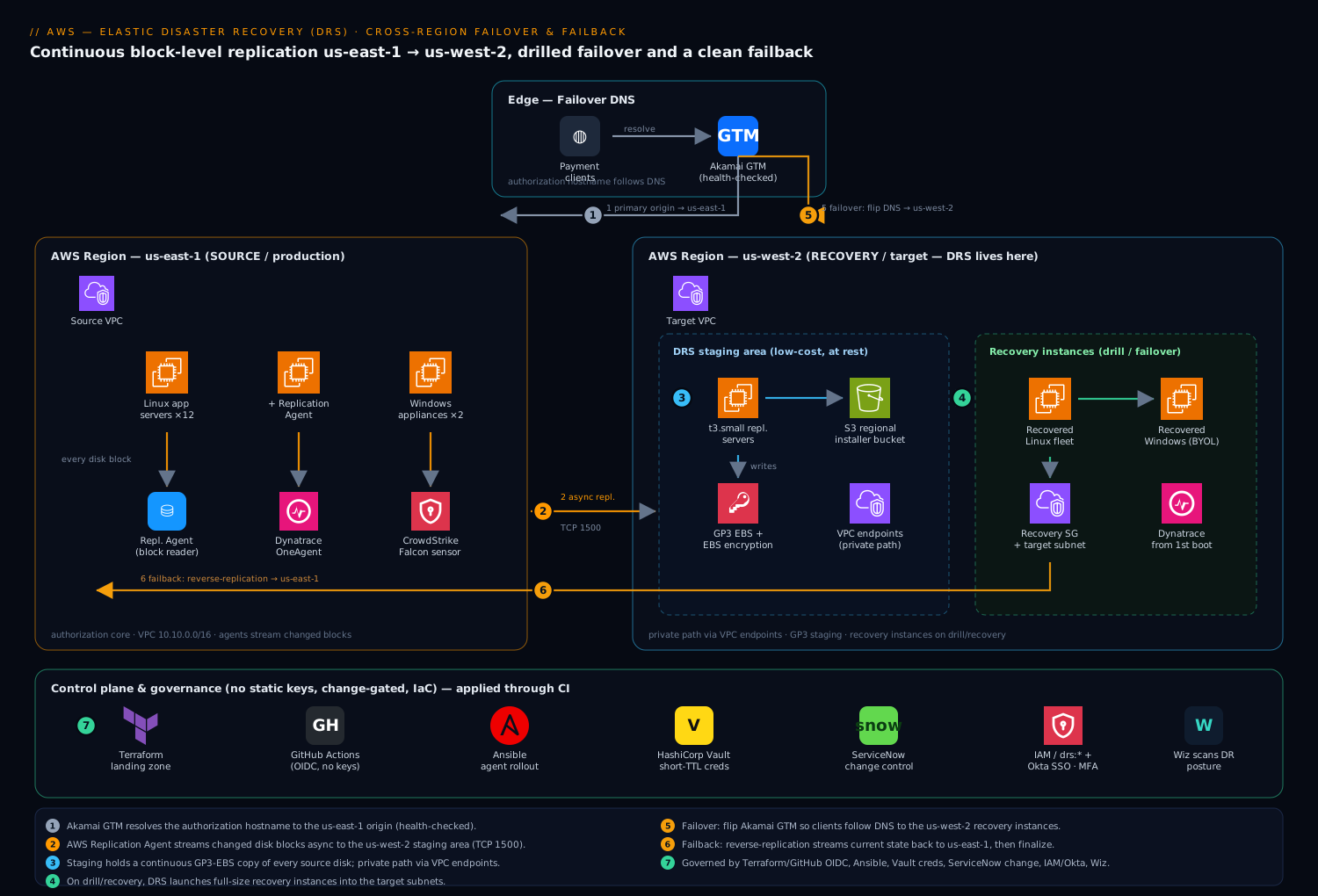
The shape is deliberately simple, which is what makes it auditable. In us-east-1 the production fleet runs normally; on each server an AWS Replication Agent reads every disk block and streams changes asynchronously across the Region boundary. In us-west-2 DRS maintains a staging area — a small subnet of cheap t3 replication servers plus low-cost EBS volumes that hold a continuously-updated copy of every source disk. Nothing production-grade runs there until you ask: on drill or recovery, DRS launches full-size recovery instances from the latest (or a chosen point-in-time) snapshot into your real target subnets, behind the same security groups and, in a real cutover, the same DNS. Akamai Global Traffic Management sits in front as the authoritative failover DNS — health-checking the us-east-1 origin and steering the authorization hostname to the us-west-2 recovery instances when the primary is declared down — so clients move Regions without a config change. Dynatrace OneAgent is baked into every source server’s image, so a launched recovery instance is monitored from first boot with zero extra steps. The two Windows virtual appliances (license-bound vendor software) replicate exactly the same way DRS treats any server as a block device, which is precisely why DRS beats an AMI strategy for appliances you cannot rebuild from a script.
1. Initialize DRS and create the service roles in the target Region
DRS is initialized in the target Region (us-west-2) — that is where replication and recovery live. Initialization creates the default replication settings and the IAM service roles DRS needs.
export SRC_REGION=us-east-1
export DR_REGION=us-west-2

# Initialize Elastic Disaster Recovery in the recovery Region.
aws drs initialize-service --region "$DR_REGION"
That call creates AWSServiceRoleForElasticDisasterRecovery and the recovery/conversion roles. Confirm they exist before going further:
aws iam list-roles --region "$DR_REGION" \
  --query "Roles[?contains(RoleName, 'ElasticDisasterRecovery')].RoleName" \
  --output table
Define the default replication configuration template so every server that registers inherits a sane, least-cost staging footprint. Point it at the staging subnet, force in-transit encryption, and keep the cheap default instance type:
aws drs create-replication-configuration-template \
  --region "$DR_REGION" \
  --staging-area-subnet-id subnet-0dr1staging0west2a \
  --replication-server-instance-type t3.small \
  --use-dedicated-replication-server false \
  --default-large-staging-disk-type GP3 \
  --ebs-encryption DEFAULT \
  --data-plane-routing PRIVATE_IP \
  --create-public-ip false \
  --associate-default-security-group false \
  --replication-servers-security-groups-i-ds sg-0drsstaging0001 \
  --bandwidth-throttling 0 \
  --staging-area-tags Environment=dr,Owner=platform \
  --pit-policy '[{"enabled":true,"interval":10,"retentionDuration":60,"units":"MINUTE","ruleID":1},{"enabled":true,"interval":1,"retentionDuration":24,"units":"HOUR","ruleID":2},{"enabled":true,"interval":1,"retentionDuration":3,"units":"DAY","ruleID":3}]'
data-plane-routing PRIVATE_IP keeps replication traffic on private addressing (pair it with the VPC endpoints in Step 2). The pit-policy is what delivers point-in-time recovery — here, 10-minute snapshots for an hour, hourly for a day, daily for three days — so you can recover to just before a ransomware event, not only “now.”
2. Provision the target landing zone with Terraform
Treat the recovery network as infrastructure-as-code so a real disaster does not depend on click-ops memory. This is Terraform, applied through your CI pipeline (GitHub Actions with OIDC to AWS — no stored keys). Keep it minimal and explicit: VPC endpoints for a private replication path, a staging security group, and the recovery security group the launched instances will use.
# providers.tf — operate in the recovery Region
provider "aws" {
  region = "us-west-2"
}

# Staging subnet security group: only the replication protocol, inbound from sources.
resource "aws_security_group" "drs_staging" {
  name        = "drs-staging"
  description = "DRS replication servers - inbound replication"
  vpc_id      = var.dr_vpc_id

  ingress {
    description = "AWS Replication Agent stream"
    from_port   = 1500
    to_port     = 1500
    protocol    = "tcp"
    cidr_blocks = [var.source_fleet_cidr] # e.g. 10.10.0.0/16 in us-east-1
  }
  egress {
    from_port   = 0
    to_port     = 0
    protocol    = "-1"
    cidr_blocks = ["0.0.0.0/0"]
  }
  tags = { Name = "drs-staging", Environment = "dr" }
}

# Interface endpoints so replication + API calls never leave the AWS network.
locals {
  drs_endpoints = ["com.amazonaws.us-west-2.drs"]
}

resource "aws_vpc_endpoint" "drs" {
  for_each            = toset(local.drs_endpoints)
  vpc_id              = var.dr_vpc_id
  service_name        = each.value
  vpc_endpoint_type   = "Interface"
  subnet_ids          = var.dr_private_subnet_ids
  security_group_ids  = [aws_security_group.drs_staging.id]
  private_dns_enabled = true
  tags                = { Name = "vpce-drs" }
}

# Recovery instances land here at failover/drill time.
resource "aws_security_group" "recovery" {
  name        = "drs-recovery-app"
  description = "Launched recovery instances - app traffic"
  vpc_id      = var.dr_vpc_id

  ingress {
    description = "Authorization API from Akamai origin range"
    from_port   = 443
    to_port     = 443
    protocol    = "tcp"
    cidr_blocks = var.akamai_origin_cidrs
  }
  egress {
    from_port   = 0
    to_port     = 0
    protocol    = "-1"
    cidr_blocks = ["0.0.0.0/0"]
  }
  tags = { Name = "drs-recovery-app", Environment = "dr" }
}
S3 (gateway) and EC2/EBS interface endpoints are also worth adding for a fully private control path; they are routine and omitted here for length. Run it the usual way:
terraform init
terraform plan  -var-file=dr.tfvars -out=dr.plan
terraform apply dr.plan
3. Install the AWS Replication Agent on each source server
The agent is what turns a server into a replicating source. Do not paste a long-lived access key onto a production box. Have HashiCorp Vault’s AWS secrets engine mint a short-TTL credential scoped to exactly the DRS agent-installation actions, install, then let the lease expire:
# On a bastion: pull a 15-minute installer credential from Vault.
eval "$(vault read -format=json aws/creds/drs-agent-install \
  | jq -r '.data | "export AWS_ACCESS_KEY_ID=\(.access_key)\nexport AWS_SECRET_ACCESS_KEY=\(.secret_key)"')"
On each Linux source server (the credential is passed to the installer, not persisted):
wget -O ./aws-replication-installer-init \
  "https://aws-elastic-disaster-recovery-us-west-2.s3.us-west-2.amazonaws.com/latest/linux/aws-replication-installer-init"
chmod +x aws-replication-installer-init

sudo ./aws-replication-installer-init \
  --region us-west-2 \
  --aws-access-key-id "$AWS_ACCESS_KEY_ID" \
  --aws-secret-access-key "$AWS_SECRET_ACCESS_KEY" \
  --no-prompt
On each Windows virtual appliance, fetch aws-replication-installer-init.exe from the same regional bucket and run it from an elevated PowerShell with the same --region us-west-2 --no-prompt flags. The agent inventories every attached disk and begins the initial sync — a full block-level copy — immediately.
For fleets, do not hand-run this. Drive it with Ansible so installation is repeatable and logged:
# drs-agent.yml — install the agent across the source fleet
- hosts: authorization_core
  become: true
  vars:
    drs_region: us-west-2
  tasks:
    - name: Stage the DRS installer
      get_url:
        url: "https://aws-elastic-disaster-recovery-{{ drs_region }}.s3.{{ drs_region }}.amazonaws.com/latest/linux/aws-replication-installer-init"
        dest: /opt/aws-replication-installer-init
        mode: "0755"
    - name: Install and register the agent
      command: >
        /opt/aws-replication-installer-init
        --region {{ drs_region }}
        --aws-access-key-id {{ lookup('env','AWS_ACCESS_KEY_ID') }}
        --aws-secret-access-key {{ lookup('env','AWS_SECRET_ACCESS_KEY') }}
        --no-prompt
      args:
        creates: /var/lib/aws-replication-agent
4. Confirm replication reaches a healthy, continuous state
Initial sync moves every used block once; after that the agent ships only changed blocks, which is what keeps RPO in seconds. Watch each source server progress to CONTINUOUS:
aws drs describe-source-servers --region "$DR_REGION" \
  --query "items[].{Host:sourceProperties.identificationHints.hostname, \
           State:dataReplicationInfo.dataReplicationState, \
           Lag:dataReplicationInfo.lagDuration, \
           Backlog:dataReplicationInfo.replicatedStorageBytes}" \
  --output table
You want dataReplicationState = CONTINUOUS and a near-zero lagDuration (an ISO-8601 duration like PT0S). INITIAL_SYNC or RESCAN means a bulk copy is still in flight — expected on day one and after large writes.
Now define how a recovery instance should boot by setting each server’s launch configuration. The critical flag for a real cutover is COPY_PRIVATE_IP=false with a target-subnet IP plan, and launchDisposition STOPPED for drills so nothing auto-starts before you are ready:
SERVER_ID=s-1111aaaa2222bbbb3   # from describe-source-servers

aws drs update-launch-configuration --region "$DR_REGION" \
  --source-server-id "$SERVER_ID" \
  --name "auth-core-01-recovery" \
  --launch-disposition STARTED \
  --copy-private-ip false \
  --copy-tags true \
  --target-instance-type-right-sizing-method BASIC \
  --licensing '{"osByol":true}'
osByol:true matters for the two Windows appliances — it preserves bring-your-own-license rather than billing AWS-provided Windows. target-instance-type-right-sizing-method BASIC lets DRS pick an instance size matching the source’s footprint instead of you hard-coding one per server.
5. Run a non-disruptive failover drill
This is the quarter’s audit deliverable and it must not touch production or replication. A drill launches recovery instances from the latest snapshot into an isolated test subnet while replication keeps running. Open a ServiceNow change ticket first (the runbook references the CHG number in every step), then launch:
# Launch a DRILL for one or many servers from the latest point in time.
aws drs start-recovery --region "$DR_REGION" \
  --is-drill \
  --source-servers sourceServerID="$SERVER_ID"
For the whole authorization core in one orchestrated job, pass every server ID in a single start-recovery call so DRS launches them together. Track the job to completion:
JOB_ID=$(aws drs start-recovery --region "$DR_REGION" --is-drill \
  --source-servers sourceServerID=s-1111aaaa2222bbbb3 \
                   sourceServerID=s-4444cccc5555dddd6 \
  --query "job.jobID" --output text)

aws drs describe-jobs --region "$DR_REGION" \
  --filters jobIDs="$JOB_ID" \
  --query "items[].{Job:jobID,Status:status,Type:type}" --output table
# ...poll until Status = COMPLETED
When the job completes, the drill instances are running in us-west-2. Boot the application, run your synthetic authorization transaction against them, and capture timings. Dynatrace already reports on them because OneAgent shipped inside the replicated image — confirm the auth service shows healthy and a test transaction traces end-to-end. Record the measured RTO against the 60-minute SLA in the ServiceNow ticket, then terminate the drill instances to stop paying for them:
aws drs terminate-recovery-instances --region "$DR_REGION" \
  --recovery-instance-ids i-0recovery1111 i-0recovery2222
Replication was never interrupted; you have just proven recovery works without a real outage.
6. Execute a real cross-region recovery (failover)
When us-east-1 is genuinely down (or you are committing to a planned Region cutover), the steps are the same minus --is-drill, plus the DNS move. Recover to the latest point in time for an outage, or to a chosen recovery point to land before a corruption/ransomware event:
# Real failover for the full authorization core, latest point in time.
aws drs start-recovery --region "$DR_REGION" \
  --source-servers sourceServerID=s-1111aaaa2222bbbb3 \
                   sourceServerID=s-4444cccc5555dddd6
To recover to a specific earlier snapshot, list the points and target one:
aws drs describe-recovery-snapshots --region "$DR_REGION" \
  --source-server-id "$SERVER_ID" \
  --query "items[].{Snap:snapshotID,Time:timestamp}" --output table

aws drs start-recovery --region "$DR_REGION" \
  --source-servers sourceServerID="$SERVER_ID",recoverySnapshotID=pit-0abc123def456
Once the recovery instances are STARTED and the app passes health checks, flip traffic. Update Akamai GTM to mark the us-east-1 origin down and promote the us-west-2 recovery instances as the live origin for the authorization hostname, so clients follow DNS without any client-side change. Verify the cutover:
aws drs describe-recovery-instances --region "$DR_REGION" \
  --query "items[].{Host:sourceProperties.identificationHints.hostname, \
           EC2:ec2InstanceID,Failback:failbackState}" --output table
You are now serving authorization out of us-west-2.
7. Fail back to the primary Region
Failback is the half teams forget — and a DR plan you cannot reverse is not a plan. When us-east-1 is healthy again, DRS reverses the replication: the running recovery instances become sources and stream their current state back to the original Region, so you return without losing the writes taken during the outage.
# Reverse replication: recovery instances -> original source Region.
aws drs reverse-replication --region "$DR_REGION" \
  --recovery-instance-id i-0recovery1111
Watch the failback direction sync, then, on a maintenance window, complete the failback so the original-Region servers become production again and the DR posture flips back to normal (us-east-1 source → us-west-2 staging):
aws drs describe-recovery-instances --region "$DR_REGION" \
  --query "items[].{Host:sourceProperties.identificationHints.hostname,Failback:failbackState}" \
  --output table
# Expect: FAILBACK_READY  -> then finalize in a window:

aws drs start-failback-launch --region "$DR_REGION" \
  --recovery-instance-i-ds i-0recovery1111 i-0recovery2222
Move Akamai GTM back to the us-east-1 origin, confirm in Dynatrace, and you have completed the full loop.
Validation
Treat these as the pass/fail gates for the quarterly drill and any real event:
- Replication healthy:
describe-source-serversshows every serverCONTINUOUSwithlagDurationunder your RPO target (seconds). AnySTALLEDserver fails the gate. - Drill RTO met: time from
start-recovery --is-drillto a passing synthetic authorization transaction is ≤ 60 minutes, logged in ServiceNow. - Data correctness: application-level checks against the recovery instance (row counts, a known test record, a signed test transaction) — not just “the instance booted.”
- Point-in-time works: at least once per quarter, recover to a non-latest snapshot and confirm you land on the expected earlier state.
- Monitoring intact: the recovery instance appears in Dynatrace within minutes of boot and the auth service shows green; an absent host means OneAgent was missing from the source image — fix the source, not the recovery.
- Failback clean: after failback,
us-east-1is primary again, replication readsCONTINUOUSin the original direction, and Akamai points home.
Rollback / teardown
A drill leaves cost behind if you walk away; tear it down explicitly.
# Stop and remove drill/recovery instances (releases their EBS + compute).
aws drs terminate-recovery-instances --region "$DR_REGION" \
  --recovery-instance-ids i-0recovery1111 i-0recovery2222

# To stop replicating a decommissioned source (keeps the server record):
aws drs stop-replication --region "$DR_REGION" --source-server-id "$SERVER_ID"

# To fully remove a source server from DRS (also removes its staging resources):
aws drs delete-source-server --region "$DR_REGION" --source-server-id "$SERVER_ID"
To dismantle the whole DR setup, terminate all recovery instances, delete-source-server for each source, delete-replication-configuration-template, then terraform destroy the landing zone. Uninstall the agent on a retired source with /var/lib/aws-replication-agent/uninstall (Linux) or the appliance’s Add/Remove Programs entry (Windows). Note that terminate-recovery-instances does not stop source-side replication — they are independent calls, which is exactly the trap that leaves staging volumes billing after a “cleanup.”
Common pitfalls
- Initializing DRS in the wrong Region. DRS lives in the target; running
initialize-serviceinus-east-1sets up replication out ofus-west-2, the opposite of the plan. Initialize inus-west-2. - Port 1500 blocked. If the staging security group or a source-side egress rule misses TCP 1500, agents register but never leave
INITIAL_SYNC. CheckdataReplicationInfo.dataReplicationErrorfirst. - Drills that hit production. Forgetting
--is-drill, or pointing a drill’s launch config at the production subnet/IP, can collide with live systems. Keep a dedicated test subnet andcopy-private-ip falsefor drills. - No DNS cutover plan. Recovery instances boot, but nothing routes to them because failover DNS was never wired. Make the Akamai GTM flip an explicit, tested step in the runbook, not an afterthought.
- Windows BYOL billed as AWS-provided. Omitting
osByol:trueon license-bound appliances silently adds Windows licensing charges to every recovery instance. - Skipping failback rehearsal. Teams drill failover and never failback; the first real failback then fails under pressure. Rehearse the reverse loop too.
- Right-sizing surprises.
BASICright-sizing maps to a comparable family, but verify the recovery instance type actually meets your performance need before an incident — drill it.
Security notes
Keep the DR plane as governed as production. Replication uses EBS encryption (ebs-encryption DEFAULT) at rest and TLS in transit; with data-plane-routing PRIVATE_IP plus the VPC interface endpoints from Step 2, replication traffic never touches the public internet. Agent installation pulls short-lived credentials from HashiCorp Vault so no static key ever lands on a server — and any operator who can call drs:StartRecovery is, in effect, able to launch copies of production, so scope that IAM permission tightly and gate it behind a ServiceNow change. Roll the DR Region into your normal posture tooling: Wiz continuously scans us-west-2 for misconfigured staging security groups, public exposure of a recovery instance, or unencrypted volumes, and CrowdStrike Falcon runs on the source images so its sensor is present on every recovery instance from first boot — a failover must not become a security blind spot. For workforce access to the DRS console and break-glass operator role, federate through Okta (or Entra ID) with SSO and conditional access rather than IAM users, and require MFA on the recovery role.
Cost notes
DRS is deliberately cheap at rest, which is the entire point versus a warm standby: you pay a small per-source-server hourly DRS charge, the low-cost staging EBS volumes (GP3) holding replicated data, and the small t3.small replication servers — not full-size duplicate infrastructure. Real compute cost only appears while drill or recovery instances run, so terminate drill instances the moment validation is captured (Step 5) — the single biggest avoidable line item. Keep the point-in-time retention window honest to your compliance need (the 60-min/24-hr/3-day policy above) because longer retention means more snapshot storage. Use the VPC endpoints not only for the private path but to keep replication off NAT-gateway data processing charges. Pipe the staging-area and recovery-instance spend into your normal cost dashboards (the same Dynatrace the platform team already uses for the chargeback view) so DR cost is visible per business line, and the team can prove a quarterly drill costs hours of compute, not a parallel data center.