A mid-size SaaS company runs forty Linux application servers and a fleet of virtual appliances, all backing up nightly to a single dedicated backup host. During a tabletop exercise the security team asks the uncomfortable question: “If an attacker gets root on one of those forty servers, what stops them from running borg delete against the backup host and wiping every restore point — the exact move modern ransomware crews make before they encrypt?” With the default setup, the honest answer is “nothing.” A backup that a compromised client can erase is not a backup; it is a convenience. This guide fixes that. We will build a deduplicated, encrypted, ransomware-resistant BorgBackup tier where a client key can write new archives but can never prune, delete, or compact anything — and we will pin that restriction at the SSH layer with a forced command, so the guarantee holds even if the client is fully owned.
BorgBackup (usually just “Borg”) is a deduplicating archiver with compression and authenticated encryption. It splits every file into content-defined chunks, stores each unique chunk exactly once across the whole repository, encrypts and authenticates everything client-side, and exposes archives you can list, mount, and extract like snapshots. Its append-only mode is a server-side flag that lets a session add new data but refuses to erase old data at the storage layer — so a borg delete issued by a compromised client is recorded in the transaction log but never committed to the segment files. Combine that with an SSH forced command (command="borg serve --append-only ..."), the modern restrict option, and an out-of-band pruning identity on a firewalled host, and you get the standard, well-trodden answer to “how do I keep backups an attacker can’t destroy.”
The threat model is specific, and worth stating plainly before we build anything. We are not primarily defending against disk failure — RAID, checksums, and a second copy handle that. We are defending against an authenticated, malicious, or compromised backup client that wants to destroy history. By the end you will be able to explain exactly why Borg’s chunker makes forty similar servers cheap to store, why append-only enforcement must live on the server and never be trusted from the client, how retention and space reclamation actually work (prune marks, compact frees), and how to prove — not assume — that a rooted client genuinely cannot reach back through time.
What problem this solves
Every backup tool answers “what if the disk dies.” Far fewer answer “what if the person (or process) with backup credentials turns hostile.” That second question is now the common case: modern ransomware operators spend days inside a network, and their playbook explicitly includes deleting or encrypting the backups first so the victim has no choice but to pay. If your nightly job runs as root on an application server and holds a key that can borg delete or borg prune the repository, then rooting that one server hands the attacker the power to erase every restore point you have. The backup you were counting on evaporates at the exact moment you need it.
The naive fixes fail in instructive ways. “Give the backup account read-only SSH” breaks backups entirely — you need to write. “Snapshot the backup volume” helps against the disk dying but not against an attacker who owns the box hosting the snapshots. “Copy backups to the cloud nightly” just moves the same delete-capable credential to a new target. What actually works is an asymmetry of power: the many clients can only ever add data; a single, separate, firewalled identity is the only thing on Earth that can remove it. Borg’s append-only mode plus SSH forced commands is the mechanism that creates that asymmetry cheaply and verifiably.
Who hits this: anyone running self-managed Linux servers, VMs, or appliances who wants backups that survive the compromise of the very hosts they protect — home-lab operators, SMB sysadmins, platform teams, MSPs backing up many tenants. It is the open-source, no-license-cost sibling of the object-lock/WORM immutability you would buy from a vendor. If you are already sold on immutable object storage, this guide gives you the client-side discipline that makes a repository worth locking; if you cannot afford object-lock storage, append-only over SSH gets you most of the resilience for the price of one small admin host.
To frame the whole design before the deep dive, here are the three identities that touch the repository and their deliberately unequal power:
| Identity | Where it lives | SSH forced command | Can create? | Can delete / prune / compact? | Role in the threat model |
|---|---|---|---|---|---|
| Client servers (the many) | Each app server / appliance | borg serve --append-only --restrict-to-repository <repo> |
Yes | No (delete is logged, not committed) | The identity an attacker captures by rooting a box — harmless to history |
| Append-only repository (the vault) | Dedicated backup host, own user | n/a (it is the target) | — | — | New data only ever added; old segments not rewritten under append-only |
| Prune admin (the one) | Separate firewalled admin host | borg serve --restrict-to-repository <repo> (no --append-only) |
Yes | Yes | The only place history can shrink; out of band from every client |
Learning objectives
By the end of this article you can:
- Explain how Borg’s content-defined chunking, global deduplication, compression, and authenticated encryption turn a fleet of similar servers into a small on-disk footprint.
- Describe the on-disk repository model (segments, the transaction log, the index) and why that model makes append-only enforcement possible at all.
- Configure server-side append-only mode correctly — in the SSH forced command, never trusted from the client — and lock the key down with
restrictand--restrict-to-repository. - Stand up a remote repository over SSH with a dedicated unprivileged backup user and per-client Ed25519 keys.
- Design a retention policy with
prune --keep-daily/-weekly/-monthly/-yearlyand run the full create → prune → compact → check lifecycle from the right identities. - Schedule backups with systemd timers or Borgmatic, and recover data with
borg extractandborg mount(FUSE). - Verify integrity with
borg check --verify-data, apply the 3-2-1 rule with an air-gapped/object-locked third copy, and wire exit-code monitoring so a silent failure pages someone.
Prerequisites & where this fits
You should be comfortable on the Linux command line, with SSH keys and authorized_keys, with systemd units at a basic level, and with the idea of a backup repository versus an archive (a repository holds many archives; each archive is one point-in-time snapshot). Nothing here requires a cloud account — it runs on any Linux boxes you control — though the air-gapped tier optionally uses object storage. You will want:
- A dedicated backup server on a recent Linux (this guide uses Ubuntu 24.04 LTS; RHEL 9 / Rocky / Alma paths are noted where they differ), reachable over SSH from the clients, ideally on a management VLAN.
- One or more Linux client servers / VMs / appliances to back up. BorgBackup 1.2.x or newer on both ends (
borg --version); the versions must be compatible across the SSH link (skew is the #1 cause of cryptic remote errors). - Root or
sudoon both ends for initial setup, plus a separate firewalled admin host that will hold the only key allowed to prune. - Optional but recommended: HashiCorp Vault (or any secret store) to issue and hold the repository passphrase so it never lands in a script or shell history.
- Outbound SSH (tcp/22, or a custom port) from clients to the backup server only — never the reverse.
Where this sits: it is the resilience layer underneath your platform. It pairs naturally with a filesystem-snapshot tool for application-consistent sources, with an offsite immutable target, and with restore-focused tools for other stacks. If you run a mixed estate, see the sibling guides Back Up a Linux Fleet with Restic to S3: Snapshots, Pruning & Verification, PostgreSQL Point-in-Time Recovery with pgBackRest to S3, and MySQL/Percona XtraBackup with Binlog PITR for database-consistent backups that Borg can then archive.
Core concepts
Borg does a lot behind one short command line. Five mental models make everything later obvious.
A repository is an append-structured object store, not a folder of files. When you borg init a repository you get a directory of segment files (large, append-only log files that hold the actual encrypted chunk data), plus an index (chunk-hash → location) and a small transaction log/hints. Borg never edits a segment in place; it appends new segments and, only during compaction, rewrites segments to drop chunks no archive references anymore. This append-structured design is precisely what makes append-only mode enforceable: a session can be told “you may append new segments, but you may not run the compaction that would rewrite/shrink existing ones.”
Deduplication is content-defined and global. Borg runs a rolling-hash chunker (“buzhash”) over each file, cutting it at content-defined boundaries so that inserting a byte near the front of a file does not reshuffle every chunk after it (the way fixed-size blocks would). Each chunk is hashed; if that hash is already in the repository, Borg stores only a reference, not the bytes. Dedup is global across every archive in the repo — so backing up forty near-identical Ubuntu servers stores the common /usr, /lib, and base OS once, and each nightly run stores only the day’s genuine deltas. This is why the first archive is large and every subsequent one is tiny, and why a six-month retention window is affordable.
Compression and encryption happen client-side, in that order-ish, per chunk. After chunking, Borg optionally compresses each chunk (lz4, zstd, zlib, or none) and then encrypts + authenticates it. Encryption is not bolt-on: with a repokey/keyfile mode, chunks are encrypted with AES-CTR and authenticated with HMAC-SHA256 (or, with the -blake2 variants, keyed BLAKE2b), and even the chunk IDs are HMAC’d so the server learns nothing about your content. Critically, the backup server never sees plaintext and never holds the passphrase — it only ever stores opaque, authenticated ciphertext. That is what lets you treat a remote or even semi-trusted backup host as a dumb, safe target.
Append-only is a property of the server session, not the data. borg serve --append-only puts the server side of a connection into a mode where destructive operations are accepted over the wire and written to the transaction log, but the commit that would actually free or rewrite segments is withheld. The archives “deleted” by a client remain fully listable and restorable. Only a non-append-only session (from your prune admin) can truly prune and then compact to reclaim the space. Because the enforcement is server-side and pinned by the SSH forced command, a client flag or a malicious client cannot switch it off.
The lifecycle is four verbs, run from two identities. borg create (client, append-only) makes archives. borg prune (admin, non-append-only) marks archives outside your retention rules for deletion. borg compact (admin) actually frees the segment space the pruned/unreferenced chunks occupied. borg check (admin) verifies repository consistency and, with --verify-data, re-reads and re-authenticates every chunk. Split those four across the client and the admin correctly and the whole security model falls out for free.
The vocabulary in one table
Pin down every moving part before the deep sections; the glossary repeats these for lookup.
| Term | One-line definition | Where it lives | Why it matters here |
|---|---|---|---|
| Repository | The encrypted, append-structured store of all archives | Backup server (/srv/borg/repos/<name>) |
The thing an attacker wants to destroy |
| Archive | One point-in-time snapshot inside a repo | In the repo (::name) |
What you list, mount, and restore |
| Segment | Append-only log file holding chunk data | Inside the repo dir | Never edited in place → append-only is possible |
| Chunk | A content-defined slice of a file | Inside segments | Deduplicated unit; stored once per unique hash |
| Chunker | Rolling-hash splitter (buzhash) | Client, in borg create |
Content-defined boundaries → efficient dedup |
borg serve |
The server side of a remote session | Backup server (via SSH) | Where --append-only is enforced |
| Append-only mode | Server session that adds but won’t destroy | borg serve --append-only |
Defeats a compromised client’s delete/prune |
| Forced command | authorized_keys command="…" that overrides the client |
Backup server authorized_keys |
Pins append-only regardless of what the client asks |
restrict |
OpenSSH option disabling PTY/forwarding/etc. | Backup server authorized_keys |
Removes every SSH pivot from the backup key |
repokey / keyfile |
Where the (wrapped) encryption key is stored | In the repo / on the client | Determines what “losing the repo” costs you |
| Prune | Marks archives outside retention for deletion | Admin host (non-append-only) | Enforces retention; does not free space |
| Compact | Rewrites segments to free unreferenced space | Admin host | The step that actually reclaims disk |
| Check | Verifies repo/archive consistency | Admin host | Catches bit-rot; --verify-data re-reads chunks |
| 3-2-1 | 3 copies, 2 media, 1 offsite | Your whole design | Append-only is one layer; 3-2-1 completes it |
How Borg works under the hood
You cannot reason about append-only, retention, or restore performance without a concrete picture of what Borg does to your bytes. Here is the pipeline, end to end, on a single borg create.
The create pipeline, chunk by chunk
For each file (and its metadata), Borg walks a fixed pipeline. Knowing each stage tells you which knob changes what:
| Stage | What happens | Controlled by | Effect if you change it |
|---|---|---|---|
| Traverse | Walk the paths, apply excludes, honor one-file-system |
--exclude, --exclude-caches, --one-file-system |
Fewer/again more files in the archive |
| Chunk | Rolling-hash split into content-defined chunks | --chunker-params (min/max/mask) |
Bigger chunks = faster/less dedup; smaller = better dedup, bigger index |
| Hash / dedup lookup | HMAC chunk-ID; skip if already stored | encryption mode (HMAC-SHA256 vs BLAKE2) | Determines dedup granularity and CPU cost |
| Compress | Per-chunk compression of new chunks only | --compression |
zstd,3 fast+good default; zstd,9 tighter, slower; none for pre-compressed |
| Encrypt + authenticate | AES-CTR + HMAC/BLAKE2 per new chunk | encryption mode chosen at init |
Confidentiality + tamper-evidence; server sees only ciphertext |
| Append to segment | Write new chunks into current segment file | (automatic) | Repo grows only by genuinely new data |
| Commit | Write the archive manifest + transaction commit | (automatic) | Archive becomes listable/restorable |
Two consequences fall out immediately. First, compression and encryption only touch new chunks — a nightly run that changes 200 MB across a 400 GB source compresses and encrypts ~200 MB, not 400 GB, which is why incrementals are fast. Second, because chunk IDs are keyed HMACs, an attacker who steals a segment file learns neither your data nor even which files changed.
Encryption modes — pick one at init, live with it forever
You choose the encryption mode at borg init and it is effectively permanent for that repo. This is the single most consequential decision, so enumerate it fully:
| Mode | Key stored where | Cipher / MAC | Passphrase needed? | Best for | Gotcha |
|---|---|---|---|---|---|
repokey |
In the repo (passphrase-wrapped) | AES-CTR + HMAC-SHA256 | Yes | Small repos; convenience | Lose the repo and never export → data gone |
repokey-blake2 |
In the repo (passphrase-wrapped) | AES-CTR + keyed BLAKE2b | Yes | Fast integrity on modern CPUs | Same export discipline required |
keyfile |
On the client (~/.config/borg/keys) |
AES-CTR + HMAC-SHA256 | Yes | Untrusted server; key must not live with data | Back up the keyfile separately or you’re locked out |
keyfile-blake2 |
On the client | AES-CTR + keyed BLAKE2b | Yes | Untrusted server + fast integrity | Same |
authenticated |
In the repo | BLAKE2b MAC, no encryption | Yes (for MAC key) | Trusted storage; want tamper-evidence, not secrecy | Data is not encrypted at rest |
none |
— | none | No | Throwaway/lab only | No encryption, no authentication — never for real data |
The practical rule: use repokey-blake2 when the passphrase is strong and stored in a secret manager (BLAKE2b is faster than SHA-256 on most modern CPUs and the key travels with the repo, which is convenient for restore). Use a keyfile mode when you specifically do not want the key to live on the same host as the data (highest paranoia). Whatever you pick, borg key export the key material into your secret store, because if the repo is destroyed and you never exported the key, the backups are cryptographically unrecoverable — an own-goal that has burned many operators.
Compression — the second big lever on cost
Compression is per-chunk and chosen at create time (you can even change it between runs; only new chunks are affected):
| Setting | Speed | Ratio | When to pick it | Note |
|---|---|---|---|---|
none |
fastest | 1.0 | Already-compressed data (video, .gz, encrypted blobs) |
Wastes CPU trying to compress the incompressible if you don’t set it |
lz4 |
very fast | low | CPU-constrained clients, huge throughput | Borg’s historical default; great when CPU is scarce |
zstd,3 |
fast | good | Sensible default for general server data | Best speed/ratio balance for most fleets |
zstd,9 |
slower | better | Storage-constrained, CPU to spare | The old article’s choice; tighter but heavier |
zstd,19/22 |
slow | best | Cold, rarely-changing data; small deltas | Diminishing returns; can bottleneck the run |
zlib,6 |
moderate | good | Interop/older Borg compatibility | Superseded by zstd in practice |
auto,zstd,N |
adaptive | good | Mixed data | Borg tries lz4 first; only zstd-compresses if it helps |
For a general fleet, --compression auto,zstd,3 is hard to beat: the auto, prefix means Borg does a cheap lz4 test and only pays for zstd where it actually shrinks the chunk, so you never waste CPU compressing incompressible data.
The repository on disk
It helps to know what you are protecting. A Borg repo directory contains:
| Component | Contents | Written when | Append-only implication |
|---|---|---|---|
data/ segments |
Encrypted chunk data in append-only log files | Every create (new chunks) |
Appended freely; only compact rewrites them |
index.N |
Chunk-ID → (segment, offset) map | On commit | Rebuildable via check; not secret |
hints.N |
Compaction hints (freeable space per segment) | On commit / compact | Guides what compact can reclaim |
config |
Repo id, encryption mode, chunker params | At init |
Do not hand-edit |
README |
A note that this is a Borg repo | At init |
Harmless |
| Transaction log | Pending/committed transaction markers | Every operation | Where a client’s “delete” is recorded but not committed under append-only |
Append-only mode: how it actually defeats ransomware
This is the heart of the design, so it deserves precision. When a client connects and the server runs borg serve --append-only, the server accepts the full protocol — including delete and prune requests — but treats the current transaction as append-only: new segments may be written, but the destructive commit that would free or rewrite existing segments is not performed. The result is written to the repository’s transaction log as an uncommitted deletion. To the client, borg delete appears to succeed. On the repository, the data is still there.
The key insight that trips people up: append-only is set on the server, and only trusted from the server. A client that runs borg delete --append-only=no is not asking the client to relax anything — the flag that matters is the one in the server’s borg serve invocation, which the client cannot influence because it is pinned in the SSH forced command. An attacker who owns the client can pass any arguments they like; the forced command ignores all of them and always runs borg serve --append-only. That single indirection is what converts “a credential that can delete backups” into “a credential that provably cannot.”
What append-only does and does not stop, enumerated so there are no surprises:
| Client action (attacker-controlled) | Under append-only mode | Net effect on your history |
|---|---|---|
borg create (new archive) |
Allowed and committed | New restore point added — fine |
borg delete ::archive |
Recorded in transaction log, not committed | Archive still listable/restorable |
borg prune --keep-daily=0 |
Recorded, not committed | Nothing actually pruned |
borg compact |
Refused / no space freed under append-only | Segments not rewritten; old data safe |
borg check --repair |
Blocked (repair needs write commit) | Cannot be abused to corrupt |
| Overwrite/replace an existing archive name | New data appends; old chunks remain referenced by prior manifest | Old archive still intact |
| Fill the disk with junk archives (DoS) | Allowed — this is the one real residual risk | Repo can grow; monitor free space & quota |
That last row is the honest limit: append-only stops destruction of history but not a denial-of-service by filling the volume. Mitigate it with filesystem quotas on the backup user, disk-space alerting, and the out-of-band prune that periodically reclaims space. It is a far smaller problem than silent deletion, and it is loud (disk fills, monitoring fires) rather than silent.
Recovering from a hostile client action
Sometimes a client legitimately needs an archive gone (a secret was backed up by mistake). Because append-only records the deletion without committing it, an operator can inspect the append-only transaction log and decide, deliberately, whether to honor it. The mechanics:
| Situation | What you do (from the admin identity) | Why it’s safe |
|---|---|---|
Attacker ran mass borg delete |
Do nothing — deletions were never committed; archives remain | Append-only already protected you |
| Legitimate delete you want to honor | Inspect the append-only log, then run a real (non-append-only) borg delete + compact from the admin |
Deliberate, audited, single-identity action |
| Repo left with an aborted append-only transaction | borg check from the admin repairs the transaction state |
Only the admin, never a client, can repair |
| You need to be 100% sure nothing was committed | borg list the repo from the admin and confirm archives present |
The list is the ground truth |
Locking the client key with SSH — the enforcement layer
Append-only is only as strong as the SSH configuration that pins it. The forced command plus restrict is where a “backup key” becomes a “write-only, single-repo, no-pivot” key. Each client’s public key goes into the backup user’s authorized_keys wrapped in exactly these controls:
command="borg serve --append-only --restrict-to-repository /srv/borg/repos/app01",restrict ssh-ed25519 AAAAC3Nz...app01-key borg-appendonly-app01.example.com
What each token buys you, enumerated:
| Token | What it does | Attack it removes | If you omit it |
|---|---|---|---|
command="borg serve …" |
Forced command — runs this regardless of what the client sends | Interactive shell; running arbitrary borg/OS commands |
Client key becomes a general SSH login = full compromise pivot |
--append-only |
Server-side append-only enforcement | Client-issued delete/prune/compact actually taking effect |
Client can truly delete backups — model collapses |
--restrict-to-repository <path> |
Confines the key to exactly one repo path | Reading/writing other clients’ repos | A rooted app01 can touch app02’s backups |
restrict |
Disables PTY, port/agent/X11 forwarding, ~/.ssh/rc |
Tunnels, agent theft, X11 pivots, rc-file abuse | Backup key can forward ports / hijack agents |
On older OpenSSH that predates restrict, spell the negatives out: no-port-forwarding,no-agent-forwarding,no-X11-forwarding,no-pty. On modern OpenSSH, restrict is the safe default and you add back only what you need (you need nothing here). You may also pin the source with from="10.20.0.0/24" to accept the key only from the management VLAN — defense in depth so a stolen key is useless off-network.
A subtle but critical operational point: file permissions. sshd silently ignores an authorized_keys file (and thus your entire restriction) if it is group- or world-writable, or if the .ssh directory is too open. The failure mode is dangerous because it fails open — the key still works, just without your forced command. Enforce 0700 on .ssh and 0600 on authorized_keys, owned by the backup user, and verify with sshd -T or the auth log if a restriction ever seems not to apply.
The two-identity split, side by side
The whole point is that the prune identity is not a client. Compare the two authorized_keys lines:
| Property | Client line (the many) | Admin line (the one) |
|---|---|---|
| Forced command | borg serve --append-only --restrict-to-repository <repo> |
borg serve --restrict-to-repository <repo> (no --append-only) |
| Lives on | Every app server | One firewalled admin host |
Can create |
Yes | Yes |
Can prune/compact/delete |
No (append-only) | Yes |
| Blast radius if key stolen | Cannot destroy history; DoS at worst | Full destructive power — protect like a crown jewel |
| Network exposure | Reachable from many hosts | Reachable from one, MFA/SSO-gated human access |
If you take one thing from this article: never let the non-append-only prune key live on a backup client. Doing so silently reintroduces the exact single-point-of-failure append-only exists to remove — the destructive identity becomes capturable from a server you are trying to protect.
Retention: prune, then compact
Append-only repositories grow forever unless an authorized identity trims them. Retention has two distinct steps that people constantly conflate: prune marks archives outside your keep rules for deletion; compact frees the segment space those (now unreferenced) chunks occupied. Prune without compact = the repo keeps growing even though borg list shows fewer archives.
Borg’s --keep-* rules are a tiered thinning scheme, not a simple “delete older than N days.” Each rule keeps the most recent archive in each time bucket; buckets don’t double-count. Enumerate them:
| Flag | Keeps | Typical value | What it protects |
|---|---|---|---|
--keep-within |
Everything newer than an interval (e.g. 10d, 48H) |
2d |
Very recent granular restore points |
--keep-secondly / --keep-minutely / --keep-hourly |
Newest per second/minute/hour | rare / 24 (hourly) |
Sub-day granularity for chatty backups |
--keep-daily |
Newest archive per day | 7 |
Roll back to any of the last week’s days |
--keep-weekly |
Newest per ISO week | 4 |
Last month at weekly resolution |
--keep-monthly |
Newest per month | 6–12 |
Half-year to a year of monthly points |
--keep-yearly |
Newest per year | 2–7 |
Long-term / compliance retention |
--keep-last (alias -H intervals aside) |
The N most recent regardless of time | --keep-last=3 |
Guarantee a floor of recent archives |
How the tiers combine, worked out, so the behavior is not mysterious. Suppose you run nightly and set --keep-daily=7 --keep-weekly=4 --keep-monthly=6:
| Age of archive | Which rule keeps it | Result |
|---|---|---|
| 0–7 days | keep-daily |
One per day, last 7 days kept |
| 8–28 days | keep-weekly |
One per ISO week, ~4 weeks kept |
| ~1–6 months | keep-monthly |
One per month, 6 months kept |
| > 6 months | (no rule matches) | Pruned on the next admin prune+compact |
Two safety rails you should always use:
--glob-archives 'app01-*'(or--prefixon older Borg): scope pruning to this client’s archives so a shared repo prune never touches a sibling’s history. Getting this wrong can delete the wrong client’s backups.--dry-run --list(or--list --statswithout--dry-runwhen you’re confident): always preview what a new retention policy will prune before you let it run for real. A mis-set--keep-daily=0with no other rule can wipe a repo.
The compact step has its own knob worth knowing: --threshold PERCENT (default 10) tells Borg to only rewrite a segment if at least that fraction of it is now freeable, trading disk reclamation against I/O. On a busy repo you might raise it; on a space-tight one, lower it.
Remote repositories over SSH
Borg speaks to a remote repository by SSHing to the backup host and running borg serve there — there is no separate daemon or open port beyond SSH. The client controls three environment variables (or their command-line equivalents) that make this ergonomic and safe:
| Variable | Purpose | Example | Why set it |
|---|---|---|---|
BORG_REPO |
Default repo so you can use ::archive shorthand |
ssh://borgsrv@backup.example.com/srv/borg/repos/app01 |
Avoids retyping the URL; enables ::name |
BORG_RSH |
The SSH command Borg uses | ssh -i /root/.ssh/borg_appendonly -o StrictHostKeyChecking=yes |
Pins the key and host-key policy |
BORG_PASSPHRASE |
Repo passphrase (encryption) | $(vault kv get -field=passphrase secret/borg/app01) |
Keeps the secret out of scripts/history |
Host-key policy matters for backups: use StrictHostKeyChecking=accept-new for the very first connect (trust on first use), then switch to yes so a swapped host key (possible MITM) fails loudly instead of silently. Never use no. The repo URL form ssh://user@host:port/absolute/path (or ssh://user@host:port/./relative) is the reliable syntax; the older user@host:path scp-style form works but is easier to get wrong with ports.
Scheduling: systemd timers vs Borgmatic
You need the backup to run unattended, log cleanly, and expose a real exit status to monitoring. Two mainstream approaches, compared:
| Concern | Raw systemd timer + script |
Borgmatic |
|---|---|---|
| Config style | Bash script + .timer/.service units |
Single declarative YAML (config.yaml) |
| Multiple repos/targets | You loop in the script | First-class: list of repositories |
| Retention | You call borg prune/compact yourself |
retention: block; runs prune+compact for you |
| Consistency (DB dumps) | You script dumps as pre-hooks | Built-in hooks: for PostgreSQL/MySQL/MongoDB |
| Monitoring integration | You curl your metrics endpoint |
Built-in hooks for Healthchecks/Cronhub/ntfy/PagerDuty |
| Checks | You schedule borg check |
checks: block schedules repository/archive checks |
| Learning curve | Familiar if you know systemd | One more tool, but far less bespoke Bash |
| Best when | You want minimal dependencies, full control | You manage many hosts/sources and want less glue code |
Both are legitimate. Bare systemd is transparent and dependency-free (the lab below uses it so nothing is hidden). Borgmatic pays off across a fleet: one reviewed YAML per host replaces a pile of hand-rolled scripts, and its hooks for database dumps and monitoring remove the two most error-prone pieces of DIY glue. A representative Borgmatic config:
# /etc/borgmatic/config.yaml  (client side)
source_directories:
  - /etc
  - /home
  - /var/www
  - /srv
repositories:
  - path: ssh://borgsrv@backup.example.com/srv/borg/repos/app01
    label: app01-primary
encryption_passcommand: "vault kv get -field=passphrase secret/borg/app01"
ssh_command: "ssh -i /root/.ssh/borg_appendonly -o StrictHostKeyChecking=yes"
exclude_caches: true
exclude_patterns:
  - /var/www/*/cache
compression: auto,zstd,3
# NOTE: no retention/checks here — the CLIENT is append-only and must not prune.
# Retention + checks run from the admin host's own borgmatic config.
hooks:
  healthchecks:
    ping_url: https://hc.example.com/ping/app01-uuid
Note the deliberate omission: the client Borgmatic config has no retention: or destructive checks: block, because the client key is append-only and cannot prune. Retention and verification live in a separate Borgmatic config on the admin host that uses the non-append-only key. This mirrors the two-identity split exactly.
Recovery: extract and mount
A backup you have not restored is a hypothesis. Borg gives you two recovery paths, and you should know both cold:
| Method | Command | Best for | Trade-off |
|---|---|---|---|
| Extract | borg extract ::archive path/within |
Restoring specific files/dirs or a whole tree to disk | Writes files out; you specify what and where |
| Mount (FUSE) | borg mount ::archive /mnt/x (or the whole repo) |
Browsing, cp-ing a few files, comparing versions |
Read-only; needs FUSE; slower random access |
| Export tar | `borg export-tar ::archive - | tar x -C /dest` | Piping a restore through tar/ssh to another host |
Recovery patterns worth internalizing:
- Point-in-time file recovery:
borg mount ::app01-2026-06-09T02:30:00 /mnt/restore, thencpthe file you need, thenborg umount /mnt/restore. Non-destructive, no scratch space for the whole archive. - Full-tree restore:
cd /target && borg extract ::archive(paths are stored relative, so you extract into a location). Add--dry-run --listfirst to see what lands where. - Compare two versions: mount both archives and
diff -r, orborg diff ::old ::newto see exactly what changed between snapshots. - Whole-repository mount:
borg mount <repo> /mnt/allexposes every archive as a subdirectory — handy for “which archive still has the file I deleted last Tuesday?”
Always run restores from the admin identity for repository-wide operations, but note that a client can restore its own archives too (reading is allowed under append-only) — useful when the owning server needs to self-recover a file without involving the admin.
Verification and the 3-2-1 rule
Two independent disciplines keep a backup trustworthy: verify that what is stored is intact, and replicate so a single site or medium failure cannot take everything.
borg check is the verifier, and it has levels:
| Check | Command | What it validates | Cost | Cadence |
|---|---|---|---|---|
| Repository check | borg check --repository-only <repo> |
Segment/index/transaction consistency | Cheap-ish | Frequently (nightly/weekly) |
| Archive check | borg check --archives-only <repo> |
Each archive’s metadata & chunk references | Moderate | Weekly |
| Full check | borg check <repo> |
Both of the above | Moderate | Weekly |
| Data verification | borg check --verify-data <repo> |
Re-reads and re-authenticates every chunk (catches bit-rot) | Expensive (reads all data) | Monthly/quarterly |
| Repair | borg check --repair <repo> |
Attempts to fix detected inconsistencies | Varies; admin only | Only when a check fails |
--verify-data is the only check that catches silent disk corruption, because it actually reads and re-authenticates chunk contents rather than just checking pointers — schedule it periodically from the admin, and pipe its exit code to monitoring. Note that under append-only a client cannot run --repair (it needs a write commit), which is correct: repair is an admin action.
The 3-2-1 rule — 3 copies of the data, on 2 different media/types, with 1 off-site — is the framing that append-only slots into. Append-only hardens one copy against a hostile client; 3-2-1 hardens the whole against fire, flood, ransomware that jumps hosts, and a bad admin:
| 3-2-1 element | This design’s realization | Guards against |
|---|---|---|
| Copy 1 (production) | The live data on the client servers | (the thing being protected) |
| Copy 2 (on-site backup) | The append-only Borg repo on the backup host | Client compromise, accidental deletion, disk failure on client |
| Copy 3 (off-site) | Repo replicated to object-locked/WORM object storage or an offline disk | Site loss, ransomware jumping to the backup host, admin error |
| 2 media/types | Local block storage + object storage (or tape/offline disk) | A single storage technology’s systemic failure |
| 1 off-site | The cloud/object-lock or physically-removed copy | Fire/flood/theft at the primary site |
For the off-site copy you can push the whole repository to object storage with object-lock (WORM), or use a one-way replication so the online admin identity itself cannot reach back and delete the offline copy — the strongest form of “an attacker who owns everything online still cannot destroy this.”
Monitoring: make silence loud
The most dangerous backup failure is the silent one — the job that stopped running six weeks ago and nobody noticed until a restore failed. Every scheduled Borg operation must emit a signal, and the absence of a success signal must page someone.
| Signal source | How to capture it | Route to | Alert condition |
|---|---|---|---|
borg create exit code |
Script captures $? / systemd ExecStop/OnFailure |
Metrics endpoint / Dynatrace / Datadog | Non-zero exit, or no success within 26h |
borg check --verify-data exit code |
Admin script captures $? |
Metrics / ticketing | Non-zero → auto-raise a ServiceNow incident |
| Dead-man’s switch | Healthchecks.io / Cronhub ping on success | On-call (PagerDuty) | Missing ping = job didn’t run at all |
| Repo free space | Node exporter / df on backup host |
Prometheus / Dynatrace | < 15% free (append-only can’t shrink under attack) |
| systemd unit status | systemctl --failed, journal |
Log pipeline | borg-backup.service failed |
| Runtime threat detection | CrowdStrike Falcon on backup host & clients | SOC | Mass-delete staging / probing of the backup host |
Borg’s exit codes are worth memorizing because they distinguish “failed” from “succeeded with warnings”:
| Exit code | Meaning | Treat as |
|---|---|---|
0 |
Success | Green; ping the dead-man’s switch |
1 |
Warning (e.g. a file changed while read, a file vanished) | Yellow; log, review, usually not paging |
2 |
Error (the operation failed) | Red; page / raise incident |
128 + N |
Killed by signal N | Red; investigate (OOM, timeout, manual kill) |
A common mistake is set -e in a wrapper swallowing a warning-code 1 as a failure, or the reverse — treating a real 2 as fine. Capture the code explicitly and branch on it, as the lab script does.
Architecture at a glance
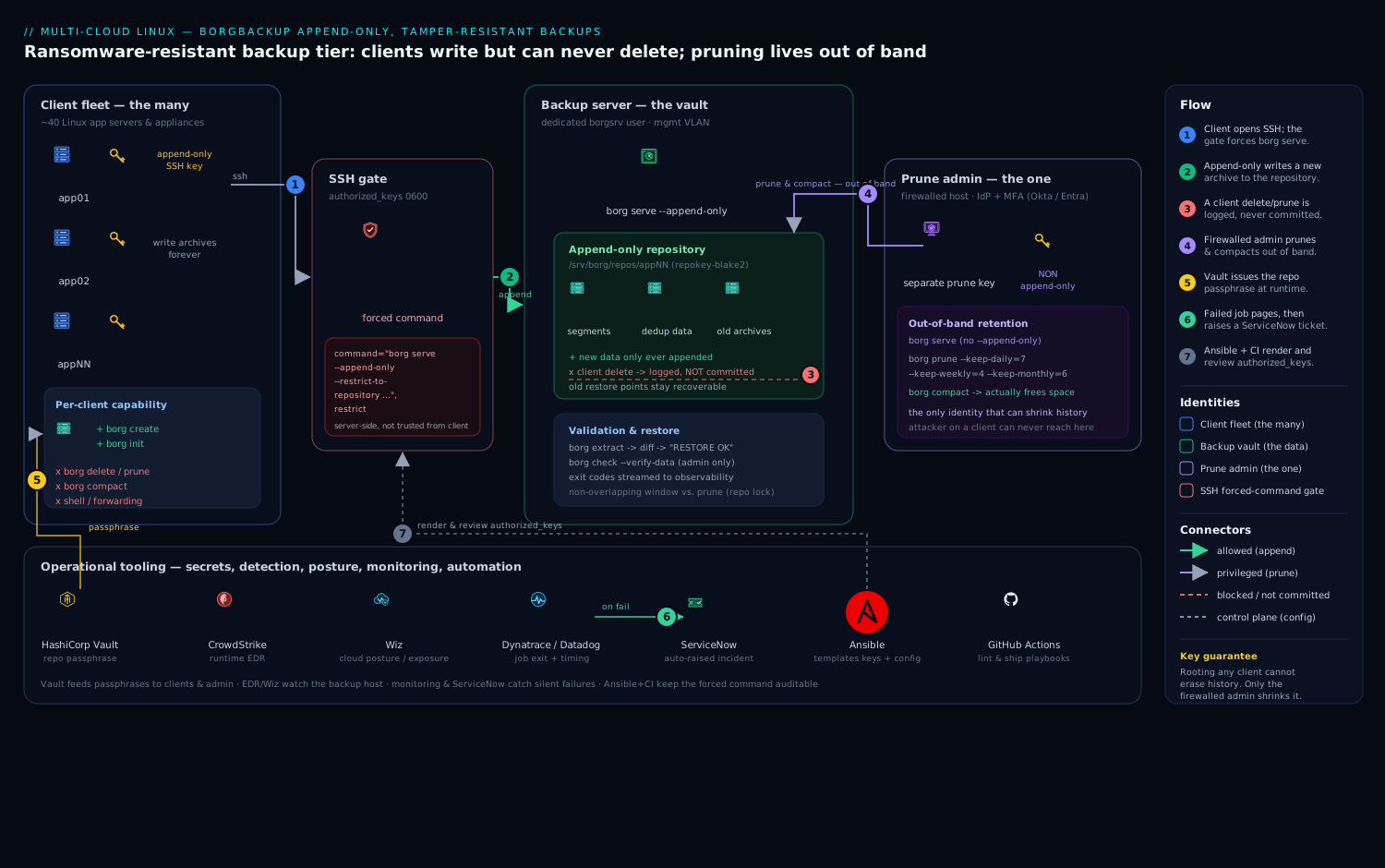
The design has three identities touching one repository, with deliberately asymmetric power, plus the operational tools that make it observable. Read the diagram left to right: on the left, the client servers (the many) — each application server and virtual appliance holds an SSH key whose only capability on the backup host is to run borg serve --append-only against its own repository. It can create archives forever; it cannot delete, prune, or compact. In the center sits the append-only repository (the vault) on the dedicated backup host: new data is only ever added, and the segment files that hold old archives are never rewritten under an append-only session, so even a borg delete issued by a client is recorded but not honored at the storage layer. On the right, isolated behind a firewall, the prune admin (the one) holds a different SSH key that runs full, non-append-only borg serve — the single identity where retention pruning and borg compact happen, out of band, on a schedule the attacker has no access to.
Around that core sit the operational tools the arrows connect to: HashiCorp Vault issues the per-repository encryption passphrase so it never lives in a script; CrowdStrike Falcon runs on the backup server and clients for runtime threat detection; Wiz scans the backup host’s cloud posture for public-exposure drift; Dynatrace (or Datadog) ingests the backup job’s exit status and timing so a silent failure pages someone; ServiceNow receives an auto-raised incident when a verification fails; Ansible templates the client configuration and its authorized_keys forced-command line, and GitHub Actions lints and ships those playbooks so the restriction is never quietly weakened. Follow any client’s write path into the vault, then follow the separate admin path in from the right, and the whole security property — many can add, only one can remove — is visible in a single glance.
Real-world scenario
Nimbus Ledger, a fintech SaaS, runs 40 Linux application servers (Ubuntu 22.04) plus 8 virtual appliances, all backing up nightly to one dedicated backup host in their Central India colo. Total protected data is about 3.1 TB of source, but because the servers are near-identical images, Borg’s global dedup stores the whole fleet in roughly 410 GB after the first week — a large initial archive and nightly deltas averaging 1.2–2.5 GB across all 48 hosts. Retention is --keep-daily=7 --keep-weekly=4 --keep-monthly=6. The platform team is five engineers; storage spend is a single 2 TB SSD volume plus a cheap object-storage bucket for the off-site copy.
The original setup was the naive one: every client’s cron job ran borg create and borg prune, using a key that had a plain command="borg serve" (no --append-only). It worked flawlessly for two years — which is exactly why nobody questioned it. Then the security tabletop asked the ransomware question, and the room went quiet. A single compromised app server held a key that could borg prune --keep-daily=0 the shared repo and, with a follow-up compact, permanently destroy every restore point for all 48 hosts. The “backup” was one sudo on one box away from total loss.
The remediation took one sprint and no new spend beyond a small admin VM. First, they moved retention off the clients entirely and stood up a firewalled admin host on the management VLAN with a non-append-only key, running a weekly prune+compact via its own Borgmatic config. Second, they rewrote all 48 clients’ authorized_keys lines — via Ansible, so the forced command was identical and reviewed in a PR — to command="borg serve --append-only --restrict-to-repository /srv/borg/repos/<host>",restrict,from="10.20.0.0/24". Third, they added --restrict-to-repository per host so a compromised app17 could no longer even read app18’s archives. Fourth, they exported every repo key into Vault and moved the passphrase to encryption_passcommand so it never sat in a file. Finally, they added a Healthchecks.io dead-man’s switch per client and a monthly borg check --verify-data from the admin that auto-raises a ServiceNow ticket on failure.
The proof was in the test they ran the next day. From app03, an engineer role-playing the attacker ran borg delete against the three oldest archives and borg prune --keep-daily=0. Both commands returned success locally. Then, from the admin host, borg list showed every archive still present, and a test borg extract of a file from the “deleted” oldest archive restored cleanly. The delete had been logged and discarded. The lesson written on the runbook: “A backup credential that can delete backups is not a backup credential — it’s the attacker’s off-switch. Make the many write-only; make the one that can destroy history unreachable from anything you’re protecting.” Six weeks later a real (unrelated) laptop-borne infection hit two app servers; the backups were untouched, and recovery took hours instead of a ransom negotiation.
Advantages and disadvantages
The append-only-over-SSH model is powerful precisely because it is simple and free, but it has real costs. Weigh them honestly:
| Advantages | Disadvantages |
|---|---|
| Compromised/rooted client provably cannot destroy history — the headline property | You knowingly hold more history than the minimum (clients can’t trim it), so storage runs higher |
| Open source, no license cost — spend is storage + one small admin host | You run a second admin host and must protect its key like a crown jewel |
| Global dedup + compression make a fleet of similar servers cheap to store long-term | Restore of a huge tree can be I/O-bound; FUSE mount is slower than local disk |
| Client-side encryption means the backup host never sees plaintext or the passphrase | Lose the exported key and the data is unrecoverable — key management is now critical |
| Enforcement is at the SSH layer, independent of client trust | Append-only does not stop a DoS by filling the volume — needs quota + alerting |
| Works anywhere Linux + SSH exist; no cloud dependency | Version skew across the SSH link causes cryptic remote errors; you must pin versions |
Retention (prune/compact) and verification (check) are first-class, scriptable |
Exclusive repo lock means overlapping create/prune runs fail; you must schedule windows |
When each side matters: the advantages dominate for any self-managed fleet where ransomware resilience is a real requirement and you have the discipline to run a separate admin host and manage keys. The disadvantages bite hardest for teams that want zero operational overhead (a managed immutable-backup product may be worth the license), for very large single trees where restore time is critical (test your RTO), and for anyone tempted to shortcut the two-identity split — which silently voids the entire benefit.
Hands-on lab
This is the centerpiece. You will build the whole system end to end — dedicated backup user, per-client key locked with a forced command, Vault-sourced passphrase, an append-only repo, a nightly systemd timer, out-of-band pruning from a separate admin identity — and then prove the ransomware protection holds by trying to delete from a client and confirming the data survives. It is copy-pasteable; substitute your own hostnames. For a self-contained run you can use three machines (client, backup, admin) or three VMs; where a real Vault isn’t available, a note shows the plain-passphrase fallback.
Conventions: commands are labeled [CLIENT], [BACKUP], or [ADMIN] for which host to run them on.
Step 1 — Install Borg on all hosts (pin the same version)
# [CLIENT], [BACKUP], [ADMIN] — Ubuntu/Debian
sudo apt-get update && sudo apt-get install -y borgbackup
# RHEL/Rocky/Alma:  sudo dnf install -y epel-release && sudo dnf install -y borgbackup
borg --version
For a real fleet, prefer the pinned standalone binary on every host so client and server can never drift (skew is the top cause of “Remote: Borg server is too old”):
# [CLIENT], [BACKUP], [ADMIN]
sudo curl -L -o /usr/local/bin/borg \
  https://github.com/borgbackup/borg/releases/download/1.4.0/borg-linux-glibc236
sudo chown root:root /usr/local/bin/borg && sudo chmod 755 /usr/local/bin/borg
borg --version    # Expected: identical version string on all three hosts
Step 2 — Create the dedicated backup user on the backup host
# [BACKUP]
sudo useradd --create-home --home-dir /srv/borg --shell /bin/bash borgsrv
sudo install -d -o borgsrv -g borgsrv -m 0700 /srv/borg/.ssh
sudo install -d -o borgsrv -g borgsrv -m 0700 /srv/borg/repos
# Optional but recommended: a filesystem quota on /srv/borg limits the DoS-by-fill risk.
Expected: id borgsrv shows the account; the two 0700 directories exist and are owned by borgsrv.
Step 3 — Generate a dedicated per-client key
# [CLIENT] — as root, since the nightly job runs as root
sudo ssh-keygen -t ed25519 -N '' \
  -f /root/.ssh/borg_appendonly \
  -C "borg-appendonly-$(hostname -f)"
sudo cat /root/.ssh/borg_appendonly.pub    # copy this public key string
Do not reuse an admin or login key — this key will be locked to borg serve only.
Step 4 — Lock the client key with the append-only forced command
# [BACKUP] — add ONE line to /srv/borg/.ssh/authorized_keys (paste the real pubkey)
# The forced command + restrict is the entire security control.
sudo tee -a /srv/borg/.ssh/authorized_keys >/dev/null <<'EOF'
command="borg serve --append-only --restrict-to-repository /srv/borg/repos/app01",restrict,from="10.20.0.0/24" ssh-ed25519 AAAAC3Nz...app01-key borg-appendonly-app01.example.com
EOF
sudo chown borgsrv:borgsrv /srv/borg/.ssh/authorized_keys
sudo chmod 600 /srv/borg/.ssh/authorized_keys
Expected: stat -c '%a' /srv/borg/.ssh/authorized_keys prints 600. If it isn’t, sshd will ignore the file and your restriction vanishes silently.
Step 5 — Source the passphrase and initialize the append-only repo
# [BACKUP] operator, once — generate & store the passphrase (never echo it to a log)
vault kv put secret/borg/app01 passphrase="$(openssl rand -base64 48)"
# [CLIENT] — set the three env vars; passphrase comes from Vault at runtime
export BORG_RSH="ssh -i /root/.ssh/borg_appendonly -o StrictHostKeyChecking=accept-new"
export BORG_REPO="ssh://borgsrv@backup.example.com/srv/borg/repos/app01"
export BORG_PASSPHRASE="$(vault kv get -field=passphrase secret/borg/app01)"
# --- Fallback if you have no Vault (lab only): export BORG_PASSPHRASE='a-strong-passphrase'

borg init --encryption=repokey-blake2 "$BORG_REPO"
init is a create/write operation, which append-only permits. Expected: no error, and the repo directory now exists on the backup host. Immediately export the key out of band — losing it means losing every backup:
# [CLIENT]
borg key export "$BORG_REPO" /root/borg-app01.keyfile
vault kv put secret/borg/app01-keyfile keyfile=@/root/borg-app01.keyfile
sudo shred -u /root/borg-app01.keyfile
Step 6 — Run the first backup
# [CLIENT] — first run is large (full), later runs are tiny deltas
borg create --stats --compression auto,zstd,3 \
  "::app01-{hostname}-{now:%Y-%m-%dT%H:%M:%S}" \
  /etc /home /var/www /srv \
  --exclude '/var/www/*/cache' --exclude-caches
Expected: a --stats block showing “Original size / Compressed size / Deduplicated size” and “Number of files”. Run it a second time (borg create ... again) and watch Deduplicated size drop to near-zero — proof that dedup is working.
Step 7 — Wire the nightly systemd timer
# [CLIENT] — /usr/local/sbin/borg-backup.sh  (chmod 0700, root)
sudo tee /usr/local/sbin/borg-backup.sh >/dev/null <<'EOF'
#!/usr/bin/env bash
set -uo pipefail
export BORG_RSH="ssh -i /root/.ssh/borg_appendonly -o StrictHostKeyChecking=yes"
export BORG_REPO="ssh://borgsrv@backup.example.com/srv/borg/repos/app01"
export BORG_PASSPHRASE="$(vault kv get -field=passphrase secret/borg/app01)"

borg create --stats --compression auto,zstd,3 \
  "::app01-{hostname}-{now:%Y-%m-%dT%H:%M:%S}" \
  /etc /home /var/www /srv --exclude-caches
rc=$?

# Emit exit code to monitoring; ping the dead-man's switch only on clean success.
curl -fsS -m 10 "https://hc.example.com/ping/app01-uuid/$rc" || true
exit $rc
EOF
sudo chmod 700 /usr/local/sbin/borg-backup.sh
# [CLIENT] — /etc/systemd/system/borg-backup.service
[Unit]
Description=Tamper-resistant Borg backup (append-only)
[Service]
Type=oneshot
ExecStart=/usr/local/sbin/borg-backup.sh
# [CLIENT] — /etc/systemd/system/borg-backup.timer
[Unit]
Description=Nightly Borg backup
[Timer]
OnCalendar=*-*-* 02:30:00
RandomizedDelaySec=1800
Persistent=true
[Install]
WantedBy=timers.target
# [CLIENT]
sudo systemctl daemon-reload
sudo systemctl enable --now borg-backup.timer
systemctl list-timers borg-backup.timer   # Expected: next run shown at ~02:30
Note what is absent: no prune, no delete, no compact. The client physically cannot run them (the forced command blocks it), so we don’t pretend to. Retention lives in Step 8.
Step 8 — Out-of-band pruning from the separate admin identity
# [ADMIN] generate the admin's own key, then add a SECOND authorized_keys line on [BACKUP]:
#   command="borg serve --restrict-to-repository /srv/borg/repos/app01",restrict ssh-ed25519 AAAA...ADMIN-key borg-prune-admin
# NOTE: no --append-only here — this identity is allowed to prune & compact.
# [ADMIN] — scheduled weekly (its own timer/borgmatic). Prune MARKS, compact FREES.
export BORG_RSH="ssh -i /root/.ssh/borg_prune_admin -o StrictHostKeyChecking=yes"
export BORG_REPO="ssh://borgsrv@backup.example.com/srv/borg/repos/app01"
export BORG_PASSPHRASE="$(vault kv get -field=passphrase secret/borg/app01)"

borg prune --list --stats --dry-run \
  --keep-daily=7 --keep-weekly=4 --keep-monthly=6 \
  --glob-archives 'app01-*'          # preview first — ALWAYS

borg prune --list --stats \
  --keep-daily=7 --keep-weekly=4 --keep-monthly=6 \
  --glob-archives 'app01-*'          # then for real
borg compact "$BORG_REPO"            # THIS frees the disk
Expected: the dry run lists which archives would be pruned; the real run prunes them; compact reports space reclaimed. Because this admin key is the only identity that can shrink history, a rooted client cannot reach back through time.
Step 9 — PROVE the ransomware protection (the headline test)
# [CLIENT] — role-play the attacker with the append-only key
OLDEST=$(borg list --short "$BORG_REPO" | head -1)
borg delete "::$OLDEST"                 # appears to succeed locally
borg prune --keep-daily=0 --glob-archives 'app01-*'   # appears to succeed too
# [ADMIN] — confirm the data SURVIVED (append-only logged but did not commit)
borg list "$BORG_REPO" | grep "$OLDEST"   # Expected: the archive is STILL THERE
mkdir -p /tmp/borg-proof && cd /tmp/borg-proof
borg extract "::$OLDEST" etc/hostname     # Expected: restores cleanly
echo "PROOF: 'deleted' archive was fully recoverable"
This is the whole point demonstrated: a client with the append-only key issued destructive commands, they returned success on the client, and the repository lost nothing.
Step 10 — Validate the SSH lockdown
# [CLIENT] — the forced command must refuse a shell or arbitrary command
ssh -i /root/.ssh/borg_appendonly borgsrv@backup.example.com "id"
# Expected: runs 'borg serve' and exits; 'id' NEVER executes.
ssh -i /root/.ssh/borg_appendonly borgsrv@backup.example.com
# Expected: no interactive shell (restrict strips PTY).
Step 11 — Test a real restore and verify integrity
# [CLIENT or ADMIN] — restore a known file (extract) ...
mkdir -p /tmp/borg-restore && cd /tmp/borg-restore
LATEST=$(borg list --short "$BORG_REPO" | tail -1)
borg extract "::$LATEST" etc/hostname
diff /etc/hostname etc/hostname && echo "RESTORE OK"

# ... and browse via FUSE mount
mkdir -p /mnt/borgview
borg mount "::$LATEST" /mnt/borgview
ls /mnt/borgview/etc | head
borg umount /mnt/borgview
# [ADMIN] — server-side integrity, including full data re-authentication
borg check --verify-data "$BORG_REPO" && echo "INTEGRITY OK"
Pipe the exit codes of the checks into Dynatrace/Datadog; on failure auto-raise a ServiceNow incident so a missed verification is a ticket, not a log line.
Validation checklist
What each step proved, mapped to the real-world outcome:
| Step | What you did | What it proves | Real-world analogue |
|---|---|---|---|
| 4 | Locked the key with forced command + restrict |
The key can only run borg serve --append-only, nothing else |
Every client key across the fleet |
| 6–7 | First backup + nightly timer | Backups run unattended with a real exit status | Production nightly job |
| 8 | Prune + compact from a separate key | Retention/space reclamation happen out of band | Weekly admin maintenance |
| 9 | Client tried to delete; admin confirmed survival | Append-only genuinely defeats a compromised client | The ransomware scenario |
| 10 | Shell/command refused over the backup key | The SSH lockdown removes every pivot | Post-compromise blast-radius test |
| 11 | Extract + mount + --verify-data |
Restores work and data is intact | Your actual RTO test |
Teardown
# [CLIENT] stop the schedule and destroy the client private key
sudo systemctl disable --now borg-backup.timer
sudo shred -u /root/.ssh/borg_appendonly /root/.ssh/borg_appendonly.pub

# [BACKUP] revoke the client's access (instantly cuts the forced-command path)
sudo sed -i '/borg-appendonly-app01.example.com/d' /srv/borg/.ssh/authorized_keys

# [ADMIN] full teardown only — delete the repo (needs the non-append-only admin key)
borg delete --force "$BORG_REPO"

# [BACKUP] remove the dedicated account and its data
sudo userdel -r borgsrv
Revoke the matching Vault secrets last, once you are certain no restore is pending: vault kv metadata delete secret/borg/app01.
Common mistakes & troubleshooting
The failure modes below are the ones that actually bite, as a symptom → root cause → confirm → fix playbook.
| # | Symptom | Root cause | Confirm (exact command / check) | Fix |
|---|---|---|---|---|
| 1 | Client can still borg delete/prune for real |
--append-only set on the client, not in the server’s forced command |
On [BACKUP]: grep borg serve /srv/borg/.ssh/authorized_keys — is --append-only present? |
Put --append-only in the command="…" forced command; never trust the client flag |
| 2 | Restrictions silently ignored; key acts like a normal login | authorized_keys or .ssh too open → sshd refuses the file |
stat -c '%a' /srv/borg/.ssh/authorized_keys (want 600), dir 700; check /var/log/auth.log for “bad ownership or modes” |
chmod 600 file, 700 dir, chown borgsrv:borgsrv |
| 3 | Repo grows forever; volume fills | Ran prune but never compact — or no admin prune at all |
On [BACKUP]: du -sh /srv/borg/repos/app01; count archives via borg list |
Run borg compact from the admin after prune; schedule it weekly |
| 4 | Remote: Borg server is too old (or protocol errors) |
Version skew across the SSH link | borg --version on client vs backup host |
Pin the same standalone binary on both ends |
| 5 | Failed to create/acquire the lock |
Overlapping create and prune/check (exclusive repo lock) |
borg list errors with lock; check both hosts’ schedules |
Stagger windows; if a job died, borg break-lock (admin, after confirming no run active) |
| 6 | Backups “succeed” but restore fails / key error | Repo key never exported; only lived in the repo that’s now gone | Try borg list after simulated repo loss — asks for a key you don’t have |
Always borg key export into Vault at init; test restore regularly |
| 7 | Prune key found on a backup client | The destructive identity is capturable from a protected host | On each client: grep -L append-only /root/.ssh/* and audit which keys reach the repo |
Move the non-append-only key to the firewalled admin host only |
| 8 | Passphrase visible in history/process list |
Secret pasted into a script or export from a file on disk |
`history | grep BORG_PASSPHRASE; ps aux` during a run |
| 9 | Client can read another client’s archives | Missing --restrict-to-repository on the forced command |
On [BACKUP]: check each line has --restrict-to-repository <that-client's-repo> |
Add per-client --restrict-to-repository; one repo per client |
| 10 | borg mount fails: “fusermount: command not found” |
FUSE not installed on the restoring host | which fusermount; borg mount error text |
apt-get install -y fuse3 (or fuse); retry the mount |
| 11 | Nightly job silently stopped weeks ago; nobody noticed | No dead-man’s switch; only alerting on explicit failures | systemctl list-timers; last archive date via `borg list |
tail -1` |
| 12 | Every archive is huge; dedup seems off | Chunker params or compression fighting the data (or backing up already-compressed blobs uncompressed logic) | Compare --stats “Original” vs “Deduplicated” across two runs |
Use auto,zstd,3; check excludes; avoid re-chunking pre-compressed data poorly |
| 13 | borg check reports inconsistencies |
Bit-rot on the backup volume, or an interrupted transaction | borg check --verify-data from [ADMIN] |
borg check --repair (admin only); replace failing disk; restore from off-site copy |
| 14 | Host key changed warning / connection refused mid-rollout | Backup host reimaged; StrictHostKeyChecking=yes now failing (good!) |
The SSH error names the changed key | Verify it’s a legitimate change, update known_hosts; never set StrictHostKeyChecking=no |
The three that cause the most damage, expanded:
#1 — --append-only on the client instead of the server. This is the cardinal error and it looks like it works because backups still run. But the flag that enforces append-only is the one in the server’s borg serve invocation, which the forced command pins. A client-side --append-only is a suggestion an attacker simply omits. Always confirm on the backup host that the command="…" string contains --append-only.
#3 — Forgetting compact. prune only marks archives; the space they held is freed only when compact rewrites the affected segments. Teams run prune for months, watch borg list shrink, and are baffled when the disk fills anyway. compact must run (from the admin) after prune.
#7 — Prune key on a client. This silently collapses the whole model. The moment the non-append-only key lives on a machine you’re protecting, rooting that machine hands the attacker the off-switch again. The destructive identity must live only on the firewalled admin host.
Best practices
- Set
--append-onlyin the server-side forced command — always, on every client line. It is the entire control; a client flag is worthless. Review theauthorized_keystemplate in version control so it can’t be quietly weakened. - Use
restrictand--restrict-to-repositoryon every client key. Strip PTY/forwarding/agent, and confine each key to exactly one repo so a compromised host can’t touch a sibling’s backups. Addfrom="<mgmt-CIDR>"for source pinning. - Keep the prune/compact identity on a separate, firewalled host — never on a client. This single-identity destructive power is what append-only exists to isolate.
prunemarks,compactfrees — run both, from the admin, on a schedule. Preview every new retention policy with--dry-run --listbefore it runs for real.- Export the repo key into a secret store at init.
borg key export→ Vault. Losing an un-exported key loses all data. Never store the passphrase in a script; source it at runtime withBORG_PASSCOMMAND/encryption_passcommand. - Pin identical Borg versions on both ends of every link (standalone binary), to kill version-skew errors.
- Verify regularly — and verify data, not just pointers. Schedule
borg check --verify-datamonthly from the admin; a check you never run is a hope, not a control. - Test restores, not just backups. A quarterly
borg extract/mountdrill against a real archive is the only proof your RTO holds. - Apply 3-2-1: replicate the repo off-site to object-locked/WORM or offline storage. Append-only protects one copy; 3-2-1 protects against site loss and an attacker who owns the whole online estate.
- Schedule create and prune/check in non-overlapping windows. Borg takes an exclusive repo lock; overlapping runs fail.
- Make silence loud. Dead-man’s switch (Healthchecks/Cronhub) plus exit-code monitoring; alert on a missing success, not only on explicit failures.
- Quota the backup user and alert on free space. Append-only can’t shrink under attack, so a DoS-by-fill is the residual risk — cap and watch it.
Security notes
Append-only mode is one layer; defense in depth completes it. Treat the backup server as a crown-jewel asset: minimal packages, SSH key-only auth (PasswordAuthentication no), a host firewall allowing inbound SSH only from the client management VLAN, and a dedicated unprivileged user that owns nothing else. Run CrowdStrike Falcon on both the backup server and the clients so an attacker probing the backup host — or staging mass deletions on a client — trips a runtime detection that reaches the SOC. Point Wiz at the backup host’s cloud account (if it lives in cloud) to alert the instant its storage or a snapshot drifts to public exposure or an over-broad IAM policy widens access.
Authenticate human operators to the admin host through your IdP — Okta or Microsoft Entra ID — with MFA and conditional access, so even the prune identity sits behind strong SSO rather than a lone key; a brokered-access layer like HashiCorp Boundary or Teleport makes that access short-lived and audited. Keep secrets out of scripts entirely: source the passphrase from Vault (or a secretless injector like CyberArk Conjur) at runtime, and export the repo key into the vault, never a file on disk.
The security controls and what each one buys, side by side:
| Control | Mechanism | Defends against | Also prevents |
|---|---|---|---|
| Server-side append-only | command="borg serve --append-only …" |
Compromised client destroying history | Accidental client-side prune wiping data |
restrict + --restrict-to-repository |
OpenSSH authorized_keys options |
Backup key used as a pivot / cross-repo read | Agent/port-forward abuse from the key |
| Source pinning | from="<mgmt-CIDR>" |
Stolen key used off the management network | Off-VLAN brute-force with a leaked key |
| Client-side encryption | repokey-blake2 / keyfile |
Backup host or its disks being stolen/read | Server-side plaintext exposure |
| Key export to Vault | borg key export → secret store |
Total data loss if the repo is destroyed | Passphrase-in-file leakage |
| Separate firewalled admin | Non-append-only key on one host | Destructive identity captured from a protected box | Single-point-of-failure for deletion |
| Runtime detection (Falcon) | EDR on backup host + clients | Attacker staging mass deletion / probing backup host | Lateral movement to the vault |
| Off-site WORM/object-lock copy | One-way replication to immutable storage | Ransomware that jumps to the backup host; site loss | A malicious admin destroying everything online |
For the strongest tier, replicate to object-locked (WORM) object storage or an offline disk over a one-way link, giving you a copy no online identity — not even the admin — can touch. That is the difference between “very hard to destroy” and “impossible to destroy from the network.”
Cost & sizing
BorgBackup is open source, so the spend is storage plus a little compute and one small admin host. The levers that matter:
- Deduplication + compression dominate the storage bill. A fleet of similar Linux servers stores a large first archive and very small nightly deltas — often an order of magnitude less than raw. This is what makes long retention (
--keep-monthly=6) affordable.auto,zstd,3gets most of the compression benefit at low CPU;zstd,9+ trades CPU for a bit more ratio when storage is the constraint. - Retention shape sets your steady-state size. More
--keep-*buckets = more history = more disk. Because prune+compact reclaim space predictably, you can forecast growth and avoid over-provisioning. The honest trade-off of append-only: you knowingly hold more than the minimum, since clients can’t trim — budget for it. - The admin host is tiny. It only runs prune/compact/check on a schedule; a small VM suffices. That one host and the extra history are the entire premium over a delete-capable setup.
- Off-site copy uses cheap tiers. Put the 3-2-1 third copy on low-cost object storage with lifecycle rules, or an offline disk you rotate.
Rough sizing figures for planning (INR indicative, self-hosted colo/cloud block storage):
| Item | Drives cost via | Rough monthly figure (INR) | Notes |
|---|---|---|---|
| Backup volume (block SSD) | GB provisioned for repo + headroom | ~₹8–15 / GB-month | Size = deduped fleet + retention history + ~20% headroom |
| Admin host (small VM) | vCPU/RAM hours | ~₹1,000–2,500 | Runs prune/compact/check only; can be tiny |
| Off-site object storage (WORM) | GB stored + requests | ~₹2–5 / GB-month | 3-2-1 third copy; lifecycle to colder tiers |
| Compute on clients | CPU during create |
negligible | auto,zstd,3 keeps CPU low; incrementals are small |
| Monitoring (dead-man’s switch) | Per-check plan | ~₹0–800 | Healthchecks.io free tier covers small fleets |
| Borg license | — | ₹0 | Open source |
A worked example (the Nimbus Ledger fleet): 3.1 TB source deduping to ~410 GB, with retention roughly doubling steady-state to ~800 GB, on a 2 TB SSD volume (~₹20,000/mo including headroom), plus a tiny admin VM (~₹1,500), plus ~800 GB in WORM object storage for the off-site copy (~₹3,200). The extra storage and that one small host are the price of a backup tier that survives the compromise of everything it protects — cheap insurance against the ransomware scenario that started this guide.
Interview & exam questions
1. Why must append-only mode be set on the server and not the client? Because the client is exactly the identity you assume can be compromised. If append-only were a client flag, an attacker who owns the client simply omits it. Pinning borg serve --append-only in the SSH forced command means the server enforces it regardless of what the client sends, so the guarantee survives full client compromise.
2. What does append-only mode actually do to a borg delete from a client? The delete is accepted over the protocol and recorded in the repository’s transaction log, but the destructive commit that would free or rewrite segment data is withheld. The archive appears deleted to the client but remains fully listable and restorable until an authorized (non-append-only) identity deliberately prunes and compacts.
3. Difference between borg prune and borg compact? prune marks archives outside your --keep-* retention rules for deletion (they stop appearing in borg list), but frees no disk. compact rewrites the affected segment files to actually reclaim the space that pruned/unreferenced chunks occupied. Prune without compact means the repo keeps growing.
4. How does Borg deduplicate, and why does a byte inserted at the start of a file not blow up the repo? Borg uses content-defined chunking via a rolling hash (buzhash): chunk boundaries are chosen by content, not fixed offsets. Inserting a byte only shifts the one chunk it lands in, not every subsequent chunk, so dedup stays effective. Each unique chunk is stored once, globally across all archives in the repo.
5. What is the single biggest data-loss risk with repokey encryption, and how do you mitigate it? repokey stores the (passphrase-wrapped) key inside the repository. If the repository is destroyed and you never exported the key, the data is cryptographically unrecoverable. Mitigate by always running borg key export and storing the key material in a secret manager (Vault) at init time.
6. Why must the pruning identity live on a separate, firewalled host? Pruning/compaction requires a non-append-only key with the power to destroy history. If that key lives on a backup client, rooting that client hands the attacker the ability to wipe backups — reintroducing the exact single-point-of-failure append-only exists to remove. It must live only where a client compromise can’t reach it.
7. What does the restrict option add to an authorized_keys line, and what would you use on older OpenSSH? restrict disables PTY allocation, port/agent/X11 forwarding, and ~/.ssh/rc execution, removing every SSH pivot from the key. On OpenSSH too old for restrict, spell it out: no-port-forwarding,no-agent-forwarding,no-X11-forwarding,no-pty.
8. Which borg check variant catches silent disk corruption, and why is it more expensive? borg check --verify-data, because it re-reads and re-authenticates every chunk’s contents rather than only validating the index/reference pointers. That full read is expensive, so you run it monthly/quarterly rather than nightly, while cheaper repository/archive checks run more often.
9. How does this design satisfy the 3-2-1 rule? Copy 1 is production data on the clients; copy 2 is the append-only Borg repo on the backup host (two different media if the repo is on block storage); copy 3 is an off-site replica to object-locked/WORM or offline storage. That gives 3 copies, 2 media types, and 1 off-site — with append-only additionally hardening copy 2 against a hostile client.
10. An attacker roots a backup client and runs borg prune --keep-daily=0. What happens, and how do you verify no harm was done? Under append-only the prune is logged but not committed, so nothing is actually removed. Verify from the admin identity with borg list (all archives still present) and a test borg extract of a supposedly-deleted archive (restores cleanly). The only residual risk is DoS-by-fill, mitigated by quotas and free-space alerting.
11. What is the residual risk append-only does not cover, and how do you handle it? Append-only stops destruction of history but not a denial-of-service where a compromised client writes junk archives to fill the volume. Handle it with a filesystem quota on the backup user, free-space alerting, and periodic admin prune+compact to reclaim space — a loud, recoverable problem, not silent loss.
12. Why pin the same Borg version on both ends of the SSH link? The client and the server-side borg serve speak a versioned protocol; a newer client against an older server (or vice versa) throws cryptic “Borg server is too old” / protocol errors. Pinning the identical standalone binary on both ends eliminates skew.
These map to hands-on Linux/security certifications and SRE interviews rather than a single cloud exam. A compact revision grid:
| Question theme | Relevant domain | Why it’s tested |
|---|---|---|
| Append-only enforcement, forced commands | Linux hardening / SSH security | Core of tamper-resistant backup design |
| prune vs compact, retention shaping | Backup & DR operations | Distinguishes operators who’ve run it from those who’ve read about it |
| Dedup/chunking internals | Storage fundamentals | Explains cost and performance behavior |
| Encryption modes, key management | Applied cryptography / secrets | The most consequential, irreversible choice |
| 3-2-1, off-site WORM | DR strategy / resilience | Ransomware-era backup design |
Quick check
- Where must
--append-onlybe set for it to be a real control, and why does the location matter? - You’ve run
borg prunefor two months andborg listshows fewer archives, yet the backup volume is nearly full. What did you forget, and which command fixes it? - True or false: a client with the append-only key that runs
borg deletehas permanently removed that archive. - Name the one machine the non-append-only prune/compact key must never live on, and say why.
- Your backups have “succeeded” every night for a year, but a test restore fails asking for a key you don’t have. What single init-time step would have prevented this?
Answers
- In the server-side SSH forced command (
command="borg serve --append-only …"). It matters because the client is the identity you assume can be compromised; only a server-enforced flag, pinned by the forced command, survives full client compromise. A client-side--append-onlyis a suggestion an attacker omits. - You forgot
borg compact.pruneonly marks archives for deletion (so they leaveborg list); it frees no disk. Runningborg compactfrom the admin identity rewrites the affected segments and actually reclaims the space. - False. Under append-only the delete is written to the transaction log but not committed; the archive remains listable and restorable until an authorized non-append-only identity deliberately prunes and compacts.
- Any backup client (any host you are protecting). If the destructive prune/compact key lives there, rooting that host hands the attacker the power to wipe backups — recreating the single-point-of-failure append-only exists to eliminate. It belongs only on the firewalled admin host.
borg key exportthe repository key into a secret store at init (e.g. Vault). Withrepokeythe key lives inside the repo; if the repo is ever lost and the key was never exported, the data is unrecoverable. Exporting at init guarantees you can always restore.
Glossary
- Repository — the encrypted, append-structured store of all archives on the backup host; the thing an attacker wants to destroy.
- Archive — one point-in-time snapshot inside a repository, addressed as
::name; what you list, mount, and restore. - Segment — an append-only log file inside the repo holding encrypted chunk data; never edited in place, which is what makes append-only enforceable.
- Chunk — a content-defined slice of a file; Borg’s unit of deduplication, stored once per unique hash across the whole repo.
- Chunker (buzhash) — the rolling-hash algorithm that cuts files at content-defined boundaries so small edits don’t reshuffle every chunk.
borg serve— the server side of a remote Borg session, launched over SSH; where--append-onlyis enforced.- Append-only mode — a server session that accepts new data but records (without committing) destructive operations, so old data survives a compromised client.
- Forced command — the
command="…"prefix inauthorized_keysthat runs a fixed command regardless of what the client requests; pinsborg serve --append-only. restrict— the OpenSSH option that disables PTY, port/agent/X11 forwarding, and~/.ssh/rc, removing SSH pivots from the key.--restrict-to-repository— aborg serveoption confining a key to exactly one repository path.repokey/keyfile— encryption modes storing the (wrapped) key inside the repo or on the client respectively;-blake2variants use keyed BLAKE2b for faster authentication.- Prune — marks archives outside the
--keep-*retention rules for deletion; does not free disk on its own. - Compact — rewrites segment files to reclaim the space pruned/unreferenced chunks occupied; the step that actually frees disk.
- Check /
--verify-data— verifies repository/archive consistency;--verify-datare-reads and re-authenticates every chunk to catch bit-rot. - Borgmatic — a declarative YAML wrapper over Borg with built-in hooks for retention, database dumps, checks, and monitoring.
- Mount (FUSE) —
borg mountexposes an archive (or the whole repo) as a read-only filesystem for browsing and selective restore. - 3-2-1 rule — three copies of data, on two media types, with one off-site; append-only hardens one copy, 3-2-1 hardens the whole.
- WORM / object-lock — write-once-read-many immutable storage for the off-site copy that no online identity can delete.
- Dead-man’s switch — a monitoring pattern (Healthchecks/Cronhub) that pings on success and alerts on a missing ping, catching jobs that silently stopped.
Next steps
You can now build a Borg backup tier that survives the compromise of any server it protects. Extend the design outward:
- Related: Back Up a Linux Fleet with Restic to S3: Snapshots, Pruning & Verification — the same discipline with Restic and S3-style object storage, a natural off-site tier.
- Related: PostgreSQL Point-in-Time Recovery with pgBackRest to S3 and MySQL/Percona XtraBackup with Binlog PITR — database-consistent backups Borg can then archive.
- Related: Immutable, Object-Locked Backups with Kasten K10 and MinIO Object Locking & Site Replication for Immutable Targets — the WORM/object-lock target that completes your 3-2-1.
- Related: Brokered SSH/RDP Access with HashiCorp Boundary — put the admin identity behind short-lived, audited access instead of a lone key.
- Related: Runtime Threat Detection on Linux/Kubernetes with CrowdStrike Falcon — the EDR layer that catches an attacker staging mass deletions before they reach the vault.