A payments company runs 40-odd AWS accounts under one Organization, and the cloud security team has exactly the problem every multi-account shop hits eventually: they have agent coverage on EC2 from the CrowdStrike Falcon sensor, but no continuous picture of the configuration of the accounts themselves — the public S3 bucket someone spun up for a one-day test, the security group that quietly opened 0.0.0.0/0 to RDS, the IAM role with *:* that a contractor created and never removed. They also ship roughly 200 container images a week to Amazon ECR, and “is this image safe to deploy” is currently answered by a vibe. The mandate from the CISO is concrete: onboard every account into CrowdStrike Falcon Cloud Security for agentless posture management (CSPM), turn on behavioural Indicator-of-Attack (IOA) detection so a live attacker action — not just a static misconfig — pages the SOC, and make ECR registry scanning a gate in the build pipeline. This guide is the step-by-step to do exactly that, repeatably, with Terraform.
The thing to internalise before you start: Falcon Cloud Security gives you two complementary lenses. Agentless CSPM reads your AWS control plane through a cross-account IAM role and tells you what is misconfigured and what an attack path looks like. IOA detection consumes a CloudTrail-derived event stream and tells you what an attacker is doing right now — a root login from a new country, a disabled GuardDuty detector, a sudden PutBucketPolicy that makes data public. ECR assessment is a third lens on your supply chain. You will wire all three.
Prerequisites
- A CrowdStrike Falcon subscription that includes the Cloud Security module (the “Falcon Cloud Security” SKU), and a Falcon console user with the Falcon Administrator and Cloud Security Manager roles.
- An AWS Organizations management account, plus permission to deploy into member accounts (a
OrganizationAccountAccessRoleor an AFT/Control Tower pipeline). Org-level onboarding is the only sane choice past ~5 accounts. - Terraform ≥ 1.6 and the AWS provider ≥ 5.40, run from a host or CI runner with
sts:AssumeRoleinto the target accounts. Ansible is optional, used later only to push the ECR scan CLI onto self-hosted build agents. - A Falcon API client (client ID + secret) created under Support and resources → API clients and keys with scopes
CSPM registration: Read/WriteandFalcon Container Image: Read/Write. Store the secret in HashiCorp Vault (pathsecret/falcon/cspm); never put it in a tfvars file. - The Falcon CID (Customer ID) for your tenant, and the AWS region you will use as the home region for the integration (CrowdStrike onboards Org-wide but stamps a primary region).
- SSO already federated: workforce login to the Falcon console via Okta (or Microsoft Entra ID) over SAML, so analysts authenticate with corporate identity and MFA rather than local Falcon passwords.
Target topology
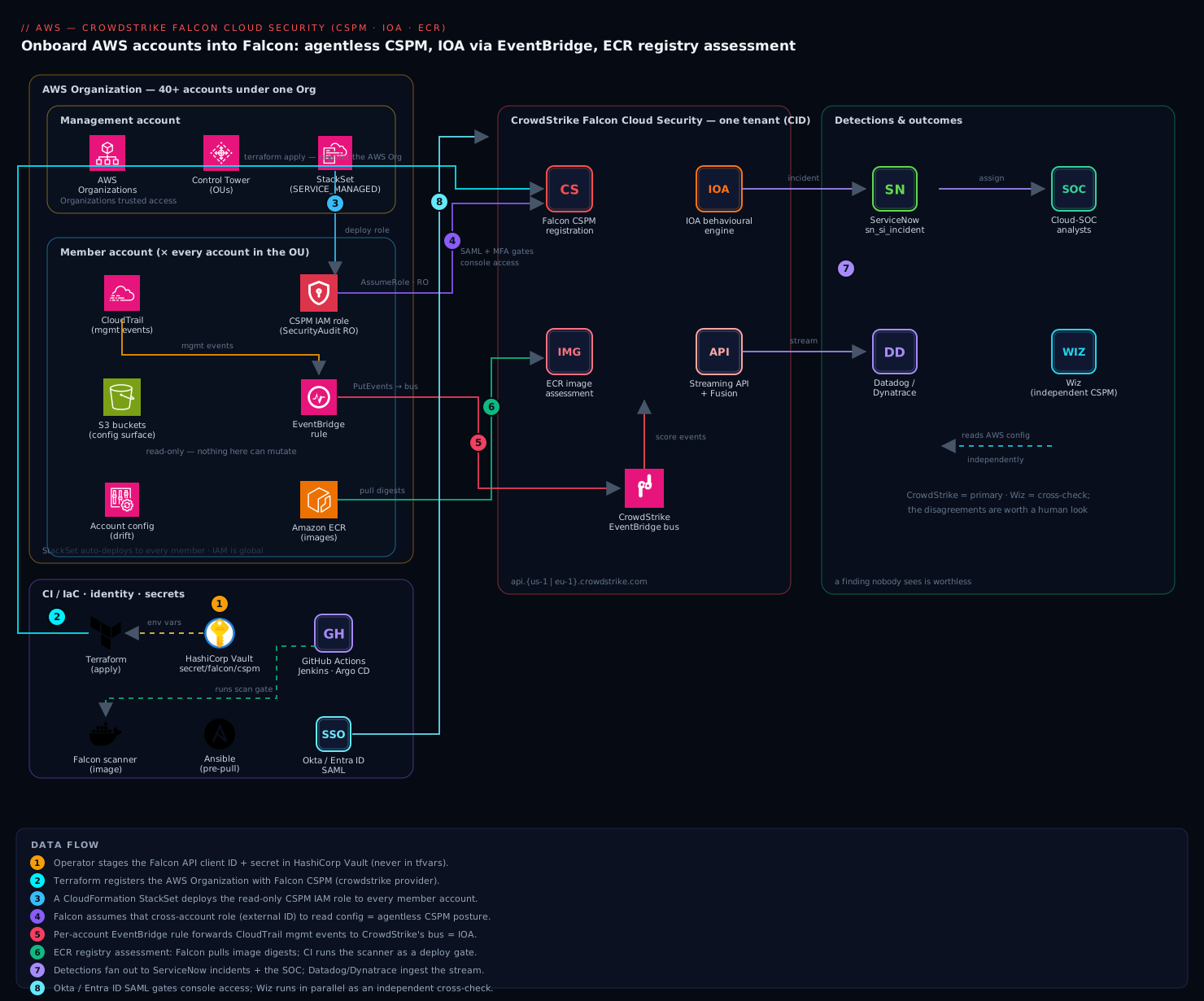
The picture has three flows landing in one Falcon tenant. CSPM is a cross-account IAM role per AWS account that Falcon assumes (read-only) from its own AWS account to enumerate your config. IOA is a per-account EventBridge rule that forwards CloudTrail management events to a CrowdStrike-owned EventBridge bus, where the behavioural engine scores them. ECR assessment is the Falcon image-assessment service pulling (or being pushed) image digests, with results surfaced in the console and queryable from CI. Around the edge: Okta/Entra gate console access; HashiCorp Vault holds the API credentials and the scan token; detections fan out to ServiceNow (incidents) and the SOC; Wiz runs in parallel as an independent posture cross-check; and Datadog/Dynatrace ingest the detection stream for dashboards. GitHub Actions / Jenkins / Argo CD call the ECR scan as a deploy gate.
1. Create the Falcon API client and stage credentials in Vault
Everything that follows is driven by the CrowdStrike Falcon API, so the first concrete step is a scoped API client and getting its secret out of human hands and into HashiCorp Vault.
In the Falcon console: Support and resources → API clients and keys → Create API client. Name it aws-cspm-onboarding, grant scopes CSPM registration: Read & Write and Falcon Container Image: Read & Write, and copy the client ID and secret once (the secret is shown exactly once).
Stash them in Vault and read them back as environment variables the Terraform CrowdStrike provider expects:
# Write once (an operator does this; the value never touches disk in CI)
vault kv put secret/falcon/cspm \
  client_id="$FALCON_CLIENT_ID" \
  client_secret="$FALCON_CLIENT_SECRET" \
  cloud="us-1"

# In the pipeline / shell, hydrate the provider's expected env vars
export FALCON_CLIENT_ID=$(vault kv get -field=client_id secret/falcon/cspm)
export FALCON_CLIENT_SECRET=$(vault kv get -field=client_secret secret/falcon/cspm)
export FALCON_CLOUD=$(vault kv get -field=cloud secret/falcon/cspm)
Confirm the credentials work and you can see the tenant before touching AWS:
# Quick OAuth2 smoke test against the Falcon API
curl -s -X POST "https://api.${FALCON_CLOUD}.crowdstrike.com/oauth2/token" \
  -H "Content-Type: application/x-www-form-urlencoded" \
  -d "client_id=${FALCON_CLIENT_ID}&client_secret=${FALCON_CLIENT_SECRET}" \
  | python3 -c "import sys,json;print('token-ok' if json.load(sys.stdin).get('access_token') else 'FAILED')"
A token-ok here means the rest of the guide will work. A failure now is a wrong cloud region (us-1, us-2, eu-1, us-gov-1) or a mistyped secret — fix it before proceeding.
2. Register the AWS Organization with Falcon CSPM (Terraform)
CrowdStrike publishes the crowdstrike/crowdstrike Terraform provider, which talks to the Falcon API to register the account and hand you back the exact IAM trust policy AWS must satisfy. The clean pattern is: register at the Org level, then deploy the IAM role into every member via a StackSet.
Define the provider and register the Organization:
terraform {
  required_providers {
    crowdstrike = { source = "crowdstrike/crowdstrike", version = "~> 0.4" }
    aws         = { source = "hashicorp/aws",         version = "~> 5.40" }
  }
}

# Reads FALCON_CLIENT_ID / FALCON_CLIENT_SECRET / FALCON_CLOUD from env
provider "crowdstrike" {}

# Register the whole AWS Org for agentless CSPM + IOA behavioural detection
resource "crowdstrike_cloud_aws_account" "org" {
  account_id           = "123456789012"          # the Org MANAGEMENT account
  organization_id      = "o-abcd1234ef"          # your AWS Organizations Org ID
  is_organization_mgmt = true

  asset_inventory   = { enabled = true }         # agentless CSPM config read
  realtime_visibility = {                        # IOA / behavioural detection
    enabled              = true
    cloudtrail_region    = "us-east-1"
  }
  sensor_management = { enabled = false }        # we already manage sensors separately
}

# What AWS must trust — Falcon hands these back after registration
output "iam_role_name"        { value = crowdstrike_cloud_aws_account.org.iam_role_name }
output "intermediate_role"    { value = crowdstrike_cloud_aws_account.org.intermediate_role_arn }
output "external_id"          { value = crowdstrike_cloud_aws_account.org.external_id }
output "eventbridge_role_arn" { value = crowdstrike_cloud_aws_account.org.eventbus_arn }
terraform init
terraform apply -target=crowdstrike_cloud_aws_account.org
After apply, terraform output external_id and iam_role_name give you the values the IAM role in the next step must use. The external ID is the confused-deputy protection: it is unique to your registration, and the cross-account role only trusts CrowdStrike when that exact external ID is presented.
3. Deploy the read-only CSPM IAM role to every account (StackSet)
CrowdStrike provides a CloudFormation template for the role, but doing it in Terraform via a CloudFormation StackSet keeps it in the same plan and rolls it to all accounts in the Org. The role is strictly read-only for posture and grants CrowdStrike’s account permission to assume it.
data "crowdstrike_cloud_aws_account" "reg" {
  account_id = "123456789012"
}

resource "aws_cloudformation_stack_set" "falcon_cspm_role" {
  name             = "CrowdStrike-CSPM-ReadOnly"
  permission_model = "SERVICE_MANAGED"           # uses Org trusted access, auto-deploys to members
  capabilities     = ["CAPABILITY_NAMED_IAM"]

  auto_deployment {
    enabled                          = true       # new accounts get the role automatically
    retain_stacks_on_account_removal = false
  }

  parameters = {
    RoleName     = data.crowdstrike_cloud_aws_account.reg.iam_role_name
    ExternalID   = data.crowdstrike_cloud_aws_account.reg.external_id
    CSRoleArn    = data.crowdstrike_cloud_aws_account.reg.intermediate_role_arn
  }

  # Pull the official CrowdStrike CSPM role template (pinned, reviewed in your repo)
  template_body = file("${path.module}/templates/cs-cspm-readonly-role.yaml")
}

resource "aws_cloudformation_stack_set_instance" "falcon_role_all" {
  stack_set_name = aws_cloudformation_stack_set.falcon_cspm_role.name
  deployment_targets {
    organizational_unit_ids = ["ou-abcd-11111111"]   # the OU(s) holding your member accounts
  }
  region = "us-east-1"                                  # IAM is global; one region pins the stack
}
terraform apply
# Watch the StackSet fan out
aws cloudformation list-stack-instances \
  --stack-set-name CrowdStrike-CSPM-ReadOnly \
  --query 'Summaries[].[Account,Status]' --output table
The role this creates attaches AWS-managed SecurityAudit plus a small CrowdStrike-specific read policy (for services SecurityAudit does not cover, like a few config-history and ECR describe calls). Nothing in it can mutate your environment — verify that claim yourself in step 7.
4. Turn on IOA behavioural detection via EventBridge
CSPM scanning (step 2) reads config on a schedule. IOA detection is the real-time half: it needs a copy of CloudTrail management events delivered to a CrowdStrike-owned EventBridge event bus, where the behavioural engine evaluates them against attack indicators. Because you set realtime_visibility.enabled = true in step 2, Falcon already provisioned the target bus and gave you eventbus_arn. Now create the per-account EventBridge rule that forwards events to it.
Add this to the StackSet template (so it lands in every account alongside the role), or deploy as its own StackSet:
resource "aws_cloudwatch_event_rule" "falcon_ioa" {
  name          = "cs-falcon-ioa-forward"
  description   = "Forward CloudTrail management events to CrowdStrike for IOA detection"
  event_pattern = jsonencode({
    detail-type = ["AWS API Call via CloudTrail"]
  })
}

resource "aws_cloudwatch_event_target" "falcon_ioa" {
  rule      = aws_cloudwatch_event_rule.falcon_ioa.name
  arn       = data.crowdstrike_cloud_aws_account.reg.eventbus_arn   # CrowdStrike's bus
  role_arn  = aws_iam_role.eventbridge_forward.arn                  # role allowing events:PutEvents
}
IOA detection assumes CloudTrail is actually capturing management events. If you do not already have an Org-wide trail, that is the prerequisite that makes IOA meaningful:
# Confirm an Org trail exists and is logging management events
aws cloudtrail describe-trails --query 'trailList[].[Name,IsOrganizationTrail]' --output table
aws cloudtrail get-trail-status --name org-management-trail --query 'IsLogging'
If IsLogging is false or no Org trail exists, create one before relying on IOA — otherwise the EventBridge rule forwards nothing and the SOC sees silence, not safety.
5. Enable ECR registry assessment
The third lens is your container supply chain. Falcon’s image assessment can scan Amazon ECR registries for vulnerabilities and embedded secrets. There are two integration styles; pick one per pipeline.
Style A — registry connection (Falcon pulls). Connect the ECR registry to Falcon so it inventories and assesses images on a schedule. Falcon assumes a read role into ECR (the CSPM role from step 3 already carries ecr:Describe*, ecr:GetDownloadUrlForLayer, ecr:BatchGetImage). Register the registry via the API:
ACCESS_TOKEN=$(curl -s -X POST "https://api.${FALCON_CLOUD}.crowdstrike.com/oauth2/token" \
  -d "client_id=${FALCON_CLIENT_ID}&client_secret=${FALCON_CLIENT_SECRET}" \
  | python3 -c "import sys,json;print(json.load(sys.stdin)['access_token'])")

curl -s -X POST "https://api.${FALCON_CLOUD}.crowdstrike.com/container-security/entities/registries/v1" \
  -H "Authorization: Bearer ${ACCESS_TOKEN}" \
  -H "Content-Type: application/json" \
  -d '{
        "type": "ecr",
        "url": "123456789012.dkr.ecr.us-east-1.amazonaws.com",
        "details": { "aws_iam_role": "arn:aws:iam::123456789012:role/CrowdStrike-ECR-Read",
                     "aws_external_id": "'"$(terraform output -raw external_id)"'" }
      }'
Style B — inline scan in CI (you push the image to the scanner). Better as a deploy gate: scan the image you just built, before it is promoted, and fail the build on policy. CrowdStrike ships a self-contained scanner image. In GitHub Actions:
- name: CrowdStrike image assessment (gate)
  env:
    FALCON_CLIENT_ID:     ${{ secrets.FALCON_CLIENT_ID }}
    FALCON_CLIENT_SECRET: ${{ secrets.FALCON_CLIENT_SECRET }}
  run: |
    docker run --rm \
      -v /var/run/docker.sock:/var/run/docker.sock \
      registry.crowdstrike.com/falcon-imageanalyzer/us-1/release/falcon-image-analyzer:latest \
      --client-id "$FALCON_CLIENT_ID" --client-secret "$FALCON_CLIENT_SECRET" \
      --cloud "$FALCON_CLOUD" \
      --image "123456789012.dkr.ecr.us-east-1.amazonaws.com/payments-api:${GIT_SHA}" \
      --fail-on "high"        # non-zero exit if a High/Critical CVE or secret is found
For Jenkins the same docker run goes in a sh step; for Argo CD, run the scan as a pre-sync hook job so a non-compliant image never syncs to the cluster. On self-hosted runners that lack the scanner image, an Ansible play (community.docker.docker_image) pre-pulls it so the gate step is fast and offline-safe.
6. Route detections to ServiceNow, the SOC, and your observability stack
A finding nobody sees is worthless. Falcon Cloud Security pushes CSPM findings and IOA detections out through its integrations and the streaming API.
- ServiceNow: enable the CrowdStrike ServiceNow app (or a Falcon Fusion workflow) so a New/High IOA detection or a Critical CSPM misconfiguration auto-creates a
sn_si_incidentwith the account, region, resource ARN, and the IOA narrative — the SOC works tickets, not a console firehose. - Datadog / Dynatrace: consume Falcon’s Streaming API (
/sensors/entities/datafeed/v2) to land detections as events/logs, so cloud-security signal sits on the same dashboards as platform health and a posture regression is visible next to a latency spike. - Wiz: run Wiz agentlessly in parallel as an independent posture engine. Two CSPM tools sounds redundant; in practice they disagree at the edges, and the disagreements are exactly the findings worth a human look. Treat CrowdStrike as the primary (it shares lineage with your runtime sensor and IOA narrative) and Wiz as the cross-check that the controls are real.
A minimal Fusion-to-ServiceNow trigger condition, expressed as the rule you configure in the console:
WHEN  cloud detection severity >= High
 AND  cloud provider = AWS
THEN  create ServiceNow incident  (assignment group = Cloud-SOC, priority = mapped from severity)
7. Validation
Prove each of the three lenses is live before you call it done.
CSPM is reading config. In the console, Cloud security → Account registration: every account shows status Active / Provisioned. From the API:
curl -s "https://api.${FALCON_CLOUD}.crowdstrike.com/cloud-connect-cspm-aws/entities/account/v1?status=provisioned" \
  -H "Authorization: Bearer ${ACCESS_TOKEN}" \
  | python3 -c "import sys,json;d=json.load(sys.stdin);print('accounts provisioned:',len(d.get('resources',[])))"
Then deliberately create a finding and watch it surface (do this in a sandbox account):
# Create an intentionally public bucket policy, then expect a CSPM finding within a scan cycle
aws s3api put-bucket-policy --bucket cs-test-public-bucket \
  --policy '{"Version":"2012-10-17","Statement":[{"Effect":"Allow","Principal":"*","Action":"s3:GetObject","Resource":"arn:aws:s3:::cs-test-public-bucket/*"}]}'
# In console: Cloud security → Assessment → filter "S3 bucket is publicly accessible" → expect the bucket listed
IOA is detecting behaviour. Trigger a classic indicator and confirm a detection appears under Cloud security → Detections (give it a few minutes for the EventBridge → bus → engine path):
# A commonly-flagged IOA: stopping CloudTrail logging (do this only in a sandbox!)
aws cloudtrail stop-logging --name org-management-trail
# Expect an IOA detection like "CloudTrail logging disabled" — then immediately re-enable:
aws cloudtrail start-logging --name org-management-trail
Verify the role is genuinely read-only (the claim from step 3). It should fail to mutate:
aws sts assume-role --role-arn "arn:aws:iam::<member>:role/CrowdStrike-CSPM-ReadOnly" \
  --role-session-name verify --external-id "$(terraform output -raw external_id)" >/tmp/cs.json
# Using those creds, a write must be denied:
AWS_ACCESS_KEY_ID=... aws s3api put-object --bucket any --key x 2>&1 | grep -q 'AccessDenied' \
  && echo "read-only confirmed"
ECR assessment ran. Confirm the CI gate fails closed by scanning a knowingly-vulnerable image and asserting a non-zero exit, then check the console Cloud security → Images lists the digest with its CVE count.
8. Rollback and teardown
Because every mutation went through Terraform and StackSets, teardown is clean and ordered — remove forwarders first so nothing dangles, then deregister.
# 1. Stop forwarding events (do this first so no orphaned rule points at a dead bus)
terraform destroy -target=aws_cloudwatch_event_target.falcon_ioa \
                  -target=aws_cloudwatch_event_rule.falcon_ioa

# 2. Remove the IAM role from all member accounts
terraform destroy -target=aws_cloudformation_stack_set_instance.falcon_role_all
terraform destroy -target=aws_cloudformation_stack_set.falcon_cspm_role

# 3. Deregister the account/Org from Falcon (also via API if Terraform state is gone)
terraform destroy -target=crowdstrike_cloud_aws_account.org

# API fallback to deregister if state is lost:
curl -s -X DELETE \
  "https://api.${FALCON_CLOUD}.crowdstrike.com/cloud-connect-cspm-aws/entities/account/v1?ids=123456789012" \
  -H "Authorization: Bearer ${ACCESS_TOKEN}"
For the ECR registry connection (Style A), delete it via the registries API DELETE …/registries/v1?ids=<registry_id>. Finally, rotate the Falcon API client in the console and remove secret/falcon/cspm from Vault if you are decommissioning entirely.
Common pitfalls
- Wrong Falcon cloud region.
api.us-1vsapi.eu-1vsapi.us-2— a token call against the wrong one fails with an opaque error. Confirm your tenant’s region in the console URL and pinFALCON_CLOUDin Vault. - External ID omitted or mismatched. The cross-account role refuses the assume-role without the exact external ID from your registration. Always source it from
terraform output, never hand-copy. - IOA enabled but CloudTrail off. Real-time visibility silently delivers nothing if there is no Org trail logging management events. The EventBridge rule existing is not enough — the trail must be
IsLogging = true. - StackSet not in
SERVICE_MANAGEDmode. Self-managed StackSets need an admin/exec role pair in every account; service-managed mode uses Org trusted access and auto-enrols new accounts, which is what you want. - ECR gate as warning, not gate. A scan that logs but does not fail the build trains everyone to ignore it. Use
--fail-on high(or stricter) and make it a required check. - Treating Falcon CSPM and the EC2 sensor as the same coverage. Agentless CSPM does not give you runtime process visibility, and the sensor does not give you config posture. You need both lenses; do not let one’s green dashboard imply the other.
Security notes
The CSPM role is read-only by design — verify that in step 7 rather than trusting it. Keep the Falcon API client scoped to exactly CSPM registration and Falcon Container Image; do not reuse a broad admin client. The OAuth2 secret and the ECR scan credentials live only in HashiCorp Vault and are injected at runtime — they must never appear in a .tfvars, a CI log, or git history. Gate human access to the Falcon console behind Okta / Entra ID SAML with MFA and map console roles to IdP groups so analyst, manager, and admin separation is enforced at the identity layer. Route every High/Critical detection to ServiceNow so there is an audited incident trail, and let Wiz independently confirm that the posture controls CrowdStrike reports are actually holding.
Cost notes
Agentless CSPM and IOA are licensed per cloud account/asset in your Falcon Cloud Security subscription, so the dominant cost lever is scoping — onboard the OUs that hold real workloads, and exclude pure sandbox OUs if your licensing is per-account. The AWS-side infrastructure (the IAM role, the EventBridge rule) is effectively free; the only AWS charge that scales is CloudTrail management-event delivery and any S3 storage for the trail, which you are almost certainly already paying. ECR inline scanning consumes CI minutes — cache the scanner image (the Ansible pre-pull above) so you pay for the scan, not a repeated multi-hundred-MB pull on every build. Finally, sending the detection stream to Datadog/Dynatrace incurs log-ingestion cost there; filter to High/Critical at the source if volume becomes a line item.