A payments company fails a PCI-DSS audit on a single finding: a database password sat in plaintext inside a Jenkins credential store, a Kubernetes Secret, and — the auditor found this with git log -p — three commits deep in a service’s repo where a junior engineer had pasted it “temporarily” eighteen months ago. The remediation mandate from the CISO is absolute: no application or pipeline may ever hold a long-lived database or API credential again. The platform team’s answer is CyberArk Conjur as the central secrets broker plus the Secretless Broker as a local sidecar that opens the actual connection on the app’s behalf — so the application code never sees the password, the pipeline never injects it as an environment variable, and there is nothing in a Secret, a log, or a layer of a container image to leak. This guide builds that end to end: Conjur policy, machine identity for GitHub Actions and Argo CD via JWT, Secretless connection profiles, and the operational glue. Every command here is real and runnable against a self-hosted Conjur Enterprise (or open-source Conjur) deployment.
Prerequisites
- A running Conjur follower reachable from your CI runners and clusters (Conjur Enterprise leader + followers, or open-source Conjur on a VM/cluster). This guide assumes the appliance URL
https://conjur.kloudvin.internaland accountkloudvin. - The
conjurCLI v8+ installed locally, andkubectlaccess to the cluster that runs your apps. - An OIDC-capable CI system: GitHub Actions (this guide) and Argo CD for GitOps app delivery. Jenkins is supported via the Conjur plugin; the JWT pattern below is preferred over the plugin for new work.
- A target PostgreSQL database (we use credentials for
appdb) and one third-party REST API key to demonstrate both connection-injection and generic-secret retrieval. - HashiCorp Vault already in use elsewhere in the estate — we will sync, not rip-and-replace.
- Workforce SSO through Okta federated to Entra ID, used to gate human access to the Conjur UI and CLI; machines never use human identity.
- A host with
docker/podmanfor running the Secretless Broker sidecar locally during testing.
Target topology
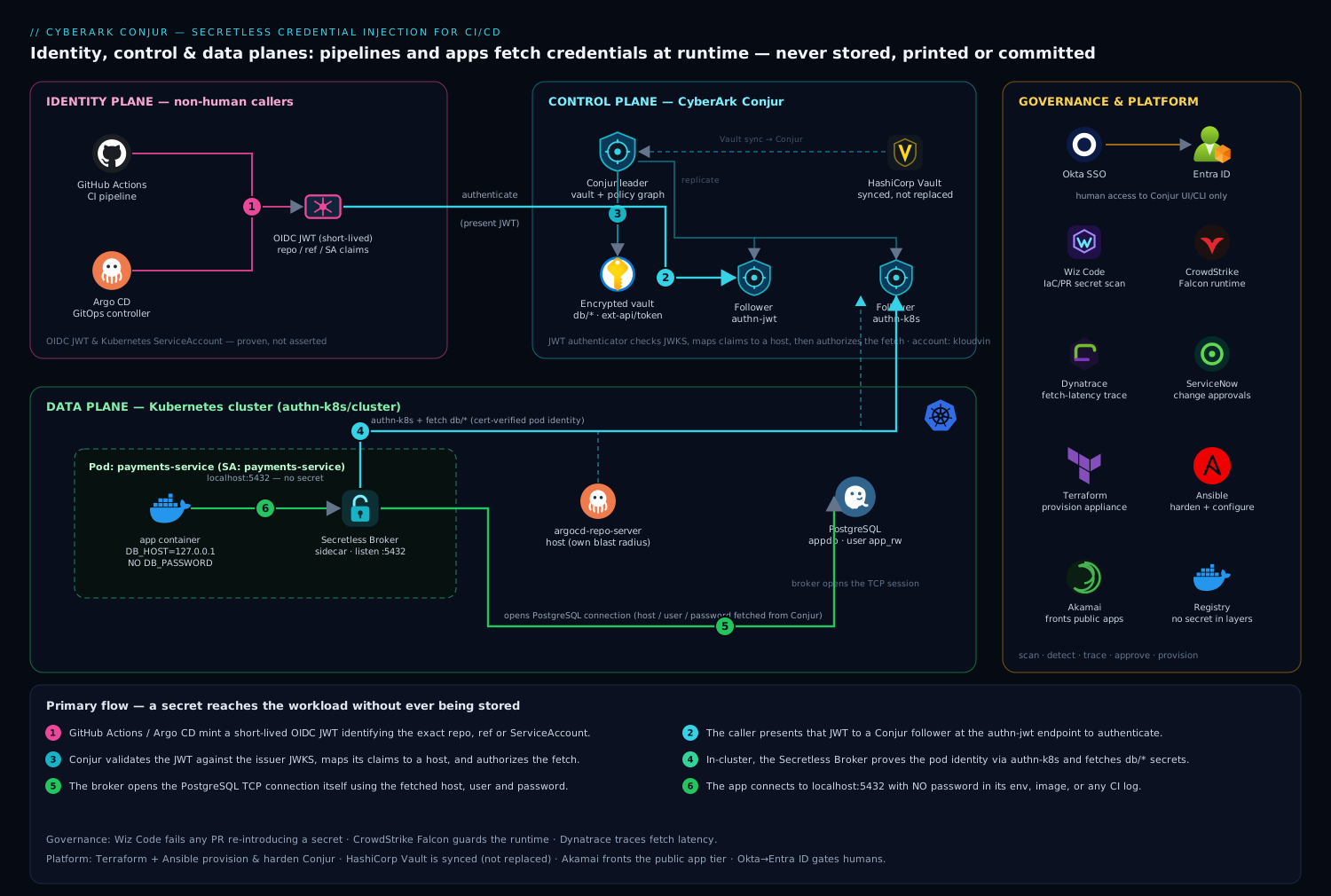
The design has three planes. The control plane is Conjur itself: the leader holds the encrypted vault and policy graph, followers serve read-heavy authentication and secret-fetch traffic close to the workloads. The identity plane is how non-human callers prove who they are — GitHub Actions and Argo CD present a short-lived OIDC JWT, Conjur validates it against the issuer’s JWKS and maps its claims to a Conjur host identity, and only then authorizes a fetch. The data plane is where the credential is actually used: the Secretless Broker runs as a sidecar next to the application, authenticates to Conjur with the workload’s identity, retrieves the database password, and opens the TCP connection to PostgreSQL itself — the app connects to localhost and never possesses the password. Around all three, Wiz Code scans IaC and pipelines for any secret that slips back in, CrowdStrike Falcon watches the broker and Conjur runtime, Dynatrace traces fetch latency, and ServiceNow carries the change approvals. Terraform and Ansible provision the appliance and policy; Akamai fronts the public-facing apps that ultimately use these credentials.
1. Bootstrap the Conjur CLI and admin session
Install and initialize the CLI against your follower, then log in. The first login uses the bootstrap admin API key minted during appliance configuration; rotate it immediately after (Step 9).
# Install the Conjur CLI (Go binary), then point it at the appliance
conjur init --url https://conjur.kloudvin.internal --account kloudvin --self-signed
conjur login --id admin           # prompts for the admin API key

# Sanity check the connection and your identity
conjur whoami
conjur server info
Human access to this admin session is itself gated: the Conjur UI is configured with Okta as the OIDC provider (federated to Entra ID), so an engineer authenticates with corporate SSO and conditional access before they ever reach a policy. Machines, by contrast, will use the JWT and Kubernetes authenticators below — never a human login, never a static admin key in a pipeline.
2. Define the policy: vaults, groups, and the secrets themselves
Conjur is policy-as-code. Author policy in YAML, version it in Git, and load it with the CLI. Start with the data layer — a policy branch that declares the variables (secrets) and the groups that may consume them. Save as policy/01-secrets.yml:
- !policy
  id: db
  body:
    # The PostgreSQL credential the app needs — host, port, db, user, password
    - &db-variables
      - !variable url
      - !variable port
      - !variable database
      - !variable username
      - !variable password

    # A consumer group; anything granted membership can fetch these secrets
    - !group consumers

    - !permit
      role: !group consumers
      privileges: [ read, execute ]
      resources: *db-variables

- !policy
  id: ext-api
  body:
    - !variable token            # a third-party REST API key
    - !group consumers
    - !permit
      role: !group consumers
      privileges: [ read, execute ]
      resource: !variable token
Load it under the root, then populate the secret values. The values are set once, here, by the platform team — never by the app and never in a pipeline:
conjur policy load -b root -f policy/01-secrets.yml

# Seed the PostgreSQL connection values (read from your secure source, not echoed)
conjur variable set -i db/url      -v "appdb.postgres.kloudvin.internal"
conjur variable set -i db/port     -v "5432"
conjur variable set -i db/database -v "appdb"
conjur variable set -i db/username -v "app_rw"
conjur variable set -i db/password -v "$(cat /run/secure/appdb_pw)"   # local secure file, deleted after

# Seed the external API key
conjur variable set -i ext-api/token -v "$(cat /run/secure/partner_api_key)"

# Verify the value is stored (this is the platform admin; apps never do this)
conjur variable get -i db/database
3. Configure the JWT authenticator for GitHub Actions
GitHub Actions can mint an OIDC token per job whose claims (repository, ref, workflow, environment) identify exactly which pipeline is calling. Conjur’s JWT authenticator validates that token against GitHub’s JWKS and maps it to a host. Save policy/02-authn-github.yml:
- !policy
  id: conjur/authn-jwt/github
  body:
    - !webservice

    # Where Conjur fetches GitHub's signing keys, and which claims to trust
    - !variable jwks-uri
    - !variable token-app-property      # the claim used as the host identifier
    - !variable identity-path
    - !variable issuer
    - !variable audience

    # The group of hosts allowed to authenticate via this service
    - !group authenticatable
    - !permit
      role: !group authenticatable
      privilege: [ read, authenticate ]
      resource: !webservice
Load it and set the authenticator configuration. token-app-property: repository means the host id is derived from the calling repo; audience pins the token to your Conjur so a token minted for any other service is rejected:
conjur policy load -b root -f policy/02-authn-github.yml

conjur variable set -i conjur/authn-jwt/github/jwks-uri \
  -v "https://token.actions.githubusercontent.com/.well-known/jwks"
conjur variable set -i conjur/authn-jwt/github/issuer \
  -v "https://token.actions.githubusercontent.com"
conjur variable set -i conjur/authn-jwt/github/token-app-property -v "repository"
conjur variable set -i conjur/authn-jwt/github/identity-path     -v "pipelines/github"
conjur variable set -i conjur/authn-jwt/github/audience          -v "https://conjur.kloudvin.internal"
Finally, enable the authenticator on the appliance. On Conjur Enterprise this is the CONJUR_AUTHENTICATORS env on the followers (or the UI toggle); the service id must match the policy branch:
# Append to the followers' authenticator allowlist, then restart the service
export CONJUR_AUTHENTICATORS="authn,authn-jwt/github,authn-jwt/argo,authn-k8s/cluster"
4. Declare the pipeline host and grant it the secrets
Now create the machine identity the GitHub job becomes, and add it to the consumers groups from Step 2. The host id must align with identity-path + the repository claim. Save policy/03-host-github.yml:
- !policy
  id: pipelines/github
  body:
    # Host id matches the GitHub "repository" claim: <org>/<repo>
    - !host
      id: kloudvin/payments-service
      annotations:
        authn-jwt/github/repository: kloudvin/payments-service

- !grant
  role: !group db/consumers
  member: !host pipelines/github/kloudvin/payments-service

- !grant
  role: !group ext-api/consumers
  member: !host pipelines/github/kloudvin/payments-service
conjur policy load -b root -f policy/03-host-github.yml
The host now exists and is permitted to read exactly db/* and ext-api/token — nothing else. Tighten further by adding a ref annotation (e.g. authn-jwt/github/ref: refs/heads/main) so only the main branch’s jobs authenticate; this stops a feature branch or a fork PR from fetching production credentials.
5. Fetch a secret from a GitHub Actions job (no secret stored)
In the workflow, request the OIDC token, exchange it at Conjur’s JWT endpoint for a short-lived access token, then fetch the variable. Nothing is stored in GitHub Secrets — the only inputs are the public Conjur URL and account.
# .github/workflows/deploy.yml
name: deploy
on: { push: { branches: [ main ] } }

permissions:
  id-token: write     # REQUIRED so GitHub will mint the OIDC JWT
  contents: read

jobs:
  migrate:
    runs-on: ubuntu-latest
    env:
      CONJUR_URL: https://conjur.kloudvin.internal
      CONJUR_ACCOUNT: kloudvin
    steps:
      - name: Get Conjur access token via OIDC JWT
        run: |
          JWT=$(curl -sS -H "Authorization: Bearer $ACTIONS_ID_TOKEN_REQUEST_TOKEN" \
            "$ACTIONS_ID_TOKEN_REQUEST_URL&audience=$CONJUR_URL" | jq -r '.value')
          ACCESS=$(curl -sS --request POST \
            "$CONJUR_URL/authn-jwt/github/$CONJUR_ACCOUNT/authenticate" \
            --header "Content-Type: application/x-www-form-urlencoded" \
            --data-urlencode "jwt=$JWT" | base64 | tr -d '\r\n')
          echo "::add-mask::$ACCESS"
          echo "CONJUR_ACCESS=$ACCESS" >> "$GITHUB_ENV"

      - name: Run DB migration without ever printing the password
        run: |
          # Retrieve and immediately consume — the value is masked and never persisted
          PW=$(curl -sS -H "Authorization: Token token=\"$CONJUR_ACCESS\"" \
            "$CONJUR_URL/secrets/$CONJUR_ACCOUNT/variable/db%2Fpassword")
          echo "::add-mask::$PW"
          PGPASSWORD="$PW" psql -h appdb.postgres.kloudvin.internal -U app_rw -d appdb \
            -f migrations/2026_06_add_index.sql
The token GitHub issues lives only for the job, the Conjur access token is valid for minutes, and the masking (::add-mask::) keeps both out of logs. For most workloads, though, you should not even fetch the password into the job — Step 6 removes that step entirely.
6. Deploy the Secretless Broker sidecar (the app never sees the password)
The Secretless Broker is the heart of the “secretless” claim. It runs as a sidecar, authenticates to Conjur with the workload’s identity (here, the Kubernetes authenticator), retrieves db/*, and opens the PostgreSQL connection itself, exposing a plain localhost:5432 to the app container. The application connects to localhost with no password configured at all.
First, the Secretless config — a ConfigMap defining one PostgreSQL listener whose credentials come from Conjur:
# secretless.yml (mounted into the broker container)
version: "2"
services:
  appdb-pg:
    connector: pg
    listenOn: tcp://0.0.0.0:5432
    credentials:
      host:     { from: conjur, get: db/url }
      port:     { from: conjur, get: db/port }
      username: { from: conjur, get: db/username }
      password: { from: conjur, get: db/password }
Then the Deployment with two containers — the app and the broker — sharing the pod network. Note the app’s DB_HOST=127.0.0.1 and the complete absence of any password in the app’s environment:
apiVersion: apps/v1
kind: Deployment
metadata: { name: payments-service }
spec:
  replicas: 3
  template:
    metadata:
      labels: { app: payments-service }
    spec:
      serviceAccountName: payments-service       # ties to the Conjur K8s host identity
      containers:
        - name: app
          image: registry.kloudvin.internal/payments-service:1.8.2
          env:
            - { name: DB_HOST, value: "127.0.0.1" }   # talk to the broker, not PG directly
            - { name: DB_PORT, value: "5432" }
            - { name: DB_NAME, value: "appdb" }
            # NO DB_PASSWORD anywhere — that is the whole point
        - name: secretless
          image: cyberark/secretless-broker:1.7.19
          args: ["-f", "/cfg/secretless.yml"]
          env:
            - { name: CONJUR_APPLIANCE_URL,   value: "https://conjur.kloudvin.internal" }
            - { name: CONJUR_ACCOUNT,         value: "kloudvin" }
            - { name: CONJUR_AUTHN_URL,       value: "https://conjur.kloudvin.internal/authn-k8s/cluster" }
            - { name: CONJUR_AUTHN_LOGIN,     value: "host/apps/payments-service" }
            - { name: CONJUR_SSL_CERTIFICATE, valueFrom: { configMapKeyRef: { name: conjur-cert, key: ca.pem } } }
          volumeMounts:
            - { name: cfg, mountPath: /cfg }
      volumes:
        - name: cfg
          configMap: { name: secretless-config }
The Kubernetes authenticator (authn-k8s/cluster) verifies the pod’s identity by injecting a certificate into the pod and confirming it via the Kubernetes API, so the host/apps/payments-service identity cannot be spoofed by a pod that is not actually that ServiceAccount in that namespace. The matching Conjur policy grants host/apps/payments-service membership in db/consumers exactly as in Step 4.
7. Wire Argo CD for GitOps delivery with its own identity
Your GitOps controller deploys the manifests above, and it too needs an identity — for example to read a Helm-values secret or a registry credential. Argo CD runs in-cluster, so it can use the same Kubernetes authenticator, but give it a distinct host so its blast radius is separate from the app’s. Add to policy:
- !policy
  id: apps
  body:
    - !host
      id: argocd-repo-server
      annotations:
        authn-k8s/cluster/namespace: argocd
        authn-k8s/cluster/service-account: argocd-repo-server
    - !host
      id: payments-service
      annotations:
        authn-k8s/cluster/namespace: payments
        authn-k8s/cluster/service-account: payments-service

- !grant
  role: !group ext-api/consumers
  member: !host apps/argocd-repo-server
Argo CD applies the Deployment from Step 6; the Terraform that provisioned the cluster and the Conjur followers, plus the Ansible playbook that configured the appliance hardening, are themselves stored in Git and reconciled the same way. A new policy branch or a new host grant flows through a pull request, a Wiz Code scan of that PR, and a ServiceNow change record before Argo CD or conjur policy load applies it — so granting a workload access to a secret is an auditable, reviewed change, not an ssh and a manual edit.
8. Sync existing HashiCorp Vault secrets into Conjur
You will not migrate everything at once. Run Conjur and HashiCorp Vault side by side and use the Conjur–Vault synchronizer so a secret rotated in Vault propagates into the corresponding Conjur variable, letting Secretless and the JWT flows consume it without each app needing a Vault client. Configure the sync mapping:
# Map a Vault KV path to a Conjur policy branch; the synchronizer is a CyberArk component
conjur-vault-sync map \
  --vault-path  "secret/data/appdb" \
  --conjur-branch "db" \
  --rotate-on-change

# Verify the mapped value resolves through Conjur after a Vault rotation
conjur variable get -i db/password   # reflects the latest Vault value
This lets teams already standardized on Vault keep their rotation tooling while consumers move to the secretless pattern incrementally. New secrets are authored directly in Conjur; legacy ones flow in from Vault until their owners cut over.
9. Rotate the bootstrap admin and enable secret rotation
Close the loop the audit opened: rotate the bootstrap admin key, and turn on automatic rotation for the database credential so even the central copy is short-lived.
# Rotate the admin's own API key and re-login with the new one
conjur user rotate-api-key
conjur login --id admin

# Configure rotation on the PostgreSQL password (Conjur Enterprise rotator)
conjur policy load -b db -f policy/04-rotation.yml   # declares a !rotator on db/password
With rotation on, Conjur periodically changes the PostgreSQL password and updates db/password; because the app uses Secretless, the broker simply fetches the new value on the next connection and the app never notices — no redeploy, no restart, no env var to update.
Validation
Prove each plane works before you trust it.
# 1. Identity plane: a host can authenticate and fetch only what it's permitted
conjur host show -i pipelines/github/kloudvin/payments-service
conjur resource exists -i variable:db/password        # -> true for permitted host

# 2. Data plane: the app connects through the broker with NO password
kubectl exec deploy/payments-service -c app -- \
  psql -h 127.0.0.1 -U app_rw -d appdb -c "select 1;"   # succeeds; app has no PG password

# 3. Negative test: a different namespace/SA is denied (authn-k8s mismatch)
kubectl -n other-ns run probe --image=cyberark/secretless-broker:1.7.19 --restart=Never \
  -- /bin/sh -c 'echo expect 401'     # broker logs a 401 from authn-k8s

# 4. Audit plane: every fetch is logged with the requesting host
conjur audit -i variable:db/password --limit 20
Then assert the failure that started the project is now impossible: grep the running app container and the GitHub job logs for the password string and confirm zero hits. Point Wiz Code at the repo and IaC to confirm no secret has crept back into a manifest, and confirm Dynatrace shows the Conjur fetch as a sub-millisecond span in the app’s trace so the broker is not a latency regression.
Rollback / teardown
Everything is policy-as-code, so teardown is ordered policy deletion plus workload removal. Delete in reverse dependency order — grants and hosts before the secrets and authenticators they reference.
# 1. Remove the workloads so nothing is mid-connection
kubectl delete deployment payments-service
argocd app delete payments-service --cascade

# 2. Revoke machine identities and their grants (use a delete-policy with !delete records)
conjur policy load -b root --delete -f policy/teardown-hosts.yml

# 3. Disable the authenticators on the followers
export CONJUR_AUTHENTICATORS="authn"     # drop authn-jwt/* and authn-k8s/*
# (restart followers to apply)

# 4. Remove the secret variables LAST, after nothing references them
conjur policy load -b root --delete -f policy/teardown-secrets.yml
For a non-destructive backout (incident, not decommission), you do not delete policy at all — you rotate the affected credential (conjur user rotate-api-key, or trigger the DB rotator) which instantly invalidates anything that may have leaked, and re-point apps to direct connections temporarily by reverting the Secretless ConfigMap. The Git history of your policy branch is the rollback record; revert the PR and let Argo CD reconcile.
Common pitfalls
id-token: writemissing in GitHub Actions. Without it GitHub will not mint the OIDC JWT and the authenticate call fails with no obvious cause. It is the single most common GitHub-side failure.- Audience mismatch. The
audienceyou set on the OIDC token request must exactly equal theaudiencevariable in Conjur, or every token is rejected. Pin it to the Conjur URL on both sides. - Over-broad host annotations. Mapping only
repositorylets any branch — including a fork’s PR — authenticate as the host. Addref/environmentannotations so only protected branches reach production secrets. - Broker config drift. The Secretless
connectormust match the backend (pg,mysql,mssql, generichttp); a wrong connector opens a listener that silently fails the handshake. Validate with the negative test above. - Forgetting the CA cert. The broker and CLI need the Conjur CA via
CONJUR_SSL_CERTIFICATE/--self-signed; a missing cert surfaces as a generic TLS error, not an auth error. - Deleting variables before grants. Conjur refuses (or orphans) if you remove a secret still referenced by a permitted group — always tear down grants and hosts first.
Security notes
The architecture is secretless by construction: the application binary, its container image, its environment, and every CI log are free of long-lived credentials, so the leak vectors that caused the audit finding simply do not exist. Identity is proven, not asserted — a GitHub job proves its repo and branch via a signed JWT, a pod proves its ServiceAccount via the injected certificate, and a human proves identity via Okta → Entra ID SSO with conditional access before touching the Conjur UI. Least privilege is the default: each host is granted exactly the consumers group it needs and nothing more, and ref/namespace annotations narrow it further. Defense in depth wraps the platform: CrowdStrike Falcon sensors on the Conjur leader/followers and the broker sidecars catch runtime tampering, Wiz Code fails any pull request that reintroduces a hardcoded secret into IaC or a pipeline, and a denied authentication or a policy change auto-raises a ServiceNow record for the security team. Turn on rotation (Step 9) so even the central copy is short-lived, and keep appliance access behind a bastion fronted by Akamai for the public app tier.
Cost notes
Conjur’s cost is dominated by the appliance footprint, not per-secret pricing: run the leader plus two followers as right-sized VMs (the followers are stateless read replicas — scale them horizontally to your authentication QPS rather than oversizing one box). The Secretless Broker is a lightweight sidecar (tens of MB RAM per pod); its only real cost is the per-pod overhead, which is negligible against the engineering and audit-remediation cost of a single leaked-credential incident. Reuse the existing HashiCorp Vault investment via the synchronizer instead of a forced migration, and let Argo CD + Terraform/Ansible drive the whole platform from Git so there is no bespoke automation to maintain. Meter Conjur fetch latency and follower load in Dynatrace (or Datadog if that is your standard) to size followers precisely and avoid paying for idle capacity. The dominant return is risk avoided: the PCI finding closes, and the class of failure that produced it is eliminated rather than patched.