A payments platform team keeps getting paged for the wrong things. Someone clicks “create monitor” in the Datadog UI during an incident, tunes the threshold by feel, and forgets it exists — six months later there are 340 monitors, nobody knows which are load-bearing, three of them alert on a host naming convention that was retired last year, and the on-call rotation has quietly muted the two that matter because they were too noisy. Meanwhile the SRE lead cannot answer the one question leadership keeps asking: “are we actually meeting the 99.9% checkout SLO we promised the merchants?” The fix is not another dashboard. It is to stop treating observability config as clickops and start treating it as code: every monitor, every SLO, every synthetic test, and every maintenance window defined in Terraform, reviewed in a pull request, and applied by a pipeline. This guide walks through doing exactly that with the official Datadog Terraform provider, end to end, with the real resource names and flags.
The payoff is concrete. A monitor change becomes a diff a teammate can review before it pages anyone. An SLO target is version-controlled, so “we lowered the threshold” is a commit with an author and a reason, not a mystery. Synthetic tests that probe the checkout flow from outside live next to the app they guard. And a planned deploy can ship a scheduled downtime in the same PR, so nobody gets paged for a maintenance window everyone knew about.
Prerequisites
- A Datadog account with an API key and an Application key (the app key must belong to a user/service account with admin or the granular
monitors_write,synthetics_write, andslos_writescopes). - Terraform >= 1.6 and the
DataDog/datadogprovider~> 3.50. - A remote state backend (this guide uses an S3 bucket with DynamoDB locking; any supported backend works).
- A CI runner — GitHub Actions here — that can reach
api.datadoghq.com(or your regional site, e.g.api.datadoghq.eu). - HashiCorp Vault reachable from CI for the Datadog keys, plus an existing integration emitting the metrics you will alert on (APM, a custom metric, or an integration like
aws.elb). - Datadog Synthetics enabled on the account, and at least one notification channel (a Slack integration and/or a ServiceNow integration for incident creation).
Target topology
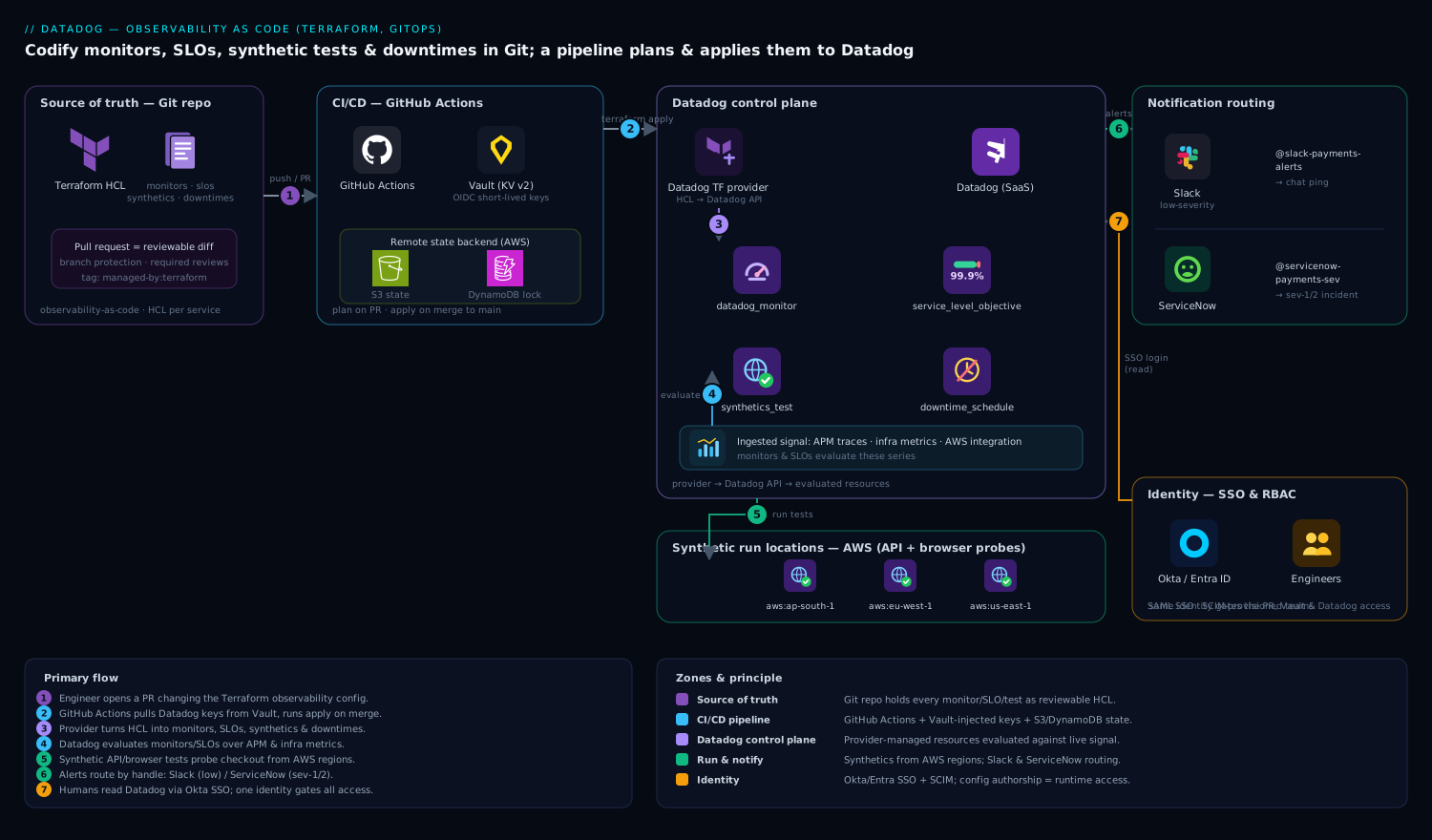
The shape is a single Git repository that is the source of truth for observability config, a CI pipeline that plans and applies it, and the Datadog control plane that the provider talks to. Engineers never touch the Datadog UI to create config; they read it there, but they change it in Terraform. Concretely:
- A Git repo (the
observability-as-coderepo) holds the Terraform: provider config, monitors, SLOs, synthetic tests, and downtime schedules, organized per service. - GitHub Actions runs
terraform planon every pull request and posts the plan as a PR comment; on merge tomainit runsterraform apply. The runner authenticates to Datadog with keys it pulls at job time from HashiCorp Vault (KV v2), so no Datadog secret is ever committed or stored as a long-lived CI variable. - The Datadog Terraform provider translates HCL into Datadog API calls, creating
datadog_monitor,datadog_service_level_objective,datadog_synthetics_test, anddatadog_downtime_scheduleresources. - Datadog itself ingests metrics from the application (APM traces, infra metrics, the AWS integration), evaluates the monitors and SLOs, and runs the synthetic API/browser tests from managed and (optionally) private locations.
- When a monitor triggers, notifications route by handle: Slack for low-severity, and a ServiceNow integration that opens an incident ticket for sev-1/sev-2, so the on-call has a record, not just a chat ping.
- Humans access Datadog through Okta (or Entra ID) SAML SSO with SCIM-provisioned teams, so the same identity that reviews the Terraform PR is the one whose RBAC governs what they can see in Datadog — config authorship and runtime access share one identity source.
Everything below builds this repo from an empty directory.
1. Lay out the repo and pin the provider
Create the project skeleton. Keeping one file per concern (monitors, SLOs, synthetics, downtimes) makes PR review legible and lets you terraform plan -target a single domain when you need to.
mkdir -p observability-as-code && cd observability-as-code
mkdir -p envs/prod
touch versions.tf provider.tf variables.tf \
      monitors.tf slos.tf synthetics.tf downtimes.tf outputs.tf
Pin the provider and Terraform versions explicitly. A floating provider version is how a terraform apply in CI silently changes behavior between two green PRs.
# versions.tf
terraform {
  required_version = ">= 1.6.0"

  required_providers {
    datadog = {
      source  = "DataDog/datadog"
      version = "~> 3.50"
    }
  }

  backend "s3" {
    bucket         = "kv-tfstate-observability"
    key            = "datadog/prod/terraform.tfstate"
    region         = "ap-south-1"
    dynamodb_table = "kv-tflock"
    encrypt        = true
  }
}
2. Wire credentials through Vault, never into HCL
The provider needs api_key, app_key, and api_url. Do not hardcode them and do not put them in a committed .tfvars. Read them from environment variables that CI populates from HashiCorp Vault at job time.
# provider.tf
provider "datadog" {
  # Reads DD_API_KEY / DD_APP_KEY / DD_HOST from the environment.
  # api_key  = var... <- intentionally omitted; use env vars.
  validate = true
}
Terraform’s Datadog provider reads DD_API_KEY, DD_APP_KEY, and DD_HOST from the environment automatically, so you only set those three. For local development against a non-prod org, export them from a Vault login:
export VAULT_ADDR="https://vault.kloudvin.internal:8200"
vault login -method=oidc   # Okta-backed OIDC auth to Vault

# KV v2 secret at secret/datadog/prod with keys api_key, app_key
export DD_API_KEY=$(vault kv get -field=api_key secret/datadog/prod)
export DD_APP_KEY=$(vault kv get -field=app_key secret/datadog/prod)
export DD_HOST="https://api.datadoghq.com"   # use api.datadoghq.eu for EU site

terraform init
terraform plan
In CI the same secrets come from Vault via the GitHub Actions Vault action (Step 8), so the keys live in exactly one place and rotate from there. Okta fronts both Vault login and Datadog SSO, so revoking a leaver in Okta cuts their access to the secret and the platform in one action.
3. Define monitors as code
Start with the alerts that actually wake people: a metric monitor on checkout error rate and a monitor on p99 latency. Use template variables and a shared notification block so every monitor speaks the same language to the on-call.
# variables.tf
variable "slack_low"   { default = "@slack-payments-alerts" }
variable "pager_high"  { default = "@servicenow-payments-sev" } # ServiceNow integration handle
variable "env"         { default = "prod" }
# monitors.tf
resource "datadog_monitor" "checkout_error_rate" {
  name    = "[${var.env}] Checkout error rate > 2%"
  type    = "metric alert"
  message = <<-EOT
    {{#is_alert}}
    Checkout error rate is {{value}}% over the last 5m (threshold 2%).
    Runbook: https://runbooks.kloudvin.io/checkout-errors
    ${var.pager_high}
    {{/is_alert}}
    {{#is_recovery}}Checkout error rate recovered.${var.slack_low}{{/is_recovery}}
  EOT

  query = <<-EOT
    sum(last_5m):sum:trace.http.request.errors{service:checkout,env:${var.env}}.as_count()
    / sum:trace.http.request.hits{service:checkout,env:${var.env}}.as_count() * 100 > 2
  EOT

  monitor_thresholds {
    critical = 2.0
    warning  = 1.0
  }

  notify_no_data    = true
  no_data_timeframe = 10
  renotify_interval  = 30
  require_full_window = false
  priority           = 1

  tags = ["service:checkout", "env:${var.env}", "team:payments", "managed-by:terraform"]
}

resource "datadog_monitor" "checkout_p99_latency" {
  name    = "[${var.env}] Checkout p99 latency > 800ms"
  type    = "metric alert"
  message = "Checkout p99 latency high. ${var.slack_low}"

  query = <<-EOT
    percentile(last_10m):p99:trace.http.request.duration{service:checkout,env:${var.env}} > 0.8
  EOT

  monitor_thresholds {
    critical = 0.8
    warning  = 0.6
  }

  priority = 2
  tags     = ["service:checkout", "env:${var.env}", "team:payments", "managed-by:terraform"]
}
A few choices that matter: managed-by:terraform on every resource lets you later query Datadog for any drift (monitors created by hand are the ones without that tag); require_full_window = false avoids the common false-recovery where a sparse metric flaps; and routing sev-1 to the @servicenow-... handle means a real incident opens a ServiceNow ticket automatically rather than living only in Slack.
4. Define SLOs that reference the monitors
An SLO turns the promise (“99.9% of checkouts succeed”) into a tracked, budgeted target. Datadog supports both metric-based and monitor-based SLOs. Use a metric-based SLO for the success-rate target and a monitor-based SLO that aggregates the latency monitor for an availability view.
# slos.tf
resource "datadog_service_level_objective" "checkout_success" {
  name        = "Checkout success rate"
  type        = "metric"
  description = "99.9% of checkout requests succeed (non-5xx)."

  query {
    numerator   = "sum:trace.http.request.hits{service:checkout,env:prod}.as_count() - sum:trace.http.request.errors{service:checkout,env:prod}.as_count()"
    denominator = "sum:trace.http.request.hits{service:checkout,env:prod}.as_count()"
  }

  # 30-day and 7-day rolling targets
  thresholds {
    timeframe = "30d"
    target    = 99.9
    warning   = 99.95
  }
  thresholds {
    timeframe = "7d"
    target    = 99.9
    warning   = 99.95
  }

  tags = ["service:checkout", "team:payments", "managed-by:terraform"]
}

resource "datadog_service_level_objective" "checkout_latency_avail" {
  name        = "Checkout latency availability"
  type        = "monitor"
  description = "Time the p99-latency monitor is in OK state."
  monitor_ids = [datadog_monitor.checkout_p99_latency.id]

  thresholds {
    timeframe = "30d"
    target    = 99.5
    warning   = 99.7
  }

  tags = ["service:checkout", "team:payments", "managed-by:terraform"]
}
The monitor-based SLO references datadog_monitor.checkout_p99_latency.id directly, so Terraform’s dependency graph guarantees the monitor exists before the SLO that consumes it — and if you delete the monitor, terraform plan will flag the now-broken SLO instead of leaving a dangling reference.
5. Add synthetic API and browser tests
Synthetics probe the service the way a user does, from outside your network — the signal a metric monitor cannot give you when the app is up but the login page 500s. Define an API test for a fast health-check and a browser test that walks the real checkout flow.
# synthetics.tf
resource "datadog_synthetics_test" "checkout_api_health" {
  name      = "API - checkout health endpoint"
  type      = "api"
  subtype   = "http"
  status    = "live"
  locations = ["aws:ap-south-1", "aws:eu-west-1", "aws:us-east-1"]
  message   = "Checkout health check failing. @slack-payments-alerts"
  tags      = ["service:checkout", "env:prod", "managed-by:terraform"]

  request_definition {
    method = "GET"
    url    = "https://checkout.kloudvin.io/healthz"
  }

  assertion {
    type     = "statusCode"
    operator = "is"
    target   = "200"
  }
  assertion {
    type     = "responseTime"
    operator = "lessThan"
    target   = "1500"
  }

  options_list {
    tick_every          = 60        # seconds between runs
    min_location_failed = 2         # alert only if >=2 locations fail (avoids one-region blips)
    retry { count = 1  interval = 300 }
    monitor_priority = 2
  }
}

resource "datadog_synthetics_test" "checkout_browser_flow" {
  name      = "Browser - end-to-end checkout"
  type      = "browser"
  status    = "live"
  device_ids = ["chrome.laptop_large"]
  locations  = ["aws:ap-south-1", "aws:eu-west-1"]
  message    = "End-to-end checkout journey broken. @servicenow-payments-sev"
  tags       = ["service:checkout", "env:prod", "managed-by:terraform"]

  request_definition {
    method = "GET"
    url    = "https://checkout.kloudvin.io/"
  }

  browser_step {
    name = "Click 'Add to cart'"
    type = "click"
    params { element = jsonencode({ targetOuterHTML = "<button>Add to cart</button>", url = "https://checkout.kloudvin.io/" }) }
  }
  browser_step {
    name = "Assert order confirmation visible"
    type = "assertElementContent"
    params {
      check = "contains"
      value = "Order confirmed"
      element = jsonencode({ targetOuterHTML = "<h1 class='confirm'></h1>" })
    }
  }

  options_list {
    tick_every          = 300
    min_location_failed = 1
    retry { count = 1  interval = 600 }
  }
}
min_location_failed = 2 on the API test is the difference between a useful alert and a 3 a.m. page for a transient hiccup in one AWS region. For checkout flows that must run from inside a VPC or behind the corporate edge, you would register a private location (a Datadog synthetics worker deployed as a container or virtual appliance in your network) and add its ID to locations; the test definition is otherwise identical. If your edge sits behind Akamai, point synthetic URLs at the public Akamai hostname so the test exercises the full CDN/WAF path a user actually traverses, not the origin directly.
6. Schedule downtimes for planned maintenance
The whole point of codifying downtimes is to ship the maintenance window in the same PR as the deploy it covers, so nobody gets paged for expected disruption. Use the modern datadog_downtime_schedule resource (the older datadog_downtime is deprecated).
# downtimes.tf
# Recurring weekly maintenance window (Sunday 02:00 IST), muting checkout monitors.
resource "datadog_downtime_schedule" "weekly_maintenance" {
  scope = "service:checkout AND env:prod"

  monitor_identifier {
    monitor_tags = ["service:checkout", "managed-by:terraform"]
  }

  recurring_schedule {
    timezone = "Asia/Kolkata"
    recurrence {
      start    = "2026-06-15T02:00:00"
      duration = "1h"
      rrule    = "FREQ=WEEKLY;INTERVAL=1;BYDAY=SU"
    }
  }

  display_timezone        = "Asia/Kolkata"
  notify_end_states       = ["alert", "warn"]
  notify_end_types        = ["expired", "canceled"]
  mute_first_recovery_notification = true
}
For a one-off deploy window, drop the recurring_schedule block and use one_time_schedule { start = "..." end = "..." } instead. Because the downtime targets monitor_tags, any new monitor you add later with service:checkout is automatically covered — no need to enumerate monitor IDs.
7. Plan and apply locally first
Before any CI runs, prove the config against a non-prod org from your workstation (with the Vault-exported keys from Step 2).
terraform init
terraform fmt -check          # fail the build on unformatted HCL
terraform validate
terraform plan -out=tfplan    # review every create/change
terraform apply tfplan
Read the plan carefully the first time: it should report only + create for net-new resources. If you already have hand-built monitors you want to bring under management, import them instead of letting Terraform create duplicates:
# Find the monitor ID in the Datadog UI URL, then:
terraform import datadog_monitor.checkout_error_rate 12345678
terraform plan   # should now show no changes if HCL matches reality
8. Promote to GitHub Actions
Now make the pipeline the only thing that touches prod. The workflow pulls Datadog keys from HashiCorp Vault at job time, plans on PRs, and applies on merge. No Datadog secret is stored in GitHub.
# .github/workflows/datadog-iac.yml
name: datadog-observability-as-code
on:
  pull_request: { paths: ["**.tf"] }
  push: { branches: [main], paths: ["**.tf"] }

permissions:
  contents: read
  id-token: write          # for OIDC to Vault and AWS state backend
  pull-requests: write     # to post the plan comment

jobs:
  terraform:
    runs-on: ubuntu-latest
    steps:
      - uses: actions/checkout@v4

      - name: Import Datadog secrets from Vault
        uses: hashicorp/vault-action@v3
        with:
          url: https://vault.kloudvin.internal:8200
          method: jwt
          role: gha-datadog-iac
          secrets: |
            secret/data/datadog/prod api_key | DD_API_KEY ;
            secret/data/datadog/prod app_key | DD_APP_KEY

      - uses: hashicorp/setup-terraform@v3
        with: { terraform_version: 1.6.6 }

      - name: Plan
        env:
          DD_HOST: https://api.datadoghq.com
        run: |
          terraform init
          terraform fmt -check
          terraform validate
          terraform plan -no-color -out=tfplan | tee plan.txt

      - name: Apply (main only)
        if: github.ref == 'refs/heads/main' && github.event_name == 'push'
        env:
          DD_HOST: https://api.datadoghq.com
        run: terraform apply -no-color -auto-approve tfplan
The vault-action exchanges the workflow’s OIDC token (id-token: write) for a short-lived Vault token bound to the gha-datadog-iac role, fetches the Datadog keys, and exports them as masked env vars for that job only. This is the same pattern that keeps long-lived credentials out of CI everywhere — the runner holds the keys for seconds, not forever.
Validation
After an apply, confirm the resources are real and behaving, both in Terraform’s view and in Datadog’s.
# 1. Terraform agrees the world matches the code (no drift)
terraform plan -detailed-exitcode
#   exit 0 = no changes (good); exit 2 = drift to investigate

# 2. List what Terraform now manages
terraform state list | grep -E "datadog_(monitor|service_level_objective|synthetics_test|downtime)"

# 3. Verify a monitor via the Datadog API directly
MID=$(terraform output -raw checkout_error_rate_id)
curl -sf -H "DD-API-KEY: $DD_API_KEY" -H "DD-APPLICATION-KEY: $DD_APP_KEY" \
  "https://api.datadoghq.com/api/v1/monitor/${MID}" | jq '.name, .overall_state'

# 4. Trigger a synthetic test on demand and check the result
TID=$(terraform output -raw checkout_api_test_public_id)
curl -sf -X POST -H "DD-API-KEY: $DD_API_KEY" -H "DD-APPLICATION-KEY: $DD_APP_KEY" \
  -H "Content-Type: application/json" \
  -d "{\"tests\":[{\"public_id\":\"${TID}\"}]}" \
  "https://api.datadoghq.com/api/v1/synthetics/tests/trigger" | jq '.results[].result_id'
Add the matching output blocks so those commands resolve:
# outputs.tf
output "checkout_error_rate_id"      { value = datadog_monitor.checkout_error_rate.id }
output "checkout_api_test_public_id" { value = datadog_synthetics_test.checkout_api_health.id }
output "checkout_slo_id"             { value = datadog_service_level_objective.checkout_success.id }
Then visually confirm in the Datadog UI: the SLO appears on the Service Level Objectives page with an error budget bar, the synthetic tests show green runs from each configured location, and the monitors list filters cleanly on managed-by:terraform. A healthy steady state is terraform plan returning exit code 0 in CI on every run.
Rollback and teardown
Because the config is code, rollback is a Git operation, not a frantic clickops session.
# Roll back a bad change: revert the commit and let CI re-apply the prior state.
git revert <bad-sha>
git push    # the pipeline plans + applies the reverted config

# Remove a single resource cleanly
terraform plan  -destroy -target=datadog_synthetics_test.checkout_browser_flow
terraform apply -destroy -target=datadog_synthetics_test.checkout_browser_flow

# Tear down everything this stack manages (non-prod cleanup)
terraform plan  -destroy -out=tf-destroy
terraform apply tf-destroy
Two safeguards before you ever run a broad destroy: first, terraform plan -destroy and read the list — a metric-based SLO or a downtime you forgot about can be in scope. Second, if you need to stop managing a resource without deleting it from Datadog, use terraform state rm <address> to drop it from state, leaving the live object untouched. Deleting a monitor that an SLO references will fail the apply until you remove the SLO too — which is the dependency graph protecting you, not fighting you.
Common pitfalls
- Wrong site /
403 Forbidden. EU, US3, US5, and AP1 orgs each have their own API host. SetDD_HOSTto the matchingapi.datadoghq.eu/api.us3.datadoghq.com/ etc., or every call 403s with a confusing auth error that looks like a bad key. - App key lacks scope. A newly created app key may not carry
monitors_write/synthetics_write/slos_write. The provider then fails on apply, not plan. Grant the scopes (or use an admin service account) up front. - Drift from clickops. Someone edits a Terraform-managed monitor in the UI; the next
terraform applysilently reverts it. Make that visible: alert on any monitor without themanaged-by:terraformtag, and treat UI edits to managed resources as a process bug. min_location_failed = 1everywhere. A single-region network blip then pages the team. Set it to ≥2 for multi-region API tests so a real outage (multiple locations) is required to alert.- Deprecated
datadog_downtime. New code should usedatadog_downtime_schedule; mixing the two on the same monitors produces overlapping, hard-to-debug mutes. - Synthetic browser-step brittleness. Selectors captured from the recorder break when the DOM changes. Prefer stable
data-testidhooks in the app and keep browser tests few and high-value; lean on cheap API tests for breadth. - No-data handling.
notify_no_data = trueis right for a service that should always emit; for a metric that legitimately goes quiet, it manufactures false alerts. Decide per monitor.
Security notes
Keys are the whole game. Hold the Datadog API and Application keys in HashiCorp Vault (KV v2) and inject them into CI via short-lived, OIDC-exchanged tokens (Step 8) so nothing long-lived sits in GitHub or a .tfvars. Scope the application key to a dedicated service account with only the write permissions it needs, not a human admin. Front Datadog itself with Okta (or Entra ID) SAML SSO and SCIM provisioning so platform access is governed by the same identity directory that gates the Vault secret — one offboarding action revokes both. Restrict who can merge to main on the observability repo with branch protection and required reviews, because a merge here can mute production alerting. If you run private-location synthetic workers as virtual appliances inside the VPC, treat them as production infrastructure: patch them, and scope their egress to Datadog’s intake only.
Cost notes
Three Datadog cost drivers show up here, and Terraform makes each one a reviewable decision rather than an accident. Synthetic test runs bill per check (API runs are cheap, browser runs cost more), so the tick_every interval you set in HCL is literally a line-item — a 60-second browser test across three locations is far pricier than a 5-minute one, and the diff makes that visible in review. Custom metrics behind your monitors and SLOs are billed by cardinality; alerting on a metric tagged with unbounded values (per-request IDs) can quietly explode the bill, so keep monitor queries on bounded tags like service and env. Synthetic and APM volume scale with traffic, so cap noisy tests and prune monitors that no longer fire — and because everything is code, a quarterly “delete the dead monitors” PR is a five-minute review, not an archaeology project. Pipe Datadog’s own usage metrics into a monitor (yes, codified here too) so a cost spike pages someone before the invoice does.