A mid-sized fintech just failed a SOC 2 control because a contractor logged into the Salesforce tenant from a personal, unpatched Windows laptop with nothing but a username, a password, and a one-time code copied off a shared spreadsheet. The CISO’s directive is blunt: every workforce login — to SaaS through Okta and to the corporate VPN — must prove two things before it is allowed. First, who you are, with a phishing-resistant second factor. Second, what you are logging in from — a company-managed, encrypted, EDR-protected device, not a kiosk in an airport lounge. Cisco Duo is the tool that proves both: it is the MFA factor Okta calls out to, the RADIUS MFA the VPN calls out to, and the device-trust engine that inspects posture on every authentication. This guide wires all three together, end to end, with real commands.
Prerequisites
- A Cisco Duo subscription at the Duo Beyond tier (Device Trust and the Trusted Endpoints policy require Beyond, not Essentials/Advantage).
- An Okta org with Super Admin access, and at least one app already assigned to a test user (we use Salesforce as the example SP).
- A VPN concentrator that speaks RADIUS — examples here use a Palo Alto GlobalProtect gateway, but Cisco ASA/Firepower, FortiGate, or any RADIUS client works the same way.
- A management certificate authority you control: Intune (for Entra-joined Windows), Jamf (for macOS), or an internal Microsoft AD CS. Device Trust verifies a client certificate that only a managed device can present.
- A Linux host (RHEL 9 or Ubuntu 22.04) to run the Duo Authentication Proxy — the RADIUS-to-Duo bridge. 2 vCPU / 4 GB is plenty.
- HashiCorp Vault reachable from that host, for the proxy’s RADIUS shared secret and the Duo integration keys (never hand-edit secrets into the config file).
- Terraform ≥ 1.7 with the
cisco/duoandokta/oktaproviders, and an existing CrowdStrike Falcon + Wiz deployment for the posture-signal half of this design.
Target topology
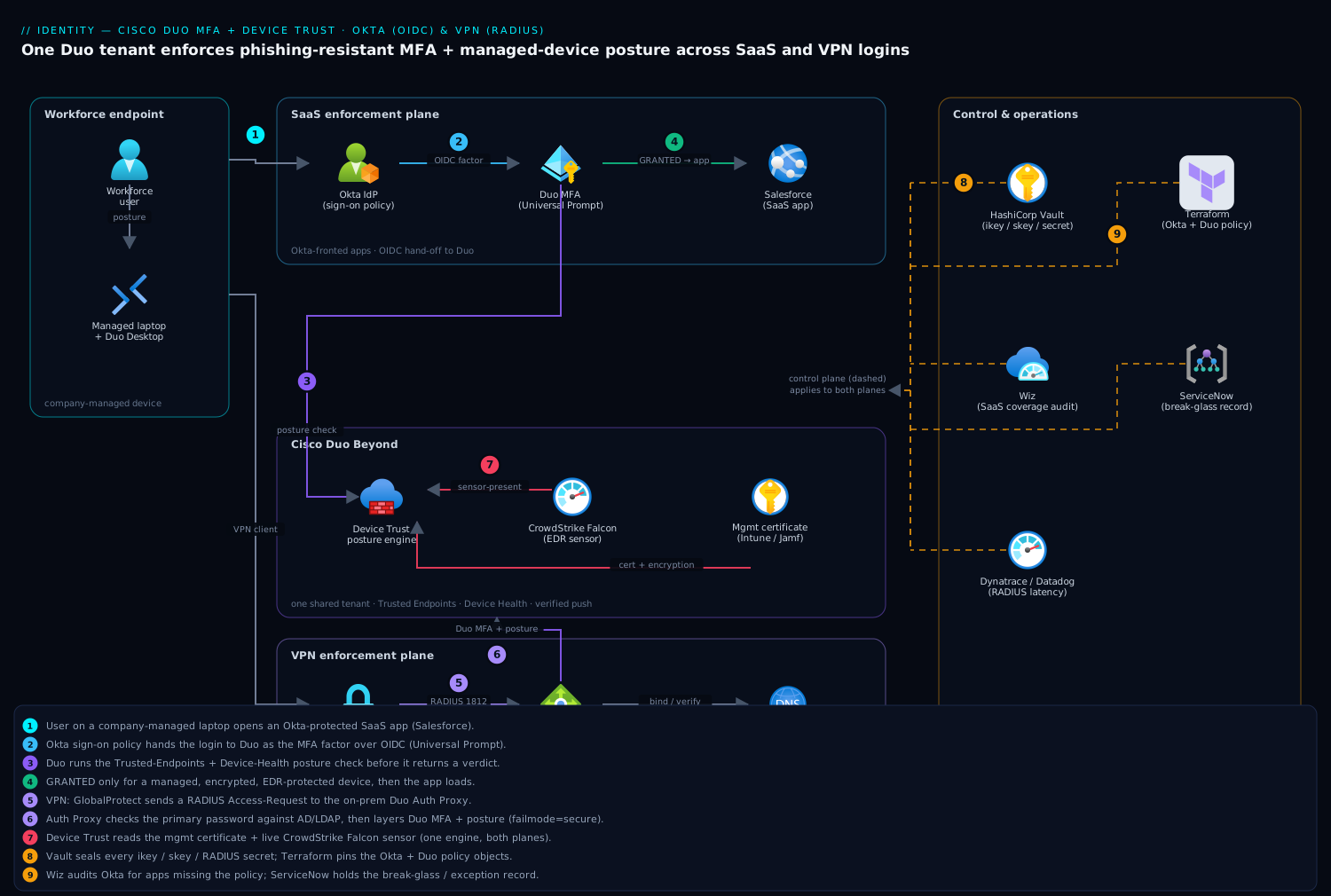
Two enforcement planes share one Duo tenant. On the SaaS plane, a user hits an Okta-protected app; Okta runs its sign-on policy, hands off to Duo as the MFA factor over OIDC, and Duo runs the device-trust posture check before returning a pass. On the VPN plane, the GlobalProtect gateway speaks RADIUS to the on-prem Duo Authentication Proxy, which validates the primary credential against Okta/LDAP and then layers Duo MFA plus posture on top. Both planes draw their device-trust verdict from the same place: a management certificate that proves the device is enrolled, plus live posture (disk encryption, firewall, OS patch level, and the presence of the CrowdStrike Falcon sensor) read by the Duo Desktop agent. HashiCorp Vault holds every shared secret and integration key; Terraform declares the Okta and Duo policy objects; ServiceNow is the break-glass and exception system of record; and Wiz continuously audits that no SaaS app slipped out from behind the MFA policy.
The walkthrough below builds the SaaS plane first (steps 1–4), then the VPN plane (steps 5–6), then hardens posture and operations across both (steps 7–9).
1. Create the Duo applications and seal the keys in Vault
Duo models every integration as an “application,” each with its own integration key (ikey), secret key (skey), and API hostname. You need two: one Okta application (Single Sign-On / OIDC type) and one RADIUS application for the VPN proxy. Create them with Terraform so they are reproducible and reviewable, not click-ops.
# providers.tf
terraform {
  required_providers {
    duo  = { source = "cisco/duo",  version = "~> 0.3" }
    okta = { source = "okta/okta",  version = "~> 4.9" }
  }
}

# duo_apps.tf
resource "duo_integration" "okta_mfa" {
  name = "Okta MFA - Workforce SSO"
  type = "sso-oidc"          # Okta-as-SP, Duo Universal Prompt
}

resource "duo_integration" "vpn_radius" {
  name = "GlobalProtect VPN - RADIUS"
  type = "radius"
}

output "okta_mfa_ikey"  { value = duo_integration.okta_mfa.integration_key }
output "vpn_radius_ikey" { value = duo_integration.vpn_radius.integration_key }
Never let the skey land in Terraform state in cleartext for long. Immediately push both integrations’ keys into HashiCorp Vault under a KV mount the Auth Proxy host and the Okta admin tooling can read with a short-lived token:
# Seal Duo secrets in Vault (run once, from a host with a Vault token)
vault kv put secret/duo/okta-mfa \
  ikey="$(terraform output -raw okta_mfa_ikey)" \
  skey='DUOSKEYxxxxxxxxxxxxxxxxxxxxxxxxxx' \
  api_host='api-abc12345.duosecurity.com'

vault kv put secret/duo/vpn-radius \
  ikey="$(terraform output -raw vpn_radius_ikey)" \
  skey='DUOSKEYyyyyyyyyyyyyyyyyyyyyyyyyyy' \
  api_host='api-abc12345.duosecurity.com' \
  radius_secret="$(openssl rand -base64 32)"
The radius_secret is the shared secret the VPN concentrator and the Auth Proxy use to trust each other — generate it here, store it once, and reference it from both sides.
2. Register Duo as an Identity Provider / MFA factor in Okta
Okta calls Duo as a factor during its sign-on flow. The clean, modern path is Duo’s Universal Prompt over OIDC, registered in Okta as a custom IdP factor. In the Okta Admin console: Security → Multifactor → Factor Types → Duo Security, then supply the three values you just stored in Vault.
Integration key (ikey):  <vault: secret/duo/okta-mfa#ikey>
Secret key (skey):       <vault: secret/duo/okta-mfa#skey>
API hostname:            api-abc12345.duosecurity.com
Okta username format:    Username (matches Duo username = Okta login)
The username format line is the one teams get wrong: the identifier Okta sends to Duo must exactly match the username on the Duo user record, or every login fails closed with “user not found.” Standardize on the user’s primary email/UPN on both sides. If your IdP of record is Microsoft Entra ID rather than Okta, the equivalent is adding Duo as an external authentication method via the Entra customAuthenticationExtension — the rest of this guide’s posture logic is identical; only the broker changes.
3. Bind Duo to a sign-on policy and require it for the app
Registering the factor does nothing until a sign-on policy requires it. Create a dedicated app sign-on policy so you can pilot on one app before going org-wide. Declare it in Terraform against the Okta provider:
# okta_policy.tf
resource "okta_app_signon_policy" "salesforce_mfa" {
  name        = "Salesforce - Duo MFA + Device Trust"
  description = "Require Duo factor and managed-device posture"
}

resource "okta_app_signon_policy_rule" "require_duo" {
  policy_id                   = okta_app_signon_policy.salesforce_mfa.id
  name                        = "Require Duo MFA every 8h"
  factor_mode                 = "2FA"
  re_authentication_frequency = "PT8H"        # step-up at most every 8 hours
  constraints = [jsonencode({
    knowledge      = { types = ["password"] }
    possession     = { hardwareProtection = "REQUIRED", phishingResistant = "REQUIRED" }
  })]
  custom_expression = "device.managed == true"  # Okta-side managed signal
  access            = "ALLOW"
}
Then attach the policy to the app (in the Okta UI: the app’s Sign On tab → Authentication policy → select Salesforce - Duo MFA + Device Trust). The phishingResistant = REQUIRED constraint pushes users toward Duo’s verified push and platform authenticators (Touch ID/Windows Hello) instead of phishable SMS codes — set the matching method restrictions inside the Duo policy in step 7.
4. Smoke-test the SaaS plane before you touch the VPN
Validate one full login before adding the second enforcement plane — debugging two new systems at once is how outages start. Enroll your test user in Duo, assign them the app, and log in.
# Confirm the user exists in Duo with the exact Okta username
curl -s -X GET "https://api-abc12345.duosecurity.com/admin/v1/users?username=jdoe@fintech.com" \
  --header "Authorization: Basic $(printf '%s:%s' "$DUO_IKEY" "$DUO_SKEY" | base64)" | jq '.response[].status'
# expect: "active"
Open the app in a fresh browser session. You should get: Okta password prompt → Duo Universal Prompt → a push to the enrolled phone or a Touch ID tap → app loads. Watch it land in the Duo Admin → Reports → Authentication Log as Granted / User approved. If you see Denied / no_keys the ikey/skey are mismatched; if Denied / user_not_found the username format in step 2 is wrong.
5. Stand up the Duo Authentication Proxy for the VPN
The VPN does not speak Duo natively — it speaks RADIUS. The Duo Authentication Proxy is the bridge: the VPN sends a RADIUS Access-Request, the proxy validates the primary password against your directory, then performs Duo MFA, and only then returns Access-Accept. Install it on the Linux host:
sudo dnf install -y gcc make libffi-devel perl zlib-devel  # RHEL 9 build deps
curl -L https://dl.duosecurity.com/duoauthproxy-latest-src.tgz -o /tmp/dap.tgz
tar xzf /tmp/dap.tgz -C /opt && cd /opt/duoauthproxy-*-src
sudo ./build && sudo ./duoauthproxy-build/install --install-dir /opt/duoauthproxy
Render its config from Vault rather than writing secrets to disk. A small wrapper pulls the keys and the shared secret at deploy time (this script lives in /tmp or your config-management repo, not in the article tree):
# /opt/duoauthproxy/conf/authproxy.cfg  (rendered by Ansible/Vault Agent)
[duo_only_client]

[radius_server_auto]
ikey=<vault: secret/duo/vpn-radius#ikey>
skey=<vault: secret/duo/vpn-radius#skey>
api_host=api-abc12345.duosecurity.com
radius_ip_1=10.20.0.5            # GlobalProtect gateway management IP
radius_secret_1=<vault: secret/duo/vpn-radius#radius_secret>
client=ad_client                  # validate primary creds against AD/LDAP first
failmode=secure                   # if Duo is unreachable, DENY (never fail-open)
port=1812

[ad_client]
host=dc01.corp.fintech.com
service_account_username=svc-duo-radius
service_account_password=<vault: secret/duo/vpn-radius#svc_pw>
search_dn=DC=corp,DC=fintech,DC=com
failmode=secure is the single most important line for a VPN: if Duo’s cloud is unreachable, the proxy denies rather than waving everyone through. A fail-open VPN MFA is worse than no MFA because it gives false assurance. Start and enable the service:
sudo systemctl enable --now duoauthproxy
sudo journalctl -u duoauthproxy -f | grep -i "listening\|error"
# expect: "Listening for RADIUS connections on 0.0.0.0:1812"
6. Point the VPN gateway at the proxy
Configure the VPN concentrator to use the Auth Proxy as its RADIUS server. On Palo Alto GlobalProtect, that is a RADIUS server profile plus an authentication profile bound to the portal/gateway:
# Device > Server Profiles > RADIUS
Name:            DUO-RADIUS
Server:          duo-authproxy-01 (10.20.0.30)  Port: 1812
Secret:          <radius_secret from Vault>
Timeout:         60   # MUST exceed the time a user takes to approve a push
Retries:         1    # do NOT retry — a retry sends a SECOND push

# Device > Authentication Profile
Name:            GP-DUO-MFA
Type:            RADIUS  →  Server Profile: DUO-RADIUS

# Network > GlobalProtect > Gateways/Portal  →  Authentication
Authentication Profile: GP-DUO-MFA
Two timing details are non-obvious and cause most VPN-MFA tickets. Set the RADIUS timeout to 60 seconds — the default 3s fires long before a human taps “approve,” producing a confusing instant failure. And set retries to 1 (no retry) — a retransmitted Access-Request triggers a second Duo push, so users get double-prompted and the second push’s denial overrides the first’s approval. Test by connecting the GlobalProtect client: password → push → tunnel up.
7. Turn on Device Trust and the Trusted Endpoints posture policy
This is the step that turns “MFA” into “MFA from a managed device.” In Duo Admin → Trusted Endpoints, enable an integration that issues the management certificate Duo will check: Intune, Jamf Pro, or a generic management certificate from your AD CS. Duo’s Duo Desktop agent (deployed to every laptop via Intune/Jamf) presents that certificate and reads live posture during authentication.
Duo Admin > Trusted Endpoints > Add Integration
  Type:            Microsoft Intune  (Entra-joined Windows)
  Verification:    Management certificate via Duo Desktop
  Block untrusted: Yes, for the Okta + RADIUS applications

Duo Admin > Policy (global) > Trusted Endpoints
  Require endpoints to be trusted:  Enforce  (was: Allow + report-only)
Always run the policy in report-only / “Allow but log” for at least a week first, so you can see in the Authentication Log how many real users would be blocked before you flip it to Enforce. Then layer the Device Health policy so an unhealthy managed device still fails:
Duo Admin > Policy > Device Health Application (Duo Desktop)
  Require Duo Desktop:                    Enforce
  Windows:  Firewall ON, Disk encryption (BitLocker) ON,
            OS not older than N-1, no debug/dev mode
  macOS:    Firewall ON, FileVault ON, System Integrity Protection ON
  Endpoint security agent present:        CrowdStrike Falcon   # block if sensor absent
  Out-of-date action:                     Block  (not "warn")
The “Endpoint security agent present: CrowdStrike Falcon” check is the bridge between EDR and access: if a laptop’s Falcon sensor has been killed or removed, Duo refuses the login, so a tampered device cannot reach SaaS or the VPN even with valid creds and a phone in hand. For deeper signal, CrowdStrike Falcon’s Zero Trust Assessment (ZTA) score and Wiz Code findings on the user’s repos can feed risk-based step-up — but the baseline “agent must be running” check is what every team should ship first.
8. Validation
Verify both planes, both the happy path and the intended denials — a control you have not seen block something is a control you do not actually have.
# 8a. SaaS plane — managed device, healthy: expect GRANTED
#     Log into Salesforce on a corp laptop with Duo Desktop + Falcon running.
#     Duo Admin > Reports > Authentication Log:
#       Result=Granted  Access Device: "Trusted"  Application: "Okta MFA - Workforce SSO"

# 8b. SaaS plane — UNmanaged device: expect DENIED (the control working)
#     Same login from a personal browser with no Duo Desktop:
#       Result=Denied   Reason="Endpoint is not in management system"

# 8c. VPN plane — RADIUS end-to-end test from the proxy host itself
radtest jdoe@fintech.com 'CorrectHorse' 10.20.0.30 1812 "$RADIUS_SECRET"
#   -> sends a real Duo push; approve it -> "Access-Accept"
#   -> deny/ignore it           -> "Access-Reject"

# 8d. VPN fail-secure check — block the proxy's egress to Duo, retry:
sudo iptables -A OUTPUT -d api-abc12345.duosecurity.com -j DROP
radtest jdoe@fintech.com 'CorrectHorse' 10.20.0.30 1812 "$RADIUS_SECRET"
#   -> expect Access-Reject (failmode=secure). Then REMOVE the rule:
sudo iptables -D OUTPUT -d api-abc12345.duosecurity.com -j DROP
Cross-check the Dynatrace (or Datadog) RADIUS-latency dashboard while you test 8c: a healthy push round-trip is well under the 60s timeout, and a creeping p95 is your early warning that the Auth Proxy or Duo region is degrading before users start filing tickets. Pipe the Auth Proxy’s journald logs and Okta’s System Log into the same observability backend so both planes are visible in one pane.
9. Rollback / teardown
Have the un-break path ready before you enforce, because an MFA mistake locks out the whole workforce, not just you. Roll back in reverse order of blast radius.
# Fastest, lowest-risk rollback (posture too aggressive, users blocked):
Duo Admin > Policy > Trusted Endpoints:  Enforce -> "Allow but log"  (instant, no restart)
Duo Admin > Policy > Device Health:      Block   -> "Warn"

# SaaS plane rollback (Duo factor itself is the problem):
Okta > the app's Sign On tab > swap the authentication policy back to "Default"
#   or in Terraform: set okta_app_signon_policy_rule.require_duo factor_mode = "1FA"
terraform apply -target=okta_app_signon_policy_rule.require_duo

# VPN plane rollback (proxy/RADIUS broken, users can't connect):
#   On GlobalProtect, point the Authentication Profile back to the prior
#   LDAP/SAML profile (keep the old profile — do NOT delete it during cutover).

# Break-glass for a single locked-out admin (audited, time-boxed):
#   A pre-created ServiceNow request grants a 60-min bypass code:
curl -s -X POST "https://api-abc12345.duosecurity.com/admin/v1/users/$DUO_UID/bypass_codes" \
  -d "count=1" -d "valid_secs=3600" \
  --header "Authorization: Basic $(printf '%s:%s' "$DUO_IKEY" "$DUO_SKEY" | base64)"

# Full teardown of the pilot:
terraform destroy -target=duo_integration.okta_mfa -target=duo_integration.vpn_radius
sudo systemctl disable --now duoauthproxy
vault kv delete secret/duo/okta-mfa secret/duo/vpn-radius
Keep the prior VPN authentication profile and Okta default policy in place for the entire cutover window. The single most common production incident here is deleting the fallback path on day one and then discovering the new path has a username-format bug — with no way back in.
Common pitfalls
- Username mismatch between Okta/AD and Duo (
user_not_found). Standardize on email/UPN on every side; this is the number-one cause of total lockout. - Fail-open RADIUS. Leaving
failmode=safemeans an outage at Duo’s cloud silently lets everyone onto the VPN with no MFA. Usefailmode=secureand accept that a Duo outage blocks new VPN sessions — that is the correct, auditable behavior. - Double pushes on VPN. RADIUS retries and short timeouts each fire a second Duo prompt; set retries=1 and timeout=60.
- Enforcing Trusted Endpoints cold. Always run report-only first; flipping straight to Enforce blocks every BYOD and not-yet-enrolled device at once and floods the help desk.
- Forgetting an app. A new SaaS app added in Okta without the Duo sign-on policy is an unguarded door. Let Wiz continuously inventory Okta apps and alert when one lacks the MFA + device-trust policy, so coverage drift surfaces automatically instead of in the next audit.
- No bypass plan. Without a pre-created, ServiceNow-tracked break-glass procedure, your first locked-out admin is a Sev-1.
Security notes
This design is Zero Trust for the workforce login: identity is proven by a phishing-resistant Duo factor, and the device is proven by a management certificate plus live posture — neither alone is enough. Drive method restrictions in the Duo policy so weak factors (SMS, phone call) are disabled and only verified push and platform authenticators (Touch ID / Windows Hello) are allowed; verified push defeats the “approve the prompt to make it stop” MFA-fatigue attack. Bind the CrowdStrike Falcon “sensor present” check so a disabled-EDR device is denied, and feed Falcon’s Zero Trust Assessment score plus Wiz SaaS-posture findings into risk-based step-up for higher-risk sessions. Every secret — Duo skey, RADIUS shared secret, the AD service-account password — lives in HashiCorp Vault with short-lived leases, never in the proxy config or Terraform state in cleartext. Pin Okta and Duo policy objects in Terraform so a change is reviewed in a pull request, and let ServiceNow be the system of record for every bypass and exception, so the audit trail is complete.
Cost notes
The dominant cost is the Duo Beyond per-user, per-month subscription — Beyond is required because Device Trust and Trusted Endpoints are not in the cheaper tiers, so right-size the licensed population (employees + long-lived contractors, not every transient guest). The Duo Authentication Proxy is free software on a small VM (2 vCPU / 4 GB ≈ a few dollars a month); run two behind the VPN’s RADIUS server list for high availability — cheap insurance against a single-host failure taking down all VPN logins. Okta MFA factor integration carries no extra Okta cost beyond your existing per-user tier. The real saving is on the other side of the ledger: a single avoided credential-stuffing breach or a passed SOC 2 / ISO 27001 audit dwarfs the annual Duo spend, which is exactly the business case the CISO will take to finance.