A payments platform team runs forty microservices across two AWS regions, and the on-call rotation is drowning. Dynatrace sees everything — which is exactly the problem. Every dashboard shows all forty services, every Davis problem card pages the whole SRE channel regardless of which squad owns the broken thing, and the “checkout latency” SLO nobody trusts is computed over an entity selection that silently swallowed three batch jobs months ago. The head of platform wants three concrete outcomes: each squad sees only its services, an SLO per critical user journey that an error budget policy can actually gate releases on, and Davis problem cards that arrive pre-routed to the owning team in ServiceNow and Slack — not a firehose. This guide builds exactly that, as code, so it is reproducible across the dev and prod tenants and reviewable in a pull request.
The three features compose deliberately. Management zones partition the environment so dashboards, SLOs, and access control all see a consistent, team-scoped slice. SLOs turn raw service metrics into a budget the business understands. And Davis AI — Dynatrace’s causal anomaly-detection and root-cause engine — correlates events into a single problem card with a probable root cause instead of fifty disconnected alerts, and we tune its sensitivity and routing so the card reaches the right human. Get the zones right first; everything downstream inherits their scope.
Prerequisites
- A Dynatrace SaaS tenant (Gen3 / Grail) on a recent version, with OneAgent or the Dynatrace Operator already reporting host and service data. This guide assumes services are flowing.
- A Dynatrace API token (
Settings > Access Tokens) with at least these scopes:settings.read,settings.write,slo.read,slo.write,entities.read,ReadConfig,WriteConfig, andmetrics.read. Store it in HashiCorp Vault (KV v2), which holds all Dynatrace credentials; never put the raw token in a tfvars file or CI variable. - Workforce SSO already federated through Okta (or Entra ID) into Dynatrace via SAML/SCIM, so the IdP groups you will bind to management zones already exist.
- Terraform >= 1.6 and the
dynatrace-oss/dynatraceprovider, plus the Monaco CLI (monacov2) for config-as-code of dashboards. Pipelines run in GitHub Actions (or Jenkins); Argo CD is out of scope here since Dynatrace config is API-driven, not Kubernetes-native. - A ServiceNow instance with the Dynatrace integration (or the ITSM problem-notification endpoint) reachable, and an incoming-webhook URL for the squad’s Slack channel.
Target topology
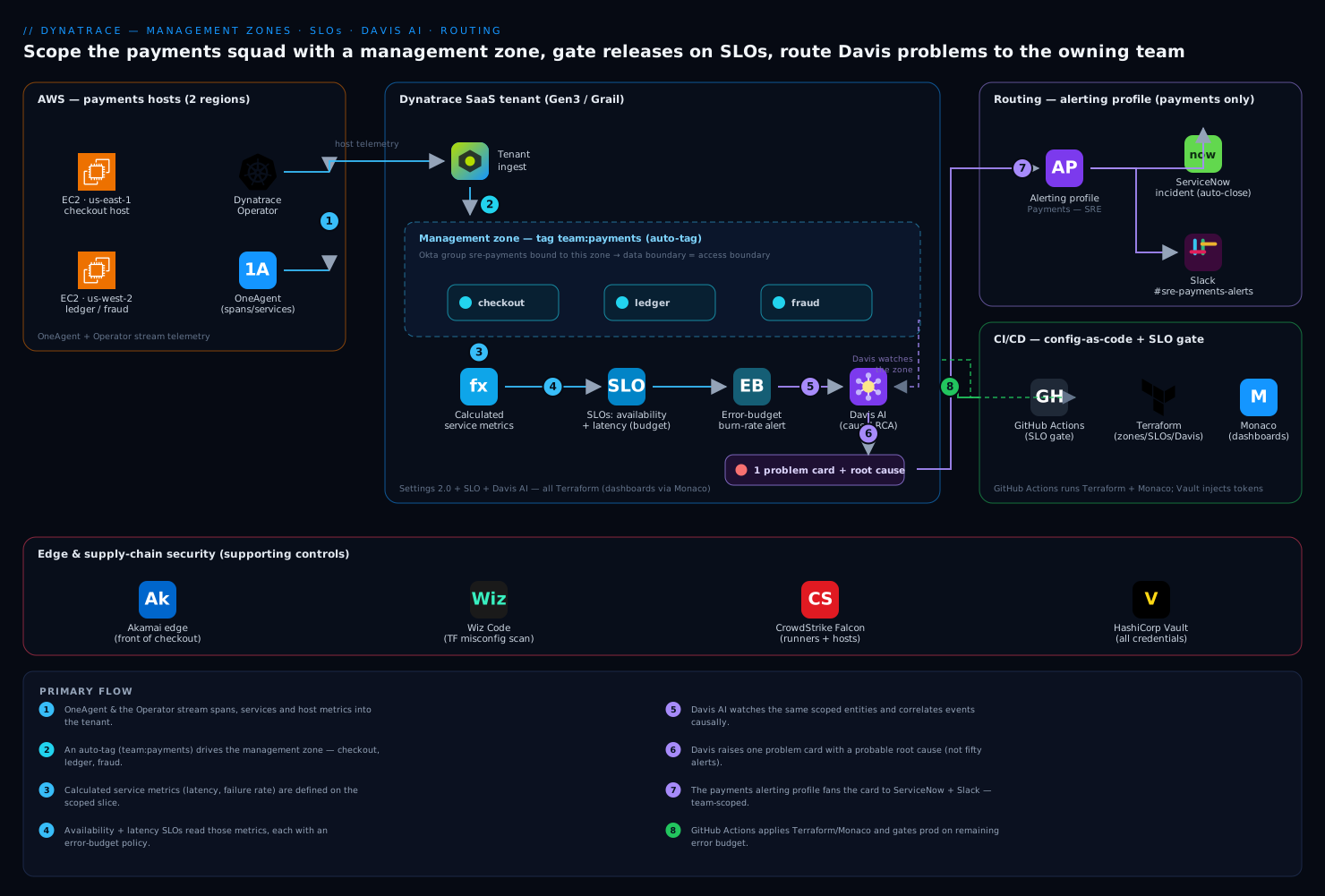
The shape of what we are building: OneAgent and the Dynatrace Operator feed raw spans, services, and host metrics into the Dynatrace tenant. A management zone rule tagged team:payments carves out just the checkout, ledger, and fraud services into a team-scoped view. On that scoped slice we define calculated service metrics (latency, failure rate) that become the data source for two SLOs — availability and latency — each governed by an error budget policy. Davis AI watches the same scoped entities, raises one correlated problem card with a probable root cause, and a problem notification fans that card out to ServiceNow (incident) and Slack (the owning squad’s channel). Wiz Code scans the Terraform in CI for misconfigurations, CrowdStrike Falcon secures the runners and OneAgent hosts, and Akamai sits at the edge in front of the checkout service whose latency the SLO measures. Everything except the dashboards is Terraform; dashboards are Monaco.
1. Provision the management zone as code
Management zones are an environment-level setting in modern Dynatrace, managed through the Settings 2.0 schema builtin:management-zones. The Terraform provider exposes this as dynatrace_management_zone_v2. We scope by tag, not by hand-picking entities, so that any new service the squad ships inherits the zone automatically the moment it is tagged.
First, make sure services carry the ownership tag. The cleanest source is a OneAgent/Operator deployment label that Dynatrace maps to a tag, but you can also enforce it with an automated tagging rule. Here is the zone plus a supporting auto-tag, in Terraform:
terraform {
  required_providers {
    dynatrace = {
      source  = "dynatrace-oss/dynatrace"
      version = "~> 1.70"
    }
  }
}

# Token + tenant URL injected from Vault via TF_VAR_* env, never hardcoded.
provider "dynatrace" {
  dt_env_url   = var.dt_env_url   # https://abc12345.live.dynatrace.com
  dt_api_token = var.dt_api_token # sourced from Vault KV v2 in CI
}

# Auto-tag: stamp team:payments onto any service whose K8s label says so.
resource "dynatrace_autotag_v2" "team_payments" {
  name = "team"
  rules {
    rule {
      type    = "ME"
      enabled = true
      attribute_rule {
        entity_type = "SERVICE"
        conditions {
          condition {
            key = "KUBERNETES_LABELS:team"
            string_value {
              operator = "EQUALS"
              value    = "payments"
            }
          }
        }
      }
      value_format    = "payments"
      value_normalization = "Leave text as-is"
    }
  }
}

resource "dynatrace_management_zone_v2" "payments" {
  name = "Team Payments"
  rules {
    rule {
      type    = "SERVICE"
      enabled = true
      attribute_conditions {
        condition {
          key = "SERVICE_TAGS"
          tag {
            operator = "TAG_KEY_EQUALS"
            context  = "CONTEXTLESS"
            key      = "team"
            value    = "payments"
          }
        }
      }
    }
    # Pull in the hosts and process groups behind those services too,
    # so the zone's host view is coherent.
    rule {
      type    = "PROCESS_GROUP"
      enabled = true
      attribute_conditions {
        condition {
          key = "PROCESS_GROUP_TAGS"
          tag {
            operator = "TAG_KEY_EQUALS"
            context  = "CONTEXTLESS"
            key      = "team"
            value    = "payments"
          }
        }
      }
    }
  }
}
Apply it and confirm the zone resolves to the services you expect before building anything on top:
export TF_VAR_dt_env_url="$(vault kv get -field=env_url secret/dynatrace/prod)"
export TF_VAR_dt_api_token="$(vault kv get -field=api_token secret/dynatrace/prod)"

terraform init
terraform plan  -out tf.plan
terraform apply tf.plan
Bind the zone to the right people. In Settings > Access > Management zones (or via the IAM API), grant the Okta/Entra group sre-payments the Access environment permission scoped to the Team Payments zone only. Now that group’s dashboards, notebooks, and SLO list show payments services and nothing else, and the access boundary is the same boundary as the data boundary — which is the whole point.
2. Define calculated service metrics as the SLO data source
An SLO needs a numeric series. You can point an SLO straight at a built-in metric, but for a meaningful user-journey SLO you almost always want a calculated service metric scoped to the specific request the journey makes — for example, only POST /checkout on the checkout service, splitting success from failure. Define those first.
# Failure-rate numerator/denominator for the availability SLO:
# count of checkout requests, and we'll let the SLO's filter pick "successful".
resource "dynatrace_calculated_service_metric" "checkout_requests" {
  name           = "checkout.requests"
  enabled        = true
  metric_key     = "calc:service.checkoutrequests"
  unit           = "Count"
  management_zones = [dynatrace_management_zone_v2.payments.legacy_id]

  metric_definition {
    metric         = "REQUEST_COUNT"
    request_attribute_key = null
  }

  conditions {
    condition {
      attribute = "SERVICE_REQUEST_PATH"
      comparison {
        string {
          operator = "BEGINS_WITH"
          value    = "/checkout"
          case_sensitive = false
        }
      }
    }
  }
}

# Latency series: response time of the same checkout requests.
resource "dynatrace_calculated_service_metric" "checkout_latency" {
  name           = "checkout.latency"
  enabled        = true
  metric_key     = "calc:service.checkoutlatency"
  unit           = "MicroSecond"
  management_zones = [dynatrace_management_zone_v2.payments.legacy_id]

  metric_definition {
    metric = "RESPONSE_TIME"
  }

  conditions {
    condition {
      attribute = "SERVICE_REQUEST_PATH"
      comparison {
        string {
          operator       = "BEGINS_WITH"
          value          = "/checkout"
          case_sensitive = false
        }
      }
    }
  }
}
You can sanity-check the metric exists and is producing data by querying the Metrics v2 API directly before wiring an SLO to it:
curl -s -H "Authorization: Api-Token ${DT_TOKEN}" \
  "${DT_URL}/api/v2/metrics/query?metricSelector=calc:service.checkoutlatency:percentile(90)&from=now-2h&resolution=5m" \
  | jq '.result[0].data[0].values | length'
# Expect a non-zero count of datapoints. Zero means the metric definition
# matched no requests — fix the path condition before continuing.
3. Create the availability and latency SLOs
Dynatrace SLOs use a metric expression of the form (good / total) * 100. The cleanest, version-agnostic way to express a service SLO is with the built-in SLO metrics builtin:service.successCount and builtin:service.requestCount, filtered to the management zone so the SLO measures exactly the team’s scope. We define two SLOs: availability (success ratio) and latency (fraction of requests under a threshold), each with its own target and warning level.
resource "dynatrace_slo_v2" "checkout_availability" {
  name    = "Checkout - Availability"
  enabled = true

  evaluation_type = "AGGREGATE"
  metric_expression = "(100)*(builtin:service.successCount:splitBy())/(builtin:service.requestCount:splitBy())"
  filter            = "type(\"SERVICE\"),mzName(\"Team Payments\"),entityName.startsWith(\"checkout\")"

  target  = 99.9   # objective
  warning = 99.95  # burn-warning threshold

  timeframe = "-1d"   # rolling 24h; also publish a -28d for the monthly budget
}

resource "dynatrace_slo_v2" "checkout_latency" {
  name    = "Checkout - Latency under 800ms"
  enabled = true

  evaluation_type   = "AGGREGATE"
  # good = requests faster than 800ms; total = all requests in zone.
  metric_expression = "(100)*(builtin:service.requestCount.server:filter(lt(builtin:service.response.time,800000)):splitBy())/(builtin:service.requestCount.server:splitBy())"
  filter            = "type(\"SERVICE\"),mzName(\"Team Payments\"),entityName.startsWith(\"checkout\")"

  target  = 99.0
  warning = 99.5

  timeframe = "-7d"
}
A few choices that teams get wrong here. The filter uses mzName("Team Payments") so the SLO inherits the management zone scope you already defined — change the zone rule and the SLO follows, no duplication. The latency threshold is in microseconds (800000 = 800ms) because that is the unit of builtin:service.response.time; getting the unit wrong is the most common silent bug. And we set warning above target so Dynatrace flags an at-risk budget before it is actually breached. Apply, then open Service-level objectives in the UI filtered to the zone and confirm both SLOs show a status, a current value, and an error-budget percentage.
4. Gate releases with an error budget policy
An SLO is only operationally useful if it changes behavior. Wire an error budget burn-rate alert so Davis raises a problem when the budget is being consumed too fast, and feed that signal to the release pipeline so a fast burn blocks a deploy. Burn-rate alerting is configured per SLO via the slo.errorBudgetBurnRate settings schema:
resource "dynatrace_slo_error_budget_burn_rate" "checkout_avail_burn" {
  slo_id                 = dynatrace_slo_v2.checkout_availability.id
  burn_rate_visualization_enabled = true

  fast_burn_threshold = 10   # 10x normal burn over the alerting window
}
In GitHub Actions, query the SLO before promoting to prod and fail the job if the budget is exhausted, so an unhealthy service cannot ship more change on top of an incident:
# .github/workflows/promote-prod.yml (excerpt)
- name: SLO gate - checkout availability
  run: |
    STATUS=$(curl -s -H "Authorization: Api-Token ${{ secrets.DT_SLO_TOKEN }}" \
      "${DT_URL}/api/v2/slo/${SLO_ID}?timeFrame=CURRENT" \
      | jq -r '.errorBudget')
    echo "Remaining error budget: ${STATUS}%"
    awk -v b="$STATUS" 'BEGIN{ exit (b+0 < 1.0) }' || {
      echo "::error::Error budget under 1% - blocking prod promotion"; exit 1; }
The DT_SLO_TOKEN here is a read-only slo.read token, again pulled from Vault at job start rather than stored as a long-lived secret. For teams on Jenkins, the same curl | jq check runs as a pipeline stage with the build failing on a non-zero exit.
5. Tune Davis AI anomaly detection for the scope
Davis AI is on by default, but two things make it useful instead of noisy: scoping its automatic baselining to how this service actually behaves, and routing the resulting problem cards. Service-level anomaly detection lives in the builtin:anomaly-detection.services schema and can be set globally or overridden per management zone. For the payments zone, switch the failure-rate detection from automatic to a fixed threshold the squad agrees on (auto-baselining can be too twitchy for a low-traffic checkout path at night), and keep response-time on automatic with a tuned sensitivity:
resource "dynatrace_service_anomalies_v2" "payments_anomalies" {
  scope = dynatrace_management_zone_v2.payments.id

  failure_rate {
    fixed {
      threshold = 2.0   # alert when failure rate exceeds 2%
      sensitivity = "HIGH"
    }
  }

  response_time {
    auto {
      # Davis baselines per-endpoint; raise the bar to cut night-time noise.
      response_time_degradation_milliseconds       = 100
      slowest_response_time_degradation_milliseconds = 1000
      load                                         = "FIFTEEN_REQUESTS_PER_MINUTE"
      sensitivity                                  = "MEDIUM"
    }
  }
}
Davis correlates these signals causally: a database slowdown, the service latency it causes, and the failed checkout requests downstream collapse into one problem card with the database flagged as the probable root cause — instead of three separate pages. That correlation is the entire value of Davis over threshold-only alerting, and scoping the detection per management zone is what keeps one squad’s tuning from affecting another’s.
6. Route problem cards to ServiceNow and Slack
Now connect the problem card to humans. Dynatrace problem notifications fire on Davis problem open/update/close. Create two: a ServiceNow integration that opens and auto-closes an incident, and a Slack webhook that posts to the squad channel. Crucially, set the alerting profile so only problems on the payments management zone trigger these — that is what makes the routing team-specific.
# Alerting profile: only fire for problems in the payments zone, and only
# for availability/error events at warning severity and above.
resource "dynatrace_alerting" "payments_profile" {
  name            = "Payments - SRE"
  management_zone = dynatrace_management_zone_v2.payments.legacy_id

  rules {
    rule {
      severity_level = "ERROR"
      delay_in_minutes = 0
      tag_filter {
        include_mode = "INCLUDE_ALL"
        tag_filters {
          filter { context = "CONTEXTLESS"  key = "team"  value = "payments" }
        }
      }
    }
  }
}

resource "dynatrace_service_now_notification" "payments_snow" {
  enabled          = true
  name             = "Payments -> ServiceNow"
  alerting_profile = dynatrace_alerting.payments_profile.id

  instance_name = "acme"   # acme.service-now.com
  username      = var.snow_user
  password      = var.snow_password   # from Vault
  message       = "Dynatrace problem {ProblemID}: {ProblemTitle} on {ProblemImpact}. Root cause: {ProblemDetailsText}"
  send_incidents = true
  send_events    = false
}

resource "dynatrace_slack_notification" "payments_slack" {
  enabled          = true
  name             = "Payments -> Slack"
  alerting_profile = dynatrace_alerting.payments_profile.id

  url     = var.slack_webhook_url   # from Vault
  channel = "#sre-payments-alerts"
  title   = "{ProblemSeverity}: {ProblemTitle}"
  message = "Davis flagged {ProblemImpact} impact. Root cause: {ProblemDetailsText}. {ProblemURL}"
}
The placeholders ({ProblemID}, {ProblemDetailsText}, {ProblemURL}) are Dynatrace problem-notification variables; {ProblemDetailsText} carries Davis’s root-cause narrative straight into the ServiceNow incident and the Slack message, so the on-call engineer sees the probable cause in the first notification rather than chasing it. Because both notifications hang off the payments_profile alerting profile, a problem on another team’s service never reaches this channel.
7. Ship the team dashboard with Monaco
Dashboards are better managed with Monaco (Monitoring-as-Code) than raw Terraform, because Monaco templates the JSON and handles environment promotion (dev tenant to prod tenant) cleanly. Define the squad dashboard, tile it with the two SLOs and the Davis problem feed, and pin it to the management zone.
# manifest.yaml
manifestVersion: "1.0"
projects:
  - name: payments-dashboards
environmentGroups:
  - name: production
    environments:
      - name: prod
        url: { value: "https://abc12345.live.dynatrace.com" }
        auth:
          token:
            name: "DT_MONACO_TOKEN"   # env var, sourced from Vault in CI
# Validate, then deploy only the payments project to prod.
monaco deploy manifest.yaml --project payments-dashboards --environment prod --dry-run
monaco deploy manifest.yaml --project payments-dashboards --environment prod
Keep the dashboard JSON’s tile filters set to Team Payments so the dashboard, the SLOs, and the access control are all the same scope — a single source of truth the squad bookmarks.
Validation
Confirm the whole chain works end to end, not just that Terraform applied:
# 1. Zone resolves to the expected services (entities v2 API).
curl -s -H "Authorization: Api-Token ${DT_TOKEN}" \
  "${DT_URL}/api/v2/entities?entitySelector=type(SERVICE),mzName(Team%20Payments)&fields=tags" \
  | jq '.entities[].displayName'

# 2. Both SLOs report a numeric status and an error budget.
curl -s -H "Authorization: Api-Token ${DT_TOKEN}" \
  "${DT_URL}/api/v2/slo?sloSelector=text(checkout)&timeFrame=CURRENT" \
  | jq '.slo[] | {name, status, evaluatedPercentage, errorBudget}'

# 3. Notifications are wired (settings objects exist and are enabled).
curl -s -H "Authorization: Api-Token ${DT_TOKEN}" \
  "${DT_URL}/api/v2/settings/objects?schemaIds=builtin:problem.notifications&fields=value" \
  | jq '.items[].value | {displayName, enabled}'
Then force a live test: deploy a deliberately failing canary of the checkout service (or use a load-test fault injection) so failure rate crosses 2%. Within a minute or two you should see (a) a Davis problem card open against a payments service, (b) a ServiceNow incident created, and © a Slack message in #sre-payments-alerts carrying the root-cause text. Roll the canary back and confirm Davis auto-closes the problem and ServiceNow auto-resolves the incident. If the problem opens but no notification fires, the alerting profile’s management-zone or tag filter is the usual culprit.
Rollback / teardown
Because everything is code, rollback is a revert. To remove a single change, revert the commit and re-apply; to tear the whole stack down in dependency order:
# Dashboards first (Monaco does not destroy; delete via API or remove the config).
monaco deploy manifest.yaml --project payments-dashboards --environment prod  # after emptying the project

# Then the Dynatrace settings/SLOs/zone, in reverse dependency order.
terraform destroy \
  -target=dynatrace_slack_notification.payments_slack \
  -target=dynatrace_service_now_notification.payments_snow \
  -target=dynatrace_alerting.payments_profile \
  -target=dynatrace_service_anomalies_v2.payments_anomalies \
  -target=dynatrace_slo_v2.checkout_latency \
  -target=dynatrace_slo_v2.checkout_availability \
  -target=dynatrace_calculated_service_metric.checkout_latency \
  -target=dynatrace_calculated_service_metric.checkout_requests \
  -target=dynatrace_management_zone_v2.payments \
  -target=dynatrace_autotag_v2.team_payments
Destroy the management zone last — SLOs, anomaly settings, and alerting profiles reference it by name or id, and removing it first leaves them pointing at a dead scope. If you only want to pause alerting (e.g., a planned maintenance window), set the notifications’ enabled = false and apply, rather than destroying them, so the wiring survives.
Common pitfalls
- Pointing the SLO at the wrong scope. An SLO whose
filterlacksmzName(...)quietly measures the whole environment, so a healthy global average hides a broken checkout. Always anchor the SLO filter to the management zone. - Unit confusion on latency.
builtin:service.response.timeis in microseconds; an800threshold means 0.8ms, not 800ms, and your latency SLO reads as 0% good. Use800000. - Auto-baseline noise on low-traffic paths. Davis automatic response-time baselining can page on a single slow request at 3 a.m. Raise the
loadminimum and degradation thresholds, or pin failure rate to a fixed percentage per zone, as in step 5. - Tags applied too late. If the ownership tag is set by a rule that only evaluates on new data, existing entities may sit outside the zone for a baseline window. Verify zone membership (validation step 1) before trusting SLOs built on it.
- One global alerting profile. A profile without a management-zone restriction routes every team’s problems to every channel — the exact firehose you set out to kill. One profile per zone.
Security notes
Every Dynatrace API token and ServiceNow/Slack credential is sourced from HashiCorp Vault at apply time (TF_VAR_* env injection), never written to a tfvars file, state-readable variable, or CI secret store. Scope tokens to least privilege: the SLO gate uses a slo.read-only token, while the apply pipeline’s token holds settings.write/slo.write and lives only for the job. Bind management zones to Okta/Entra groups via SCIM so the data boundary equals the access boundary — a payments engineer cannot read another team’s traces. Run Wiz Code as a CI step against this Terraform to catch misconfigurations (over-broad tokens, public exposure, drift) before merge, and keep CrowdStrike Falcon sensors on the GitHub/Jenkins runners and on the OneAgent-instrumented hosts so the observability supply chain itself is monitored. Treat the state file as sensitive (remote backend with encryption) since it records resource ids, not secrets, but still warrants protection.
Cost notes
Dynatrace bills primarily on host units, ingested data (Grail retention), and custom metrics, so a few habits keep the bill predictable. Calculated service metrics and SLOs are cheap, but uncontrolled custom-metric cardinality is not — avoid splitting a calculated metric by a high-cardinality dimension (per-user, per-request-id) you do not need for the SLO. Set Grail retention per bucket to match how long you actually investigate (e.g., 35 days for problem and SLO data, less for verbose logs). Davis AI itself adds no per-analysis charge, so lean on its correlation rather than building dozens of static threshold events that each generate billable custom events. Finally, scope OneAgent deployment to the hosts you need observed; the management zone controls visibility, but host units are billed on deployment, so right-size the Operator’s node selection to the payments workloads rather than blanketing the cluster.