A fintech moving its core ledger from a colo to Google Cloud hits a wall in the security review: the colo had a pair of physical FortiGate chassis inspecting every packet in and out, and the CISO will not sign the migration until GCP has the same north-south NGFW posture — deep packet inspection, IPS, SSL inspection, and a single audited egress — with no single point of failure. GCP’s native firewall rules filter by 5-tuple but do not do IPS, application control, or stateful SSL inspection, and a single FortiGate-VM is exactly the SPOF the auditor will flag. The answer the Fortinet reference architecture lands on, and what this guide builds end to end, is a FortiGate-VM HA pair clustered with FGCP, fronted by a GCP external pass-through load balancer for ingress and routed for egress via an internal load balancer, with a GCP SDN connector so the cluster reprograms cloud routes itself on failover. By the end you will have two firewalls where the loss of either one is a sub-10-second blip, not an outage.
This is an Advanced guide. It assumes you are comfortable with GCP VPC design, gcloud, and the FortiGate CLI, and that you understand why a stateful firewall in the cloud cannot rely on gratuitous ARP the way it does on-prem.
Prerequisites
- A GCP project with billing enabled, and
roles/compute.adminplusroles/iam.serviceAccountAdminon it. gcloudCLI authenticated (gcloud auth login) and a default project set (gcloud config set project <PROJECT_ID>).- A FortiGate-VM BYOL or PAYG license — two instances’ worth. BYOL pulls entitlements from FortiCare; PAYG bills through GCP Marketplace. This guide uses FortiOS 7.4.
- Accept the FortiGate-VM image terms once in the GCP Marketplace so the image is launchable from the
fortigcp-project-001public image project. - An identity story: admin access to the FortiGates is federated through Okta (or Entra ID) via SAML so engineers log in with corporate SSO and MFA, not a shared
adminpassword. - HashiCorp Vault reachable from your bootstrap host — it will hold the FortiGate API tokens, the SDN connector service-account key, and the BYOL license files instead of committing them anywhere.
- A bastion/jump host or Cloud NAT for initial CLI access.
Target topology
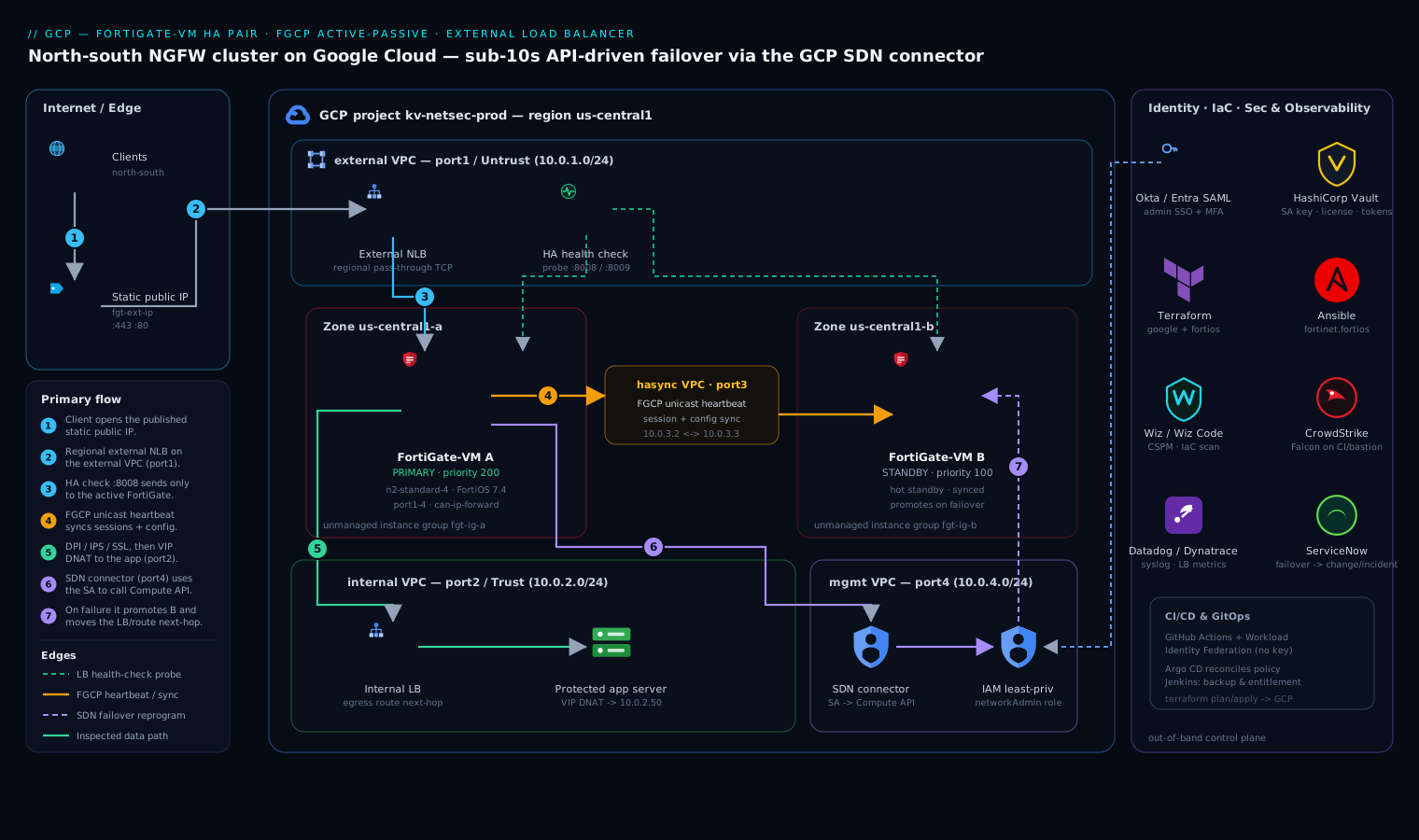
FGCP (FortiGate Clustering Protocol) on GCP runs active-passive: one unit is primary and owns all traffic, the other is a hot standby with a synchronized session table and config. Because GCP does not honor gratuitous ARP or let two NICs share a MAC, failover does not move an IP at layer 2 the way an on-prem FGCP cluster does. Instead, the standby — on becoming primary — uses the GCP SDN connector to call the Compute API and reprogram the cloud: it moves a target (the load balancer’s backend, or a route’s next hop) onto itself. That API-driven failover is the single most important concept in this build, and the SDN connector’s IAM permissions are what make or break it.
Each FortiGate carries four NICs, and the order is load-bearing because FortiOS maps them to fixed roles:
| NIC | Subnet | FortiOS port | Role |
|---|---|---|---|
| nic0 | external (public) |
port1 | Untrust / north-south ingress + egress; carries the public-facing front end |
| nic1 | internal (private) |
port2 | Trust / protected workload subnets |
| nic2 | hasync |
port3 | FGCP heartbeat + config/session sync between the two units |
| nic3 | mgmt |
port4 | Out-of-band management, SSH/HTTPS admin, SDN connector API calls |
North-south ingress lands on a regional external pass-through Network Load Balancer whose backend is an unmanaged instance group containing the active FortiGate; egress from workloads is steered to an internal pass-through load balancer (or a route) whose next hop is the active firewall. Both FortiGates sit in a single region across two zones (e.g. us-central1-a and us-central1-b) so a zonal failure takes out at most one unit.
1. Set project variables and enable APIs
Front-load every name so the rest of the commands are copy-paste. Keep these in a sourced file on the bootstrap host, not in git.
export PROJECT_ID="kv-netsec-prod"
export REGION="us-central1"
export ZONE_A="us-central1-a"
export ZONE_B="us-central1-b"
export PREFIX="fgt"
export FGT_IMAGE_PROJECT="fortigcp-project-001"
export FGT_IMAGE_FAMILY="fortigate-74-byol"   # use fortigate-74-payg for PAYG
export MACHINE_TYPE="n2-standard-4"           # 4 vCPU min for SSL inspection throughput

gcloud config set project "$PROJECT_ID"
gcloud services enable compute.googleapis.com iam.googleapis.com \
  cloudresourcemanager.googleapis.com
2. Build the four VPCs and subnets
GCP attaches each NIC to a separate VPC, so you create four VPC networks, one per firewall interface. This is the GCP norm for multi-NIC NVAs and keeps the trust boundaries clean.
for NET in external internal hasync mgmt; do
  gcloud compute networks create "${PREFIX}-${NET}-vpc" \
    --subnet-mode=custom --bgp-routing-mode=regional
done

# One subnet per VPC in our region
gcloud compute networks subnets create "${PREFIX}-external-subnet" \
  --network="${PREFIX}-external-vpc" --region="$REGION" --range="10.0.1.0/24"
gcloud compute networks subnets create "${PREFIX}-internal-subnet" \
  --network="${PREFIX}-internal-vpc" --region="$REGION" --range="10.0.2.0/24"
gcloud compute networks subnets create "${PREFIX}-hasync-subnet" \
  --network="${PREFIX}-hasync-vpc" --region="$REGION" --range="10.0.3.0/24"
gcloud compute networks subnets create "${PREFIX}-mgmt-subnet" \
  --network="${PREFIX}-mgmt-vpc" --region="$REGION" --range="10.0.4.0/24"
Firewall rules: allow the FGCP heartbeat freely on the hasync VPC, allow admin only from your management CIDR on mgmt, and (initially) allow health checks plus your test traffic on external.
# FGCP heartbeat — allow all between the two units on hasync
gcloud compute firewall-rules create "${PREFIX}-hasync-allow" \
  --network="${PREFIX}-hasync-vpc" --direction=INGRESS --action=ALLOW \
  --rules=all --source-ranges="10.0.3.0/24"

# Admin to mgmt from corporate egress + Okta-fronted bastion only
gcloud compute firewall-rules create "${PREFIX}-mgmt-allow" \
  --network="${PREFIX}-mgmt-vpc" --direction=INGRESS --action=ALLOW \
  --rules=tcp:22,tcp:443 --source-ranges="203.0.113.0/24"

# GCP health-check probe ranges must reach the external port for the NLB
gcloud compute firewall-rules create "${PREFIX}-ext-health" \
  --network="${PREFIX}-external-vpc" --direction=INGRESS --action=ALLOW \
  --rules=tcp:8008,tcp:8009 --source-ranges="35.191.0.0/16,130.211.0.0/22"
8008/8009 are FortiGate’s built-in HA health-check responder ports — the LB probes these, and only the active unit answers, which is how the LB knows which firewall to send traffic to.
3. Create the SDN connector service account
The cluster must call the Compute API to reprogram routes/targets on failover. Give it a dedicated service account with least privilege, generate a key, and store that key in Vault — never on disk.
gcloud iam service-accounts create "${PREFIX}-sdn-sa" \
  --display-name="FortiGate SDN connector"

# Minimal role set for FGCP route/forwarding-rule reprogramming
gcloud projects add-iam-policy-binding "$PROJECT_ID" \
  --member="serviceAccount:${PREFIX}-sdn-sa@${PROJECT_ID}.iam.gserviceaccount.com" \
  --role="roles/compute.networkAdmin"
gcloud projects add-iam-policy-binding "$PROJECT_ID" \
  --member="serviceAccount:${PREFIX}-sdn-sa@${PROJECT_ID}.iam.gserviceaccount.com" \
  --role="roles/compute.instanceAdmin.v1"

# Generate the key, push to Vault, delete the local copy immediately
gcloud iam service-accounts keys create /tmp/sdn-key.json \
  --iam-account="${PREFIX}-sdn-sa@${PROJECT_ID}.iam.gserviceaccount.com"
vault kv put secret/fgt/gcp-sdn key=@/tmp/sdn-key.json
shred -u /tmp/sdn-key.json
Attaching this service account to both FortiGate instances (Step 5) means FortiOS can use the instance’s own metadata credentials for the SDN connector instead of an embedded key — preferable in production. The exported key is the break-glass fallback held in Vault.
4. Write the bootstrap (cloud-init) config
FortiGate-VM reads a user-data config at first boot. This sets the hostname, HA settings, ports, and the SDN connector. Generate one file per unit; the only differences are hostname, priority, and the management IP. Pull the BYOL license content from Vault, not from a checked-in file.
LICENSE_A=$(vault kv get -field=fgt_a secret/fgt/licenses)

cat > /tmp/fgt-a.conf <<EOF
config system global
    set hostname "${PREFIX}-a"
    set admin-sport 443
end
config system ha
    set group-name "fgt-cluster"
    set mode a-p
    set hbdev "port3" 100
    set session-pickup enable
    set session-pickup-connectionless enable
    set override disable
    set priority 200
    set unicast-hb enable
    set unicast-hb-peerip 10.0.3.3
    set unicast-hb-netmask 255.255.255.0
end
config system sdn-connector
    edit "gcp-fgcp"
        set type gcp
        set ha-status enable
        set gcp-project "${PROJECT_ID}"
        set region "${REGION}"
        set route-table "default"
    next
end
config system probe-response
    set http-probe-value "OK"
    set mode http-probe
end
EOF

# Prepend the license so FortiOS activates on boot (BYOL)
printf '%s\n' "$LICENSE_A" | cat - /tmp/fgt-a.conf > /tmp/fgt-a.bootstrap
The key directives: mode a-p selects active-passive; hbdev "port3" 100 puts the heartbeat on nic2 with priority 100; session-pickup enable syncs the session table so live connections survive failover; unicast-hb is mandatory on GCP because broadcast/multicast heartbeat does not work on a cloud VPC; priority 200 makes unit A primary (give B priority 100). The sdn-connector block with ha-status enable is what lets the unit reprogram GCP on failover. Repeat for unit B with set hostname "${PREFIX}-b", set priority 100, and set unicast-hb-peerip 10.0.3.2.
5. Launch both FortiGate-VM instances
Each instance gets all four NICs in NIC order (external, internal, hasync, mgmt), the SDN service account, and its bootstrap file. Unit A in zone A, unit B in zone B.
# --- Unit A (us-central1-a) ---
gcloud compute instances create "${PREFIX}-a" \
  --zone="$ZONE_A" --machine-type="$MACHINE_TYPE" \
  --image-project="$FGT_IMAGE_PROJECT" --image-family="$FGT_IMAGE_FAMILY" \
  --service-account="${PREFIX}-sdn-sa@${PROJECT_ID}.iam.gserviceaccount.com" \
  --scopes="https://www.googleapis.com/auth/cloud-platform" \
  --can-ip-forward \
  --network-interface="subnet=${PREFIX}-external-subnet,no-address" \
  --network-interface="subnet=${PREFIX}-internal-subnet,no-address" \
  --network-interface="subnet=${PREFIX}-hasync-subnet,private-network-ip=10.0.3.2,no-address" \
  --network-interface="subnet=${PREFIX}-mgmt-subnet,private-network-ip=10.0.4.2" \
  --metadata-from-file="user-data=/tmp/fgt-a.bootstrap"

# --- Unit B (us-central1-b) ---
gcloud compute instances create "${PREFIX}-b" \
  --zone="$ZONE_B" --machine-type="$MACHINE_TYPE" \
  --image-project="$FGT_IMAGE_PROJECT" --image-family="$FGT_IMAGE_FAMILY" \
  --service-account="${PREFIX}-sdn-sa@${PROJECT_ID}.iam.gserviceaccount.com" \
  --scopes="https://www.googleapis.com/auth/cloud-platform" \
  --can-ip-forward \
  --network-interface="subnet=${PREFIX}-external-subnet,no-address" \
  --network-interface="subnet=${PREFIX}-internal-subnet,no-address" \
  --network-interface="subnet=${PREFIX}-hasync-subnet,private-network-ip=10.0.3.3,no-address" \
  --network-interface="subnet=${PREFIX}-mgmt-subnet,private-network-ip=10.0.4.3" \
  --metadata-from-file="user-data=/tmp/fgt-b.bootstrap"
--can-ip-forward is non-negotiable — without it GCP drops any packet whose destination IP is not the instance’s own, and a firewall forwarding traffic does exactly that. --scopes=cloud-platform lets the attached service account drive the SDN connector via metadata. Only the mgmt NIC gets a (later) external IP; the external NIC’s public reachability comes through the load balancer, not a per-instance address.
Give the units ~5 minutes to boot, license, and form the cluster. SSH to the management IP of unit A (via the bastion) and confirm:
get system ha status
# Look for: Mode: HA A-P, and both fgt-a (primary) and fgt-b (secondary) listed
diagnose sys ha checksum cluster
# All checksums must match between members — mismatch means config is not in sync
6. Front the cluster with the external load balancer
Build an unmanaged instance group per zone, add each FortiGate to its zone’s group, then a regional external pass-through Network Load Balancer with a health check that probes the FortiGate HA responder port. Only the active unit answers 8008, so the LB always forwards to the live firewall.
# Unmanaged instance groups (one per zone) holding each unit
gcloud compute instance-groups unmanaged create "${PREFIX}-ig-a" --zone="$ZONE_A"
gcloud compute instance-groups unmanaged add-instances "${PREFIX}-ig-a" \
  --zone="$ZONE_A" --instances="${PREFIX}-a"
gcloud compute instance-groups unmanaged create "${PREFIX}-ig-b" --zone="$ZONE_B"
gcloud compute instance-groups unmanaged add-instances "${PREFIX}-ig-b" \
  --zone="$ZONE_B" --instances="${PREFIX}-b"

# Health check against FortiGate's HA probe responder (only active answers)
gcloud compute health-checks create http "${PREFIX}-hc" \
  --port=8008 --request-path="/" --check-interval=5s --timeout=2s \
  --healthy-threshold=1 --unhealthy-threshold=2

# Regional backend service (external, pass-through) bound to both groups
gcloud compute backend-services create "${PREFIX}-bes" \
  --load-balancing-scheme=EXTERNAL --protocol=TCP --region="$REGION" \
  --health-checks="${PREFIX}-hc"
gcloud compute backend-services add-backend "${PREFIX}-bes" \
  --region="$REGION" --instance-group="${PREFIX}-ig-a" --instance-group-zone="$ZONE_A"
gcloud compute backend-services add-backend "${PREFIX}-bes" \
  --region="$REGION" --instance-group="${PREFIX}-ig-b" --instance-group-zone="$ZONE_B"

# Reserve a static public IP and publish the forwarding rule
gcloud compute addresses create "${PREFIX}-ext-ip" --region="$REGION"
EXT_IP=$(gcloud compute addresses describe "${PREFIX}-ext-ip" \
  --region="$REGION" --format="value(address)")
gcloud compute forwarding-rules create "${PREFIX}-fr" \
  --load-balancing-scheme=EXTERNAL --region="$REGION" \
  --address="${EXT_IP}" --ip-protocol=TCP --ports=443,80 \
  --backend-service="${PREFIX}-bes"
On the FortiGate, create a matching VIP that DNATs the LB’s traffic to your protected workload, plus a policy that runs the full security profile set on it:
config firewall vip
    edit "app-vip"
        set extip ${EXT_IP}
        set extintf "port1"
        set mappedip "10.0.2.50"   # the protected app server on the internal subnet
        set portforward enable
        set extport 443
        set mappedport 443
    next
end
config firewall policy
    edit 1
        set name "north-south-ingress"
        set srcintf "port1"
        set dstintf "port2"
        set srcaddr "all"
        set dstaddr "app-vip"
        set action accept
        set schedule "always"
        set service "HTTPS"
        set utm-status enable
        set ips-sensor "default"
        set ssl-ssh-profile "deep-inspection"
        set av-profile "default"
        set logtraffic all
    next
end
For egress, create an internal pass-through load balancer in the internal VPC whose backend is the same instance groups, and point your workload subnets’ default route at its forwarding-rule IP. On failover the SDN connector moves the route’s next hop, so outbound flows follow the new active unit.
7. Wire in identity, IaC, security tooling and observability
The firewall is now passing traffic; make it operable.
- Okta / Entra ID for admin SSO. Configure FortiGate SAML so engineers authenticate to the GUI/CLI with corporate identity and MFA instead of the local
adminaccount, which you reduce to break-glass only:config user saml edit "okta-admin" set idp-entity-id "http://www.okta.com/exk..." set idp-single-sign-on-url "https://kloudvin.okta.com/app/.../sso/saml" set idp-cert "Okta-IdP-Cert" next end - Terraform + Ansible. Everything above belongs in code, not in a runbook of pasted commands. Manage the VPCs, NLB, IAM and instances with the Terraform
googleprovider, and drive in-firewall policy with thefortiosTerraform provider or with Ansiblefortinet.fortiosroles, so the two firewalls are identical and reviewable. - Jenkins / GitHub Actions + Argo CD. Run
terraform plan/applyfrom a GitHub Actions pipeline using Workload Identity Federation (no stored service-account key), and let Argo CD reconcile the declarative FortiManager/firewall policy objects in a GitOps loop so drift is auto-corrected. Jenkins can host the periodic config-backup and FortiCare entitlement-sync jobs. - HashiCorp Vault. Keep doing what Steps 3–4 started: the SDN service-account key, BYOL license blobs, and the FortiGate REST API tokens used by the pipeline all live in Vault, leased short and pulled at deploy time — never committed.
- Wiz / Wiz Code. Point Wiz at the project for CSPM so it flags any
externalfirewall rule that drifts to0.0.0.0/0on the wrong port or an instance that losescan-ip-forward; run Wiz Code in the IaC pipeline to catch a misconfigured Terraform plan before apply. - CrowdStrike Falcon. The FortiGates are appliances, but the bastion, the CI runners, and any management VMs carry Falcon sensors for runtime threat detection feeding the SOC.
- Dynatrace / Datadog. Stream FortiGate SNMP/
syslogand the GCP load-balancer + health-check metrics into Datadog (or Dynatrace) so failover events, session counts, CPU under SSL-inspection load, and LB backend health are on one dashboard with alerting on an unhealthy backend or an HA state change. - ServiceNow. Hook FortiGate HA failover and IPS-critical events to ServiceNow so a failover or a blocked exploit auto-raises a change/incident record — the auditor wants a ticket, not just a log line.
Validation
Prove ingress, then prove failover.
# 1. North-south path works through the active firewall
curl -vk https://${EXT_IP}/        # should reach the mapped app via the FortiGate VIP

# 2. Cluster is healthy and in sync (on unit A CLI)
get system ha status               # one primary, one secondary, in-sync
diagnose sys ha checksum cluster   # checksums identical across members

# 3. The SDN connector authenticated to GCP
diagnose debug application gcpd -1
diagnose debug enable
# Expect successful Compute API calls; "permission denied" means the SA roles in Step 3 are wrong
Now force a failover and watch the load balancer and routes follow:
# Hard-stop the active unit to simulate a zonal failure
gcloud compute instances stop "${PREFIX}-a" --zone="$ZONE_A"

# Re-run curl in a loop from a client; expect a brief gap then continuity
while true; do curl -sk -o /dev/null -w "%{http_code} %{time_total}\n" \
  https://${EXT_IP}/; sleep 1; done
You should see traffic resume on unit B within a handful of seconds as it promotes itself, the LB health check fails A and passes B, and the SDN connector moves the egress route’s next hop. Confirm on unit B that it is now primary (get system ha status) and that the egress route’s next hop is its internal IP.
Rollback / teardown
Tear down in reverse dependency order so nothing is left orphaned and billing stops cleanly.
gcloud compute forwarding-rules delete "${PREFIX}-fr" --region="$REGION" -q
gcloud compute addresses delete "${PREFIX}-ext-ip" --region="$REGION" -q
gcloud compute backend-services delete "${PREFIX}-bes" --region="$REGION" -q
gcloud compute health-checks delete "${PREFIX}-hc" -q
gcloud compute instance-groups unmanaged delete "${PREFIX}-ig-a" --zone="$ZONE_A" -q
gcloud compute instance-groups unmanaged delete "${PREFIX}-ig-b" --zone="$ZONE_B" -q
gcloud compute instances delete "${PREFIX}-a" --zone="$ZONE_A" -q
gcloud compute instances delete "${PREFIX}-b" --zone="$ZONE_B" -q
for NET in external internal hasync mgmt; do
  gcloud compute firewall-rules list --filter="network~${PREFIX}-${NET}-vpc" \
    --format="value(name)" | xargs -r -n1 gcloud compute firewall-rules delete -q
  gcloud compute networks subnets delete "${PREFIX}-${NET}-subnet" --region="$REGION" -q
  gcloud compute networks delete "${PREFIX}-${NET}-vpc" -q
done
# Finally revoke the SDN service account
gcloud iam service-accounts delete \
  "${PREFIX}-sdn-sa@${PROJECT_ID}.iam.gserviceaccount.com" -q
For a partial rollback during a bad change, just drain the broken unit — execute ha manage 1 ; exit to the standby and set priority adjustments — rather than destroying the cluster; FGCP keeps serving from the healthy member.
Common pitfalls
- Forgetting
--can-ip-forward. The single most common failure. The cluster forms, admin works, but no transit traffic passes because GCP silently drops forwarded packets. You cannot add the flag to a running instance — you must recreate it. - Broadcast heartbeat on GCP. Default FGCP heartbeat is L2 multicast, which a VPC does not carry. You must set
unicast-hb enablewith explicit peer IPs (Step 4) or the units never see each other and both go active — a split brain. - SDN connector IAM too narrow. If failover does not move traffic, it is almost always the service account missing
compute.networkAdmin/instanceAdmin. Watchdiagnose debug application gcpd -1for permission-denied. - NIC order wrong. FortiOS hard-maps nic0→port1 … nic3→port4. Attach the NICs out of order and your heartbeat lands on the public interface. The
--network-interfaceflags must be in external, internal, hasync, mgmt order. - Health check on the wrong port. The LB must probe
8008/8009(the HA responder), not your app port, or it will not track which unit is active. - Mismatched config checksums.
diagnose sys ha checksum clusterdivergence means a setting did not sync — usually something configured on one unit out-of-band. Configure only on the primary.
Security notes
This cluster is the security control, so keep it Zero Trust around the edges: management lives on its own VPC reachable only from the Okta/Entra-fronted bastion CIDR (Step 2), the local admin account is break-glass with its credentials in Vault, and every admin action is over SAML SSO with MFA. Run deep SSL inspection and the IPS sensor on the north-south policy (Step 6), not just allow/deny. Keep the SDN service account at least privilege and let Wiz continuously verify no firewall rule drifts open and no instance loses can-ip-forward. Pin the FortiOS version and patch on FortiCare advisories — an unpatched NGFW is worse than none because it gives false assurance.
Cost notes
The dominant cost is two always-on FortiGate-VMs (the standby bills even while idle — that is the price of HA) plus their licenses. Size the machine type to throughput honestly: n2-standard-4 is a sane floor for SSL inspection, but oversizing the standby wastes money since it carries no traffic until failover — match it to the active unit’s needs, not to peak-plus-headroom on both. Choose PAYG licensing for short-lived or burst environments and BYOL for steady-state where an annual FortiCare entitlement is cheaper. The load balancers, static IP, and inter-zone heartbeat traffic are minor by comparison; the inter-zone egress for session sync is real but small. Pipe utilization to Datadog/Dynatrace so you can right-size the machine type after a month of real traffic rather than guessing up front, and put a budget alert on the project so a runaway forwarding-rule or data-egress surprise pages you before the invoice does.