A platform team at a mid-sized fintech is paying for two dozen always-on c5.4xlarge EC2 runners that sit at 4% utilisation overnight and then bottleneck hard at 9am when every squad pushes at once. The bill is real, the queue times are worse, and a security review just flagged that the runners are long-lived pets — one compromised job can poison the next build on the same box. The mandate from engineering leadership is precise: ephemeral runners that exist only for the duration of one job, scale from zero to hundreds in minutes, and run on Spot to cut the bill by ~70%. This guide builds exactly that on EKS — GitHub’s Actions Runner Controller (ARC) to manage runner lifecycle, and Karpenter to provision and terminate the underlying nodes just-in-time. Every command below is real; run them top to bottom and you will have a working autoscaling runner fleet.
Prerequisites
- An EKS cluster on Kubernetes 1.28+ with an OIDC provider associated (
aws eks describe-cluster ... --query cluster.identity.oidc). - Karpenter v1.x installed, or follow step 3 here. Requires the Karpenter controller IAM role and a node IAM role/instance profile (
KarpenterNodeRole). - CLI tooling:
awsv2,kubectl,helmv3.14+,eksctl, andjq. - A GitHub organization where you can register a GitHub App (org owner) — the recommended auth path over a PAT.
- HashiCorp Vault reachable from the cluster (used here to store the GitHub App private key out of plain Kubernetes Secrets).
- Cluster admin via
kubectl, and Terraform if you manage IAM as code (snippets included).
Target topology
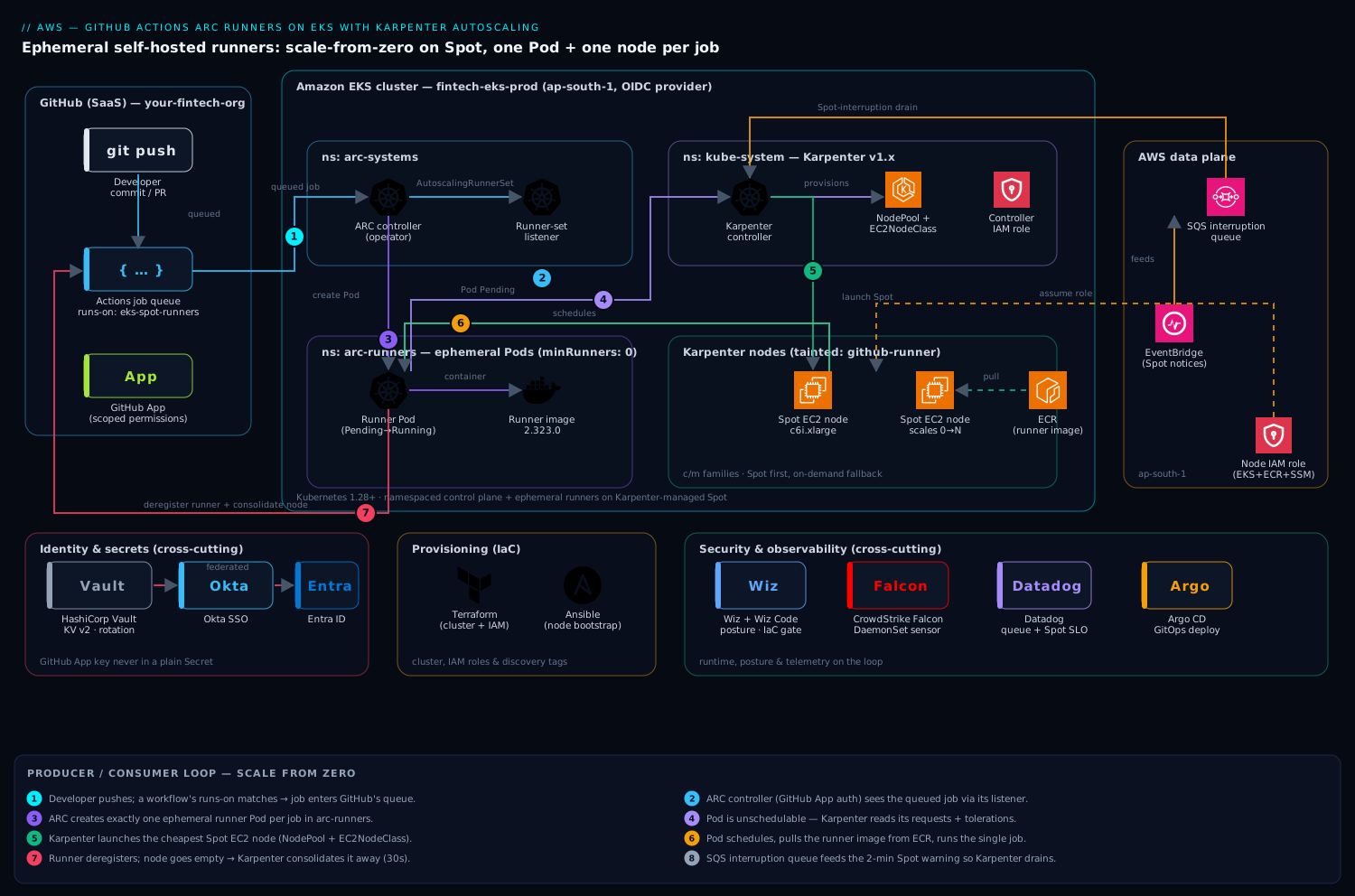
The control flow is a clean producer/consumer loop. A developer pushes; a workflow whose runs-on matches a runner label enters GitHub’s job queue. ARC’s controller watches GitHub via the GitHub App for queued jobs and, through its AutoscalingRunnerSet/listener, creates exactly one ephemeral runner Pod per job. Those Pods are unschedulable for a moment because no node has room — which is precisely the signal Karpenter waits for. Karpenter reads the pending Pods’ resource requests and constraints, launches the cheapest Spot instance that fits (via a NodePool + EC2NodeClass), the runner Pod schedules, executes the single job, then deregisters and terminates. Seconds later Karpenter sees the now-empty node and consolidates it away. Capacity tracks demand with no idle fleet.
Two cross-cutting layers ride alongside: identity and secrets — the GitHub App key sourced from HashiCorp Vault (which issues and rotates short-lived secrets) rather than living forever in a Secret, with cluster-admin SSO fronted by Okta federated to Entra ID; and security and observability — Wiz (and Wiz Code in the pipeline) for cloud posture and IaC scanning, CrowdStrike Falcon as the runtime sensor on every Karpenter node, and Datadog for cluster, runner-queue, and Spot-interruption telemetry. We wire each in at the step where it actually belongs.
1. Create the GitHub App and store its key in Vault
ARC authenticates to GitHub as a GitHub App (finer-grained and higher rate limits than a PAT). At the org level, create an App with these repository permissions: Actions: Read & write, Administration: Read & write (to register self-hosted runners), Metadata: Read-only, and for org-level runner sets, Self-hosted runners: Read & write on the org. Install it on the org (all or selected repos), then note three values: the App ID, the Installation ID, and a generated private key (.pem).
Do not paste that key into a manifest. Put it in HashiCorp Vault, which holds it encrypted and lets you rotate it without redeploying:
# Store the GitHub App credentials in Vault's KV v2 engine
vault kv put secret/arc/github-app \
  app_id="123456" \
  installation_id="78901234" \
  private_key=@arc-runner-app.2026-06-10.private-key.pem

# Confirm (metadata only; never echo the key)
vault kv metadata get secret/arc/github-app
The cluster will read this through the Vault Secrets Operator or the CSI provider so the private key only ever lands in a tmpfs-mounted file inside the controller Pod, never in etcd in cleartext. Human access to Vault and to the cluster is gated by Okta SSO federated to Entra ID, so the engineers who can read this path are the same identities your conditional-access policies already govern.
2. Create a dedicated namespace and project the GitHub App secret
Keep ARC’s control plane and its runners in separate namespaces — it makes RBAC and network policy far cleaner.
kubectl create namespace arc-systems   # ARC controller lives here
kubectl create namespace arc-runners   # ephemeral runner Pods land here
If you use the Vault Secrets Operator (VSO), declare a VaultStaticSecret that syncs the App key into a native Secret in arc-runners:
# vault-static-secret.yaml
apiVersion: secrets.hashicorp.com/v1beta1
kind: VaultStaticSecret
metadata:
  name: github-app-secret
  namespace: arc-runners
spec:
  type: kv-v2
  mount: secret
  path: arc/github-app
  destination:
    name: github-app-secret        # the K8s Secret ARC will consume
    create: true
    overwrite: true
    transformation:
      excludes: [".*"]
      templates:
        github_app_id:              { text: "{{ .Secrets.app_id }}" }
        github_app_installation_id: { text: "{{ .Secrets.installation_id }}" }
        github_app_private_key:     { text: "{{ .Secrets.private_key }}" }
  refreshAfter: 1h
  vaultAuthRef: vault-auth-arc
kubectl apply -f vault-static-secret.yaml
# Verify the three keys exist (values stay hidden)
kubectl -n arc-runners get secret github-app-secret -o jsonpath='{.data}' | jq 'keys'
ARC expects exactly those three keys (github_app_id, github_app_installation_id, github_app_private_key), so the templating above maps Vault’s field names onto ARC’s contract.
3. Install (or verify) Karpenter
If Karpenter is already running, skip to step 4. Otherwise install the controller via Helm using OCI, pinning the version and pointing it at your cluster. Export the basics first:
export CLUSTER_NAME="fintech-eks-prod"
export AWS_REGION="ap-south-1"
export KARPENTER_VERSION="1.3.3"
export KARPENTER_IAM_ROLE_ARN="arn:aws:iam::111122223333:role/KarpenterController-${CLUSTER_NAME}"

helm upgrade --install karpenter oci://public.ecr.aws/karpenter/karpenter \
  --version "${KARPENTER_VERSION}" \
  --namespace kube-system \
  --set "settings.clusterName=${CLUSTER_NAME}" \
  --set "settings.interruptionQueue=${CLUSTER_NAME}" \
  --set "serviceAccount.annotations.eks\.amazonaws\.com/role-arn=${KARPENTER_IAM_ROLE_ARN}" \
  --set controller.resources.requests.cpu=1 \
  --set controller.resources.requests.memory=1Gi \
  --wait
The interruptionQueue is an SQS queue fed by EventBridge rules for Spot interruption notices, rebalance recommendations, and instance state changes. Karpenter drains a node gracefully on the 2-minute Spot warning instead of letting a job die abruptly — essential when your fleet is Spot-heavy. If you manage IAM with Terraform, the node role is straightforward:
# karpenter-node-role.tf — the role nodes Karpenter launches assume
resource "aws_iam_role" "karpenter_node" {
  name               = "KarpenterNodeRole-${var.cluster_name}"
  assume_role_policy = data.aws_iam_policy_document.ec2_assume.json
}

resource "aws_iam_role_policy_attachment" "node" {
  for_each = toset([
    "arn:aws:iam::aws:policy/AmazonEKSWorkerNodePolicy",
    "arn:aws:iam::aws:policy/AmazonEKS_CNI_Policy",
    "arn:aws:iam::aws:policy/AmazonEC2ContainerRegistryReadOnly",
    "arn:aws:iam::aws:policy/AmazonSSMManagedInstanceCore",
  ])
  role       = aws_iam_role.karpenter_node.name
  policy_arn = each.value
}
Your subnets and security groups must carry the discovery tag karpenter.sh/discovery = ${CLUSTER_NAME} so the EC2NodeClass below can find them. We provision the cluster, IAM, and these tags with Terraform, and Ansible handles any node-bootstrap config that lives outside the AMI.
4. Define a Karpenter NodePool and EC2NodeClass for runners
This is where Spot economics get encoded. Create an EC2NodeClass describing how nodes look (AMI, role, networking) and a NodePool describing what Karpenter may launch and when to reclaim it. We taint runner nodes so only runner Pods land on them.
# karpenter-runners.yaml
apiVersion: karpenter.k8s.aws/v1
kind: EC2NodeClass
metadata:
  name: arc-runners
spec:
  amiFamily: AL2023
  amiSelectorTerms:
    - alias: al2023@latest
  role: "KarpenterNodeRole-fintech-eks-prod"
  subnetSelectorTerms:
    - tags: { karpenter.sh/discovery: "fintech-eks-prod" }
  securityGroupSelectorTerms:
    - tags: { karpenter.sh/discovery: "fintech-eks-prod" }
  metadataOptions:
    httpTokens: required          # enforce IMDSv2 — Wiz will flag anything less
  blockDeviceMappings:
    - deviceName: /dev/xvda
      ebs: { volumeSize: 100Gi, volumeType: gp3, encrypted: true, deleteOnTermination: true }
---
apiVersion: karpenter.sh/v1
kind: NodePool
metadata:
  name: arc-runners
spec:
  template:
    metadata:
      labels: { workload: "github-runner" }
    spec:
      nodeClassRef: { group: karpenter.k8s.aws, kind: EC2NodeClass, name: arc-runners }
      taints:
        - key: "github-runner"
          value: "true"
          effect: "NoSchedule"      # keep general workloads off runner nodes
      requirements:
        - key: karpenter.sh/capacity-type
          operator: In
          values: ["spot", "on-demand"]   # Spot first; on-demand is the fallback
        - key: kubernetes.io/arch
          operator: In
          values: ["amd64"]
        - key: karpenter.k8s.aws/instance-category
          operator: In
          values: ["c", "m"]
        - key: karpenter.k8s.aws/instance-generation
          operator: Gt
          values: ["5"]
      expireAfter: 168h
  limits:
    cpu: "2000"                      # hard ceiling so a misfire can't launch 1000 nodes
  disruption:
    consolidationPolicy: WhenEmpty   # reclaim a node the instant its job ends
    consolidateAfter: 30s
kubectl apply -f karpenter-runners.yaml
Three choices carry the design. capacity-type: [spot, on-demand] lets Karpenter prefer Spot and automatically fall back to on-demand when Spot is exhausted — pricey CI is better than stalled CI. consolidationPolicy: WhenEmpty with a 30s delay is what makes the fleet ephemeral: the moment a runner Pod finishes and the node is empty, Karpenter terminates it, so you pay for seconds, not hours. The limits.cpu is a guardrail against a runaway workflow fanning out into a four-figure EC2 bill.
5. Install the ARC controller
ARC ships as two Helm charts: the controller (the operator) and the runner scale set (one per runner pool). Install the controller into arc-systems:
helm upgrade --install arc \
  oci://ghcr.io/actions/actions-runner-controller-charts/gha-runner-scale-set-controller \
  --namespace arc-systems \
  --version 0.12.1 \
  --set flags.watchSingleNamespace=arc-runners \
  --wait

kubectl -n arc-systems get deploy
# NAME                            READY   UP-TO-DATE   AVAILABLE
# arc-gha-rs-controller           1/1     1            1
Pinning watchSingleNamespace scopes the controller’s RBAC to just arc-runners, a least-privilege win. Confirm the CRDs landed:
kubectl get crd | grep actions.github.com
# autoscalingrunnersets.actions.github.com
# autoscalinglisteners.actions.github.com
# ephemeralrunners.actions.github.com
6. Deploy the AutoscalingRunnerSet bound to Karpenter
Now the keystone: an AutoscalingRunnerSet that registers a runner scale set with your GitHub org, scales from zero, and — critically — gives its runner Pods the toleration, nodeSelector, and resource requests that make Karpenter launch a dedicated Spot node per job. Install it via the runner-scale-set chart with an inline values override:
helm upgrade --install arc-runner-set \
  oci://ghcr.io/actions/actions-runner-controller-charts/gha-runner-scale-set \
  --namespace arc-runners \
  --version 0.12.1 \
  --set githubConfigUrl="https://github.com/your-fintech-org" \
  --set githubConfigSecret=github-app-secret \
  --set minRunners=0 \
  --set maxRunners=100 \
  --set runnerScaleSetName="eks-spot-runners" \
  -f runner-values.yaml \
  --wait
# runner-values.yaml — pins runners onto Karpenter's Spot NodePool
template:
  spec:
    tolerations:
      - key: "github-runner"
        operator: "Equal"
        value: "true"
        effect: "NoSchedule"
    nodeSelector:
      workload: "github-runner"
    containers:
      - name: runner
        image: ghcr.io/actions/actions-runner:2.323.0
        command: ["/home/runner/run.sh"]
        resources:
          requests: { cpu: "2", memory: "4Gi" }    # drives Karpenter's instance sizing
          limits:   { cpu: "4", memory: "8Gi" }
The requests block is the contract between ARC and Karpenter: Karpenter sums pending runner Pods’ requests and picks the cheapest Spot instance from the c/m families that fits them. Verify the listener connected to GitHub:
kubectl -n arc-runners get autoscalingrunnerset
# NAME                MINIMUM   MAXIMUM   CURRENT   STATE
# eks-spot-runners    0         100       0
kubectl -n arc-systems get pods -l app.kubernetes.io/component=runner-scale-set-listener
In your repos, target the pool by its scale-set name:
# .github/workflows/ci.yml
jobs:
  build:
    runs-on: eks-spot-runners        # matches runnerScaleSetName
    steps:
      - uses: actions/checkout@v4
      - run: make test
The Jenkins jobs the team is migrating off stay parallel-run for a sprint; once green, Argo CD owns the GitOps deployment that follows a successful build, while GitHub Actions does build, test, and the Wiz Code IaC scan as a required gate.
Validation
Prove the loop end to end. Push a commit (or use gh workflow run ci.yml) and watch the chain react:
# 1) Runner Pods appear, briefly Pending (no node fits yet)
kubectl -n arc-runners get pods -w

# 2) Karpenter provisions a node for those pending Pods — watch it decide
kubectl -n kube-system logs -l app.kubernetes.io/name=karpenter -f | grep -E "nominat|launch|registered"

# 3) The new node is Spot, freshly born
kubectl get nodes -L karpenter.sh/capacity-type,node.kubernetes.io/instance-type \
  -l workload=github-runner
# NAME                STATUS   CAPACITY-TYPE   INSTANCE-TYPE
# ip-10-0-3-187...    Ready    spot            c6i.xlarge

# 4) After the job, the runner deregisters and Karpenter consolidates the node away
kubectl get nodes -l workload=github-runner -w   # node disappears ~30s after idle
A scale-from-zero job typically goes from queued to running in 60–120s (Spot launch + kubelet join + image pull). Confirm in the GitHub UI under Settings → Actions → Runners that eks-spot-runners shows runners appearing and vanishing per job. Datadog is your durable view here: install the Agent and watch karpenter.nodeclaims, aws.ec2.spot_interruptions, and the GitHub-Actions job-queue-duration metric on one dashboard — the SLO that justified the project is queue time, so alert on it.
Rollback / teardown
Tear down in reverse dependency order so nothing is orphaned and no node is leaked:
# 1) Remove the runner scale set (deregisters runners from GitHub, stops new Pods)
helm uninstall arc-runner-set -n arc-runners

# 2) Remove the ARC controller
helm uninstall arc -n arc-systems

# 3) Remove the Karpenter NodePool/EC2NodeClass — Karpenter drains & terminates its nodes
kubectl delete -f karpenter-runners.yaml
# Confirm no runner nodes linger
kubectl get nodes -l workload=github-runner   # expect: No resources found

# 4) (Optional) full Karpenter removal
helm uninstall karpenter -n kube-system

# 5) Clean up secrets and namespaces
kubectl delete -f vault-static-secret.yaml
kubectl delete namespace arc-runners arc-systems
To roll back just a bad runner image or version, you do not need any of the above — bump the chart/image and helm upgrade; in-flight jobs finish on old Pods and new jobs land on the new spec. If GitHub auth breaks (App key rotated), revoke fast by deleting the App installation in GitHub; ARC stops creating runners within a reconcile cycle. Always finish a teardown by checking the EC2 console for any instance tagged karpenter.sh/nodepool=arc-runners that outlived its node object.
Common pitfalls
- Runner Pods stay
Pendingforever. The toleration/nodeSelector inrunner-values.yamldoes not match theNodePooltaint/label, so Karpenter never claims the Pods. The key, value, and effect must match exactly. - Karpenter ignores the Pods. Subnets or security groups are missing the
karpenter.sh/discoverytag, so theEC2NodeClassselects nothing and logsno instance type satisfied. Tag them. - Jobs killed mid-run. Spot reclaim with no interruption handling. Confirm
settings.interruptionQueueis set and the EventBridge→SQS plumbing exists; Karpenter then cordons and drains on the 2-minute notice. For jobs that genuinely cannot tolerate interruption, give that poolcapacity-type: ["on-demand"]only. maxRunnershit at peak. The cap is too low orlimits.cpuon theNodePoolis throttling node launches before ARC’s cap. Raise both together, deliberately.- GitHub 403 / auth errors in the listener logs. Wrong App permissions (needs Administration: R/W) or the Vault-projected Secret key names don’t match ARC’s expected
github_app_*fields. Re-check step 2’s templating. dockernot found in jobs. The default runner image is rootless and has no Docker daemon. For container builds use Kubernetes mode (containerMode.type: kubernetes) so each step runs as a Pod, or use Buildkit — do not grant privileged Docker-in-Docker on shared Spot nodes.
Security notes
Ephemerality is the headline security control: each runner executes one job then is destroyed, so a compromised job cannot persist or taint the next build — the exact pet-runner risk that triggered this project. Layer on top: scope the GitHub App to the minimum permissions above and keep its key in HashiCorp Vault with rotation, never in a long-lived Secret; enforce IMDSv2 (httpTokens: required) so a job can’t steal node credentials via the metadata endpoint; taint runner nodes so untrusted CI never co-schedules with platform workloads; and run CrowdStrike Falcon as a DaemonSet sensor on every Karpenter node for runtime threat detection, with detections piped to the SOC. Wiz continuously scans cloud posture (public exposure, IAM drift, missing encryption) and Wiz Code gates the IaC and container images in the GitHub Actions pipeline before they ship. Restrict runs-on to trusted workflows, and disallow self-hosted runners on public-fork PRs — a fork that can target your Spot fleet is remote code execution on your AWS account.
Cost notes
The win is structural, not a discount. Spot typically saves ~70% versus on-demand for the same instances, and the [spot, on-demand] fallback keeps CI moving when Spot is scarce. Scale-to-zero (minRunners: 0) plus Karpenter’s WhenEmpty consolidation means the overnight idle fleet that started this story drops to literally nothing — you pay only for the seconds a job actually runs. Karpenter’s bin-packing chooses the cheapest fitting instance across the c/m families rather than a fixed type you over-provisioned. Keep limits.cpu on the NodePool and maxRunners on the scale set as the two ceilings that stop a fan-out workflow from running up a surprise bill, and put Datadog Cloud Cost Management on the runner node tag so engineering sees CI spend per team and can be charged back. Net effect for the fintech: the two-dozen always-on c5.4xlarge fleet becomes a fleet that is empty at 3am and a few hundred cores at 9am, billed by the second.