A mid-size university IT team runs a Moodle learning platform plus three internal web apps behind a single public hostname, and their old hardware load balancer is end-of-life with a renewal quote that would eat half the year’s networking budget. The decision is to replace it with a pair of Citrix NetScaler ADC VPX virtual appliances — the software form of the appliance, running as VMs on the existing hypervisor — and consolidate everything behind one TLS endpoint. The brief is concrete: terminate HTTPS once at the ADC (SSL offload), route /moodle, /grades, and /api to different backend pools by URL path (Layer-7 content switching), health-check every backend so a dead app server is pulled in seconds, and do it all as repeatable config the team can rebuild from a Git repo. This guide walks that build end to end on NetScaler ADC VPX, with the exact CLI you will type.
The reason L7 content switching matters here — rather than a simple L4 forward — is that the team wants one certificate and one IP serving many apps, with routing decided by what’s in the HTTP request (path, host header, cookie), not just destination port. That requires the ADC to terminate TLS, read the decrypted request, and then choose a backend. SSL offload makes that possible and also moves the expensive crypto work off the application servers onto the ADC, where it belongs.
Prerequisites
- A NetScaler ADC VPX instance deployed and reachable — VPX is the virtual-appliance edition; deploy it from the Citrix-supplied image (VHD/OVA/qcow2/cloud marketplace) onto VMware ESXi, Hyper-V, KVM, or a public cloud. This guide assumes firmware NetScaler 14.1 and the Standard or Advanced license (content switching requires at least Standard; the free Express tier does not include it).
- Three network interfaces or VLANs reachable: management (NSIP), a client-facing subnet (for the VIP), and the server-facing subnet where your web tier lives.
- Backend web servers already running — for this scenario, two Moodle app servers (
10.20.1.11,10.20.1.12), two “grades” app servers (10.20.1.21,10.20.1.22), and two API servers (10.20.1.31,10.20.1.32), all serving plain HTTP on the back side. - A TLS server certificate and private key for the public hostname (
apps.uni.example.edu), in PEM. In production these come from HashiCorp Vault’s PKI secrets engine, not a file on someone’s laptop (covered in the Security section). - SSH and HTTPS access to the NSIP, plus an admin account. CLI examples below are run from the ADC shell after
ssh nsroot@<NSIP>.
Target topology
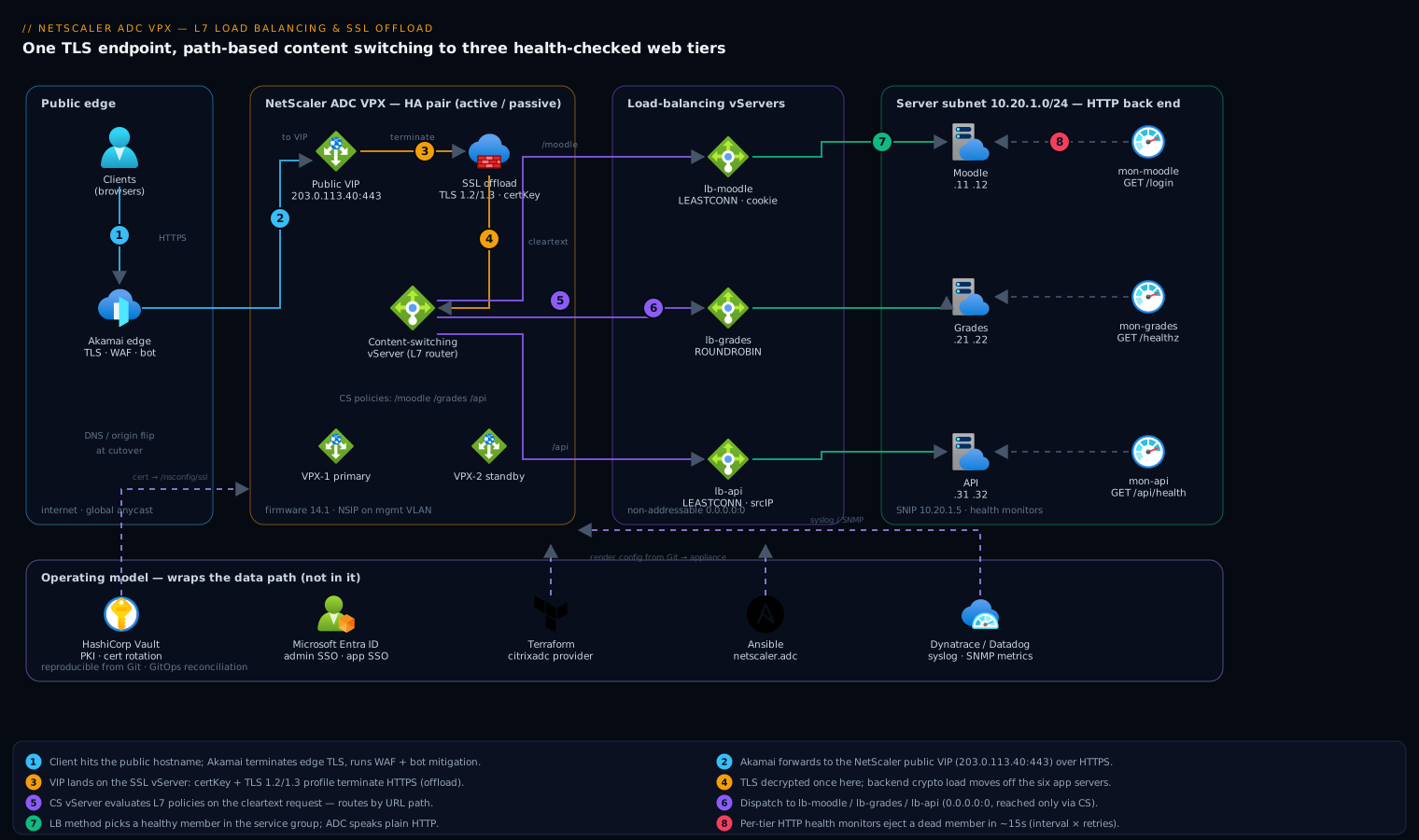
Traffic flows: client → Akamai edge (TLS, global anycast, WAF/bot mitigation at the perimeter) → public VIP on the NetScaler ADC VPX → SSL offload (HTTPS terminated here) → a content-switching vServer that inspects the decrypted HTTP request → one of three load-balancing vServers (Moodle, grades, API) → a healthy backend service chosen by the configured load-balancing method, verified by per-service health monitors. The ADC speaks plain HTTP to the back end on the trusted server subnet. A second VPX runs in a high-availability pair so the loss of one appliance does not drop the VIP.
The named tools sit around the data path, not in it: Akamai fronts the VIP at the edge; Microsoft Entra ID (federated from the campus IdP) provides SSO for the apps themselves and for ADC admin login via RADIUS/SAML; HashiCorp Vault issues and rotates the TLS material; Wiz / Wiz Code scans the appliance config and the IaC for misconfig and exposure; CrowdStrike Falcon runs on the backend app-server hosts for runtime threat detection (the ADC itself is an appliance, so it is monitored, not agent-loaded); Dynatrace / Datadog ingest the ADC’s metrics and syslog; ServiceNow holds the change ticket gating the cutover; Jenkins / GitHub Actions plus Argo CD drive the pipeline; and Terraform / Ansible render this entire config from version control. Each is wired in concretely below.
1. Establish identity, license, and base network on the VPX
First confirm the appliance identity and apply the license. On a fresh VPX you set the NSIP (management IP) during first boot; here we add the data-plane addresses. The SNIP (Subnet IP) is the source IP the ADC uses to talk to the back-end servers — without one on the server subnet, monitors and load balancing cannot reach the web tier.
# Save running config habitually; you will reference this a lot.
show ns ip

# Add a Subnet IP (SNIP) on the server-facing subnet.
add ns ip 10.20.1.5 255.255.255.0 -type SNIP -mgmtAccess DISABLED

# Add the VIP that clients (via Akamai) will hit. -type VIP, not SNIP.
add ns ip 203.0.113.40 255.255.255.0 -type VIP -icmp ENABLED

# Default route out of the client-facing subnet.
add route 0.0.0.0 0.0.0.0 203.0.113.1

# Set a hostname and timezone so logs to Dynatrace/Datadog are sane.
set ns hostName adc-vpx-edu-01
set ns param -timezone "GMT+05:30-IST-Asia/Kolkata"
Enable only the features you need — leaving everything on widens the attack surface that Wiz will (correctly) flag:
# LB = load balancing, CS = content switching, SSL = SSL offload, REWRITE/RESPONDER for L7 logic.
enable ns feature LB CS SSL REWRITE RESPONDER
enable ns mode FR L3 USIP   # Edge-Recirculation off; keep modes minimal and explicit.
Apply the license file (uploaded to /nsconfig/license/) and reboot if the model tier changed:
# After copying the .lic into /nsconfig/license/ via scp:
show ns license          # confirm "Content Switching: YES" before proceeding
2. Define backend service groups and bind health monitors
Model each app tier as a service group (a named pool of backend members) rather than individual services — it scales cleanly and lets one monitor cover the whole pool. A health monitor is the probe that decides whether a member is UP; an HTTP monitor that checks for a real 200 on a real URL is the difference between “the TCP port is open” and “the app actually works.”
# --- Custom HTTP health monitors, one per tier, checking a real health URL ---
add lb monitor mon-moodle HTTP -respCode 200 -httpRequest "GET /login/index.php" \
    -interval 5 SEC -resTimeout 2 SEC -retries 3 -downTime 10 SEC
add lb monitor mon-grades HTTP -respCode 200 -httpRequest "GET /healthz" \
    -interval 5 SEC -resTimeout 2 SEC -retries 3
add lb monitor mon-api    HTTP -respCode 200 -httpRequest "GET /api/health" \
    -interval 5 SEC -resTimeout 2 SEC -retries 3 -secure NO

# --- Service groups (HTTP on the back side; ADC already offloaded TLS) ---
add serviceGroup sg-moodle HTTP -healthMonitor YES
bind serviceGroup sg-moodle 10.20.1.11 80
bind serviceGroup sg-moodle 10.20.1.12 80
bind serviceGroup sg-moodle -monitorName mon-moodle

add serviceGroup sg-grades HTTP -healthMonitor YES
bind serviceGroup sg-grades 10.20.1.21 80
bind serviceGroup sg-grades 10.20.1.22 80
bind serviceGroup sg-grades -monitorName mon-grades

add serviceGroup sg-api HTTP -healthMonitor YES
bind serviceGroup sg-api 10.20.1.31 80
bind serviceGroup sg-api 10.20.1.32 80
bind serviceGroup sg-api -monitorName mon-api
Verify every member came up before moving on — a member stuck at DOWN here means the SNIP route or the health URL is wrong, and it is far cheaper to catch it now:
show serviceGroup sg-moodle # each member State should read UP
3. Create the load-balancing vServers (one per tier)
A load-balancing vServer owns the load-balancing decision for one pool. Because content switching will dispatch to these, set their IP to 0.0.0.0 and port 0 — they are non-addressable targets reached only via the CS vServer, never directly by clients. Choose a method per tier: LEASTCONNECTION is the sane default; Moodle benefits from persistence so a user’s session sticks to one app server.
# Moodle: least-connection + cookie-insert persistence (sticky sessions for LMS state).
add lb vserver lb-moodle HTTP 0.0.0.0 0 -lbMethod LEASTCONNECTION \
    -persistenceType COOKIEINSERT -timeout 30
bind lb vserver lb-moodle sg-moodle

# Grades: round-robin is fine for a stateless reporting app.
add lb vserver lb-grades HTTP 0.0.0.0 0 -lbMethod ROUNDROBIN
bind lb vserver lb-grades sg-grades

# API: least-connection, source-IP persistence so a client's calls stay coherent.
add lb vserver lb-api HTTP 0.0.0.0 0 -lbMethod LEASTCONNECTION \
    -persistenceType SOURCEIP -timeout 20
bind lb vserver lb-api sg-api
show lb vserver lb-moodle # State UP, "Effective State UP", members listed
4. Install the certificate and build the SSL offload front end
This is the SSL-offload core. Upload the PEM cert and key to /nsconfig/ssl/, register them as a certKey pair, then create an SSL vServer that terminates HTTPS on the public VIP. The SSL vServer decrypts, hands the cleartext request up to content switching, and re-encrypts nothing on the back side (that’s the “offload”).
# Register the cert + key (already placed in /nsconfig/ssl/ via scp or Vault Agent).
add ssl certKey ck-apps-uni -cert "apps.uni.example.edu.pem" \
    -key "apps.uni.example.edu.key"

# If using an intermediate CA chain, link it:
add ssl certKey ck-intermediate-ca -cert "intermediate-ca.pem"
link ssl certKey ck-apps-uni ck-intermediate-ca
Now the SSL front end. Note it is type SSL on the real VIP and port 443 — this is what clients reach. We will make it a content-switching vServer in the next step; here we lock down the TLS posture so Wiz and your scanner do not flag weak ciphers:
# Modern TLS posture: disable SSLv3/TLS1.0/1.1, enable TLS1.2/1.3.
add ssl profile prof-frontend-tls -tls1 DISABLED -tls11 DISABLED \
    -tls12 ENABLED -tls13 ENABLED -ssl3 DISABLED -denySSLReneg ALL \
    -HSTS ENABLED -maxage 31536000

# A cipher group that drops everything weak (illustrative ordering).
add ssl cipher cg-strong-2026
bind ssl cipher cg-strong-2026 -cipherName TLS1.3-AES256-GCM-SHA384
bind ssl cipher cg-strong-2026 -cipherName TLS1.2-ECDHE-RSA-AES256-GCM-SHA384
bind ssl cipher cg-strong-2026 -cipherName TLS1.2-ECDHE-RSA-AES128-GCM-SHA256
5. Configure the content-switching vServer (the L7 router)
The content-switching (CS) vServer is the single public entry point. It is type SSL so it terminates TLS, applies the cert and TLS profile from step 4, and then evaluates CS policies — advanced-policy expressions over the decrypted request — to pick a target LB vServer by URL path. Order matters: policies are evaluated by priority, lowest number first, so put the most specific rules first and a default last.
# The public-facing CS vServer: type SSL, on the real VIP:443.
add cs vserver cs-apps SSL 203.0.113.40 443 -cltTimeout 180

# Bind the cert, the hardened TLS profile, and cipher group to the CS vServer.
bind ssl vserver cs-apps -certkeyName ck-apps-uni
set ssl vserver cs-apps -sslProfile prof-frontend-tls
bind ssl vserver cs-apps -cipherName cg-strong-2026

# --- L7 content-switching policies: route by URL path prefix ---
add cs action act-to-moodle -targetLBVserver lb-moodle
add cs action act-to-grades -targetLBVserver lb-grades
add cs action act-to-api    -targetLBVserver lb-api

add cs policy pol-moodle -rule "HTTP.REQ.URL.PATH.SET_TEXT_MODE(IGNORECASE).STARTSWITH(\"/moodle\")" -action act-to-moodle
add cs policy pol-grades -rule "HTTP.REQ.URL.PATH.SET_TEXT_MODE(IGNORECASE).STARTSWITH(\"/grades\")" -action act-to-grades
add cs policy pol-api    -rule "HTTP.REQ.URL.PATH.SET_TEXT_MODE(IGNORECASE).STARTSWITH(\"/api\")"    -action act-to-api

# Bind in priority order (lower = evaluated first).
bind cs vserver cs-apps -policyName pol-moodle -priority 100
bind cs vserver cs-apps -policyName pol-grades -priority 110
bind cs vserver cs-apps -policyName pol-api    -priority 120

# Anything that matches no policy falls through to the default LB vServer.
bind cs vserver cs-apps -lbvserver lb-moodle   # default target
You can also route on the host header (e.g. HTTP.REQ.HOSTNAME.EQ("api.uni.example.edu")) if the team later splits apps onto separate hostnames behind the same VIP — the pattern is identical, only the rule expression changes.
6. Add L7 polish: HTTP→HTTPS redirect, header insertion, and HA
Two small but important L7 touches. First, a redirect vServer so plain http:// requests are bounced to HTTPS instead of failing. Second, insert the standard forwarded headers so backends (and Moodle) see the real client IP and know the original scheme was HTTPS — without this, Moodle generates http:// links and mixed-content breaks.
# Redirect any HTTP:80 hit on the VIP up to HTTPS.
add cs vserver cs-apps-redirect HTTP 203.0.113.40 80 \
    -cltTimeout 180 -redirectURL "https://apps.uni.example.edu"

# Tell the back end the real client IP + original scheme (SSL offload context).
add rewrite action act-xff insert_http_header X-Forwarded-For "CLIENT.IP.SRC"
add rewrite action act-proto insert_http_header X-Forwarded-Proto "\"https\""
add rewrite policy pol-xff true act-xff
add rewrite policy pol-proto true act-proto
bind cs vserver cs-apps -policyName pol-xff   -priority 100 -type REQUEST
bind cs vserver cs-apps -policyName pol-proto -priority 110 -type REQUEST
Pair the second VPX for high availability so a single appliance failure does not take the VIP down. Run on the secondary node, pointing at the primary’s NSIP; config syncs automatically from primary to secondary:
# On node 2 (secondary): join the HA pair. <NSIP-primary> is node 1's mgmt IP.
add ha node 1 10.0.0.11        # 10.0.0.11 = primary NSIP
set ha node -haStatus STAYSECONDARY   # (optional) pin roles during cutover, then clear
# Config propagation is automatic; verify with: show ha node
Finally, persist everything — unsaved config is lost on reboot, a classic 2 a.m. incident:
save ns config
7. Wire in the enterprise toolchain
The ADC config above is the data path; the operating model wraps it:
- HashiCorp Vault issues the TLS cert from its PKI engine on a short TTL, and a Vault Agent on a jump host renders it to
/nsconfig/ssl/and calls the NITRO API (update ssl certKey) to hot-swap it — so the cert in step 4 rotates automatically and no long-lived key sits on disk. This is also where the old leaked credentials lesson applies: keys live in Vault, never in the Git repo. - Terraform (via the
citrix/citrixadcprovider) or Ansible (thenetscaler.adccollection) renders this whole config from version control, so the appliance is reproducible and drift is detectable — the team’s actual goal of “rebuild from Git.”add cs policy,add serviceGroup, etc. become declarative resources. - Jenkins / GitHub Actions runs that Terraform/Ansible on merge; Argo CD can sync the desired NetScaler state for GitOps-style continuous reconciliation against the live appliance config.
- ServiceNow holds the change ticket that gates the production cutover — the pipeline checks the change is approved before it flips the VIP.
- Dynatrace / Datadog ingest the ADC’s metrics and syslog (configured below) for golden-signal dashboards: request rate, 5xx rate, TLS handshake latency, and per-vServer backend health.
- Wiz / Wiz Code scans both the rendered IaC (Wiz Code, pre-merge) and the running posture (weak ciphers, exposed mgmt interface, public VIP drift) post-deploy.
- CrowdStrike Falcon runs on the backend Moodle/app-server hosts for runtime threat detection; the ADC appliance is monitored via syslog and SNMP rather than an agent, since it is a sealed virtual appliance.
- Microsoft Entra ID (federated from the campus identity provider) provides app SSO and can back ADC admin authentication via SAML/RADIUS so operators log in with corporate identity and MFA, not a shared
nsrootpassword.
# Point ADC audit + metrics at Dynatrace/Datadog collectors.
add audit syslogAction sa-observ 10.30.9.50 -logLevel ALL -dateFormat DDMMYYYY -tcp ALL
add audit syslogPolicy sp-observ true sa-observ
bind audit syslogGlobal -policyName sp-observ -priority 100
# Enable SNMP/metrics export for the Datadog/Dynatrace NetScaler integration:
add snmp community observ-ro READONLY
add snmp manager 10.30.9.51
Validation
Work from the back of the chain forward, then end to end:
# 1. Every backend member UP?
show serviceGroup sg-moodle ; show serviceGroup sg-grades ; show serviceGroup sg-api

# 2. LB vServers UP with members bound?
stat lb vserver lb-moodle    # check "Vserver hits" climb under test traffic

# 3. CS vServer UP, policies bound in the right order?
show cs vserver cs-apps
stat cs vserver cs-apps      # "Total Requests" should increment per request

# 4. SSL: correct cert, no weak protocol?
show ssl vserver cs-apps     # confirm certkey ck-apps-uni + TLS1.2/1.3 only
From a client, prove SSL offload and L7 routing actually work:
# TLS terminates at the ADC; cert subject should be apps.uni.example.edu, TLS1.3 negotiated.
openssl s_client -connect apps.uni.example.edu:443 -servername apps.uni.example.edu </dev/null 2>/dev/null \
  | openssl x509 -noout -subject -issuer

# Path-based content switching: each path must land on its own tier.
curl -sk https://apps.uni.example.edu/moodle/login/index.php -o /dev/null -w "moodle -> %{http_code}\n"
curl -sk https://apps.uni.example.edu/grades/healthz        -o /dev/null -w "grades -> %{http_code}\n"
curl -sk https://apps.uni.example.edu/api/health            -o /dev/null -w "api    -> %{http_code}\n"

# HTTP must 301/302 redirect to HTTPS, not serve cleartext.
curl -skI http://apps.uni.example.edu/moodle | grep -i "location:"
Pull one backend member and confirm the monitor ejects it within the configured window (interval × retries ≈ 15s) and traffic keeps flowing on the survivor — this is the test that actually proves the design:
disable serviceGroup sg-moodle 10.20.1.11 80
show serviceGroup sg-moodle    # 10.20.1.11 -> DOWN, 10.20.1.12 -> UP, VIP still serving
enable  serviceGroup sg-moodle 10.20.1.11 80
Rollback / teardown
Because the new VIP is a new IP, the safest cutover is at the edge: leave the old balancer running and flip Akamai’s origin (or DNS) to 203.0.113.40 only after validation, so rollback is a one-line edge change, not an ADC change. To tear down the ADC objects themselves, unbind and remove in reverse dependency order (CS → LB → service groups → SSL → IPs), or restore the saved config:
# Fast, safe rollback: restore the last-known-good config the pipeline archived.
# (Pipelines should 'show ns runningConfig' and commit it as an artifact before each change.)

# Manual teardown, reverse order of creation:
rm cs vserver cs-apps
rm cs vserver cs-apps-redirect
rm cs policy pol-moodle ; rm cs policy pol-grades ; rm cs policy pol-api
rm cs action act-to-moodle ; rm cs action act-to-grades ; rm cs action act-to-api
rm lb vserver lb-moodle ; rm lb vserver lb-grades ; rm lb vserver lb-api
rm serviceGroup sg-moodle ; rm serviceGroup sg-grades ; rm serviceGroup sg-api
rm ssl certKey ck-apps-uni
rm ns ip 203.0.113.40
save ns config
If a single change misbehaved and you have not yet saved, simply do not save ns config and reboot — the appliance comes back on the last saved config. With the Terraform/Ansible workflow, terraform apply of the previous commit (or argocd app rollback) is the cleaner path and the one to prefer.
Common pitfalls
- No SNIP on the server subnet. Monitors stay
DOWNand no backend is reachable. The ADC sources backend traffic from a SNIP; if there isn’t one on10.20.1.0/24, nothing works. This is the single most common first-day failure. - LB vServer given a real IP. When a CS vServer dispatches to LB vServers, those LB vServers must be
0.0.0.0:0(non-addressable). Giving them a real IP creates a second front door that bypasses content switching and the cert. - Policy priority inverted. A broad rule like
STARTSWITH("/")bound at a lower priority number shadows everything after it. Order specific → general, and keep the catch-all as the default binding, not a high-priority policy. - Missing
X-Forwarded-Proto. After SSL offload the back end sees HTTP and Moodle buildshttp://URLs, causing redirect loops and mixed content. Theinsert_http_header X-Forwarded-Proto "https"rewrite (step 6) fixes it; the app must also be told to trust it. - Forgetting
save ns config. Everything works until the next reboot, then the VIP vanishes. Save after every validated change, and let the pipeline assert it. - Health URL that always 200s (or needs auth). A monitor pointed at a page behind login flaps; point it at an unauthenticated
/healthzthat returns200only when the app is genuinely ready.
Security notes
Terminate TLS with material from HashiCorp Vault’s PKI engine on a short TTL and rotate via the NITRO API, so no long-lived private key sits on disk — and never commit keys to the repo. Harden the front-end TLS profile to TLS 1.2/1.3 only, strong cipher group, HSTS on, renegotiation denied (step 4–5), which is exactly what Wiz / Wiz Code will audit in both the IaC and the live posture. Put Akamai’s WAF and bot mitigation in front of the VIP so the ADC is not the first thing the internet touches, and never expose the NSIP management interface to the client subnet — bind admin access to the management VLAN and authenticate operators through Microsoft Entra ID (SAML/RADIUS) with MFA rather than a shared nsroot login. CrowdStrike Falcon covers the backend app hosts at runtime; the appliance feeds Dynatrace / Datadog via syslog/SNMP so a config change or attack pattern is visible to the SOC. Production cutovers pass a ServiceNow change gate.
Cost notes
The whole point of VPX over hardware is cost and elasticity: you license the virtual appliance per throughput band (e.g. 200 Mbps / 1 Gbps / 3 Gbps), so size to measured p95 traffic — over-provisioning the bandwidth tier is the main way teams overpay. SSL offload also has a direct cost effect: moving TLS handshakes off six app servers onto the ADC lets the app tier run smaller/fewer instances, and the ADC’s dedicated SSL processing handles the load cheaper than per-app crypto. Run the HA pair as one primary + one standby (active/passive) rather than two active appliances unless throughput genuinely needs both — you pay for two but only one carries traffic, which is the right trade for a campus this size. Finally, because the entire config is Terraform/Ansible in Git driven by Jenkins / GitHub Actions / Argo CD, rebuilds and DR are near-zero labor cost — the expensive thing in load-balancer operations has always been the hand-built snowflake, and this design eliminates it.