A media-analytics company runs a mix that Kubernetes alone makes awkward: a dozen stateless Go and Node services that are perfectly happy in containers, and a legacy C++ transcoding engine plus a Windows licensing daemon that must run as plain processes on bare metal — they tap GPU drivers and a hardware dongle that nobody is going to containerize this decade. The platform team wants one scheduler, one mesh, and one identity story across all of it, without forcing the legacy binaries into containers they were never built for. Nomad is the answer: it schedules Docker tasks and raw_exec (fork-a-process) tasks on the same cluster, and Consul Connect gives every one of those tasks — container or process — a sidecar proxy and an mTLS identity, so a containerized API and a bare-metal transcoder talk over the same authenticated, intention-gated service mesh. This guide builds that cluster end to end.
Prerequisites
- 5 Linux hosts (Ubuntu 22.04 or RHEL 9): 3 for the server/control plane, 2+ for clients. One client host has GPU drivers and the licensing dongle for the
raw_execworkloads. Minimum 2 vCPU / 4 GB on servers, 4 vCPU / 8 GB on clients. - A private network where all nodes can reach each other on the Consul (8300–8302, 8500, 8600), Nomad (4646–4648), and Connect sidecar (per-task dynamic) ports. Open these in your security groups /
virtual appliances(the perimeter firewalls), not on the host. - Docker Engine 24+ installed on the container clients; the legacy binaries staged on the
raw_execclient. - Binaries: Nomad 1.7+, Consul 1.17+, Vault 1.15+, and the CNI reference plugins (
bridge,firewall,portmap) in/opt/cni/bin. Consul Connect’s sidecars require CNI. - A HashiCorp Vault cluster reachable from all nodes (it issues the mesh CA and dynamic secrets). It can be a separate Nomad job later, but bootstrap it externally first.
- Workforce SSO via Entra ID (federated from Okta as the upstream IdP) for the Nomad/Consul UIs — operators log in with corporate credentials, not static tokens.
terraformandansibleon your workstation: Terraform provisions the hosts, load balancer, and DNS; Ansible installs and configures the agents idempotently.
Target topology
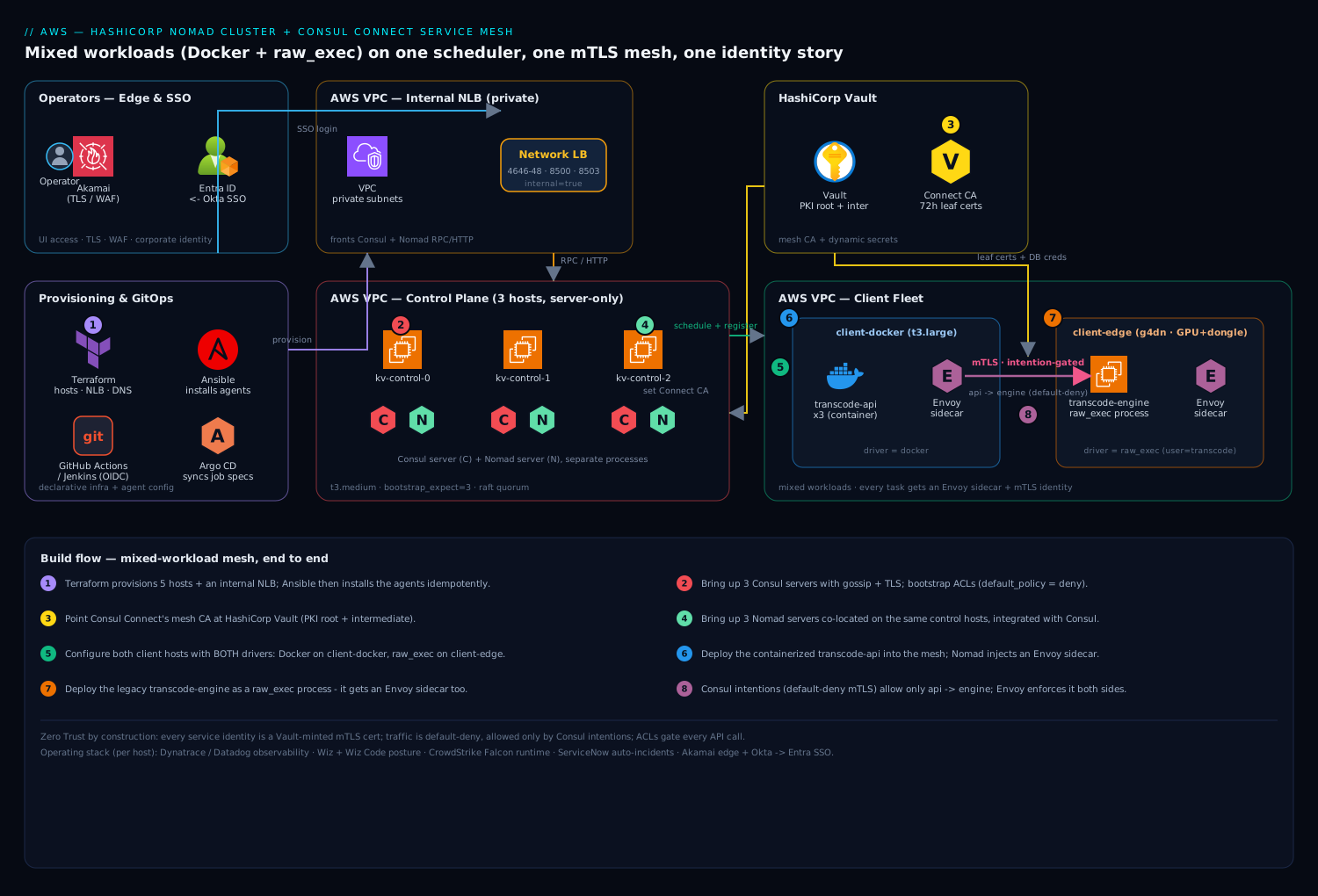
Three Consul servers and three Nomad servers (co-located on the same 3 control hosts, separate processes) form the control plane behind an internal load balancer. Two client hosts run the workloads: client-docker runs containerized services via the Docker task driver; client-edge runs the transcoder and licensing daemon via raw_exec. Every workload — regardless of driver — gets an Envoy sidecar injected by Consul Connect, and all service-to-service traffic flows sidecar-to-sidecar over mTLS, gated by Consul intentions. Vault is the mesh CA and the source of dynamic credentials. Operators reach the UIs through Akamai at the edge (TLS, WAF) and authenticate via Entra/Okta.
1. Provision hosts and the control-plane LB with Terraform
Treat the network and load balancer as the first deliverable. A trimmed Terraform module communicates the intent — five hosts and an internal NLB fronting the Consul/Nomad RPC and HTTP ports:
resource "aws_instance" "control" {
  count                  = 3
  ami                    = var.base_ami
  instance_type          = "t3.medium"
  subnet_id              = var.private_subnets[count.index]
  vpc_security_group_ids = [aws_security_group.cluster.id]
  tags = { Name = "kv-control-${count.index}", role = "server" }
}

resource "aws_instance" "client" {
  for_each      = { docker = "t3.large", edge = "g4dn.xlarge" }
  ami           = var.base_ami
  instance_type = each.value
  subnet_id     = var.private_subnets[0]
  vpc_security_group_ids = [aws_security_group.cluster.id]
  tags = { Name = "kv-client-${each.key}", role = "client", workload = each.key }
}

resource "aws_lb" "control" {
  name               = "kv-nomad-consul"
  internal           = true
  load_balancer_type = "network"
  subnets            = var.private_subnets
}
Apply it, then capture the host IPs into an Ansible inventory. The pipeline that runs terraform apply lives in GitHub Actions (or Jenkins if you are on the self-hosted runner fleet), authenticating to the cloud with OIDC federation so there is no long-lived cloud key in the runner — and Argo CD later syncs the Nomad job specs from the same Git repo so the cluster’s desired state is declarative.
2. Bootstrap Consul servers with gossip + TLS encryption
Generate the gossip key and a CA once, distribute via Ansible. On each server host, /etc/consul.d/consul.hcl:
datacenter         = "kv-dc1"
data_dir           = "/opt/consul"
server             = true
bootstrap_expect   = 3
retry_join         = ["kv-control-0", "kv-control-1", "kv-control-2"]
encrypt            = "BASE64_GOSSIP_KEY"   # consul keygen
ui_config { enabled = true }

tls {
  defaults {
    ca_file   = "/etc/consul.d/consul-agent-ca.pem"
    cert_file = "/etc/consul.d/dc1-server-consul.pem"
    key_file  = "/etc/consul.d/dc1-server-consul-key.pem"
    verify_incoming = true
    verify_outgoing = true
  }
  internal_rpc { verify_server_hostname = true }
}

acl {
  enabled                  = true
  default_policy           = "deny"
  enable_token_persistence = true
}

connect { enabled = true }   # turns on the service mesh + CA
ports { grpc_tls = 8503 }    # Envoy xDS over TLS
Generate the certs with consul tls ca create and consul tls cert create -server -dc kv-dc1, start the agents (systemctl enable --now consul), then bootstrap ACLs once:
consul acl bootstrap          # save the SecretID — this is the management token
export CONSUL_HTTP_TOKEN=<management-token>
consul members               # expect 3 servers, all alive
3. Point Consul Connect’s CA at Vault
Out of the box Connect uses a built-in CA. For production, back the mesh CA with HashiCorp Vault so certificate issuance is auditable and rotation is centralized — Vault here is doing double duty as the mesh certificate authority and the store for the dongle license key and DB credentials the workloads need. Enable two PKI mounts in Vault (root + intermediate), then reconfigure Consul’s Connect CA:
vault secrets enable -path=connect-root pki
vault secrets enable -path=connect-inter pki

consul connect ca set-config -config-file - <<'EOF'
{
  "Provider": "vault",
  "Config": {
    "Address": "https://vault.kv.internal:8200",
    "Token": "<vault-token-with-pki-policy>",
    "RootPKIPath": "connect-root/",
    "IntermediatePKIPath": "connect-inter/",
    "LeafCertTTL": "72h",
    "RotationPeriod": "2160h"
  }
}
EOF
Verify the swap took effect — consul connect ca get-config should now report "Provider": "vault". Every Envoy sidecar leaf certificate is now minted by Vault.
4. Bring up Nomad servers, integrated with Consul
On the same 3 control hosts, /etc/nomad.d/nomad.hcl:
datacenter = "kv-dc1"
data_dir   = "/opt/nomad"

server {
  enabled          = true
  bootstrap_expect = 3
  encrypt          = "BASE64_NOMAD_GOSSIP_KEY"
}

consul {
  address = "127.0.0.1:8500"
  token   = "<nomad-server-consul-token>"   # ACL token from step 2
  grpc_address = "127.0.0.1:8503"
  service_identity { aud = ["consul.io"] }
  task_identity    { aud = ["consul.io"] }
}

tls {
  http = true
  rpc  = true
  ca_file   = "/etc/nomad.d/nomad-ca.pem"
  cert_file = "/etc/nomad.d/server.pem"
  key_file  = "/etc/nomad.d/server-key.pem"
  verify_server_hostname = true
}

acl { enabled = true }
Start the agents, then bootstrap Nomad ACLs and confirm the cluster:
systemctl enable --now nomad
nomad acl bootstrap                    # save the management token
export NOMAD_TOKEN=<nomad-mgmt-token>
nomad server members                   # 3 servers, status alive, raft leader elected
Nomad auto-registers its own health into Consul, so consul catalog services will now list nomad and nomad-client.
5. Configure clients with BOTH the Docker and raw_exec drivers
This is the crux of “mixed workloads.” On both client hosts, run a Consul client agent (same file as step 2 but server = false) and a Nomad client. The Nomad client config enables the two drivers — and critically, raw_exec is opt-in and runs as an unprivileged user, never root.
On client-docker, /etc/nomad.d/client.hcl:
client {
  enabled = true
  servers = ["kv-control-0:4647", "kv-control-1:4647", "kv-control-2:4647"]
  cni_path = "/opt/cni/bin"             # required for Connect sidecars
  meta { workload_class = "container" }
}
plugin "docker" {
  config { allow_privileged = false  volumes { enabled = false } }
}
consul { address = "127.0.0.1:8500"  token = "<client-consul-token>" }
On client-edge (the bare-metal host with the GPU and dongle):
client {
  enabled  = true
  servers  = ["kv-control-0:4647", "kv-control-1:4647", "kv-control-2:4647"]
  cni_path = "/opt/cni/bin"
  meta { workload_class = "raw" }
}
plugin "raw_exec" {
  config {
    enabled        = true               # explicit opt-in — off by default for a reason
    no_cgroups     = false              # keep cgroup resource limits on the process
  }
}
consul { address = "127.0.0.1:8500"  token = "<client-consul-token>" }
Restart Nomad on both and confirm the fleet and its drivers:
nomad node status                                  # 2 ready clients
nomad node status -verbose <edge-node-id> | grep -A2 'raw_exec\|docker'
# raw_exec.driver = true on edge; docker.driver = true on docker client
6. Deploy a containerized service into the mesh
Here is the container side. The connect { sidecar_service {} } stanza is the entire mesh opt-in — Nomad injects an Envoy sidecar and registers the service with Consul. transcode-api.nomad:
job "transcode-api" {
  datacenters = ["kv-dc1"]
  group "api" {
    count = 3
    constraint { attribute = "${meta.workload_class}"  value = "container" }

    network {
      mode = "bridge"
      port "http" { to = 8080 }
    }

    service {
      name = "transcode-api"
      port = "8080"
      connect {
        sidecar_service {
          proxy {
            upstreams {
              destination_name = "transcode-engine"   # the raw_exec service
              local_bind_port  = 9090
            }
          }
        }
      }
      check { type = "http"  path = "/healthz"  interval = "10s"  timeout = "2s"  expose = true }
    }

    task "api" {
      driver = "docker"
      config { image = "registry.kv.internal/transcode-api:1.6.2" }
      template {
        # pull DB creds dynamically from Vault — never bake them in
        data        = "DB_DSN={{ with secret \"database/creds/transcode\" }}{{ .Data.username }}:{{ .Data.password }}@db.kv.internal/jobs{{ end }}"
        destination = "secrets/db.env"
        env         = true
      }
      vault { policies = ["transcode-api"] }
      resources { cpu = 500  memory = 512 }
    }
  }
}
nomad job run transcode-api.nomad. The container reaches the engine at localhost:9090 — its own sidecar — and never needs to know where the engine actually runs.
7. Deploy the legacy binary as a raw_exec job, in the SAME mesh
This is what Kubernetes will not do cleanly. The transcoder is a plain process, but it still gets a Connect sidecar and an mTLS identity. transcode-engine.nomad:
job "transcode-engine" {
  datacenters = ["kv-dc1"]
  type = "service"
  group "engine" {
    count = 1
    constraint { attribute = "${meta.workload_class}"  value = "raw" }   # pin to client-edge

    network {
      mode = "bridge"
      port "grpc" { to = 7000 }
    }

    service {
      name = "transcode-engine"
      port = "7000"
      connect { sidecar_service {} }      # process gets an Envoy proxy too
      check { type = "tcp"  interval = "10s"  timeout = "2s" }
    }

    task "engine" {
      driver = "raw_exec"
      config {
        command = "/opt/transcode/bin/engine"
        args    = ["--listen=127.0.0.1:7000", "--gpu=0"]
      }
      user = "transcode"                  # unprivileged service account, NOT root
      template {
        data        = "{{ with secret \"kv/data/transcode/dongle\" }}{{ .Data.data.license }}{{ end }}"
        destination = "secrets/license.key"
      }
      vault { policies = ["transcode-engine"] }
      resources { cpu = 4000  memory = 8192 }
    }
  }
}
nomad job run transcode-engine.nomad. Now both a container and a bare-metal process are services in the same Consul mesh, each fronted by Envoy.
8. Lock down traffic with Consul intentions (default-deny mTLS)
By design the mesh is deny by default (you set default_policy = "deny" in step 2). Until you write an intention, the API’s calls to the engine are blocked — proving the mesh is real. Allow exactly the one path you need:
# allow the API to call the engine; nothing else can
consul intention create -allow transcode-api transcode-engine

# explicitly deny a noisy neighbor, documented
consul intention create -deny   metrics-scraper transcode-engine

consul intention list
Intentions are enforced by the Envoy sidecars on the mTLS layer, so a raw_exec process is governed by the exact same policy engine as a container. Prefer the L7 form for HTTP services (consul config write with a service-intentions config entry) when you need method/path-level rules.
Validation
Walk the data path top to bottom:
# 1. Control plane healthy
consul operator raft list-peers          # 3 voters, one leader
nomad server members                      # 3 alive
nomad node status                         # 2 clients ready

# 2. Both workloads running with their sidecars
nomad job status transcode-api            # 3 running allocs
nomad job status transcode-engine         # 1 running alloc
nomad alloc status -verbose <id> | grep -i envoy   # connect-proxy task present

# 3. Mesh + mTLS actually enforced — this MUST fail before the intention, pass after
consul intention check transcode-api transcode-engine      # => Allowed
consul intention check metrics-scraper transcode-engine    # => Denied

# 4. End-to-end through the mesh (from inside the API alloc)
nomad alloc exec -task api <api-alloc-id> \
  sh -c 'curl -s localhost:9090/health'   # hits the engine via the sidecar, mTLS under the hood

# 5. Certs are Vault-issued and short-lived
consul connect ca get-config | grep -i provider   # vault
Wire these into the platform’s observability: run Dynatrace OneAgent (or the Datadog Agent if that is your standard) on every host so the Envoy sidecar metrics, Nomad allocation health, and mTLS handshake latency land in one dashboard — and so a stuck raw_exec process or a failing intention pages on-call instead of dying silently. A failed deploy or an intention breach auto-raises a ServiceNow incident through the alerting webhook, giving ops a ticket rather than a log line.
Rollback / teardown
Nomad jobs are versioned, so rolling back is first-class — never edit a running job by hand:
# Roll a bad deploy back to the previous healthy version
nomad job revert transcode-api <previous-version-index>

# Or stop a job entirely (-purge removes it from state)
nomad job stop -purge transcode-engine
nomad job stop -purge transcode-api

# Remove a too-permissive rule
consul intention delete transcode-api transcode-engine
For full cluster teardown, drain clients first so allocations reschedule cleanly, then tear down infra with the same IaC that built it:
nomad node drain -enable -yes <node-id>   # cordon + migrate, per client
nomad node drain -enable -deadline 5m -yes <node-id>
terraform destroy                          # the LB, hosts, SGs — reverse of step 1
Common pitfalls
- CNI plugins missing. Connect sidecars need
bridge/firewall/portmapin/opt/cni/bin. Without them, allocs staypendingwith a cryptic network error. Stage them with Ansible before the client ever starts. raw_execleft running as root. It defaults to the Nomad agent’s user. Always setuser = "..."to an unprivileged account — araw_exectask is code execution on the host, so treat it like one.- Forgetting the intention is default-deny. New engineers see traffic blocked and assume the mesh is broken. It is working — write the intention. This is a feature, not a bug.
bootstrap_expectmismatch between Consul and Nomad, or co-locating servers and clients on the same host. Keep the 3 server hosts server-only; a server that also schedules work loses quorum predictably under load.- One unencrypted gossip key. If
encryptdiffers across nodes (or is absent on one), that node silently fails to join. Distribute the single key with Ansible, never by hand. - Vault token for the Connect CA expiring. Use a periodic token or a Vault auth method with renewal, or leaf-cert issuance halts and new sidecars cannot start.
Security notes
The mesh is Zero Trust by construction: every service identity is an mTLS certificate minted by Vault, traffic is default-deny and explicitly allowed only by Consul intentions, and ACLs gate every Consul and Nomad API call. Layer on the corporate controls: Wiz (with Wiz Code scanning the Terraform and Nomad job HCL in the repo) runs posture analysis across the hosts and flags any drift — a raw_exec job that sneaks in as root, a security group opened to the world, an ACL that widened. CrowdStrike Falcon sensors run on every node for runtime threat detection on both the container and bare-metal workloads, feeding the SOC. Operator access to the Nomad and Consul UIs federates Okta → Entra ID so humans authenticate with corporate SSO and conditional access, never a shared management token, and the edge sits behind Akamai for TLS termination and WAF. The perimeter firewalls (the virtual appliances) restrict the cluster ports to the private network. If you run the platform’s training content — a Moodle LMS for the internal “operating Nomad” course — schedule it as just another containerized Connect service so it inherits the same mTLS and intention posture rather than becoming a snowflake.
Cost notes
Nomad’s pitch here is partly a cost one: you do not pay the tax of rewriting the transcoder and licensing daemon to fit a container runtime, and you run a single scheduler instead of separate platforms for containers and VMs. Keep the control plane on 3 modest nodes — servers are cheap; spend the budget on client capacity where the GPUs live. Use Nomad’s bin-packing and spread/affinity to drive client utilization up before adding hosts, and scale the g4dn GPU edge fleet on actual transcoding queue depth rather than provisioning for peak. Vault leaf certs and ACL tokens cost nothing but discipline. Pipe per-job CPU/memory utilization from Dynatrace into the monthly chargeback so each team owns its footprint — the same metric that tells you when a client host is finally worth adding.