A platform team at a mid-size fintech runs roughly 60 Terraform root modules across three AWS accounts and a shared GCP project, and the workflow is exactly the mess you would predict: engineers terraform apply from laptops, two of them once applied conflicting changes to the same VPC inside the same hour, nobody can answer “is production actually what main says it is,” and the security team only finds out a public S3 bucket shipped when Wiz pages them three days later. The mandate from the new head of platform is precise: every change goes through a pull request, no human ever holds long-lived cloud credentials, a machine-readable policy blocks the dangerous changes before they apply, and the platform tells us within an hour when reality drifts from code. This guide configures Spacelift to deliver exactly that — stacks bound to Git, OPA policies that gate plans, reusable contexts that inject secrets from Vault, and scheduled drift detection across the whole estate.
This is a hands-on, advanced guide. You will end with a self-service GitOps pipeline where a merge to main triggers a planned, policy-checked, optionally human-approved apply, and where Spacelift proactively reconciles drift on a schedule. We assume you are comfortable with Terraform, OPA/Rego basics, and OIDC trust relationships.
Prerequisites
- A Spacelift account (a free trial works for the walk-through) and the
spacectlCLI installed (brew install spacelift-io/spacelift/spacectl). - An identity provider for human SSO — Okta or Microsoft Entra ID — where you can register a SAML/OIDC app; this is how engineers log in to Spacelift instead of using local accounts.
- Terraform >= 1.6 and at least one working Terraform root module in a Git repository (GitHub assumed here; GitLab/Bitbucket work identically).
- A cloud account you can grant Spacelift OIDC access to (AWS used for the integration example).
- Admin on the Git repo so you can install the Spacelift VCS app.
- Optional but recommended: a HashiCorp Vault cluster for dynamic cloud credentials, and a ServiceNow instance if you want change-record gating.
Target topology
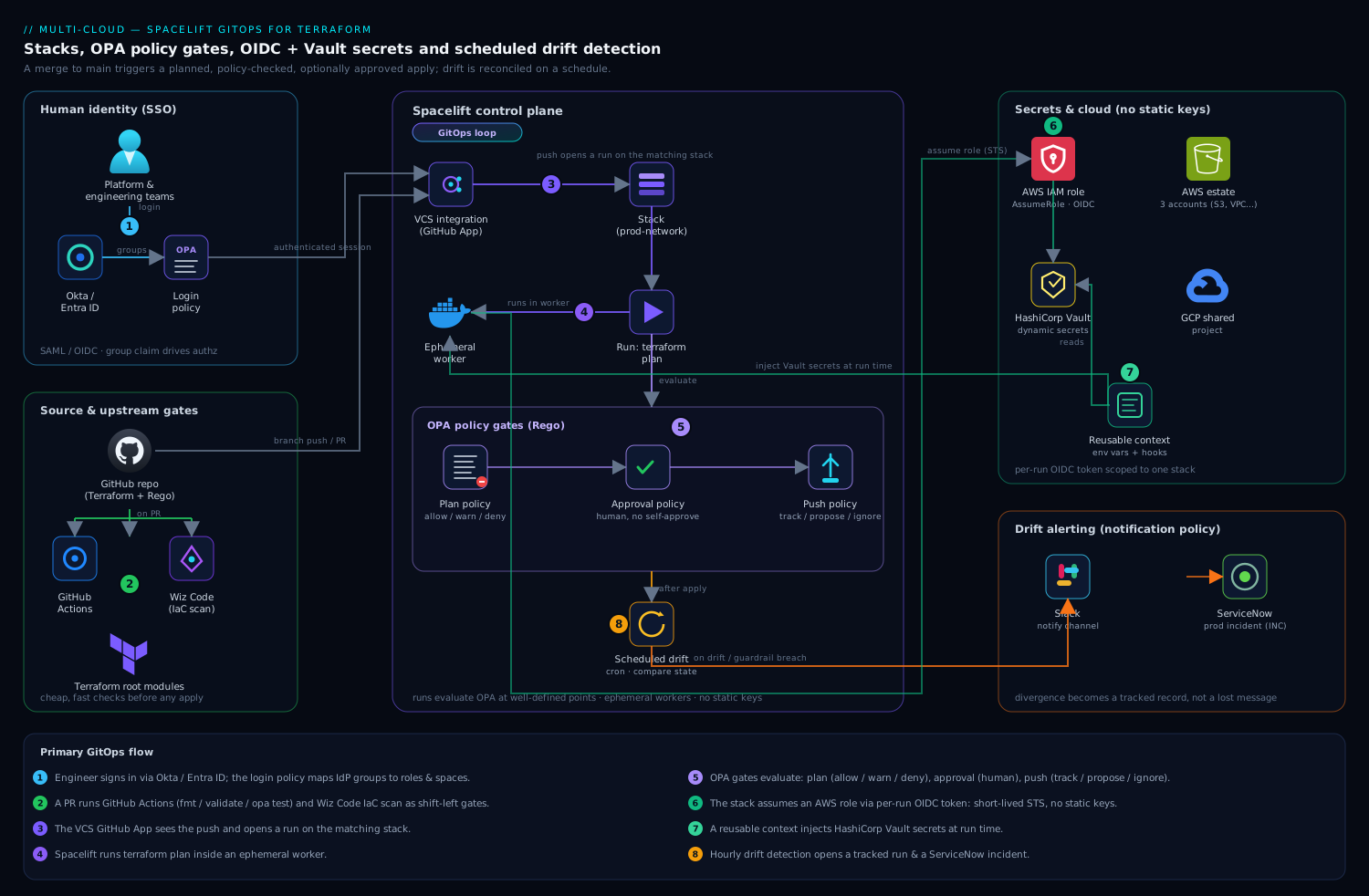
The shape is a GitOps loop. Engineers authenticate to the Spacelift UI through Okta / Entra ID (SAML/OIDC), and a Spacelift login policy maps their IdP groups to Spacelift roles and spaces. Code lives in Git; the Spacelift VCS integration (a GitHub App) watches branches. A push opens a run on the matching stack; Spacelift executes terraform plan inside an ephemeral worker, then evaluates OPA policies of three kinds — plan policies that allow/warn/deny based on the proposed change, approval policies that require a human review on sensitive stacks, and push policies that decide which commits trigger which run type. Cloud credentials are never static: the stack assumes an AWS role via OIDC, and any extra secrets (a Datadog API key, a database password) come from HashiCorp Vault injected through a reusable context. GitHub Actions runs unit tests and terraform validate on every PR before Spacelift ever sees a merge, and Wiz Code scans the same PR for IaC misconfigurations as a parallel gate. After apply, a scheduled drift-detection run on each stack compares real-world state against the recorded state on a cron, opening a tracked run (and, optionally, a ServiceNow incident) when they diverge.
1. Connect human identity: SSO and a login policy
Stop using local Spacelift logins on day one. Wire your account to the corporate IdP so access is centrally governed and offboarding is one click in Okta/Entra.
In the Spacelift UI go to Settings -> Single Sign-On, choose SAML 2.0, and register the application in your IdP. Spacelift gives you the ACS URL and entity ID; Okta (or Entra ID) gives you the IdP metadata URL and, critically, a groups claim. Map that group attribute so Spacelift receives the user’s group memberships on every login — those drive authorization.
Authorization itself is a login policy (a Rego policy of type login). It decides who may log in, whether they are an admin, and which spaces they land in. Create it under Policies -> Create policy -> Login policy:
package spacelift

# Inputs Spacelift provides: input.session.login, input.session.teams (IdP groups), ...

# Platform team are account admins.
admin {
    input.session.teams[_] == "platform-admins"
}

# Anyone in an engineering group may log in (non-admin).
allow {
    input.session.teams[_] == "engineering"
}

# Deny everyone else explicitly.
deny {
    not allow
    not admin
}

# Map IdP groups to Spacelift space access (least privilege).
space_read["prod"]  { input.session.teams[_] == "engineering" }
space_write["prod"] { input.session.teams[_] == "platform-admins" }
Attach the login policy at the account level. From now on, an engineer removed from the engineering group in Okta loses Spacelift access at their next login — no orphaned local accounts.
2. Connect the VCS and create your first stack
Install the Spacelift GitHub App from Settings -> Source code -> GitHub and grant it access to the repos holding your Terraform. This is what lets Spacelift open check runs on PRs and react to pushes.
Now create a stack. You can click through the UI, but treat Spacelift configuration as code too — define stacks in Terraform using the Spacelift provider so the estate is reproducible. Here is a real stack definition for a production network module:
resource "spacelift_stack" "prod_network" {
  name         = "prod-network"
  description  = "Core VPC, subnets, TGW attachments for prod"
  repository   = "infra-terraform"
  branch       = "main"
  project_root = "stacks/prod/network"
  space_id     = "prod"

  terraform_version  = "1.9.5"
  terraform_workflow_tool = "OPEN_TOFU" # or "TERRAFORM_FOSS"

  autodeploy   = false   # require approval gate on prod (see step 4)
  manage_state = true    # Spacelift holds the Terraform state backend
}
Key fields to get right: project_root scopes the stack to one directory so a monorepo hosts many stacks; branch is the tracked branch whose merges produce deployments; autodeploy = false means a successful plan waits for confirmation rather than applying automatically — exactly what you want on production. Apply this with spacectl or a bootstrap pipeline, and the prod-network stack appears, already bound to Git.
3. Inject credentials safely: OIDC role assumption and a Vault context
A stack with no cloud credentials cannot do anything; a stack with static credentials is the leak waiting to happen. Use two mechanisms, neither of which stores a long-lived secret.
Cloud access via OIDC. Spacelift issues a signed OIDC token per run. Configure the AWS integration so the stack assumes a role by federating that token — no access keys anywhere. Create the cloud integration and attach it:
resource "spacelift_aws_integration" "prod" {
  name                           = "aws-prod"
  role_arn                       = "arn:aws:iam::111122223333:role/spacelift-prod"
  generate_credentials_in_worker = true
  space_id                       = "prod"
}

resource "spacelift_aws_integration_attachment" "prod_network" {
  integration_id = spacelift_aws_integration.prod.id
  stack_id       = spacelift_stack.prod_network.id
  write          = true   # this stack may apply, not just plan
}
The IAM role’s trust policy federates https://spacelift.io/... as an OIDC provider and conditions on the stack id, so only the prod-network stack can assume it. Rotating credentials becomes a non-issue: every run gets fresh, short-lived STS credentials.
Application secrets via Vault. For secrets Terraform itself needs — a Datadog API key for a monitor resource, a DB master password — pull them from HashiCorp Vault at run time through a reusable context. A context is a named bundle of environment variables and mounted files you attach to many stacks. Use a hooks-based context that authenticates to Vault with the run’s OIDC token and exports the secret:
resource "spacelift_context" "vault_secrets" {
  name     = "vault-secrets"
  space_id = "prod"
}

resource "spacelift_context_attachment" "net_vault" {
  context_id = spacelift_context.vault_secrets.id
  stack_id   = spacelift_stack.prod_network.id
}
Inside that context’s before_init hooks you run vault login -method=jwt role=spacelift jwt="$SPACELIFT_OIDC_TOKEN" then export TF_VAR_datadog_api_key=$(vault kv get -field=key secret/datadog). The secret lives only in the ephemeral worker’s memory for the life of the run and is never written to state output or logs. This is the clean separation: OIDC for cloud-plane access, Vault for in-config secrets, zero static keys in Spacelift.
4. Gate changes with OPA: plan, approval, and push policies
This is the heart of the mandate — a machine blocking dangerous changes before they apply. Spacelift evaluates Open Policy Agent Rego policies at well-defined points in a run. You will use three types.
Plan policy — evaluated after terraform plan, with the full plan (resource changes, before/after values) as input. It returns deny, warn, or allow. Block the change everyone fears — a publicly readable S3 bucket — and warn on resource deletions:
package spacelift

# Hard-deny any S3 bucket made public.
deny[msg] {
    rc := input.terraform.resource_changes[_]
    rc.type == "aws_s3_bucket_public_access_block"
    rc.change.after.block_public_acls == false
    msg := sprintf("S3 public access blocked must stay on: %s", [rc.address])
}

# Warn (but allow) on any destroy so a human notices.
warn[msg] {
    rc := input.terraform.resource_changes[_]
    rc.change.actions[_] == "delete"
    msg := sprintf("Resource will be DESTROYED: %s", [rc.address])
}

# Block oversized instances to control cost.
deny[msg] {
    rc := input.terraform.resource_changes[_]
    rc.type == "aws_instance"
    forbidden := {"m5.24xlarge", "c5.24xlarge", "x1e.32xlarge"}
    forbidden[rc.change.after.instance_type]
    msg := sprintf("Instance type %s is not allowed: %s",
                   [rc.change.after.instance_type, rc.address])
}
Approval policy — requires named humans to approve before a run proceeds, and lets you encode who. On production stacks, require a platform-admin approval and forbid self-approval:
package spacelift

# Approve once a platform admin (other than the author) clicks Approve.
approve {
    some i
    input.reviews.current[i].state == "APPROVED"
    input.reviews.current[i].session.teams[_] == "platform-admins"
    input.reviews.current[i].session.login != input.run.triggered_by
}

# Reject if anyone with veto rights declines.
reject {
    input.reviews.current[_].state == "REJECTED"
}
Push policy — decides what a Git event does: trigger a tracked run (deploy), a proposed run (plan-only on a PR), or nothing. Use it so only the tracked branch deploys and so doc-only changes are ignored:
package spacelift

# Open a plan-only "proposed" run for pull requests.
propose { input.pull_request != null }

# Deploy only when the tracked branch advances.
track { input.push.branch == input.stack.branch }

# Ignore pushes that touch only markdown/docs.
ignore {
    every f in input.push.affected_files {
        endswith(f, ".md")
    }
}
Attach each policy to the relevant stacks (or to a whole space, which cascades). Now a PR that would expose a bucket fails its check run before merge, a destroy surfaces a warning, and production applies wait for an admin who is not the author. Write Rego tests with opa test and run them in CI so a broken policy never reaches Spacelift.
5. Layer in the CI and security gates around Spacelift
Spacelift owns the apply; keep the cheap, fast checks upstream so bad code never gets that far.
Run GitHub Actions on every pull request to do what Spacelift should not waste a worker on — formatting, validation, and unit tests:
name: terraform-ci
on: pull_request
jobs:
  validate:
    runs-on: ubuntu-latest
    steps:
      - uses: actions/checkout@v4
      - uses: hashicorp/setup-terraform@v3
      - run: terraform fmt -check -recursive
      - run: terraform init -backend=false
      - run: terraform validate
      - run: opa test policies/ -v   # unit-test the Rego from step 4
In parallel, point Wiz Code at the same repository so its IaC scanner inspects the Terraform in the PR for misconfigurations (open security groups, unencrypted volumes, over-broad IAM) and posts findings as PR comments and a status check. Wiz Code is your shift-left security gate; the OPA plan policy in Spacelift is the enforcement gate at apply time — defense in depth, with Wiz also watching the live cloud for posture drift the way it always has. The result: a change must pass GitHub Actions tests, clear Wiz Code, satisfy the OPA plan policy, and (on prod) earn a human approval before a single resource changes.
6. Configure scheduled drift detection across stacks
Drift is the silent failure the team kept getting burned by — someone clicks in the console, reality diverges from code, and nobody knows. Spacelift detects this by running a periodic plan against real infrastructure and comparing it to recorded state. Enable it per stack (define it as code so every stack inherits the policy):
resource "spacelift_drift_detection" "prod_network" {
  stack_id     = spacelift_stack.prod_network.id
  schedule     = ["0 * * * *"]   # hourly, satisfying the one-hour mandate
  reconcile    = false           # detect and alert; do not auto-fix prod
  ignore_state = ["FINISHED"]    # only run when the stack is idle
  timezone     = "UTC"
}
reconcile = false means Spacelift opens a tracked drift run and flags it but does not auto-apply on production — a human decides. For lower environments where you want self-healing, set reconcile = true and Spacelift will re-apply the code to erase the drift automatically. To roll this across the estate, loop the resource over your stacks with for_each so all 60 stacks get hourly detection from one definition.
Wire the alert to your workflow. A notification policy routes drift events to Slack and, for production, opens a ServiceNow incident so the divergence becomes a tracked record with an owner rather than a Slack message that scrolls away:
package spacelift

# On a detected drift run, raise a ServiceNow incident for prod stacks.
incident[msg] {
    input.run.drift_detection
    input.run.state == "UNCONFIRMED"
    input.stack.labels[_] == "env:prod"
    msg := sprintf("Drift detected on %s — open ServiceNow INC", [input.stack.id])
}
Validation
Confirm each layer actually does its job before you trust it.
- SSO + login policy. Log in as a test user who is only in
engineering; confirm they reachprodread-only and cannot create stacks. Remove them from the group in Okta and confirm the next login is denied. - OIDC, no static keys. Trigger a run and inspect the worker log: it should show STS
AssumeRoleWithWebIdentity, andspacectl stack environment list --id prod-networkshould reveal noAWS_ACCESS_KEY_ID. - Plan policy. Open a PR that flips
block_public_aclstofalse. The Spacelift check must fail with your deny message and the merge must be blocked. - Approval policy. Merge a benign change to a prod stack; the run must pause in “Pending approval” and reject a self-approval by the author.
- Drift detection. Make a deliberate out-of-band change (toggle a tag on the VPC in the AWS console), wait for the top of the hour, and confirm a drift run appears showing exactly that delta — and that a ServiceNow incident was created. Use
spacectl stack list --status DRIFTEDto see drifted stacks programmatically.
# Trigger a run and watch it from the CLI end to end.
spacectl stack deploy --id prod-network
spacectl stack logs --id prod-network
spacectl stack list --status DRIFTED
Rollback and teardown
If a policy is too strict or a run misbehaves, recover cleanly without ripping out the platform.
- Loosen a policy fast: change
denytowarnin the offending Rego and re-attach; Spacelift picks up the new policy on the next run. Keep policies in Git so this is a reviewed revert, not a console hack. - Unblock a stuck run: cancel it with
spacectl stack cancel --id <stack>, or in a true emergency set the stack to autodeploy and bypass — but record why, because you have just stepped around the gate the team built. - Roll back infrastructure: revert the merge in Git and let the normal pipeline plan/apply the previous state — never hand-edit cloud resources, which only creates the drift you are trying to eliminate.
- Tear down a stack:
terraform destroythe workloads via a one-off run, thenspacectl stack delete --id prod-network. If you bootstrapped stacks with the Spacelift provider, simplyterraform destroythe management workspace to remove stacks, contexts, integrations, and policies together. Detach integrations first so dangling AWS roles can be cleaned up.
Common pitfalls
- Forgetting
project_rootin a monorepo makes a stack plan the entire repo and collide with siblings. Always scope it to one directory. autodeploy = trueon production. It feels convenient until an un-reviewed merge applies to prod. Keep prod on approval policies; reserve autodeploy for dev/preview stacks.- Treating Wiz Code and OPA as redundant. They run at different times — Wiz at PR (shift-left), OPA at plan (enforcement). Dropping either leaves a gap.
- Reconciling drift on prod automatically.
reconcile = trueon production can re-apply over a legitimate emergency manual fix. Detect-and-alert on prod; auto-reconcile only below it. - Static credentials “just to get started.” They never get removed. Stand up OIDC from the first stack — retrofitting it after secrets leak is far more painful.
- Unversioned policies. Editing Rego in the console with no Git history and no
opa testmeans a typo can block every run estate-wide. Manage policies as code and test them in GitHub Actions.
Security notes
The design is least-privilege by construction: humans authenticate through Okta / Entra ID with group-mapped roles, machines use per-run OIDC tokens scoped to a single stack so a compromised run cannot pivot to another account, and application secrets come from HashiCorp Vault with short leases instead of stored variables. The OPA plan policy is a hard control that blocks risky changes (public buckets, over-broad IAM, forbidden instance types) before apply, while Wiz Code shifts the same scrutiny left into the PR and Wiz continues to watch the live cloud for posture drift. Pair this with Spacelift’s audit trail — every run, approval, and policy decision is logged — and a guardrail breach can auto-open a ServiceNow record so security has a ticket, not just a notification.
Cost notes
Spacelift bills primarily on the number of concurrent workers and seats, so the largest lever is keeping runs cheap and few. Use push policies to ignore doc-only commits and to keep PRs to plan-only (no wasted applies). Schedule drift detection at a cadence that matches real risk — hourly on production, daily on rarely-changing stacks — because every drift run consumes a worker minute. Put the OPA cost guardrail from step 4 to work blocking oversized instances at plan time, which stops budget overruns before they provision rather than discovering them on the next cloud bill. Finally, run the fast checks (fmt, validate, opa test, Wiz Code) in GitHub Actions, which is far cheaper per minute than a Spacelift worker, so the worker is reserved for the plan/apply it alone can do.