A payments platform team runs three EKS clusters and a fleet of CI runners, and every one of them holds a long-lived Vault token baked into a Kubernetes Secret or a Jenkins credential. A Wiz Code scan of the IaC repo flags the pattern as a critical finding — a token with a year-long TTL, copied into four namespaces, that nobody has rotated since the cluster was built. The mandate from the security architecture review is blunt: no workload may hold a static Vault credential. Every pod and every pipeline must prove who it is with an identity the platform already trusts — its Kubernetes ServiceAccount or an OIDC token from the CI provider — and Vault must hand back only a short-lived, narrowly-scoped lease in return. This guide walks through configuring Vault’s Kubernetes auth method (for in-cluster pods) and its JWT/OIDC auth method (for CI runners and human operators) so that identity, not a secret, is what unlocks secrets.
The two methods solve the same problem from two angles. The Kubernetes auth method lets Vault validate a pod’s projected ServiceAccount token against the cluster’s TokenReview API (or its public JWKS), then map the namespace:serviceaccount to a Vault role and policy. The JWT/OIDC auth method lets Vault validate any OIDC-signed JWT — from GitHub Actions, from an Okta/Entra ID app, or from a cloud workload-identity provider — against the issuer’s JWKS, then bind selected claims to a role. Both end in the same place: a workload presents proof of identity, Vault returns a token leased for minutes, and there is no standing secret to steal, rotate, or leak.
Prerequisites
- A running Vault cluster (v1.15+) reachable from your clusters and CI, ideally on its own virtual appliances or a hardened node pool, with a storage backend and auto-unseal already configured. This guide does not cover bootstrapping or unsealing Vault.
vaultCLI v1.15+ andkubectlv1.27+ on your workstation, plus a Vault token withsudo-level policy to configure auth methods and write policies.- One or more Kubernetes clusters (EKS/AKS/GKE or vanilla) at v1.27+ with the ServiceAccount Token Volume Projection and Bound ServiceAccount Token features enabled (default on modern clusters).
- An OIDC identity provider for the JWT path: GitHub Actions OIDC (
https://token.actions.githubusercontent.com), or an Okta / Microsoft Entra ID application if you want human or pipeline logins federated through your corporate IdP. helmv3 if you intend to inject secrets via the Vault Agent Injector (covered in step 6).- Network reachability from Vault to each cluster’s API server (for the TokenReview call) and outbound from Vault to each OIDC issuer’s JWKS endpoint.
Target topology
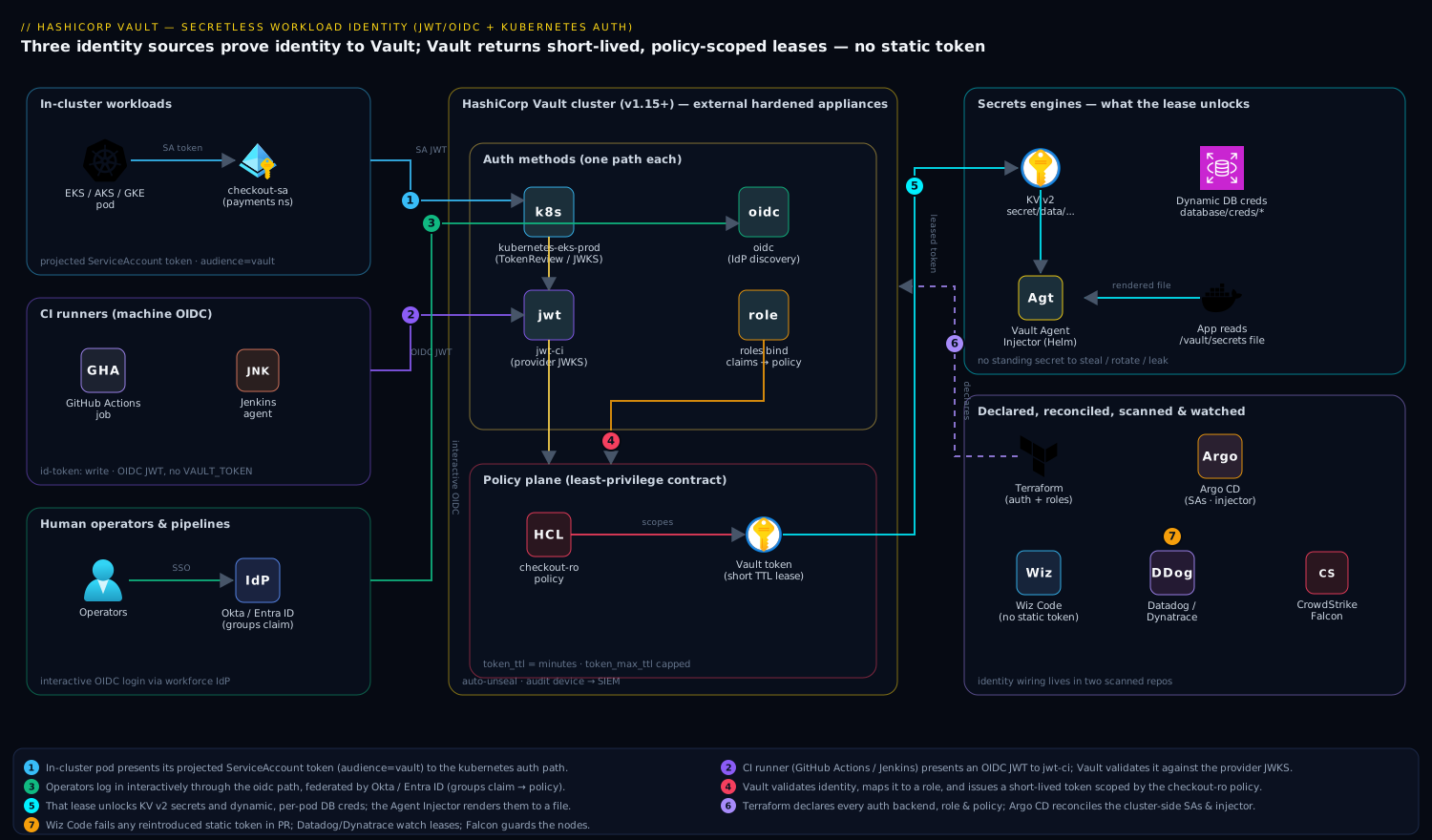
Three identity sources converge on one Vault. In-cluster pods present a projected Kubernetes ServiceAccount token; Vault’s Kubernetes auth method validates it (via TokenReview or the cluster JWKS) and maps payments/checkout-sa to a role and policy. CI runners — Jenkins agents or GitHub Actions jobs — present an OIDC JWT; Vault’s JWT auth method validates it against the provider’s JWKS and binds claims like the repository or the runner’s subject to a role. Human operators and pipelines federated through Okta or Entra ID hit Vault’s OIDC auth method for an interactive login. Every path resolves to a Vault policy that scopes access to a specific KV path or dynamic-secrets engine, and every issued token carries a short TTL. Terraform declares the auth backends, roles, and policies; Argo CD reconciles the Kubernetes-side ServiceAccounts and Agent Injector config; Wiz Code scans both repos for any reintroduced static token; Dynatrace or Datadog watches Vault audit and lease metrics; CrowdStrike Falcon guards the Vault appliance and cluster nodes; and ServiceNow holds the change record for every new role binding.
1. Enable and configure the Kubernetes auth method
Enable a dedicated auth path per cluster so you can revoke or reconfigure one cluster without touching the others. Name the path after the cluster.
# Run against your Vault, authenticated with an admin token.
vault auth enable -path=kubernetes-eks-prod-cin kubernetes
Vault now needs to know how to talk to that cluster’s TokenReview API. The modern, recommended pattern is to not give Vault a long-lived reviewer token; instead, let it use the short-lived token of the pod it is validating, and point it at the cluster’s CA and API host. Create a ServiceAccount in the cluster whose token Vault will use only when it cannot rely on the request’s own token:
# In the target cluster: a reviewer SA bound to the system:auth-delegator role.
kubectl create serviceaccount vault-token-reviewer -n vault-auth
kubectl create clusterrolebinding vault-token-reviewer \
  --clusterrole=system:auth-delegator \
  --serviceaccount=vault-auth:vault-token-reviewer

# Mint a short-lived reviewer JWT (1h) and capture the cluster CA + host.
REVIEWER_JWT=$(kubectl create token vault-token-reviewer -n vault-auth --duration=1h)
KUBE_CA=$(kubectl config view --raw --minify --flatten \
  -o jsonpath='{.clusters[].cluster.certificate-authority-data}' | base64 -d)
KUBE_HOST=$(kubectl config view --raw --minify --flatten \
  -o jsonpath='{.clusters[].cluster.server}')
Now configure the auth backend. Setting disable_local_ca_jwt=false and omitting a static token_reviewer_jwt lets Vault use the caller’s token for the review — the cleanest option when Vault runs inside the same cluster. For an external Vault (the appliance pattern here), supply the reviewer JWT and CA explicitly:
vault write auth/kubernetes-eks-prod-cin/config \
  kubernetes_host="${KUBE_HOST}" \
  kubernetes_ca_cert="${KUBE_CA}" \
  token_reviewer_jwt="${REVIEWER_JWT}" \
  disable_iss_validation=false
Because the reviewer JWT expires in an hour, do not hand-roll its rotation — let Terraform (step 8) or a small Argo CD-managed CronJob re-mint and re-write it. A token Vault can renew beats a token someone forgets.
2. Write a least-privilege Vault policy
A policy is the contract: it says exactly which paths an identity may touch and with which capabilities. Keep it narrow — one app, one path. Write the policy to a file and load it.
cat > /tmp/checkout-policy.hcl <<'EOF'
# Read-only access to the checkout service's KV v2 secrets.
path "secret/data/payments/checkout/*" {
  capabilities = ["read"]
}
# Allow the app to look up its own token (for renew loops).
path "auth/token/lookup-self" {
  capabilities = ["read"]
}
# Dynamic database creds for the checkout Postgres role.
path "database/creds/checkout-ro" {
  capabilities = ["read"]
}
EOF

vault policy write checkout-ro /tmp/checkout-policy.hcl
Note the KV v2 quirk that trips everyone: the data path is secret/data/... even though you read it from the CLI as secret/.... The policy must use the data/ segment.
3. Bind a ServiceAccount to a Vault role
The role is where identity meets policy. It says: a token from this ServiceAccount in this namespace gets this policy, leased for this long.
vault write auth/kubernetes-eks-prod-cin/role/checkout \
  bound_service_account_names=checkout-sa \
  bound_service_account_namespaces=payments \
  token_policies=checkout-ro \
  audience=vault \
  token_ttl=20m \
  token_max_ttl=1h
The audience=vault value matters: the projected token the pod presents must have been minted with that same audience, or validation fails. Bind to explicit names and namespaces — never * for both, which would let any ServiceAccount in any namespace assume the role.
On the cluster side, create the ServiceAccount and a token volume scoped to the vault audience:
# checkout-sa.yaml — applied by Argo CD into the payments namespace.
apiVersion: v1
kind: ServiceAccount
metadata:
  name: checkout-sa
  namespace: payments
---
apiVersion: apps/v1
kind: Deployment
metadata:
  name: checkout
  namespace: payments
spec:
  template:
    spec:
      serviceAccountName: checkout-sa
      containers:
        - name: checkout
          image: registry.internal/payments/checkout:1.8.2
          volumeMounts:
            - name: vault-token
              mountPath: /var/run/secrets/vault
              readOnly: true
      volumes:
        - name: vault-token
          projected:
            sources:
              - serviceAccountToken:
                  path: vault-token
                  audience: vault       # must match the role's audience
                  expirationSeconds: 600
4. Verify a pod can log in
From inside a checkout-sa pod, exchange the projected token for a Vault token. This is exactly what the Vault Agent will automate, but doing it by hand first proves the binding.
# Exec into a pod running as checkout-sa.
JWT=$(cat /var/run/secrets/vault/vault-token)

curl -s --request POST \
  --data "{\"role\":\"checkout\",\"jwt\":\"${JWT}\"}" \
  https://vault.internal:8200/v1/auth/kubernetes-eks-prod-cin/login \
  | jq '.auth.client_token, .auth.lease_duration, .auth.token_policies'
A successful response returns a client_token, a lease_duration of 1200 seconds (your 20m token_ttl), and ["checkout-ro", "default"]. The pod never held a Vault secret — it proved identity and received a lease.
5. Enable and configure the JWT/OIDC auth method for CI and humans
In-cluster pods are covered. Now the CI runners and operators. Enable a JWT auth path for machine OIDC (GitHub Actions, Jenkins with an OIDC plugin) and, separately, an OIDC path for interactive human login through Okta or Entra ID.
# Machine path: validates GitHub Actions / Jenkins OIDC JWTs against a JWKS.
vault auth enable -path=jwt-ci jwt

vault write auth/jwt-ci/config \
  oidc_discovery_url="https://token.actions.githubusercontent.com" \
  bound_issuer="https://token.actions.githubusercontent.com" \
  default_role="gha-deployer"
Bind a role to the claims your provider emits. For GitHub Actions, the sub and repository claims pin the role to a specific repo and branch so a fork or an unrelated repo cannot assume it:
vault write auth/jwt-ci/role/gha-deployer \
  role_type="jwt" \
  user_claim="repository" \
  bound_audiences="https://github.com/kloudvin" \
  bound_claims_type="glob" \
  bound_claims='{"repository":"kloudvin/payments-*","ref":"refs/heads/main"}' \
  token_policies="checkout-ro" \
  token_ttl=15m \
  token_max_ttl=30m
For interactive operators federated through Okta or Entra ID, enable a second path of type=oidc and register Vault as an OIDC application in the IdP (redirect URIs https://vault.internal:8200/ui/vault/auth/oidc/oidc/callback and http://localhost:8250/oidc/callback):
vault auth enable -path=oidc oidc

vault write auth/oidc/config \
  oidc_discovery_url="https://kloudvin.okta.com" \
  oidc_client_id="0oa<redacted>" \
  oidc_client_secret="${OKTA_VAULT_CLIENT_SECRET}" \
  default_role="operator"

# Map an Okta/Entra group claim to a Vault policy.
vault write auth/oidc/role/operator \
  user_claim="sub" \
  allowed_redirect_uris="https://vault.internal:8200/ui/vault/auth/oidc/oidc/callback,http://localhost:8250/oidc/callback" \
  bound_audiences="0oa<redacted>" \
  groups_claim="groups" \
  token_policies="checkout-ro" \
  token_ttl=1h
The OIDC client secret here is the one legitimate secret in the system — it lives only in Vault’s own config, never in a workload. Okta / Entra ID is the workforce IdP that authenticates the human and emits the groups claim Vault maps to a policy.
6. Inject secrets automatically with the Vault Agent Injector
Hand-fetching a token (step 4) proves the wiring; in production you let the Vault Agent Injector do it. Install it with Helm, pointed at your external Vault, then annotate the Deployment.
helm repo add hashicorp https://helm.releases.hashicorp.com
helm install vault hashicorp/vault \
  --namespace vault \
  --set "injector.externalVaultAddr=https://vault.internal:8200" \
  --set "server.enabled=false"
Annotations on the pod template tell the injector which role to use and which secret to render. The Agent logs in with the projected token, fetches the secret, writes it to a tmpfs file, and keeps it renewed — the app just reads a file:
# Add to the checkout Deployment's pod template metadata.
metadata:
  annotations:
    vault.hashicorp.com/agent-inject: "true"
    vault.hashicorp.com/role: "checkout"
    vault.hashicorp.com/auth-path: "auth/kubernetes-eks-prod-cin"
    vault.hashicorp.com/agent-inject-secret-db.env: "database/creds/checkout-ro"
    vault.hashicorp.com/agent-inject-template-db.env: |
      {{- with secret "database/creds/checkout-ro" -}}
      DB_USER={{ .Data.username }}
      DB_PASS={{ .Data.password }}
      {{- end -}}
The rendered file lands at /vault/secrets/db.env. Nothing is written to a Kubernetes Secret, and the database credential is a dynamic, leased one — Vault generates a unique Postgres user per pod and revokes it when the lease ends.
7. Use the JWT auth from a GitHub Actions pipeline
The CI side mirrors the pod side. The job requests a GitHub OIDC token for the vault audience, hands it to Vault, and gets back a short-lived token to read a secret — no VAULT_TOKEN stored in repo or org secrets.
# .github/workflows/deploy.yml (auth excerpt — full pipeline lives elsewhere)
permissions:
  id-token: write     # allow the job to mint an OIDC token
  contents: read
jobs:
  deploy:
    runs-on: ubuntu-latest
    steps:
      - name: Authenticate to Vault via OIDC
        uses: hashicorp/vault-action@v3
        with:
          url: https://vault.internal:8200
          path: jwt-ci
          method: jwt
          role: gha-deployer
          jwtGithubAudience: https://github.com/kloudvin
          secrets: |
            secret/data/payments/checkout/* DB_PASS | CHECKOUT_DB_PASS
Jenkins runners follow the same shape using the HashiCorp Vault plugin’s JWT credential, presenting the agent’s OIDC token to the jwt-ci path. Argo CD never logs in to fetch app secrets at all — the Agent Injector handles that at pod start — so Argo’s own credentials stay scoped to Git and the cluster API only.
8. Codify everything in Terraform
Click-ops on auth methods drifts and is unauditable. Declare the backends, roles, and policies in Terraform using the Vault provider so every binding is reviewed in a PR, scanned by Wiz Code, and tracked against a ServiceNow change record.
resource "vault_auth_backend" "k8s_eks_prod" {
  type = "kubernetes"
  path = "kubernetes-eks-prod-cin"
}

resource "vault_policy" "checkout_ro" {
  name   = "checkout-ro"
  policy = file("${path.module}/policies/checkout-ro.hcl")
}

resource "vault_kubernetes_auth_backend_role" "checkout" {
  backend                          = vault_auth_backend.k8s_eks_prod.path
  role_name                        = "checkout"
  bound_service_account_names      = ["checkout-sa"]
  bound_service_account_namespaces = ["payments"]
  token_policies                   = [vault_policy.checkout_ro.name]
  audience                         = "vault"
  token_ttl                        = 1200
  token_max_ttl                    = 3600
}

resource "vault_jwt_auth_backend" "ci" {
  path               = "jwt-ci"
  oidc_discovery_url = "https://token.actions.githubusercontent.com"
  bound_issuer       = "https://token.actions.githubusercontent.com"
}
Keep the cluster-side ServiceAccounts and Agent Injector annotations in the Git repo that Argo CD reconciles, and the Vault config in the Terraform repo. The two repos together are the whole identity wiring — and both are scanned, so a reintroduced static token surfaces in a PR check, not a quarterly audit. Use Ansible only for the Vault appliance OS hardening and the audit-log shipping config, keeping configuration management off the policy plane.
Validation
Confirm each path independently before you trust it.
# 1. Kubernetes path: list configured roles and inspect the binding.
vault list auth/kubernetes-eks-prod-cin/role
vault read  auth/kubernetes-eks-prod-cin/role/checkout

# 2. End-to-end pod login (from a checkout-sa pod, as in step 4) returns a token.

# 3. JWT path: verify the JWKS is reachable and the role's bound claims.
vault read auth/jwt-ci/config
vault read auth/jwt-ci/role/gha-deployer

# 4. Confirm a wrong identity is REJECTED — the critical negative test.
#    A token from default:default must fail against the checkout role.
vault write auth/kubernetes-eks-prod-cin/login role=checkout jwt="$WRONG_SA_JWT"
# Expected: "permission denied" — proof the binding is tight, not open.

# 5. Audit the lease: tokens must be short-lived.
vault token lookup <client_token> | grep -E 'ttl|policies'
Pipe Vault’s audit device to Datadog or Dynatrace and assert two things in a dashboard: that the count of auth/*/login successes tracks your deploy rate, and that no issued token has a TTL above its role’s token_max_ttl. A token that lives too long is the regression this whole project exists to prevent.
Rollback / teardown
Every change is reversible. To retire a single role without disturbing others:
vault delete auth/kubernetes-eks-prod-cin/role/checkout
vault policy delete checkout-ro
To disable an entire auth method (this revokes all tokens issued through it — coordinate the window):
vault auth disable jwt-ci
vault auth disable kubernetes-eks-prod-cin
On the cluster, remove the reviewer binding and ServiceAccounts:
kubectl delete clusterrolebinding vault-token-reviewer
kubectl delete serviceaccount vault-token-reviewer -n vault-auth
kubectl delete serviceaccount checkout-sa -n payments
If you manage this in Terraform, terraform destroy -target=vault_kubernetes_auth_backend_role.checkout is the auditable path; raise the corresponding ServiceNow change so the revocation is recorded. Because nothing static was ever distributed, teardown leaves no orphaned credential to hunt down — the absence of standing secrets is itself the cleanup.
Common pitfalls
- Audience mismatch. The projected token’s
audience(step 3 manifest) must equal the role’saudience(step 3vault write). A mismatch yields a crypticinvalid audienceand is the single most common failure. - KV v2 path confusion. Policies must reference
secret/data/..., notsecret/.... The CLI hides thedata/segment; the policy does not. - Over-broad bindings.
bound_service_account_namespaces=*combined withbound_service_account_names=*turns the role into a cluster-wide skeleton key. Always pin at least the namespace. - Reviewer JWT expiry. The external-Vault
token_reviewer_jwt(step 1) expires; if you set it once by hand it silently breaks logins later. Automate its renewal. - JWKS unreachable. If Vault cannot reach the OIDC issuer’s JWKS endpoint (egress firewall, proxy), JWT login fails with a validation error. Test reachability from the Vault host, not your laptop.
bound_claimstoo loose on CI. Without pinningrepository/ref(or the equivalent on Jenkins), any repo in the org — or a PR from a fork — can assume the deployer role. Glob-bind tightly.
Security notes
This design is Zero Trust at the credential layer: no workload holds a standing secret, every token is short-lived (minutes, not months), and identity is proven against a source the platform already trusts — the cluster’s own TokenReview or the IdP’s JWKS. Keep token_ttl as low as the workload’s renew loop tolerates, and prefer dynamic secrets engines (the database/creds/... path above) so even the leased credential is unique per consumer and auto-revoked. Wiz / Wiz Code scans both the Terraform and GitOps repos for any reintroduced long-lived VAULT_TOKEN or hard-coded role, failing the PR. CrowdStrike Falcon runs on the Vault virtual appliances and the cluster nodes for runtime threat detection, feeding the SOC. Enable a Vault audit device to a write-only sink and forward it to your SIEM; a sudden spike in a single role’s logins is an early signal of a compromised pod. The OIDC client secret for the Okta/Entra path is the one true secret — store it only in Vault’s config and rotate it through the IdP on a schedule.
Cost notes
The mechanism itself is near-free: Vault’s auth methods, policies, and token issuance carry no marginal license cost on Vault Community, and the projected-token validation adds a negligible TokenReview call per login. The real savings are operational and risk-denominated — eliminating static tokens removes the rotation toil, the incident-response cost of a leaked credential, and the audit findings that Wiz would otherwise raise every quarter. Dynamic database credentials add a small amount of Postgres role churn; cap it by tuning token_ttl so you are not minting a new DB user every few seconds under load. If you run Vault Enterprise for namespaces or performance replication, that is the only line item of consequence here, and it is justified by scale and multi-team isolation, not by this auth pattern. Observability is the other cost to plan for: shipping Vault audit logs and lease metrics into Datadog or Dynatrace is what turns “we think tokens are short-lived” into a number on a dashboard the security team will actually trust.