A payments company runs its tokenization service on an EKS cluster in us-east-1, and the workload is mostly stateless — except for two stubborn StatefulSets: a self-hosted Vault-backed signing service that keeps key metadata on an EBS-backed PVC, and a Moodle-derived compliance-training portal whose course content and SCORM uploads live on an EFS volume. When the platform team has to rebuild that cluster — a Kubernetes version jump that cannot be done in place, or a region move dictated by a new data-residency clause — they need those volumes’ file contents to land intact in a brand-new cluster, not just the YAML. Volume snapshots alone do not solve this: EBS snapshots are zonal and cannot restore an EFS file tree, and the new cluster may use a different storage class entirely. The pattern that actually works is Velero with Kopia file-system backup (FSB) — it reads the files inside each PersistentVolume, deduplicates and encrypts them, and ships them to an S3 bucket that any cluster with credentials can restore from. This guide builds that pipeline end to end and proves a cross-cluster restore.
Prerequisites
- Two EKS clusters, both at Kubernetes 1.29+, named
eks-prod-use1(source) andeks-dr-use1(target). They can share a region or not; this guide keeps both inus-east-1for clarity. - The Velero CLI v1.14+ and
kubectl/eksctl/awsCLIs installed locally. - An OIDC provider associated with each cluster (
eksctl utils associate-iam-oidc-provider), so we can use IRSA (IAM Roles for Service Accounts) instead of static keys. - The EBS CSI and EFS CSI drivers installed on both clusters, with at least one
StorageClasson the target that can satisfy your PVCs. - Permission to create an S3 bucket and two IAM roles. No node instance-profile credentials are used for Velero — that is the anti-pattern this guide avoids.
- A stateful test workload on the source cluster (we use a StatefulSet with an EBS PVC) so the restore is verifiable, not theoretical.
Target topology
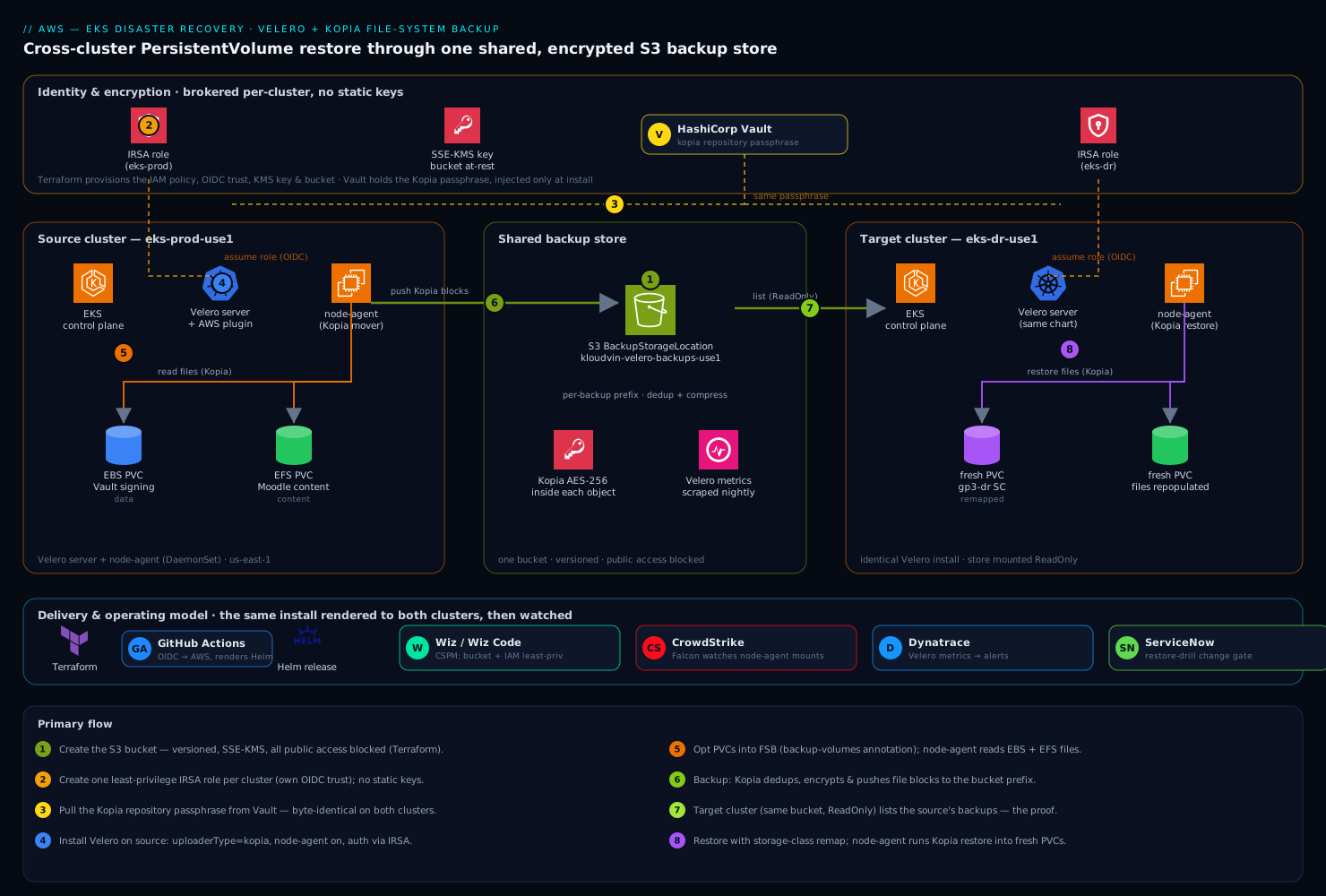
The shape is deliberately simple, and the simplicity is the point: a single S3 bucket is the shared backup store, and both clusters are clients of it. The source cluster’s Velero server, with its node-agent DaemonSet, walks each PVC’s filesystem with Kopia, deduplicates and encrypts the file blocks, and pushes them to the bucket under a per-backup prefix. The target cluster runs an identical Velero install pointed at the same bucket; because the backup is file-level and storage-agnostic, the target’s node-agent can restore those files into a freshly provisioned PVC backed by whatever StorageClass exists there — even a different CSI driver. Velero objects (Deployments, Services, ConfigMaps) are restored from the same backup’s resource manifests. Identity to the bucket is brokered per-cluster through IRSA, so neither cluster holds a long-lived AWS key, and the encryption passphrase Kopia uses to seal the repository is held outside the cluster in HashiCorp Vault rather than living forever in a Kubernetes Secret.
Around that core, the operating model is where a regulated team earns its keep. Wiz (and Wiz Code scanning the Velero schedule and IAM manifests in the repo) continuously checks that the backup bucket never drifts to public and that the IRSA policy stays least-privilege; CrowdStrike Falcon sensors on both node pools watch the node-agent’s mount-and-read behavior for anything anomalous; Dynatrace (Datadog works equally well) scrapes Velero’s Prometheus metrics so a silently failing nightly backup pages someone instead of being discovered during an incident; ServiceNow is the change gate that a real restore drill files against; and the whole install is delivered by Terraform (IAM, bucket, OIDC) plus a GitHub Actions workflow (or Argo CD app-of-apps) that renders the Velero Helm release so the two clusters are provably identical. We will call out where each one plugs in.
1. Create the S3 backup store and lock it down
Velero needs one bucket as its BackupStorageLocation. Create it with versioning, default encryption, and all public access blocked. In production this is a Terraform resource so Wiz Code can lint it before it ever applies; the equivalent CLI is shown for clarity.
export AWS_REGION=us-east-1
export BUCKET=kloudvin-velero-backups-use1-$(aws sts get-caller-identity --query Account --output text)

aws s3api create-bucket \
  --bucket "$BUCKET" \
  --region "$AWS_REGION"

aws s3api put-bucket-versioning \
  --bucket "$BUCKET" \
  --versioning-configuration Status=Enabled

aws s3api put-bucket-encryption \
  --bucket "$BUCKET" \
  --server-side-encryption-configuration '{
    "Rules":[{"ApplyServerSideEncryptionByDefault":{"SSEAlgorithm":"aws:kms"}}]
  }'

aws s3api put-public-access-block \
  --bucket "$BUCKET" \
  --public-access-block-configuration \
  BlockPublicAcls=true,IgnorePublicAcls=true,BlockPublicPolicy=true,RestrictPublicBuckets=true
The aws:kms default encryption is the bucket-at-rest layer; Kopia adds a second, independent encryption layer inside the objects, which is what lets you store regulated file data here without the KMS key alone being the whole trust boundary.
2. Create the IRSA role and least-privilege policy
Velero’s pods authenticate to S3 through a service account annotated with an IAM role. Write the policy to grant only the actions Velero needs on this one bucket — never s3:* on *. This JSON is the artifact Wiz flags on if it ever widens.
cat > /tmp/velero-policy.json <<EOF
{
  "Version": "2012-10-17",
  "Statement": [
    {
      "Effect": "Allow",
      "Action": ["s3:GetObject","s3:PutObject","s3:DeleteObject","s3:ListMultipartUploadParts","s3:AbortMultipartUpload"],
      "Resource": "arn:aws:s3:::${BUCKET}/*"
    },
    {
      "Effect": "Allow",
      "Action": ["s3:ListBucket","s3:GetBucketLocation"],
      "Resource": "arn:aws:s3:::${BUCKET}"
    }
  ]
}
EOF

aws iam create-policy \
  --policy-name KloudvinVeleroS3 \
  --policy-document file:///tmp/velero-policy.json
Now create one IRSA role per cluster (each cluster has its own OIDC issuer, so they cannot share a trust policy). eksctl does the trust-policy plumbing for you:
# Source cluster
eksctl create iamserviceaccount \
  --cluster eks-prod-use1 --region "$AWS_REGION" \
  --namespace velero --name velero \
  --role-name KloudvinVeleroRole-prod \
  --attach-policy-arn arn:aws:iam::$(aws sts get-caller-identity --query Account --output text):policy/KloudvinVeleroS3 \
  --role-only --approve

# Target cluster (same policy, its own role + trust)
eksctl create iamserviceaccount \
  --cluster eks-dr-use1 --region "$AWS_REGION" \
  --namespace velero --name velero \
  --role-name KloudvinVeleroRole-dr \
  --attach-policy-arn arn:aws:iam::$(aws sts get-caller-identity --query Account --output text):policy/KloudvinVeleroS3 \
  --role-only --approve
--role-only creates the role and trust relationship without creating the service account yet — the Velero Helm chart will create the SA and we annotate it with the role ARN. This keeps a single source of truth for the SA in the Helm values.
3. Pull the Kopia repository passphrase from Vault
Kopia encrypts the backup repository with a passphrase. Velero reads it from a Secret named velero-repo-credentials with key repository-password. Do not type a passphrase into a manifest you commit. Instead, fetch it from HashiCorp Vault at install time so the secret has a single authoritative home, can be rotated, and never lands in git:
export VAULT_ADDR=https://vault.internal.kloudvin.io
# Auth to Vault via the platform's OIDC/Kubernetes auth method (not shown);
# then read the passphrase that was generated once and stored here.
REPO_PW=$(vault kv get -field=kopia_passphrase secret/eks/velero)

kubectl create namespace velero --dry-run=client -o yaml | kubectl apply -f -

kubectl -n velero create secret generic velero-repo-credentials \
  --from-literal=repository-password="$REPO_PW"
Run that identical step against both clusters’ contexts. The passphrase must match on source and target — a cross-cluster restore can only open a Kopia repository sealed with the same secret. That single shared secret, held in Vault and injected at install, is the crux of why the restore works at all.
4. Install Velero with the Kopia file-system backup uploader
Install Velero on the source cluster with the AWS plugin, the node-agent enabled (it runs the Kopia data movement), and the uploader explicitly set to kopia. Pin the chart so the two clusters match — this is the Helm release GitHub Actions or Argo CD renders.
helm repo add vmware-tanzu https://vmware-tanzu.github.io/helm-charts
helm repo update

ACCOUNT=$(aws sts get-caller-identity --query Account --output text)

helm install velero vmware-tanzu/velero \
  --namespace velero \
  --version 8.1.0 \
  --set-string configuration.uploaderType=kopia \
  --set deployNodeAgent=true \
  --set "initContainers[0].name=velero-plugin-for-aws" \
  --set "initContainers[0].image=velero/velero-plugin-for-aws:v1.11.0" \
  --set "initContainers[0].volumeMounts[0].mountPath=/target" \
  --set "initContainers[0].volumeMounts[0].name=plugins" \
  --set configuration.backupStorageLocation[0].name=default \
  --set configuration.backupStorageLocation[0].provider=aws \
  --set configuration.backupStorageLocation[0].bucket="$BUCKET" \
  --set configuration.backupStorageLocation[0].config.region="$AWS_REGION" \
  --set "serviceAccount.server.annotations.eks\.amazonaws\.com/role-arn=arn:aws:iam::${ACCOUNT}:role/KloudvinVeleroRole-prod" \
  --set credentials.useSecret=false
Two flags carry the whole design: configuration.uploaderType=kopia selects Kopia (not Restic) as the FSB data mover, and credentials.useSecret=false tells Velero to authenticate via IRSA rather than a mounted static AWS key. Confirm the components came up:
kubectl -n velero get deploy velero
kubectl -n velero get daemonset node-agent          # one pod per node
kubectl -n velero get backupstoragelocation default # PHASE should be Available
If node-agent shows zero desired pods, deployNodeAgent did not take — without it there is no Kopia data movement and PVC contents will silently not be backed up.
5. Opt the PersistentVolumes into file-system backup
Velero with Kopia uses opt-in by default: a volume is only file-backed up if its pod carries the backup.velero.io/backup-volumes annotation listing the volume names. (You can flip to opt-out globally with --default-volumes-to-fs-backup, but explicit opt-in is the auditable choice and what Wiz Code can verify in the manifest.) Annotate the running pods of your stateful workload:
# The StatefulSet mounts a volume named "data" — annotate each pod.
kubectl -n payments annotate pod tokenizer-0 \
  backup.velero.io/backup-volumes=data --overwrite

# Or bake it into the pod template so it survives restarts:
kubectl -n payments patch statefulset tokenizer --type merge -p '{
  "spec":{"template":{"metadata":{"annotations":
    {"backup.velero.io/backup-volumes":"data"}}}}}'
For the EFS-backed Moodle content volume, annotate backup.velero.io/backup-volumes=content the same way. Kopia handles EBS and EFS identically — it reads files from the mount, not blocks from the disk — which is exactly why it survives a storage-class change on restore.
6. Take the first backup
Trigger an on-demand backup scoped to the namespace, then set the nightly schedule that Dynatrace will watch.
velero backup create payments-$(date +%Y%m%d-%H%M) \
  --include-namespaces payments \
  --snapshot-volumes=false \
  --default-volumes-to-fs-backup=false \
  --wait

# Nightly schedule, 30-day retention (ttl), file-level via the annotations above:
velero schedule create payments-nightly \
  --schedule="0 2 * * *" \
  --include-namespaces payments \
  --ttl 720h0m0s
--snapshot-volumes=false keeps this purely file-level (no EBS snapshot side-channel), so the only copy of the data is the storage-agnostic Kopia one in S3 — the copy a different cluster can read. Inspect the result and confirm the Kopia data movement actually ran:
velero backup describe payments-20260610-0200 --details
# Look for "Kopia Backups" / podvolumebackups with status Completed, Bytes Done > 0.
velero backup logs payments-20260610-0200 | grep -i kopia
If podvolumebackups is empty, the annotation in step 5 did not land — the resource YAML was captured but the file data was not.
7. Install Velero on the target cluster, same bucket
Switch context to eks-dr-use1 and install Velero identically, with one change: the IRSA role ARN is the target cluster’s role, and the BackupStorageLocation is set read-only so a DR cluster can never overwrite or expire the source’s backups.
kubectl config use-context arn:aws:eks:us-east-1:${ACCOUNT}:cluster/eks-dr-use1

helm install velero vmware-tanzu/velero \
  --namespace velero --version 8.1.0 \
  --set-string configuration.uploaderType=kopia \
  --set deployNodeAgent=true \
  --set "initContainers[0].name=velero-plugin-for-aws" \
  --set "initContainers[0].image=velero/velero-plugin-for-aws:v1.11.0" \
  --set "initContainers[0].volumeMounts[0].mountPath=/target" \
  --set "initContainers[0].volumeMounts[0].name=plugins" \
  --set configuration.backupStorageLocation[0].name=default \
  --set configuration.backupStorageLocation[0].provider=aws \
  --set configuration.backupStorageLocation[0].bucket="$BUCKET" \
  --set configuration.backupStorageLocation[0].accessMode=ReadOnly \
  --set configuration.backupStorageLocation[0].config.region="$AWS_REGION" \
  --set "serviceAccount.server.annotations.eks\.amazonaws\.com/role-arn=arn:aws:iam::${ACCOUNT}:role/KloudvinVeleroRole-dr" \
  --set credentials.useSecret=false
Remember step 3 must already have run here too, so velero-repo-credentials holds the same passphrase. Give Velero a minute to sync the store, then confirm the target can see the source’s backups:
velero backup get          # the source's backups appear here, read-only
velero backup-location get # default -> PHASE Available, ACCESS MODE ReadOnly
Seeing the source backups listed on the target cluster is the whole proof that the shared-store, shared-passphrase wiring is correct.
8. Restore into the target cluster with PVC remapping
Now restore the workload. The target may not have the source’s exact StorageClass, so remap it during restore. Restore into the same namespace (or a new one with --namespace-mappings).
# Map the source storage class to one that exists on the target cluster.
cat > /tmp/sc-mapping.yaml <<'EOF'
apiVersion: v1
kind: ConfigMap
metadata:
  name: change-storage-class-config
  namespace: velero
  labels:
    velero.io/plugin-config: ""
    velero.io/change-storage-class: RestoreItemAction
data:
  gp3-prod: gp3-dr      # source SC  ->  target SC
EOF
kubectl apply -f /tmp/sc-mapping.yaml

velero restore create payments-restore-1 \
  --from-backup payments-20260610-0200 \
  --include-namespaces payments \
  --existing-resource-policy=update \
  --wait
Velero recreates the Deployments/StatefulSets/Services from the backup’s manifests, provisions fresh PVCs under gp3-dr, and the node-agent runs Kopia restore to repopulate each PVC’s files from S3 before the pod is allowed to start. Watch it:
velero restore describe payments-restore-1 --details
# "Kopia Restores" / podvolumerestores should reach Completed.
kubectl -n payments get pods -w
Validation
Prove the files came back, not just the objects — this is the test a snapshot-only approach silently fails.
# 1. Restore reports success with no warnings/errors.
velero restore describe payments-restore-1 | egrep 'Phase|Warnings|Errors'

# 2. Every PVC is Bound on the target's storage class.
kubectl -n payments get pvc -o wide

# 3. The actual file contents are present inside the restored volume.
kubectl -n payments exec tokenizer-0 -- sh -c 'ls -la /var/lib/data && cat /var/lib/data/.bootstrapped 2>/dev/null'

# 4. The app reports healthy and its data checksum matches the source.
kubectl -n payments exec tokenizer-0 -- sha256sum /var/lib/data/keymeta.db
Compare that final checksum against the same file on the source cluster before the cutover. Equal checksums on a different cluster with a different storage class is the unambiguous pass. Pipe the Velero metrics (velero_backup_success_total, velero_restore_failed_total, velero_backup_last_successful_timestamp) into Dynatrace or Datadog so this becomes a standing alert — a backup that quietly stopped completing two weeks ago is the classic DR-day disaster.
Rollback / teardown
Velero restores are additive, so rolling back a botched restore is just deleting what it created plus its provisioned volumes.
# Remove the restored namespace's workload and PVCs (PVCs delete the PVs too).
kubectl delete namespace payments            # on the target cluster only
velero restore delete payments-restore-1

# Decommission the whole pipeline if you are tearing the lab down:
velero schedule delete payments-nightly
helm uninstall velero -n velero              # run on BOTH clusters
kubectl delete namespace velero              # on both

# IAM + bucket (mind that the bucket is your only copy of backups):
aws iam delete-policy --policy-arn arn:aws:iam::${ACCOUNT}:policy/KloudvinVeleroS3
aws s3 rb "s3://$BUCKET" --force
Deleting a Velero restore object does not delete the Kubernetes resources it created — you must delete those (the namespace) yourself, which is why the namespace delete comes first. File a ServiceNow change for any production teardown; a deleted backup bucket is unrecoverable.
Common pitfalls
- Forgetting
deployNodeAgent=true. No node-agent means no Kopia data mover; backups “succeed” with only resource manifests and zeropodvolumebackups. Always verify the DaemonSet has running pods (step 4). - Mismatched repository passphrase. If the target’s
velero-repo-credentialsdiffers from the source’s, the restore fails to open the Kopia repo with a decryption error. The Vault-sourced passphrase (step 3) must be byte-identical on both clusters. - Missing the volume annotation. Opt-in is the default; an un-annotated volume is skipped silently. Bake the annotation into the pod template, not just the live pod, or it vanishes on the next rollout.
- No matching StorageClass on the target. Restored PVCs sit
Pendingforever if theirstorageClassNamedoes not exist. Use thechange-storage-classplugin (step 8) or pre-create the class. - Writable store on the DR cluster. Without
accessMode=ReadOnly, the target’s Velero can run its own backup expiry against the shared bucket and delete the source’s recovery points. Always set the DR location read-only. - EFS access points and UIDs. EFS restores re-create files under the access point’s enforced UID/GID; if your app expects specific ownership, set the matching
fsGroup/access-point posix user or the restored files will be unreadable to the pod.
Security notes
Identity to S3 is IRSA end to end — neither cluster holds a static AWS key, and the IAM policy is scoped to exactly one bucket and the minimal action set (step 2), so a compromised node-agent cannot pivot to other storage. Data is encrypted twice and independently: SSE-KMS at the bucket and Kopia’s own AES-256 inside every object, with the Kopia passphrase held in HashiCorp Vault and injected only at install time rather than living in a committed manifest. Wiz runs continuous CSPM on the bucket and the IAM role — alerting the instant either drifts toward public exposure or wider permissions — while Wiz Code lints the Terraform and the Velero Helm values in the pull request before they merge. CrowdStrike Falcon sensors on both node pools watch the node-agent’s privileged mount-and-read behavior for anomalies, since an FSB data mover legitimately touches every volume on the host and is therefore a high-value target. Every backup and restore runs as a ServiceNow-tracked change so there is an auditable record of who restored regulated data where, and the GitHub Actions pipeline that renders both installs authenticates to AWS via OIDC, so no service-principal secret is stored in CI.
Cost notes
Kopia’s content-addressed dedup and compression mean the S3 footprint is typically a fraction of the raw PVC size — repeated files across daily backups are stored once — so the dominant spend is steady-state S3 standard storage plus a little PUT/GET on backup and restore. Tame it with an S3 lifecycle policy that transitions older backup prefixes to S3-IA or Glacier Instant Retrieval and an honest Velero --ttl (720h here) so expired recovery points are actually reclaimed rather than accumulating forever. The node-agent adds modest CPU/memory on each node only during backup and restore windows; schedule backups off-peak (the 0 2 * * * cron) so they do not contend with production traffic. Cross-AZ or cross-region data-transfer charges appear only if the bucket and clusters span regions — keeping the DR bucket in the same region as shown avoids that line item entirely until a true region-move DR event, when it is a deliberate, one-time cost. Wire the bucket size and request metrics into Dynatrace alongside the Velero metrics so storage growth is a dashboard the platform owner sees, not a month-end surprise.