A mid-sized online-grocery company — call it FreshCart, serving a few metro cities with same-day delivery — is two years old and has exactly one database: a single PostgreSQL instance that started as “the obvious choice” and is now the load-bearing wall holding up the whole business. Catalog, carts, orders, user sessions, the delivery-tracking page, and the per-store inventory counter all live in it. The symptoms are textbook. The home page is slow at 7pm because every page load reruns the same catalog query. The “track my order” map refreshes every few seconds and hammers the same rows. The Friday-evening flash sale on strawberries oversold by 400 units because two checkout requests read the same stock number a millisecond apart. And a junior engineer, told to “make it faster,” is about to do the most expensive thing in this whole story: pick a trendy database off a conference slide and migrate to it on a hunch.
This article is the conversation that should happen before that migration. It is deliberately a fundamentals piece — no exotic engines, no heroic scale — because the single most valuable database skill is not knowing twenty databases. It is being able to look at one feature, describe how it reads and writes data, and from that derive which kind of store fits. The headline rule, which we will earn rather than assert: you do not choose a database and then design around it. You describe your access patterns and then choose the database that serves them.
Start with access patterns, not products
An access pattern is a plain-English sentence about how a piece of data is read and written. You can usually write it before you know any product name. FreshCart’s real patterns look like this:
- “Given an order ID, show this order with its line items, customer, payment status, and current delivery stage.” — one entity, read by primary key, needs to be consistent the instant payment clears.
- “List all orders for a customer in the last 90 days, sorted by date.” — a query across many rows, filtered and sorted.
- “Decrement strawberry stock by 1 if and only if stock > 0, and never let two checkouts win the same unit.” — a write that must be atomic and correct under contention; getting this wrong is the oversell bug.
- “Show the product catalog page.” — the same data, read tens of thousands of times an hour, changing maybe twice a day.
- “Render the live delivery map.” — high-frequency reads of a value that is allowed to be a second or two stale.
Notice that these sentences already imply their stores. Two of them want strong relational integrity (orders, money, stock). Two of them are really caching problems (catalog, live map). One is a list-by-key read that a document store does beautifully. The art is hearing the requirement and recognizing the shape — and the rest of this article is a vocabulary for those shapes.
The four questions that pull the shape out of any feature:
- What is the unit you read? A single self-contained thing (an order, a user profile)? Or rows you slice, join, and aggregate across (all orders this quarter by region)?
- What are the consistency rules? Must a write be visible immediately and correct under concurrency (money, stock), or is “a few seconds stale” perfectly fine (a view counter, a delivery dot on a map)?
- What is the read/write ratio and the volume? Write-once read-rarely, or read-the-same-thing-ten-thousand-times?
- Do the relationships matter at query time? Will you constantly ask “join A to B to C,” or do you always fetch one aggregate whole?
The three families you actually need first
Most foundational systems are well served by three categories. Learn these cold before reaching for anything else.
Relational / SQL — PostgreSQL, MySQL, and their managed forms (AWS RDS / Aurora, Azure Database for PostgreSQL, Google Cloud SQL). Data lives in tables with a fixed schema and typed columns. The superpowers are ACID transactions (a multi-row change either fully happens or fully does not), joins (combine related tables at read time), and a mature query planner. This is the correct default for anything involving money, inventory, or records that must agree with each other. FreshCart’s orders, payments, and stock belong here and arguably never leave.
Document / NoSQL — Amazon DynamoDB, Azure Cosmos DB, Google Firestore, MongoDB. Data lives as self-contained JSON-ish documents, usually with a flexible schema, retrieved by a key. The superpowers are horizontal scale (the store partitions across many nodes by a key, so throughput grows by adding machines) and predictable single-digit-millisecond reads when you query the way the table was designed. The crucial, commonly-missed catch: these stores reward you for knowing your access pattern in advance and punish you for ad-hoc queries. DynamoDB does not join; you model the access pattern into the keys, or you scan the whole table and weep. A user profile with embedded preferences and addresses, read by user ID, is a perfect document.
Cache / key-value — Redis, Memcached, and managed forms (Amazon ElastiCache, Azure Cache for Redis, Google Memorystore). Data lives in memory as keys mapped to values, optionally with a time-to-live. It is not your source of truth; it is a fast copy in front of one. The superpower is latency: microseconds, and it absorbs read storms so your real database stays calm. FreshCart’s catalog page and live delivery map are not really database problems — they are caching problems wearing a database costume.
| Dimension | Relational (SQL) | Document (NoSQL) | Cache (key-value) |
|---|---|---|---|
| Data shape | Tables, fixed schema | Self-contained documents | Keys → values in memory |
| Read by | Keys, joins, ad-hoc filters/sorts | Primarily the partition key | Exact key |
| Transactions | Strong, multi-row ACID | Limited; per-item or per-partition | None (it is a copy) |
| Scales by | Bigger box; read replicas | Adding nodes (horizontal) | Adding memory/nodes |
| Best for | Money, inventory, related records | High-volume known-key lookups | Hot reads, sessions, derived views |
| Worst at | Web-scale single-table throughput | Ad-hoc queries and joins | Being your system of record |
Walking FreshCart’s data through the model
This is the worked example — the heart of the article. We take each access pattern and derive the store, showing the data and control flow as a request moves through the system.
Orders, payments, inventory → relational, and non-negotiably so
A checkout is a single logical event that touches several tables at once: insert an order row, insert line items, record a payment, and decrement stock for each product. Either all of that happens or none of it does — a paid order with no stock reserved, or stock reserved with no payment, is a corrupt business state. That “all or nothing” is the literal definition of a transaction, and it is why this stays on PostgreSQL.
The oversell bug is worth dwelling on because it teaches the core idea. Two checkouts both read stock = 1, both think “great, one left,” and both sell it. The fix is not a faster database; it is letting the database arbitrate the race with an atomic conditional write inside a transaction:
BEGIN;
UPDATE inventory
   SET stock = stock - 1
 WHERE product_id = 'strawberry-250g'
   AND stock > 0
RETURNING stock;            -- zero rows back? sold out — abort the checkout
INSERT INTO orders (...) VALUES (...);
COMMIT;
The AND stock > 0 guard plus row-level locking means exactly one of the two racing checkouts wins the last unit and the other is cleanly told “sold out.” A document store can approximate this with per-item conditional writes, but the moment a single business action must atomically span several tables — order, line items, payment, stock — relational ACID is doing real work that you would otherwise be reimplementing badly by hand. Do not move money or inventory off SQL to chase throughput you do not have yet.
The order-history and product pages → read replicas, then a cache
“Show me my last 90 days of orders” is a read-heavy query that does not need to see a write from one millisecond ago. So the first scaling move is not a new database — it is a read replica: a streaming copy of the primary that serves reads while the primary handles writes. RDS, Cloud SQL, and Azure Database all create one with a checkbox. Point reporting and history reads at the replica and the primary breathes.
The product catalog is the clearest “this is secretly a cache” case. The same query runs thousands of times an hour and the underlying data changes twice a day. Putting Redis in front turns a database storm into a memory lookup:
GET catalog:home:v37          -> HIT  : return JSON from memory in ~0.5 ms
                              -> MISS : query Postgres once, SET with TTL 600s, return
This is the cache-aside pattern: check cache, on a miss read the database and populate the cache, and invalidate the key when the catalog is republished. The live delivery map is the same shape — write the courier’s position to Redis with a short TTL and let the map read from memory, accepting a second of staleness, instead of pounding a relational row dozens of times a second per active order.
User profiles and the session store → where document and cache earn their place
A user profile — preferences, saved addresses, dietary tags, notification settings — is a self-contained blob almost always read by user ID. That is a document. You can keep it in SQL (and at FreshCart’s size, you happily do, as a jsonb column), but it is the canonical example of where a document store like DynamoDB or Cosmos DB fits naturally once profile volume and read rate climb: one key in, one document out, single-digit milliseconds, scales horizontally without you thinking about it.
Login sessions are the cleanest non-relational case of all. A session is a short-lived key (session:abc123 → {user, expiry}) read on nearly every request and thrown away when it expires. It does not belong in your transactional database competing with checkouts — it belongs in Redis with a TTL. This single move (sessions out of Postgres, into Redis) often buys back more primary-database headroom than any query tuning.
The decision, summarized
| FreshCart feature | Access pattern | Store | Why |
|---|---|---|---|
| Orders / payments | Multi-table atomic write, read by key | PostgreSQL (RDS/Cloud SQL) | Needs ACID across tables |
| Inventory decrement | Atomic conditional write under contention | PostgreSQL | Race correctness = transactions |
| Order history | Read-heavy, slightly-stale OK | SQL read replica | Offload reads from primary |
| Product catalog | Same read ×10,000/hr, rarely changes | Redis (cache-aside) | It is a caching problem |
| Live delivery map | High-frequency, staleness OK | Redis (short TTL) | Absorb read storm |
| User profile | Self-contained, read by user ID | SQL jsonb now → document later |
Aggregate read by key |
| Login session | Short-lived key, every request | Redis (TTL) | Ephemeral, not a record |
The punchline: FreshCart’s “we need a new database” panic is really “we need a read replica and a cache, and we should move sessions out of the primary.” Two of the three families it needs are in front of or beside the relational store it already has — not a replacement for it.
Architecture overview
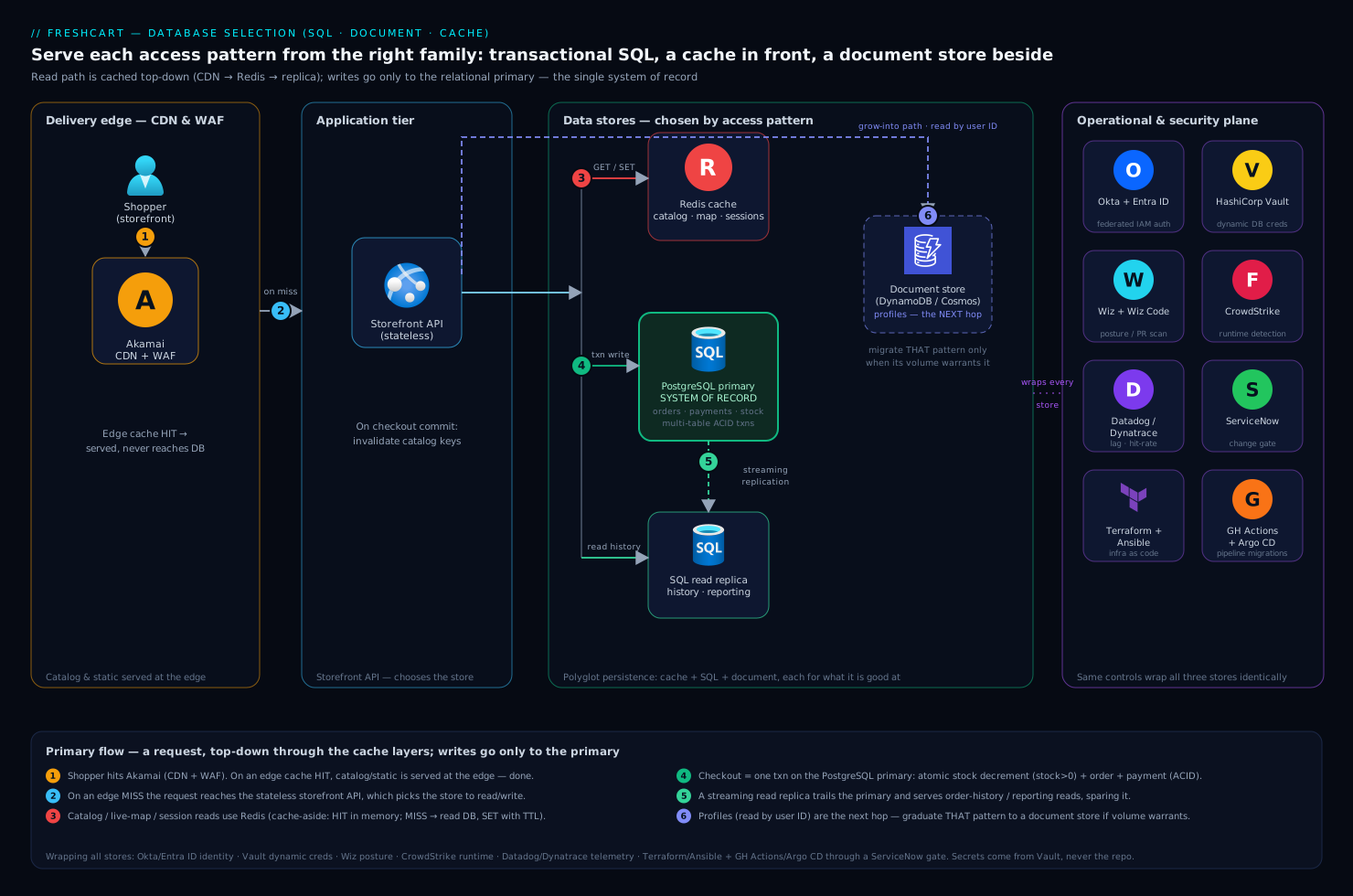
Here is the small, sane shape FreshCart should run, and how a request flows through it.
The application tier (the API behind the storefront) talks to three data stores, each chosen by the access patterns above. The relational primary is the system of record for orders, payments, and inventory — the single source of truth. A read replica trails it and serves history and reporting reads. Redis sits beside the application as a cache for the catalog and live-map reads and as the session store. The delivery edge — static assets, catalog API responses — is fronted by Akamai as the CDN and WAF, so a chunk of catalog traffic is served at the edge and never reaches the cache, let alone the database. Behind these, the document store is the next hop FreshCart grows into for profiles, not a day-one component.
Control flow for a catalog page load: request hits Akamai (CDN cache hit → served at the edge, done) → on a miss, the API checks Redis (GET catalog:home) → on a Redis miss, the API queries the read replica, writes the result into Redis with a TTL, and returns it. Three layers, each shielding the one below; the relational primary is touched only when both caches miss.
Control flow for a checkout (the write path): request hits the API → the API opens a transaction on the relational primary → atomically decrements inventory with the stock > 0 guard, inserts the order and line items, records the payment → commits → invalidates the affected catalog cache keys in Redis → returns. Money and stock only ever move through the one store that can guarantee they move correctly. The read replica and the caches are downstream of this truth, never the place the truth is written.
The operational and security plane wraps all three stores identically, which is the part juniors under-build:
- Identity to the databases is not a shared password. Application and human access flow through Okta (the workforce identity provider, brokered to Entra ID for cloud RBAC), so engineers authenticate as themselves with short-lived tokens and IAM database authentication, not a
prod_admincredential pasted in Slack. The database password and connection strings the app does need live in HashiCorp Vault with dynamic, short-lived leases — Vault mints a database credential on demand and expires it — so a leaked secret has minutes of value, not months. (This blog’s own history is the cautionary tale: old DB passwords once sat in git. Never again — secrets come from Vault, never the repo.) - Posture and code scanning run continuously via Wiz (cloud security posture — it flags a database that drifted to public network access, an over-broad security group, or unencrypted storage) and Wiz Code in the pull request, which catches a hardcoded connection string or a missing-TLS config before it merges.
- Runtime threat detection on the database hosts and the app nodes comes from CrowdStrike Falcon, whose sensor watches for the exfiltration and intrusion patterns a perimeter firewall misses, piping detections to the SOC.
- Observability is Dynatrace or Datadog on every store: slow-query telemetry, replica lag, cache hit-rate, connection-pool saturation, and per-query latency — so “the home page is slow at 7pm” becomes a graph of replica lag and cache misses instead of a guess.
- Operations and change control: a schema change or an index addition is raised as a ServiceNow change request and applied through the CI/CD pipeline — Jenkins or GitHub Actions runs the migration and tests, Argo CD reconciles the desired application state, and Terraform provisions the database, the replica, and the Redis cluster as code (with Ansible configuring any self-managed instance) so the whole topology is reproducible and reviewable, not hand-clicked in a console.
That last bullet is the difference between a database you operate and one you merely have. Even a junior-scale system deserves Terraform-defined infrastructure, a migration that runs in a pipeline, and a metric that tells you the truth.
Managed vs. self-hosted: the tradeoff to get right early
FreshCart’s team is small, so this decision is mostly made for them — but understanding why matters.
Managed (RDS, Cloud SQL, Azure Database, DynamoDB, ElastiCache) means the cloud provider runs the engine: patching, backups, replica creation, failover, and minor-version upgrades are their job. You pay a premium and give up some low-level knobs. Self-hosted (PostgreSQL on a VM or in Kubernetes, configured by Ansible) means total control and lower sticker price — and that you now personally own 3am failover, backup verification, and the security patch that just dropped.
| Factor | Managed | Self-hosted |
|---|---|---|
| Backups / PITR | Built in, push-button | You build and test restores |
| Failover / HA | Automated multi-AZ | You design and operate it |
| Patching | Provider, in a window | Your pager, your CVE triage |
| Cost | Higher sticker price | Lower price, real staff time |
| Control | Limited extensions/knobs | Full |
| Best for | Small/lean teams | Large teams with a real DBA |
For a team of FreshCart’s size the answer is managed, almost always: the labor saved on backups, patching, and failover dwarfs the price premium, and a junior team should not be hand-rolling Postgres high-availability. Self-hosting earns its keep when you have genuine DBA depth, a specific extension or version the managed service will not run, or scale economics where the premium becomes a number worth engineering against. The honest cost framing: managed is not “more expensive,” it is salary you are not paying converted into a line item — and for a lean team that trade is almost always correct.
Failure modes, scaling, and the cost of getting it wrong
The failure modes are mostly choosing the wrong family, and each has a signature:
- Putting money/inventory in an eventually-consistent store to chase scale → the oversell bug, but now structural and un-fixable with a
WHEREclause. Signature: occasional impossible business states. - Driving ad-hoc reporting queries against a document store → full-table scans, blown read-capacity bills, timeouts. Signature: DynamoDB cost spiking when an analyst writes a new query. Document stores serve the access patterns you modeled into the keys; for anything else you need a relational copy or a warehouse.
- No cache, so every read hits the database → exactly FreshCart’s 7pm slowness; the primary spends its life re-answering the catalog query.
- Treating the cache as a source of truth → data loss on a Redis restart, because someone forgot it is a copy. The database is truth; the cache is a fast, disposable mirror.
- Reading your own write from a lagging replica → “I placed an order but my history doesn’t show it.” Send the just-wrote-it read to the primary, or design for the lag.
Scaling, in the order you actually do it:
- Cache the hot reads (Redis). Cheapest, biggest win, every time.
- Add a read replica for read-heavy, staleness-tolerant queries.
- Index and tune the queries your APM (Datadog/Dynatrace) flags as slow — often a missing index, not a missing database.
- Scale up the primary (a bigger instance) before doing anything exotic.
- Only then consider moving a specific high-volume, known-key access pattern (sessions, profiles, an event feed) to a horizontally-scaling document store — and move that pattern, not the whole system.
The deepest lesson is that step 5 is last for a reason: most teams that “needed NoSQL” actually needed steps 1 through 4. Polyglot persistence — using SQL and a document store and a cache, each for what it is good at — is the mature end state, but it is something you grow into one access pattern at a time, not a thing you architect up front out of fear.
Security and cost, briefly but non-optionally
Security is identical across all three stores and not advanced: encrypt at rest and in transit (managed services do this with a setting); never expose a database to the public internet (Wiz alerts the instant one drifts that way); authenticate with short-lived IAM/Vault-issued credentials federated through Okta/Entra ID, not a shared static password; least-privilege the app’s database role so a compromised app cannot drop tables; and keep CrowdStrike Falcon on the hosts for runtime detection. Backups must be not just taken but restore-tested — an untested backup is a hope. (Even the internal team’s training portal — a Moodle instance teaching new hires these very patterns — follows the same rules: managed database, Vault-issued credentials, no secrets in the repo, because the lesson and the practice should match.)
Cost tracks the choices directly. Relational read replicas and larger instances are predictable monthly line items. A cache is cheap insurance that reduces database cost by deflecting reads. Document stores like DynamoDB bill on read/write capacity, which is wonderfully cheap for the access pattern you designed and brutally expensive for the scan you did not — so a mis-modeled NoSQL table is the easiest way to get a surprise invoice. And the largest hidden cost is always the wrong-family migration done in a panic: the safe, boring path of cache-then-replica-then-tune is not only better engineering, it is dramatically cheaper than re-platforming under fire.
The shape of the win
FreshCart does not need a new database. It needs to name its access patterns and serve each from the right family: orders and inventory stay on transactional PostgreSQL because money and stock demand ACID; the catalog and live map move to a Redis cache because they are read storms, not write problems; sessions leave the primary for Redis where ephemeral keys belong; order history reads move to a replica; and profiles are a jsonb column today and the natural first thing to graduate to a document store tomorrow — if and when its volume actually warrants it. Wrap all three in the same operational plane — Vault for credentials, Okta/Entra ID for identity, Wiz for posture, CrowdStrike Falcon for runtime, Dynatrace/Datadog for visibility, Terraform/Ansible and GitHub Actions/Jenkins/Argo CD through a ServiceNow change gate for every change — and you have a foundational data layer that is correct, observable, and reversible. That is the whole skill: not memorizing engines, but reading a feature, hearing its access pattern, and reaching for the family that already fits.