A mid-size logistics company runs about 220 Airflow DAGs — nightly warehouse reconciliations, hourly carrier-rate pulls, a few heavy Spark-submit jobs — on a single fat VM with the CeleryExecutor and a pinned worker pool. It works until it doesn’t: one runaway pandas task balloons to 30 GB and the OOM killer takes down three unrelated workers, a numpy upgrade for one team’s DAG breaks another team’s image because every task shares one Python environment, and scaling means manually adding Celery workers nobody right-sizes. The data platform team’s mandate is blunt: every task runs in its own isolated pod, DAGs ship through Git not SCP, no database password lives in a values file, and the whole thing autoscales to zero between batch windows. That is exactly what Airflow’s KubernetesExecutor plus the official Helm chart gives you, and this guide walks the full deployment end to end on a real cluster.
The KubernetesExecutor changes Airflow’s execution model fundamentally. Instead of a fixed fleet of always-on workers pulling from a queue, the scheduler asks the Kubernetes API to launch one ephemeral pod per task instance, the pod runs that single task and exits, and Kubernetes reclaims the resources. Each task gets its own CPU/memory request and limit, its own image if it needs one, and a hard blast radius — a task that OOMs kills only itself. You pay only for pods that are actually running tasks, which between a 02:00 batch and a 09:00 report is often zero workers.
Prerequisites
- A Kubernetes cluster, v1.27+, with at least 3 schedulable nodes and a working default
StorageClass(managed AKS/EKS/GKE or a solid on-prem cluster).kubectlcontext pointed at it. - Helm 3.12+ and the
helmCLI on your machine. - A PostgreSQL 13+ instance for Airflow’s metadata DB — strongly prefer a managed external Postgres (Azure Database for PostgreSQL, Amazon RDS, Cloud SQL) over the chart’s bundled one for any non-toy use.
- A Git repository holding your DAGs, plus a read-only deploy key (SSH) for git-sync.
- An OCI registry for your custom Airflow image (ACR / ECR / GHCR).
cluster-admin(or enough RBAC to create a namespace, ServiceAccounts, Roles, and RoleBindings).- Optional but assumed in production here: a HashiCorp Vault cluster reachable from the namespace.
Target topology
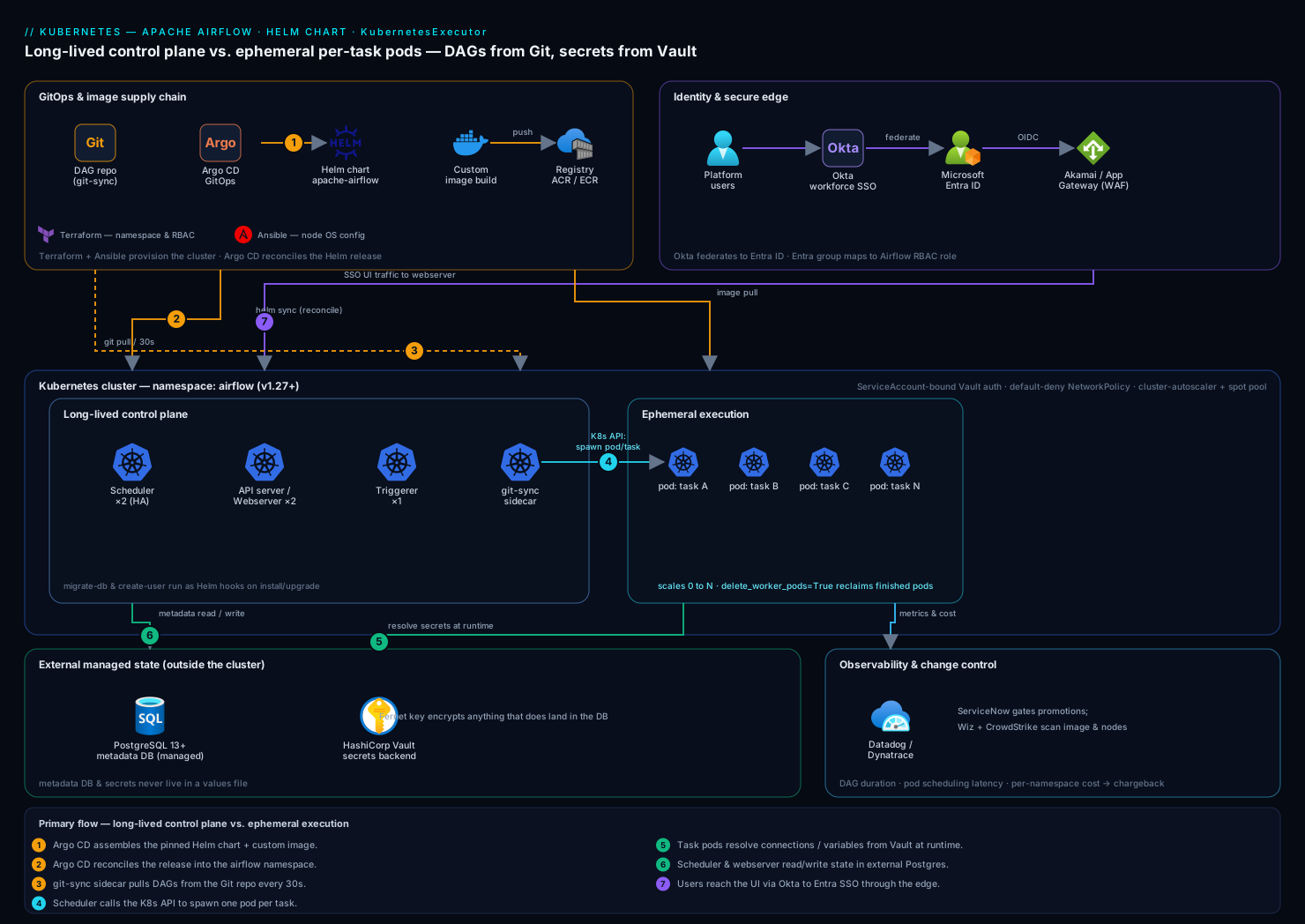
The deployment has a small set of long-lived components and a swarm of short-lived ones. Long-lived: the scheduler (watches the DB, decides what to run, and calls the Kubernetes API to spawn task pods), the API server / webserver (the UI and REST API), the triggerer (runs deferrable operators efficiently), and a git-sync sidecar that keeps DAGs current from your repo. Short-lived: one worker pod per task instance, created on demand by the scheduler and torn down on completion. State lives in external PostgreSQL; secrets resolve from HashiCorp Vault through Airflow’s secrets backend; identity is brokered by Okta federated to Microsoft Entra ID in front of the webserver; and the whole release is reconciled by Argo CD from Git. Keeping the “long-lived control plane vs. ephemeral execution” split clear in your head is the single most useful mental model for operating this.
1. Create the namespace and the metadata database
Isolate Airflow in its own namespace and create the Postgres database/role it will use. Run the database statements against your managed Postgres, not a pod.
kubectl create namespace airflow

# On your managed PostgreSQL instance (psql as an admin):
# CREATE ROLE airflow LOGIN PASSWORD '<set-a-strong-one>';
# CREATE DATABASE airflow OWNER airflow;
# GRANT ALL PRIVILEGES ON DATABASE airflow TO airflow;
Create the Kubernetes Secret holding the SQLAlchemy connection string. We bootstrap with a Secret now and migrate the value into Vault in step 6 — but the metadata DB connection is needed before the secrets backend is up, so it stays a native Secret.
kubectl create secret generic airflow-metadata-db \
  --namespace airflow \
  --from-literal=connection='postgresql://airflow:<password>@pg-airflow-prod.postgres.database.azure.com:5432/airflow?sslmode=require'
Also generate the Fernet key (encrypts connections/variables at rest in the DB) and a webserver secret key (signs UI sessions) — both must be stable across pod restarts, so never let the chart auto-generate them in production:
kubectl create secret generic airflow-fernet-key \
  --namespace airflow \
  --from-literal=fernet-key="$(python3 -c 'from cryptography.fernet import Fernet; print(Fernet.generate_key().decode())')"

kubectl create secret generic airflow-webserver-secret \
  --namespace airflow \
  --from-literal=webserver-secret-key="$(openssl rand -hex 32)"
2. Add the chart repo and pin the version
Use the official Apache Airflow Helm chart (apache-airflow/airflow), not a third-party one. Pin both the chart version and the Airflow app version — a floating tag is how a 3am batch silently changes behavior.
helm repo add apache-airflow https://airflow.apache.org
helm repo update

# Inspect what you're about to install
helm show chart apache-airflow/airflow --version 1.16.0
helm search repo apache-airflow/airflow --versions | head
3. Build and push a custom Airflow image
Most teams need at least a few provider packages and Python deps baked in. Extend the official image rather than installing at runtime (runtime installs make task pods slow and non-reproducible).
# Dockerfile
FROM apache/airflow:2.10.3-python3.11

USER root
RUN apt-get update && apt-get install -y --no-install-recommends \
      build-essential libpq-dev \
    && rm -rf /var/lib/apt/lists/*

USER airflow
COPY requirements.txt /requirements.txt
RUN pip install --no-cache-dir -r /requirements.txt
# requirements.txt
apache-airflow-providers-cncf-kubernetes==10.0.0
apache-airflow-providers-amazon==9.1.0
apache-airflow-providers-hashicorp==4.0.0
pandas==2.2.3
Build and push to your registry:
export IMG=acrkvairflow.azurecr.io/airflow:2.10.3-r3
az acr login --name acrkvairflow            # or: aws ecr get-login-password | docker login ...
docker build -t "$IMG" .
docker push "$IMG"
This image becomes the default base for every task pod the KubernetesExecutor launches, so a single, version-controlled environment ends the “works in my DAG, breaks in yours” problem.
4. Author the Helm values file
This is the heart of the deployment. Create values.yaml. The decisive line is executor: "KubernetesExecutor"; the rest wires in the external DB, your image, git-sync, and the pre-created secrets.
# values.yaml
executor: "KubernetesExecutor"

# Use the image you built in step 3 everywhere (scheduler, webserver, AND task pods)
images:
  airflow:
    repository: acrkvairflow.azurecr.io/airflow
    tag: 2.10.3-r3
    pullPolicy: IfNotPresent

# Do NOT use the bundled Postgres in production
postgresql:
  enabled: false

data:
  # Point the chart at the Secret created in step 1
  metadataSecretName: airflow-metadata-db

# Stable, externally-managed keys (step 1) — never auto-generate in prod
fernetKeySecretName: airflow-fernet-key
webserverSecretKeySecretName: airflow-webserver-secret

# Core Airflow config injected as AIRFLOW__* env vars
config:
  core:
    # Default resources/behaviour for spawned task pods come from this template
    dags_folder: /opt/airflow/dags/repo/dags
    load_examples: "False"
  kubernetes_executor:
    namespace: airflow
    delete_worker_pods: "True"          # reclaim finished pods
    delete_worker_pods_on_failure: "False"  # keep failed pods for triage
    worker_pods_creation_batch_size: "16"

# git-sync sidecar: DAGs come from Git, not a baked image or PVC
dags:
  gitSync:
    enabled: true
    repo: git@github.com:kloudvin/airflow-dags.git
    branch: main
    rev: HEAD
    depth: 1
    subPath: ""
    period: 30s                         # poll cadence
    wait: 30
    sshKeySecret: airflow-git-ssh-key   # created in step 5
  persistence:
    enabled: false                      # git-sync replaces a shared DAG PVC

# Long-lived control-plane components
scheduler:
  replicas: 2                           # HA scheduler; both safe to run together
triggerer:
  replicas: 1
webserver:
  replicas: 2

# Resource hints for the EPHEMERAL task pods
workers:
  resources:
    requests:
      cpu: "500m"
      memory: "1Gi"
    limits:
      cpu: "2"
      memory: "4Gi"

# Run the one-shot DB migration as a Helm hook on install/upgrade
migrateDatabaseJob:
  enabled: true

createUserJob:
  useHelmHooks: true
A note on what delete_worker_pods_on_failure: "False" buys you: when a task fails, its pod sticks around so you can kubectl logs it and read exactly why — invaluable for debugging a DAG that only fails in the cluster.
5. Wire git-sync to your DAG repository
Create the SSH deploy-key Secret git-sync references. Generate a dedicated read-only key, add the public half as a deploy key on the repo, and store the private half:
ssh-keygen -t ed25519 -C "airflow-gitsync" -f ./gitsync_ed25519 -N ""
# Add ./gitsync_ed25519.pub as a READ-ONLY deploy key in GitHub repo settings.

kubectl create secret generic airflow-git-ssh-key \
  --namespace airflow \
  --from-file=gitSshKey=./gitsync_ed25519
shred -u ./gitsync_ed25519 ./gitsync_ed25519.pub   # don't leave keys on disk
git-sync clones into /opt/airflow/dags/repo and re-pulls every 30s; the scheduler and every task pod mount that path, so a git push to main propagates to running Airflow within a minute — no image rebuild, no redeploy.
6. Configure the HashiCorp Vault secrets backend
So that DAG connections and variables are never stored in the Airflow DB or a values file, point Airflow at HashiCorp Vault as its secrets backend. Vault holds the connections (e.g. the warehouse Postgres, the carrier-API token); Airflow resolves them at task runtime via the hashicorp provider.
Add to values.yaml under config:
config:
  secrets:
    backend: "airflow.providers.hashicorp.secrets.vault.VaultBackend"
    backend_kwargs: >-
      {
        "connections_path": "airflow/connections",
        "variables_path": "airflow/variables",
        "mount_point": "secret",
        "url": "https://vault.kloudvin.internal:8200",
        "auth_type": "kubernetes",
        "kubernetes_role": "airflow"
      }
Configure Vault to trust the namespace’s ServiceAccount (run against Vault):
vault auth enable kubernetes
vault write auth/kubernetes/config \
  kubernetes_host="https://kubernetes.default.svc:443"

vault policy write airflow - <<'EOF'
path "secret/data/airflow/*" { capabilities = ["read"] }
EOF

vault write auth/kubernetes/role/airflow \
  bound_service_account_names=airflow-worker,airflow-scheduler,airflow-triggerer \
  bound_service_account_namespaces=airflow \
  policy=airflow \
  ttl=1h
Now a connection stored at secret/airflow/connections/warehouse_pg is reachable in any DAG as Connection.get('warehouse_pg') with zero plaintext in Git or the metadata DB. The Vault token is short-lived (1h TTL) and bound to the exact ServiceAccounts, so a leaked DAG file exposes nothing.
7. Install the release
With values complete, install. Use --atomic so a failed install rolls itself back instead of leaving a half-deployed mess, and --timeout generous enough for the DB migration.
helm install airflow apache-airflow/airflow \
  --namespace airflow \
  --version 1.16.0 \
  --values values.yaml \
  --atomic \
  --timeout 10m
Watch the control plane come up:
kubectl get pods -n airflow -w
You should see airflow-scheduler-*, airflow-webserver-*, airflow-triggerer-*, and the airflow-run-airflow-migrations-* job complete. Note there are no standing worker pods — that is correct for the KubernetesExecutor; workers appear only when a task runs.
8. Put identity in front of the webserver
Do not expose the Airflow UI with basic auth on a public IP. Front it with an ingress that delegates authentication to Okta, federated to Microsoft Entra ID so the same workforce SSO and conditional-access policies that gate the rest of the platform gate Airflow too. A typical pattern is an OAuth2-proxy sidecar or an ingress annotation that enforces an OIDC flow; the webserver itself maps the resulting groups to Airflow RBAC roles (Admin, Op, Viewer).
# values.yaml (FlaskAppBuilder OAuth → Entra, brokered from Okta)
webserver:
  webserverConfig: |
    from flask_appbuilder.security.manager import AUTH_OAUTH
    AUTH_TYPE = AUTH_OAUTH
    AUTH_USER_REGISTRATION = True
    AUTH_USER_REGISTRATION_ROLE = "Viewer"
    OAUTH_PROVIDERS = [{
        "name": "azure",
        "token_key": "access_token",
        "icon": "fa-microsoft",
        "remote_app": {
            "client_id": "<entra-app-client-id>",
            "client_secret": "<from-vault>",
            "api_base_url": "https://login.microsoftonline.com/<tenant>/oauth2",
            "server_metadata_url":
              "https://login.microsoftonline.com/<tenant>/v2.0/.well-known/openid-configuration",
            "client_kwargs": {"scope": "openid profile email"},
        },
    }]
    AUTH_ROLES_MAPPING = {"airflow-admins": ["Admin"], "airflow-ops": ["Op"]}
Users authenticate with their corporate Okta identity, Okta federates to Entra, and their Entra group membership decides whether they land as Admin, Op, or Viewer in Airflow — no separate Airflow password to manage or leak. Put Akamai at the edge in front of the ingress for TLS termination, global anycast, and WAF/bot protection so the UI never takes raw internet traffic.
9. Reconcile the release with Argo CD (GitOps)
For repeatable, auditable deployments, do not run helm install by hand in production after the first bootstrap — let Argo CD reconcile the Helm release from Git so the cluster always matches the committed values.yaml. A Jenkins or GitHub Actions pipeline builds and pushes the image (step 3) and bumps the tag in Git; Argo CD detects the change and rolls it out.
# argocd-airflow-app.yaml
apiVersion: argoproj.io/v1alpha1
kind: Application
metadata:
  name: airflow
  namespace: argocd
spec:
  project: data-platform
  source:
    repoURL: https://airflow.apache.org
    chart: airflow
    targetRevision: 1.16.0
    helm:
      valueFiles:
        - $values/airflow/values.yaml
  sources: []
  destination:
    server: https://kubernetes.default.svc
    namespace: airflow
  syncPolicy:
    automated:
      prune: true
      selfHeal: true
The cluster’s namespace and base RBAC are themselves provisioned with Terraform (and any node-level or OS configuration via Ansible), so the full stack — infra, then release, then DAGs — is reconstructable from version control. A change request that promotes a new chart version flows through ServiceNow for approval before Argo CD is allowed to sync to production, giving change management a documented gate.
Validation
Confirm the executor and prove a task actually spawns its own pod.
# 1. Verify the executor in effect
kubectl exec -n airflow deploy/airflow-scheduler -- airflow config get-value core executor
# -> KubernetesExecutor

# 2. Check DB connectivity and migration state
kubectl exec -n airflow deploy/airflow-scheduler -- airflow db check
kubectl exec -n airflow deploy/airflow-scheduler -- airflow db check-migrations

# 3. Confirm git-sync pulled your DAGs
kubectl exec -n airflow deploy/airflow-scheduler -- ls /opt/airflow/dags/repo/dags

# 4. Trigger a DAG and WATCH the ephemeral worker pod appear
kubectl exec -n airflow deploy/airflow-scheduler -- airflow dags trigger example_warehouse_recon
kubectl get pods -n airflow -w     # a *-task-* pod is created, runs, then disappears

# 5. Verify a Vault-backed connection resolves
kubectl exec -n airflow deploy/airflow-scheduler -- \
  airflow connections get warehouse_pg
Seeing a transient ...-task-... pod spin up for the triggered run, then vanish when delete_worker_pods=True reclaims it, is the definitive proof the KubernetesExecutor is doing its job.
Rollback / teardown
Helm makes rollback a one-liner; keep the metadata DB intact so history survives.
# Roll back to the previous release revision (DB schema permitting)
helm history airflow -n airflow
helm rollback airflow <previous-revision> -n airflow --wait

# Full teardown of the workload (DB and secrets are external, so they persist)
helm uninstall airflow -n airflow

# Remove the namespace and its in-cluster secrets only when you truly mean it
kubectl delete namespace airflow
One caveat: an Airflow upgrade may run a DB migration that a helm rollback cannot cleanly reverse. For major version jumps, snapshot the Postgres database first (pg_dump or a managed point-in-time backup) so rollback means restoring the DB, not just the chart.
Common pitfalls
- Auto-generated Fernet / webserver keys. Let the chart generate them and every
helm upgraderotates the keys — existing connections become undecryptable and all UI sessions drop. Always pre-create them as Secrets (step 1). - Bundled Postgres in production. The chart’s in-cluster Postgres has no HA and a PVC that is easy to lose. Set
postgresql.enabled: falseand use managed Postgres. - Tasks can’t find DAGs. The git-sync mount path and
core.dags_foldermust agree (/opt/airflow/dags/repo/dagshere). A mismatch shows up as DAGs visible in the UI butDagBagerrors at task runtime. - RBAC denied creating pods. If the scheduler’s ServiceAccount lacks pod-create permission in the namespace, every task fails to launch. The chart’s default RBAC handles this — don’t override
rbac.create: falsewithout supplying equivalent Roles. - Worker pods OOMKilled. The
workers.resources.limitsapply to task pods; a heavy task needs its own higher limit via apod_overridein the DAG’sexecutor_config, not a global bump. - Image pull failures on task pods. Every ephemeral pod pulls your image; without an
imagePullSecrets(or a node identity granting registry access) tasks stayErrImagePull. Set it underregistry.secretName.
Security notes
The posture here is secrets-out-of-Git by construction: connections and variables live in HashiCorp Vault resolved via short-lived, ServiceAccount-bound tokens, while the Fernet key encrypts anything that does land in the DB. Human access to the UI is Okta → Entra SSO with group-to-role mapping — no shared Airflow password. Scan the namespace and your custom image continuously: Wiz (and Wiz Code on the DAG repo and Dockerfile) for cloud and IaC misconfigurations, exposed-secret detection, and attack-path analysis across the cluster; CrowdStrike Falcon sensors on the node pool for runtime threat detection on the ephemeral task pods, feeding the SOC. A flagged finding — a publicly exposed webserver, a leaked credential in a DAG — auto-raises a ServiceNow incident so security gets a ticket, not just a log line. Lock down the namespace with a default-deny NetworkPolicy, allowing only the egress task pods actually need (Postgres, Vault, your data sources). Where a task must reach a legacy system, route it through the appropriate virtual appliances (firewall/proxy VMs) rather than opening the cluster’s egress wholesale.
Cost notes
The KubernetesExecutor is the cost story: because workers are ephemeral, a cluster sized with cluster-autoscaler and a spot/low-priority node pool scales node count toward zero between batch windows instead of paying for an always-on Celery fleet. Right-size workers.resources.requests honestly — over-requesting wastes scheduled capacity, under-requesting risks OOMKills. Keep the long-lived control plane (2 schedulers, 2 webservers, 1 triggerer) on a small on-demand pool and let task pods land on cheaper spot nodes, tolerating the occasional preemption with Airflow retries. Instrument the whole release with Datadog (or Dynatrace) — DAG run duration, task pod scheduling latency, queue depth, and per-namespace node cost — so you can see exactly which DAG drives spend and chargeback to the owning team; the same dashboards surface a scheduling-latency regression before it delays a batch. Finally, if your platform also fronts internal training content, the same Entra SSO can gate a Moodle instance for the team’s Airflow onboarding course, reusing the identity layer you already built rather than standing up another login.