A logistics company streams every parcel scan event — pickup, sortation, out-for-delivery, exception — into a raw S3 bucket via Kinesis Firehose, roughly 40 million small JSON-then-Parquet files a day. The analytics team built dashboards on top with Athena, and within three months query latency went from two seconds to ninety, the Glue crawler ran for forty minutes per partition, and a single “delete the parcels for customer X” GDPR request meant rewriting an entire day’s partition by hand. The lake had no transactions, no row-level deletes, and a catastrophic small-file problem. This guide rebuilds that table as an Apache Iceberg table on S3, registered in the AWS Glue Data Catalog, with hidden partitioning, scheduled bin-pack compaction, and snapshot expiry — so the same dataset stays queryable in single-digit seconds, supports MERGE and DELETE, and does not silently grow to petabytes of orphaned data.
Iceberg is a table format, not a query engine: it layers a tree of metadata (a table metadata JSON, manifest lists, and manifests) over your Parquet data files so that any engine — Athena, Spark, Trino, Flink — sees one consistent, transactional, time-travellable table. The Glue Data Catalog is the catalog in Iceberg terms: it holds the pointer to the current table metadata location and serializes commits so two writers cannot corrupt the table. Everything below wires those two together and then keeps the table healthy on a schedule.
Prerequisites
- An AWS account with permission to create S3 buckets, Glue databases/tables, IAM roles, and EMR Serverless applications (or a Glue 4.0/5.0 job).
- The AWS CLI v2 configured, plus Python 3.10+ locally for the PyIceberg verification step.
- Apache Spark 3.5 with the
iceberg-spark-runtime-3.5_2.12:1.6.xandbundle(AWS) jars — provided automatically by EMR Serverless 7.x or Glue 5.0. - A dedicated S3 bucket for the warehouse (this guide uses
s3://kv-lakehouse-prod) with default SSE-KMS encryption and versioning off (Iceberg manages its own versions; bucket versioning just doubles storage cost). - Terraform 1.7+ if you want to provision the buckets, Glue database, and IAM roles as code rather than by hand.
Target topology
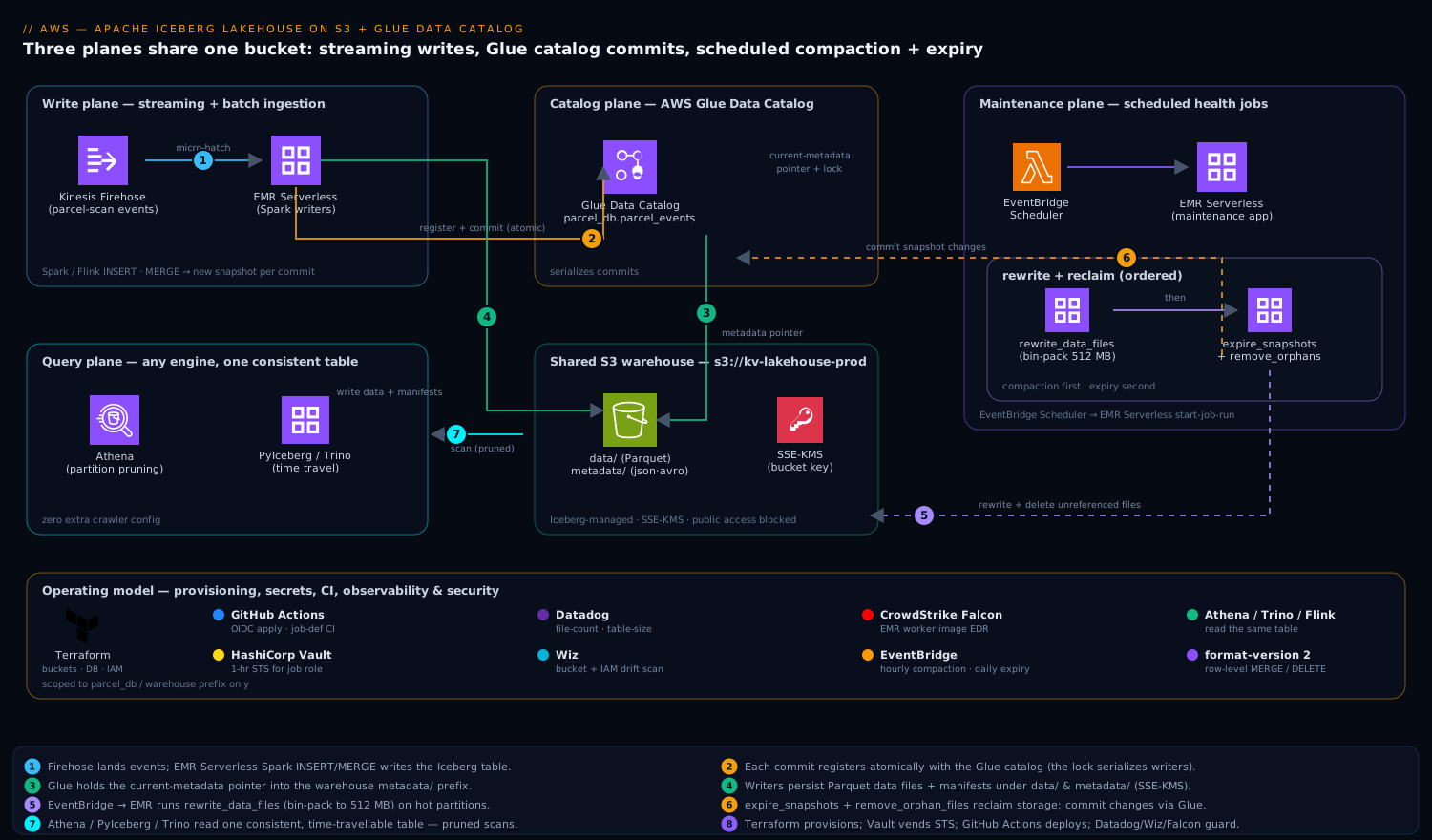
Three planes share one bucket. The write plane is your streaming or batch ingestion — Spark/Flink jobs that INSERT/MERGE into the Iceberg table, each commit creating a new snapshot. The catalog plane is the AWS Glue Data Catalog, which holds the table’s current-metadata pointer and acts as the lock that serializes those commits. The maintenance plane is a pair of scheduled jobs — compaction and expiry — that rewrite many small files into few large ones and then delete the snapshots and orphaned data files nobody references anymore. The supporting cast is the operating model around it: Terraform provisions the buckets, Glue database, and IAM roles; HashiCorp Vault issues the short-lived AWS credentials the maintenance jobs assume so no long-lived keys sit in CI; GitHub Actions runs the table-DDL and job-definition pipeline; Datadog scrapes the per-snapshot file-count and table-size metrics so the small-file problem can never sneak back; Wiz continuously scans the warehouse bucket for public-exposure or over-broad-IAM drift; and CrowdStrike Falcon runs on the EMR Serverless worker images for runtime threat detection. Where each fits is called out in the steps below.
Lay the bucket out so the three planes never collide:
s3://kv-lakehouse-prod/
  warehouse/                # Iceberg-managed: data/ and metadata/ per table
    parcel_db/
      parcel_events/
        data/               # Parquet data files (Iceberg writes these)
        metadata/           # *.metadata.json, snap-*.avro, manifests
  _scratch/                 # Spark/EMR temp + spark-events logs (lifecycle-expired)
1. Provision the bucket, Glue database, and IAM role with Terraform
Provision the durable pieces as code so the warehouse, catalog database, and the role the jobs assume are reviewable and reproducible. Keep this in your infra repo and let GitHub Actions apply it via OIDC — no stored AWS keys.
# iceberg.tf
resource "aws_s3_bucket" "lakehouse" {
  bucket = "kv-lakehouse-prod"
}

resource "aws_s3_bucket_server_side_encryption_configuration" "lakehouse" {
  bucket = aws_s3_bucket.lakehouse.id
  rule {
    apply_server_side_encryption_by_default { sse_algorithm = "aws:kms" }
    bucket_key_enabled = true
  }
}

# Block ALL public access — Wiz alerts if this ever drifts open.
resource "aws_s3_bucket_public_access_block" "lakehouse" {
  bucket                  = aws_s3_bucket.lakehouse.id
  block_public_acls       = true
  block_public_policy     = true
  ignore_public_acls      = true
  restrict_public_buckets = true
}

# Expire only the scratch prefix; never touch warehouse/ (Iceberg owns deletes).
resource "aws_s3_bucket_lifecycle_configuration" "lakehouse" {
  bucket = aws_s3_bucket.lakehouse.id
  rule {
    id     = "expire-scratch"
    status = "Enabled"
    filter { prefix = "_scratch/" }
    expiration { days = 3 }
  }
}

resource "aws_glue_catalog_database" "parcel_db" {
  name        = "parcel_db"
  location_uri = "s3://kv-lakehouse-prod/warehouse/parcel_db"
}
The IAM role the Spark/EMR jobs assume needs S3 access to the warehouse prefix and Glue catalog access scoped to this database only — not glue:* on *:
data "aws_iam_policy_document" "iceberg_rw" {
  statement {
    sid     = "S3Warehouse"
    actions = ["s3:GetObject", "s3:PutObject", "s3:DeleteObject", "s3:ListBucket"]
    resources = [
      aws_s3_bucket.lakehouse.arn,
      "${aws_s3_bucket.lakehouse.arn}/warehouse/*",
      "${aws_s3_bucket.lakehouse.arn}/_scratch/*",
    ]
  }
  statement {
    sid     = "GlueCatalog"
    actions = [
      "glue:GetDatabase", "glue:GetTable", "glue:GetTables",
      "glue:CreateTable", "glue:UpdateTable", "glue:GetPartitions",
    ]
    resources = [
      "arn:aws:glue:ap-south-1:${data.aws_caller_identity.me.account_id}:catalog",
      "arn:aws:glue:ap-south-1:${data.aws_caller_identity.me.account_id}:database/parcel_db",
      "arn:aws:glue:ap-south-1:${data.aws_caller_identity.me.account_id}:table/parcel_db/*",
    ]
  }
}
In production the maintenance jobs do not hold this role’s keys directly; HashiCorp Vault’s AWS secrets engine vends a 1-hour STS credential against this role at job start, so a leaked CI log never exposes a usable key.
2. Create an EMR Serverless application with the Iceberg runtime
EMR Serverless gives you Spark with the Iceberg jars preloaded and no cluster to babysit — ideal for the spiky, scheduled maintenance jobs. Create one application and reuse it for both writes and maintenance.
aws emr-serverless create-application \
  --name iceberg-maintenance \
  --release-label emr-7.5.0 \
  --type SPARK \
  --region ap-south-1 \
  --runtime-configuration '[
    {
      "classification": "spark-defaults",
      "properties": {
        "spark.sql.extensions": "org.apache.iceberg.spark.extensions.IcebergSparkSessionExtensions",
        "spark.sql.catalog.glue": "org.apache.iceberg.spark.SparkCatalog",
        "spark.sql.catalog.glue.catalog-impl": "org.apache.iceberg.aws.glue.GlueCatalog",
        "spark.sql.catalog.glue.warehouse": "s3://kv-lakehouse-prod/warehouse",
        "spark.sql.catalog.glue.io-impl": "org.apache.iceberg.aws.s3.S3FileIO"
      }
    }
  ]'
The four catalog properties are the whole game: they register a Spark catalog named glue backed by Iceberg’s GlueCatalog implementation, point it at the S3 warehouse, and use S3FileIO for fast, dependency-light S3 access. Note the application ID it returns — you will pass it to every start-job-run.
The worker image EMR Serverless runs carries a CrowdStrike Falcon sensor baked in via a custom image, so the compute executing your SQL is under the same runtime EDR as the rest of the fleet; detections flow to the SOC.
3. Create the partitioned Iceberg table
Run this DDL once. Submit it as a SQL file to the EMR Serverless app, or paste it into a Spark SQL shell with the same catalog config. The critical choices are hidden partitioning and the write-distribution properties.
CREATE TABLE glue.parcel_db.parcel_events (
    event_id      STRING,
    parcel_id     STRING,
    customer_id   STRING,
    event_type    STRING,
    facility_code STRING,
    event_ts      TIMESTAMP,
    payload       STRING
)
USING iceberg
PARTITIONED BY (days(event_ts), bucket(16, customer_id))
TBLPROPERTIES (
    'format-version'                      = '2',
    'write.parquet.compression-codec'     = 'zstd',
    'write.target-file-size-bytes'        = '536870912',   -- 512 MB target
    'write.distribution-mode'             = 'hash',
    'write.metadata.delete-after-commit.enabled' = 'true',
    'write.metadata.previous-versions-max'       = '20'
);
What each choice buys you:
days(event_ts)is a hidden partition transform. Queries filter onevent_tsnaturally (WHERE event_ts >= '2026-06-01') and Iceberg prunes partitions automatically — nodt=2026-06-01column to maintain and no chance of a query forgetting the partition predicate. This alone kills the Glue-crawler-per-partition pain from the intro.bucket(16, customer_id)hash-distributes by customer into 16 buckets so a per-customer GDPRDELETEtouches a bounded slice, and writes spread evenly instead of hot-spotting one parcel-heavy customer.format-version = 2enables row-level deletes (merge-on-read), which is what makesDELETE/MERGElegal without rewriting whole files.write.distribution-mode = hashmakes Spark shuffle by partition before writing, producing a few large files per partition instead of one small file per task — the structural fix for the small-file problem, applied at write time so compaction has less to clean up.
Register the table once and the Glue Data Catalog holds the pointer; Athena, Trino, and Flink now all see it with zero extra crawler config.
4. Write data and confirm snapshots accumulate
Point your ingestion at the table. For the streaming case, a Flink or Spark Structured Streaming job appends micro-batches; for backfill, a simple INSERT ... SELECT from the raw landing table works. A representative MERGE that upserts late-arriving corrections:
MERGE INTO glue.parcel_db.parcel_events t
USING raw.parcel_events_staging s
ON t.event_id = s.event_id
WHEN MATCHED THEN UPDATE SET *
WHEN NOT MATCHED THEN INSERT *;
Every commit writes a new snapshot. Inspect the metadata tables Iceberg exposes — this is your window into table health:
-- How many snapshots, and how fast are they piling up?
SELECT committed_at, snapshot_id, operation,
       summary['added-data-files']   AS added,
       summary['total-data-files']   AS total_files
FROM glue.parcel_db.parcel_events.snapshots
ORDER BY committed_at DESC LIMIT 10;

-- Distribution of file sizes — small files are the enemy.
SELECT partition,
       count(*)                       AS file_count,
       round(avg(file_size_in_bytes)/1048576, 1) AS avg_mb
FROM glue.parcel_db.parcel_events.files
GROUP BY partition ORDER BY file_count DESC LIMIT 20;
If avg_mb is in the low single digits and file_count per partition is in the thousands, you have confirmed the problem compaction exists to solve. Push total_files and the partition file-count to Datadog as a gauge from this query so the small-file regression is a monitored metric, not a surprise the next time queries slow down.
5. Schedule compaction (bin-pack rewrite)
Compaction rewrites the many small Parquet files in a partition into few large ones, and folds merge-on-read delete files back into the data. Iceberg ships this as the rewrite_data_files stored procedure. Put it in a SQL file and schedule it.
CALL glue.system.rewrite_data_files(
  table => 'parcel_db.parcel_events',
  strategy => 'binpack',
  options => map(
    'target-file-size-bytes', '536870912',   -- 512 MB, matches the table prop
    'min-input-files',        '5',            -- only rewrite where it pays off
    'max-concurrent-file-group-rewrites', '8',
    'partial-progress.enabled', 'true',       -- commit groups as they finish
    'rewrite-all',            'false'         -- skip already-optimal partitions
  ),
  where => 'event_ts >= current_date - INTERVAL 2 DAYS'   -- only hot partitions
);
Two non-obvious flags carry the load. partial-progress.enabled = true commits each file group as it completes instead of one giant all-or-nothing commit, so a failure midway through a billion-row partition does not lose hours of work. The where predicate scopes the rewrite to recently written partitions — old partitions are already compacted and rewriting them burns money for nothing. Run the hot-partition pass hourly and a full sweep (drop the where) weekly.
Submit it to EMR Serverless on a schedule (EventBridge Scheduler → EMR Serverless start-job-run):
aws emr-serverless start-job-run \
  --application-id "$APP_ID" \
  --execution-role-arn "$JOB_ROLE_ARN" \
  --name "compaction-hourly" \
  --region ap-south-1 \
  --job-driver '{
    "sparkSubmit": {
      "entryPoint": "s3://kv-lakehouse-prod/_scratch/jobs/compaction.sql",
      "sparkSubmitParameters": "--class org.apache.spark.sql.hive.thriftserver.SparkSQLCLIDriver"
    }
  }'
The $JOB_ROLE_ARN is the Vault-vended STS credential from step 1, and the whole job definition is version-controlled and deployed through GitHub Actions, so a change to the compaction cadence goes through review.
6. Schedule snapshot expiry and orphan cleanup
Compaction creates new files but leaves the old small files reachable by historical snapshots — so until you expire those snapshots, compaction makes storage go up, not down. Expiry is the other half of the job and must run after compaction.
-- 1. Expire snapshots older than 7 days, keep at least the last 10.
CALL glue.system.expire_snapshots(
  table => 'parcel_db.parcel_events',
  older_than => TIMESTAMP '2026-06-03 00:00:00',
  retain_last => 10,
  max_concurrent_deletes => 8
);

-- 2. Delete data/metadata files no snapshot references (belt and braces).
CALL glue.system.remove_orphan_files(
  table => 'parcel_db.parcel_events',
  older_than => TIMESTAMP '2026-06-09 00:00:00'   -- only files >1 day old
);
expire_snapshots is the one that actually reclaims storage and collapses your time-travel window to seven days; it physically deletes the data files only the expired snapshots referenced. remove_orphan_files is the safety net for files left behind by failed jobs that never committed — keep its older_than at least a day in the past so it can never race a live write and delete a file a commit-in-flight is about to reference. Run expiry after the daily compaction pass, never before.
Schedule it as a second EventBridge → EMR Serverless job, daily, named expiry-daily. Emit the post-expiry table size and snapshot count to Datadog; a flat or growing line after expiry runs means a misconfiguration (usually retain_last set too high or a downstream reader holding old snapshots open).
Validation
Confirm the deployment is correct and the maintenance loop is actually working — not just running.
# Glue holds the table and points at a real metadata location.
aws glue get-table --database-name parcel_db --name parcel_events \
  --region ap-south-1 \
  --query 'Table.Parameters.metadata_location'
Then prove the table is independently readable with PyIceberg — no Spark, just the catalog — and that file health improved after compaction:
# pip install "pyiceberg[glue,s3fs]"
from pyiceberg.catalog.glue import GlueCatalog

cat = GlueCatalog("glue", **{"warehouse": "s3://kv-lakehouse-prod/warehouse"})
tbl = cat.load_table("parcel_db.parcel_events")

# Current snapshot + total data-file count after compaction.
print("snapshot:", tbl.current_snapshot().snapshot_id)
print("files:", tbl.inspect.files().num_rows)

# Time travel: read the table as of an older snapshot id.
scan = tbl.scan(snapshot_id=<older_snapshot_id>)
print("rows then:", scan.to_arrow().num_rows)
Finally, query through Athena to confirm the partition pruning that justifies the whole exercise:
SELECT count(*) FROM parcel_db.parcel_events
WHERE event_ts >= DATE '2026-06-09';
-- Check "Data scanned" in the Athena result panel: it should be a few
-- hundred MB (one day's partitions), not the whole table.
Pass criteria: Glue returns a metadata_location, PyIceberg reads the table and time-travels, post-compaction avg_mb per partition is near 512 MB with file counts in the tens, and Athena’s bytes-scanned reflects one day, not all history.
Rollback and teardown
Iceberg’s killer rollback feature is built in: a bad write is undone by pointing the table at a previous snapshot, no restore needed.
-- Roll the table back to a known-good snapshot (e.g. before a bad MERGE).
CALL glue.system.rollback_to_snapshot(
  table => 'parcel_db.parcel_events',
  snapshot_id => <good_snapshot_id>
);
Full teardown, in order — drop the table (which also removes the data when PURGE is used), delete the application, then the bucket and Terraform-managed infra:
# Drop the table AND its underlying S3 files.
# In Spark SQL: DROP TABLE glue.parcel_db.parcel_events PURGE;

aws emr-serverless delete-application --application-id "$APP_ID" --region ap-south-1
aws s3 rm s3://kv-lakehouse-prod/warehouse/parcel_db/parcel_events --recursive
# terraform destroy -target=aws_glue_catalog_database.parcel_db ...
If you provisioned with Terraform, prefer terraform destroy over manual deletes so state stays consistent; delete the table with PURGE first, because Terraform destroying the bucket will not remove the Iceberg data Glue does not track per-object.
Common pitfalls
- Compaction without expiry. The number-one surprise: storage and cost climb after you enable compaction because old files are still pinned by snapshots. Expiry is mandatory, not optional, and runs second.
remove_orphan_fileswith a recentolder_than. Set it to “now” and a concurrent write loses a file mid-commit. Always keep it at least 24 hours behind real time.- Manual S3 deletes inside
warehouse/. Deleting a Parquet file directly bypasses Iceberg’s metadata and corrupts the table — every delete must go throughDELETE,expire_snapshots, orremove_orphan_files. The S3 lifecycle rule in step 1 is deliberately scoped to_scratch/only for exactly this reason. - Forgetting
write.distribution-mode = hash. Without it, each Spark task writes its own tiny file and you manufacture the small-file problem on every write, leaving compaction to clean up a mess you could have avoided. - Two writers, no catalog lock illusion. The Glue catalog serializes commits, but a writer using a stale metadata pointer will get a commit conflict and must retry — make sure your job has
commit.retry.num-retriesset (default 4) and does not swallow the exception. MERGEon a v1 table. Row-level operations requireformat-version = 2; on v1 they silently rewrite whole files or fail. Set it at create time.
Security notes
The warehouse bucket is private by construction — the Terraform block_public_access settings in step 1 close all four public vectors, and Wiz continuously scans the bucket and the job IAM role, alerting the moment posture drifts to public exposure or the role’s policy widens beyond the parcel_db scope. Encryption is SSE-KMS with a bucket key to cut KMS request cost. Credentials never live long: HashiCorp Vault’s AWS secrets engine vends 1-hour STS tokens for the job role so CI logs and EventBridge targets hold no usable key, and the EMR Serverless workers run a CrowdStrike Falcon sensor for runtime threat detection on the compute that executes your SQL. Scope the Glue and S3 IAM to this database and prefix only, never glue:*/s3:* on *.
Cost notes
Three levers dominate. Compaction + expiry together are the headline saving — they take a thousands-of-small-files partition down to a handful of 512 MB files, which both shrinks S3 PUT/GET and LIST request charges and slashes Athena’s bytes-scanned (and therefore per-query cost) since pruning works on far fewer files. zstd compression typically beats Snappy by 20-30% on JSON-shaped event payloads, paid once at write/compaction time. EMR Serverless bills only for the vCPU-seconds the scheduled jobs actually run, so the maintenance plane costs cents when idle. Watch the metrics in Datadog — table size after expiry, average file size, and Athena bytes-scanned per dashboard query — because the cost win is only real if expiry is actually reclaiming storage; a growing table size after expiry runs is the signal that your time-travel retention is set too generously and you are paying to keep history nobody queries.