A 30-engineer platform team has a problem that always arrives the same way: Terraform is run from laptops. Someone applies from a stale branch, someone else exports long-lived cloud keys to a dotfile, two people race on the same state and the lock file lands in a bad place, and the only record of what changed in production is whatever the author remembers to paste in Slack. The fix everyone reaches for is “put Terraform in CI” — but a generic terraform apply step in a pipeline has no review gate, no per-resource plan in the PR, no locking across concurrent PRs, and still needs cloud admin credentials sitting in a CI secret. Atlantis closes exactly that gap: it is a self-hosted server that listens to pull-request webhooks, runs terraform plan automatically, posts the plan back as a PR comment, takes a workspace lock so a second PR cannot plan the same project, and runs terraform apply only after a human approves and types atlantis apply — with the whole workflow defined server-side so individual repos cannot weaken it. This guide stands Atlantis up on Kubernetes with a locked-down server-side repo config, OPA policy checks, and short-lived Vault credentials, so that the pull request becomes the single, audited front door to your infrastructure.
We will deploy to a Kubernetes cluster (the examples use AKS, but EKS/GKE differ only in the credential and ingress lines), wire it to a GitHub organization, and put real guardrails around it. By the end, a developer opens a PR, sees a plan, an approver reviews it, OPA passes or blocks it, and atlantis apply ships it — no laptop, no static keys, full audit trail.
Prerequisites
- A Kubernetes cluster (1.27+) you can
kubectlto, with an ingress controller (NGINX in these examples) and cert-manager for TLS. helm3.12+,kubectl, andterraform1.6+ locally.- A GitHub organization where you can create a bot user and an org/repo webhook (the same flow exists for GitLab, Bitbucket, and Azure DevOps).
- HashiCorp Vault reachable from the cluster, configured with the AWS or Azure secrets engine — Atlantis will fetch short-lived cloud credentials per run instead of holding static keys.
- An identity provider — Okta or Microsoft Entra ID — fronting the Atlantis UI via your ingress (OAuth2 Proxy), so the dashboard and lock list are not open to the internet.
- A remote Terraform state backend already in place (S3 + DynamoDB lock table, or an Azure Storage account with a blob container). Atlantis runs Terraform; it does not replace your backend.
Target topology
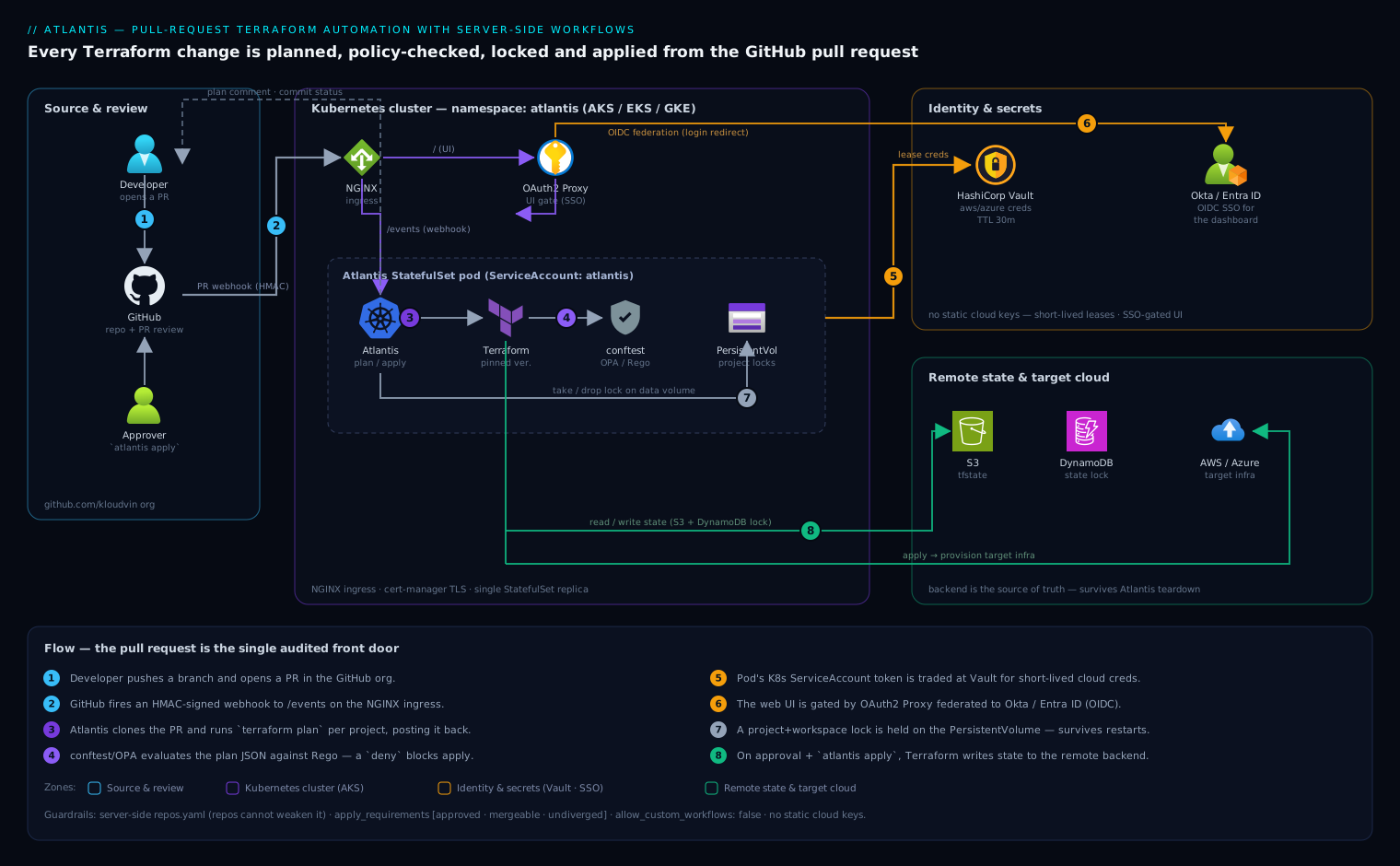
The flow is a loop anchored on the pull request. A developer pushes a branch and opens a PR in the GitHub org. GitHub fires a webhook to the Atlantis server, which runs as a single StatefulSet pod on Kubernetes behind an NGINX ingress with a cert-manager TLS certificate. Atlantis clones the PR, runs terraform plan for each affected project in an isolated working directory, and posts the plan as a PR comment while taking a lock on that project+workspace (the lock is held in Atlantis’s data volume, so it survives pod restarts — hence a StatefulSet with a PersistentVolume, not a Deployment).
Before a plan is accepted, Atlantis runs a policy check stage that invokes conftest/OPA against the plan JSON; a failing Rego policy blocks apply until either the policy passes or an owner overrides it. For credentials, the Atlantis pod authenticates to HashiCorp Vault with its Kubernetes ServiceAccount token and pulls a short-lived AWS/Azure credential for the duration of the run, so no long-lived cloud key ever lives in the cluster. The Atlantis web UI — where the lock list and plan logs live — sits behind OAuth2 Proxy federated to Okta (or Entra ID), so only authenticated engineers can see it. Terraform reads and writes state in the remote backend (S3/DynamoDB or Azure Storage). When an approver reviews the plan and comments atlantis apply, Atlantis runs terraform apply, drops the lock, and writes the outcome back to the PR — which is now the durable audit record of the change.
1. Create the GitHub bot user, token, and webhook secret
Atlantis acts as a GitHub user. Create a dedicated machine user (e.g. kloudvin-atlantis), add it to your org with write access to the repos it will manage, and generate a personal access token. A fine-grained token scoped to the target repos with Contents: read/write, Pull requests: read/write, and Commit statuses: read/write is enough; a classic token needs the repo scope.
Generate a strong webhook secret — this is what lets Atlantis verify that webhook deliveries genuinely came from GitHub:
# 40-char webhook shared secret
openssl rand -hex 20 > /tmp/atlantis-webhook-secret.txt

# Sanity-check the bot token can see the org (replace TOKEN)
curl -sf -H "Authorization: Bearer ghp_xxx" \
  https://api.github.com/orgs/kloudvin/repos?per_page=1 >/dev/null \
  && echo "token OK"
Hold both values for the secret in step 3. Do not commit them.
2. Define the server-side repo config (the real control plane)
The heart of a locked-down Atlantis is repos.yaml — the server-side repo config. Because it lives on the server, not in the managed repositories, developers cannot loosen it from a branch. It decides which repos are allowed, what atlantis.yaml (the repo-side config) may override, whether apply requires approval, and which custom workflow runs.
Create repos.yaml:
repos:
  - id: github.com/kloudvin/.*           # only our org's repos
    branch: /^(main|master)$/            # only PRs targeting main may apply
    apply_requirements:
      - approved                         # a human must approve the PR
      - mergeable                        # no conflicts / failing required checks
      - undiverged                       # branch is up to date with main
    allowed_overrides: [workflow, apply_requirements]
    allow_custom_workflows: false        # repos pick a named workflow, not arbitrary commands
    workflow: kloudvin-default

workflows:
  kloudvin-default:
    plan:
      steps:
        - env:
            name: TF_IN_AUTOMATION
            value: "true"
        - run: ./scripts/vault-creds.sh    # export short-lived cloud creds (step 6)
        - init
        - plan
    policy_check:
      steps:
        - show                             # emit the plan as JSON for OPA
        - policy_check                      # run the conftest policy set (step 5)
    apply:
      steps:
        - run: ./scripts/vault-creds.sh
        - apply
Two design choices matter here. apply_requirements: [approved, mergeable, undiverged] means an atlantis apply is rejected unless the PR is approved by a reviewer, has no merge conflicts or failing required status checks, and is rebased on the latest main — this single line is what turns Atlantis from “remote terraform” into a governed gate. And allow_custom_workflows: false with a fixed workflow is what stops a repo from defining its own run: rm -rf step; repos may only select a named server-side workflow.
A managed repo then carries a minimal atlantis.yaml to declare its projects (so Atlantis plans each independently and locks them separately):
version: 3
projects:
  - name: network
    dir: envs/prod/network
    workspace: default
    autoplan:
      when_modified: ["*.tf", "../../../modules/**/*.tf"]
      enabled: true
  - name: data
    dir: envs/prod/data
    workspace: default
3. Create the Kubernetes namespace and secrets
Put everything in its own namespace and load the sensitive values as a Secret. The repos.yaml from step 2 goes in as a ConfigMap (it is policy, not a secret).
kubectl create namespace atlantis

kubectl -n atlantis create secret generic atlantis-vcs \
  --from-literal=github_token='ghp_xxx' \
  --from-literal=github_secret="$(cat /tmp/atlantis-webhook-secret.txt)"

kubectl -n atlantis create configmap atlantis-repo-config \
  --from-file=repos.yaml=./repos.yaml
4. Deploy Atlantis with the official Helm chart
Add the chart and write a values.yaml. The key decisions: mount the server-side repos.yaml, run policy checks, and persist the data directory so locks survive restarts.
helm repo add runatlantis https://runatlantis.github.io/helm-charts
helm repo update
# values.yaml
orgAllowlist: "github.com/kloudvin/*"   # required: which repos may use this server

github:
  user: kloudvin-atlantis
  # token + webhook secret come from the existing Secret, not plaintext here
existingSecret: "atlantis-vcs"

# Mount the server-side repo config and turn on policy checking
repoConfig: |-
  # placeholder; we override via extraVolumes below to use the ConfigMap
extraArgs:
  - --repo-config=/etc/atlantis/repos.yaml
  - --enable-policy-checks
  - --hide-prev-plan-comments        # keep PRs readable on re-plan
  - --write-git-creds                 # let cloned modules over HTTPS auth as the bot

extraVolumes:
  - name: repo-config
    configMap:
      name: atlantis-repo-config
extraVolumeMounts:
  - name: repo-config
    mountPath: /etc/atlantis
    readOnly: true

# Persist locks + plans across pod restarts (this is why it is a StatefulSet)
dataStorage: 5Gi
storageClassName: managed-csi          # AKS default; use gp3 on EKS, standard-rwo on GKE

# Pin the Atlantis + Terraform versions; never float in production
image:
  tag: v0.28.5
environment:
  ATLANTIS_DEFAULT_TF_VERSION: "1.9.5"

serviceAccount:
  create: true
  name: atlantis                       # referenced by the Vault role in step 6

resources:
  requests: { cpu: 250m, memory: 512Mi }
  limits:   { cpu: "1",  memory: 1Gi }

ingress:
  enabled: true
  ingressClassName: nginx
  annotations:
    cert-manager.io/cluster-issuer: letsencrypt-prod
  host: atlantis.kloudvin.com
  tls:
    - secretName: atlantis-tls
      hosts: [atlantis.kloudvin.com]
Install it:
helm upgrade --install atlantis runatlantis/atlantis \
  -n atlantis -f values.yaml --wait

kubectl -n atlantis rollout status statefulset/atlantis
kubectl -n atlantis get ingress atlantis
5. Add the OPA / conftest policy set
--enable-policy-checks tells Atlantis to run the policy_check workflow stage, but you must supply the policies. Atlantis ships with conftest and evaluates Rego policies against the plan rendered as JSON. Define the policy set in the server-side config and store the Rego in a dedicated repo so it is reviewed like any other code.
Extend repos.yaml with a policies block:
policies:
  owners:
    users: [vinod-kloudvin]            # who may /approve_policies to override a fail
  policy_sets:
    - name: kloudvin-guardrails
      path: /policies                  # Rego files baked into a sidecar/initContainer
      source: local
A representative Rego rule — deny any security group open to the world on 22/3389, and require a cost-center tag:
package main

deny[msg] {
  rc := input.resource_changes[_]
  rc.type == "aws_security_group_rule"
  rc.change.after.cidr_blocks[_] == "0.0.0.0/0"
  rc.change.after.to_port == 22
  msg := sprintf("SSH open to the world in %s", [rc.address])
}

deny[msg] {
  rc := input.resource_changes[_]
  rc.change.after.tags["cost-center"] == ""
  msg := sprintf("missing cost-center tag on %s", [rc.address])
}
When a plan trips a deny, Atlantis marks the policy check failed and blocks apply. Only a listed owner can clear it by commenting atlantis approve_policies — so an exception is an explicit, attributable act recorded on the PR, not a silent bypass.
6. Wire short-lived cloud credentials from Vault
This is the step that removes static cloud keys. The Atlantis pod’s Kubernetes ServiceAccount authenticates to HashiCorp Vault, which mints a short-lived AWS (or Azure) credential scoped to exactly what Terraform needs. Configure the Vault Kubernetes auth role to trust the atlantis ServiceAccount:
vault write auth/kubernetes/role/atlantis \
  bound_service_account_names=atlantis \
  bound_service_account_namespaces=atlantis \
  policies=atlantis-terraform \
  ttl=30m
The vault-creds.sh referenced by the workflow logs in with the pod’s projected token and exports the leased credentials so Terraform inherits them:
#!/usr/bin/env bash
set -euo pipefail
JWT=$(cat /var/run/secrets/kubernetes.io/serviceaccount/token)
export VAULT_ADDR="https://vault.kloudvin.com"

VAULT_TOKEN=$(vault write -field=token auth/kubernetes/login \
  role=atlantis jwt="$JWT")
export VAULT_TOKEN

# AWS secrets engine -> short-lived STS keys (TTL matches the role)
creds=$(vault read -format=json aws/creds/terraform-deployer)
export AWS_ACCESS_KEY_ID=$(echo "$creds"  | jq -r .data.access_key)
export AWS_SECRET_ACCESS_KEY=$(echo "$creds" | jq -r .data.secret_key)
export AWS_SESSION_TOKEN=$(echo "$creds" | jq -r .data.security_token)
Because the lease TTL is short, a credential that somehow leaked from a plan log is useless minutes later. (On Azure, swap in azure/creds/<role> and export ARM_CLIENT_ID/ARM_CLIENT_SECRET/ARM_TENANT_ID/ARM_SUBSCRIPTION_ID.)
7. Put the UI behind Okta / Entra ID SSO
The Atlantis web UI exposes the lock list and full plan output, so it must not be open. Front the ingress with OAuth2 Proxy federated to Okta (or Microsoft Entra ID). Register an OIDC app in your IdP with the callback https://atlantis.kloudvin.com/oauth2/callback, then route unauthenticated requests through the proxy via NGINX auth_url/auth_signin annotations:
ingress:
  annotations:
    nginx.ingress.kubernetes.io/auth-url: "https://atlantis.kloudvin.com/oauth2/auth"
    nginx.ingress.kubernetes.io/auth-signin: "https://atlantis.kloudvin.com/oauth2/start?rd=$escaped_request_uri"
Now only an engineer who has authenticated through Okta/Entra — and is in the allowed group — can reach the dashboard. Webhook deliveries from GitHub hit /events directly and are authenticated by the HMAC webhook secret from step 1, so machine traffic still works while humans go through SSO.
8. Register the webhook in GitHub
Point GitHub at the server. Add a webhook at the org level (so it covers every managed repo) under Settings → Webhooks:
- Payload URL:
https://atlantis.kloudvin.com/events - Content type:
application/json - Secret: the value from
/tmp/atlantis-webhook-secret.txt - Events: Pull requests, Pull request reviews, Issue comments, and Pushes.
After saving, GitHub sends a ping. Confirm Atlantis received it:
kubectl -n atlantis logs statefulset/atlantis | grep -i "ping\|webhook"
Validation
Run an end-to-end PR to prove every gate fires.
# In a managed repo, make a trivial, safe change and open a PR
git checkout -b atlantis-smoke
sed -i 's/desired_capacity = 2/desired_capacity = 3/' envs/prod/data/main.tf
git commit -am "test: bump capacity to validate atlantis" && git push -u origin atlantis-smoke
gh pr create --fill --base main
Within seconds you should observe, on the PR:
- An autoplan comment showing the
terraform plandiff for thedataproject only. - A lock taken — open a second PR touching the same project and confirm Atlantis comments that the project is locked. Verify in the UI at
https://atlantis.kloudvin.com(after SSO) that the lock is listed. - A policy-check result — temporarily add an untagged resource and confirm the OPA
denyblocks apply with the cost-center message. - Apply blocked until approved — comment
atlantis applybefore approval and confirm it is rejected for theapprovedrequirement; then approve the PR and commentatlantis applyagain to watch it run and release the lock.
A quick health probe from outside the cluster:
curl -sf https://atlantis.kloudvin.com/healthz && echo " healthz OK"
Rollback / teardown
Atlantis only orchestrates Terraform; tearing it down does not destroy any infrastructure it created, and the remote state backend remains the source of truth. To remove or revert:
# Roll back to a previous chart revision (e.g. a bad values change)
helm history atlantis -n atlantis
helm rollback atlantis <REVISION> -n atlantis

# Full teardown of the Atlantis server
helm uninstall atlantis -n atlantis
kubectl -n atlantis delete pvc -l app.kubernetes.io/name=atlantis   # drops held locks
kubectl delete namespace atlantis
Then disable the GitHub org webhook (or delete it) so PRs stop trying to reach a dead endpoint, and revoke the bot’s PAT. If a specific apply needs reverting, do it the Atlantis way: open a PR that reverts the Terraform change and let the normal plan/approve/apply loop roll it back, so the rollback is itself reviewed and audited. Because state lives in S3/DynamoDB or Azure Storage, you can always re-deploy Atlantis later and it will pick up exactly where the backend left off.
Common pitfalls
- Using a Deployment instead of a StatefulSet (or no PVC). Locks and in-flight plans live on disk. Without a PersistentVolume, a pod restart drops every lock and orphans plans — the chart’s
dataStorageis not optional in production. - A too-permissive
orgAllowlist.*lets any repo on the internet drive your server. Scope it to your org, and pinbranch:so only PRs targetingmaincan apply. - Forgetting
apply_requirements. Withoutapproved, anyone who can comment can apply unreviewed infrastructure changes. This is the most common security miss. - Letting
allow_custom_workflows: true. That hands repos arbitraryrun:steps on your server. Keep itfalseand expose only named server-side workflows. - Mismatched Terraform versions. A repo init’d at 1.5 and applied at 1.9 can rewrite state. Pin
ATLANTIS_DEFAULT_TF_VERSIONand let repos override per-project only deliberately. - Plans that print secrets. Mark sensitive variables and avoid
terraform outputof secrets in workflow steps, since plan logs land in a public-to-the-org PR comment.
Security notes
The credential model is the headline: no static cloud keys anywhere — the pod trades its Kubernetes ServiceAccount token for a short-lived Vault-issued credential per run (step 6), so the blast radius of a leak is minutes, not forever. The UI is gated by Okta/Entra SSO (step 7) while webhooks are authenticated by an HMAC secret, separating human and machine trust. The server-side repos.yaml is the policy boundary repos cannot weaken, and OPA/conftest turns “don’t open SSH to the world” and “everything must be tagged” into enforced gates rather than review-time hopes (step 5). For defence in depth, run the cluster’s existing CrowdStrike Falcon sensor on the node pool so the Atlantis pod gets runtime threat detection, and let Wiz / Wiz Code scan both the cluster posture and the Terraform/IaC in the managed repos so a misconfiguration is caught before the plan, not after the apply. Restrict egress so the pod can reach only GitHub, Vault, the cloud APIs, and the state backend.
Cost notes
Atlantis itself is nearly free: a single small pod (250m CPU / 512Mi) plus a 5Gi volume — a few dollars a month on any managed Kubernetes. The real saving is indirect and larger: every change is planned and reviewed before it applies, so the class of incident where a fat-fingered apply provisions an oversized cluster or leaves orphaned NAT gateways running is caught in the PR. Pair the OPA policy set with cost-center tagging (enforced above) so the Datadog or Dynatrace cost dashboards can attribute every resource to a team — making spend visible to the people who created it. Keep the pod a single replica (Atlantis is not horizontally scalable — locking assumes one server), and you have a governed, audited, credential-safe front door to your infrastructure for the price of a coffee.