A regional retailer is collapsing two legacy MPLS circuits per store into broadband-plus-LTE and wants its 140 branches to reach line-of-business apps that now live in an Azure landing zone — not in the on-prem data centre they are decommissioning. The networking team’s mandate is concrete: stand up a redundant SD-WAN edge inside Azure so branch traffic rides the Cisco SD-WAN fabric straight into the hub VNet, keep the whole thing in code so it can be rebuilt in any region, and hand the SOC the same visibility they had on the physical routers. This guide walks the build end to end: a pair of Cisco Catalyst 8000V (C8000V) virtual routers deployed into an Azure hub VNet, onboarded to Cisco vManage as the SD-WAN controller, peered to branch C8000V/C8300 sites over IPsec in the SD-WAN overlay, and exchanging routes with the Azure network and the branches over BGP. Everything is provisioned with Terraform and configured with Ansible, bootstrap secrets come from HashiCorp Vault, and posture and runtime security ride along from day one.
This is an Advanced build. Before you start, you need:
- An Azure subscription with Owner or Network Contributor + Virtual Machine Contributor on the target resource group, and quota for at least the
Standard_D8s_v5SKU in your region. - A running Cisco Catalyst SD-WAN controller stack — vManage, at least one vBond (orchestrator), and a vSmart (controller) — reachable from the C8000V’s public interface. This can be Cisco-hosted (cloud-delivered) or self-managed; this guide assumes you have the vBond IP/FQDN, the Organization Name exactly as it appears in vManage, and the controller root CA / enterprise CA chain.
- The C8000V
.binimage published to Azure Marketplace (search “Cisco Catalyst 8000V”) and accepted Marketplace terms for the SD-WAN plan. - A device serial/UUID allow-list uploaded to vManage (the WAN Edge list), plus a bootstrap configuration or a one-time-password / token if you use Plug-and-Play (PnP).
- Tooling: Terraform ≥ 1.6, the AzureRM provider ≥ 3.100, Ansible ≥ 2.16 with the
cisco.ioscollection, the Azure CLI, and read access to a HashiCorp Vault namespace that holds the SD-WAN org secrets. - An on-prem or branch ExpressRoute / VPN is not required — branches connect over the SD-WAN overlay across the public internet; you only need internet breakout at each site.
Target topology
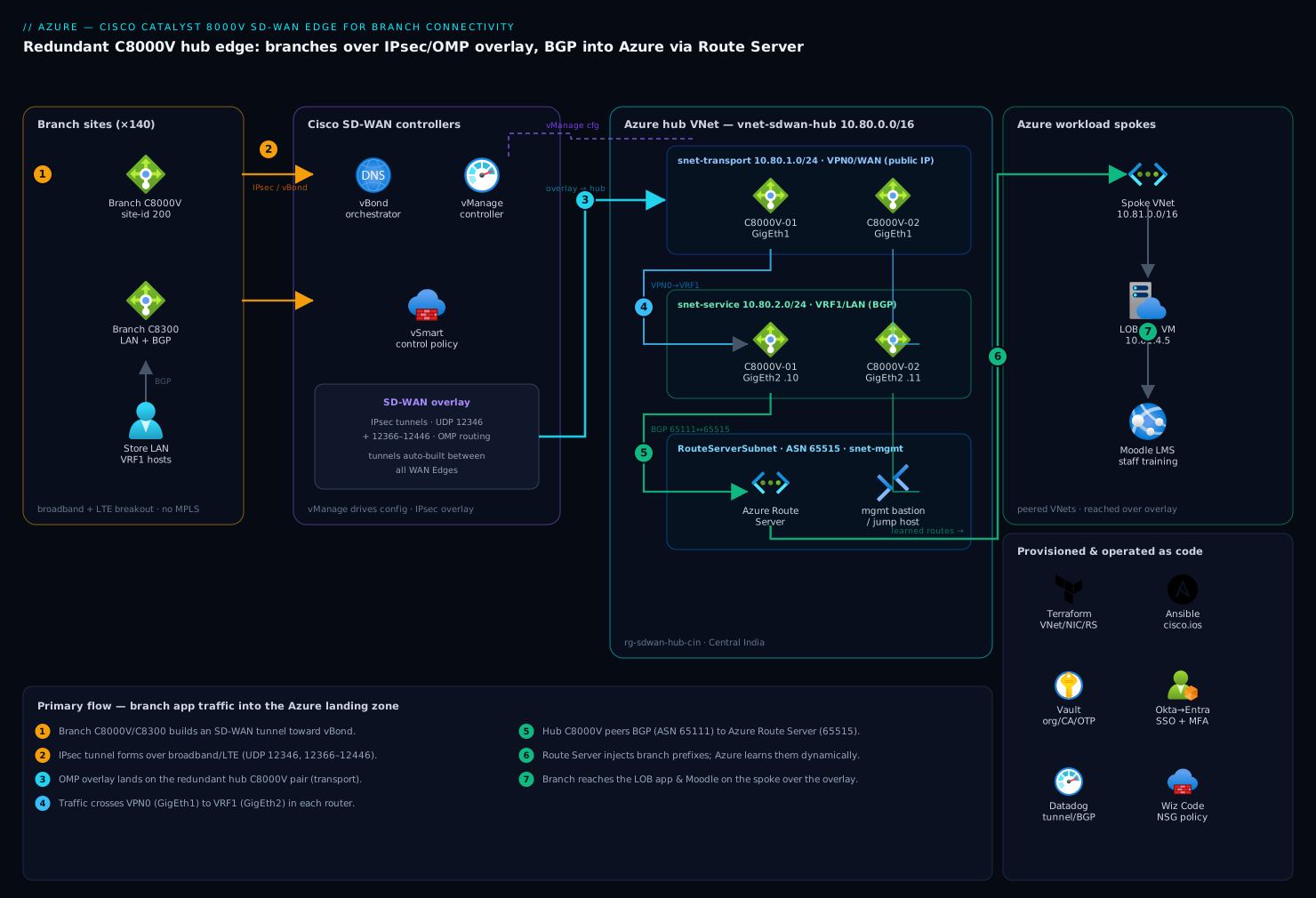
The design is a classic hub-and-spoke. In the Azure hub VNet sits a pair of C8000V routers, each with three NICs: a transport (WAN/VPN0) interface in a public-facing subnet that builds the SD-WAN tunnels, a service (LAN/VRF1) interface that faces the Azure workload spokes, and a management interface for vManage/SSH. The two routers form a redundant edge; branch sites each run their own C8000V (or physical C8300) and build IPsec tunnels in the SD-WAN overlay to the Azure edge through vBond. Inside the overlay, OMP (Overlay Management Protocol) distributes routes between WAN Edges, while at the two physical boundaries we speak BGP: between the Azure C8000V service interface and the Azure spokes (via an Azure Route Server, so the platform learns branch prefixes), and between each branch C8000V and the branch LAN. vManage drives all device config; vSmart enforces the control and data policy; vBond authenticates and stitches the fabric together.
1. Lay down the Azure network foundation with Terraform
Treat the network as the first deliverable — the C8000V cannot onboard if its transport NIC cannot egress to vBond on UDP/12346 and 12366–12446. Build the hub VNet, three subnets, and the NSGs first.
# providers.tf
terraform {
  required_version = ">= 1.6"
  required_providers {
    azurerm = { source = "hashicorp/azurerm", version = "~> 3.100" }
    vault   = { source = "hashicorp/vault",   version = "~> 4.2" }
  }
}
provider "azurerm" { features {} }

# network.tf
resource "azurerm_resource_group" "sdwan" {
  name     = "rg-sdwan-hub-cin"
  location = "centralindia"
}

resource "azurerm_virtual_network" "hub" {
  name                = "vnet-sdwan-hub"
  resource_group_name = azurerm_resource_group.sdwan.name
  location            = azurerm_resource_group.sdwan.location
  address_space       = ["10.80.0.0/16"]
}

resource "azurerm_subnet" "transport" {                 # VPN0 / WAN — builds SD-WAN tunnels
  name                 = "snet-transport"
  resource_group_name  = azurerm_resource_group.sdwan.name
  virtual_network_name = azurerm_virtual_network.hub.name
  address_prefixes     = ["10.80.1.0/24"]
}
resource "azurerm_subnet" "service" {                   # VRF1 / LAN — faces Azure spokes
  name                 = "snet-service"
  resource_group_name  = azurerm_resource_group.sdwan.name
  virtual_network_name = azurerm_virtual_network.hub.name
  address_prefixes     = ["10.80.2.0/24"]
}
resource "azurerm_subnet" "mgmt" {
  name                 = "snet-mgmt"
  resource_group_name  = azurerm_resource_group.sdwan.name
  virtual_network_name = azurerm_virtual_network.hub.name
  address_prefixes     = ["10.80.3.0/24"]
}
The transport NSG must allow the Cisco SD-WAN data-plane and control-plane ports outbound, and DTLS/TLS back from the controllers. Open exactly these — not “any/any”:
resource "azurerm_network_security_group" "transport" {
  name                = "nsg-transport"
  location            = azurerm_resource_group.sdwan.location
  resource_group_name = azurerm_resource_group.sdwan.name

  security_rule {
    name                       = "allow-sdwan-dataplane"
    priority                   = 100
    direction                  = "Inbound"
    access                     = "Allow"
    protocol                   = "Udp"
    source_port_range          = "*"
    destination_port_ranges    = ["12346", "12366-12446"]   # SD-WAN tunnel + port-hop range
    source_address_prefix      = "Internet"
    destination_address_prefix = "*"
  }
  security_rule {
    name                       = "allow-controllers-dtls"
    priority                   = 110
    direction                  = "Inbound"
    access                     = "Allow"
    protocol                   = "Tcp"
    source_port_range          = "*"
    destination_port_range     = "23456"                    # vManage/vBond DTLS fallback
    source_address_prefix      = "Internet"
    destination_address_prefix = "*"
  }
}
If your controllers sit behind known public IPs, tighten
source_address_prefixto those /32s. “Internet” is correct only because branch transport IPs are dynamic broadband/LTE addresses.
Apply the foundation:
az login
export ARM_SUBSCRIPTION_ID=$(az account show --query id -o tsv)
terraform init
terraform plan  -out tf.plan
terraform apply tf.plan
2. Pull the bootstrap secrets from HashiCorp Vault
The C8000V’s day-0 (PnP/bootstrap) config needs the Organization Name, the vBond address, and the enterprise root CA — and on some deployments a one-time OTP token. These are fabric-wide secrets; do not paste them into Terraform state or the VM’s plaintext customData. Keep them in HashiCorp Vault and read them at apply time so they live in a short-lived lease, not in your repo.
# secrets.tf — read SD-WAN org material from Vault
data "vault_kv_secret_v2" "sdwan" {
  mount = "kv"
  name  = "sdwan/azure-edge"
}

locals {
  org_name      = data.vault_kv_secret_v2.sdwan.data["org_name"]
  vbond_address = data.vault_kv_secret_v2.sdwan.data["vbond_fqdn"]
  root_ca_pem   = data.vault_kv_secret_v2.sdwan.data["enterprise_root_ca"]
  otp_token     = data.vault_kv_secret_v2.sdwan.data["pnp_otp"]
}
Authenticate Terraform to Vault with a short-lived token (in CI this is an AppRole or the cloud-auth method, never a static root token):
export VAULT_ADDR="https://vault.internal.kloudvin.example:8200"
export VAULT_TOKEN=$(vault write -field=token auth/approle/login \
  role_id="$VAULT_ROLE_ID" secret_id="$VAULT_SECRET_ID")
Vault is doing one job here: it is the secret broker for the SD-WAN organization material so the bootstrap token and CA chain are leased, audited, and revocable rather than committed to git. (KloudVin learned the hard way what committed credentials cost — these never touch the repo.)
3. Deploy the redundant C8000V pair
Accept the Marketplace plan once per subscription, then deploy two VMs, each with the three NICs from Step 1. The transport NIC gets a public IP; the service and management NICs stay private. The day-0 config is injected via custom_data (cloud-init/bootstrap) so the router comes up already pointed at vBond.
# one-time: accept the Cisco C8000V SD-WAN Marketplace terms
az vm image terms accept \
  --publisher cisco \
  --offer cisco-c8000v \
  --plan 17_15_01a-byol
# c8000v.tf  (one of a pair; use count = 2 or a module in practice)
locals {
  bootstrap_cfg = templatefile("${path.module}/bootstrap.tftpl", {
    org_name = local.org_name
    vbond    = local.vbond_address
    root_ca  = local.root_ca_pem
    otp      = local.otp_token
    uuid     = var.c8kv_uuid[0]              # serial/UUID from the vManage WAN-Edge list
  })
}

resource "azurerm_linux_virtual_machine" "c8kv" {
  name                = "c8kv-hub-01"
  resource_group_name = azurerm_resource_group.sdwan.name
  location            = azurerm_resource_group.sdwan.location
  size                = "Standard_D8s_v5"   # 8 vCPU meets the C8000V SD-WAN forwarding plane
  disable_password_authentication = true
  admin_username      = "azureuser"
  admin_ssh_key { username = "azureuser"; public_key = var.ssh_pubkey }

  network_interface_ids = [
    azurerm_network_interface.transport[0].id,   # nic0 = GigabitEthernet1 / VPN0
    azurerm_network_interface.service[0].id,      # nic1 = GigabitEthernet2 / VRF1
    azurerm_network_interface.mgmt[0].id,         # nic2 = mgmt
  ]

  custom_data = base64encode(local.bootstrap_cfg)

  plan {
    publisher = "cisco"
    product   = "cisco-c8000v"
    name      = "17_15_01a-byol"
  }
  source_image_reference {
    publisher = "cisco"
    offer     = "cisco-c8000v"
    sku       = "17_15_01a-byol"
    version   = "latest"
  }
  boot_diagnostics {}                              # capture serial console for PnP troubleshooting
}
The NIC order is load-bearing: the first NIC maps to GigabitEthernet1 (the controller-connection/VPN0 transport), so it must be the one in snet-transport with the public IP. Enable IP forwarding on the service and transport NICs so the router can route transit traffic:
resource "azurerm_network_interface" "transport" {
  name                  = "nic-c8kv-01-transport"
  location              = azurerm_resource_group.sdwan.location
  resource_group_name   = azurerm_resource_group.sdwan.name
  ip_forwarding_enabled = true
  ip_configuration {
    name                          = "ipcfg"
    subnet_id                     = azurerm_subnet.transport.id
    private_ip_address_allocation = "Static"
    private_ip_address            = "10.80.1.10"
    public_ip_address_id          = azurerm_public_ip.transport[0].id
  }
}
A minimal bootstrap.tftpl (the day-0 SD-WAN config the device boots with) carries just enough to reach vBond and authenticate to the fabric:
ciscosdwan
system
 system-ip             10.255.0.11
 site-id               100
 organization-name     "${org_name}"
 vbond                 ${vbond}
!
sdwan
 interface GigabitEthernet1
  tunnel-interface
   encapsulation ipsec
   color biz-internet
  no shutdown
!
crypto pki trustpoint ENTERPRISE-ROOT
 enrollment terminal
 ! ${root_ca} installed at first boot
!
Apply, then watch the serial console (az vm boot-diagnostics get-boot-log) until the device prints system is vmanage-connected.
4. Onboard the edge to vManage
With the device booted and pointed at vBond, complete onboarding in vManage. The UUID you put in var.c8kv_uuid must already be on the WAN Edge List (Configuration → Devices → Upload WAN Edge List, or Sync Smart Account for cloud-delivered fabrics), and the device must be set Valid in the certificate authorization (Configuration → Certificates → set state to Valid → Send to Controllers).
Attach a device template so vManage pushes the production config (interfaces, VPNs, OMP, BGP) instead of leaving the bootstrap minimal config in place. You can drive this from the vManage REST API so it lives in your pipeline rather than the GUI:
# authenticate to vManage and grab the XSRF token
VMANAGE="https://vmanage.sdwan.kloudvin.example"
COOKIE=$(curl -sk -c - -X POST "$VMANAGE/j_security_check" \
  --data "j_username=$VMANAGE_USER&j_password=$VMANAGE_PASS" | awk '/JSESSIONID/{print $7}')
TOKEN=$(curl -sk -b "JSESSIONID=$COOKIE" "$VMANAGE/dataservice/client/token")

# attach the prebuilt device template to the edge by UUID
curl -sk -b "JSESSIONID=$COOKIE" -H "X-XSRF-TOKEN: $TOKEN" \
  -H "Content-Type: application/json" \
  -X POST "$VMANAGE/dataservice/template/device/config/attachfeature" \
  -d @attach-c8kv-hub.json
The template encodes VPN0 (transport with color biz-internet), VPN512 (management), and the service VPN (VRF1) facing Azure — the same structure as the bootstrap, now complete and centrally managed.
5. Bring up the SD-WAN overlay to the branches
Each branch C8000V is onboarded the same way (its own UUID on the WAN Edge list, its own device template) and configured with a transport interface and a service VPN matching the Azure hub’s service VPN number. Once both ends are vManage-connected and vSmart-connected, OMP advertises each site’s service-VPN prefixes across the fabric and the data plane auto-builds IPsec tunnels between WAN Edges — you do not hand-configure tunnels.
Control which sites talk to which with a control policy on vSmart. For a hub-and-spoke where branches reach Azure (and each other only via the hub), apply a topology policy:
policy
 control-policy BRANCH-TO-HUB
  sequence 10
   match route
    site-list BRANCHES
   action accept
    set tloc-list AZURE-HUB-TLOCS    ! force branch routes through the Azure edge
  default-action accept
!
apply-policy
 site-list BRANCHES control-policy BRANCH-TO-HUB out
Push it from vManage (Configuration → Policies → Activate). Verify a branch is forming tunnels to the hub:
# on a branch C8000V
show sdwan bfd sessions          # expect UP sessions to the two hub system-IPs
show sdwan omp routes vpn 1      # branch should learn the Azure service-VPN prefixes
6. Wire BGP into the Azure network
The SD-WAN overlay gets branch traffic to the Azure C8000V’s service interface; BGP gets it the rest of the way into the Azure spokes. Deploy an Azure Route Server in the hub and peer it with both C8000V service interfaces so the Azure platform dynamically learns the branch prefixes the routers redistribute from OMP — no static 0.0.0.0/0 UDRs to maintain per spoke.
resource "azurerm_route_server" "hub" {
  name                             = "rs-sdwan-hub"
  resource_group_name              = azurerm_resource_group.sdwan.name
  location                         = azurerm_resource_group.sdwan.location
  sku                              = "Standard"
  public_ip_address_id             = azurerm_public_ip.rs.id
  subnet_id                        = azurerm_subnet.routeserver.id   # must be named "RouteServerSubnet"
  branch_to_branch_traffic_enabled = true
}

resource "azurerm_route_server_bgp_connection" "c8kv01" {
  name            = "bgp-c8kv-01"
  route_server_id = azurerm_route_server.hub.id
  peer_asn        = 65111                       # C8000V ASN
  peer_ip         = "10.80.2.10"                # service NIC private IP
}
On the C8000V (via the vManage service-VPN feature template, shown here as the resulting CLI), peer back to the Route Server’s two instance IPs and redistribute OMP into BGP so branch routes reach Azure, and BGP into OMP so Azure spoke routes reach the branches:
router bgp 65111
 address-family ipv4 vrf 1
  neighbor 10.80.2.4  remote-as 65515     ! Azure Route Server fixed ASN
  neighbor 10.80.2.5  remote-as 65515
  redistribute omp                        ! branch prefixes -> Azure
 exit-address-family
!
sdwan
 omp
  address-family ipv4 vrf 1
   advertise bgp                          ! Azure spoke prefixes -> branches over OMP
Azure Route Server’s ASN is always 65515 — your C8000V uses any private ASN (here 65111). Confirm the platform learned the routes: az network routeserver peering list-learned-routes.
7. Layer security and observability onto the edge
The routers are now in the data path, so the SOC needs them treated like any other production node.
- Identity for operators. Front vManage and router SSH with SSO instead of local accounts. Federate Okta as the workforce IdP into Microsoft Entra ID, and configure vManage’s SSO (SAML) against that so network engineers log in with corporate identity, MFA, and conditional access — and a leaver loses access by being deprovisioned once, centrally.
- Posture & IaC scanning with Wiz / Wiz Code. Run Wiz agentless scanning across the hub subscription so any drift — a transport NSG widened to all ports, a public IP attached to the service NIC, an unencrypted disk — alerts the moment it appears. Wire Wiz Code into the pipeline so the Terraform in Steps 1–6 is policy-scanned before apply and a misconfigured NSG never reaches Azure.
- Runtime protection with CrowdStrike Falcon. Although the C8000V is a closed network OS (no agent on the router itself), put CrowdStrike Falcon sensors on the jump host / management VMs that operate the fabric and on any Azure spoke VMs, feeding detections to the SOC so a compromised operator box is caught.
- Observability with Datadog / Dynatrace. Export router telemetry (interface, tunnel/BFD, BGP session, and CPU metrics) from vManage and via SNMP/streaming telemetry into Datadog (or Dynatrace), and build dashboards and monitors on tunnel up/down, BGP peer state, and per-branch loss/latency/jitter so a flapping branch circuit pages on-call instead of being discovered by a store manager.
- Change management with ServiceNow. Gate vManage policy and template changes behind a ServiceNow change request, and auto-raise a ServiceNow incident when a monitor (a downed branch tunnel, a BGP session reset) fires — so there is always a ticket, not just a graph.
- Edge web acceleration with Akamai. Where a branch also serves public web traffic broken out locally, front those properties with Akamai for TLS, caching, and WAF at the edge — keeping the SD-WAN fabric for private app traffic and the public path on a hardened CDN.
- Education sites. Several of the retailer’s larger branches host a Moodle LMS for in-store staff training; with the service VPN now reaching Azure, that Moodle instance moves to an Azure spoke and is reached over the same overlay, retiring its on-prem box.
8. Drive it all from CI/CD
Two pipelines keep this reproducible. Infrastructure (the Terraform in Steps 1–6) runs in GitHub Actions or Jenkins, authenticating to Azure via OIDC federation (no stored service-principal secret) and to Vault via AppRole, with terraform plan posted to the PR and apply gated on review and a passing Wiz Code scan. Configuration drift on the routers and jump hosts is enforced with Ansible (the cisco.ios collection over the management VPN) run on a schedule, so any out-of-band CLI change is detected and reverted. If you run a GitOps shop, Argo CD reconciles the Kubernetes-side spoke workloads (the Moodle deployment, telemetry collectors) while the network layer stays in the Terraform/Ansible pipeline. The principle is the same across all of them: the edge is code, rebuildable in any region by re-running the pipeline against the controller stack.
Validation
Walk these checks before declaring the edge live:
# 1. Both hub routers are fully onboarded
#    vManage UI: Monitor -> Devices -> state "In Sync", "vManage/vSmart/vBond connected"

# 2. Control & data plane up from a branch
show sdwan control connections        # expect connections to vBond, vManage, both vSmarts
show sdwan bfd sessions               # expect UP to both hub system-IPs, state "up"

# 3. Overlay routing is exchanging the right prefixes
show sdwan omp routes vpn 1 | i 10.80 # branch learns Azure service-VPN subnets

# 4. BGP into Azure is established
#    On C8000V:
show bgp vpnv4 unicast vrf 1 summary  # neighbors 10.80.2.4/.5 in "Established"
#    On Azure:
az network routeserver peering list-learned-routes \
  --routeserver rs-sdwan-hub -g rg-sdwan-hub-cin --name bgp-c8kv-01

# 5. End-to-end data path
#    From a branch host, reach an Azure spoke VM:
ping 10.81.4.5 && traceroute 10.81.4.5   # path should transit the hub C8000V, not the internet
Then fail one hub router (az vm deallocate on c8kv-hub-01) and confirm branch BFD sessions converge onto c8kv-hub-02 and traffic continues — that is the redundancy actually working, not just two VMs running.
Rollback / teardown
Roll back in the reverse order you built, so you never strand a branch:
- Drain traffic first. In vManage, deactivate the control policy or shift the branch
tloc-listso branches stop preferring the Azure hub; confirm sessions move before touching infrastructure. - Detach templates / decommission devices. Set the hub C8000V certificates to Invalid and Send to Controllers, then Invalidate / delete the WAN Edges from vManage so the UUIDs free up.
- Tear down Azure with Terraform.
terraform destroyremoves the Route Server, NICs, public IPs, VMs, NSGs, and VNet in dependency order. The state file is the source of truth — there is nothing to hand-delete in the portal. - Revoke secrets. Revoke the Vault lease/token used for bootstrap (
vault lease revoke -prefix kv/sdwan) so the org material cannot be reused.
terraform destroy -auto-approve     # only after step 1 & 2; this is irreversible
vault token revoke -self
Keep the controller stack (vManage/vBond/vSmart) — it is shared fabric infrastructure and is not part of this teardown.
Common pitfalls
- NIC order wrong. If
GigabitEthernet1is not the public transport NIC, the router never reaches vBond and silently stays unclaimed. The firstnetwork_interface_idsentry must be the transport NIC. - Organization Name mismatch. The
organization-namein the bootstrap must match vManage character-for-character (it is case-sensitive). A mismatch fails certificate validation with a cryptic “vBond connection” error. - NSG too tight — or too loose. Block UDP 12346 / 12366–12446 and tunnels never form; open everything and Wiz (rightly) flags it. Open exactly the SD-WAN ports.
- Forgot IP forwarding. Without
ip_forwarding_enabled = trueon the NICs, Azure drops transit packets and only host-destined traffic works — BFD comes up but data does not pass. - Route Server ASN. Peering with anything other than ASN 65515 on the Azure side, or reusing 65515 on the router, breaks the BGP session.
- Single router. Deploying one C8000V “to start” gives you no failover; a router reboot or Azure host maintenance blacks out every branch. Deploy the pair from day one.
Security notes
Keep the management plane off the public internet: the management NIC is private, vManage is reached over the management VPN or a bastion, and operator access is Okta → Entra SSO with MFA, never local router accounts. Bootstrap and CA material lives in HashiCorp Vault with short leases and is revoked on teardown — it is never in Terraform state or customData in cleartext. Wiz / Wiz Code continuously assert that the transport NSG stays tight and no service NIC gains a public IP, while CrowdStrike Falcon covers the management VMs that an attacker would target to reach the fabric. The overlay itself is IPsec-encrypted end to end by default, so branch traffic is confidential across the public internet without extra work.
Cost notes
The dominant cost is compute: two Standard_D8s_v5 VMs run continuously, so reserve them (1- or 3-year Reserved Instances cut roughly 40–60% versus pay-as-you-go) since the edge is always-on. Cisco SD-WAN licensing (DNA/Catalyst SD-WAN subscription tier per device, plus controller licensing) is usually the larger line item — right-size the throughput tier to actual branch bandwidth rather than the maximum. Egress on the transport public IPs is metered, but SD-WAN over broadband is precisely what replaces the far pricier MPLS this project retires, so the net is a saving. The Azure Route Server carries an hourly charge plus learned-route metering; one per hub is enough. Hold the whole footprint to plan by metering tunnel and egress telemetry in Datadog and alerting on cost or throughput drift.