A payments platform runs ~40 services across three EKS clusters, and the on-call rotation has the same complaint every week: when checkout latency spikes, nobody can say in under ten minutes whether it is the database, a noisy neighbour pod, a downstream API, or a bad deploy. Metrics live in one tool, traces in another, and pod logs are a kubectl logs lottery that vanishes the moment a pod restarts. The mandate from the new head of SRE is blunt: one pane of glass where a trace, the host metrics under it, and the exact log lines for that request all line up — and it has to be deployable by Terraform and survive a node recycle. This guide walks through standing that up with Datadog on Kubernetes the way it should be done in production: the Datadog Operator managing a node-level Agent DaemonSet and a Cluster Agent, wired for cluster metrics, APM traces, and pod log collection with Autodiscovery and consistent tagging.
We will use the Operator rather than the raw Helm chart or hand-rolled manifests because it gives you a single declarative DatadogAgent custom resource, reconciled continuously, that a GitOps tool can own end to end. Dynatrace is the obvious alternative in this space and many shops run it; here Datadog is the chosen APM/observability backend, and everything below assumes that decision is made.
Prerequisites
- A Kubernetes cluster, v1.27+, with
kubectlandhelmv3.12+ configured against it. Examples assume EKS but call out where AKS/GKE differ. - Cluster-admin (the install creates RBAC, a
CustomResourceDefinition, and privileged DaemonSet pods). - A Datadog account plus an API key and an app key (the app key is what the Cluster Agent uses for cluster-level features and the External Metrics provider).
- Your Datadog site value —
datadoghq.com(US1),datadoghq.eu(EU),us3.datadoghq.com,us5.datadoghq.com, etc. Using the wrong site is the single most common reason “nothing shows up.” - Helm and Terraform on the workstation or CI runner. Identity to the cluster comes from your IdP — Okta or Entra ID federated to the cloud provider — so engineers assume a role rather than holding static kubeconfig credentials.
- A secrets backend. We store the Datadog keys in HashiCorp Vault and project them into the cluster, never in a plaintext manifest or a committed values file.
Target topology
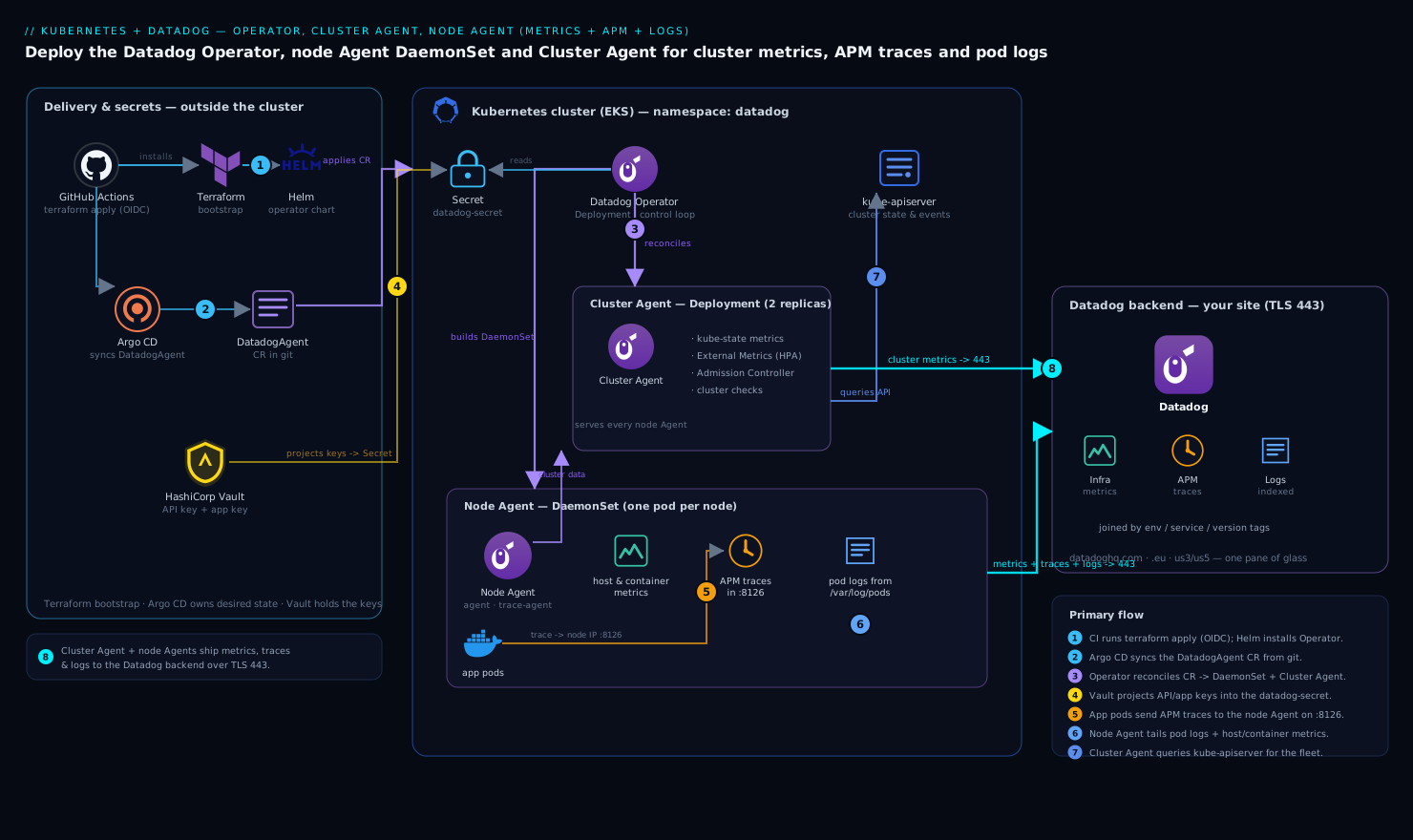
The deployment has three moving parts inside the cluster and one outside it. The Datadog Operator runs as a Deployment and watches a single DatadogAgent custom resource — it is the control loop that turns your desired state into the actual workloads. From that resource it reconciles a node Agent DaemonSet (one pod per node, collecting host and container metrics, receiving APM traces from local application pods over the node’s IP, and tailing container log files off the node filesystem) and a Cluster Agent Deployment (a small set of replicas that talk to the Kubernetes API on behalf of every node Agent, so you do not have dozens of pods hammering the API server). Outside the cluster sits the Datadog backend at your chosen site, which the Cluster Agent and node Agents ship to over TLS on 443.
The reason the Cluster Agent exists is worth internalising: it is the single component that queries the API server for cluster-level state (events, kube-state metrics, the node/pod topology) and serves that to node Agents, plus it hosts the External Metrics Provider so a HorizontalPodAutoscaler can scale on a Datadog query. Node Agents handle the per-host work; the Cluster Agent handles the per-cluster work. Keep that split clear and the rest of the configuration follows from it.
1. Put the Datadog keys in Vault and project them into the cluster
Never bake the API and app keys into a Helm values file that lands in git — that is exactly the kind of leak that haunts a repo’s history forever. Store them in HashiCorp Vault and let the Vault Secrets Operator (or the Vault Agent injector) materialise a native Kubernetes Secret the Datadog Operator can reference.
Write the keys into Vault (KV v2) once, from an authenticated session:
# Keys come from the Datadog UI: Organization Settings > API Keys / Application Keys
vault kv put secret/datadog/prod \
  api-key="$DD_API_KEY" \
  app-key="$DD_APP_KEY"
Then create the namespace and a VaultStaticSecret so the Vault Secrets Operator syncs those values into a Kubernetes Secret named datadog-secret:
kubectl create namespace datadog
# vault-static-secret.yaml
apiVersion: secrets.hashicorp.com/v1beta1
kind: VaultStaticSecret
metadata:
  name: datadog-keys
  namespace: datadog
spec:
  type: kv-v2
  mount: secret
  path: datadog/prod
  destination:
    name: datadog-secret      # the K8s Secret the Operator will read
    create: true
  refreshAfter: 1h
  hmacSecretData: true
kubectl apply -f vault-static-secret.yaml
kubectl get secret datadog-secret -n datadog -o jsonpath='{.data}' | jq 'keys'
# expect: ["api-key","app-key"]
If you do not run Vault, the fallback is kubectl create secret generic datadog-secret -n datadog --from-literal api-key=... --from-literal app-key=..., but treat that as a lab-only shortcut. Either way, the Datadog Operator consumes the keys by Secret reference, so the credential never appears in the resource you commit.
2. Install the Datadog Operator with Helm
The Operator itself is a small controller. Install it from the official Helm repo into the datadog namespace:
helm repo add datadog https://helm.datadoghq.com
helm repo update

helm install datadog-operator datadog/datadog-operator \
  --namespace datadog \
  --version 1.11.0 \
  --set image.tag=1.11.0
Confirm the Operator is running and the DatadogAgent CRD is registered before you create any custom resource:
kubectl get pods -n datadog -l app.kubernetes.io/name=datadog-operator
kubectl get crd datadogagents.datadoghq.com
Pinning --version matters: the DatadogAgent API surface evolves, and you want CI to install a known controller version, not whatever is newest the day the pipeline runs.
3. Define the DatadogAgent custom resource (metrics + APM + logs)
This is the heart of the deployment — one declarative object that turns on cluster metrics, APM, and log collection together, sets your site, and references the Vault-projected secret. Apply it and the Operator builds the DaemonSet and Cluster Agent for you.
# datadog-agent.yaml
apiVersion: datadoghq.com/v2alpha1
kind: DatadogAgent
metadata:
  name: datadog
  namespace: datadog
spec:
  global:
    site: datadoghq.com            # MATCH your account's site exactly
    clusterName: payments-prod-eks # shows up as kube_cluster_name tag
    credentials:
      apiSecret:
        secretName: datadog-secret
        keyName: api-key
      appSecret:
        secretName: datadog-secret
        keyName: app-key
    # Unified tagging: env/service/version stamped on every metric, trace, and log
    tags:
      - "team:payments"
    podLabelsAsTags:
      app: kube_app
    env:
      - name: DD_ENV
        value: prod

  features:
    apm:
      enabled: true
      hostPortConfig:
        enabled: true             # apps send traces to the node IP on 8126
    logCollection:
      enabled: true
      containerCollectAll: true   # tail logs from every container, not just annotated ones
    liveProcessCollection:
      enabled: true
    npm:
      enabled: false              # turn on later if you want network performance monitoring
    clusterChecks:
      enabled: true
    externalMetricsServer:
      enabled: true               # lets HPAs scale on Datadog queries
      useDatadogMetrics: true

  override:
    nodeAgent:
      image:
        tag: "7.54.0"
    clusterAgent:
      replicas: 2                 # HA for the cluster-level component
      image:
        tag: "7.54.0"
Apply it and watch the Operator reconcile:
kubectl apply -f datadog-agent.yaml
kubectl get datadogagent datadog -n datadog -o wide

# The Operator should produce a DaemonSet and a Cluster Agent Deployment:
kubectl get daemonset  -n datadog
kubectl get deployment -n datadog -l app.kubernetes.io/component=cluster-agent
kubectl get pods -n datadog -o wide
You want one node-Agent pod per schedulable node and (here) two Cluster Agent pods. The tags, DD_ENV, and clusterName settings implement unified service tagging — the env, service, and version triplet that lets Datadog correlate a trace to the metrics and logs from the same workload. Skipping this is why so many Datadog rollouts end up with data that will not join across signals.
4. Verify and tune log collection
containerCollectAll: true tails the container log files Kubernetes writes under /var/log/pods and /var/lib/docker/containers, which the Operator mounts read-only into the node Agent. That gives you logs from everything immediately. To control noise and parse structured logs, use Autodiscovery pod annotations on your application Deployments rather than editing the Agent:
# excerpt from an application Deployment's pod template
metadata:
  annotations:
    ad.datadoghq.com/checkout.logs: |
      [{
        "source": "java",
        "service": "checkout",
        "log_processing_rules": [{
          "type": "multi_line",
          "name": "stack_traces",
          "pattern": "\\d{4}-\\d{2}-\\d{2}"
        }]
      }]
Here checkout is the container name; source drives the Datadog log pipeline (so Java stack traces are stitched into one event, not split per line), and service ties the logs to the same service as its traces. Confirm logs are flowing from the Agent’s own status:
AGENT=$(kubectl get pod -n datadog -l agent.datadoghq.com/component=agent \
  -o jsonpath='{.items[0].metadata.name}')

kubectl exec -n datadog "$AGENT" -c agent -- agent status | sed -n '/Logs Agent/,/^$/p'
Look for BytesSent climbing and each integration showing Status: OK. To exclude a chatty namespace from log collection entirely, add DD_CONTAINER_EXCLUDE_LOGS="kube_namespace:kube-system" via spec.override.nodeAgent.env rather than disabling collection globally.
5. Instrument an application for APM
The node Agent receives traces on port 8126 via the host port you enabled in step 3, so each application pod sends to the node it runs on. The cleanest way to get the right endpoint into the app is the Kubernetes downward API, then add the language tracer.
Add these to the application container’s env:
env:
  - name: DD_AGENT_HOST          # node IP, via the downward API
    valueFrom:
      fieldRef:
        fieldPath: status.hostIP
  - name: DD_TRACE_AGENT_PORT
    value: "8126"
  - name: DD_ENV
    value: "prod"
  - name: DD_SERVICE
    value: "checkout"
  - name: DD_VERSION
    value: "2026.06.10"          # match your release/version tag
For a Node.js service, install and load the tracer as the very first import:
npm install dd-trace
# entrypoint: node -r dd-trace/init server.js
Datadog also supports auto-instrumentation through the Admission Controller that the Cluster Agent runs — annotate a pod with admission.datadoghq.com/js-lib.version and the tracer library is injected for you, no image rebuild. That is the better path at scale; the explicit install above is the transparent version for understanding what is happening. Confirm traces land by hitting the service, then checking the trace agent:
kubectl exec -n datadog "$AGENT" -c trace-agent -- agent status | sed -n '/APM/,/^$/p'
# TracesReceived and TracesBytesReceived should be > 0 after traffic
6. Wire it into CI and GitOps
The DatadogAgent resource is desired state, so it belongs in version control and is applied by your delivery pipeline — Argo CD for the in-cluster manifests, with the bootstrap (Helm Operator install, namespace, Vault wiring) done by Terraform so the whole thing is reproducible.
A minimal Terraform shape installs the Operator chart and lets Argo own the custom resource:
resource "helm_release" "datadog_operator" {
  name       = "datadog-operator"
  repository = "https://helm.datadoghq.com"
  chart      = "datadog-operator"
  version    = "1.11.0"
  namespace  = "datadog"
  create_namespace = true
}

resource "argocd_application" "datadog" {
  metadata { name = "datadog" }
  spec {
    source {
      repo_url        = "https://github.com/payments/observability"
      path            = "datadog/overlays/prod"   # holds datadog-agent.yaml
      target_revision = "HEAD"
    }
    destination { server = "https://kubernetes.default.svc"  namespace = "datadog" }
    sync_policy { automated { prune = true  self_heal = true } }
  }
}
The GitHub Actions workflow that runs terraform apply authenticates to the cloud via OIDC (no stored cloud credentials), and the Datadog keys are read from Vault at apply time, never passed as plaintext CI variables. Argo’s self_heal then guarantees that if someone hand-edits the live DatadogAgent, it snaps back to git. If your org runs Jenkins instead of GitHub Actions, the same two stages — terraform apply for bootstrap, argocd app sync datadog for the manifests — map cleanly onto a declarative Jenkinsfile.
Validation
Walk the signals end to end before you call it done:
# 1. Every node has an Agent; Cluster Agent is healthy
kubectl get pods -n datadog -o wide
kubectl get pods -n datadog -l app.kubernetes.io/component=cluster-agent

# 2. Cluster Agent is actually serving node Agents (the key integration)
DCA=$(kubectl get pod -n datadog -l app.kubernetes.io/component=cluster-agent \
  -o jsonpath='{.items[0].metadata.name}')
kubectl exec -n datadog "$DCA" -- agent status | grep -A5 "Cluster Agent"
kubectl exec -n datadog "$AGENT" -c agent -- agent status | grep -A3 "Cluster Agent"
# node Agent should report it is talking to the Cluster Agent, not the API server directly

# 3. Connectivity to your Datadog site
kubectl exec -n datadog "$AGENT" -c agent -- agent status | grep -A5 "Forwarder"
Then in the Datadog UI: open Infrastructure > Kubernetes and confirm the cluster payments-prod-eks and its nodes appear; open APM > Services and confirm checkout shows traces tagged env:prod; open Logs and filter service:checkout to see the multi-line stack traces stitched correctly. The win condition from the opening scenario is that clicking a slow trace in APM surfaces the host metrics under it and the correlated log lines — all joined by the unified env/service/version tags you set in step 3.
Rollback / teardown
Because everything is declarative, removal is clean and ordered — delete the custom resource first so the Operator tears down what it created, then the Operator, then the secret and namespace:
# 1. Operator removes the DaemonSet + Cluster Agent it reconciled
kubectl delete -f datadog-agent.yaml

# 2. (GitOps) disable the Argo app so it does not recreate the resource
argocd app set datadog --sync-policy none   # or delete the Application

# 3. Remove the Operator and CRD
helm uninstall datadog-operator -n datadog
kubectl delete crd datadogagents.datadoghq.com

# 4. Clean up secrets + namespace
kubectl delete -f vault-static-secret.yaml
kubectl delete namespace datadog
For a partial rollback — say APM is causing trouble — flip spec.features.apm.enabled to false and re-apply; the Operator reconciles the change without touching metrics or logs. That granularity is the main reason to run the Operator over a monolithic Helm install.
Common pitfalls
- Wrong
site. Agents connect, report healthy, and you still see nothing — because they are shipping todatadoghq.comwhile your org is ondatadoghq.eu. CheckForwarderinagent statusand matchspec.global.siteto your account. - APM host port blocked. If a
NetworkPolicyor a security group denies pod-to-node traffic on 8126, apps cannot reach their local Agent. Either allow it, or switch to the Unix Domain Socket transport (DD_APM_RECEIVER_SOCKET) which avoids host networking entirely. - Log volume surprise.
containerCollectAll: trueingests everything, and Datadog bills per ingested GB. Exclude noisy namespaces withDD_CONTAINER_EXCLUDE_LOGSand sample where you can before the first invoice lands. - One Cluster Agent replica. A single replica makes cluster checks and the metrics provider a single point of failure during a node drain. Run at least two (as above) with a leader election lease.
- Missing unified tags. Forget
DD_ENV/DD_SERVICE/DD_VERSIONon the app and your traces, metrics, and logs will not correlate — the whole point of the exercise. Set them on every workload, ideally via the Admission Controller defaults. - Tracer not loaded first. A language tracer imported after your web framework misses spans. For Node it must be
-r dd-trace/init; for Python,ddtrace-run.
Security notes
Treat the Datadog keys as the crown jewels they are: hold them in HashiCorp Vault, project them as a referenced Kubernetes Secret, and never commit them — a leaked API key lets anyone write to your org. Scope cluster access through your IdP, Okta or Entra ID federated to the cloud provider, so engineers assume short-lived roles instead of sharing a static kubeconfig. The node Agent runs privileged to read host log files and container runtime sockets, so keep its image pinned and patched and let your runtime-security tooling — CrowdStrike Falcon for workload threat detection, Wiz (with Wiz Code scanning the IaC in the pull request) for posture and misconfiguration drift — watch the DaemonSet like any other privileged workload. Restrict the app key to the Cluster Agent only; node Agents need just the API key. Route any Agent health or security alert into ServiceNow so an unexpected DaemonSet change becomes a tracked incident, not a missed log line. If your perimeter terminates at Akamai, allow the Datadog intake endpoints for your site through egress controls so Agents can reach the backend.
Cost notes
Datadog bills primarily on per-host infrastructure, ingested + indexed log GB, and APM ingested/indexed spans, so the levers are about volume, not the install. Use log filtering and exclusion (DD_CONTAINER_EXCLUDE_LOGS, plus exclusion filters in the UI) to ingest only what you will actually query; archive the rest to cheap object storage and rehydrate on demand. For APM, enable ingestion sampling so you keep a statistically useful share of traces rather than 100% of a high-traffic service. Run the Cluster Agent at two replicas, not ten — it is lightweight and the cluster checks feature deliberately moves work off the per-node Agents, which also trims API-server load. Right-size the node Agent resource requests; an oversized DaemonSet multiplies waste by every node in the fleet. And track host count: scaling the cluster scales your Datadog host bill linearly, so node autoscaling decisions are also cost decisions. This whole topology is deliberately lean — Operator, one DaemonSet, two Cluster Agent pods — precisely so the observability layer does not become a line item that rivals the workloads it watches.