A fintech platform team has been pulling base images straight from Docker Hub into production for two years, and an auditor finally asked the question that ends that era: “prove that the image running in your payments cluster is the one your pipeline built, that it was scanned, and that nobody swapped a layer in between.” Nobody could. There was no private registry of record, no vulnerability gate, no signature — just a latest tag and trust. This guide builds the thing that makes that audit a five-minute conversation: a self-hosted Harbor OCI registry on Kubernetes, with Trivy scanning every push and blocking pulls of vulnerable images, Cosign and Notation signing so a deploy can be made to refuse anything unsigned, and replication so a second region (and the air-gapped DR cluster) always has the exact same bits. By the end you have a registry that is the single source of truth for every container in the estate, gated and signed, that a CISO will sign off on.
Prerequisites
- A Kubernetes cluster, v1.27+, with at least 3 worker nodes (Harbor’s components plus Trivy’s scan jobs are memory-hungry). Works on AKS, EKS, GKE, or on-prem.
- An ingress controller (this guide uses ingress-nginx) and cert-manager for TLS, or a real CA-issued wildcard cert. Harbor requires HTTPS for Cosign/Notary to work.
- A default StorageClass that supports
ReadWriteOncefor the database and Redis, plus either object storage (S3/Azure Blob/GCS) or a largeReadWriteManyvolume for the registry blob store. kubectl,helmv3.12+,cosignv2.x, andtrivyCLI on your workstation.- DNS you control for
harbor.example.com(and a second name for the DR region). - An OIDC identity provider — Microsoft Entra ID or Okta — for human SSO into the Harbor UI and API.
Target topology
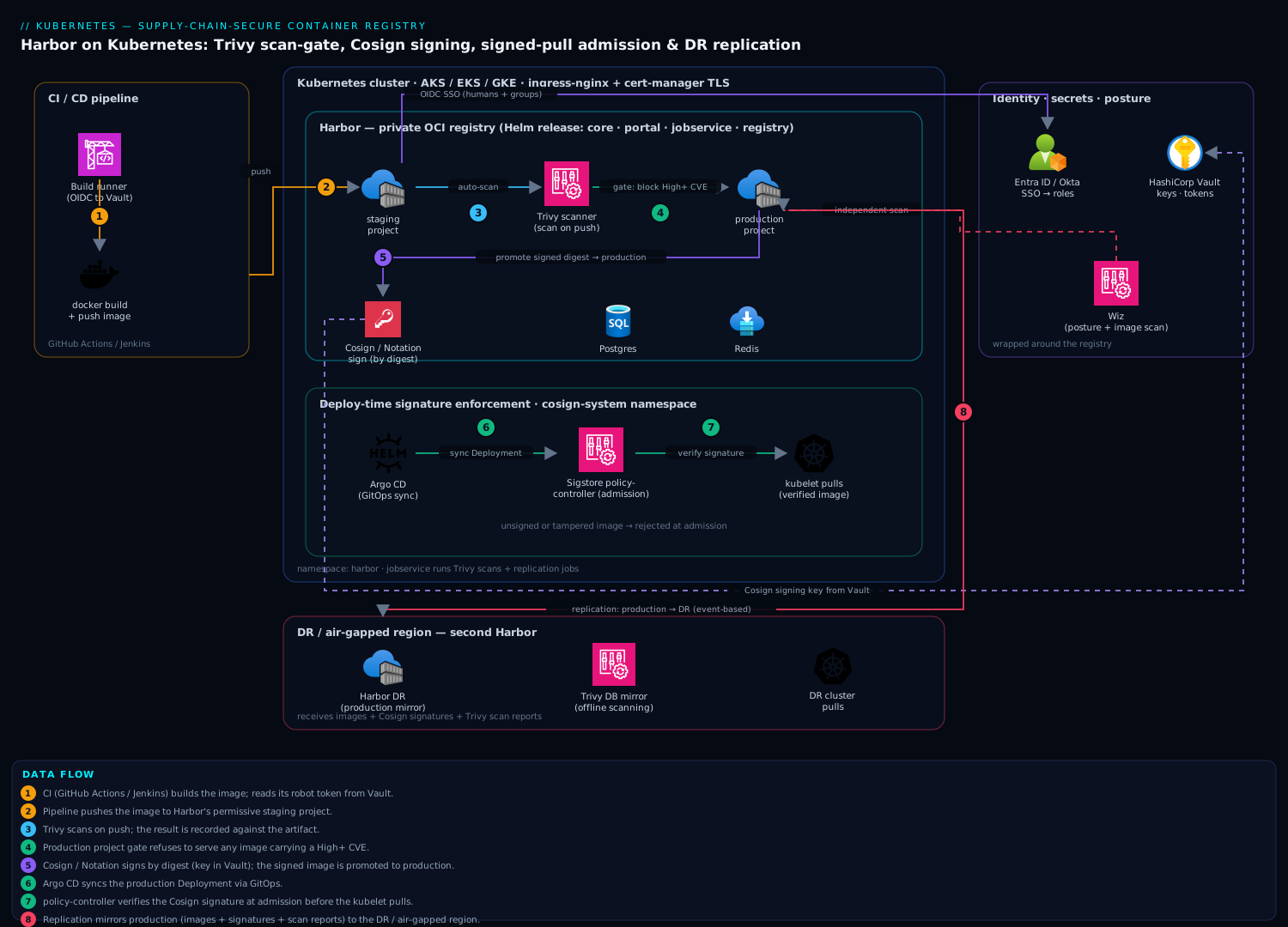
The registry runs as a set of Harbor microservices on the cluster — core, portal, jobservice, registry, trivy, plus a PostgreSQL database and Redis — fronted by an ingress that terminates TLS. Two paths flow through it. The publish path: CI (GitHub Actions or Jenkins) builds an image, pushes it to a staging project in Harbor, Trivy scans it on arrival, and only if the scan passes the gate does the pipeline run cosign sign and promote the image to a production project. The consume path: Argo CD deploys to the cluster, an admission policy verifies the Cosign signature against your public key before the kubelet is ever allowed to pull, and Harbor itself refuses to serve any image whose severity exceeds the project’s threshold. A replication rule continuously mirrors the production project to a second Harbor in the DR region. Wrapped around all of it: Entra ID/Okta for who-can-do-what, HashiCorp Vault holding the signing keys and robot-account tokens, and Wiz independently scanning the running registry and the images it stores for posture drift.
1. Create the namespace, TLS, and storage
Harbor must be served over real TLS or signing breaks. Issue a certificate first. With cert-manager and a ClusterIssuer already configured:
kubectl create namespace harbor

cat <<'EOF' | kubectl apply -f -
apiVersion: cert-manager.io/v1
kind: Certificate
metadata:
  name: harbor-tls
  namespace: harbor
spec:
  secretName: harbor-tls
  dnsNames:
    - harbor.example.com
    - notary.example.com
  issuerRef:
    name: letsencrypt-prod
    kind: ClusterIssuer
EOF

kubectl -n harbor get certificate harbor-tls -w
Wait for READY=True before continuing. If you use a corporate CA instead, create the secret directly:
kubectl -n harbor create secret tls harbor-tls \
  --cert=harbor.example.com.crt --key=harbor.example.com.key
2. Install Harbor with Helm
Add the official chart repo and render a values file. The key decisions here are: external HTTPS via the existing ingress, the bundled Trivy scanner enabled, object storage for blobs, and Postgres/Redis sized for real traffic.
helm repo add harbor https://helm.goharbor.io
helm repo update
helm search repo harbor/harbor   # pin to a known chart version, e.g. 1.16.x
Create harbor-values.yaml:
expose:
  type: ingress
  tls:
    enabled: true
    certSource: secret
    secret:
      secretName: harbor-tls
  ingress:
    hosts:
      core: harbor.example.com
    className: nginx
    annotations:
      nginx.ingress.kubernetes.io/proxy-body-size: "0"   # allow large layer pushes

externalURL: https://harbor.example.com

# DO NOT keep this default in production — see step 6 (pull from Vault / set via --set)
harborAdminPassword: "CHANGE_ME_VIA_SECRET"

persistence:
  enabled: true
  imageChartStorage:
    type: s3
    s3:
      region: ap-south-1
      bucket: kloudvin-harbor-prod
      # credentials injected via existingSecret, not inline
  persistentVolumeClaim:
    database:
      size: 20Gi
    redis:
      size: 5Gi

trivy:
  enabled: true
  vulnType: "os,library"
  severity: "CRITICAL,HIGH,MEDIUM"
  ignoreUnfixed: false
  # Trivy pulls its vuln DB from ghcr.io; mirror it for air-gapped installs (step 8)

database:
  type: internal      # swap to 'external' to point at managed Postgres in prod
redis:
  type: internal

jobservice:
  replicas: 2         # replication + scan jobs run here; give them headroom
Install:
helm install harbor harbor/harbor \
  -n harbor \
  -f harbor-values.yaml \
  --set harborAdminPassword="$(vault kv get -field=admin_password secret/harbor/bootstrap)"

kubectl -n harbor rollout status deploy/harbor-core
kubectl -n harbor get pods
You should see harbor-core, harbor-portal, harbor-jobservice, harbor-registry, harbor-trivy, harbor-database, and harbor-redis all Running. Browse to https://harbor.example.com and log in as admin.
3. Wire SSO through Entra ID or Okta
Local accounts do not scale and leave no audit trail your security team trusts. Switch Harbor’s auth mode to OIDC so humans sign in with corporate identity and group membership maps to Harbor roles. Register an app in Entra ID (or an OIDC app in Okta) with redirect URI https://harbor.example.com/c/oidc/callback, then in Harbor go to Administration → Configuration → Authentication and set:
Auth Mode:            OIDC
OIDC Provider Name:   Entra ID
OIDC Endpoint:        https://login.microsoftonline.com/<tenant-id>/v2.0
OIDC Client ID:       <app-registration-client-id>
OIDC Client Secret:   <from Vault — never typed in a ticket>
Group Claim Name:     groups
OIDC Scope:           openid,profile,email,offline_access
With this in place, an engineer in the harbor-developers Entra group lands as a Developer in their projects, and harbor-admins map to project admins. Robot accounts (next steps) are what CI uses — humans never share credentials with pipelines. Keep the admin password in Vault strictly as break-glass.
4. Create projects, robot accounts, and the Trivy gate
Structure the registry around promotion. Create two projects — a permissive staging and a locked-down production — and turn on the scan-on-push and the pull-prevention gate for production. Do it via the API so it is reproducible (this is what your Terraform/Ansible would codify):
HARBOR=https://harbor.example.com
AUTH="admin:$(vault kv get -field=admin_password secret/harbor/bootstrap)"

# create the production project
curl -s -u "$AUTH" -X POST "$HARBOR/api/v2.0/projects" \
  -H "Content-Type: application/json" \
  -d '{"project_name":"production","public":false}'

# enforce: scan on push, and BLOCK pulls of images with a HIGH+ CVE
curl -s -u "$AUTH" -X PUT "$HARBOR/api/v2.0/projects/production/metadatas/auto_scan" \
  -H "Content-Type: application/json" -d '{"auto_scan":"true"}'

curl -s -u "$AUTH" -X PUT "$HARBOR/api/v2.0/projects/production/metadatas/prevent_vul" \
  -H "Content-Type: application/json" -d '{"prevent_vul":"true"}'

curl -s -u "$AUTH" -X PUT "$HARBOR/api/v2.0/projects/production/metadatas/severity" \
  -H "Content-Type: application/json" -d '{"severity":"high"}'
That prevent_vul=true with severity=high is the heart of the supply-chain gate: Harbor will physically refuse to serve any image in production carrying a High or Critical vulnerability, so a vulnerable image cannot reach a node even if a manifest references it. Now mint a scoped robot account for CI to push:
curl -s -u "$AUTH" -X POST "$HARBOR/api/v2.0/robots" \
  -H "Content-Type: application/json" -d '{
    "name":"ci-pusher","duration":-1,"level":"project",
    "permissions":[{"kind":"project","namespace":"staging",
      "access":[{"resource":"repository","action":"push"},
                {"resource":"repository","action":"pull"}]}]
  }'
Store the returned secret in Vault under secret/harbor/ci-pusher; your pipeline reads it at run time, so no long-lived registry password lives in a CI secret store.
5. Push, scan, and gate from CI
Now the publish path. In GitHub Actions (the Jenkins equivalent is a pipeline stage running the same CLIs), build, push to staging, wait for Harbor’s scan, and fail the build on a High finding before promoting:
# .github/workflows/build-and-sign.yml
jobs:
  build:
    runs-on: ubuntu-latest
    permissions:
      id-token: write          # OIDC to Vault for the robot token + signing key
    steps:
      - uses: actions/checkout@v4

      - name: Log in to Harbor
        run: |
          echo "${ROBOT_SECRET}" | docker login harbor.example.com \
            -u 'robot$staging+ci-pusher' --password-stdin

      - name: Build and push to staging
        run: |
          docker build -t harbor.example.com/staging/payments-api:${GITHUB_SHA} .
          docker push harbor.example.com/staging/payments-api:${GITHUB_SHA}

      - name: Gate on Trivy (client-side, fail fast)
        run: |
          trivy image --exit-code 1 --severity HIGH,CRITICAL --ignore-unfixed \
            harbor.example.com/staging/payments-api:${GITHUB_SHA}
Running trivy image in the pipeline gives a fast local gate, while Harbor’s server-side auto_scan is the authoritative record stored against the artifact. Belt and braces: the build fails here, and even if it did not, the production project’s prevent_vul gate would refuse the pull.
6. Sign images with Cosign (and add a Notation signature)
A passing scan proves the image was clean; a signature proves the image is the one you built and nobody altered it. Generate a Cosign key pair and keep the private key in Vault — Cosign has a native Vault key backend, so the key material never touches the runner’s disk:
# one-time: generate into Vault's transit/KV
export VAULT_ADDR=https://vault.example.com
cosign generate-key-pair --kms hashivault://harbor-cosign
# public key for verifiers:
cosign public-key --key hashivault://harbor-cosign > cosign.pub
Add the signing step to the pipeline, right after the Trivy gate, then promote to production:
      - name: Cosign sign and promote
        env:
          COSIGN_KEY: hashivault://harbor-cosign
        run: |
          IMG=harbor.example.com/staging/payments-api:${GITHUB_SHA}
          DIGEST=$(crane digest "$IMG")
          cosign sign --yes --key "$COSIGN_KEY" \
            harbor.example.com/staging/payments-api@${DIGEST}
          # promote the exact digest to production
          crane copy \
            harbor.example.com/staging/payments-api@${DIGEST} \
            harbor.example.com/production/payments-api:${GITHUB_SHA}
Always sign and copy by digest, never tag — tags are mutable, digests are not. For environments standardizing on the OCI/CNCF Notation project instead of (or alongside) Cosign, sign with a cert from your CA:
notation sign --signature-format cose \
  harbor.example.com/production/payments-api@${DIGEST} \
  --id <cert-key-id> --plugin azure-kv
Harbor stores both Cosign and Notation signatures as OCI artifacts attached to the image, and shows a “Signed” badge in the UI. You can now turn on Harbor’s project policy to block unsigned artifacts from being pulled.
7. Enforce signatures at deploy time
Signing is worthless unless something checks it. Two complementary enforcement points:
At the registry, enable the project-level signature requirement so Harbor refuses to serve unsigned images:
curl -s -u "$AUTH" -X PUT \
  "$HARBOR/api/v2.0/projects/production/metadatas/enable_content_trust_cosign" \
  -H "Content-Type: application/json" -d '{"enable_content_trust_cosign":"true"}'
At admission, install a policy controller so the kubelet is never allowed to pull an unverified image. Using the Sigstore policy-controller (Kyverno’s verifyImages rule is an equivalent):
helm install policy-controller sigstore/policy-controller -n cosign-system --create-namespace

cat <<EOF | kubectl apply -f -
apiVersion: policy.sigstore.dev/v1beta1
kind: ClusterImagePolicy
metadata:
  name: require-payments-signature
spec:
  images:
    - glob: "harbor.example.com/production/**"
  authorities:
    - key:
        data: |
$(sed 's/^/          /' cosign.pub)
EOF
Now Argo CD can sync the production deployment, and any pod referencing an unsigned or tampered image is rejected at admission with a clear error — the verifiable chain the auditor asked for is complete: built → scanned → signed → verified-on-pull.
8. Configure replication to the DR region
The DR cluster and any air-gapped site need the exact same signed bits. Harbor replication mirrors a project — images and their signatures and scan reports — on a schedule or on push. Register the remote Harbor as an endpoint, then create a rule:
# register the DR registry as a replication target
curl -s -u "$AUTH" -X POST "$HARBOR/api/v2.0/registries" \
  -H "Content-Type: application/json" -d '{
    "name":"harbor-dr","type":"harbor",
    "url":"https://harbor-dr.example.com",
    "credential":{"type":"basic","access_key":"robot$replication",
                  "access_secret":"'"$(vault kv get -field=token secret/harbor/dr-robot)"'"}
  }'

# push-based rule: mirror production to DR on every push
curl -s -u "$AUTH" -X POST "$HARBOR/api/v2.0/replication/policies" \
  -H "Content-Type: application/json" -d '{
    "name":"prod-to-dr","src_registry":null,
    "dest_registry":{"id":1},
    "dest_namespace":"production",
    "trigger":{"type":"event_based"},
    "filters":[{"type":"name","value":"production/**"},
               {"type":"tag","value":"**"}],
    "override":true,"enabled":true,"copy_by_chunk":true
  }'
event_based means a promoted production image lands in DR within seconds. For the air-gapped cluster that cannot reach the primary, flip to a pull-based rule on the air-gapped Harbor, or export with harbor-cli / crane to a transfer disk. Mirror Trivy’s vulnerability database too, so the offline scanner stays current:
trivy image --download-db-only
oras push harbor.example.com/library/trivy-db:2 \
  db.tar.gz:application/vnd.aquasec.trivy.db.layer.v1.tar+gzip
Point the air-gapped Harbor’s Trivy at that internal DB URL so scanning works with zero internet egress.
Validation
Prove every gate fires before you trust it:
# 1. A clean, signed image deploys
kubectl run ok --image=harbor.example.com/production/payments-api:${GOOD_SHA}
kubectl get pod ok           # Running

# 2. An unsigned image is REJECTED at admission
kubectl run bad --image=harbor.example.com/production/nginx:unsigned
# -> error: admission webhook denied: no matching signatures

# 3. A vulnerable image cannot be pulled from production
docker pull harbor.example.com/production/payments-api:${VULN_SHA}
# -> denied: current image with 1 critical vulnerability cannot be pulled

# 4. Verify a signature by hand
cosign verify --key cosign.pub \
  harbor.example.com/production/payments-api@${DIGEST}

# 5. Confirm DR has the image
crane ls harbor-dr.example.com/production/payments-api
In the Harbor UI, each artifact should show its CVE count, a green Signed badge, and the replication job log should read Succeeded. Check kubectl -n harbor logs deploy/harbor-jobservice if a scan or replication stalls.
Rollback / teardown
Removing Harbor is clean because Helm owns the workloads, but the data lives outside the release — drop it deliberately, not by accident.
# disable enforcement first so you don't lock yourself out mid-rollback
kubectl delete clusterimagepolicy require-payments-signature
helm uninstall policy-controller -n cosign-system

# remove Harbor itself
helm uninstall harbor -n harbor

# PVCs and the bootstrap secret are intentionally NOT deleted by uninstall:
kubectl -n harbor get pvc
kubectl -n harbor delete pvc --all          # destroys DB + Redis state — irreversible
kubectl delete namespace harbor

# object-storage blobs persist in S3/Blob/GCS — delete the bucket separately if decommissioning
To roll back an upgrade rather than tear down, helm rollback harbor <previous-revision> and let the database migration job reconcile. Always snapshot the Postgres PVC before any chart upgrade.
Common pitfalls
- Plain HTTP / self-signed cert. Cosign and Notation refuse to talk to a registry without trusted TLS, and Docker push fails with
x509. Use a real cert from step 1 — this trips up almost every first install. - Signing by tag.
cosign sign image:tagsigns whatever the tag points at now; an attacker who can move the tag breaks your chain. Always sign and verify by@sha256:digest. ignoreUnfixed: trueto make the gate green. Tempting, dishonest, and it hides exactly the CVEs an auditor will find. Leave itfalseand fix or explicitly waive via Harbor’s CVE allowlist with a documented reason.- Under-provisioned jobservice. Trivy scan jobs and replication both run on
jobservice; one replica means scans queue for minutes and replication lags. Give it 2+ replicas and real memory limits. - Stale Trivy DB in air-gapped sites. A scanner with a month-old DB passes images it should fail. Automate the DB mirror (step 8) on a daily schedule.
- Letting
adminbe a shared login. Once OIDC is on,adminis break-glass only; day-to-day access goes through Entra/Okta groups so every action is attributable.
Security notes
The whole design is a software-supply-chain control: nothing reaches a node that was not built by your pipeline (signature), known-clean at promotion (Trivy gate), and unaltered since (digest + verification at admission). Keep the Cosign private key in HashiCorp Vault (or a cloud KMS) so it is never on a runner’s disk; rotate it and re-sign on a schedule. Human access is Entra ID/Okta SSO with group-mapped roles and full audit; CI uses short-scoped robot accounts whose tokens live in Vault, not in CI secret stores. Layer independent verification on top: run Wiz (and Wiz Code in the pipeline) against both the running Harbor and the images it stores, so posture drift, an exposed endpoint, or a critical CVE that slipped a gate is caught out-of-band. Run CrowdStrike Falcon sensors on the Harbor node pool for runtime protection of the registry itself. A blocked-pull or a failed-signature event should fan out to ServiceNow as an incident and to Datadog/Dynatrace as a metric, so security responds to a ticket, not a log line buried in jobservice.
Cost notes
Self-hosting Harbor is mostly compute and storage you already run: budget roughly 1.5–2 vCPU and 4–6 GiB across the core components at idle, scaling with scan concurrency, plus 20 GiB for Postgres and however large your blob store grows. Object storage (S3/Blob/GCS) for layers is the variable cost — enable Harbor’s tag retention and garbage collection policies to reap untagged, replaced layers so a busy staging project does not balloon the bucket. Replication egress to a second region is real cross-region transfer cost; the copy_by_chunk and digest-based dedup keep it to only changed layers. Versus a managed registry (ACR/ECR/GAR) priced per-GB plus per-scan, a self-hosted Harbor wins decisively once you store tens of repos and scan thousands of pushes a month — and it is the only option that gives you Trivy gating, Cosign enforcement, and cross-region replication under one policy plane without per-feature SKUs. Observe storage growth and scan volume in Datadog so the GC schedule is tuned before the bucket, not the bill, surprises you.