A retail SaaS platform team runs a 60-node EKS cluster behind a single overprovisioned managed node group of m5.2xlarge On-Demand instances. Bin-packing is poor, nodes sit at 35% utilization through the night, and every traffic spike means a 4-minute wait while the Cluster Autoscaler asks an Auto Scaling Group to add a node of the one fixed shape it knows. The monthly compute bill is the second-largest line in the AWS invoice, and the FinOps lead has flagged it twice. The brief is concrete: cut steady-state compute cost by moving the right workloads onto Spot, scale in seconds instead of minutes, and right-size automatically as load falls — without paging the on-call team every time a Spot instance is reclaimed. This guide installs Karpenter to do exactly that, with consolidation to claw back the idle capacity, Spot diversification so a single capacity pool drying up does not stall the cluster, and disruption budgets so the churn never breaches the platform’s availability SLO.
Prerequisites
- An existing EKS cluster on Kubernetes 1.29+ with the EKS Pod Identity Agent add-on installed (this guide uses Pod Identity, not IRSA).
awsCLI v2,kubectl,helmv3.14+,eksctl, andjqinstalled and authenticated against the target account.- Cluster admin on the cluster and IAM permissions to create roles, instance profiles, and SQS queues in the account.
- The cluster’s VPC subnets and node security group tagged with
karpenter.sh/discovery: <cluster-name>so Karpenter can discover where to launch nodes. - An OCI-capable registry path to
public.ecr.aws/karpenterreachable from the cluster. - Environment seed values:
export CLUSTER_NAME="saas-prod"
export AWS_REGION="ap-south-1"
export AWS_ACCOUNT_ID="$(aws sts get-caller-identity --query Account --output text)"
export KARPENTER_VERSION="1.3.3"
export K8S_VERSION="1.31"
# AL2023 EKS-optimized AMI alias Karpenter will resolve at launch
export AMI_ALIAS="al2023@latest"
Target topology
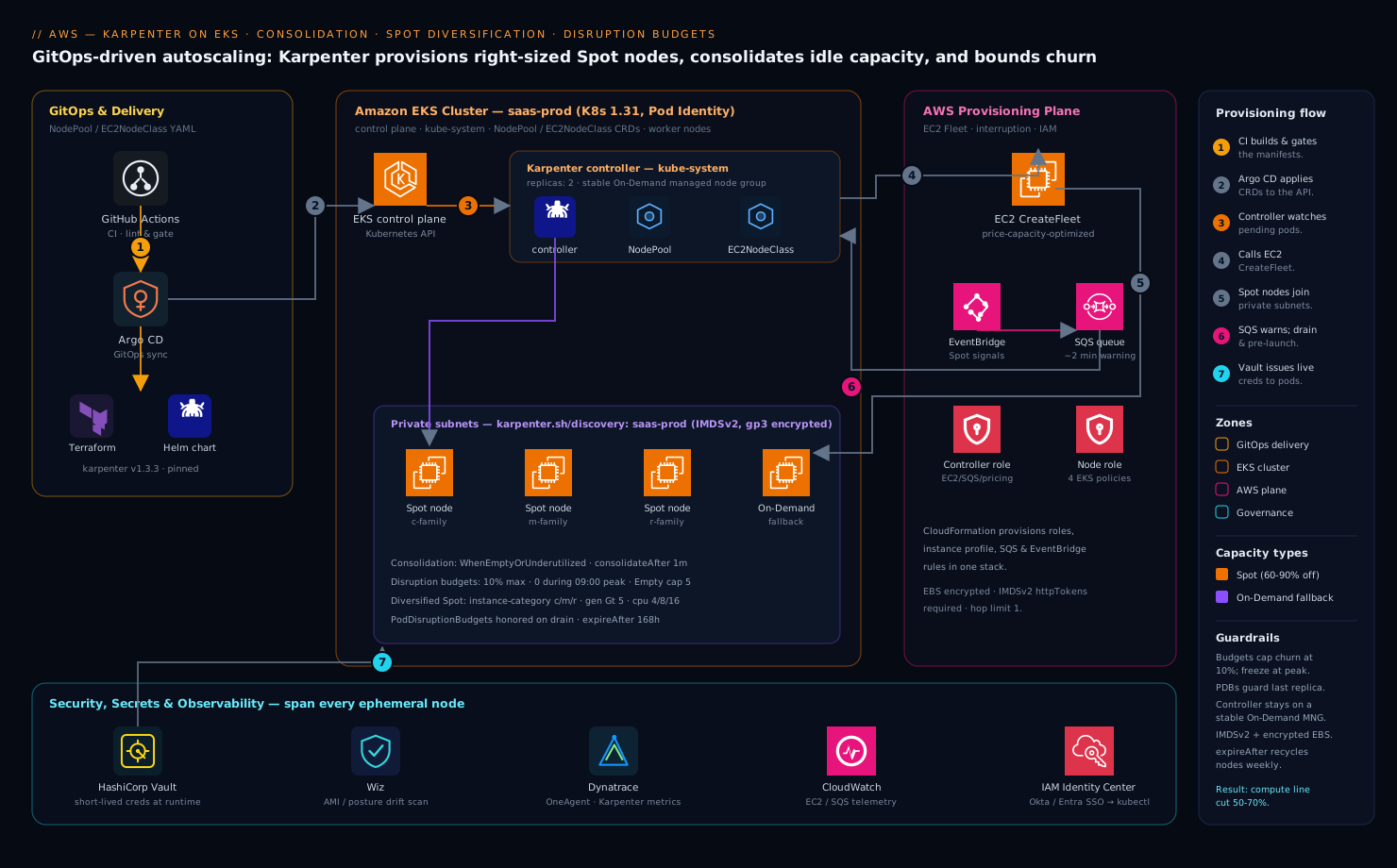
Karpenter runs as a two-replica Deployment on a small, stable managed node group that you keep On-Demand on purpose — the controller must survive a Spot reclamation event, so it never schedules itself onto the capacity it manages. From that foothold it watches the Kubernetes API for unschedulable pods, and instead of resizing an Auto Scaling Group it calls the EC2 CreateFleet API directly to launch a right-sized node that fits the pending pods’ exact CPU, memory, architecture, and topology requirements. It owns the full node lifecycle: provisioning, in-place consolidation to pack workloads onto fewer or cheaper nodes, and graceful disruption with cordon-and-drain. An SQS interruption queue fed by EventBridge gives Karpenter ~2 minutes of warning on a Spot rebalance recommendation or reclaim, so it can cordon, drain, and pre-launch a replacement before the instance disappears. Two custom resources drive everything: a NodePool (what kinds of nodes may exist, and the rules for disrupting them) and an EC2NodeClass (the AWS-specific launch template — AMI, subnets, security groups, instance profile). Around the cluster, HashiCorp Vault issues the short-lived database and third-party API credentials the workloads consume so no static secret rides a Spot node to its grave, Dynatrace OneAgent (deployed by a DaemonSet that tolerates every node) traces pods across the constant node churn, Wiz continuously scans the running node AMIs and Kubernetes posture for drift, and the whole configuration ships through a GitHub Actions plus Argo CD GitOps pipeline rather than kubectl apply by hand.
1. Create the Karpenter controller and node IAM roles
Karpenter needs two identities: a controller role the pod assumes (to call EC2/SQS/pricing APIs) and a node role the launched EC2 instances run under. eksctl ships a Karpenter-aware command that creates both plus the SQS interruption queue and EventBridge rules in one shot. Run it against the existing cluster:
eksctl create iamidentitymapping \
  --cluster "$CLUSTER_NAME" --region "$AWS_REGION" \
  --arn "arn:aws:iam::${AWS_ACCOUNT_ID}:role/KarpenterNodeRole-${CLUSTER_NAME}" \
  --group system:bootstrappers --group system:nodes \
  --username "system:node:{{EC2PrivateDNSName}}"
If you are starting clean, the supported path is the CloudFormation template Karpenter publishes — it provisions KarpenterNodeRole-<cluster>, KarpenterControllerRole-<cluster>, the instance profile, the Karpenter-<cluster> SQS queue, and the EventBridge rules for Spot interruption, rebalance, instance state-change, and scheduled-change events:
curl -fsSL "https://raw.githubusercontent.com/aws/karpenter-provider-aws/v${KARPENTER_VERSION}/website/content/en/preview/getting-started/getting-started-with-karpenter/cloudformation.yaml" \
  -o /tmp/karpenter-cfn.yaml

aws cloudformation deploy \
  --stack-name "Karpenter-${CLUSTER_NAME}" \
  --template-file /tmp/karpenter-cfn.yaml \
  --capabilities CAPABILITY_NAMED_IAM \
  --parameter-overrides "ClusterName=${CLUSTER_NAME}" \
  --region "$AWS_REGION"
The node role needs the four EKS-managed policies (AmazonEKSWorkerNodePolicy, AmazonEKS_CNI_Policy, AmazonEC2ContainerRegistryReadOnly, AmazonSSMManagedInstanceCore) — the CloudFormation template attaches them. Confirm the queue exists before continuing:
aws sqs get-queue-url --queue-name "Karpenter-${CLUSTER_NAME}" --region "$AWS_REGION"
2. Associate the controller role with Pod Identity
Bind the controller role to the karpenter service account in the kube-system namespace using EKS Pod Identity — simpler than IRSA because there is no OIDC trust policy to hand-edit:
aws eks create-pod-identity-association \
  --cluster-name "$CLUSTER_NAME" --region "$AWS_REGION" \
  --namespace kube-system \
  --service-account karpenter \
  --role-arn "arn:aws:iam::${AWS_ACCOUNT_ID}:role/KarpenterControllerRole-${CLUSTER_NAME}"
The controller role’s trust policy must allow the Pod Identity principal pods.eks.amazonaws.com to assume it with both sts:AssumeRole and sts:TagSession — the CloudFormation template sets this. Verify the association:
aws eks list-pod-identity-associations \
  --cluster-name "$CLUSTER_NAME" --region "$AWS_REGION" \
  --query "associations[?serviceAccount=='karpenter']"
3. Tag subnets and security groups for discovery
Karpenter finds where to launch nodes through tag selectors, not hardcoded IDs. Tag the private subnets and the cluster node security group so the EC2NodeClass in step 5 can select them:
# Tag the cluster's private subnets
for subnet in $(aws eks describe-cluster --name "$CLUSTER_NAME" --region "$AWS_REGION" \
    --query "cluster.resourcesVpcConfig.subnetIds[]" --output text); do
  aws ec2 create-tags --region "$AWS_REGION" --resources "$subnet" \
    --tags "Key=karpenter.sh/discovery,Value=${CLUSTER_NAME}"
done

# Tag the shared node security group
NODE_SG=$(aws eks describe-cluster --name "$CLUSTER_NAME" --region "$AWS_REGION" \
  --query "cluster.resourcesVpcConfig.clusterSecurityGroupId" --output text)
aws ec2 create-tags --region "$AWS_REGION" --resources "$NODE_SG" \
  --tags "Key=karpenter.sh/discovery,Value=${CLUSTER_NAME}"
Use only private subnets — launching Spot nodes into public subnets is both a cost and a security mistake. Wiz will flag any node that lands on a public subnet, but it is cheaper to never tag them in the first place.
4. Install Karpenter with Helm
Install the controller chart from the public ECR OCI registry, pinned to the exact version. Note that the controller is scheduled with a nodeAffinity onto the existing managed node group via the karpenter.sh/nodepool DoesNotExist rule so it never runs on nodes it manages — and replicas: 2 so it tolerates the loss of one:
helm upgrade --install karpenter \
  oci://public.ecr.aws/karpenter/karpenter \
  --version "$KARPENTER_VERSION" \
  --namespace kube-system \
  --set "settings.clusterName=${CLUSTER_NAME}" \
  --set "settings.interruptionQueue=Karpenter-${CLUSTER_NAME}" \
  --set "controller.resources.requests.cpu=1" \
  --set "controller.resources.requests.memory=1Gi" \
  --set "controller.resources.limits.cpu=1" \
  --set "controller.resources.limits.memory=1Gi" \
  --set "replicas=2" \
  --wait
Confirm both replicas are running and leader election settled:
kubectl -n kube-system rollout status deploy/karpenter --timeout=180s
kubectl -n kube-system logs -l app.kubernetes.io/name=karpenter -c controller --tail=20
5. Define the EC2NodeClass
The EC2NodeClass is the AWS-specific half: which AMI family, which subnets and security groups (by the tags from step 3), the instance profile, and disk. Pin the AL2023 family and an explicit AMI alias so a silent base-image change can never roll the fleet underneath you — let your pipeline bump it deliberately. Apply:
# ec2nodeclass.yaml
apiVersion: karpenter.k8s.aws/v1
kind: EC2NodeClass
metadata:
  name: default
spec:
  role: "KarpenterNodeRole-saas-prod"
  amiFamily: AL2023
  amiSelectorTerms:
    - alias: al2023@latest
  subnetSelectorTerms:
    - tags:
        karpenter.sh/discovery: "saas-prod"
  securityGroupSelectorTerms:
    - tags:
        karpenter.sh/discovery: "saas-prod"
  blockDeviceMappings:
    - deviceName: /dev/xvda
      ebs:
        volumeType: gp3
        volumeSize: 50Gi
        encrypted: true       # EBS-at-rest encryption is non-negotiable for the security review
        deleteOnTermination: true
  metadataOptions:
    httpTokens: required        # IMDSv2 only — blocks SSRF-style credential theft
    httpPutResponseHopLimit: 1
  tags:
    team: platform
    managed-by: karpenter
kubectl apply -f ec2nodeclass.yaml
httpTokens: required forces IMDSv2 so a compromised pod cannot reach the node’s credentials over the legacy metadata endpoint — exactly the kind of finding Wiz raises if you leave it on the default.
6. Define a NodePool with Spot diversification
The NodePool is the Kubernetes-facing contract: the universe of instance types Karpenter may pick from, the capacity types it may use, and the disruption rules. The single most important lever for Spot resilience is diversification — give Karpenter a broad set of instance families and sizes so its Spot allocation strategy (price-capacity-optimized under the hood) can draw from many capacity pools. A NodePool locked to one instance type on Spot is fragile; a NodePool spanning a dozen is resilient.
# nodepool-general.yaml
apiVersion: karpenter.sh/v1
kind: NodePool
metadata:
  name: general-spot
spec:
  template:
    metadata:
      labels:
        workload-class: general
    spec:
      nodeClassRef:
        group: karpenter.k8s.aws
        kind: EC2NodeClass
        name: default
      requirements:
        - key: kubernetes.io/arch
          operator: In
          values: ["amd64"]
        - key: karpenter.sh/capacity-type
          operator: In
          values: ["spot", "on-demand"]   # prefer spot; fall back to on-demand
        - key: karpenter.k8s.aws/instance-category
          operator: In
          values: ["c", "m", "r"]          # broad families = many Spot pools
        - key: karpenter.k8s.aws/instance-generation
          operator: Gt
          values: ["5"]                     # gen 6+ for price/perf
        - key: karpenter.k8s.aws/instance-cpu
          operator: In
          values: ["4", "8", "16"]
      expireAfter: 168h                      # recycle nodes weekly for patching
      terminationGracePeriod: 5m
  limits:
    cpu: "400"                               # hard ceiling on this pool's total vCPU
  disruption:
    consolidationPolicy: WhenEmptyOrUnderutilized
    consolidateAfter: 1m
kubectl apply -f nodepool-general.yaml
Two things make this safe and cheap. Listing both spot and on-demand lets Karpenter prefer Spot but fall back to On-Demand when no Spot capacity is available, so workloads never get stuck pending. The broad instance-category / instance-generation / instance-cpu requirements expand the pool count dramatically — Karpenter weighs ~hundreds of viable types and picks the cheapest that fits, then provisions from the deepest Spot pool. The limits.cpu is your blast-radius cap: Karpenter will never grow this pool past 400 vCPU regardless of pending demand.
For workloads that genuinely cannot tolerate interruption — the Karpenter controller’s own node group aside, things like stateful singletons — run a separate On-Demand-only NodePool with a taint and schedule only those pods there with a matching toleration, so Spot churn never touches them.
7. Turn on consolidation and bound it with disruption budgets
Consolidation is what recovers the idle 35% from the opening scenario. With consolidationPolicy: WhenEmptyOrUnderutilized (set in step 6), Karpenter continuously looks for nodes it can delete (their pods fit elsewhere) or replace with a cheaper node, and acts after consolidateAfter: 1m of stability. Left unbounded, that is dangerous — a cluster-wide repack could cordon and drain a large fraction of nodes at once and breach your availability SLO. Disruption budgets cap how much voluntary churn Karpenter may cause at any moment. Patch the NodePool to add them:
# nodepool-general-budgets.yaml (merge into spec.disruption)
spec:
  disruption:
    consolidationPolicy: WhenEmptyOrUnderutilized
    consolidateAfter: 1m
    budgets:
      - nodes: "10%"                 # at most 10% of this pool's nodes disrupting at once
      - nodes: "0"                   # freeze all voluntary disruption during business peak
        schedule: "0 9 * * mon-fri"
        duration: 9h
        reasons: ["Underutilized", "Drifted"]
      - nodes: "5"                   # but always allow empty-node cleanup, capped at 5
        reasons: ["Empty"]
kubectl apply -f nodepool-general-budgets.yaml
Read the budgets top to bottom — Karpenter takes the most restrictive matching budget at any instant. The first line is the always-on ceiling: never disrupt more than 10% of the pool’s nodes simultaneously. The second freezes consolidation and drift disruptions for a 9-hour window every weekday from 09:00 (cron is in the controller’s UTC unless you set a timezone), so the cluster holds steady through peak trading hours — but it scopes reasons to Underutilized and Drifted, deliberately not Empty, so the third budget still lets Karpenter reap genuinely empty nodes (up to 5 at a time) even during the freeze. That combination — froze the risky repacking, kept the free cleanup — is the practical sweet spot.
Pair this with PodDisruptionBudgets on your actual workloads. Karpenter honors PDBs during drain, so a minAvailable on each Deployment is the second, app-level guardrail that stops a node drain from taking the last healthy replica:
apiVersion: policy/v1
kind: PodDisruptionBudget
metadata:
  name: web-pdb
spec:
  minAvailable: 2
  selector:
    matchLabels:
      app: web
Critical pods that must never be evicted by consolidation get the annotation karpenter.sh/do-not-disrupt: "true" on the pod template — use it sparingly, since every annotated pod pins its node.
Validation
Prove the three behaviors end to end. First, scale-up: deploy a pause workload that cannot fit on current nodes and watch Karpenter launch a right-sized one in seconds.
kubectl create deployment inflate --image=public.ecr.aws/eks-distro/kubernetes/pause:3.7 --replicas=0
kubectl set resources deployment/inflate --requests=cpu=1,memory=1.5Gi
kubectl scale deployment/inflate --replicas=12

# Watch a new NodeClaim go from pending to ready
kubectl get nodeclaims -w
kubectl -n kube-system logs -l app.kubernetes.io/name=karpenter -c controller -f \
  | grep -E "launched|registered|initialized"
Confirm the new node is Spot and a diversified type:
kubectl get nodes -L karpenter.sh/capacity-type,node.kubernetes.io/instance-type,topology.kubernetes.io/zone
Then consolidation: scale the workload down and watch Karpenter delete or replace nodes after the stabilization window.
kubectl scale deployment/inflate --replicas=0
# After ~1m, expect NodeClaims to be deleted via consolidation
kubectl get nodeclaims -w
kubectl -n kube-system logs -l app.kubernetes.io/name=karpenter -c controller \
  | grep -i "disrupting\|consolidat"
Finally, confirm the interruption path is live by checking the controller picked up the SQS queue, and inspect disruption-budget state:
kubectl -n kube-system logs -l app.kubernetes.io/name=karpenter -c controller | grep -i "interruption"
kubectl get nodepool general-spot -o jsonpath='{.status.conditions}' | jq .
Karpenter exports Prometheus metrics on :8080/metrics; scrape karpenter_nodes_allocatable, karpenter_nodeclaims_disrupted_total, and karpenter_pods_state into Dynatrace to alert when pending-pod time or Spot-fallback rate climbs.
Rollback / teardown
To back out, scale Karpenter to zero first so it stops provisioning while you remove its resources — otherwise it will fight you by relaunching nodes:
kubectl -n kube-system scale deploy/karpenter --replicas=0

# Delete NodePools and NodeClasses; Karpenter-owned nodes drain and terminate
kubectl delete nodepool general-spot
kubectl delete ec2nodeclass default

# Confirm all Karpenter-managed nodes are gone
kubectl get nodes -l karpenter.sh/nodepool

# Remove the controller, Pod Identity association, and CloudFormation stack
helm uninstall karpenter -n kube-system
aws eks delete-pod-identity-association --cluster-name "$CLUSTER_NAME" --region "$AWS_REGION" \
  --association-id "$(aws eks list-pod-identity-associations --cluster-name "$CLUSTER_NAME" \
    --region "$AWS_REGION" --query "associations[?serviceAccount=='karpenter'].associationId" --output text)"
aws cloudformation delete-stack --stack-name "Karpenter-${CLUSTER_NAME}" --region "$AWS_REGION"
Before deleting NodePools, make sure your original managed node group still has headroom to absorb the rescheduled pods, or the teardown drain will leave pods pending. Deleting the EC2NodeClass while NodeClaims still reference it is blocked by a finalizer, which is the safe behavior — delete the NodePool first and let nodes drain.
Common pitfalls
- Karpenter scheduling onto its own nodes. If the controller lands on a Spot node it manages, a reclaim can take out the brain that would replace it. Keep it on a stable On-Demand managed node group, with
replicas: 2. - Forgetting subnet/SG tags. Without
karpenter.sh/discoverytags, the EC2NodeClass selects nothing and every NodeClaim fails withno subnets found. This is the number-one first-run failure. - Too-narrow NodePool requirements. Pinning one instance type on Spot defeats diversification — a single pool drying up stalls scale-up. Span families
c/m/r, multiple generations, and several sizes. - No disruption budget plus no PDBs. Consolidation can then drain too many nodes at once. Always set a NodePool
budgetand per-workload PodDisruptionBudgets. consolidateAftertoo aggressive. A value like30scauses node thrash on bursty workloads — nodes are created and reaped minutes apart, which costs more (per-second billing has a 60s minimum) than it saves. Start at1m–5m.- Ignoring the interruption queue. If
settings.interruptionQueueis unset, Karpenter gets no Spot warning and pods die hard instead of being drained gracefully. - AMI
@latestwith no pipeline gate. Convenient, but a new EKS-optimized AMI can roll your whole fleet unattended. Pin a specific AMI ID in production and bump it through CI.
Security notes
Karpenter’s controller role is powerful — it can launch EC2 and pass the node role — so scope it to the cluster’s resources and let Wiz continuously check the running node AMIs, IMDS configuration, and Kubernetes RBAC for posture drift, alerting if a node ever launches without IMDSv2 or with public exposure. Enforce IMDSv2 (httpTokens: required) and a hop limit of 1 on the EC2NodeClass so a compromised pod cannot steal node credentials. Encrypt the EBS root volume (encrypted: true) to satisfy the at-rest control. Because nodes are ephemeral and constantly recycled, never bake secrets into the AMI or a node bootstrap script — have workloads pull short-lived database and third-party API credentials from HashiCorp Vault at runtime (Vault Agent sidecar or the Vault CSI provider), so a reclaimed Spot node carries nothing of value to its termination. Human and service access to the cluster federates through your IdP — Okta or Entra ID brokered to AWS IAM Identity Center — so the same SSO and conditional-access policy that governs the console governs kubectl, and there are no long-lived IAM users.
Cost notes
The win comes from three compounding levers. Spot diversification typically lands instances at 60–90% off On-Demand, and the broad NodePool keeps that discount available because Karpenter always draws from the deepest, cheapest pool. Consolidation recovers the idle headroom — the opening cluster’s 35%-utilized nodes get repacked onto fewer, smaller instances, and WhenEmptyOrUnderutilized keeps doing it as load ebbs, so you stop paying for capacity you booked for a peak that passed. Right-sizing at launch means Karpenter picks the smallest instance that fits the pending pods rather than a fixed 2xlarge, so the fleet shape tracks demand minute to minute. Set limits.cpu per NodePool as a hard spend ceiling, set expireAfter to recycle nodes weekly (patching plus a natural nudge toward newer, cheaper generations), and pipe Karpenter’s metrics to Dynatrace alongside AWS Cost Explorer so the FinOps lead sees blended Spot discount and consolidation savings on one dashboard. Teams that move a general workload pool from a fixed On-Demand managed node group to a diversified, consolidating Karpenter NodePool routinely cut that compute line 50–70% — which is the number that closes the ticket the FinOps lead opened twice.