A fintech runs forty production microservices on a managed Kubernetes cluster, each backed by a stateful PostgreSQL or MongoDB workload, and the platform team has been quietly relying on the cloud provider’s nightly volume snapshots as their “backup.” Then an auditor asks the question that ends that comfort: show me a restore. The volume snapshots restore the disk, but they were taken mid-write — Postgres comes back needing crash recovery, and one MongoDB replica set comes back with a corrupt WiredTiger checkpoint. Worse, the snapshots live in the same cloud account as the cluster, so a compromised credential or a fat-fingered terraform destroy takes the backups with it. The mandate lands the next morning: application-consistent backups, governed by policy, exported to immutable storage in a separate trust boundary, with a restore you can prove on demand. This guide walks through deploying Veeam Kasten K10 to deliver exactly that — namespace-scoped backup policies, app-consistent snapshots through database-aware hooks, and a worm-locked object-storage export that survives the cluster being deleted.
Kasten K10 is a Kubernetes-native data-management platform: it discovers applications by namespace and label, snapshots their persistent volumes through the CSI driver, captures the Kubernetes API resources alongside them, runs pre/post-snapshot hooks to quiesce databases, and exports the whole bundle to external object storage with optional immutability. It is built by Veeam, installs as a Helm release, and is driven entirely by Custom Resources — which is what makes it fit a GitOps and policy-as-code operating model rather than a clicked-together one.
Prerequisites
- A Kubernetes cluster, v1.27+, with a CSI driver that supports
VolumeSnapshot(EKS EBS CSI, AKS Azure Disk CSI, GKE PD CSI, or on-prem Ceph/Portworx). Runkubectl get volumesnapshotclassand confirm at least one exists. kubectland Helm 3.10+ on your workstation, with cluster-admin for the install.- The
VolumeSnapshotCRDs (snapshot.storage.k8s.io/v1) installed and the external-snapshotter controller running. Managed clusters usually ship these; bare clusters do not. - An object-storage bucket in a separate account/subscription from the cluster — Amazon S3, Azure Blob, or GCS — with Object Lock / immutability available.
- A HashiCorp Vault instance (or a cloud secrets manager) to hold the object-storage credentials and the K10 encryption passphrase, so nothing sensitive lands in a plain Kubernetes Secret.
- A wildcard or per-host TLS certificate for the K10 dashboard ingress, and an OIDC application registered in Microsoft Entra ID (or Okta) for dashboard SSO.
Target topology
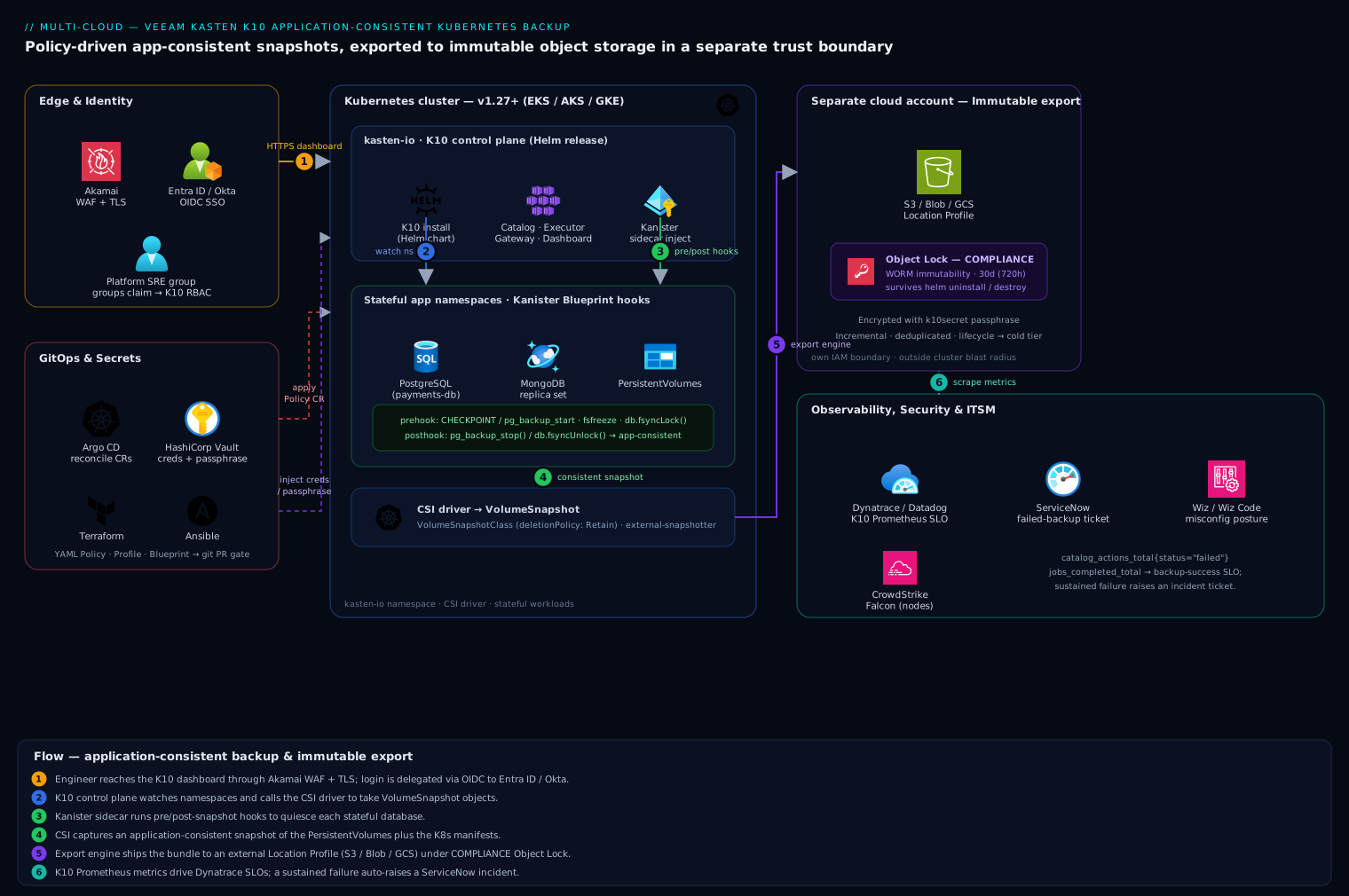
K10 installs into its own kasten-io namespace and runs a set of controllers — the catalog service, the executor, the dashboard gateway, and per-job worker pods. The flow is layered. At the edge, the K10 dashboard sits behind ingress fronted by Akamai for TLS termination and WAF, and authentication is delegated through OIDC to Entra ID or Okta so platform engineers log in with their corporate identity and group claims, never a shared local password. Inside the cluster, K10 watches namespaces, calls the CSI driver to take VolumeSnapshot objects, and runs pre/post hooks against each stateful workload (a pg_start_backup / fsfreeze style quiesce) to make the snapshot application-consistent rather than just crash-consistent. Leaving the cluster, the export engine moves snapshot data and the captured Kubernetes manifests to an external object-storage location profile — S3/Blob/GCS in a separate account — with Object Lock immutability so a ransomware actor or an errant delete cannot tamper with the restore point. Credentials for that profile and the data-encryption passphrase are injected from HashiCorp Vault. Policies are authored as YAML, committed to git, and reconciled onto the cluster by Argo CD, while Dynatrace scrapes K10’s Prometheus metrics for SLA dashboards and a failed backup auto-raises a ServiceNow incident.
1. Verify the cluster can take CSI snapshots
K10’s application-consistency story rests on CSI volume snapshots. Confirm the plumbing before installing anything — a missing snapshot class is the single most common reason a first backup silently falls back to a slow, lossy generic copy.
# Snapshot CRDs must be present (v1, not the old v1beta1)
kubectl get crd volumesnapshots.snapshot.storage.k8s.io \
  volumesnapshotclasses.snapshot.storage.k8s.io \
  volumesnapshotcontents.snapshot.storage.k8s.io

# At least one VolumeSnapshotClass for your CSI driver
kubectl get volumesnapshotclass -o wide

# The driver name here must match your StorageClass provisioner
kubectl get storageclass -o custom-columns='NAME:.metadata.name,PROVISIONER:.provisioner'
K10 needs to know which VolumeSnapshotClass pairs with each CSI driver. Annotate the snapshot class so K10 auto-selects it, and ensure its deletionPolicy is Retain so deleting a K10 restore point never orphan-deletes the underlying cloud snapshot prematurely:
# csi-snapclass.yaml
apiVersion: snapshot.storage.k8s.io/v1
kind: VolumeSnapshotClass
metadata:
  name: csi-azuredisk-vsc
  annotations:
    k10.kasten.io/is-snapshot-class: "true"   # K10 picks this class
driver: disk.csi.azure.com
deletionPolicy: Retain
kubectl apply -f csi-snapclass.yaml
2. Stage credentials in Vault, not in a Secret
The object-storage credentials and the K10 cluster encryption passphrase are the two most sensitive values in this deployment. Store them in HashiCorp Vault and let the Vault Agent (or the External Secrets Operator) materialize a short-lived Kubernetes Secret, rather than committing a long-lived key into git or typing it into the dashboard.
# Write the S3 export credentials and the K10 encryption key into Vault
vault kv put secret/k10/object-store \
  aws_access_key_id="AKIAxxxxxxxx" \
  aws_secret_access_key="xxxxxxxxxxxxxxxx"

vault kv put secret/k10/encryption \
  passphrase="$(openssl rand -base64 32)"
Have External Secrets Operator project these into the kasten-io namespace as k10-object-store-creds and k10secret (the well-known Secret name K10 reads its passphrase from). Using Vault here means the export credential is rotatable and leased — the same discipline the audit asked for around the data itself.
3. Install K10 with Helm
Add the Veeam/Kasten chart repo and pre-create the namespace, then install. Pass the dashboard behind an ingress and turn on Prometheus metrics from the start.
helm repo add kasten https://charts.kasten.io/
helm repo update

kubectl create namespace kasten-io

# Optional but recommended: run the pre-flight checks
curl https://docs.kasten.io/tools/k10_primer.sh | bash
helm install k10 kasten/k10 \
  --namespace kasten-io \
  --set auth.tokenAuth.enabled=false \
  --set auth.oidcAuth.enabled=true \
  --set auth.oidcAuth.providerURL="https://login.microsoftonline.com/<tenant-id>/v2.0" \
  --set auth.oidcAuth.clientID="<entra-app-client-id>" \
  --set auth.oidcAuth.clientSecret="<from-vault>" \
  --set auth.oidcAuth.redirectURL="https://k10.kloudvin.internal/k10/" \
  --set auth.oidcAuth.usernameClaim="email" \
  --set auth.oidcAuth.groupClaim="groups" \
  --set prometheus.server.enabled=true \
  --set injectKanisterSidecar.enabled=true \
  --set global.persistence.storageClass="managed-csi"
injectKanisterSidecar.enabled=true tells K10 to auto-inject the Kanister sidecar into matching workloads — that sidecar is what runs the application-consistency hooks in step 5. The OIDC block delegates dashboard login to Entra ID; swap the providerURL and claims for Okta (https://<org>.okta.com) if that is your workforce IdP. Watch the rollout:
kubectl get pods -n kasten-io -w
# All pods Running/Completed before continuing — gateway, catalog,
# executor, jobs, dashboardbff, auth, etc.
4. Define an immutable object-storage Location Profile
A Location Profile is the K10 Custom Resource that points at external storage. This is the export target that lives outside the cluster’s blast radius. Create it pointing at the separate-account bucket, and enable Object Lock immutability so exported restore points cannot be deleted or overwritten before their retention expires — the ransomware and rogue-delete protection the mandate demanded.
First enable Object Lock on the bucket itself (must be set at creation for S3):
aws s3api create-bucket \
  --bucket kloudvin-k10-immutable-prod \
  --region ap-south-1 \
  --create-bucket-configuration LocationConstraint=ap-south-1 \
  --object-lock-enabled-for-bucket

aws s3api put-object-lock-configuration \
  --bucket kloudvin-k10-immutable-prod \
  --object-lock-configuration '{
    "ObjectLockEnabled": "Enabled",
    "Rule": { "DefaultRetention": { "Mode": "COMPLIANCE", "Days": 30 } }
  }'
Then declare the Location Profile referencing the Vault-injected credentials Secret:
# location-profile.yaml
apiVersion: config.kio.kasten.io/v1alpha1
kind: Profile
metadata:
  name: immutable-s3-prod
  namespace: kasten-io
spec:
  type: Location
  locationSpec:
    credential:
      secretType: AwsAccessKey
      secret:
        apiVersion: v1
        kind: Secret
        name: k10-object-store-creds      # projected from Vault
        namespace: kasten-io
    type: ObjectStore
    objectStore:
      objectStoreType: S3
      name: kloudvin-k10-immutable-prod
      region: ap-south-1
      protectionPeriod: 720h               # 30d immutability window (matches Object Lock)
kubectl apply -f location-profile.yaml
kubectl get profiles.config.kio.kasten.io -n kasten-io
# STATUS should read "Success"
The protectionPeriod instructs K10 to place a COMPLIANCE-mode lock on each exported object for 30 days; align it with the bucket’s DefaultRetention so the two never disagree.
5. Make snapshots application-consistent with Blueprints
A raw CSI snapshot of a running database is only crash-consistent — it captures the disk as if the machine lost power. To get application-consistent snapshots, K10 runs Kanister Blueprints: pre-snapshot hooks that quiesce the database (flush buffers, freeze the filesystem, or take a logical dump) and post-snapshot hooks that release it. Bind a Blueprint to a workload with an annotation.
For PostgreSQL, a Blueprint that issues a checkpoint and freezes writes around the snapshot:
# postgres-blueprint.yaml
apiVersion: cr.kanister.io/v1alpha1
kind: Blueprint
metadata:
  name: postgres-consistency-bp
  namespace: kasten-io
actions:
  backupPrehook:
    phases:
      - func: KubeExec
        name: quiescePostgres
        args:
          namespace: "{{ .StatefulSet.Namespace }}"
          pod: "{{ index .StatefulSet.Pods 0 }}"
          container: postgres
          command:
            - bash
            - -o
            - errexit
            - -c
            - |
              psql -U postgres -c "CHECKPOINT;"
              psql -U postgres -c "SELECT pg_backup_start('k10', true);"
  backupPosthook:
    phases:
      - func: KubeExec
        name: unquiescePostgres
        args:
          namespace: "{{ .StatefulSet.Namespace }}"
          pod: "{{ index .StatefulSet.Pods 0 }}"
          container: postgres
          command: ["bash", "-c", "psql -U postgres -c \"SELECT pg_backup_stop();\""]
kubectl apply -f postgres-blueprint.yaml

# Bind the blueprint to the workload so K10 runs the hooks at snapshot time
kubectl annotate statefulset/payments-db -n payments \
  kanister.kasten.io/blueprint=postgres-consistency-bp
K10 now executes backupPrehook immediately before the CSI snapshot and backupPosthook immediately after, so the captured volume is consistent at the database level. Repeat with a MongoDB Blueprint (db.fsyncLock() / db.fsyncUnlock()) for the replica-set workloads. For applications that prefer a logical export, a Blueprint can instead run pg_dump/mongodump and push the artifact directly to the Location Profile.
6. Author the backup Policy as code
The Policy is the K10 Custom Resource that ties it all together: what to back up (namespace/label selector), how often (schedule), how long to keep (retention), and where to export (the immutable profile). Write it as YAML, commit it to git, and let Argo CD reconcile it — so the backup posture is reviewable in a pull request and drifts back if someone edits it by hand in the dashboard.
# policy-payments.yaml
apiVersion: config.kio.kasten.io/v1alpha1
kind: Policy
metadata:
  name: payments-daily-immutable
  namespace: kasten-io
spec:
  comment: "App-consistent daily backup of payments, exported to immutable S3"
  frequency: "@daily"
  subFrequency:
    snapshots: ["0 2 * * *"]          # local snapshot at 02:00
  retention:
    daily: 14
    weekly: 6
    monthly: 12
  actions:
    - action: backup                   # CSI snapshot + Blueprint hooks
    - action: export                   # push to the Location Profile
      exportParameters:
        frequency: "@daily"
        profile:
          name: immutable-s3-prod
          namespace: kasten-io
        exportData:
          enabled: true
        migrationToken:
          name: ""
        receiveString: ""
  selector:
    matchLabels:
      app.kubernetes.io/part-of: payments
kubectl apply -f policy-payments.yaml
kubectl get policies.config.kio.kasten.io -n kasten-io
The backup action takes the local CSI snapshot (fast, for quick restores) and the export action ships an immutable copy to S3 (durable, for DR and the audit). Retention is tiered — 14 dailies, 6 weeklies, 12 monthlies — so you keep a year of recovery points without paying to store 365 of them. Commit this file to the GitOps repo; Argo CD applies it, and the same pipeline (whether GitHub Actions, Jenkins, or Argo CD itself) can run kubectl apply --dry-run=server as a policy-as-code gate before merge. Cluster and Location Profiles can be templated by Terraform/Ansible so a new cluster comes up pre-registered with K10’s storage targets.
7. Run a policy and watch the RunAction
Trigger the policy immediately instead of waiting for 02:00, and watch the resulting RunAction:
# Manually fire the policy now
kubectl create -f - <<'EOF'
apiVersion: actions.kio.kasten.io/v1alpha1
kind: RunAction
metadata:
  generateName: run-payments-now-
  namespace: kasten-io
spec:
  subject:
    apiVersion: config.kio.kasten.io/v1alpha1
    kind: Policy
    name: payments-daily-immutable
    namespace: kasten-io
EOF

# Follow the resulting backup/export actions
kubectl get backupactions.actions.kio.kasten.io -n kasten-io -w
kubectl get exportactions.actions.kio.kasten.io -n kasten-io
A healthy run shows a BackupAction reaching Complete (with the Blueprint pre/post hooks visible in its events) followed by an ExportAction reaching Complete once the data lands in S3.
Validation: prove the restore
A backup you have never restored is a hypothesis, not a backup. Validate by restoring into a new namespace so production is untouched, then verify the database is consistent.
# List restore points K10 has cataloged for the payments app
kubectl get restorepointcontents.apps.kio.kasten.io -n kasten-io \
  -l k10.kasten.io/appNamespace=payments

# Restore the most recent restore point into an isolated namespace
kubectl create namespace payments-verify
kubectl create -f - <<'EOF'
apiVersion: actions.kio.kasten.io/v1alpha1
kind: RestoreAction
metadata:
  generateName: restore-verify-
  namespace: kasten-io
spec:
  subject:
    kind: RestorePointContent
    apiVersion: apps.kio.kasten.io/v1alpha1
    name: <restorepointcontent-name>
    namespace: kasten-io
  targetNamespace: payments-verify
EOF

kubectl get restoreactions.actions.kio.kasten.io -n kasten-io -w
Once the RestoreAction is Complete, confirm application-level integrity — not just that the pod is Running:
kubectl exec -n payments-verify statefulset/payments-db -- \
  psql -U postgres -c "SELECT pg_is_in_recovery();"   # expect 'f' = clean, not crash-recovering

kubectl exec -n payments-verify statefulset/payments-db -- \
  psql -U postgres -d payments -c "SELECT count(*) FROM transactions;"
pg_is_in_recovery() returning f is the proof the Blueprint did its job: the restore came up clean rather than replaying a write-ahead log from a torn snapshot. Confirm immutability held by attempting (and failing) to delete an exported object:
aws s3api delete-object --bucket kloudvin-k10-immutable-prod --key <exported-object-key>
# Expect: AccessDenied — Object Lock COMPLIANCE mode forbids deletion
Scrape K10’s metrics into Dynatrace (or Datadog) — catalog_actions_total{status="failed"} and jobs_completed_total give you a backup-success SLO, and a sustained failure triggers a ServiceNow incident through the alerting integration so on-call gets a ticket, not just a red tile.
Rollback and teardown
To remove a single policy without losing existing restore points, delete the Policy CR — exported data in immutable S3 survives by design until its lock expires:
kubectl delete policy.config.kio.kasten.io payments-daily-immutable -n kasten-io
kubectl delete namespace payments-verify     # clean up the validation namespace
To uninstall K10 entirely:
helm uninstall k10 --namespace kasten-io
kubectl delete namespace kasten-io
Note the asymmetry that protects you: helm uninstall removes the K10 controllers but cannot delete the immutable objects in S3 — Object Lock COMPLIANCE mode blocks even the root account until each object’s retention elapses. That is the whole point. To recover into a rebuilt cluster, reinstall K10, recreate the same Location Profile pointing at the existing bucket, and K10 re-imports the catalog of restore points from object storage — the cluster can be cattle while the backups are durable.
Common pitfalls
- Crash-consistent ≠ application-consistent. Without a Blueprint binding, K10 takes a perfectly valid CSI snapshot that still restores a database into recovery or, worse, corruption. The
kanister.kasten.io/blueprintannotation is not optional for stateful workloads. deletionPolicy: Deleteon the snapshot class can orphan-delete the cloud snapshot when a restore point ages out. UseRetainand let K10 manage lifecycle.- Object Lock must be enabled at bucket creation. You cannot retrofit it onto an existing S3 bucket — if the bucket predates this work, create a new one and re-point the Location Profile.
- Mismatched retention windows. If the K10
protectionPeriodexceeds the bucket’sDefaultRetention, K10 can fail to place the lock; if it is shorter, you lose immutability early. Keep the two equal. @dailyexport of every namespace at once saturates egress and snapshot quota. StaggersubFrequencycron times across policies and watch CSI snapshot rate limits on managed clusters.- Forgetting the encryption passphrase. K10 encrypts exported data with the
k10secretpassphrase. If you rotate it carelessly or lose it, older restore points become unreadable — keep it in Vault with a recovery path.
Security notes
Lock the dashboard behind OIDC (Entra ID or Okta) and map the groups claim to K10 RBAC so only the platform SRE group can author or delete policies; reviewers get read-only. Hold the export credential and encryption passphrase in HashiCorp Vault, leased and rotatable, never as a static Secret in git. Keep the immutable bucket in a separate cloud account with its own IAM boundary so a cluster-credential compromise cannot reach the backups, and front the dashboard with Akamai WAF. Feed cluster posture to Wiz / Wiz Code to catch a K10 misconfiguration — a public Location Profile bucket or an over-broad ServiceAccount — and run CrowdStrike Falcon sensors on the nodes so the K10 worker pods and any restore-time database containers are covered by runtime threat detection. COMPLIANCE-mode Object Lock means even an attacker with root cannot delete restore points within the retention window — the last line of defense against ransomware that targets backups first.
Cost notes
The dominant cost is export storage and egress, not the K10 license tier. Tiered retention (14 daily / 6 weekly / 12 monthly) keeps a year of recovery without storing 365 full copies, and K10’s incremental, deduplicated export means each daily ships only changed blocks after the first full. Set an S3 lifecycle rule to transition exported objects older than the active window to a colder class (S3 Glacier Instant Retrieval / Azure Cool) — but only past the Object Lock retention, since lifecycle cannot delete locked objects early. Local CSI snapshots accrue cloud snapshot charges, so prune the local tier aggressively (short daily retention) and lean on the cheaper immutable export for long-term recovery. Schedule heavy exports outside business hours to avoid competing with production for egress bandwidth, and meter snapshot/export volume per namespace so each product team owns its backup spend.