A logistics company runs an order-events platform on AKS: a payments-consumer reading a Kafka topic and an invoice-worker draining an Azure Service Bus queue. Both are sized for the 6 p.m. dispatch peak, so they sit at eight replicas each — burning CPU and node hours — through the 2 a.m. trough when the topics are silent. The CPU-based HorizontalPodAutoscaler that ops bolted on does nothing useful, because the consumers are I/O-bound on the broker, not CPU-bound: a 40,000-message Kafka backlog can build with the pods at 12% CPU and the HPA never reacts. The mandate from the platform lead is blunt: “scale on the actual backlog, and when there is no work, run zero pods.” That is exactly what KEDA does — it scales Kubernetes deployments on the depth of the event source itself (Kafka consumer lag, Service Bus queue length) and can take a deployment all the way to zero between bursts. This guide stands that up end to end.
Prerequisites
- An AKS cluster (Kubernetes 1.28+) with Azure CNI and Workload Identity + OIDC issuer enabled, and
kubectl/helm(v3.12+) pointed at it. - A Kafka cluster reachable from the cluster — this guide assumes Azure Event Hubs (Kafka surface) or a self-managed Strimzi/Confluent cluster — with a topic
ordersand a consumer grouppayments-consumer. - An Azure Service Bus namespace (Standard or Premium) with a queue
invoices. - A container image for each consumer already pushed to ACR; the deployments must run and commit offsets correctly before you add autoscaling — KEDA scales a workload, it does not fix one.
- RBAC to create cluster-scoped CRDs and an Entra app/user-assigned managed identity for workload identity.
- Standard tooling assumed in this platform: Terraform provisions the AKS cluster, identities, and Service Bus; HashiCorp Vault holds any static broker credentials; Argo CD syncs the manifests; Dynatrace observes the result.
Target topology
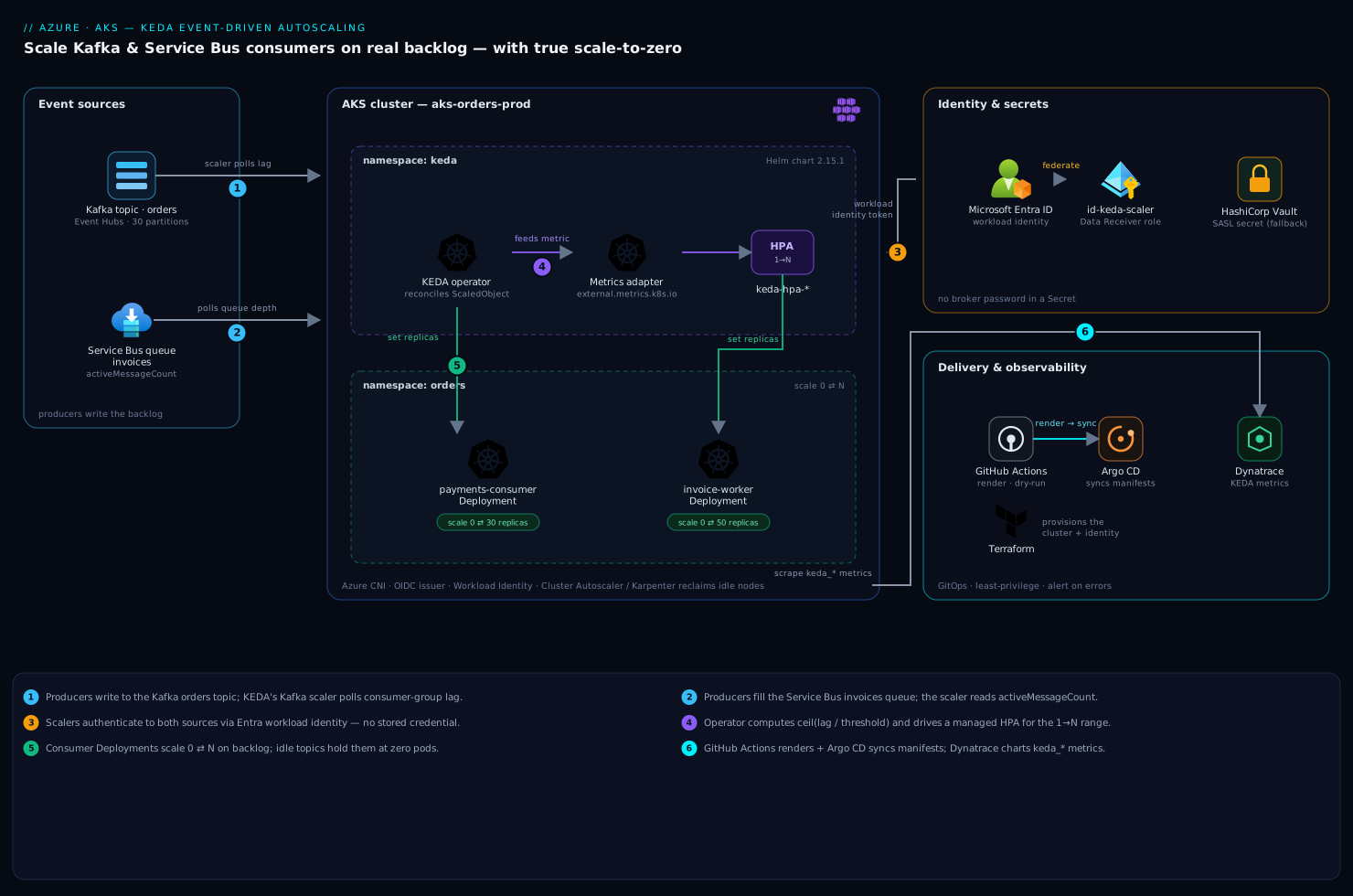
KEDA installs as two components in the keda namespace. The operator watches ScaledObject resources and reconciles the target deployment’s replica count, including the 1↔0 transitions that a plain HPA cannot do. The metrics adapter registers as a Kubernetes external-metrics API server, so for the 1→N range KEDA actually drives a standard HPA under the hood — you get native HPA behaviour (stabilization windows, scaling policies) for free, with KEDA feeding it the queue depth as the metric.
The flow is: producers write to the Kafka orders topic and the Service Bus invoices queue; KEDA’s scalers poll each source (Kafka consumer-group lag, Service Bus message count) on a fixed interval; the operator computes desired replicas as ceil(currentLag / lagThreshold) and drives the consumer Deployments, scaling them back to zero after a cooldown once the backlog clears. Identity to both sources is brokered through Microsoft Entra ID workload identity, so no broker password or Service Bus connection string lives in a Kubernetes Secret.
1. Install KEDA on the cluster
Install with Helm into a dedicated namespace. Pin the chart version — do not track latest on a component that controls replica counts cluster-wide.
helm repo add kedacore https://kedacore.github.io/charts
helm repo update

kubectl create namespace keda

helm install keda kedacore/keda \
  --namespace keda \
  --version 2.15.1 \
  --set podIdentity.azureWorkload.enabled=true \
  --set podIdentity.azureWorkload.clientId="$KEDA_OPERATOR_CLIENT_ID" \
  --set serviceAccount.create=true
Setting podIdentity.azureWorkload.enabled lets KEDA’s operator itself federate to Entra so the scalers can authenticate to Event Hubs and Service Bus without secrets (configured in step 3). Verify the control plane is healthy and the CRDs landed:
kubectl get pods -n keda
# keda-operator-...                 1/1  Running
# keda-operator-metrics-apiserver-* 1/1  Running

kubectl get crd | grep keda.sh
# scaledobjects.keda.sh
# scaledjobs.keda.sh
# triggerauthentications.keda.sh
# clustertriggerauthentications.keda.sh

kubectl get apiservice v1beta1.external.metrics.k8s.io
# ... True (the metrics adapter is registered)
If v1beta1.external.metrics.k8s.io is not True, KEDA cannot serve metrics to the HPA and no scaling will happen — that check is the single most useful smoke test on this whole install.
2. Federate identity with Entra ID workload identity
KEDA should read broker and queue depth using a managed identity, not a stored credential. Create a user-assigned identity and federate it to the KEDA operator’s service account so the scalers authenticate as it. (Terraform owns these resources in this platform; the equivalent az calls are shown for clarity — run them against a non-secret identity only.)
# A user-assigned identity KEDA's scalers will authenticate as
az identity create -g rg-orders-prod -n id-keda-scaler

KEDA_OPERATOR_CLIENT_ID=$(az identity show -g rg-orders-prod \
  -n id-keda-scaler --query clientId -o tsv)

# Federate it to KEDA's operator service account (the OIDC subject)
OIDC_ISSUER=$(az aks show -g rg-orders-prod -n aks-orders-prod \
  --query oidcIssuerProfile.issuerUrl -o tsv)

az identity federated-credential create \
  --name fc-keda-operator \
  --identity-name id-keda-scaler \
  --resource-group rg-orders-prod \
  --issuer "$OIDC_ISSUER" \
  --subject system:serviceaccount:keda:keda-operator \
  --audience api://AzureADTokenExchange
Grant that identity the data-plane roles it needs — Azure Service Bus Data Receiver on the namespace (to read queue depth) and Azure Event Hubs Data Receiver on the Event Hubs namespace if you use the Kafka-on-Event-Hubs surface:
SB_ID=$(az servicebus namespace show -g rg-orders-prod \
  -n sb-orders-prod --query id -o tsv)

az role assignment create \
  --assignee "$KEDA_OPERATOR_CLIENT_ID" \
  --role "Azure Service Bus Data Receiver" \
  --scope "$SB_ID"
Where you cannot avoid a static credential — a self-managed Kafka cluster with SASL/SCRAM, for instance — keep the username and password in HashiCorp Vault, sync them into a Kubernetes Secret via the Vault Secrets Operator or CSI driver, and reference that Secret from the TriggerAuthentication in step 4 rather than hardcoding it in the ScaledObject.
3. Add the workload’s identity for the consumers themselves
The consumer pods also need to reach the broker. Give each consumer deployment its own workload-identity service account so app traffic and KEDA’s metric polling use distinct, least-privilege identities. Label the deployment’s pod template and service account:
# payments-consumer-sa.yaml
apiVersion: v1
kind: ServiceAccount
metadata:
  name: payments-consumer
  namespace: orders
  annotations:
    azure.workload.identity/client-id: "<consumer-identity-client-id>"
---
# in the Deployment's pod template metadata:
#   labels:
#     azure.workload.identity/use: "true"
#   spec:
#     serviceAccountName: payments-consumer
kubectl apply -f payments-consumer-sa.yaml
This keeps the blast radius small: if the consumer identity is compromised it can consume messages, but it is not the identity KEDA uses to enumerate queues, and neither can write infrastructure.
4. Create a ScaledObject for the Kafka consumer
Now the core of the work. First a TriggerAuthentication that tells the Kafka scaler to use Entra workload identity, then the ScaledObject that scales payments-consumer on consumer lag.
# kafka-trigger-auth.yaml
apiVersion: keda.sh/v1alpha1
kind: TriggerAuthentication
metadata:
  name: kafka-eventhub-auth
  namespace: orders
spec:
  podIdentity:
    provider: azure-workload
    identityId: "<id-keda-scaler-client-id>"
---
# kafka-scaledobject.yaml
apiVersion: keda.sh/v1alpha1
kind: ScaledObject
metadata:
  name: payments-consumer
  namespace: orders
spec:
  scaleTargetRef:
    name: payments-consumer          # the Deployment to scale
  pollingInterval: 15                 # seconds between lag checks
  cooldownPeriod: 120                 # seconds at zero lag before scaling to 0
  minReplicaCount: 0                  # scale-to-zero between bursts
  maxReplicaCount: 30                 # never exceed the topic's partition count
  triggers:
    - type: kafka
      metadata:
        bootstrapServers: sb-orders-prod.servicebus.windows.net:9093
        consumerGroup: payments-consumer
        topic: orders
        lagThreshold: "500"           # ~1 replica per 500 messages of lag
        offsetResetPolicy: latest
        sasl: oauthbearer             # Entra token via OAuTHBEARER (Event Hubs)
        tls: enable
      authenticationRef:
        name: kafka-eventhub-auth
kubectl apply -f kafka-trigger-auth.yaml
kubectl apply -f kafka-scaledobject.yaml
Two settings carry most of the weight. lagThreshold is the messages-of-lag each replica is expected to chew through; KEDA computes desiredReplicas = ceil(totalLag / lagThreshold), so 12,000 lag at threshold 500 asks for 24 replicas. maxReplicaCount must not exceed the topic’s partition count — a Kafka consumer group can have at most one active consumer per partition, so extra pods past partition count sit idle and waste resources. If orders has 30 partitions, 30 is your real ceiling. The moment you apply the ScaledObject, KEDA creates a managed HPA named keda-hpa-payments-consumer; do not create your own HPA on the same deployment or the two will fight.
5. Create a ScaledObject for the Service Bus queue
The Service Bus worker is the same pattern with a different trigger. Reuse a workload-identity TriggerAuthentication, then scale invoice-worker on the queue’s active message count.
# servicebus-scaledobject.yaml
apiVersion: keda.sh/v1alpha1
kind: TriggerAuthentication
metadata:
  name: servicebus-auth
  namespace: orders
spec:
  podIdentity:
    provider: azure-workload
    identityId: "<id-keda-scaler-client-id>"
---
apiVersion: keda.sh/v1alpha1
kind: ScaledObject
metadata:
  name: invoice-worker
  namespace: orders
spec:
  scaleTargetRef:
    name: invoice-worker
  pollingInterval: 20
  cooldownPeriod: 300
  minReplicaCount: 0
  maxReplicaCount: 50
  triggers:
    - type: azure-servicebus
      metadata:
        namespace: sb-orders-prod
        queueName: invoices
        messageCount: "20"            # target ~20 messages per replica
      authenticationRef:
        name: servicebus-auth
kubectl apply -f servicebus-scaledobject.yaml
Here messageCount is the per-replica backlog target: KEDA reads the queue’s activeMessageCount from the management API and scales toward ceil(activeMessages / messageCount). Unlike Kafka, Service Bus has no partition ceiling, so maxReplicaCount is governed by downstream limits — your database connection pool, an API rate cap — not the broker. If invoices uses sessions, scale on messageCount still works, but cap maxReplicaCount at the number of concurrent sessions you actually expect, since one consumer locks a session at a time.
6. Tune the scale-to-zero and ramp behaviour
Scale-to-zero is governed by cooldownPeriod (how long lag/queue must stay at zero before the deployment drops to minReplicaCount: 0). The 1→N ramp, by contrast, is governed by the HPA’s scaling behaviour, which KEDA exposes through advanced.horizontalPodAutoscalerConfig. Add a stabilization window and a sane scale-down policy so a brief lull does not thrash your pods:
# patch onto the Kafka ScaledObject spec:
  advanced:
    horizontalPodAutoscalerConfig:
      behavior:
        scaleDown:
          stabilizationWindowSeconds: 300   # wait 5 min of low lag before scaling in
          policies:
            - type: Percent
              value: 50                      # at most halve replicas per step
              periodSeconds: 60
        scaleUp:
          stabilizationWindowSeconds: 0      # scale out immediately on a backlog
          policies:
            - type: Percent
              value: 100
              periodSeconds: 30
The asymmetry is deliberate: scale out fast (a backlog is customer-visible latency) and scale in slow (avoid killing a pod mid-batch and re-incurring cold-start and partition-rebalance cost on the next message). For scale-to-zero specifically, ensure the consumer handles SIGTERM gracefully — commit the current offset, finish the in-flight Service Bus message and complete/abandon it — so the last replica leaving does not drop or double-process a message.
7. Wire delivery and observability
Apply these manifests through the existing pipeline rather than kubectl in production. The repo’s manifests are rendered by a GitHub Actions workflow (which also runs kubectl apply --dry-run=server and a policy check) and synced to the cluster by Argo CD, so a ScaledObject change is a reviewed, reverted-in-one-click pull request, not an ad-hoc edit. KEDA’s CRDs are first-class Kubernetes objects, so they live in the same Git repo as the deployments they scale.
For visibility, KEDA exposes Prometheus metrics on the operator’s metrics service (keda_scaler_metrics_value, keda_scaled_object_errors). Scrape them and feed the platform’s Dynatrace tenant via the OpenTelemetry collector, then chart keda_scaler_metrics_value (the observed lag/queue depth) against the deployment’s replica count and the consumers’ end-to-end processing latency — that one dashboard tells you instantly whether the lagThreshold is sized right. Set a Dynatrace alert on keda_scaled_object_errors > 0, since a non-zero value usually means the scaler lost auth to the broker and scaling has silently frozen.
Validation
Confirm the objects are healthy and then prove scaling under load.
# READY and ACTIVE should both be True once the scaler authenticates
kubectl get scaledobject -n orders
# NAME                SCALETARGETKIND      MIN  MAX  READY  ACTIVE
# payments-consumer   apps/v1.Deployment   0    30   True   False
# invoice-worker      apps/v1.Deployment   0    50   True   False

# KEDA created the managed HPAs:
kubectl get hpa -n orders
# keda-hpa-payments-consumer   ...
# keda-hpa-invoice-worker      ...
With the topics idle, both deployments should already be at 0 replicas. Now generate a backlog and watch KEDA react:
# Flood the Service Bus queue with 5,000 test messages
az servicebus queue ... # (or your producer) push 5000 messages to 'invoices'

# Watch replicas climb from 0, then fall back after the cooldown
kubectl get deploy invoice-worker -n orders -w

# Inspect KEDA's reasoning if scaling looks wrong
kubectl describe scaledobject invoice-worker -n orders
kubectl logs -n keda -l app=keda-operator --tail=100 | grep invoice-worker
You have a working setup when: an idle topic holds the deployment at 0; pushing N messages scales it out within one pollingInterval; draining the backlog scales it back to 0 after cooldownPeriod; and keda_scaled_object_errors stays at zero throughout.
Rollback / teardown
KEDA is non-destructive to remove. Deleting a ScaledObject hands control of the deployment back to a static replica count — but be aware it may leave the deployment at whatever count KEDA last set (including 0), so set replicas explicitly afterwards.
# Remove autoscaling for one workload (deployment keeps running)
kubectl delete scaledobject invoice-worker -n orders
kubectl scale deploy invoice-worker -n orders --replicas=3   # restore a safe baseline

# Remove all KEDA objects in the namespace
kubectl delete scaledobject,triggerauthentication --all -n orders

# Uninstall KEDA entirely (CRDs are removed with the chart; finalizers must be clear)
helm uninstall keda -n keda
kubectl delete namespace keda
If a helm uninstall hangs, a ScaledObject finalizer is usually stuck because its target HPA is mid-reconcile — delete the ScaledObjects first, then uninstall. For an instant emergency stop without uninstalling, annotate the object to pause autoscaling at a fixed count: kubectl annotate scaledobject invoice-worker -n orders autoscaling.keda.sh/paused-replicas="3".
Common pitfalls
maxReplicaCountabove the Kafka partition count. Extra pods cannot consume — they idle and waste resources, and a constant rebalance storm hurts throughput. Cap at partition count.- A leftover CPU HPA on the same deployment. Two controllers writing one deployment’s replicas oscillate endlessly. Delete the old HPA; let KEDA own scaling.
- Scale-to-zero with a slow cold start. If the consumer takes 40 s to join the group and warm caches, the first messages after idle eat that latency. Either keep
minReplicaCount: 1for latency-critical paths, or accept the cold start where a few seconds is fine. pollingIntervaltoo long. A 60 s interval means up to a minute of unmonitored backlog growth. Tighten to 10–15 s for bursty topics — but not so tight you rate-limit the broker’s admin API.- Lag threshold set by guesswork. Measure a single replica’s real drain rate first, then set
lagThresholdto roughly the lag it clears in one polling interval. Too low over-scales and thrashes; too high lets backlog and latency build. ACTIVEstuckFalseunder load. Almost always a brokenTriggerAuthentication— wrong identity client ID, or the data-plane role assignment never propagated. Check the operator logs.
Security notes
Keep KEDA’s scaler identity and the consumer identities separate, each with the least-privilege Data Receiver role on only the namespace it reads — neither needs Send or Manage. Prefer Entra workload identity over connection strings everywhere; where a static SASL credential is unavoidable, lease it from HashiCorp Vault into a short-lived Kubernetes Secret rather than committing it. Scope the KEDA operator’s Kubernetes RBAC to the namespaces it manages, and gate every ScaledObject change through the Argo CD pull-request flow so a malicious or accidental maxReplicaCount: 5000 is caught in review, not in your cloud bill. Your CSPM (Wiz) and runtime sensor (CrowdStrike Falcon) already cover the cluster; the KEDA-specific addition is simply alerting on a non-zero keda_scaled_object_errors, which can mask a quietly frozen — or quietly over-scaling — workload.
Cost notes
The point of this whole exercise is the cost line. Scaling on real backlog with minReplicaCount: 0 means the payments-consumer and invoice-worker deployments consume zero pod resources during the overnight trough instead of the eight-replica floor they ran before — and when those pods drain, the cluster autoscaler (or Karpenter) can remove the now-empty nodes, turning saved pod-hours into saved VM-hours, which is where the real money is. Size lagThreshold / messageCount honestly: too aggressive and you over-provision and pay for idle replicas; too conservative and latency-SLA breaches cost you elsewhere. Pipe KEDA’s replica-count and lag metrics to Dynatrace alongside node count so the savings are visible on the same dashboard the platform lead used to justify the work — for this logistics platform, collapsing two always-on eight-replica deployments to demand-driven, scale-to-zero workloads cut their steady-state consumer footprint by well over half.